

Kling n8n Workflow (and Make): Async Jobs
Build a Kling n8n workflow, or the same in Make: create the video job, poll status every 10-20 s, download within 24 hours, and retry safely with idempotency.
By OceanToken Team
Editor's note: Video is usually the first API an automation builder meets that doesn't answer within one HTTP call. The tempting design is one long workflow that submits, sleeps and downloads. We think that's the wrong default. Make the job id the unit of work, store it, and let a second small workflow poll. Everything after the create call then becomes safe to retry.
Short answer: A Kling n8n workflow has three steps: POST /v1/videos to create the job, GET /v1/videos/{id} every 10 to 20 seconds until status is completed or failed, then GET /v1/videos/{id}/content to save the MP4. Store the job id, send an Idempotency-Key on create, and download within 24 hours.
How the async Kling video API works
The flow below follows OceanToken's video guide , which is the endpoint the examples use. Creating a job returns an object with an id and a status. The status moves through queued and in_progress and ends as completed or failed. A completed job carries a content_url; a failed one carries an error with a code and message.
| Step | Request | What you keep |
|---|---|---|
| Create | POST /v1/videos with model and prompt |
id, status |
| Poll | GET /v1/videos/{video_id} |
status, content_url or error |
| Download | GET /v1/videos/{video_id}/content |
The MP4 file |
Three details from the guide shape the whole workflow. It says to poll every 10 to 20 seconds. The content_url is valid for 24 hours, and after that the /content endpoint still works while the job is in your account. And a failed job is not charged, with its hold released. The guide doesn't mention a webhook or callback, so plan on polling.
Why one long workflow is the wrong design
You can build it as a single n8n workflow with a loop: create, Wait 15 seconds, check, repeat. It works in a demo. In production the problems pile up. A crash or redeploy mid-loop loses the job id, so you either lose the clip or create a second one and pay twice. A batch of 40 rows ties up 40 long executions at once. And you can't easily see which rows are stuck.
n8n's Wait node docs explain part of the mechanics: waits shorter than 65 seconds keep the execution in memory, while longer waits offload execution data to the database and reload it when the wait ends. That makes long waits survivable, but it doesn't solve the duplicate-create problem. On self-hosted n8n, the execution timeout docs say EXECUTIONS_TIMEOUT defaults to -1, meaning no limit unless an admin sets one. If yours does set one, a polling loop inside a single execution can be canceled partway.
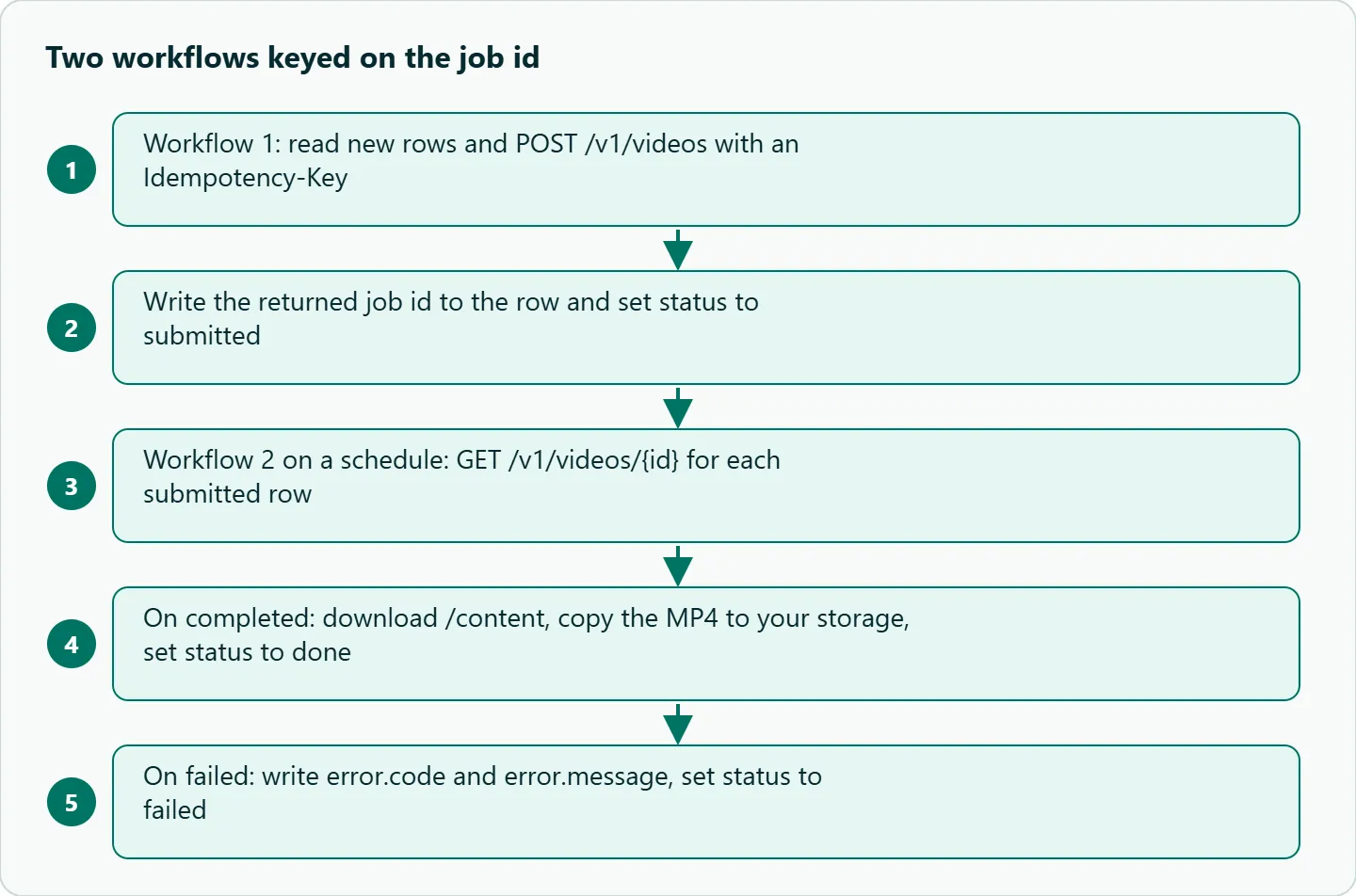
The split design avoids all of this. Workflow 1 only creates jobs and writes the id to a table. Workflow 2 runs on a schedule, reads ids that aren't finished, and checks each one. If either crashes, the table still says exactly where every job stands.
Kling n8n workflow 1: create the job
Start with a trigger that finds new rows, for example a Google Sheets or database node that reads rows where status is new. A Set node builds the body from the row. Then an HTTP Request node sends the create call:
- Method
POST, URLhttps://api.oceantoken.ai/v1/videos - Header
Authorization: Bearer <your key>, stored as an n8n credential rather than typed into the node - Header
Idempotency-Keyset to the row's own id, such asrow-123 - JSON body with
model(for examplekwaivgi/kling-v3.0-std) andprompt
The idempotency header matters more than it looks. OceanToken's errors page says that for paid video requests, a retry with the same key and body returns the stored response without running or charging again. So if n8n retries the node after a network blip, you get the same job id back instead of a second render. The same page lists 409 idempotency_key_reused if you reuse a key with a different body, which is a useful signal that two rows share an id.
Finish with an update node that writes the returned id to the row and sets status to submitted.
Kling n8n workflow 2: poll and download
A Schedule Trigger every minute is the simplest choice. That checks each job less often than the 10 to 20 seconds the guide suggests, which costs you at most about a minute of extra latency per clip and is fine for overnight batches. If turnaround matters, add a short loop with a 15-second Wait node between checks and a maximum number of attempts, so a stuck job can't keep one execution alive forever.
For each submitted row, an HTTP Request node calls GET https://api.oceantoken.ai/v1/videos/ followed by the stored id, using an expression that reads it from the row. A Switch node then routes on status:
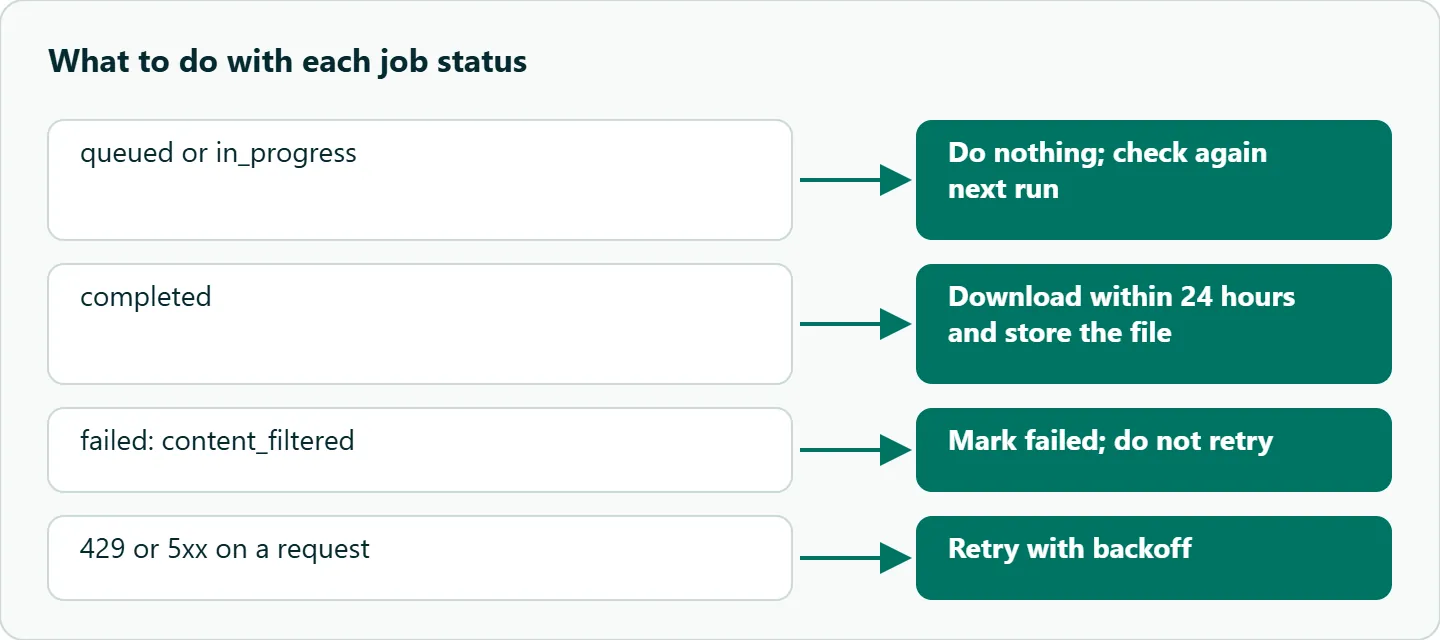
queuedorin_progress: do nothing; the next run checks again.completed: callGET /v1/videos/{id}/contentwith the response format set to file, upload the binary to S3 or Drive, write the storage link to the row, and setstatustodone.failed: writeerror.codeanderror.messageto the row and setstatustofailed.
Always copy the file to your own storage. A content_url written to a sheet is a link that stops working after 24 hours, and the clip is gone from your team's point of view even though the job succeeded.
The same Kling workflow in Make
Make uses the same split. Scenario 1 is triggered by a new sheet or database row and uses the HTTP "Make a request" module for the create call, with the same Authorization and Idempotency-Key headers, then writes the id back. Scenario 2 is scheduled, searches for submitted rows, calls the status endpoint for each, and uses a Router in place of n8n's Switch to handle completed and failed.
The reasons to split are the same as in n8n: a run that sleeps while a render finishes holds state you can lose, and a retried create without the idempotency header can start a second job. Run limits in Make depend on your plan, so check them in Make's help center rather than relying on numbers from forum threads. The split design keeps every run short, so it doesn't depend on those limits.
Failure handling that won't burn your balance
Not every failure deserves a retry. The errors page says to retry 429, any 5xx except 501, timeouts and network failures, with exponential backoff, and not to retry 400-range errors because they will fail the same way again. For video that means a content_filtered refusal should mark the row failed and stop, not loop. A timeout code on a job means it did not finish in time; treat it like failed and decide by hand whether to resubmit.
Budget errors are 400s too. insufficient_credits and request_exceeds_balance mean nothing ran and nothing was charged, so pause the create workflow and alert someone instead of retrying every row. Two cheap guards help: cap how many rows workflow 1 processes per run, and start with a concurrency of two or three jobs. A sheet that accidentally gains 200 rows is the easiest way to drain a balance. The /kling-api page also says each API key can have its own spending limit, so give the automation its own key with a limit.
How to test this on your workload
We haven't published timing measurements for this workflow, so run a small pilot before trusting it with a batch. Use a four-row sheet on kwaivgi/kling-v3.0-std. Record time from submitted to done per row, kill workflow 2 mid-run and confirm the next run picks up where it left off, rerun workflow 1 on the same rows and confirm the idempotency key returns the same job ids, and submit one prompt you expect to be refused to see how failed rows look.
Our take: Store the job id before you do anything else with it, send an idempotency key on every create, and copy the MP4 to your own storage the moment it completes. With those three habits the rest of the workflow, polling, downloading and notifying, can fail and be retried without creating duplicate renders or lost clips.
Running it on OceanToken
Use base URL https://api.oceantoken.ai/v1 with one of the Kling ids listed on /kling-api on November 6, 2026: kwaivgi/kling-v3.0-std, kwaivgi/kling-v3.0-pro (see the Kling v3.0 Pro model page), kwaivgi/kling-v3.0-omni or kwaivgi/kling-video-o1. The video endpoints are OpenAI-style, so a Code node can also use the OpenAI SDK's videos.create_and_poll helper shown on that page. Three things help an automation in particular: a failed job is not charged, retries with an idempotency key don't create a second render, and each key can carry its own spending limit.
One prepaid balance with no subscription also covers other video and text models, so a workflow that writes the prompt with an LLM and renders it with Kling needs one credential. The current Kling versions and rates are on the Kling API page.
FAQ
Is the Kling video API synchronous? No. You create a job, poll its status, and download the file once it is completed.
How often should my n8n workflow poll? OceanToken's video guide says every 10 to 20 seconds. Polling faster doesn't make the render finish sooner.
How long do result links last? The content_url is valid for 24 hours. After that, use GET /v1/videos/{id}/content while the job is still in your account.
Is there a webhook? The video guide doesn't document one, so build the workflow around polling.
Am I charged for failed jobs? The video guide says a failed job is not charged and its hold is released.
Sources
- OceanToken docs: video (checked 2026-11-06)
- OceanToken docs: errors (checked 2026-11-06)
- OceanToken Kling API page (checked 2026-11-06)
- n8n docs: Wait node (checked 2026-11-06)
- n8n docs: execution timeout (checked 2026-11-06)
Get your OceanToken API key
- Create an OceanToken account and an API key.
- Copy the snippet below, paste your key, and run it.
- Check the current rate on /kling-api.
curl https://api.oceantoken.ai/v1/videos \
  -H "Authorization: Bearer $OCEANTOKEN_API_KEY" \
  -H "Content-Type: application/json" \
  -H "Idempotency-Key: row-123" \
  -d '{"model": "kwaivgi/kling-v3.0-std", "prompt": "A cat walks past a bakery sign at dawn"}'
More from the blog
A Unified API for Chat, Image and Video
Building on a unified API for chat, image and video: sync vs async calls, billing units, retries, timeouts and storage, with three calls and a launch checklist.
Kimi K3 API International Access Guide
Use the Kimi K3 API internationally: sign up with email, pay by card, create one key and call moonshotai/kimi-k3 with an OpenAI SDK. Steps, code and checks.
Call Tencent Hy3 With the OpenAI SDK
Call Tencent Hy3 with the OpenAI SDK outside China: base URL, model id, streaming, tool calls, reasoning_effort values, Hy3 vs Hy3 preview, and token billing.