

What Is MiniMax M3? Specs, Release, vs M2
What is MiniMax M3? MiniMax's open-weight multimodal model: June 2026 release, 1M context, thinking modes, what changed from M2, and the limits to plan around.
By OceanToken Team
Editor's note: MiniMax M3 is most interesting for one practical feature: thinking is a per-request switch at the same price. That lets one model cover both fast chat and slow agent work, if you decide per call instead of leaving it on by default. The million-token window gets the headlines, but the billing threshold at 512K input matters more for your budget.
Short answer: What is MiniMax M3? It is MiniMax's open-weight, natively multimodal model, released on June 1, 2026. It reads text, images and video, supports a context window of up to 1M tokens, and lets you turn thinking on or off per request. MiniMax positions it for coding and agent work, with thinking off for latency-sensitive chat.
What is MiniMax M3, in plain terms
MiniMax M3 is a large language model that was trained on text, images and video from the start rather than having vision added later. MiniMax's launch post says it "supports image and video input and can operate a desktop computer," and introduces a new attention design the team calls MSA (MiniMax Sparse Attention), which is how it handles very long inputs.
The Hugging Face model card lists about 428B total parameters with about 23B activated per token, so it is a mixture-of-experts model: only a fraction of the network runs for each token. The weights are published there under the MiniMax community license, and the card recommends temperature=1.0 and top_p=0.95 for best results.
MiniMax calls M3 "the first and only open-weight model to bring all three together," meaning frontier coding, a 1M context window and native multimodality. That is the publisher's framing; what you can verify yourself is the feature list and the limits below.
MiniMax M3 release date and availability
The launch post is dated June 1, 2026, and says "MiniMax M3 is officially released today" and "The M3 API is now available." It promised the open weights within 10 days; the model card now offers them for download.
MiniMax's text generation docs list the model as MiniMax-M3. They also list a newer MiniMax-M3.1-Flash, with tunable thinking depth, and say MiniMax-M3 "also remains available." If you read about M3.1-Flash elsewhere, it is a separate model with its own rules: for example, its thinking cannot be turned off.
MiniMax M3 vs M2: what changed
MiniMax's direct comparison is brief: the launch post says coding "shows significant improvements over M2," and MSA is new. The rest of this table comes from each model's own published card. MiniMax describes M3 as natively multimodal; the M2 README does not list input types, so the table leaves that row out.
| MiniMax M2 | MiniMax M3 | |
|---|---|---|
| Total parameters | 230B | about 428B |
| Active parameters | 10B | about 23B |
| License | MIT | MiniMax community license |
| Thinking | Interleaved; keep the <think> block in history |
Enabled, adaptive or disabled, per request |
Sources: the MiniMax-M2 README , the M3 model card and launch post, checked 2026-11-10.
The thinking row is the change you will feel in code. The M2 README says it is an interleaved thinking model and warns: "Do not remove the <think>...</think> part, otherwise, the model's performance will be negatively affected." M3 moves to an explicit switch. The model card describes three modes for its thinking parameter: enabled, adaptive (the model decides when to reason) and disabled. The license change matters too if you self-host: read the MiniMax community license rather than assuming M2's MIT terms carry over.
MiniMax M3 context window and the 512K line
MiniMax says M3 "supports ultra-long context windows of up to 1M tokens," and its docs list MiniMax-M3 at 1,000,000 tokens. The launch post also sets a billing line: calls with 512K input tokens or fewer are billed at the standard rate, and longer calls at a higher long-context rate. So a single call that crosses 512K input is billed at the higher rate on MiniMax's own API, which makes trimming below that line worth more than it looks.
On OceanToken, the model docs for minimax/minimax-m3 list a 524,288-token context window and a 512,000-token maximum output on 2026-11-10. If your workload needs a single prompt beyond that, this catalog entry is not the fit; for everything below it, the practical advice is the same either way: retrieve and trim instead of filling the window, because every token is billed and slows the first response.
What MiniMax M3 is good for
MiniMax gives a clear split for the thinking switch. With thinking on, M3 is "suited to complex reasoning, agentic tasks, and long-horizon collaboration." With thinking off, it suits "latency-sensitive scenarios such as conversation and code completion." Both modes share the same pricing and can be switched per request.
That makes a simple routing rule possible inside one model: send chat turns, autocomplete and short extraction with thinking off, and send multi-step coding, tool-using agents and analysis of screenshots or video with thinking on. You keep one model id, one prompt style and one set of tests.
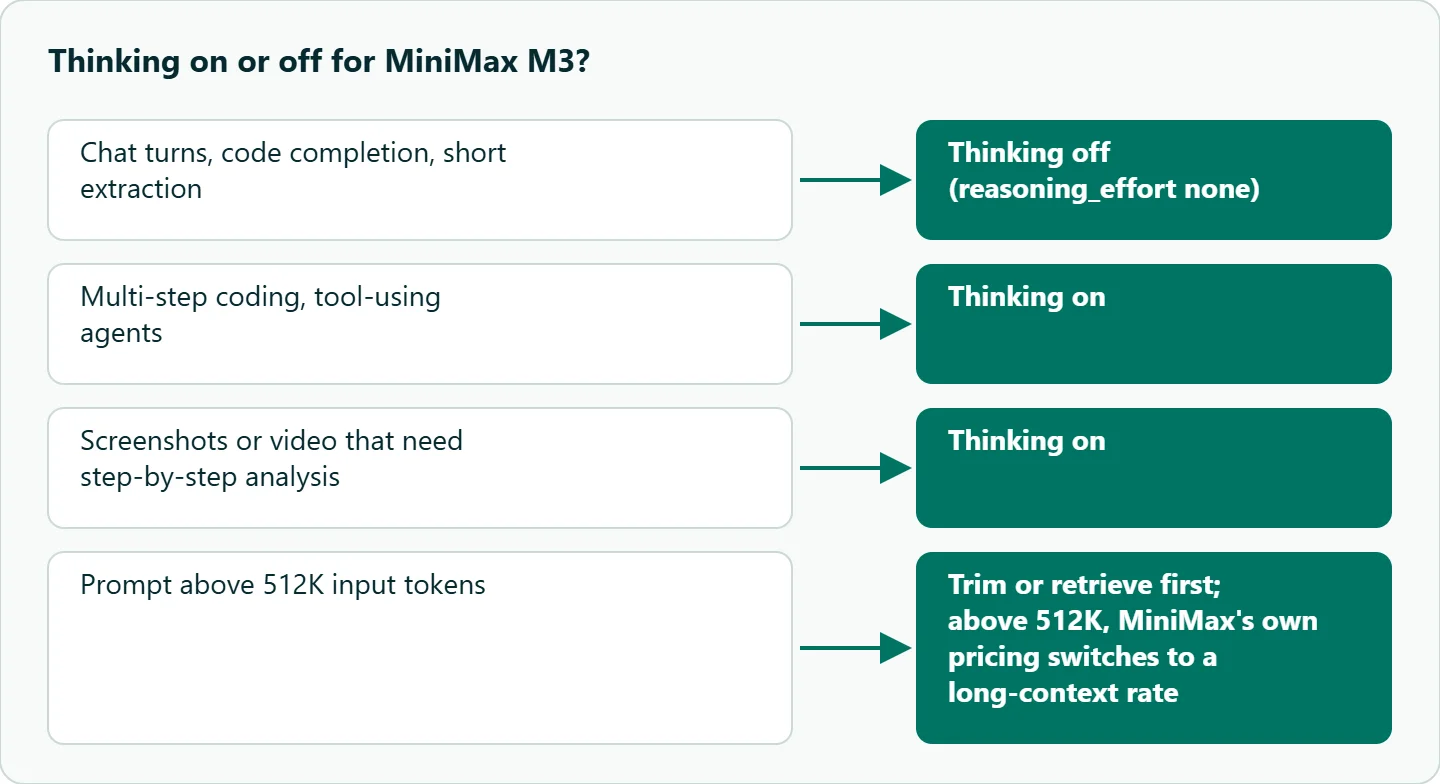
Image and video input open a second set of uses: reading UI screenshots for frontend fixes, describing product footage, or checking frames from a generated video. Test those on your own material, since MiniMax's examples are its own.
Calling MiniMax M3 with thinking off and on
On OceanToken the switch is reasoning_effort. The model docs list none, low, medium and high, where none turns reasoning off. They also say max_tokens counts reasoning, so a thinking request needs a larger cap than a chat one.
from openai import OpenAI

client = OpenAI(base_url="https://api.oceantoken.ai/v1", api_key="YOUR_OCEANTOKEN_KEY")

def ask(prompt, think=False):
    r = client.chat.completions.create(
        model="minimax/minimax-m3",
        messages=[{"role": "user", "content": prompt}],
        reasoning_effort="high" if think else "none",
        max_tokens=16000 if think else 1000,  # reasoning counts toward the cap
        temperature=1.0,
        top_p=0.95,
    )
    return r.choices[0].message.content, r.usage

print(ask("Give me a one-line commit message for a typo fix."))
print(ask("Plan the refactor of a 3-module payment service, step by step.", think=True))
The sampling values follow the model card's recommendation. If you also keep reasoning text across turns, store the full assistant message as returned; the docs return thinking in reasoning_content.
Our take: Default MiniMax M3 to thinking off and turn it on per request for agent and multi-step coding work. Same price per token either way, but thinking produces more tokens and more latency, so "on by default" quietly costs you on every chat turn. Watch the 512K input line on long-document jobs, too.
Running it on OceanToken
The model id is minimax/minimax-m3, and the base URL is https://api.oceantoken.ai/v1. The /minimax-api page listed it on 2026-11-10 alongside earlier models such as minimax/minimax-m2.7 and minimax/minimax-m2. See the current rate on /minimax-api.
The API is OpenAI-compatible, so the code above needs only the base URL and the key, and the model page says the Responses API and the Anthropic Messages API work too. One key and one prepaid balance cover M3 and every other model on your account, so moving a thinking-heavy step to a different model later is a change to the model id, not a new vendor account.
FAQ
Is MiniMax M3 open source? Its weights are open on Hugging Face under the MiniMax community license, which differs from MiniMax M2's MIT license.
What is the MiniMax M3 context window? MiniMax lists up to 1M tokens, with a higher rate above 512K input. OceanToken's docs list 524,288 tokens for minimax/minimax-m3.
Can I turn off thinking in MiniMax M3? Yes. MiniMax lets you toggle it per request; on OceanToken, set reasoning_effort to none.
Does MiniMax M3 accept images and video? Yes. MiniMax describes native image and video input, and our model page lists text, image and video input.
Is MiniMax-M3.1-Flash the same model? No. It is a newer, separate model in MiniMax's docs, and its thinking cannot be turned off.
Sources
- MiniMax: MiniMax M3 launch post (checked 2026-11-10)
- MiniMax: MiniMax-M3 model card on Hugging Face (checked 2026-11-10)
- MiniMax API docs: Text generation (checked 2026-11-10)
- MiniMax: MiniMax-M2 README (checked 2026-11-10)
- OceanToken: MiniMax M3 model page (checked 2026-11-10)
- OceanToken docs: minimax/minimax-m3 (checked 2026-11-10)
- OceanToken MiniMax API page (checked 2026-11-10)
Get your OceanToken API key
- Create an OceanToken account and an API key.
- Copy the snippet below, paste your key, and run it.
- Check the current rate on /minimax-api.
curl https://api.oceantoken.ai/v1/chat/completions \
  -H "Authorization: Bearer $OCEANTOKEN_API_KEY" \
  -H "Content-Type: application/json" \
  -d '{"model": "minimax/minimax-m3", "reasoning_effort": "none", "max_tokens": 1000, "messages": [{"role": "user", "content": "Write a one-line commit message for a typo fix."}]}'
More from the blog
A Unified API for Chat, Image and Video
Building on a unified API for chat, image and video: sync vs async calls, billing units, retries, timeouts and storage, with three calls and a launch checklist.
Kimi K3 API International Access Guide
Use the Kimi K3 API internationally: sign up with email, pay by card, create one key and call moonshotai/kimi-k3 with an OpenAI SDK. Steps, code and checks.
Call Tencent Hy3 With the OpenAI SDK
Call Tencent Hy3 with the OpenAI SDK outside China: base URL, model id, streaming, tool calls, reasoning_effort values, Hy3 vs Hy3 preview, and token billing.