

What Is Kimi K3? Release, Context, vs K2
What is Kimi K3? Moonshot's 2.8T-parameter open-weight model: release date, 1M context window, what changed from Kimi K2, and the API traps to plan around.
By OceanToken Team
Editor's note: Kimi K3 is a serious open-weight model for long coding and agent work, and Moonshot is unusually candid about where it falls short. Read the caveats before the benchmarks: thinking is always on, the conversation history has to carry its reasoning, and the model can make decisions you didn't ask for. Plan for those three and it earns its place.
Short answer: What is Kimi K3? It is Moonshot AI's open-weight, natively multimodal model, introduced in July 2026, with 2.8 trillion total parameters (104 billion active per token) and a 1,048,576-token context window. Moonshot positions it for long-horizon coding, agents and knowledge work. It always reasons before answering, which shapes how you call it.
What is Kimi K3, in plain terms
Kimi K3 is a mixture-of-experts language model. Moonshot's Kimi K3 README lists 2.8T total parameters with 104B activated, 896 experts with 16 selected per token, and 93 layers that mix two attention types: 69 layers of Kimi Delta Attention (KDA) and 24 of Gated MLA. Moonshot's launch blog calls it "the world's first open 3T-class model."
Mixture-of-experts is why a model this large is usable at all. Only a slice of the network runs for each token, so the compute per token tracks the 104B active parameters, not the full 2.8T. The weights themselves are still enormous: the blog recommends supernode deployments with 64 or more accelerators, so self-hosting is a data-center project, not a workstation one.
The model reads more than text. The blog says K3 "understands text, images, and video within the same model," and the README lists a built-in vision encoder, MoonViT-V2. The README's model table lists text and image; OceanToken's model page lists text, image and video input, so test video on your own clips before relying on it.
Kimi K3 release date and availability
Moonshot introduced Kimi K3 in mid-July 2026: the launch blog's benchmark notes say results are current as of July 16, 2026, and OceanToken's model page lists July 16, 2026 as the release date. The blog said the full weights would be released by July 27, 2026, and the README now states that the full weights are released under the Kimi K3 License.
On Moonshot's side, the model is available on Kimi.com, in Kimi Work and Kimi Code, and on the Kimi API Platform as kimi-k3, which the README describes as an OpenAI- and Anthropic-compatible API. For self-hosting, the README recommends vLLM, SGLang and TokenSpeed.
Kimi K3 vs K2: what changed
Moonshot's explicit comparisons are few, so this table sticks to what each model's own README states.
| Kimi K2 | Kimi K3 | |
|---|---|---|
| Total parameters | 1T | 2.8T |
| Active parameters | 32B | 104B |
| Context length | 128K | 1,048,576 |
| Attention | MLA | KDA plus Gated MLA |
| License | Modified MIT | Kimi K3 License |
Sources: the Kimi K2 README and the Kimi K3 README, both checked 2026-11-10.
Beyond the table, Moonshot claims an approximate 2.5× improvement in overall scaling efficiency over Kimi K2 from its Stable LatentMoE design, and says quantization-aware training (MXFP4 weights, MXFP8 activations) runs from the fine-tuning stage onward. Those are training-side claims; what you will notice as an API user is the much longer context and the always-on reasoning. The license change also matters if you plan to self-host or redistribute: read the Kimi K3 License rather than assuming K2's terms carry over.
Kimi K3 context window and output limits
Moonshot's README gives a context length of 1,048,576 tokens. OceanToken's model docs list the same 1,048,576-token window for moonshotai/kimi-k3, with a maximum output of 943,718 tokens.
Two details matter in practice. First, the docs say max_tokens is "the most tokens to write, reasoning included." Because K3 always reasons, a small cap can be spent on thinking before any answer appears, leaving empty content and finish_reason: "length". Start generous and tighten after you see real usage numbers. Second, a million-token window is a ceiling, not a target: every token you send is billed and slows the response, so retrieval and trimming still pay off for routine requests.
What Kimi K3 is good for, and the caveats Moonshot lists
Moonshot names long-horizon coding as K3's headline strength, along with frontend and game work that uses screenshots, turning research papers into executable code, knowledge work such as reports and dashboards, and agent tasks that orchestrate terminal tools.
The caveats are just as specific, and they come from Moonshot itself:
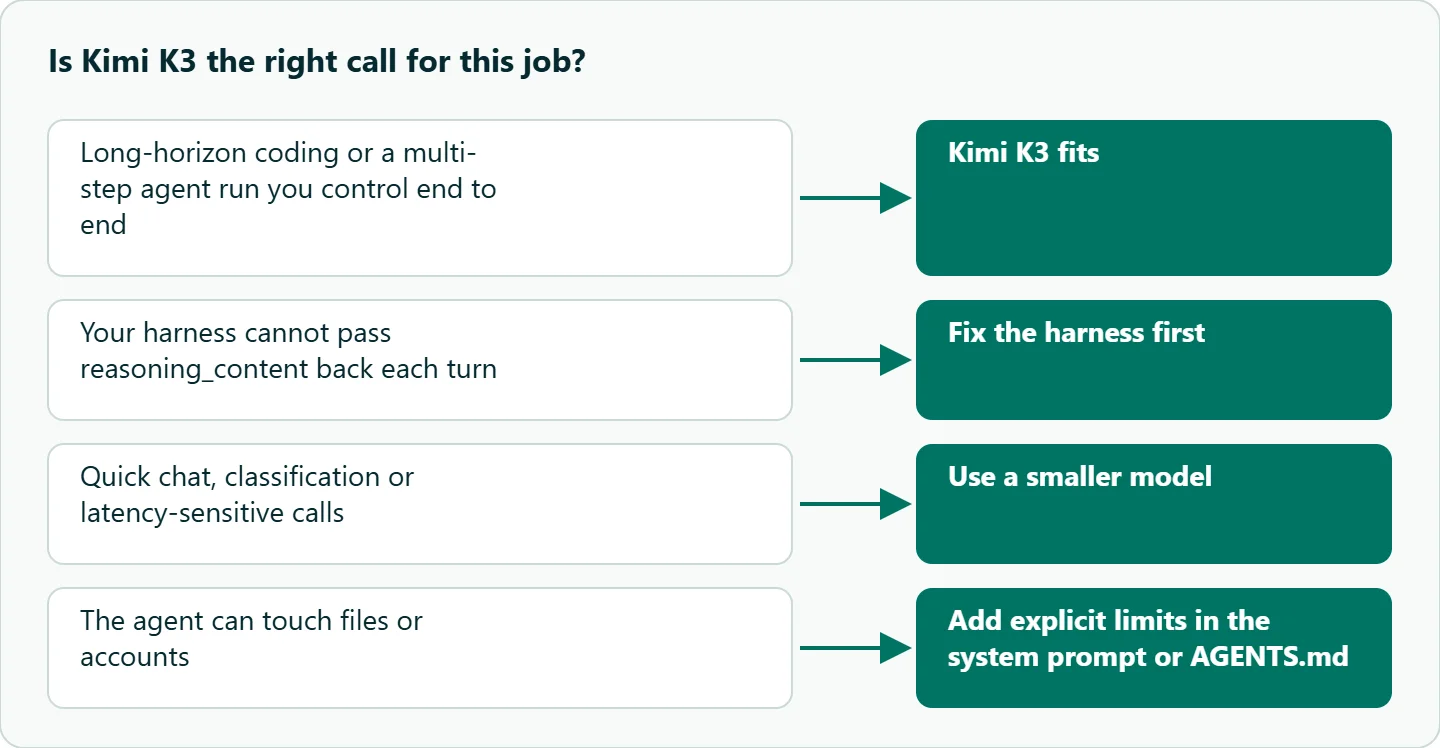
Thinking is always on. The README says K3 "always has thinking enabled" and returns reasoning_content. Effort is set with reasoning_effort (low, high or max), and the default is max. The launch blog said only max effort was available at launch, with lower levels to follow.
History must carry the reasoning. For multi-turn and tool use, the README asks you to pass back the full assistant message, including reasoning_content and tool_calls. The blog warns that if the harness drops past thinking, "generation quality may become highly unstable," and advises against switching models mid-session.
It can act on its own. The blog says the model "may make unexpected decisions on the user's behalf" and recommends explicit constraints in the system prompt or an AGENTS.md file.
It is not the top model overall. Moonshot writes that K3's overall performance "still trails the most powerful proprietary models" and that there is a noticeable user-experience gap.
Calling Kimi K3 without breaking the history
This loop keeps the whole assistant message, so the reasoning travels with the conversation as Moonshot asks:
from openai import OpenAI

client = OpenAI(base_url="https://api.oceantoken.ai/v1", api_key="YOUR_OCEANTOKEN_KEY")

messages = [
    {"role": "system", "content": "You are a coding agent. Ask before deleting files or changing dependencies."},
    {"role": "user", "content": "Read the failing test output and propose a minimal fix."},
]

r = client.chat.completions.create(
    model="moonshotai/kimi-k3",
    messages=messages,
    max_tokens=16000,  # reasoning counts toward this cap
)
msg = r.choices[0].message
print(r.choices[0].finish_reason, r.usage)

# Keep everything the model returned, including reasoning_content and tool_calls
messages.append(msg.model_dump(exclude_none=True))
The system prompt does double duty: it sets the task and adds the explicit constraint Moonshot recommends for a proactive model.
One more detail on effort. OceanToken's model page lists reasoning_effort among K3's features, but the parameter table in the model docs did not include it on 2026-11-10, and the docs say unlisted parameters are left out before they reach the model. Until the two agree, assume the default max effort and size max_tokens and timeouts for it, then check usage to see what you actually got.
Our take: Kimi K3 is worth it for long agent runs and big coding tasks where you control the harness end to end and can keep reasoning in the history. For quick chat, classification or anything latency-sensitive, its always-on, max-effort thinking is the wrong trade; use a smaller model there and keep K3 for the hard steps.
Running it on OceanToken
The model id is moonshotai/kimi-k3, and the base URL is https://api.oceantoken.ai/v1. The /kimi-api page listed it on 2026-11-10 alongside earlier Kimi models such as moonshotai/kimi-k2.7-code and moonshotai/kimi-k2. See the current rate on /kimi-api.
The API is OpenAI-compatible, so the code above runs with any OpenAI SDK after changing the base URL and key. One key and one prepaid balance cover K3 and every other model on your account, which makes it easy to pair K3 for hard steps with a cheaper model for the rest. The model page also says prompt caching is supported and billed at the official price, which matters for long agent sessions that resend the same context.
FAQ
Is Kimi K3 open source? Its weights are open. The README says the code and weights are released under the Kimi K3 License, which differs from Kimi K2's Modified MIT License.
What is the Kimi K3 context window? 1,048,576 tokens, per Moonshot's README and our model docs.
Can I turn off thinking in Kimi K3? No. Moonshot says thinking is always enabled; you can only set the effort level.
Does Kimi K3 accept images? Yes. Moonshot describes native vision, and our model page lists image and video input.
How does Kimi K3 compare with DeepSeek V4 Pro? See our Kimi K3 vs DeepSeek V4 Pro comparison for the side-by-side specs.
Sources
- Moonshot AI: Kimi K3 launch blog (checked 2026-11-10)
- Moonshot AI: Kimi K3 README (checked 2026-11-10)
- Moonshot AI: Kimi K2 README (checked 2026-11-10)
- OceanToken: Kimi K3 model page (checked 2026-11-10)
- OceanToken docs: moonshotai/kimi-k3 (checked 2026-11-10)
- OceanToken Kimi API page (checked 2026-11-10)
Get your OceanToken API key
- Create an OceanToken account and an API key.
- Copy the snippet below, paste your key, and run it.
- Check the current rate on /kimi-api.
curl https://api.oceantoken.ai/v1/chat/completions \
  -H "Authorization: Bearer $OCEANTOKEN_API_KEY" \
  -H "Content-Type: application/json" \
  -d '{"model": "moonshotai/kimi-k3", "max_tokens": 16000, "messages": [{"role": "user", "content": "Explain what a mixture-of-experts model is in two sentences."}]}'
More from the blog
A Unified API for Chat, Image and Video
Building on a unified API for chat, image and video: sync vs async calls, billing units, retries, timeouts and storage, with three calls and a launch checklist.
Kimi K3 API International Access Guide
Use the Kimi K3 API internationally: sign up with email, pay by card, create one key and call moonshotai/kimi-k3 with an OpenAI SDK. Steps, code and checks.
Call Tencent Hy3 With the OpenAI SDK
Call Tencent Hy3 with the OpenAI SDK outside China: base URL, model id, streaming, tool calls, reasoning_effort values, Hy3 vs Hy3 preview, and token billing.