

Wan Video API + Make + CapCut Workflow
A Wan video API, Make and CapCut workflow for 15-second ads: a five-shot list, two Make scenarios that survive failed jobs, the Wan 3.0 fields, and edit steps.
By OceanToken Team
Editor's note: AI video ads rarely fail on the model. They fail on assembly: five clips with five different colour temperatures, stitched together without a plan. A boring, repeatable pipeline beats a "one prompt, one miracle" demo, and the boring part here is a spreadsheet, two Make scenarios and a CapCut template you reuse every week.
Short answer: A Wan video API, Make and CapCut workflow plans a 15-second ad as five short shots in a Google Sheet. One Make scenario submits each shot to alibaba/wan-3.0, a second one collects finished clips into Drive, and you assemble them in CapCut with a voiceover, captions and one colour pass. Keep each shot to one simple action.
Why this Wan video API, Make and CapCut workflow uses short shots
Wan 3.0 can generate long clips. On OceanToken the duration field for alibaba/wan-3.0 accepts whole seconds from 2 to 30, according to the model docs . So why not prompt the whole ad at once?
Because ads get revised one shot at a time. When a client says the hand in second five looks wrong, a single 15-second take means regenerating everything, including the four shots they liked. Five separate clips let you re-roll only the bad one. Simple motion over a short span is also where video models hold together best: the product is less likely to morph, and the hand is less likely to change shape halfway through.
The cost is consistency between clips. A shared style line in every prompt and the same product photo as a first frame are there to manage that. Alibaba's own Wan 3.0 guide describes a built-in multi-shot storyboard mode with 4 to 6 seconds per shot, which is worth trying when you want one call to handle continuity. For ads that get revised shot by shot, separate clips are still easier to manage.
Shot list for a 15-second reusable-bottle ad
The shared style line goes into every prompt: "clean commercial look, soft daylight, shallow depth of field, muted teal and warm wood tones, 24fps feel".
| # | Time | Shot | Prompt |
|---|---|---|---|
| 1 | 0-3 s | Close-up hook | "Close-up of condensation drops sliding down a matte teal steel water bottle on a wooden desk, slow push-in" |
| 2 | 3-6 s | Problem | "A hand grabs a crumpled plastic cup near a laptop, handheld feel, then sets it aside" |
| 3 | 6-9 s | Product in use | "Same teal bottle lifted by a hand, cap twists open, medium shot, window light" |
| 4 | 9-12 s | Lifestyle | "Person walks along a sunny city street with the bottle in a tote, tracking shot from the side" |
| 5 | 12-15 s | End card | "Teal bottle centered on a clean cream background, slow rotate 30 degrees, space on the right for text" |
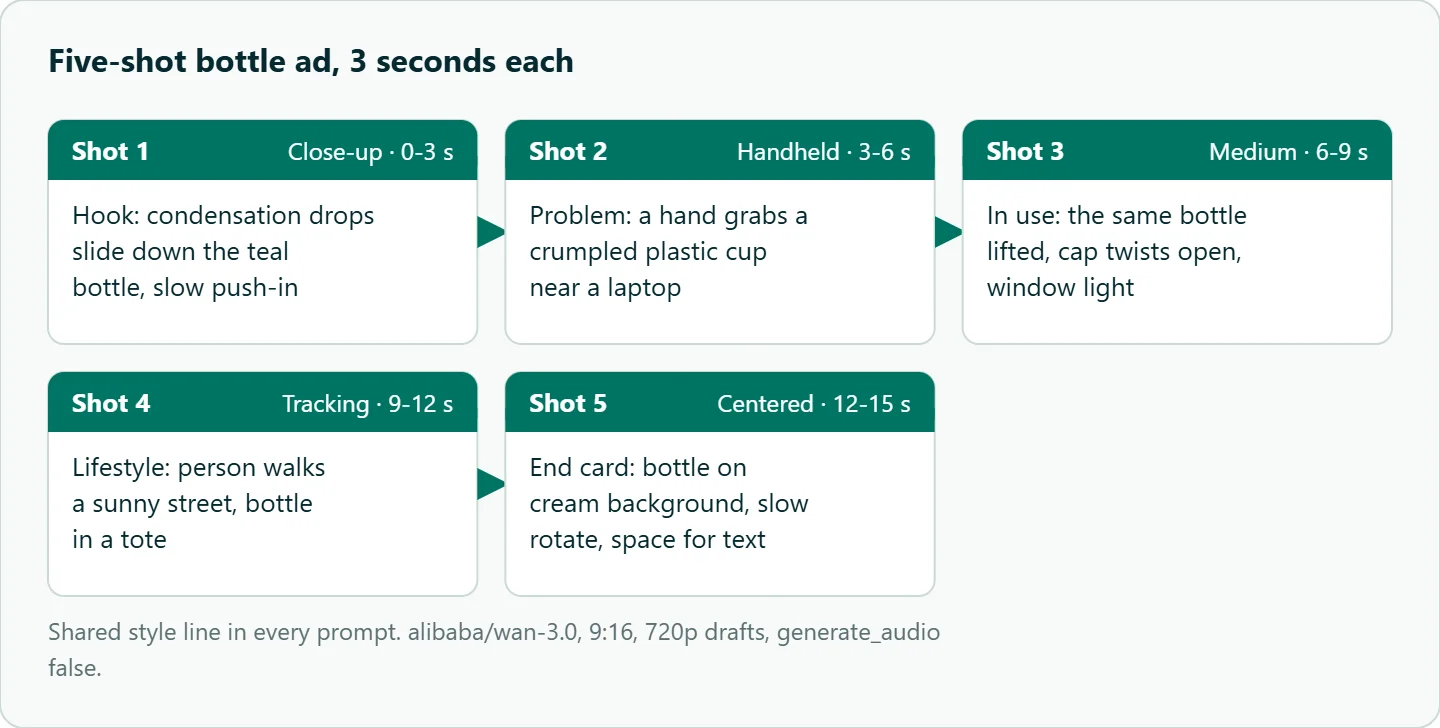
For shots 1, 3 and 5, send the same product photo as the first frame. The Wan 3.0 docs accept up to two frame_images (a first and a last frame) and up to ten input_references, and aspect_ratio defaults to adaptive when a first frame is sent without a ratio. For a 9:16 ad, set the ratio explicitly so a landscape product photo doesn't decide the format for you.
Each row has a job, in the order an editor would cut it. Shot 2 is the riskiest because hands are where video models slip. If you have to cut a shot, cut shot 4 and let shot 3 run longer. Before generating, write a one-line success test per shot: for shot 2, "one hand, five fingers, the cup does not merge with the laptop". Review then takes seconds instead of a meeting.
The Wan 3.0 request fields that matter for ads
Each row in the sheet becomes one POST https://api.oceantoken.ai/v1/videos request. This is the body for shot 3:
{
  "model": "alibaba/wan-3.0",
  "prompt": "Same teal bottle lifted by a hand, cap twists open, medium shot, window light. Clean commercial look, soft daylight, shallow depth of field, muted teal and warm wood tones, 24fps feel",
  "duration": 3,
  "resolution": "720p",
  "aspect_ratio": "9:16",
  "generate_audio": false,
  "frame_images": [{"type": "image_url", "frame_type": "first_frame", "image_url": {"url": "https://example.com/bottle.png"}}]
}
Three of these fields deserve a note. generate_audio matters because Alibaba's guide says Wan 3.0 generates dialogue, background music and sound effects natively. That is useful for a single social clip, but in a five-clip ad with a voiceover you want silence under the VO, so set it to false and add sound in the edit.
aspect_ratio is the second trap. Alibaba's guide lists 21:9 among the ratios and -1 as a "smart duration" option. The OceanToken parameter list for alibaba/wan-3.0 on 2026-11-10 had 16:9, 4:3, 1:1, 3:4, 9:16 and adaptive, and whole-second durations from 2 to 30. 21:9 is not in that list, so do not send it. The docs say adaptive is ignored and named in the x-oceantoken-dropped-params response header where it is not available, and fields that aren't listed at all (seed, negative_prompt) are left out before the request reaches the model. Log that header in the sheet so a dropped setting shows up.
resolution is the third. Generate drafts at 480p or 720p while you are still fixing prompts, and only render 1080p for the takes you approve. The docs note that lower is faster and cheaper.
The Make side: two scenarios, not one
The obvious build is one scenario: watch the sheet, submit the job, wait, download. It breaks on timing. Make's Sleep module delays the flow for up to 300 seconds, and the HTTP app timeout must be between 1 and 300 seconds. The OceanToken video guide says a clip usually takes a few minutes and recommends polling every 10 to 20 seconds. A long job can outlast any single wait you can configure.
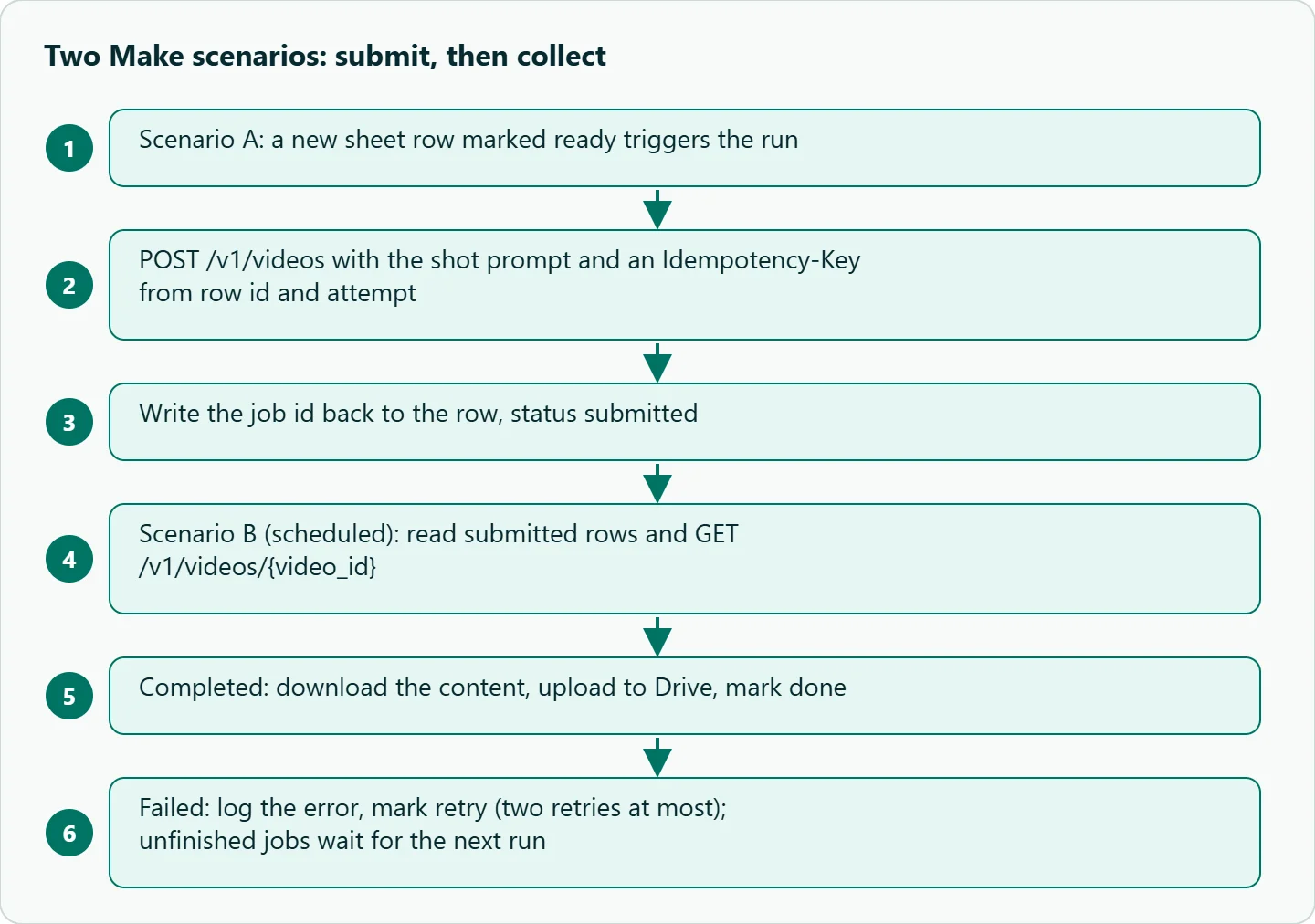
So split it. Scenario A (submit) triggers on new sheet rows marked ready, uses HTTP "Make a request" to POST the body above, sends an Idempotency-Key header built from the row id and attempt number, and writes the returned job id back to the row with status submitted. The video guide says that if a retry follows a network timeout with the same key, the existing job comes back instead of a second, billed one.
Scenario B (collect) runs on a schedule. It reads rows that are submitted, calls GET /v1/videos/{video_id}, and branches on the status. The guide lists queued, in_progress, completed and failed. For completed, the HTTP "Download a file" module fetches GET /v1/videos/{video_id}/content, Google Drive uploads it, and the row becomes done. For failed, write the error into the row and set it to retry. Unfinished jobs simply wait for the next run.
Download soon after completion: the guide says the content_url is valid for 24 hours. Cap retries at two per shot so a bad prompt cannot loop forever, and store the model id and settings in the row. When someone says shot 3 looked better last week, you want to know whether the prompt changed or it was just a better roll.
If you have already built the same pattern in n8n for another model, our Kling async workflow guide covers the polling logic in more depth.
Make or code: where the line is
Make wins when the person who owns the shot sheet is a marketer, not a developer. They can add a row, flip it to ready and get clips in Drive without opening a terminal, and the scenario history shows exactly which call failed.
Code wins once volume or variation grows. If one campaign produces 9:16, 1:1 and 16:9 cuts in three languages, you are submitting dozens of jobs per run, and you want concurrency limits, structured retries and tests that a visual scenario makes awkward. Make has no "while" loop, and its flow control docs describe a Repeater as repeating a task a set number of times, so polling patterns get clumsy fast. A short Python script with the OpenAI SDK's client.videos.create_and_poll, which the Wan 3.0 model page uses in its sample, replaces both scenarios. Our rule of thumb: start in Make, and move to code the week you catch yourself duplicating scenarios to handle variants.
Assembly in CapCut
Import the five clips in shot order and trim the handles. Grade after assembly, not before: different generations drift in colour temperature, so pick the hero shot (usually the product close-up), match the others to it, then add one light grade across the whole timeline.
Lay down the voiceover first and cut to its rhythm. For ads, hard cuts on action usually feel more native to the feed than crossfades. Put a low music bed under the VO and keep it well below the voice.
Captions carry the message for viewers who start with the sound off. Keep them in the central area of the frame, because platform buttons and descriptions cover the edges; check the current safe-area guidance for each platform you publish to. Put the end-card text in the empty space you reserved on the right in shot 5. Export 9:16 for Shorts and Reels, and a 1:1 variant if you run feed placements.
Once this works, save it as a template. Keep the style line in one sheet cell referenced by every prompt, so changing it once restyles the whole campaign. Add columns for aspect ratio and language so one run produces every variant. Over a few campaigns you will reuse approved takes more often than you regenerate them.
How to test this on your workload
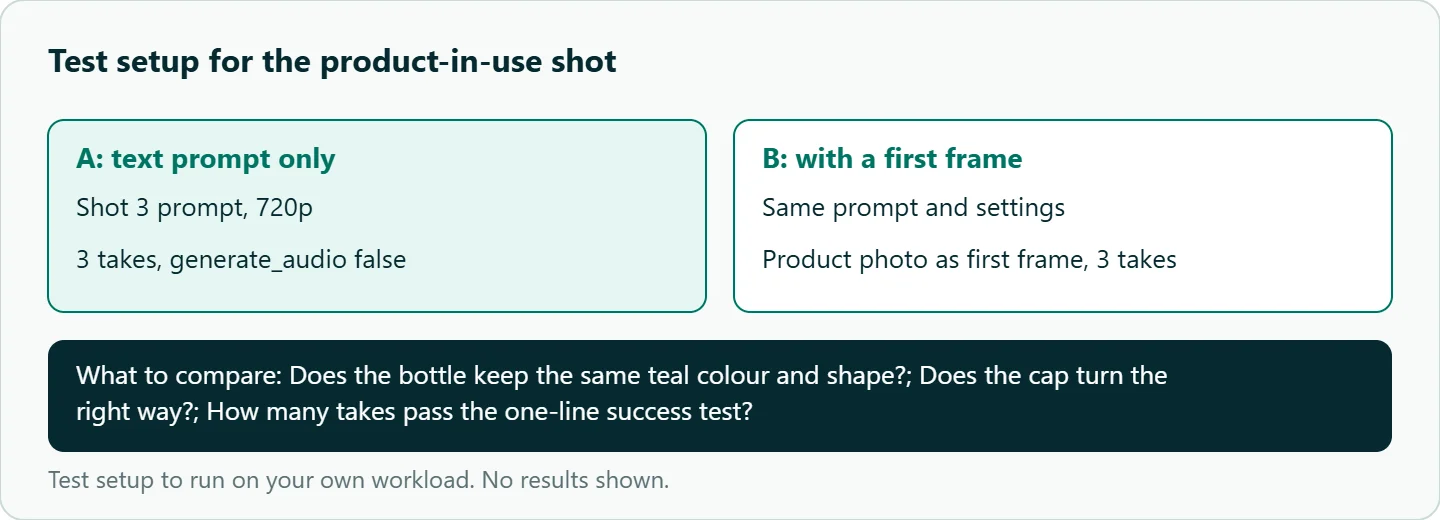
Before spending on a campaign, find out which shots are expensive to get right. We have not run this test, so these are the steps, not results:
- Generate each of the five shots three times at 720p with
generate_audio: false. - Mark each take usable or not against the one-line success test for that shot.
- Repeat shot 3 with the product photo as first frame and compare.
- Watch the assembled ad on a phone with the sound off and check that the captions alone carry the message.
- If a shot needs many tries, redesign it (show only the hand's silhouette, or cut straight to the cup) instead of paying for retries.
Our take: The assembly template matters more than the model. Once the five-shot sheet, the style line, the two scenarios and the CapCut preset exist, the model is one cell in the sheet. Keep Wan 3.0 in that cell while its takes pass your success tests, and keep the other cells boring.
Running it on OceanToken
The /wan-api page listed alibaba/wan-3.0, alibaba/wan-3.0-prime, alibaba/wan-2.7 and alibaba/wan-2.6 on 2026-11-10. Set the base URL to https://api.oceantoken.ai/v1 and use the same key for video and text calls. See the current rate on /wan-api.
A few things on the platform suit this pipeline. The video API is OpenAI-compatible, so the Make HTTP calls and a later Python version use the same endpoint and key. A failed job is not charged and its hold is released, according to the video guide, so a retry row costs nothing for the attempt that failed. The Idempotency-Key header means a Make timeout followed by a retry cannot start a second billed job. Each API key can carry its own spending limit, so the Make scenarios can run on a key capped for the campaign. And switching a shot to another video model is a change to the model value in the sheet.
FAQ
Can Wan 3.0 generate audio? Alibaba's guide says it generates dialogue, music and sound effects natively, and OceanToken exposes this as generate_audio. For multi-clip ads with a voiceover, set it to false and add sound in the edit.
What aspect ratio should I use for TikTok, Shorts and Reels? 9:16. Set it explicitly, especially when you send a first frame, because the ratio otherwise defaults to adaptive.
How do I keep the bottle identical across shots? Send the same product photo as the first frame for the product shots and keep each shot to one simple action.
Why split the Make pipeline into two scenarios? Make's Sleep and HTTP timeouts top out at 300 seconds, and a video job can take longer, so submitting and collecting separately avoids timeouts.
Is it OK to use AI footage in ads? Check each ad platform's current disclosure rules before you publish.
Sources
- OceanToken docs: alibaba/wan-3.0 (checked 2026-11-10)
- OceanToken docs: Video guide (checked 2026-11-10)
- Alibaba Cloud Model Studio: Wan 3.0 video generation guide (checked 2026-11-10)
- Make: HTTP app (checked 2026-11-10)
- Make Help Center: Tools (Sleep) (checked 2026-11-10)
- Make Help Center: Flow control (checked 2026-11-10)
- OceanToken Wan API page (checked 2026-11-10)
Get your OceanToken API key
- Create an OceanToken account and an API key.
- Copy the snippet below, paste your key, and run it.
- Check the current rate on /wan-api.
curl https://api.oceantoken.ai/v1/videos \
  -H "Authorization: Bearer $OCEANTOKEN_API_KEY" \
  -H "Content-Type: application/json" \
  -H "Idempotency-Key: bottle-ad-shot-1-attempt-1" \
  -d '{"model": "alibaba/wan-3.0", "prompt": "Close-up of condensation drops sliding down a matte teal steel water bottle on a wooden desk, slow push-in", "duration": 3, "resolution": "720p", "aspect_ratio": "9:16", "generate_audio": false}'
More from the blog
A Unified API for Chat, Image and Video
Building on a unified API for chat, image and video: sync vs async calls, billing units, retries, timeouts and storage, with three calls and a launch checklist.
Kimi K3 API International Access Guide
Use the Kimi K3 API internationally: sign up with email, pay by card, create one key and call moonshotai/kimi-k3 with an OpenAI SDK. Steps, code and checks.
Call Tencent Hy3 With the OpenAI SDK
Call Tencent Hy3 with the OpenAI SDK outside China: base URL, model id, streaming, tool calls, reasoning_effort values, Hy3 vs Hy3 preview, and token billing.