

Wan 3.0 Prime Image to Video API Guide
Wan 3.0 Prime image to video API: how to send a first frame, what the docs and model page say about a last frame, how to poll the job, and how to test it.
By OceanToken Team
Editor's note: Image to video on Wan 3.0 Prime looks like a one-field change: add a picture to a text-to-video request. The field itself is simple. What is not settled is how far the model goes with it. The model page describes first-frame image to video, while the API reference also lists a last frame. Our advice is to build on the first frame, and to prove the last frame on your own account before a pipeline depends on it.
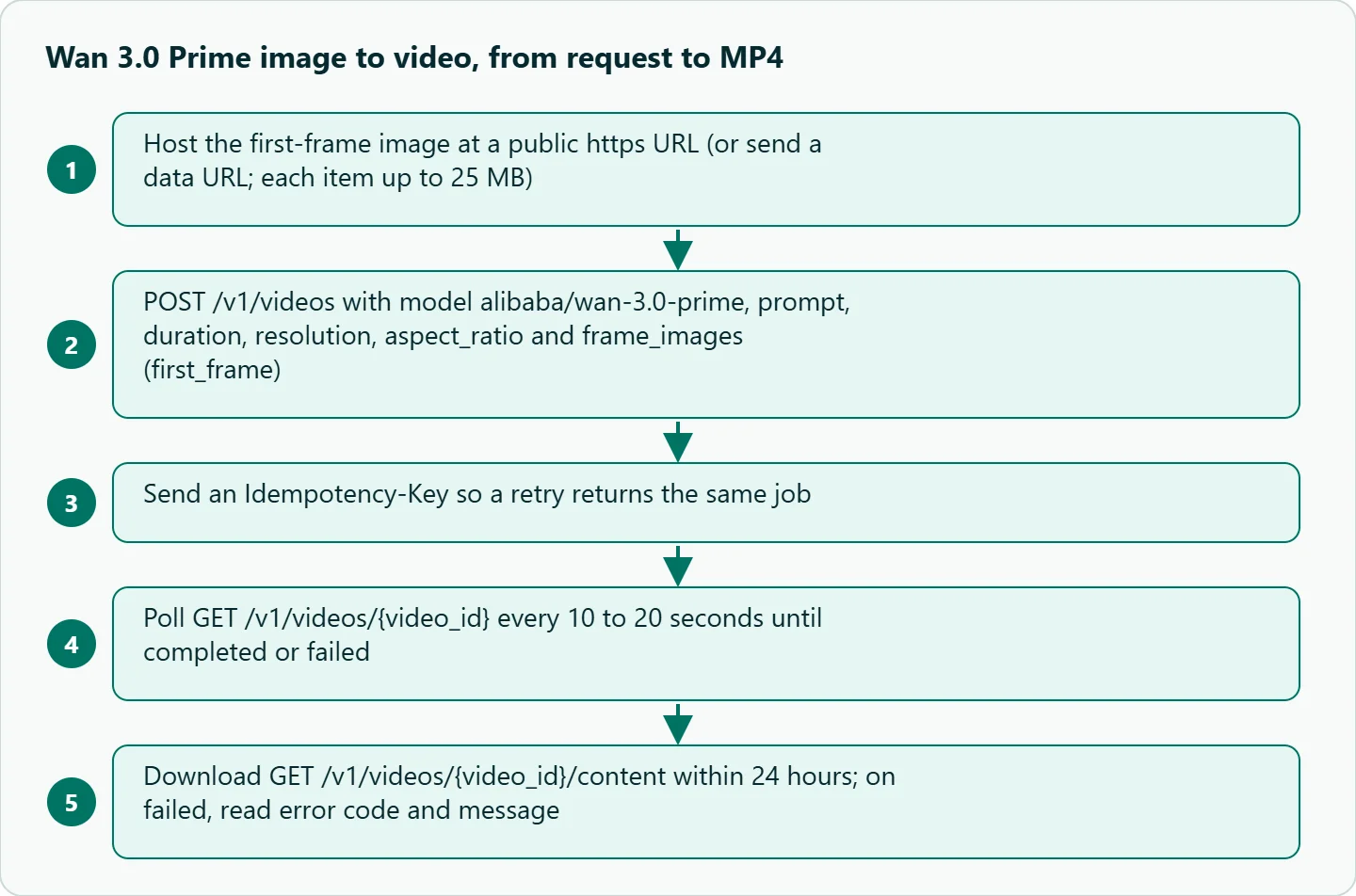
Short answer: To use the Wan 3.0 Prime image to video API, send POST /v1/videos with model: "alibaba/wan-3.0-prime", a prompt, and a frame_images entry with frame_type: "first_frame" pointing to a public image URL or a data URL. The call returns a job id. Poll it until completed, then download the MP4 within 24 hours.
01 · What the Wan 3.0 Prime image to video API accepts
Everything below comes from the API reference for alibaba/wan-3.0-prime and the model page, both read on November 18, 2026. The reference says it plainly: the model takes only these fields, and anything else in the request is left out before it reaches the model.
| Parameter | Values | What it does |
|---|---|---|
model |
alibaba/wan-3.0-prime |
Required. The id from the Wan 3.0 Prime model page |
prompt |
Text | Required. What happens in the clip, starting from your image |
duration |
2 to 30, default 5 | Length in whole seconds; seconds is accepted too |
resolution |
480p, 720p, 1080p |
Lower is faster and cheaper |
aspect_ratio |
16:9, 4:3, 1:1, 3:4, 9:16, 21:9 |
Output shape; there is no adaptive option on this model |
generate_audio |
true or false |
A clip with sound, or a silent one |
frame_images |
Up to 2 items | First frame, and per the reference a last frame |
input_references |
Up to 10 images | Reference images for reference to video, a different mode from first-frame |
Two rows change how you build requests. The duration floor of 2 seconds makes Wan 3.0 Prime usable for very short inserts, which we come back to in section 04. And the missing adaptive value means the clip does not take its shape from your image. The docs video guide describes that follow-the-frame behavior only for models that list adaptive. On Wan 3.0 Prime, send the aspect_ratio that matches your image yourself.
02 · First frame, or first and last frame?
The model page and the API reference disagree about the last frame; here is exactly where.
| Source (checked 2026-11-18) | What it says |
|---|---|
| Model page, "What is Wan 3.0 Prime?" | Text-to-video and first-frame image-to-video |
| Model page, specs | Inputs: text, image, video, audio |
API reference, frame_images |
Up to 2 items, frame types first_frame and last_frame |
Downloadable spec (spec.json) |
Input modalities: text and image |
So the reference accepts a Wan 3.0 Prime first and last frame request, and the model description only promises a first frame. Neither tells you what happens to a last frame if the model does not use it. That could mean an end frame the clip lands on, a clip that ignores it, or a refusal. We have not run the comparison, so we will not guess which one.
The docs do give you a way to ask before you spend anything. The model-spec endpoint returns, among other things, a modes list where i2v means first frame and flf2v means first and last frame:
curl "https://api.oceantoken.ai/oceantoken/video/model-spec?model=alibaba/wan-3.0-prime" \
  -H "Authorization: Bearer $OCEANTOKEN_API_KEY"
If flf2v is in that list, a two-image request is worth testing. If only i2v is, design around the first frame and treat the end of the shot as something the prompt steers. Either way, check the x-oceantoken-dropped-params header on the create response. The video guide says it names optional fields that could not be applied to a request.
03 · A first-frame request, in curl and Python
The image goes in frame_images as a public https:// URL or a data URL. The video guide caps each media item at 25 MB and suggests keeping the whole request under 10 MB, so send large images as URLs rather than base64.
curl https://api.oceantoken.ai/v1/videos \
  -H "Authorization: Bearer $OCEANTOKEN_API_KEY" \
  -H "Content-Type: application/json" \
  -H "Idempotency-Key: wan-i2v-001" \
  -d '{
    "model": "alibaba/wan-3.0-prime",
    "prompt": "The lantern flickers, then the camera pulls back slowly to reveal the empty pier",
    "duration": 5,
    "resolution": "720p",
    "aspect_ratio": "16:9",
    "frame_images": [
      {"type": "image_url", "frame_type": "first_frame", "image_url": {"url": "https://example.com/lantern.png"}}
    ]
  }'
The guide also accepts shorter forms, "first_frame": "https://...", or OpenAI's input_reference for the first frame. Use the long form if you might add a last frame later, because then only the array changes.
For the Wan 3.0 Prime API in Python, here is the create, poll and download loop with plain requests (the reference's own Python sample uses the OpenAI SDK instead):
import os, time, uuid, requests

BASE = "https://api.oceantoken.ai/v1"
H = {"Authorization": f"Bearer {os.environ['OCEANTOKEN_API_KEY']}"}

job = requests.post(f"{BASE}/videos", headers={**H, "Idempotency-Key": str(uuid.uuid4())}, json={
    "model": "alibaba/wan-3.0-prime",
    "prompt": "The lantern flickers, then the camera pulls back slowly",
    "duration": 5, "resolution": "720p", "aspect_ratio": "16:9",
    "frame_images": [{"type": "image_url", "frame_type": "first_frame",
                      "image_url": {"url": "https://example.com/lantern.png"}}],
}, timeout=60)
job.raise_for_status()
job = job.json()
while job["status"] in ("queued", "in_progress"):
    time.sleep(15)
    job = requests.get(f"{BASE}/videos/{job['id']}", headers=H, timeout=60).json()

if job["status"] == "completed":
    mp4 = requests.get(f"{BASE}/videos/{job['id']}/content", headers=H, timeout=120)
    open(f"{job['id']}.mp4", "wb").write(mp4.content)
else:
    print(job["error"])  # code and message
Poll every 10 to 20 seconds, as the guide suggests; a clip usually takes a few minutes. The content_url on a finished job is valid for 24 hours, so save the file rather than the link.
04 · Short inserts: settings for a 2-second shot
Most image to video work is not a hero shot. It is a product still that needs to breathe for two seconds between cuts, or a thumbnail that should move slightly in a feed. Wan 3.0 Prime's 2-second floor suits that job, and because the model page shows its rates per second of video, a short clip is billed as a short clip (see /wan-api).
| Insert type | Settings to start from | Why |
|---|---|---|
| Drafting the motion | duration: 2, resolution: "480p", generate_audio: false |
Fastest and cheapest way to see whether the prompt moves the image the way you want |
| Final insert for an edit | duration: 2 or 3, resolution: "1080p", generate_audio: false |
Sound usually comes from the edit, not the insert |
| Vertical feed loop | aspect_ratio: "9:16", portrait first frame |
No adaptive here, so the ratio has to be set by hand |
Current rates by resolution are on /wan-api.
Keep the prompt about motion, not content. The image already fixes the subject; a prompt that redescribes it gives the model two sources to reconcile. "Steam rises, the camera pushes in slightly" does more for a 2-second insert than a paragraph about the cup. For a longer ad workflow that strings clips together, see our Wan video ads pipeline with Make and CapCut.
05 · When a job fails, and what to check
Failures come in two places: at the create call, before anything runs, or on the job, after it was accepted. The docs list these, and a failed job is not charged; its hold goes back to your balance.
| Where | What you see | What to do |
|---|---|---|
| Create call | 400 invalid_request, message names the accepted values |
Fix the value, for example a duration outside 2 to 30 or an aspect_ratio not in the list |
| Create call | 400 because the balance cannot cover the estimate |
Add credits, or lower duration or resolution |
| Job | invalid_request |
The image URL was not public or could not be read; host it somewhere the model can fetch |
| Job | content_filtered |
The prompt, the image or the result was refused; change the prompt or the image |
| Job | rate_limited, timeout, temporarily_unavailable |
Submit again later |
| Job | generation_failed |
Submit again; if it repeats, write in with the job id |
The docs do not document a pixel size or file format limit specific to Wan 3.0 Prime beyond the 25 MB per item rule, and they do not say whether an image whose shape differs from aspect_ratio is cropped or padded. Those belong in your own test.
How to test this on your workload
We have not run Wan 3.0 Prime image to video jobs for this article. These checks answer the open questions above with a handful of short, low-resolution jobs:
- Call the model-spec endpoint and note whether
modeslistsi2v,flf2v, or both. - Send one first-frame job and one first-and-last-frame job with the same image, prompt, 480p and 4 seconds. Compare the final frame of each with your last-frame image.
- On the two-image job, read the
x-oceantoken-dropped-paramsresponse header and record whether it names anything. - Send the same first frame at
duration: 2andduration: 8and check whether the opening frame holds equally well in both. - Send a portrait image with
aspect_ratio: "16:9"and look at whether the output is cropped, padded or reframed. - Send a
durationof 1 and confirm the 400 names the accepted range.
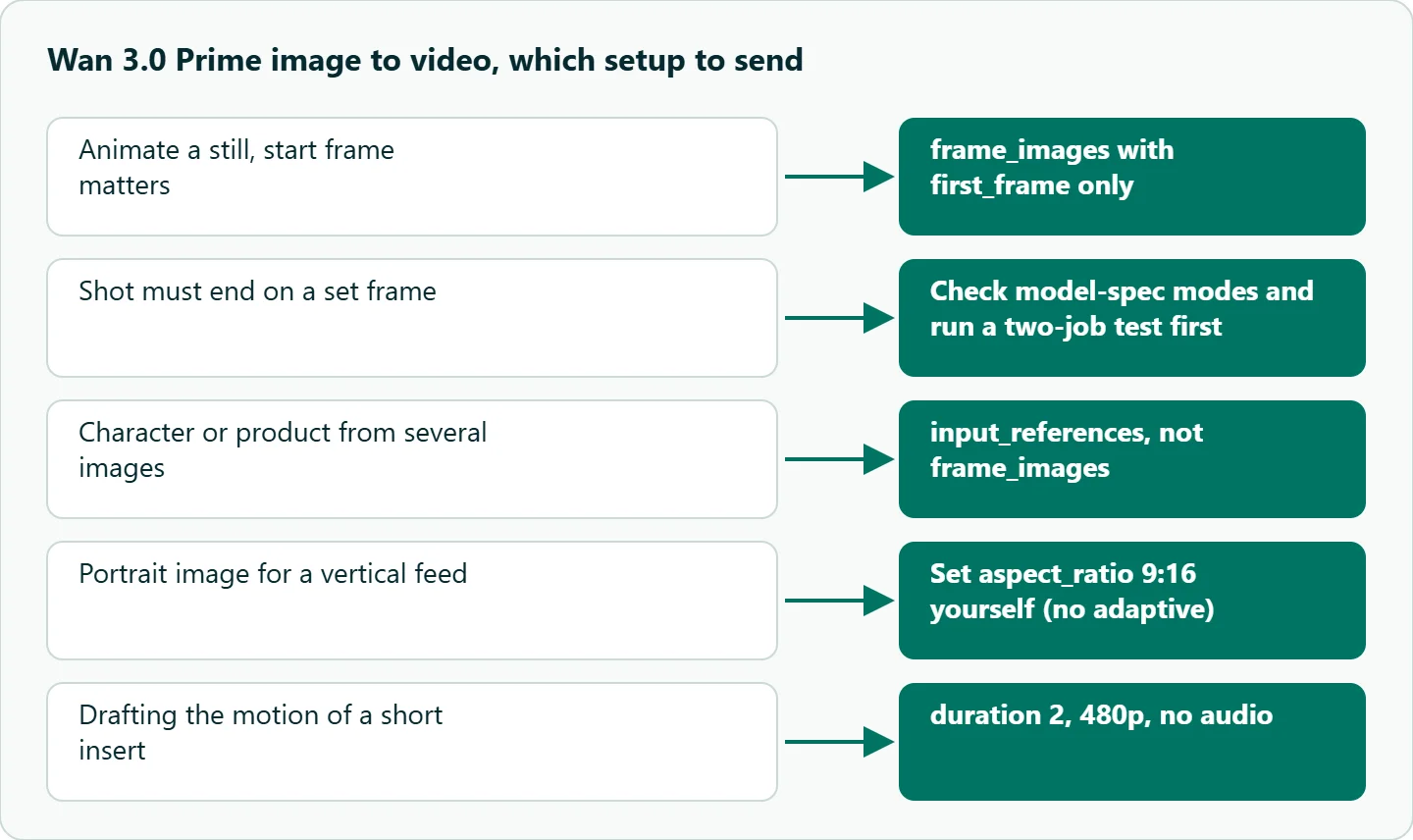
| Your job | Send |
|---|---|
| Animate a still, start frame matters | frame_images with first_frame only |
| Shot must end on a set frame | Run checks 1 to 3 first; use two frames only if they pass |
| Character or product from several images | input_references, not frame_images |
| Choosing between Wan and another video model | Read our Seedance 2.5 vs Wan 3.0 Prime comparison |
Our take: Build Wan 3.0 Prime image to video on the first frame. It is the one behavior the model page, the reference and the spec file all agree on. The last frame is accepted by the reference, but nothing we can point to shows the model honoring it. Spend one model-spec call and two short 480p jobs finding out before you design shots that depend on where a clip ends.
Running it on OceanToken
Wan 3.0 Prime runs on OceanToken at the OpenAI-compatible base URL https://api.oceantoken.ai/v1 with the model id alibaba/wan-3.0-prime, through POST /v1/videos. The same key and prepaid balance call every other video model on /video, so comparing Wan with another model on the same image is a change of model id. A failed or refused job is not charged, the Idempotency-Key header stops a retry after a network timeout from starting a second paid job, and each key can carry its own spending limit.
Wan 3.0 Prime is billed per use, with rates shown per second of video for a 16:9 clip at 24 fps; it is billed per video token, so other aspect ratios change the cost. See the current rate on /wan-api.
FAQ
Does Wan 3.0 Prime support image to video? Yes. The model page describes first-frame image to video, and you send the image in frame_images with frame_type: "first_frame".
Can I send a first and last frame to Wan 3.0 Prime? The API reference accepts up to two frame_images, first and last, but the model page only promises a first frame. Check the model-spec modes list and run a two-job test before relying on it.
How short can a Wan 3.0 Prime clip be? The reference allows 2 to 30 seconds, with 5 as the default.
Will the clip match my image's shape? Not automatically. Wan 3.0 Prime has no adaptive aspect ratio, so send the aspect_ratio that matches your image.
How long is the finished video available? The content_url is valid for 24 hours after the job completes, so download the MP4 and keep your own copy.
Sources
- OceanToken docs: Wan 3.0 Prime model reference (checked 2026-11-18)
- OceanToken docs: Wan 3.0 Prime spec (JSON) (checked 2026-11-18)
- OceanToken docs: Video guide (checked 2026-11-18)
- OceanToken: Wan 3.0 Prime model page (checked 2026-11-18)
- OceanToken: Wan API (checked 2026-11-18)
Get your OceanToken API key
- Create an OceanToken account and an API key.
- Copy the snippet below, paste your key, and run it.
- Check the current rate on /wan-api.
curl https://api.oceantoken.ai/v1/videos \
  -H "Authorization: Bearer $OCEANTOKEN_API_KEY" \
  -H "Content-Type: application/json" \
  -d '{"model": "alibaba/wan-3.0-prime", "prompt": "The lantern flickers, then the camera pulls back slowly", "duration": 5, "resolution": "720p", "aspect_ratio": "16:9", "frame_images": [{"type": "image_url", "frame_type": "first_frame", "image_url": {"url": "https://example.com/lantern.png"}}]}'
More from the blog
GPT-6.1 Sol to GPT-6.2 Sol Upgrade Guide
GPT-6.1 Sol to GPT-6.2 Sol upgrade: same listed specs, what OpenAI says changed, the one-line model change, what to retest, and a shadow-test script.
How to Make GTA 6-Style Videos with AI
Four GTA 6-style AI video shots with the exact prompts, image-to-video to fix sign text, and one chase prompt run on Seedance, Kling, Hailuo and Veo.
How to Create GTA 6-Style Scenes with AI
Four GTA 6-style scenes written as code by Claude Fable 5.2, including a drivable 3D street, plus 14 prompts to copy and the fixes for what goes wrong.