

Veo 3.1 Extend Video: Longer Scenes
Veo 3.1 extend video without an extend field: chain 4, 6 or 8 second clips with the last frame, lock subjects with reference images, and join the cut cleanly.
By OceanToken Team
Editor's note: People ask how to make a Veo clip longer when the better question is how to make the scene longer. A 30-second product film built from four planned shots, each ending where the next begins, looks more deliberate than one clip stretched step by step. On our endpoint there is no extend button anyway, so plan shots, not seconds.
Short answer: To extend video with Veo 3.1 on our endpoint, chain clips: render a 4, 6 or 8 second clip, take its last frame, and send that frame as first_frame of the next request with a prompt that continues the motion. Keep the same reference images on every segment, then join the clips and lay one audio track.
OceanToken runs google/veo-3.1 on the same POST /v1/videos call and API key as its other video and text models, and a failed job is not charged, which matters when a chain has several segments to retry. Facts below come from the model's API reference, our video guide and Google's Veo docs, read on November 21, 2026. We have not rendered the chains in this article ourselves, so the quality checks end in a test you can run.
01 · What Veo 3.1 extend video means on Google's API and on ours
Google's Gemini API docs describe an extend feature for the Veo 3.1 preview models: 7 seconds per extension, up to 20 times, on a video Veo generated earlier, at 720p in 16:9 or 9:16, with 8-second steps, returned as one combined video. The same page says those preview models were shut down in the Gemini API on October 22, 2026, so treat it as a description of how Google built extend, not a feature you can call there today.
The API reference for google/veo-3.1 on our endpoint lists none of that: no extend option, no video input, and no return_last_frame. What it does list is a first and last frame and up to three reference images, and those are enough to build a long scene from separate clips.
| Capability | Google's Gemini API docs (Veo 3.1 preview) | google/veo-3.1 on OceanToken |
|---|---|---|
| Extend an earlier Veo video | Yes, 7 s per step, up to 20 steps | Not listed |
| Video as input | For extension only | Not listed |
| First frame | Yes | Yes, frame_images with first_frame |
| Last frame | Yes, together with a first frame | Yes, frame_images with last_frame |
| Reference images | Up to 3; clip must be 8 s | Up to 3, in input_references |
| Durations | 4, 6, 8 s; 1080p and 4K need 8 s | 4, 6 or 8 s |
| Resolutions | 720p, 1080p, 4K | 720p, 1080p, 4K |
| Aspect ratios | 16:9, 9:16 | 16:9, 9:16 |
| Sound | Native audio | generate_audio true or false |
| How long the file stays | Two days on Google's server | content_url valid 24 hours |
Two rows on Google's side do not appear in our reference: the 8-second rule for 1080p and 4K, and the 8-second rule when reference images are used. Our reference does not list either restriction, so if you plan 6-second segments at 1080p or with references, send one test job and check it is accepted before you design a chain around it.
02 · Plan the scene before you render
Decide where the cuts go before you write a single prompt. Each segment can be 4, 6 or 8 seconds, so a scene is a sum of those, and the join between two segments works best at a moment when motion is slow or paused: a hand settles, the camera finishes a move, the subject stops walking.
| Scene length | Segments | Join with | Good for |
|---|---|---|---|
| Up to 8 s | One clip | Nothing | A single move or beat |
| 12 to 16 s | Two clips (6+6, 8+8) | Last frame as first frame | Product turn, then a reveal |
| 18 to 24 s | Three clips | Last frame, references | Continuous walk or dolly |
| 25 to 40 s | Four or five clips | Last frame, references, an edit | Short product film, B-roll sequence |
| Over 40 s | Plan as separate shots | Hard cuts with shared references | Anything with a story |
The last row is a recommendation, not a limit. Every join is a chance for drift: a color shift, a slightly different face, a logo that loses a letter. A chain of five segments has four joins, and errors add up from one segment to the next because each clip starts from the previous result. Past a handful of segments, planned hard cuts between different camera angles hide mismatches better than a continuous chain, and viewers accept cuts without a second thought.
For camera language that keeps a move readable across a join, such as "slow dolly in" or "lateral tracking left", our Veo 3.1 camera movement glossary lists the phrasing that works.
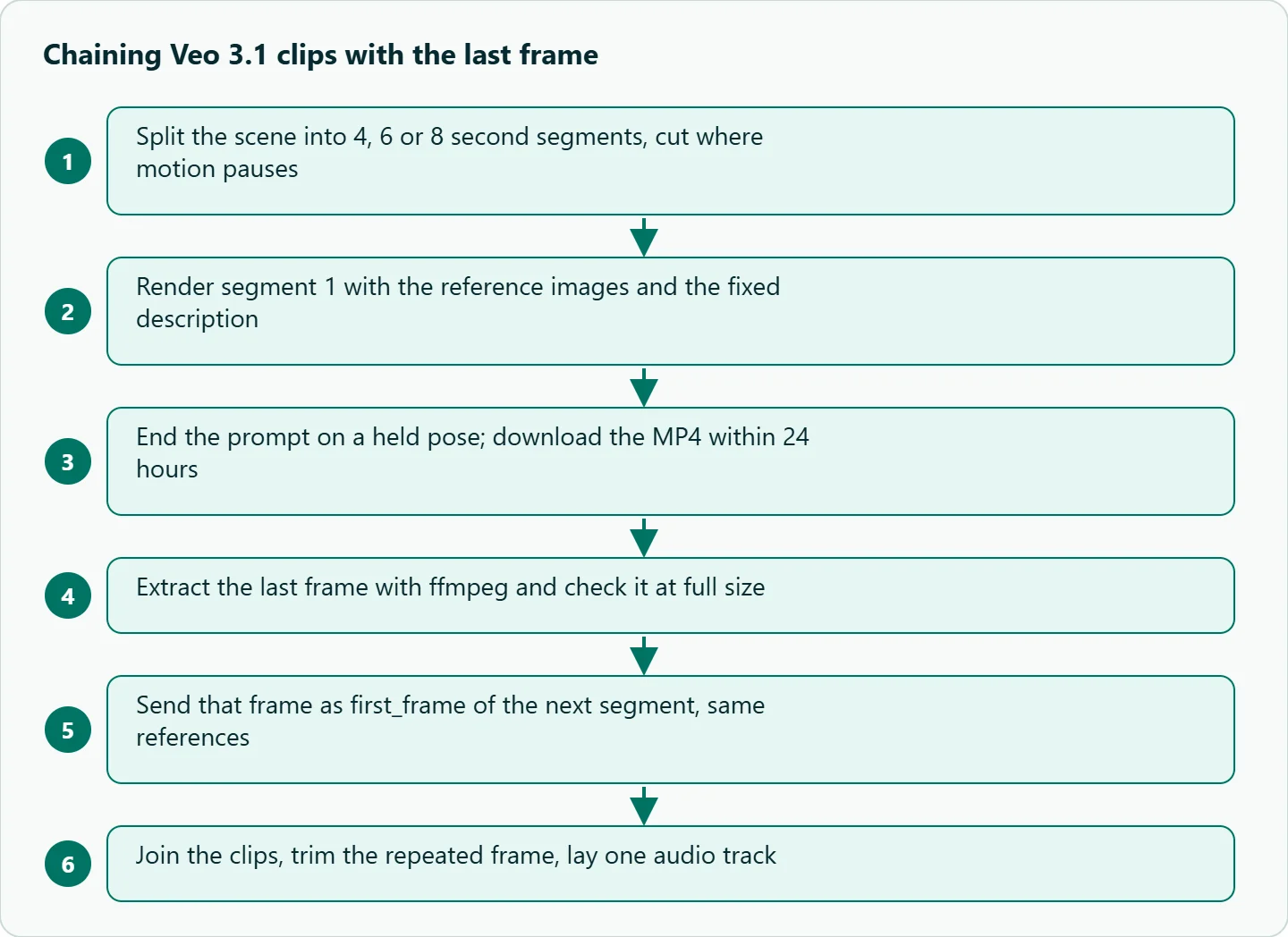
03 · Chain Veo 3.1 clips with the last frame
Chaining Veo 3.1 clips with the last frame is the core of the method: clip one runs from a prompt (and optionally a first frame), you pull its final frame from the MP4, and that image becomes first_frame of clip two. Because Veo does not return the last frame for you, ffmpeg does that step.
Here is a full chain in Python. It renders three segments, extracts each last frame, sends it as a data URL so you do not need to host images, and keeps the same references on every call:
import base64, os, subprocess, time, requests

BASE = "https://api.oceantoken.ai/v1"
H = {"Authorization": f"Bearer {os.environ['OCEANTOKEN_API_KEY']}"}
REFS = [{"type": "image_url", "image_url": {"url": "https://example.com/bottle.png"}}]
LOOK = "matte black water bottle with a white logo, granite counter, soft morning light from the left"

beats = [
    f"{LOOK}. Slow dolly in toward the bottle. End with the camera still, bottle centered.",
    f"{LOOK}. A hand enters from the right, lifts the bottle and holds it at chest height. End on the held pose.",
    f"{LOOK}. The hand turns the bottle so the logo faces the camera, slow push in. End still on the logo.",
]

def render(prompt, first_frame=None, key=""):
    body = {"model": "google/veo-3.1", "prompt": prompt, "duration": 8,
            "resolution": "720p", "aspect_ratio": "16:9", "generate_audio": False,
            "input_references": REFS}
    if first_frame:
        body["frame_images"] = [{"type": "image_url", "frame_type": "first_frame",
                                 "image_url": {"url": first_frame}}]
    job = requests.post(f"{BASE}/videos", headers={**H, "Idempotency-Key": key}, json=body, timeout=60)
    job.raise_for_status()
    vid = job.json()["id"]
    while True:
        s = requests.get(f"{BASE}/videos/{vid}", headers=H, timeout=60).json()
        if s["status"] not in ("queued", "in_progress"):
            break
        time.sleep(15)
    if s["status"] != "completed":
        raise SystemExit(f"segment failed: {s.get('error')}")
    path = f"{vid}.mp4"
    open(path, "wb").write(requests.get(f"{BASE}/videos/{vid}/content", headers=H, timeout=300).content)
    return path

def last_frame(mp4):
    out = mp4.replace(".mp4", "_last.jpg")
    subprocess.run(["ffmpeg", "-y", "-sseof", "-0.5", "-i", mp4, "-update", "1", "-q:v", "2", out], check=True)
    return "data:image/jpeg;base64," + base64.b64encode(open(out, "rb").read()).decode()

clips, frame = [], None
for i, beat in enumerate(beats):
    clip = render(beat, frame, key=f"bottle-seg-{i}")
    clips.append(clip)
    frame = last_frame(clip)
print(clips)
A few choices in that script are deliberate. Each prompt ends with "End with the camera still" or "End on the held pose", because a frame without motion blur makes a clean starting image. Writing the look once in LOOK and repeating it word for word in every prompt keeps the description from wandering. And the Idempotency-Key per segment means a retry after a network timeout returns the job already created instead of starting, and charging, a second one.
Review each last frame at full size before the next segment starts. If it is blurred, mid-blink or has a warped hand, take a frame from slightly earlier (change -sseof -0.5 to -1.0), trim the clip to that point in the edit, and chain from there. Our video guide limits each image to 25 MB and suggests keeping the whole request under 10 MB, so a JPEG frame as a data URL fits comfortably.
04 · Veo 3.1 first and last frame API
The Veo 3.1 first and last frame API is the frame_images array on POST /v1/videos: up to two entries, each with frame_type set to first_frame or last_frame. With only a first frame, the clip starts there and moves on. With both, Veo makes the motion that gets from one image to the other.
| Field | Values on google/veo-3.1 |
What it does |
|---|---|---|
frame_images |
Up to 2 entries | First and last frame of the clip |
frame_type |
first_frame, last_frame |
Which end of the clip the image sets |
image_url.url |
Public https URL or data URL, up to 25 MB | The image itself |
input_references |
Up to 3 images | Subjects or products the clip is built from |
duration |
4, 6, 8 | Length of this segment |
resolution |
720p, 1080p, 4K |
Keep it the same across the chain |
aspect_ratio |
16:9, 9:16 |
Keep it the same across the chain |
generate_audio |
true, false |
Sound in this segment |
seed |
Integer | Similar output for the same request; may be dropped |
Shorter forms also work, according to our video guide: "first_frame": "https://..." and "last_frame": "https://..." at the top level of the request.
A last frame is useful at the end of a chain. If the final segment must land on a specific packshot, such as the bottle centered with the logo square to camera, generate or photograph that image and send it as last_frame, with the previous segment's last frame as first_frame. The final segment then has a fixed start and a fixed end, and Veo fills in the move between them:
{
  "model": "google/veo-3.1",
  "prompt": "The hand sets the bottle down and withdraws, slow push in to the logo",
  "duration": 6,
  "resolution": "720p",
  "frame_images": [
    {"type": "image_url", "frame_type": "first_frame", "image_url": {"url": "data:image/jpeg;base64,..."}},
    {"type": "image_url", "frame_type": "last_frame", "image_url": {"url": "https://example.com/packshot.png"}}
  ]
}
Whether frame_images and input_references can be sent in the same Veo request is not stated in our reference. Our video guide says that on Seedance a request carries frames or references, not both, and says nothing either way for Veo. Send one combined request as a test before a chain depends on it; if it is refused with 400 invalid_request, which happens before anything runs or is charged, drop the references from segments that have a first frame and rely on the first frame plus the repeated description.
05 · Keep a character consistent across Veo clips
To keep a character or product consistent across Veo clips, send the same reference images on every segment and repeat the same written description word for word. The first frame carries continuity at the join, but it fades as the clip moves on; references and the description keep the subject on model for the rest of each segment.
Practical rules that follow from how the chain works:
| Rule | Why |
|---|---|
| Same 1 to 3 reference images on every segment | The subject is anchored by the same input each time, not by the drifting previous frame |
| One description block, pasted unchanged | Paraphrasing ("black bottle", then "dark flask") invites a different object |
| State lighting direction every time | Light flipping sides between segments is the most visible seam |
| Keep resolution and aspect ratio fixed | A change in either changes framing at the join |
| Change one thing per segment in the prompt | Motion, camera or subject action, not all three |
| Restart from a fresh reference after several joins | Errors from one segment carry into the next |
For a person, the references are best as a clean front view and a three-quarter view in the outfit they wear in the scene. For a product, use a plain-background shot that shows the logo and any text clearly. Google's docs note that its own API needs a setting that allows adults in reference images; on our endpoint, the model page FAQ covers what is refused when you use photos of real people, so read it before you plan a chain around a real face.
Seedance users will recognize this method. Our Seedance first and last frame chaining guide covers the same idea on a model that can return the last frame for you; on Veo you extract it yourself.
06 · Join the clips: seams, transitions and sound
Joining is where a chain looks like one scene or like several clips. Because each later segment starts on the exact frame where the previous one ended, a straight join repeats that frame twice. At normal speed you may not notice; on a slow move it reads as a tiny hold. Drop the first frame of every segment after the first:
# Trim the first frame of segments 2 and 3, then join everything
ffmpeg -i seg2.mp4 -vf "trim=start_frame=1,setpts=PTS-STARTPTS" -an seg2_t.mp4
ffmpeg -i seg3.mp4 -vf "trim=start_frame=1,setpts=PTS-STARTPTS" -an seg3_t.mp4
printf "file 'seg1.mp4'\nfile 'seg2_t.mp4'\nfile 'seg3_t.mp4'\n" > list.txt
ffmpeg -f concat -safe 0 -i list.txt -c copy scene.mp4
If a join still shows a jump in color or position, a short crossfade with ffmpeg's xfade filter over a few frames hides it better than a hard cut. It needs a re-encode, so do it once at the end.
Sound is the other seam. With generate_audio on, each segment gets its own ambience, and room tone or music resets at every join, which is easy to hear even when the picture matches. For B-roll and product scenes, render silent segments and lay one music or ambience track over the joined video. Our video guide says the cost of a clip depends on its length, resolution and sound, so silent segments are also the cheaper way to draft. If you need dialogue across segments, that is a different job, covered in our Seedance vs Veo 3.1 for dialogue scenes comparison.
07 · Pitfalls when chaining Veo 3.1
| Situation | What happens | What to do |
|---|---|---|
| Sending a video to continue | No video input in the reference | Extract the last frame and send it as first_frame |
"duration": 10 |
Only 4, 6, 8; refused with 400 before anything is charged | Split into two segments |
| Last frame blurred or mid-motion | The next clip starts blurred | End each prompt on a held pose; pick an earlier frame |
| Lighting flips between segments | Visible seam | State light direction in every prompt |
| Downloading late | content_url expires after 24 hours |
Download each segment as soon as it completes |
| 6 s segments at 1080p or with references | Google's API requires 8 s for these; our reference lists no such rule | Test one job before planning around it |
seed for repeatability |
May be ignored; named in x-oceantoken-dropped-params |
Do not rely on it for continuity |
How to test this on your workload
We have not rendered these chains for this article. This setup tells you how well chaining holds for your subject:
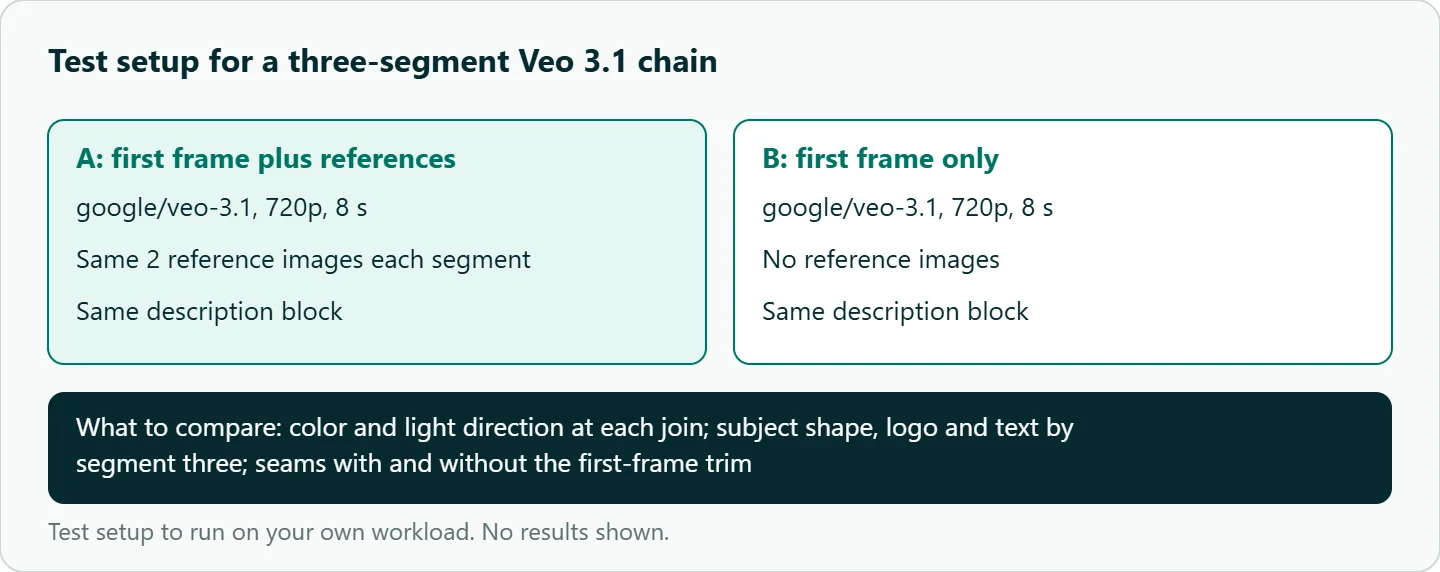
- Pick one subject you actually ship, a product or a person, and prepare two reference images.
- Render a three-segment chain at 720p with the script in section 03, references on every segment.
- Render the same chain again without references, first frame only.
- Watch each join at full size: color, light direction, subject shape, logo and text.
- Send one request with both
frame_imagesandinput_references, and one 6-second request at 1080p, and note whether each is accepted. - Join the clips with and without the first-frame trim and compare the seams at normal speed.
- Check each segment's charge in the console's Logs and divide by the seconds you kept.
For drafting a chain cheaply before the final render, google/veo-3.1-fast is the usual choice; check its options with the model-spec call first. Our Veo 3.1 Fast vs Standard comparison covers when the draft tier is enough.
| What you see | Do this |
|---|---|
| Joins clean, subject stable | Chain up to four or five segments |
| Subject drifts by segment three | Restart from the reference image every two segments |
| Combined frames and references refused | First frame plus repeated description; references on the opening segment only |
| Audio jumps at joins | Silent segments, one audio bed |
Our take: Treat a long Veo scene as a short edit. Plan where each cut falls, end every segment on a held pose, carry the last frame forward, keep the same references and description on every call, and lay sound once at the end. For more than four or five segments, switch to planned hard cuts between angles.
Running it on OceanToken
google/veo-3.1 runs at the OpenAI-compatible base URL https://api.oceantoken.ai/v1 on POST /v1/videos, and the OpenAI SDK's video methods work with only the base URL and key changed. The same key and prepaid balance, with no subscription, cover Veo 3.1 Fast for drafts and the text models you might use to write segment prompts, so a chain's draft and final renders need no second account.
A value the model does not take is refused before anything runs or is charged, a failed job is not charged and its hold goes back to your balance, and an Idempotency-Key keeps a retried segment from running twice. Veo 3.1 is priced per second of video for a 16:9, 24 fps clip and billed per video token; see the current rate on /veo-api.
FAQ
Can I use Veo 3.1's extend feature on OceanToken? No. The reference for google/veo-3.1 lists no extend option and no video input. Build longer scenes by chaining clips with the last frame as the next first frame.
How long can one Veo 3.1 clip be? 4, 6 or 8 seconds per request on our endpoint. A longer scene is several clips joined together.
Does Veo 3.1 return the last frame? Not on this endpoint; return_last_frame is not listed. Extract it from the MP4 with ffmpeg.
Can I send a first frame and reference images together? Our reference does not say. Send one test request; a refusal costs nothing because invalid requests are rejected before they run.
How do I stop the sound from jumping at each join? Render segments with generate_audio false and add one music or ambience track to the joined video.
Sources
- OceanToken docs: Veo 3.1 spec (JSON) (checked 2026-11-21)
- OceanToken docs: Video guide (checked 2026-11-21)
- OceanToken: Veo 3.1 model page (checked 2026-11-21)
- Google AI for Developers: Generate videos with Veo (checked 2026-11-21)
- FFmpeg: Filters documentation (checked 2026-11-21)
Get your OceanToken API key
- Create an OceanToken account and an API key.
- Copy the snippet below, paste your key, and run it.
- Check the current rate on /veo-api.
curl https://api.oceantoken.ai/v1/videos \
  -H "Authorization: Bearer $OCEANTOKEN_API_KEY" \
  -H "Content-Type: application/json" \
  -d '{"model": "google/veo-3.1", "prompt": "Slow dolly in toward a matte black water bottle on a granite counter, morning light from the left, end with the camera still", "duration": 8, "resolution": "720p", "generate_audio": false}'
More from the blog
GPT-6.1 Sol to GPT-6.2 Sol Upgrade Guide
GPT-6.1 Sol to GPT-6.2 Sol upgrade: same listed specs, what OpenAI says changed, the one-line model change, what to retest, and a shadow-test script.
How to Make GTA 6-Style Videos with AI
Four GTA 6-style AI video shots with the exact prompts, image-to-video to fix sign text, and one chase prompt run on Seedance, Kling, Hailuo and Veo.
How to Create GTA 6-Style Scenes with AI
Four GTA 6-style scenes written as code by Claude Fable 5.2, including a drivable 3D street, plus 14 prompts to copy and the fixes for what goes wrong.