

A Unified API for Chat, Image and Video
Building on a unified API for chat, image and video: sync vs async calls, billing units, retries, timeouts and storage, with three calls and a launch checklist.
By OceanToken Team

Editor's note: One key and one base URL make a multimodal app easier to start, but they do not make chat, images and video behave alike. Chat answers in seconds and bills by the token. Video takes minutes, runs as a job and bills per second or per million video tokens, by model. The usual mistake in these apps is treating the second like the first. Design for the job model on day one.
Short answer: A unified API for chat, image and video gives you one key, one base URL and one balance, but three call shapes: chat is synchronous or streamed and billed per token, images are synchronous and billed per image or token, and video is an asynchronous job billed per second or per million video tokens, by model. Build the video path as a queue with a worker, and store every file yourself.
01 · What a unified API for chat, image and video has to handle
Here is how the three media differ on one OpenAI-compatible API, from the API reference and Limits pages, checked November 15, 2026:
| Chat | Image | Video | |
|---|---|---|---|
| Endpoint | POST /v1/chat/completions |
POST /v1/images/generations, /edits |
POST /v1/videos, then GET /v1/videos/{id} |
| Call shape | Sync, or streamed with stream: true |
Sync | Async job: create, poll, download |
| Time limit | 240 s for a sync call; a stream stays open while tokens flow | 240 s | Not affected; you poll |
| Billing unit | Per million tokens | By model: per million image tokens (openai/gpt-image-2) or per image (sourceful/riverflow-v2-fast) |
Per second or per million video tokens, by model |
| Where the cost shows | x-oceantoken-cost header; GET /v1/usage/{id} for streams |
x-oceantoken-cost header |
Estimate held at create, charged on finish; Logs |
| Failure | Error response | Charged when an image is made | Failed job not charged; hold released |
| Output kept | In the response | URL valid 24 hours | content_url valid 24 hours |
Three rows change your architecture. The 240-second limit means a long chat answer must stream, or it ends in 504 timeout. The cost row means you can log the price of every chat and image call from the response itself, but for video you read it after the job settles. And the last row means that if your app shows a generated image or clip tomorrow, it must be served from your own storage: generated files are deleted after 30 days and their download links stop working after 24 hours.
02 · A minimal architecture that holds up
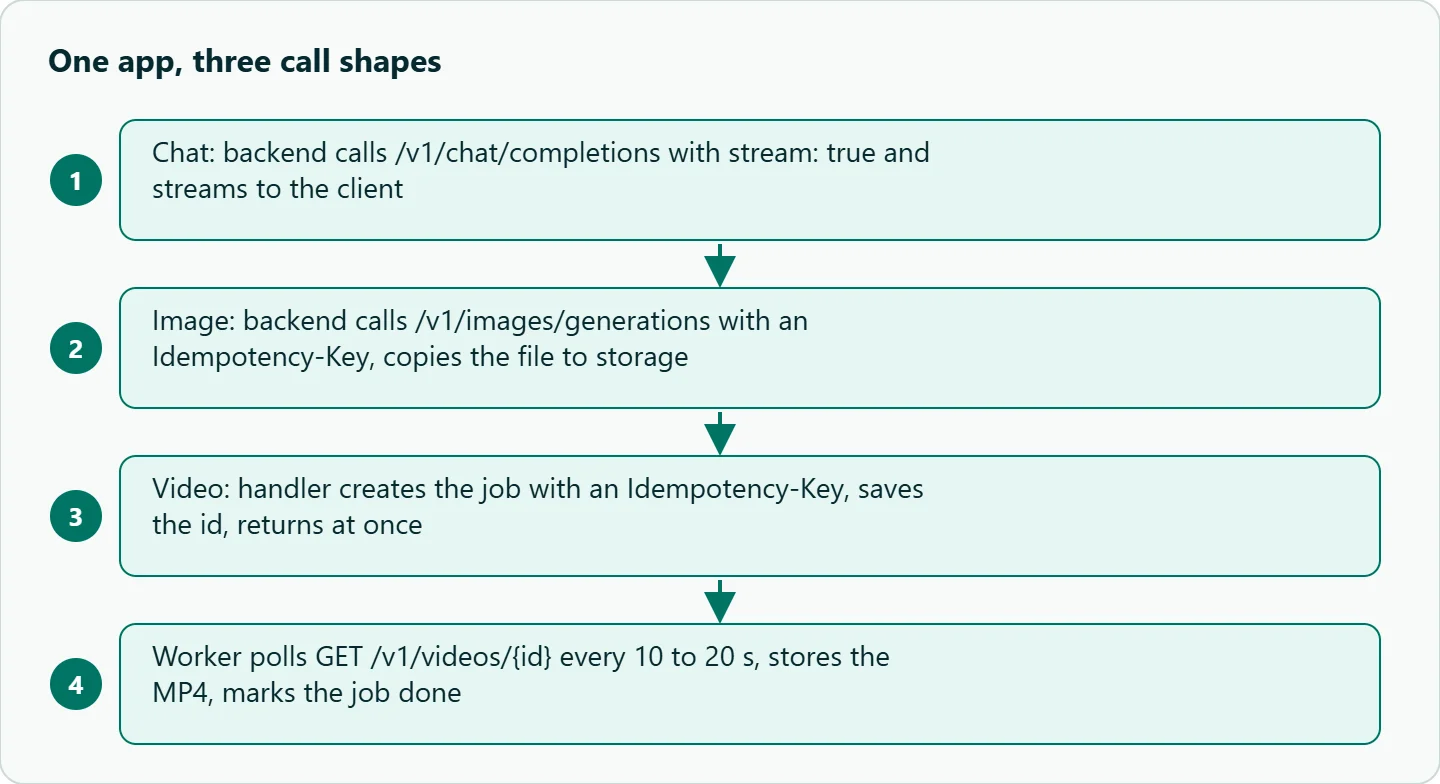
For a small team, this is the shape that avoids rewrites:
Chat goes straight from your backend to the API and streams to the client. Images also go straight through, because they finish within a normal request, but every image call carries an Idempotency-Key so a retry after a timeout cannot make and charge a second image. Video never runs inside a web request: the request handler creates the job, saves the job id in your database and returns immediately; a worker polls every 10 to 20 seconds, downloads the finished MP4 to your storage, and marks the row done. The client asks your backend for status, not the API.
The reason to build the worker on day one is that a clip usually takes a few minutes. A handler that waits that long will hit your own server's timeouts long before it hits anything on the API side, and a user who refreshes the page will start a second, separately charged job unless the create call had an idempotency key.
03 · Three calls, one client
The same OpenAI SDK client handles all three. Only the method and the model id change:
import os
from openai import OpenAI

client = OpenAI(base_url="https://api.oceantoken.ai/v1", api_key=os.environ["OCEANTOKEN_API_KEY"])

# 1. Chat: stream long answers so they never hit the 240 s sync limit
stream = client.chat.completions.create(
    model="openai/gpt-6-sol",
    messages=[{"role": "user", "content": "Write a 30-word product blurb for a steel water bottle."}],
    stream=True,
    stream_options={"include_usage": True},
)
blurb = "".join(c.choices[0].delta.content or "" for c in stream if c.choices)

# 2. Image: synchronous; the URL lasts 24 hours, so copy the file
img = client.images.generate(model="openai/gpt-image-2", prompt=f"Studio photo: {blurb}", size="1024x1024",
                             extra_headers={"Idempotency-Key": "bottle-hero-001"})
print(img.data[0].url)

# 3. Video: a job. create_and_poll is fine in a script; in a web app, create here and poll in a worker
video = client.videos.create_and_poll(model="bytedance/seedance-2.5", prompt=f"Slow turntable shot: {blurb}")
client.videos.download_content(video.id).write_to_file("bottle.mp4")
In production, split step 3: client.videos.create(...) in the request handler with an Idempotency-Key, and client.videos.retrieve(id) in the worker. Our Seedance API quickstart in Python walks through that polling loop for one video model. The model ids here are examples: chat from /gpt-api, images from /gpt-image-api, video from /seedance-api, and any other model in the model catalog slots in by changing the string.
04 · Errors and retries that differ by medium
The retry rule from the reference is simple: retry with backoff on 408, 429, any 5xx except 501, and network failures; never on other 4xx. What differs is what a retry costs and what each error means:
| Error | Where you see it | What to do |
|---|---|---|
429 rate_limited |
Any call; per-key limit | Wait for Retry-After; pace from x-oceantoken-key-rpm-limit |
429 provider_overloaded |
Every channel of that model is busy | Back off, or switch to another model |
504 timeout |
Sync call over 240 s | Stream chat; never run video synchronously |
400 key_budget_exceeded |
A key hit its own credit limit | Expected guardrail; raise the limit or stop the feature |
400 insufficient_credits / request_exceeds_balance |
Balance cannot cover the request or estimate | Top up; no job started |
Job failed: content_filtered, timeout, generation_failed |
Video status | Change the prompt or resubmit; the failed job is not charged |
One more difference is quiet. A parameter a model does not support is dropped and the request runs without it, with no error. A parameter may also be dropped on some requests even when the model supports it, and that is when the x-oceantoken-dropped-params header names it. This is what lets one request body work across models, but it also means a successful response does not prove that response_format or seed took effect. Check the response itself for the feature you rely on, once per model, and log the header.
05 · Pre-launch checklist
| Check | Why | How OceanToken handles it |
|---|---|---|
| Chat answers stream | Avoids the 240 s cut-off | stream: true on every text endpoint |
Image and video creates send Idempotency-Key |
Retries do not charge twice | Same key and body replay the first answer for 24 hours |
| Video runs in a worker | Clips take minutes | Job API with GET /v1/videos to find lost ids |
| Outputs copied to your storage | Links expire in 24 hours | Download from content_url or /content |
| Cost logged per request | Per-feature unit economics | x-oceantoken-cost, /v1/usage/{id}, Logs |
| One key per feature or environment | A runaway loop cannot drain everything | Each key has its own credit limit, reset period and expiry |
| Features you rely on checked once per model | Unsupported parameters are dropped without an error | Check the response; x-oceantoken-dropped-params names supported ones dropped on a request |
For the budget side, our guide to prepaid balances and spending guardrails goes deeper into per-key limits.
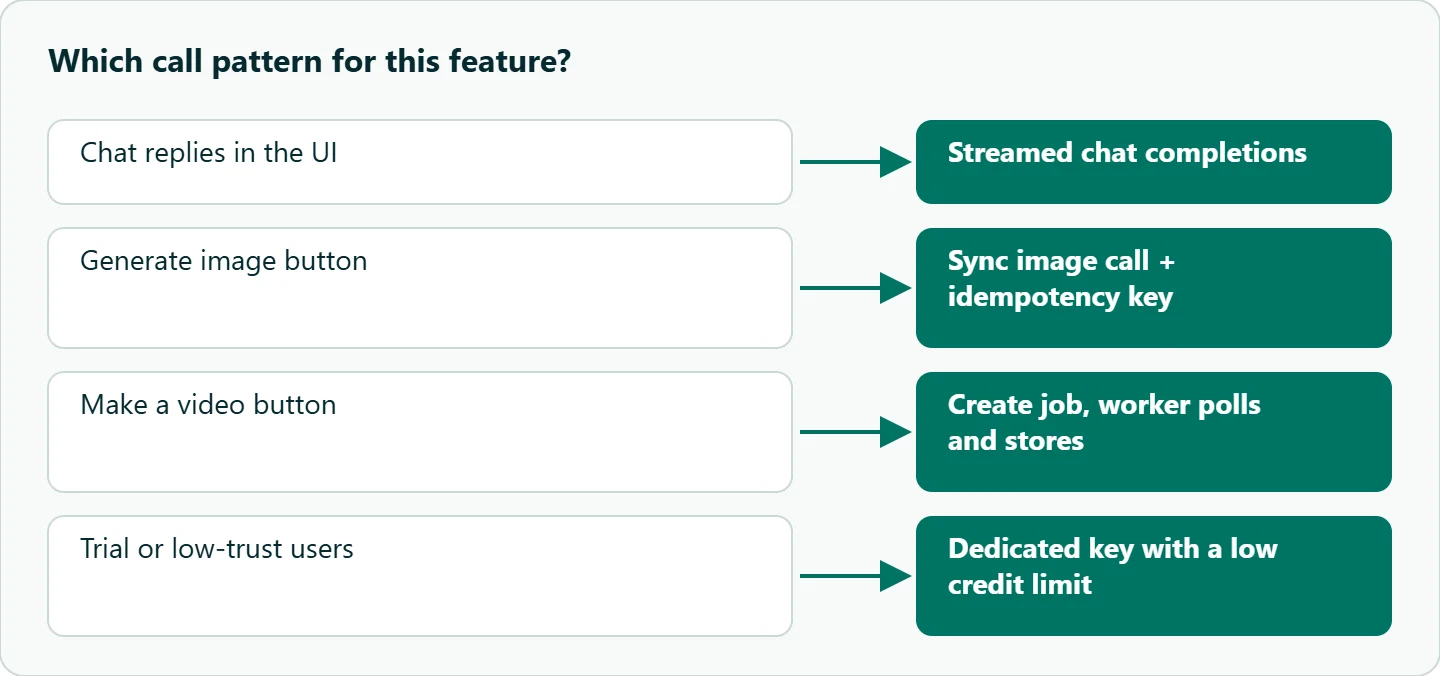
| Your feature | Start with |
|---|---|
| Chat replies in the UI | Streamed chat completions, cost from /v1/usage/{id} |
| "Generate image" button | Sync image call with an idempotency key, file copied on return |
| "Make a video" button | Create job, return id, worker polls and stores the MP4 |
| Trial or low-trust users | A dedicated key with a low credit limit |
How to test this on your workload
We have not load-tested this architecture for this article. Before launch, run these checks against your own app:
- Send a chat request that produces a long answer without streaming and confirm you handle the
504 timeout; then stream it. - Retry an image call with the same
Idempotency-Keyand confirm a single charge in Logs. - Kill your video worker mid-job, restart it, and confirm it picks up the job by id without creating a new one.
- Set a key's credit limit low and confirm your app shows a clear message on
key_budget_exceeded. - Open a 25-hour-old output link from your app and confirm it is served from your storage.
Our take: Treat video as a background job from the first commit, stream every chat answer, and put an idempotency key on anything that costs money to run. Then split keys by feature so each has its own limit. The shared key saves you setup; the queue, streaming, idempotency keys and per-feature limits are what stop a retry loop or a refresh from charging twice.
Running it on OceanToken
On OceanToken, chat, image and video models answer on one OpenAI-compatible base URL (https://api.oceantoken.ai/v1) with one key, so switching models is a change of model id, and everything draws on one prepaid balance with no subscription. Each key can carry its own credit limit, every non-streamed response reports its cost, and failed video jobs are not charged. See the current rate on /gpt-api, /gpt-image-api and /seedance-api, or browse video models.
FAQ
Can one API key call chat, image and video models? Yes. The same key and base URL work on chat completions, images and video endpoints; only the endpoint and model id change.
Why can't I generate video in a normal request? Video is a job that takes minutes. You create it, poll it, and download the file when it completes.
How do I know what each call cost? Non-streamed calls return x-oceantoken-cost; streamed chat costs come from GET /v1/usage/{id}; video charges appear in Logs when the job settles.
Am I charged for a failed video? No. The estimate is held at create time and released if the job fails.
How long are generated files kept? Download links last 24 hours and generated files are deleted after 30 days, so store what you keep.
Sources
- OceanToken docs: API reference (checked 2026-11-15)
- OceanToken docs: Limits (checked 2026-11-15)
- OceanToken docs: Video guide (checked 2026-11-15)
- OceanToken docs: Images guide (checked 2026-11-15)
- OceanToken docs: openai/gpt-6-sol (checked 2026-11-15)
- OceanToken docs: API Keys (checked 2026-11-15)
- OceanToken: GPT Image 2 model page (checked 2026-11-15)
- OceanToken: Riverflow V2 Fast model page (checked 2026-11-15)
Get your OceanToken API key
- Create an OceanToken account and an API key.
- Copy the snippet below, paste your key, and run it.
- Check the current rate on /gpt-api.
curl https://api.oceantoken.ai/v1/chat/completions \
  -H "Authorization: Bearer $OCEANTOKEN_API_KEY" \
  -H "Content-Type: application/json" \
  -d '{"model": "openai/gpt-6-sol", "messages": [{"role": "user", "content": "Write a 30-word product blurb for a steel water bottle."}]}'
More from the blog
Kimi K3 API International Access Guide
Use the Kimi K3 API internationally: sign up with email, pay by card, create one key and call moonshotai/kimi-k3 with an OpenAI SDK. Steps, code and checks.
Call Tencent Hy3 With the OpenAI SDK
Call Tencent Hy3 with the OpenAI SDK outside China: base URL, model id, streaming, tool calls, reasoning_effort values, Hy3 vs Hy3 preview, and token billing.
Call the Hailuo 3 Max API With an API Key
How to call the Hailuo 3 Max API with an API key: the request, polling and download, the Max-only limits, what sets the cost of one video, and Max vs Hailuo 3.