

Text to Image to Video Pipeline, One Key
Build a text to image to video pipeline on one API key: Qwen3.8 Flash writes the shot list as JSON, Seedream 5.5 draws keyframes, Seedance 2.0 animates them.
By OceanToken Team

Editor's note: Text-to-video asks you to judge a shot after you have paid for the motion. Putting a still frame in between moves that judgment earlier, where a bad composition is one quick image to redo. We think the stills step pays off on any piece with three or more matching shots. Our reasoning: each model's options are documented; what is not documented is what one step hands the next, so that is where this guide spends its time.
Short answer: A text to image to video pipeline has four steps: a text model writes the shot list as JSON, an image model draws one keyframe per shot, a person approves the frames, and an image-to-video model animates each approved frame. On one OpenAI-compatible key that is three model ids in one script, plus ffmpeg to join the clips.
On OceanToken all three steps sit behind the same base URL, key and prepaid balance: qwen/qwen3.8-flash writes the plan, bytedance-seed/seedream-5-5 draws the frames and bytedance/seedance-2.0 animates them, so the script needs one secret instead of three vendor accounts. The rest of this guide walks through each step, the JSON shape that holds them together, a complete Python script, and the failure points we would check first.
01 · The text to image to video pipeline, step by step
Each step hands one specific thing to the next, and a bad handoff often fails without an error message, so here they are side by side, with the endpoint each step calls:
| Step | Model or tool | Endpoint | Input | Output | Handoff to check |
|---|---|---|---|---|---|
| 1. Shot list | qwen/qwen3.8-flash |
POST /v1/chat/completions |
A one-paragraph brief | JSON: one object per shot | Parse and validate before any image is made |
| 2. Keyframes | bytedance-seed/seedream-5-5 |
POST /v1/images/generations |
Each shot's still prompt | One image per shot | Ratio matches the video; save the file at once |
| 3. Review | A person | None | The saved frames as a grid | Approved shot ids | Nothing unapproved moves on |
| 4. Clips | bytedance/seedance-2.0 |
POST /v1/videos, then poll |
Approved frame plus a motion prompt | One MP4 per shot | Download within 24 hours |
| 5. Assemble | ffmpeg | Local | The MP4s in shot order | One film | Same size, frame rate and audio on every clip |
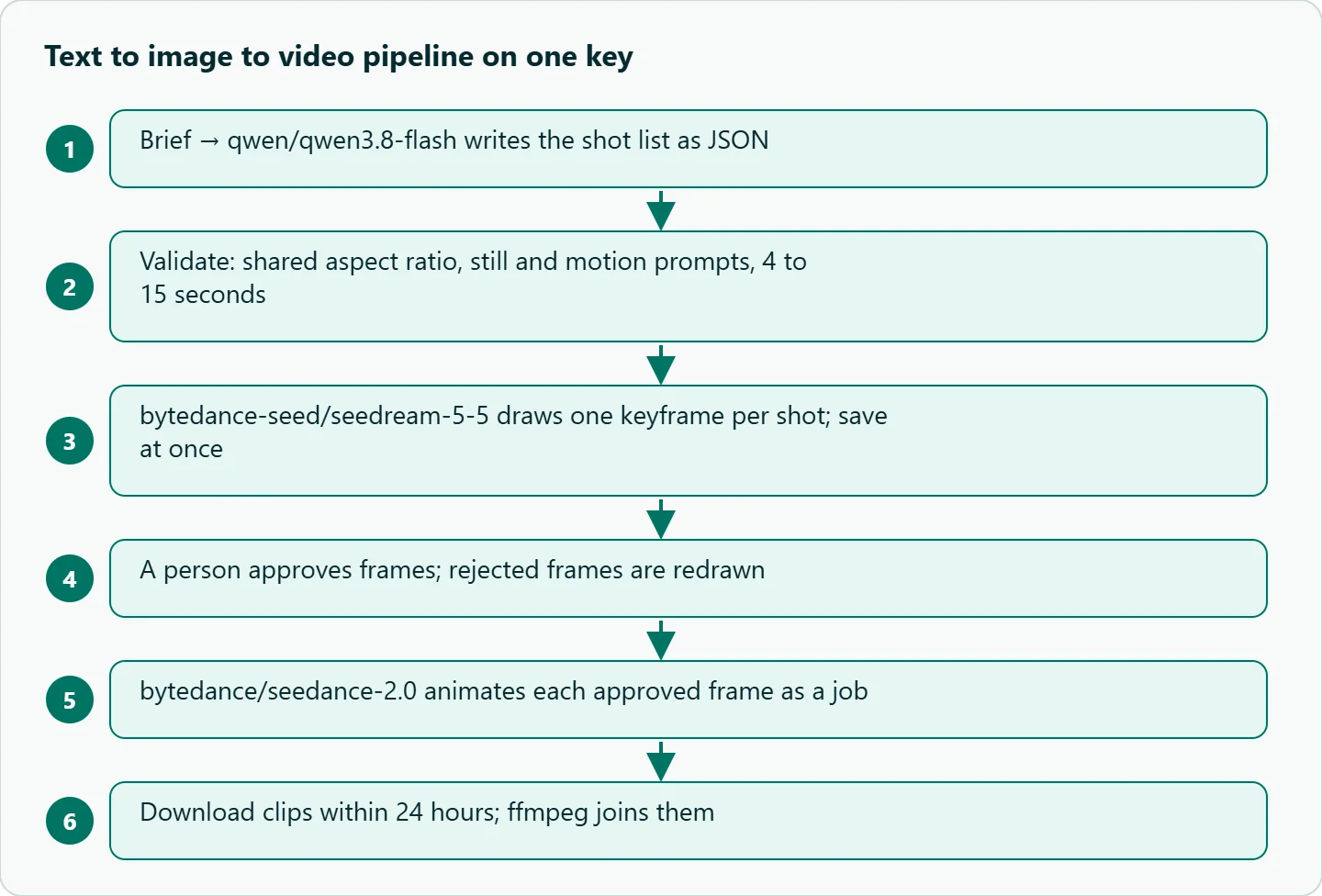
Steps 1 and 2 are synchronous: the answer comes back in the response. Step 4 is a job. You create it, poll it until it is done, then download the file, which takes minutes rather than seconds. That difference shapes the script: the cheap, fast steps run straight through, and the slow step waits behind a human gate.
If you want the architecture behind one key for chat, image and video in a product, including how each media type fails, our guide to a unified API for chat, image and video apps covers it. This article stays on the pipeline itself.
02 · Storyboard to video AI workflow: why stills come first
The case for a storyboard is about where you find mistakes. A video job takes minutes and bills by clip length and resolution; an image request is a single quick call billed per image.
When a shot is wrong because of composition, a missing prop or the wrong coat color, you want to find out at the image stage. Once the frame is approved, the video model only has to decide what moves.
The workflow also gives a person one clear decision point. Instead of watching six clips and trying to say what bothered you, you look at six stills in a grid and check continuity between them: is the same man in frames 2 and 5, does the light come from the same side, is the bench empty in the last shot. Those are questions a still answers well and a moving clip answers badly.
There is a case where the pipeline is overkill. A single shot with no continuity to keep, say one product spin for a landing page, is faster as plain text-to-video. The extra steps pay off when three or more shots have to look like the same film.
03 · LLM writes video prompts as JSON
Ask the text model for structure, not prose. Each shot needs two prompts that do different jobs: a still prompt that describes what the first frame looks like, and a motion prompt that says only what moves. Mixing them invites drift: the video model gets two descriptions of the scene and has to reconcile them (check it in test step 5).
A shape that works:
{
  "aspect_ratio": "16:9",
  "style": "Cinematic still, 35mm, teal and amber night palette, light film grain",
  "shots": [
    {"id": 1, "still": "Wide shot, empty bus stop in rain at night, one bench under a streetlight", "motion": "Slow push in. Rain falls. The streetlight flickers once.", "seconds": 5},
    {"id": 2, "still": "Medium shot, an old man in a grey coat sits on the bench holding an umbrella", "motion": "He shifts the umbrella slightly. Camera static.", "seconds": 5}
  ]
}
Keep aspect_ratio and style at the top level so every shot inherits them. The image step appends the style line to each still prompt, so every frame starts from the same look; check that in the review grid.
To get JSON reliably, use the model's structured output. The qwen/qwen3.8-flash docs page lists response_format with json_object and json_schema. {"type": "json_object"} asks for any valid JSON; json_schema asks for JSON that matches a schema you send. The text generation guide adds a caution worth taking literally: a model that does not honor a schema drops response_format and answers in prose. So parse the answer and handle the failure in code, whichever mode you use.
Two more details from the docs shape this step. Qwen3.8 Flash lists reasoning among its capabilities, and its max_tokens counts reasoning tokens too, so a tight limit can be used up before the JSON is written. Check finish_reason: length means the answer was cut off and the JSON is probably broken. Then validate the content itself. Every shot needs a still, a motion and a whole number of seconds that the video model takes: 4 to 15 on Seedance 2.0. A shot list that fails validation goes back to the text model, not forward to the image model.
04 · Keyframes, sized for the video
The keyframe becomes the clip's first frame, so its shape decides the clip's shape. That makes the aspect ratio the most important handoff in the whole script, and it is where the two models' options do not quite line up.
| Setting | Seedream 5.5 (size) |
Seedance 2.0 (aspect_ratio) |
|---|---|---|
| Shared ratios | 1:1, 3:4, 4:3, 9:16, 16:9, 21:9 | 1:1, 3:4, 4:3, 9:16, 16:9, 21:9 |
| Only on one side | 1:2, 2:1, 2:3, 3:2, 4:5, 5:4, 9:19.5, 19.5:9, 9:20, 20:9, 9:21 | adaptive (follow the first frame) |
| Resolution | quality: 1K, 1.5K or 2K |
resolution: 480p, 720p, 1080p or 4K |
A 4:5 keyframe is a perfectly good image, but Seedance 2.0 has no 4:5 output. So restrict the shot list's aspect_ratio to the six shared values and validate it in step 1. On bytedance-seed/seedream-5-5, size takes the ratio directly, such as "16:9"; a pixel size like 1024x1024 is also accepted and mapped to its ratio.
Then send aspect_ratio on the video call as well. The video guide says that on Seedance 2.0 a request with a first frame and no aspect_ratio follows the frame: a portrait image gives a portrait clip. That is convenient right up to the moment one stray frame comes back at the wrong shape and quietly turns one shot of a 16:9 film vertical. An explicit ratio on every clip prevents it.
Save each image to disk as soon as it arrives. The response's data[].url is a download link, not a storage location: image and video URLs in API responses are valid for 24 hours. A review that runs over a weekend will find dead links on Monday. Saving early also lets step 4 send the frame as a data URL built from your own file, which removes the expiry question from the video step.
Be aware of what the docs prefer, though. They cap each media item at 25 MB, suggest keeping a whole request under 10 MB, and recommend sending large images as URLs. A data URL fits this pipeline because a 1K keyframe is a small file, but base64 adds about a third to its size, so the script checks the file before encoding it. If a frame is too large, upload it to your own storage and send the public https URL instead.
05 · The review gate
This is the step that pays for the pipeline. Lay the frames out as a grid and check each one against the next, because continuity errors show up between frames, not inside one. For a six-shot short about a man waiting for the last bus:
| Frame | Check | Typical fix |
|---|---|---|
| 1, wide | Bench visible, no people | Redo with "no people" in the still prompt |
| 2, medium | Umbrella in hand, same coat as later frames | Add the coat color to the style line |
| 3, insert | Ticket text readable, or blurred on purpose | Simplify or blur the text; text warps in motion |
| 4, POV | Light direction matches frame 5 | Redo with the light direction stated |
| 5, medium | Face matches frame 2 | Redo with the same description of the face |
| 6, wide | Bench empty, bus leaving | Redo as a distinct composition |
In code, the gate is a file listing the approved shot ids. A rerun redoes only the frames you deleted and never touches a clip that already exists. That keeps the process cheap to repeat: reject a frame, delete it, run again, and only that frame is redrawn.
Seedream 5.5 also takes up to 10 reference images in images, which turns the request into an edit. If one frame is nearly right, editing it from the existing image is often closer than redrawing from text. Use that inside the review loop, not in the first pass.
06 · Seedream keyframe to Seedance video
Each approved keyframe goes to POST /v1/videos as the first frame, with the shot's motion prompt. The prompt should be short and start with verbs: what the camera does, what moves, and nothing about how the scene looks, since the image already says that. Our Seedance image to video guide goes deeper on writing those prompts and preparing the input image.
The request fields that matter here, from the bytedance/seedance-2.0 docs page:
| Field | Value in this pipeline | Why |
|---|---|---|
model |
bytedance/seedance-2.0 |
Takes a first frame, a last frame or references |
prompt |
The shot's motion prompt | Motion only; the frame carries the look |
duration |
The shot's seconds, 4 to 15 |
Validated in step 1; out-of-range values are refused |
resolution |
720p for drafts |
Lower is faster; raise it once the cut works |
aspect_ratio |
The shot list's ratio | Stops a stray frame from changing one clip's shape |
generate_audio |
false |
Keeps every clip the same for a copy-only join |
frame_images |
One first_frame entry |
The approved keyframe, as a URL or data URL |
Three rules from the video guide shape this step. On Seedance, a request carries frames or references, not both; sending both is refused with a 400, so you do not add character images in input_references to a request that already has a first frame. A value outside the model's options, such as a duration it does not take, is refused before anything runs or is charged, which is why step 1 validates durations. And a URL the model cannot fetch fails the job with invalid_request, one more reason to send the saved file as a data URL.
For shots that should continue straight from the previous one, the model page also lists return_last_frame, which adds a last_frame_url to the result: the clip's last frame as a JPEG, valid for 24 hours, so save it like the keyframes. You can then feed it in as the next shot's first frame. We would use it for a continuous camera move, not as a replacement for the review gate.
07 · The whole script
This is the full loop in Python. It stops after the keyframes and waits for your approvals file, so the video step runs only on frames a person passed.
import base64, hashlib, json, os, pathlib, sys, time
import requests
from openai import OpenAI

BASE = "https://api.oceantoken.ai/v1"
KEY = os.environ["OCEANTOKEN_API_KEY"]
client = OpenAI(base_url=BASE, api_key=KEY)
HEADERS = {"Authorization": f"Bearer {KEY}"}

TEXT_MODEL = "qwen/qwen3.8-flash"
IMAGE_MODEL = "bytedance-seed/seedream-5-5"
VIDEO_MODEL = "bytedance/seedance-2.0"
RATIOS = {"1:1", "3:4", "4:3", "9:16", "16:9", "21:9"}  # in both models' options
EXT = {"image/jpeg": ".jpg", "image/png": ".png", "image/webp": ".webp"}
MIME = {ext: mime for mime, ext in EXT.items()}
MAX_DATA_URL_BYTES = 7_000_000  # base64 adds a third; keep the request under 10 MB
OUT = pathlib.Path("film")
(OUT / "frames").mkdir(parents=True, exist_ok=True)
(OUT / "clips").mkdir(exist_ok=True)

SYSTEM = ("You plan short films. Return only JSON with keys aspect_ratio, style and shots. "
          f"aspect_ratio is one of {sorted(RATIOS)}. Each shot has id (integer), "
          "still (what the first frame looks like), motion (only what moves, verbs first) "
          "and seconds (integer from 4 to 15).")

def shot_list(brief):
    r = client.chat.completions.create(
        model=TEXT_MODEL,
        messages=[{"role": "system", "content": SYSTEM}, {"role": "user", "content": brief}],
        response_format={"type": "json_object"},
        max_tokens=8000,
    )
    if r.choices[0].finish_reason == "length":
        raise ValueError("Shot list was cut off; raise max_tokens")
    plan = json.loads(r.choices[0].message.content)
    shots = plan.get("shots")
    if not isinstance(shots, list) or not shots:
        raise ValueError("shot list is empty")
    ids = [s.get("id") for s in shots]
    if not all(type(i) is int for i in ids) or len(set(ids)) != len(ids):
        raise ValueError(f"shot ids must be unique integers, got {ids}")
    if plan.get("aspect_ratio") not in RATIOS:
        raise ValueError(f"aspect_ratio {plan.get('aspect_ratio')!r} not in {RATIOS}")
    for s in plan["shots"]:
        if not (s.get("still") and s.get("motion")):
            raise ValueError(f"shot {s.get('id')} is missing a prompt")
        if not (isinstance(s.get("seconds"), int) and 4 <= s["seconds"] <= 15):
            raise ValueError(f"shot {s.get('id')} has seconds={s.get('seconds')!r}")
    return plan

def frame_path(shot_id):
    found = sorted((OUT / "frames").glob(f"shot_{shot_id:02d}.*"))
    return found[0] if found else None

def keyframes(plan):
    for s in plan["shots"]:
        if frame_path(s["id"]):
            continue
        img = client.images.generate(model=IMAGE_MODEL, prompt=f"{s['still']}. {plan['style']}",
                                     size=plan["aspect_ratio"], quality="1K")
        dl = requests.get(img.data[0].url, timeout=120)  # the URL expires after 24 hours
        dl.raise_for_status()
        ctype = dl.headers.get("content-type", "").split(";")[0].strip()
        if ctype not in EXT:
            raise ValueError(f"shot {s['id']}: unexpected image type {ctype!r}")
        ext = EXT[ctype]
        (OUT / "frames" / f"shot_{s['id']:02d}{ext}").write_bytes(dl.content)

def data_url(path):
    if path.stat().st_size > MAX_DATA_URL_BYTES:
        raise ValueError(f"{path} is too large for a data URL; upload it to your own "
                         "storage and send the https URL instead")
    mime = MIME[path.suffix]
    return f"data:{mime};base64," + base64.b64encode(path.read_bytes()).decode()

def submit(plan, s):
    body = {"model": VIDEO_MODEL, "prompt": s["motion"], "duration": s["seconds"],
            "resolution": "720p", "aspect_ratio": plan["aspect_ratio"], "generate_audio": False,
            "frame_images": [{"type": "image_url", "frame_type": "first_frame",
                              "image_url": {"url": data_url(frame_path(s["id"]))}}]}
    idem = hashlib.sha256(json.dumps(body, sort_keys=True).encode()).hexdigest()
    r = requests.post(f"{BASE}/videos", json=body, timeout=60,
                      headers={**HEADERS, "Idempotency-Key": idem})
    if not r.ok:
        raise RuntimeError(f"shot {s['id']}: {r.status_code} {r.text}")
    return r.json()["id"]

def collect(jobs):
    for shot_id, vid in jobs.items():
        while True:
            r = requests.get(f"{BASE}/videos/{vid}", headers=HEADERS, timeout=60)
            r.raise_for_status()
            st = r.json()
            if st["status"] not in ("queued", "in_progress"):
                break
            time.sleep(15)
        if st["status"] != "completed":
            print(f"shot {shot_id} failed: {st.get('error')}")
            continue
        mp4 = requests.get(f"{BASE}/videos/{vid}/content", headers=HEADERS, timeout=300)
        mp4.raise_for_status()
        (OUT / "clips" / f"shot_{shot_id:02d}.mp4").write_bytes(mp4.content)

if __name__ == "__main__":
    plan_file = OUT / "plan.json"
    if not plan_file.exists():
        plan_file.write_text(json.dumps(shot_list(sys.argv[1]), indent=2))
    plan = json.loads(plan_file.read_text())
    keyframes(plan)
    approved_file = OUT / "approved.json"
    if not approved_file.exists():
        sys.exit(f"Review {OUT / 'frames'}, then write approved ids to {approved_file}, e.g. [1, 2, 4]")
    approved = set(json.loads(approved_file.read_text()))
    jobs = {s["id"]: submit(plan, s) for s in plan["shots"]
            if s["id"] in approved and not (OUT / "clips" / f"shot_{s['id']:02d}.mp4").exists()}
    collect(jobs)
A few choices in that code are deliberate. The plan is written to plan.json once, so a rerun does not ask the text model for a new shot list and silently change shots you already approved. All approved clips are submitted before any polling starts, since video jobs run in parallel and there is no reason to wait for shot 1 before starting shot 2.
The Idempotency-Key is a hash of the request body, so if a create call times out and you retry it, you get the job that already exists instead of a second, charged clip. The flip side: to get a fresh take of the same shot, change something in the request, such as a seed or the motion prompt.
The last step joins the clips. If every clip came from the same model at the same resolution, aspect ratio and audio setting, ffmpeg's concat demuxer can join them without re-encoding:
for f in film/clips/shot_*.mp4; do echo "file '$PWD/$f'"; done > list.txt
ffmpeg -f concat -safe 0 -i list.txt -c copy film.mp4
If any clip differs in size, frame rate or audio streams, re-encode instead of copying. That is why the script sends generate_audio: false on every shot: music and sound go on in the edit, over the whole film, rather than as six separate tracks that cut at every join.
08 · Where the pipeline breaks
| Failure | Why it happens | What to do |
|---|---|---|
| The JSON does not parse | The model answered in prose, or ran out of tokens | Check finish_reason; validate and resend step 1 |
| One shot has the wrong shape | A keyframe at another ratio and no aspect_ratio sent |
Use a shared ratio; send aspect_ratio on every clip |
| The face changes in motion | Image-to-video can reinterpret a face as it moves | Ask for subtle motion; keep head turns small |
| The clip's first frame differs from the keyframe | The model re-renders the opening | Compare frame 0 with the keyframe before accepting |
| The scene warps | The motion prompt asks for too much | One action per shot |
| Text deforms | Signs and tickets bend under camera moves | Avoid moves over text, or add the text in the edit |
A job fails with invalid_request |
The model could not fetch the image, or a value is out of range | Send the saved frame as a data URL; check the model's options |
| A request is refused with 400 | Frames and references in the same Seedance request | Send one or the other |
| Links are dead after review | Response URLs last 24 hours | Save every image and clip as soon as it arrives |
How to test this on your workload
We have not run this pipeline end to end for this article, so treat the script as a starting point and run these checks on your own material:
- Run step 1 ten times on the same brief and count how often the JSON passes validation on the first try. Try
json_schemaas well asjson_objectand compare. - Generate one keyframe at your target ratio and confirm the saved file's pixel size matches that ratio.
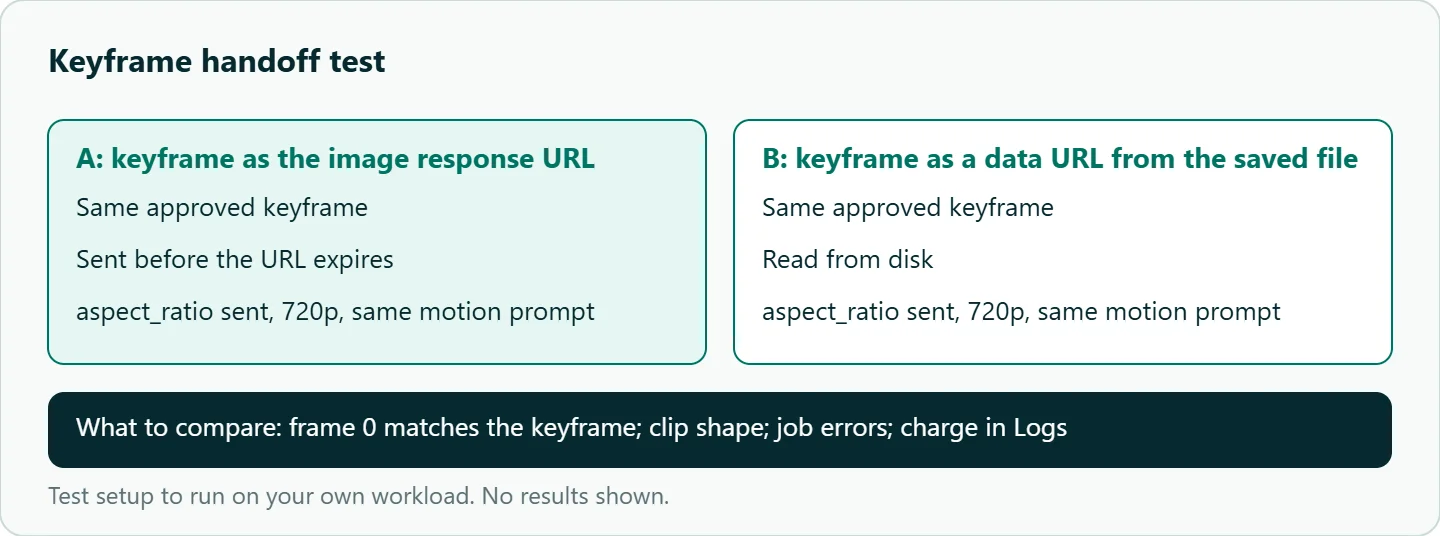
- Animate the same keyframe twice: once sent as the image response URL, once as a data URL from the saved file. Both should start on the same frame.
- Send one 9:16 keyframe with no
aspect_ratioand confirm the clip comes back portrait, then send"aspect_ratio": "16:9"and see what you get. - Compare frame 0 of each clip with its keyframe at full size.
- Count redos per shot at the image step and at the video step, and check each request's charge in the console's Logs.
The takeaway: when to run the full pipeline
| Your situation | Do this |
|---|---|
| One-off shot, no continuity | Skip the pipeline; go straight to text-to-video |
| Three or more shots that must match | Run the full pipeline with the review gate |
| A recurring character | Fix the character's description in the style line and check it in review |
| A frame that is nearly right | Edit it with Seedream reference images instead of redrawing |
| A continuous camera move across shots | Try return_last_frame and feed it to the next shot |
| Vertical social cut | Set "aspect_ratio": "9:16" in the shot list and on every video call |
Our take: Run the review gate on every multi-shot piece, even when you are in a hurry. It is the only point where fixing a shot means redoing a still instead of a clip. Spend your engineering time on the handoffs, validated JSON, a ratio both models accept, files saved on arrival, because that is where this pipeline actually breaks.
Running it on OceanToken
All three steps run on OceanToken with one key at the OpenAI-compatible base URL https://api.oceantoken.ai/v1: qwen/qwen3.8-flash for the shot list, bytedance-seed/seedream-5-5 for keyframes and bytedance/seedance-2.0 for clips. One prepaid balance pays for all of them, so the script holds one secret and you read one set of Logs, and swapping any step's model is a change of model id.
A failed video job is not charged and its hold is released, and an Idempotency-Key on each create call stops a retry from starting a second clip. Billing follows each model's unit: per million tokens for the text step, per image for keyframes, and by clip length, resolution and sound for video. See the current rates on /qwen-api, /seedream-api and /seedance-api.
FAQ
Why not go straight from text to video? You can for one-off shots. For several shots that must match, approving still frames first lets you fix composition and continuity before you pay for motion.
Which text model should write the shot list? Any that returns valid JSON reliably on your brief. We use qwen/qwen3.8-flash in the example because it lists json_object and json_schema; test step 1 ten times before you commit.
How do I keep every clip the same shape? Pick a ratio both models accept, generate every keyframe at it, and send the same aspect_ratio on every video request.
Can I add character reference images to the video step? Not in the same Seedance request as a first frame. Seedance takes frames or references, not both.
How long do I have to download each image and clip? Download URLs in API responses are valid for 24 hours, so save files as soon as they arrive.
Can a clip have sound? Yes, Seedance 2.0 takes generate_audio. The script turns it off so all clips join cleanly; add sound over the finished film.
Sources
- OceanToken docs: Qwen3.8 Flash parameters, response_format and limits (checked 2026-11-21)
- OceanToken docs: Seedream 5.5 parameters, sizes and reference images (checked 2026-11-21)
- OceanToken docs: Seedance 2.0 parameters, durations and frames (checked 2026-11-21)
- OceanToken docs: Video guide, image to video, clip shape and jobs (checked 2026-11-21)
- OceanToken docs: Images guide, response URLs and idempotency (checked 2026-11-21)
- OceanToken docs: Text generation, structured output (checked 2026-11-21)
- OceanToken docs: Limits, request size and retention (checked 2026-11-21)
- FFmpeg formats documentation: concat demuxer (checked 2026-11-21)
Get your OceanToken API key
- Create an OceanToken account and an API key.
- Copy the snippet below, paste your key, and run it.
- Check the current rate on /seedance-api.
curl https://api.oceantoken.ai/v1/videos \
  -H "Authorization: Bearer $OCEANTOKEN_API_KEY" \
  -H "Content-Type: application/json" \
  -d '{"model": "bytedance/seedance-2.0", "prompt": "Slow push in. Rain falls. The streetlight flickers once.", "duration": 5, "resolution": "720p", "aspect_ratio": "16:9", "frame_images": [{"type": "image_url", "frame_type": "first_frame", "image_url": {"url": "https://example.com/shot_1.png"}}]}'
More from the blog
GPT-6.1 Sol to GPT-6.2 Sol Upgrade Guide
GPT-6.1 Sol to GPT-6.2 Sol upgrade: same listed specs, what OpenAI says changed, the one-line model change, what to retest, and a shadow-test script.
How to Make GTA 6-Style Videos with AI
Four GTA 6-style AI video shots with the exact prompts, image-to-video to fix sign text, and one chase prompt run on Seedance, Kling, Hailuo and Veo.
How to Create GTA 6-Style Scenes with AI
Four GTA 6-style scenes written as code by Claude Fable 5.2, including a drivable 3D street, plus 14 prompts to copy and the fixes for what goes wrong.