

Call Tencent Hy3 With the OpenAI SDK
Call Tencent Hy3 with the OpenAI SDK outside China: base URL, model id, streaming, tool calls, reasoning_effort values, Hy3 vs Hy3 preview, and token billing.
By OceanToken Team
Editor's note: Hy3 is Tencent's open-weight reasoning model, a 295B-total, 21B-active MoE under Apache 2.0, and for developers outside China the practical question is often access rather than the model itself. An OpenAI-compatible endpoint removes that, with one catch most migration notes skip: the reasoning switch is spelled differently from Tencent's own docs, and the default is the expensive end.
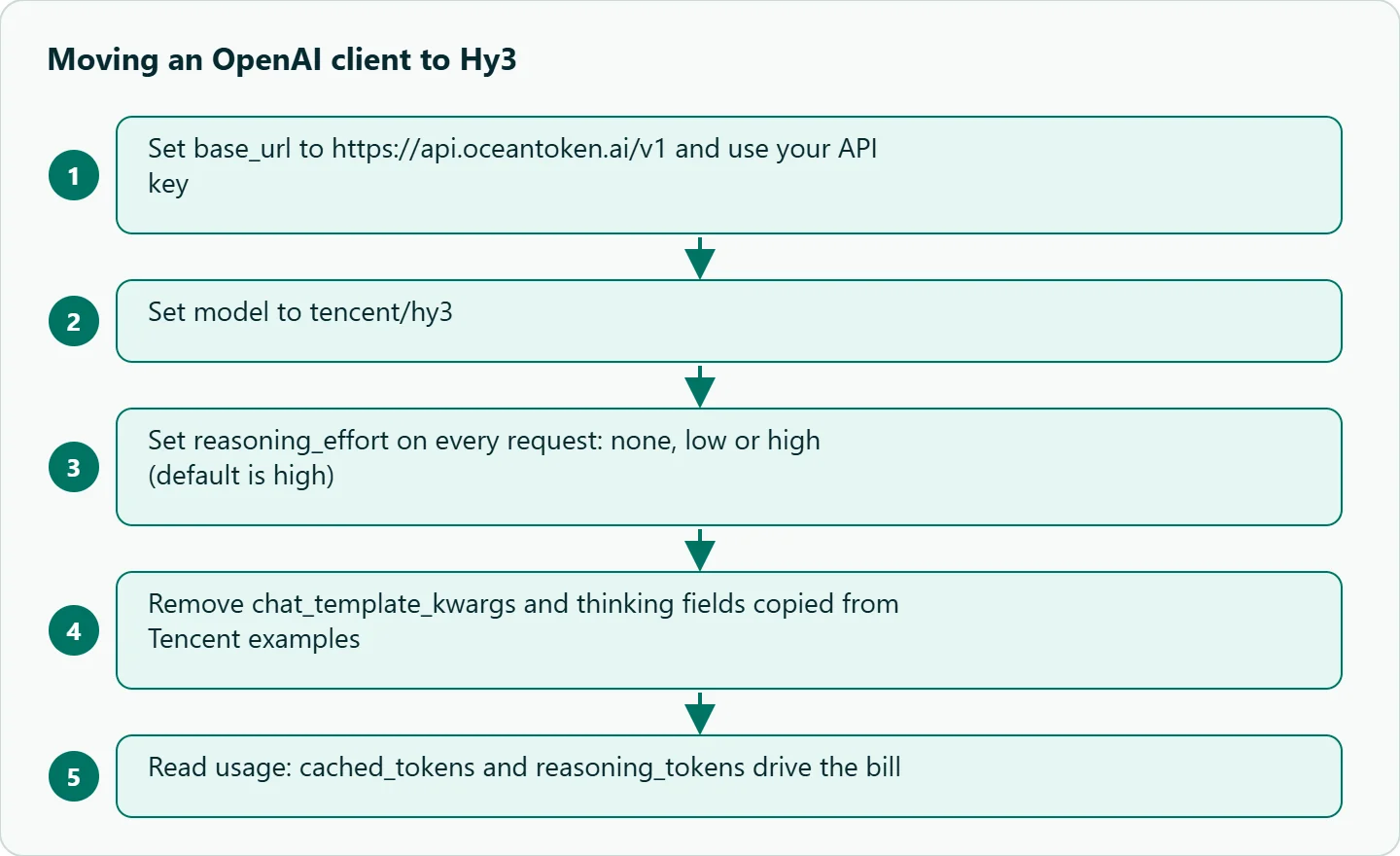
Short answer: To call Tencent Hy3 with the OpenAI SDK, point the client at https://api.oceantoken.ai/v1, use your key and model tencent/hy3. Streaming, tools and JSON output use the familiar Chat Completions fields. Set reasoning_effort (none, low, high) yourself, because it defaults to high. Billing is per million tokens; see /hunyuan-api.
01 · What Hy3 is, and which id to use
Tencent's model card describes Hy3 as a Mixture-of-Experts model with 295B total and 21B active parameters, released under Apache 2.0 and built on Hy3 preview with more post-training and reinforcement learning. Two Hy3 ids are in the catalog, and the Hunyuan API page lists both alongside the Hy4 preview and the translation models.
tencent/hy3 |
tencent/hy3-preview |
|
|---|---|---|
| Context window | 262,144 tokens | 262,144 tokens |
| Max output | 128,000 tokens | 235,929 tokens |
reasoning_effort |
none, low, high (default high) |
none, low, high (default high) |
| Tools | Yes | Yes |
response_format |
json_object, json_schema |
Not in the parameter table |
| Image input | Not listed | Not listed |
For new code, use tencent/hy3. It is the later model, and it is the one with structured output in its parameter list. The preview only wins when a single response must run past 128,000 tokens, which is rare outside long document generation.
02 · How to call Tencent Hy3 with the OpenAI SDK
Nothing about the client changes except two values. The FAQ says the official OpenAI SDKs work once the base URL is https://api.oceantoken.ai/v1 and the key is yours. You don't need a Tencent Cloud account; you add credits by card and call the endpoint.
import os
from openai import OpenAI

client = OpenAI(base_url="https://api.oceantoken.ai/v1",
                api_key=os.environ["OCEANTOKEN_API_KEY"])

resp = client.chat.completions.create(
    model="tencent/hy3",
    messages=[{"role": "user", "content": "Summarize the CAP theorem in three sentences."}],
    reasoning_effort="low",
    max_tokens=2000,
)
msg = resp.choices[0].message
print(msg.content)
print(getattr(msg, "reasoning_content", None))   # reasoning, when returned
print(resp.usage)
The Node SDK is the same shape:
import OpenAI from "openai";
const client = new OpenAI({ baseURL: "https://api.oceantoken.ai/v1", apiKey: process.env.OCEANTOKEN_API_KEY });

const stream = await client.chat.completions.create({
  model: "tencent/hy3",
  messages: [{ role: "user", content: "Write a haiku about latency." }],
  reasoning_effort: "none",
  stream: true,
  stream_options: { include_usage: true },
});
for await (const chunk of stream) process.stdout.write(chunk.choices[0]?.delta?.content ?? "");
With include_usage, the last stream event carries token counts, which is what you want for cost tracking.
03 · The reasoning switch: where Tencent's docs and the API differ
This is the part to read twice. Tencent's model card sets reasoning through chat_template_kwargs with the values no_think, low and high, and names no_think as the default. Tencent's thinking-mode documentation adds a separate thinking object. Neither spelling appears in the OceanToken reference for Hy3 , which lists a top-level reasoning_effort of none, low or high, defaults to high, and says anything outside its parameter table is left out before the request reaches the model.
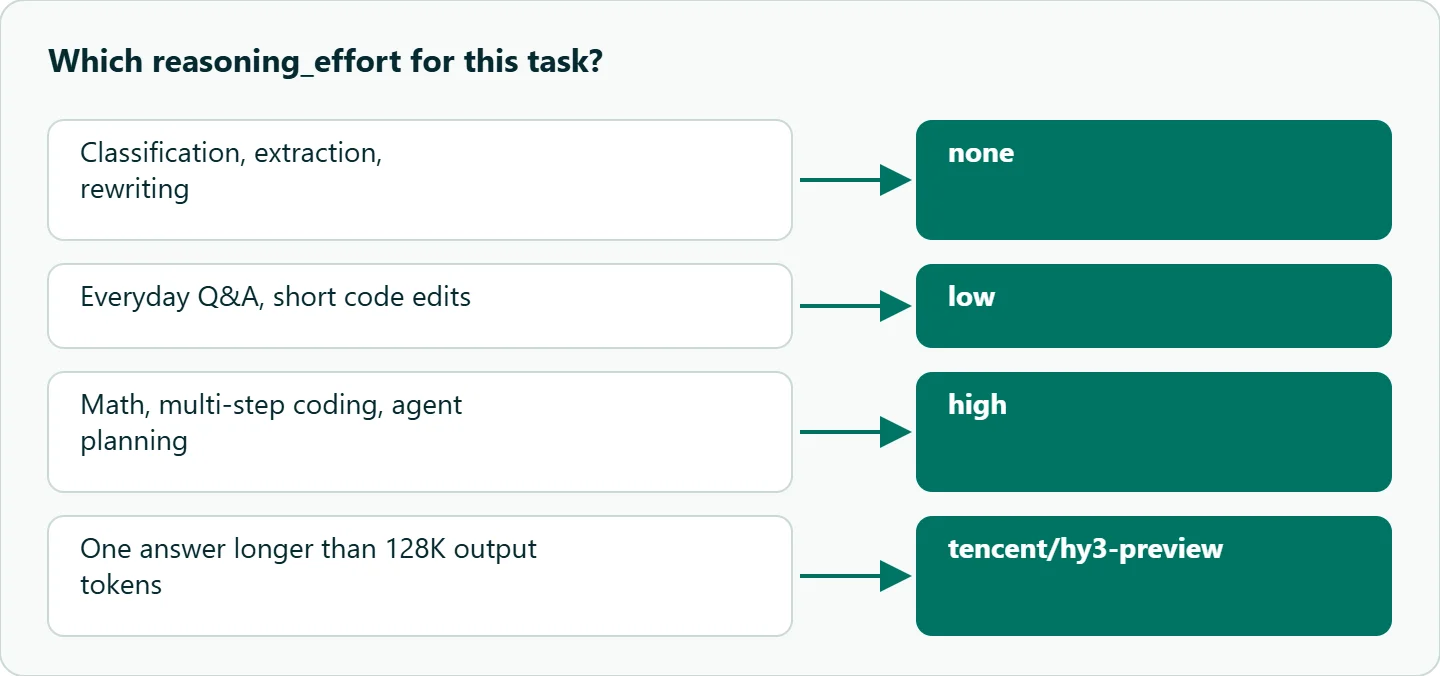
Two practical consequences follow. Code ported from Tencent examples that sends chat_template_kwargs or thinking will not switch reasoning off; use reasoning_effort="none" instead. And a request that omits the field runs at high, so a quick classification call can produce thousands of reasoning tokens. The model page says thinking tokens are billed at the output price, and max_tokens caps output with reasoning included, so a low cap on a high request can end with little or no visible answer.
| Task | reasoning_effort |
Why |
|---|---|---|
| Classification, extraction, rewriting | none |
No benefit from long reasoning |
| Everyday Q&A, short code edits | low |
Some planning, modest token use |
| Math, multi-step coding, agent planning | high |
The model card recommends high for these |
04 · Tools and JSON output
Tool calling uses the standard tools array, with tool_choice and parallel_tool_calls available. One extra rule comes from Tencent's thinking-mode doc: when tools are used in thinking mode, the earlier reasoning_content should go back with each turn. The OceanToken response carries reasoning_content on the assistant message, but its reference does not say whether that field is accepted on input, so test a two-turn tool loop with reasoning on before relying on it. If the loop misbehaves, run tool-heavy turns at none or low.
For JSON, Hy3 accepts response_format with json_object or json_schema. Generic differences between models behind one OpenAI-compatible client, such as which sampling fields each accepts, are covered in our model-switching gotchas guide; this article only covers what is specific to Hy3.
05 · Billing per million tokens
Hy3 is billed per 1M tokens, split into input and output, and the model page also lists a cached-input rate. The response tells you which bucket each token fell into: usage.prompt_tokens, usage.completion_tokens, prompt_tokens_details.cached_tokens for cache reads, and completion_tokens_details.reasoning_tokens, which is counted inside output. So the cost of one call is uncached input, cached input and output (reasoning included), each times its rate.
The model page also says a request that never ran is not charged, while a stream that breaks off is billed for tokens already processed. For the rates themselves, see /hunyuan-api. If several services share one account, our guide to prepaid balance guardrails shows how to cap spend per key.
How to test this on your workload
We have not benchmarked Hy3 for this article. Before switching traffic, run a short check:
- Send 20 of your real prompts at
none,lowandhigh; record answer quality,reasoning_tokensand latency for each. - Send one request with
chat_template_kwargsand noreasoning_effort, and confirm fromreasoning_tokensthat it ran at the default. - Run a two-turn tool call with reasoning on, once returning
reasoning_contentand once without, and compare the second turn. - Request a
json_schemaresponse ontencent/hy3and validate it against your schema.
Our take: Hy3 is worth a slot in any OpenAI-compatible stack that needs a strong open-weight reasoner, and the migration is a base URL, a key and one explicit reasoning_effort. The mistake to avoid is leaving reasoning at its default. Set reasoning_effort on every request, start with low, and raise it only for tasks where you can see the difference.
Running it on OceanToken
OceanToken serves Hy3 as tencent/hy3 on https://api.oceantoken.ai/v1, on both /v1/chat/completions and /v1/responses. The Hunyuan API page puts it plainly: "change the base URL and the key, and keep your code." The same key then reaches every other model in the catalog, so comparing Hy3 with another reasoning model is a change of model id. Billing comes from a prepaid balance with no subscription, and each key can carry its own spending limit. See the current rate on /hunyuan-api.
FAQ
What is the Hy3 model id? tencent/hy3; the earlier release is tencent/hy3-preview.
How do I turn Hy3 reasoning off? Send reasoning_effort: "none". Tencent's no_think, chat_template_kwargs and thinking spellings are not in the parameter list.
What is the Hy3 context window? 262,144 tokens, with up to 128,000 output tokens.
Are reasoning tokens billed? Yes, at the output price, and they count toward max_tokens.
Does Hy3 support structured output? Yes, response_format with json_object or json_schema on tencent/hy3.
Do I need a Tencent Cloud account? No. You create an account, add credits by card, and call the endpoint with your key.
Sources
- OceanToken docs: tencent/hy3 reference (checked 2026-11-13)
- OceanToken docs: tencent/hy3-preview reference (checked 2026-11-13)
- oceantoken.ai: Hy3 model page (checked 2026-11-13)
- oceantoken.ai: Hunyuan API (checked 2026-11-13)
- Tencent: Hy3 model card (checked 2026-11-13)
- Tencent Cloud: deep thinking mode documentation (checked 2026-11-13)
- OceanToken docs: FAQ (checked 2026-11-13)
Get your OceanToken API key
- Create an OceanToken account and an API key.
- Copy the snippet below, paste your key, and run it.
- Check the current rate on /hunyuan-api.
curl https://api.oceantoken.ai/v1/chat/completions \
  -H "Authorization: Bearer $OCEANTOKEN_API_KEY" \
  -H "Content-Type: application/json" \
  -d '{"model": "tencent/hy3", "reasoning_effort": "low", "messages": [{"role": "user", "content": "Summarize the CAP theorem in three sentences."}]}'
More from the blog
A Unified API for Chat, Image and Video
Building on a unified API for chat, image and video: sync vs async calls, billing units, retries, timeouts and storage, with three calls and a launch checklist.
Kimi K3 API International Access Guide
Use the Kimi K3 API internationally: sign up with email, pay by card, create one key and call moonshotai/kimi-k3 with an OpenAI SDK. Steps, code and checks.
Call the Hailuo 3 Max API With an API Key
How to call the Hailuo 3 Max API with an API key: the request, polling and download, the Max-only limits, what sets the cost of one video, and Max vs Hailuo 3.