

Seedance UGC Ad Prompts: 4 Templates
Four Seedance UGC ad prompts to copy (review, unboxing, 3am moment, hands-only), how to write the hook, and why real-person reference photos get refused.
By OceanToken Team
Editor's note: In our view, the first three seconds sink more AI UGC ads than the model does. People ask for "a nice testimonial" and get a slow, polite clip nobody watches. Write the hook first, then the product, then the rest. And plan around one hard rule: real-person reference photos are usually refused, so your "creator" should be invented, not uploaded.
Short answer: Good Seedance UGC ad prompts read like a short shot list: one invented presenter and one setting, three or four labeled shots with one action and one camera behavior each, a spoken hook in shot 1, the product's physical details, and an audio line. Attach a product photo, not a photo of a real person, because those are usually refused.
Why UGC prompts are different from cinematic prompts
A cinematic prompt asks for beauty. A UGC prompt asks for belief: a phone-like vertical frame, ordinary light, a person talking straight to you, and a product that looks like the one in your store. The polish you would normally prompt for works against you here.
That changes three things. You describe the camera as handheld or propped on a counter, not on a crane. You give the presenter a line to say, because in our view a silent UGC clip feels closer to stock footage than to a creator post. And you spend most of your words on the product, since it has to survive into the last frame with the right shape and label.
The shot structure is covered below, so this page sticks to what goes inside those shots for an ad. For the resolutions and reference inputs the model accepts, see the Seedance 2.5 model page; it does not list durations or aspect ratios, so see the 9:16 note further down.
The anatomy of a Seedance UGC prompt
Each template below uses the same six parts, in this order:
- Presenter and place in one sentence: rough age, clothing, room, light. Keep the presenter invented.
- Shot 1, the hook: a spoken line or a visual jolt, filmed selfie-style.
- Shot 2, the product: shape, color, material and the short label text you want kept.
- Shot 3, the use: the product doing its job, in hands.
- Shot 4, the close: a hold on the product alone.
- Audio line: room tone, the dialogue, and "no music" if you want none.
Runway's guide for Seedance 2.0 gives the notation for audio: dialogue in curly braces, music in parentheses and sound effects in angle brackets. Dialogue in a language other than English or Chinese needs the language named next to it. The same guide warns that "support for precise timing is unstable," so we label shots in order and let the model place the cuts, instead of writing exact seconds and hoping. We have not confirmed that Seedance 2.5 follows the same notation, so check it on your first clips.
Four Seedance UGC ad prompts to copy
Swap the product details for yours. Each template uses four shots. That is a starting point to test, not a measured rule: we would start there because every extra shot in the same clip length gets fewer seconds to land its action. The word "Vertical" in each prompt is a request; set the aspect ratio in the API call too (see Running it on OceanToken).
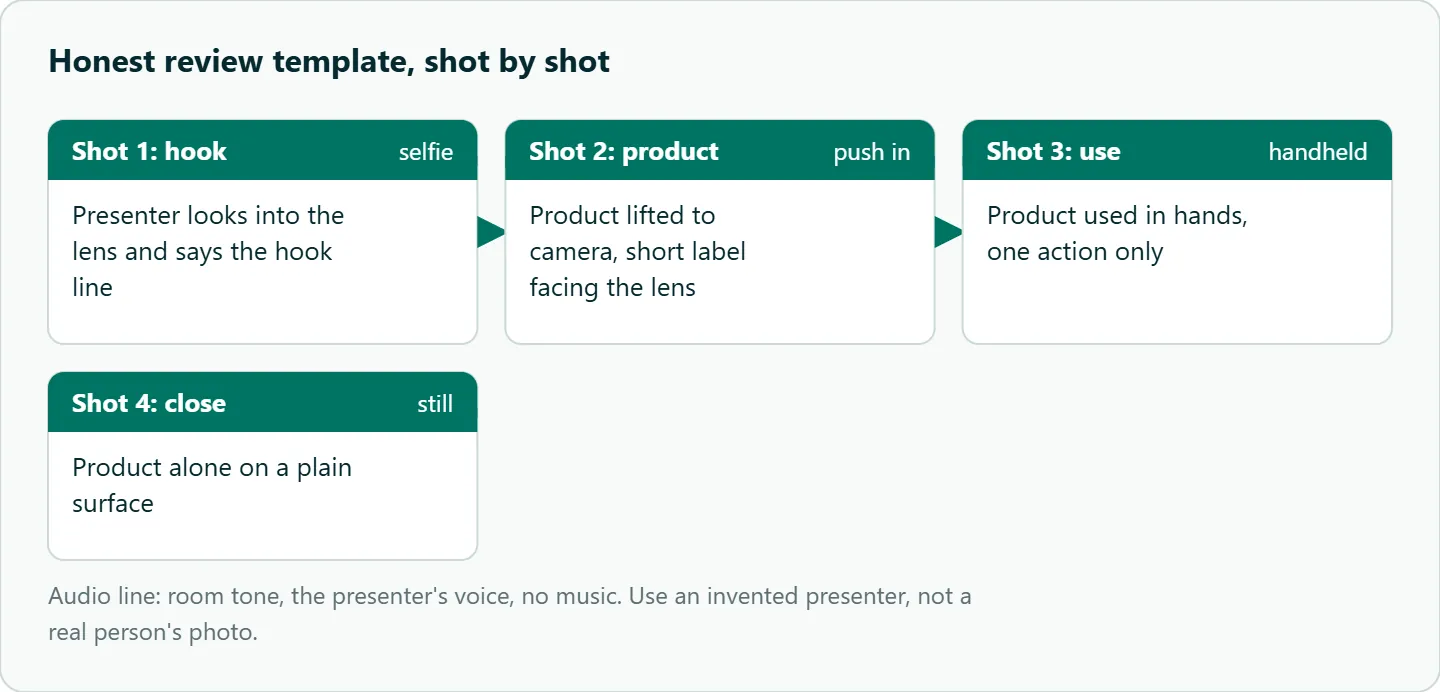
1. Honest review (skincare, supplements)
Vertical selfie video, handheld phone, soft morning bathroom light. A woman in her late 20s in a gray T-shirt, no makeup.
Shot 1: close selfie framing, she looks into the lens and says {I stopped using three products for this one}.
Shot 2: she lifts a frosted white pump bottle with a green cap; the label reads "DAILY SERUM". Slow push in on the label.
Shot 3: she presses one pump onto her fingertips and pats it into her cheek, slight camera shake.
Shot 4: the bottle alone on the white counter, camera still.
Audio: quiet room tone, her voice only, no music.
2. Unboxing reaction (fashion, beauty)
Vertical video, phone on a desk, warm lamp light. A man in his 30s in a navy hoodie.
Shot 1: overhead, his hands tear pink tissue paper out of a small kraft box <paper rustle>.
Shot 2: selfie angle, he raises his eyebrows and says {okay, that is smaller than I expected, in a good way}.
Shot 3: he turns a matte black watch so the face points at the lens.
Shot 4: hard cut to the watch alone on a cream surface, locked-off camera.
Audio: paper rustle, his voice, no music.
3. The 3am relatable moment (sleep, wellness)
Vertical video, dark bedroom lit only by a phone screen, blue light on the face. A person in their 20s sitting up in bed.
Shot 1: close on the face, they sigh and say {it's 3am again}.
Shot 2: their hand reaches to the nightstand for an amber glass jar with a white lid labeled "SLEEP".
Shot 3: they lie back and the phone light goes off.
Shot 4: slow push toward the jar on the nightstand, camera otherwise still.
Audio: low room hum, a soft exhale, no music.
4. Hands-only showcase (premium D2C)
Vertical video, top-down on a walnut table, daylight from the left. Only hands are visible, no face.
Shot 1: two hands slide a brushed steel water bottle into frame <metal tap on wood>.
Shot 2: close-up, the thumb twists the bamboo cap open.
Shot 3: water pours into a glass, slow motion.
Shot 4: the bottle stands alone, camera still, logo "NORTH" facing the lens.
Audio: table sounds and pouring water, no music.
The hands-only format exists for a reason beyond style. It sidesteps the presenter problem entirely, and it is the safest template when a brand will not accept an invented face.
What not to write in a UGC prompt
Do not upload a real creator's photo as the presenter. The Seedance 2.5 model page says reference images that show a real person are usually refused, because the model maker's safety check flags them as a possible real person. Runway's Seedance 2.0 guide adds that public figures are moderated in reference inputs. Illustrated, 3D or AI-generated characters are accepted. So generate a presenter image first, or describe the person in text.
Do not pass an invented presenter off as a real customer. An "honest review" from someone who does not exist is a simulated testimonial. The FTC's 2024 final rule on consumer reviews and testimonials covers testimonials that "misrepresent that they are by someone who does not exist, such as AI-generated fake reviews," and those from people who never used the product. If you run these templates as ads, label the clip as AI-generated or a dramatization, keep claims to what the product really does, and take extra care with skincare, supplement and sleep claims. This is not legal advice; check the ad policy of each platform you post on.
Do not stack actions. "She opens the box, smiles, applies the cream and waves" in one shot gives you a muddle. One action per shot.
Do not rely on the model to spell long label text. Keep the label to one or two words in the prompt and attach a clear product photo. If exact text matters, add it as an overlay in your editor.
Do not leave the audio to chance. Name what you hear. If a clip with generated sound is refused, the model page suggests retrying without sound, so keep a silent version of each prompt ready.
How to test this on your workload
- Run one clip first and confirm its output dimensions are vertical before you batch anything.
- Pick one template and run it three times with your product photo attached.
- Score each take on three things: is the hook line clear, does the label survive, does the presenter look like one consistent person.
- Count how many takes you needed for one usable clip.
- Change one part (the hook line, or the camera note) and run three more.
- Re-render only the best take at higher resolution.
Running it on OceanToken
On OceanToken, Seedance 2.5 comes in two ids, as listed on 2026-11-06. bytedance/seedance-2.5 is native and renders at 480p or 720p on ByteDance's official API, with settings and references passed through unchanged. bytedance/seedance-2.5-upscaled has the official model render the clip, then OceanToken's upscaler takes it to 720p or 1080p, guided by up to 9 reference images. Both are on the Seedance 2.5 model page.
That split suits UGC testing. Draft every hook on native, pick the winner, then re-run only that prompt on the upscaled id. Two things on /seedance-api make heavy iteration less painful: failed clips are not charged, and each job returns its own id you can trace. Billing is prepaid with no subscription. See the current rate on /seedance-api.
Neither the model page nor /seedance-api lists 9:16. The video guide lists an aspect_ratio field with 9:16 among its values "as the model offers," so read it first, set the ratio in the request, and confirm the output dimensions of your first clip before you batch.
Our take: Spend your effort on the hook line and the product description, use invented presenters or hands-only shots, and draft at native resolution. In our view, when a UGC ad flops, the first three seconds are a likelier culprit than the model.
FAQ
How many shots should a Seedance UGC ad have? We would start with three or four for a short clip and test from there, since each extra shot gets fewer seconds.
Can I use a real person's photo? Expect it to be refused; the safety check flags real people in reference images. Use an AI-generated or illustrated presenter.
How do I write dialogue? Put it in curly braces, and name the language if it is not English or Chinese.
Should I write exact timestamps? Treat them as hints. Runway's Seedance 2.0 guide says precise timing is unstable, so order the shots and let the model place the cuts.
Do I need a product photo? It helps the product and label stay consistent. Keep the label text short.
Sources
- OceanToken: Seedance 2.5 model page (checked 2026-11-06)
- OceanToken Seedance API page (checked 2026-11-06)
- Runway: Seedance 2.0 prompt guide (checked 2026-11-06)
- OceanToken docs: Video guide (checked 2026-11-06)
- FTC: Final rule banning fake reviews and testimonials (checked 2026-11-06)
Get your OceanToken API key
- Create an OceanToken account and an API key.
- Copy the snippet below, paste your key, and run it.
- Check the current rate on /seedance-api.
curl https://api.oceantoken.ai/v1/videos \
  -H "Authorization: Bearer $OCEANTOKEN_API_KEY" \
  -H "Content-Type: application/json" \
  -d '{"model": "bytedance/seedance-2.5", "prompt": "Vertical selfie video, handheld phone. A woman in her late 20s looks into the lens and says {I stopped using three products for this one}."}'
More from the blog
A Unified API for Chat, Image and Video
Building on a unified API for chat, image and video: sync vs async calls, billing units, retries, timeouts and storage, with three calls and a launch checklist.
Kimi K3 API International Access Guide
Use the Kimi K3 API internationally: sign up with email, pay by card, create one key and call moonshotai/kimi-k3 with an OpenAI SDK. Steps, code and checks.
Call Tencent Hy3 With the OpenAI SDK
Call Tencent Hy3 with the OpenAI SDK outside China: base URL, model id, streaming, tool calls, reasoning_effort values, Hy3 vs Hy3 preview, and token billing.