

Seedance Prompt Templates by Genre
Six Seedance prompt templates by genre (horror, romance, action, documentary, sci-fi, comedy): one copyable structure per genre with camera, light and sound.
By OceanToken Team
Editor's note: Genre is a compression format. Say "horror" and you have already bought a set of lighting, camera and sound decisions, but the model only gets them if you write them down. We think a template per genre beats a clever one-off prompt, because a template can be fixed once and reused. These are starting points: edit the nouns, keep the skeleton.
Short answer: Good Seedance prompt templates share one skeleton: framing, subject with one action, one camera move, light, a style line and an audio line, written as connected sentences. What changes per genre is the camera habit (locked and slow for horror, handheld for action, long lens for romance), the light and the sound. Start from the six below.
One skeleton for every genre
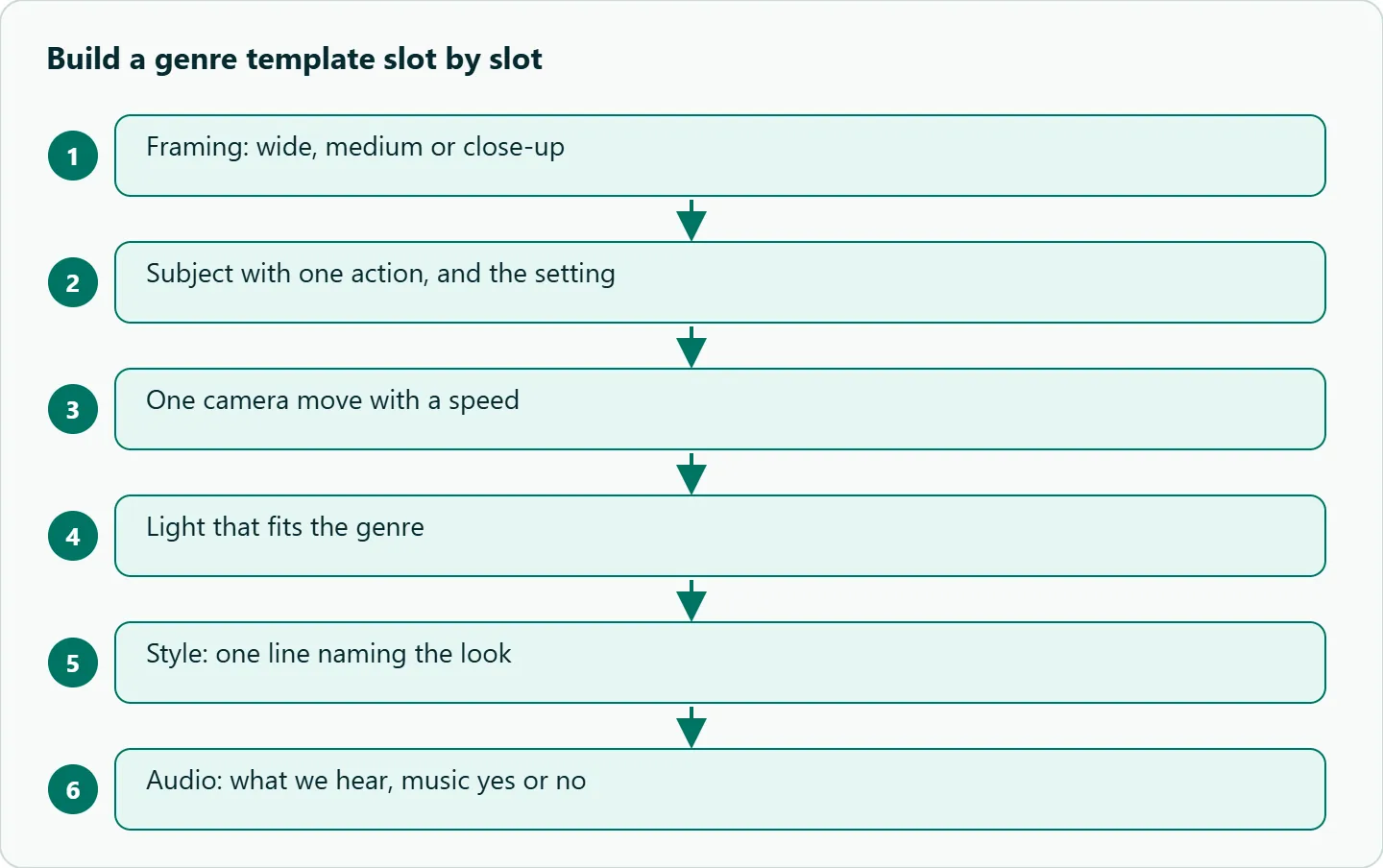
Every template on this page fills the same slots in the same order:
[Framing], [subject + one action], [setting]. [One camera move with speed]. [Light].
Style: [one line]. Audio: [what we hear, music yes or no].
The order follows Runway's Seedance 2.0 guide, which says "a complete prompt covers precise subject, action details, scene and environment," followed by lighting, camera, style, quality and constraints, and that these should be written "as connected sentences rather than a keyword list." The style line matters more than it looks. The same guide notes that "a named style keeps the look from drifting toward realism when you want something stylized."
These are single-clip templates: one continuous shot each. If you want a genre scene with cuts, take the skeleton into the Seedance multi-shot prompting guide, and for ads see Seedance UGC ad prompts. This page leaves both out.
Genre conventions at a glance
The table is ordinary film grammar, not measured output. Use it to choose the slot values before you write.
| Genre | Camera habit | Light | Sound | Pace |
|---|---|---|---|---|
| Horror | Locked-off or very slow push-in | Low-key, one practical lamp | Near silence, low drone | Slow |
| Romance | Long lens, slow track | Golden hour, soft haze | Soft ambient, light music | Medium |
| Action | Handheld tracking | Hard, high contrast | Footsteps, impacts, no music | Fast subject, steady camera |
| Documentary | Handheld or fixed | Natural window light | Room tone, voiceover | Medium |
| Sci-fi | Slow lateral tracking, wide | Cold, neon or teal | Hum, tones | Slow |
| Comedy | Static, eye level | Flat and bright | Silence before the beat | Tight |
1. Horror
Horror lives on what the camera refuses to show. Keep the camera locked or nearly still and let one small movement in the frame do the work.
Locked-off wide shot of a dim hotel corridor lit by one flickering wall lamp. At the far end, the door of room 14 slowly swings open by itself. The camera does not move. Low-key light, deep shadows.
Style: 35mm film, heavy grain, desaturated. Audio: low drone, a distant drip, no music.
2. Romance
Romance wants a long lens and warmth. The action should be small and close: a glance, a hand moving.
Medium shot through a café window at golden hour, two people at a small table, long lens, shallow focus. Her hand rests an inch from his, and one finger slowly moves closer. Slow track in toward their hands. Warm backlight, soft haze.
Style: romantic drama, soft contrast. Audio: quiet café murmur, light piano, low.
3. Action
Action is where the model is weakest, so the template is the most conservative. Runway's guide warns that "sprinting, large jumps, and violent motion are where warping and instability tend to appear." Keep one actor, one clear action, and let the camera follow instead of performing.
Wide shot, a courier in a yellow jacket runs across a city rooftop at dusk. Handheld tracking from behind at a steady pace, keeping him centered. Hard sunset light, long shadows.
Style: gritty thriller, high contrast. Audio: footsteps on gravel, wind, heavy breathing, no music.
If the clip warps, slow the subject down before you touch anything else. A jog reads better than a sprint, and one runner reads better than two people fighting.
4. Documentary
Documentary is about restraint. Natural light, a handheld or fixed camera, and an activity that looks unstaged. Runway's guide uses "Naturalistic documentary style" as an example style label.
Fixed close-up of a potter's hands shaping clay on a spinning wheel in a small workshop. Slight handheld movement. Soft natural window light from the left, dust in the air.
Style: naturalistic documentary. Audio: wheel hum, room tone, a calm voiceover {I make the same bowl every day.}
5. Sci-fi
Sci-fi rewards scale and slow movement. Put the subject small in a big frame and move the camera sideways so the set reveals itself.
Wide shot, a lone astronaut stands at a huge observation window, a ringed planet beyond. Slow lateral tracking along a console of blue indicator lights toward the astronaut. Cold teal light, clean surfaces.
Style: hard sci-fi, anamorphic look. Audio: soft electronic hum, no music.
6. Comedy
Comedy depends on timing, and a static camera gives the timing room. Frame the gag at eye level and leave a pause.
Static two-shot at eye level in a bright kitchen. A man proudly holds out a birthday cake to his friend, who stares at it in long silence, then a candle slowly tips over. The camera does not move. Flat, bright light.
Style: deadpan sitcom. Audio: kitchen room tone, silence, then a soft thud.
Make these Seedance prompt templates yours
Swap proper nouns, not structure. The skeleton is what makes the template reusable; the corridor, the café and the rooftop are placeholders. When you change something, change one slot per run so you can tell what caused the difference.
Two settings on the request help here. The bytedance/seedance-2.5 schema accepts a seed, and the same seed, prompt and settings give similar results, so you can hold a take steady while you edit one slot. And generate_audio is a separate switch, so if the audio line is not working you can render silent and add sound in your editor. Durations run from 4 to 30 seconds, with 5 as the default; for single-clip templates we would start at the default and lengthen only if the action needs it.
Once a template gives you a take you like, freeze it as a team asset. A frozen template plus a new subject is faster than a fresh prompt every time.
How to test this on your workload
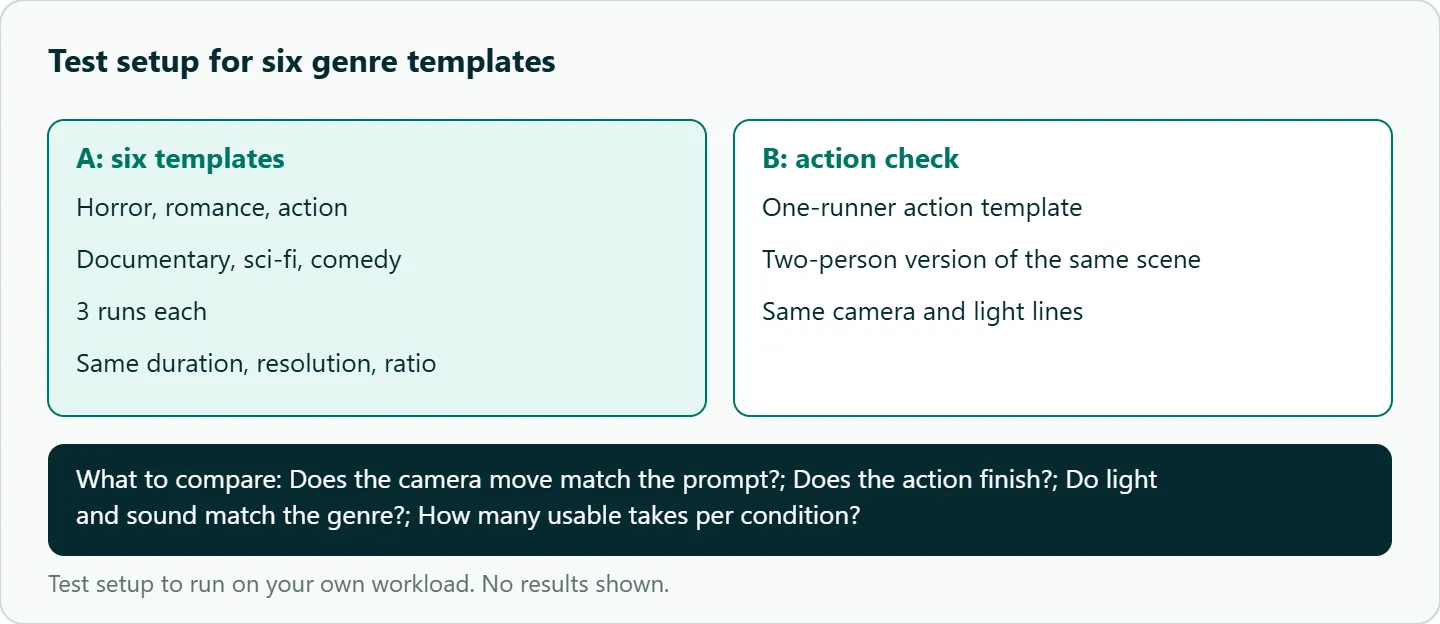
We have not scored these six templates, so the claims about genre habits are film convention, not our results. To see how they hold up on your own subjects:
- Run each template three times at the same duration, resolution and aspect ratio.
- For each take, check whether the camera move matches the prompt, whether the action finishes, and whether the light and sound match the genre.
- For action, also run a two-person version of the same scene and compare how often each take is usable.
- Keep the version that gives you a usable take most often, and change one slot at a time from there.
Our take: Genre templates are for speed and consistency. Write the skeleton once, fill it per genre, and when one works, freeze it and vary only the subject. If you only change one thing on a failing action clip, slow the subject down.
Running it on OceanToken
Seedance 2.5 is bytedance/seedance-2.5 at https://api.oceantoken.ai/v1, and the Seedance 2.5 model page also lists bytedance/seedance-2.5-upscaled for 720p and 1080p delivery. A sensible loop for templates: draft every genre on the native id at 480p, keep the winners, and re-render only those on the upscaled id.
Testing six templates three times each means a lot of jobs, and two things on OceanToken keep that manageable. Refused or failed jobs are not charged, and the held amount returns to your balance. Each job also returns its own id, so you can log which template and seed produced which clip. Billing is prepaid with no subscription, on one key that also covers the other video models. For a first working call, see the Seedance API quickstart in Python. See the current rate on /seedance-api.
FAQ
Which genre is hardest for Seedance? Fast action, especially with more than one person. Runway's guide names sprinting, large jumps and violent motion as where warping appears.
Do I need to name the genre in the prompt? Naming it helps, but the camera, light and sound lines do most of the work. Put the genre in the style line.
How long should each template run? Seedance 2.5 accepts 4 to 30 seconds. For one continuous shot, we would start at the 5-second default.
Can I mix genres? Yes. Keep one style line for the mix, such as "sci-fi horror," and pick one camera habit.
Can I use these with a first frame? Yes. Attach the image as the first frame and drop the parts of the prompt that describe what is already visible.
Sources
- Runway: Seedance 2.0 prompt guide (checked 2026-11-08)
- OceanToken docs: Seedance 2.5 request schema (checked 2026-11-08)
- OceanToken docs: Video guide (checked 2026-11-08)
- OceanToken: Seedance 2.5 model page (checked 2026-11-08)
- OceanToken Seedance API page (checked 2026-11-08)
Get your OceanToken API key
- Create an OceanToken account and an API key.
- Copy the snippet below, paste your key, and run it.
- Check the current rate on /seedance-api.
curl https://api.oceantoken.ai/v1/videos \
  -H "Authorization: Bearer $OCEANTOKEN_API_KEY" \
  -H "Content-Type: application/json" \
  -d '{"model": "bytedance/seedance-2.5", "prompt": "Locked-off wide shot of a dim hotel corridor lit by one flickering wall lamp. At the far end, a door slowly swings open by itself. Style: 35mm film, heavy grain. Audio: low drone, no music.", "duration": 5, "resolution": "480p"}'
More from the blog
A Unified API for Chat, Image and Video
Building on a unified API for chat, image and video: sync vs async calls, billing units, retries, timeouts and storage, with three calls and a launch checklist.
Kimi K3 API International Access Guide
Use the Kimi K3 API internationally: sign up with email, pay by card, create one key and call moonshotai/kimi-k3 with an OpenAI SDK. Steps, code and checks.
Call Tencent Hy3 With the OpenAI SDK
Call Tencent Hy3 with the OpenAI SDK outside China: base URL, model id, streaming, tool calls, reasoning_effort values, Hy3 vs Hy3 preview, and token billing.