

Seedance Product Demo Prompt Templates
A Seedance product demo prompt that keeps the product right: lock the design to one reference image, one camera move per shot, and keep labels short and clean.
By OceanToken Team
Editor's note: A product demo is the easiest clip to prompt badly and the easiest to fix. Most weak demos have one problem: the product is described like a mood, not like an object. We think a demo prompt should read like a spec sheet followed by a shot list. Give the model the photo, give it the shots, then stop adding adjectives.
Short answer: A good Seedance product demo prompt names one product photo as the sole authority on the design, describes three or more physical traits (shape, color, material), then lists four or five shots with one camera move each. End with exclusions such as "no added text or watermark," and keep label text short.
Treat the product as a locked asset
Runway's Seedance 2.0 guide has a running-shoe example that shows the pattern well. Its prompt says "@Image 1 is the sole authority on the shoe's silhouette, upper material and weave, midsole profile and thickness," including "every marking already present on it," and adds that "the shoe's design stays identical in every shot."
The reason is in the same guide: "An unlabeled reference leaves the model free to borrow anything from it, color, background, composition, styling." So write the role for each image you attach:
Image 1 is the sole authority on the product design: shape, color, material and every marking. Do not alter it.
Image 2 sets the surface and lighting mood only.
Keep the set small. Runway notes that "four to five assets total tends to work better than filling that ceiling." Seedance 2.5 on OceanToken accepts up to 30 reference images, but one clean product photo and one mood image is a better start than a pile of angles. One more rule from the docs: a request carries frames or references, not both. If you attach the product as a reference, you cannot also pin a first frame in the same call.
The five-move demo vocabulary
Product demos need only a handful of camera moves. Each has one job.
| Move | Use it for | Prompt wording |
|---|---|---|
| Slow push-in | The reveal, the hero moment | "Slow push-in on the product, focus locked" |
| Lateral track | Profile and length | "Smooth lateral tracking left to right along the product" |
| Slow tilt up | Height and scale | "Slow tilt up from base to top" |
| Locked close-up | Texture, a button, the label | "Fixed close-up, shallow depth of field" |
| Pull-back | The ending, room for a logo card | "Slow pull-back to a wide shot" |
One camera move per shot. Let the product do the moving (a cap twists, a lid opens, a light turns on) while the camera stays calm. A moving product under a moving camera is twice as many things for the model to keep straight.
Seedance product demo prompt A: 10-second hero (water bottle)
A copyable template. Swap the product details for yours:
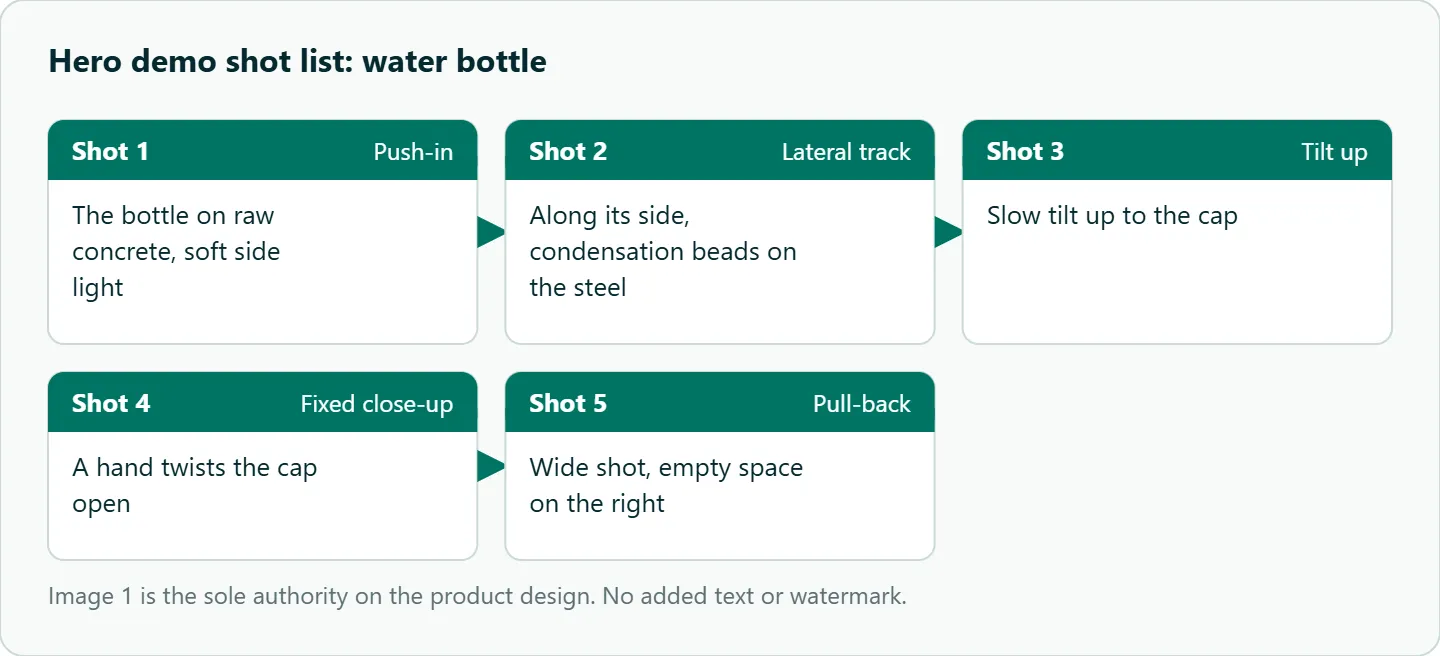
Image 1 is the sole authority on the product design: a matte slate-blue steel water bottle with a black twist cap and a small white logo. The design stays identical in every shot.
Shot 1: Slow push-in on the bottle standing on raw concrete, soft side light.
Shot 2: Smooth lateral tracking along its side, condensation beads on the steel.
Shot 3: Slow tilt up to the cap.
Shot 4: Fixed close-up, a hand twists the cap open.
Shot 5: Slow pull-back to a wide shot, empty space on the right.
Audio: quiet room tone, a soft metal click, no music.
Keep it free of added text, subtitles or graphics, and do not generate a watermark.
Prompt B: feature walk-through (headphones)
When the demo has to show a feature, give each feature its own shot and keep hands to the minimum.
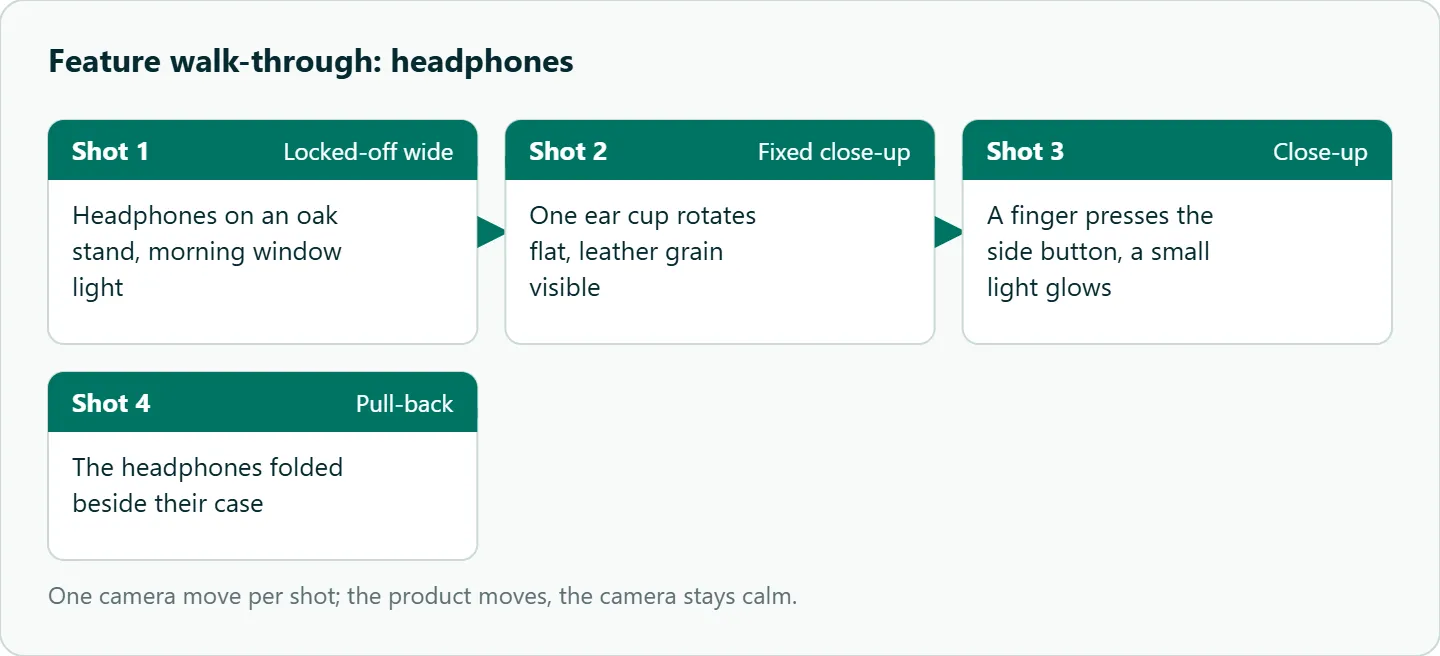
Image 1 is the sole authority on the product design: over-ear headphones in warm gray with tan leather ear cups and a single side button.
Shot 1: Locked-off wide, the headphones on an oak stand, morning window light.
Shot 2: Fixed close-up, one ear cup rotates flat, leather grain visible.
Shot 3: A finger presses the side button and a small white light glows.
Shot 4: Slow pull-back, the headphones folded beside their case.
Audio: soft room tone, a gentle click, no music.
No added text or watermark.
These are single-clip shot lists. For how Seedance handles several shots in one clip, see the Seedance multi-shot prompting guide. If you want a creator talking about the product instead of a clean demo, that is a different format, covered in Seedance UGC ad prompts.
Labels, logos and the content filter
Text is where product clips go wrong most visibly. Runway warns that "subtitles, logos, and watermarks turn up in outputs that never asked for them," and its prompts close with lines like "keep it subtitle-free and free of added text or graphics, do not generate a watermark." Do the same.
For the product's own label, keep the text to one or two words in the prompt and let the reference photo carry the rest. The Seedance 2.5 model page adds a delivery detail: very small text can lose detail in upscaled output, and it recommends native rendering for those shots. So render label close-ups on bytedance/seedance-2.5, not the upscaled id. If exact text matters, add it as an overlay in your editor.
On filtering: the same page says every prompt passes a safety check, and reference images showing a real person are usually refused. We found no rule in OceanToken's docs about brand logos or product photos as such. A product shot with a model's face at the edge of frame is the common trap; crop the face out before you upload. If a demo request is refused or fails, the Seedance generation failed checklist helps you tell a policy refusal from a settings or input problem.
Keep demos from drifting
Write the scene once (surface, light, palette) and paste the same words into every clip of a campaign, so shots from different requests still match. Avoid hands handling small parts for long; cut away once the action reads. And keep shot counts modest: Runway says a 5 to 15 second clip "is enough for a few shots rather than a full sequence," and suggests letting the model pace the shots rather than assigning fixed durations.
How to test this on your workload
We have not scored product fidelity on these templates, so test with your own product before you commit to a campaign:
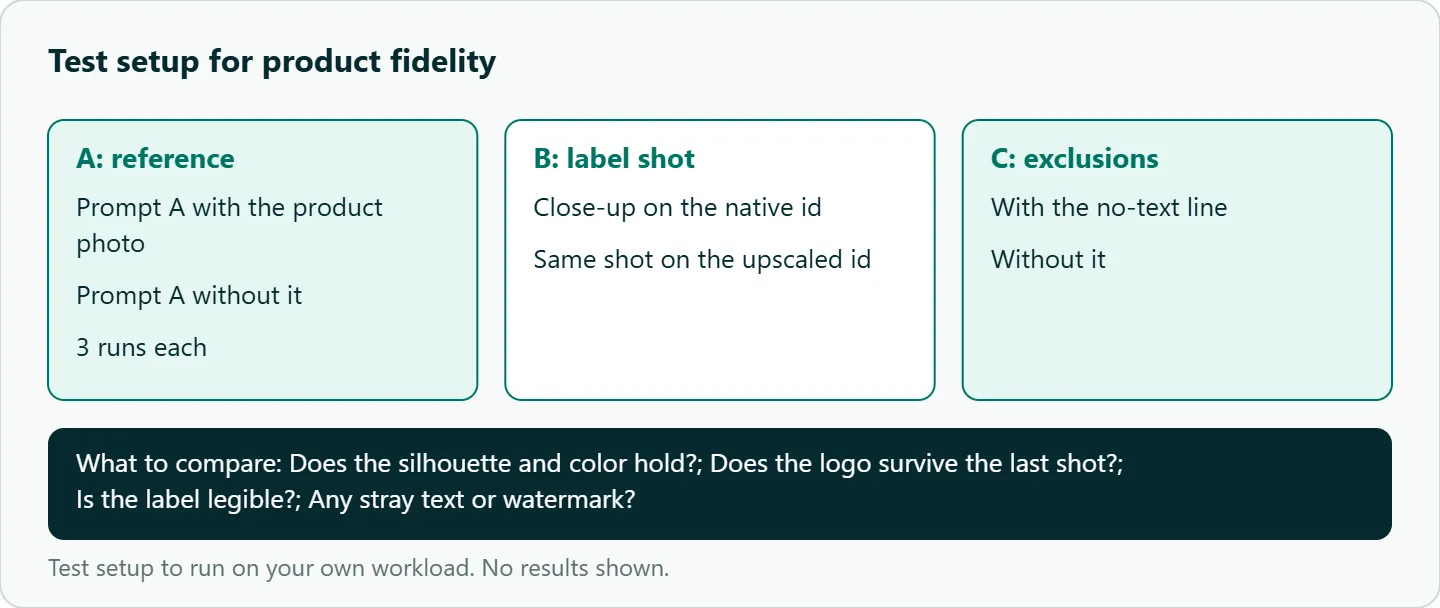
- Run prompt A three times with the product photo as a reference and three times without it.
- For each take, check the silhouette, the color, and whether the logo survives the last shot.
- Render one label close-up on the native id and one on the upscaled id, and compare text legibility.
- Remove the exclusion line once and note whether stray text or watermarks appear.
Our take: Draft the whole shot list at a low resolution first. You are testing product fidelity, not pixels. Once the silhouette and label hold, re-render the keepers.
Running it on OceanToken
Seedance 2.5 is bytedance/seedance-2.5 (480p or 720p) at https://api.oceantoken.ai/v1, with bytedance/seedance-2.5-upscaled listed on the Seedance 2.5 model page for 720p and 1080p. Use native for drafts and label shots, and upscaled for wide hero shots you keep.
Two parts of the API suit product work. Refused or failed jobs are not charged, and the held amount returns to your balance, so finding the right reference setup costs nothing for the takes that error out. And each job returns an id, so you can log which reference and prompt produced which clip across a catalog of products. Billing is prepaid with no subscription, on one key that also covers other video and image models. See the current rate on /seedance-api.
FAQ
How many reference images should I use for a product? Start with one clean product photo and at most one mood image. Runway says four to five assets total tends to work better than filling the limit.
Why does my logo change between shots? Name the photo as the sole authority on every marking, keep the label short, and render close-ups on native.
What clip length is best for a demo? Seedance 2.5 accepts 4 to 30 seconds. A few shots fit in 5 to 15 seconds; longer demos are better as separate clips.
Can I use a 3D render as the product reference? We have not tested it. A clean render with even light is a reasonable thing to try.
Can I attach the product photo and pin a first frame together? No. A Seedance request carries frames or references, not both.
Sources
- Runway: Seedance 2.0 prompt guide (checked 2026-11-09)
- OceanToken: Seedance 2.5 model page (checked 2026-11-09)
- OceanToken docs: Video guide (checked 2026-11-09)
- OceanToken docs: Seedance 2.5 request schema (checked 2026-11-09)
- OceanToken Seedance API page (checked 2026-11-09)
Get your OceanToken API key
- Create an OceanToken account and an API key.
- Copy the snippet below, paste your key, and run it.
- Check the current rate on /seedance-api.
curl https://api.oceantoken.ai/v1/videos \
  -H "Authorization: Bearer $OCEANTOKEN_API_KEY" \
  -H "Content-Type: application/json" \
  -d '{"model": "bytedance/seedance-2.5", "prompt": "Slow push-in on a matte slate-blue steel water bottle on raw concrete, soft side light. No added text or watermark.", "duration": 5, "resolution": "480p"}'
More from the blog
A Unified API for Chat, Image and Video
Building on a unified API for chat, image and video: sync vs async calls, billing units, retries, timeouts and storage, with three calls and a launch checklist.
Kimi K3 API International Access Guide
Use the Kimi K3 API internationally: sign up with email, pay by card, create one key and call moonshotai/kimi-k3 with an OpenAI SDK. Steps, code and checks.
Call Tencent Hy3 With the OpenAI SDK
Call Tencent Hy3 with the OpenAI SDK outside China: base URL, model id, streaming, tool calls, reasoning_effort values, Hy3 vs Hy3 preview, and token billing.