

Seedance On-Screen Text and Subtitles
Can Seedance render readable on-screen text and subtitles? What ByteDance says, a six-field text spec, how to stop stray captions, and when to add text in post.
By OceanToken Team
Editor's note: We would not ship a paid ad whose price, legal line or URL was rendered by a video model. A short slogan can work, and it is fun when it lands. But burned-in text cannot be edited, and nobody has published accuracy numbers for it. Our default is one short phrase from the model at most, and everything a viewer must read exactly goes in the editor.
Short answer: Seedance on screen text is possible but unverified: ByteDance publishes no accuracy claim for it. Ask for one short phrase with the exact words, timing, position and style. Expect stray subtitles and logos unless you rule them out at the end of the prompt. Add prices, legal lines, URLs and captions in post.
What ByteDance and the guides say about text in Seedance
The most useful official sentence is about text you did not ask for. ByteDance's Seedance 2.5 launch post says the model "minimizes uncontrolled occurrences in subtitles and background music." That suggests stray subtitles were a known issue, and ByteDance says 2.5 reduces them. It does not say how often it still happens.
Runway's Seedance 2.0 guide is blunter: "Subtitles, logos, and watermarks turn up in outputs that never asked for them." Its example prompts close with constraints such as "Keep it subtitle-free and free of added text or graphics." The 2.5 guide keeps that pattern and advises you to "reserve negative phrasing for subtitles and audio," while describing everything else positively.
On rendering text you do want, we found no first-party statement about spelling accuracy, supported scripts or maximum length. Runway's 2.5 examples include requested text such as engraved lettering on a product, which shows people ask for it, not that it is reliable. That gap is the reason for the cautious advice below.
A six-field spec for Seedance on-screen text
When you do want the model to render a phrase, leave it nothing to guess. This template is ours, built from how the guides structure prompts:
| Field | Example |
|---|---|
| Exact text | "Fresh Daily" |
| Language | English |
| Timing | fades in near the end of the shot, holds |
| Position | lower third, centered |
| Entry | simple fade, no animation |
| Style | white, bold sans-serif, soft shadow |
Keep the phrase to two to four common words. Every extra letter is another chance for one to come out wrong, and a single wrong letter in a brand name ruins the shot. Avoid special symbols, prices and URLs entirely; those are exactly the strings where an error costs money. Put the text instruction once, near the end of the shot it belongs to, so it does not bleed into earlier shots.
If you need small type, render on the native id. OceanToken's Seedance 2.5 model page says native rendering is still best for tiny text, since upscaled versions can lose a little detail.
Seedance subtitles: generate them or caption in post?
Runway's 2.0 guide marks subtitles with corner brackets, and its 2.5 guide treats subtitles mostly as something to switch off. We agree with that instinct. Captions are better added in the editor for three reasons: you can fix a typo without paying for another render, you can time them to the final cut rather than to the raw clip, and you can export a separate subtitle file for platforms that accept one, which also helps accessibility.
If a character speaks, write the line as dialogue so the voice is generated, but keep it off the picture: end the prompt with "No subtitles" and caption the line yourself from your script, which is the version you know is spelled right.
When to put text in post instead
Use a simple split. The model owns the scene, the motion and, optionally, one short slogan in a clean area. The editor owns the price, the call to action, legal lines, captions and the brand font. If any of those change after launch, you change a text layer, not a render.
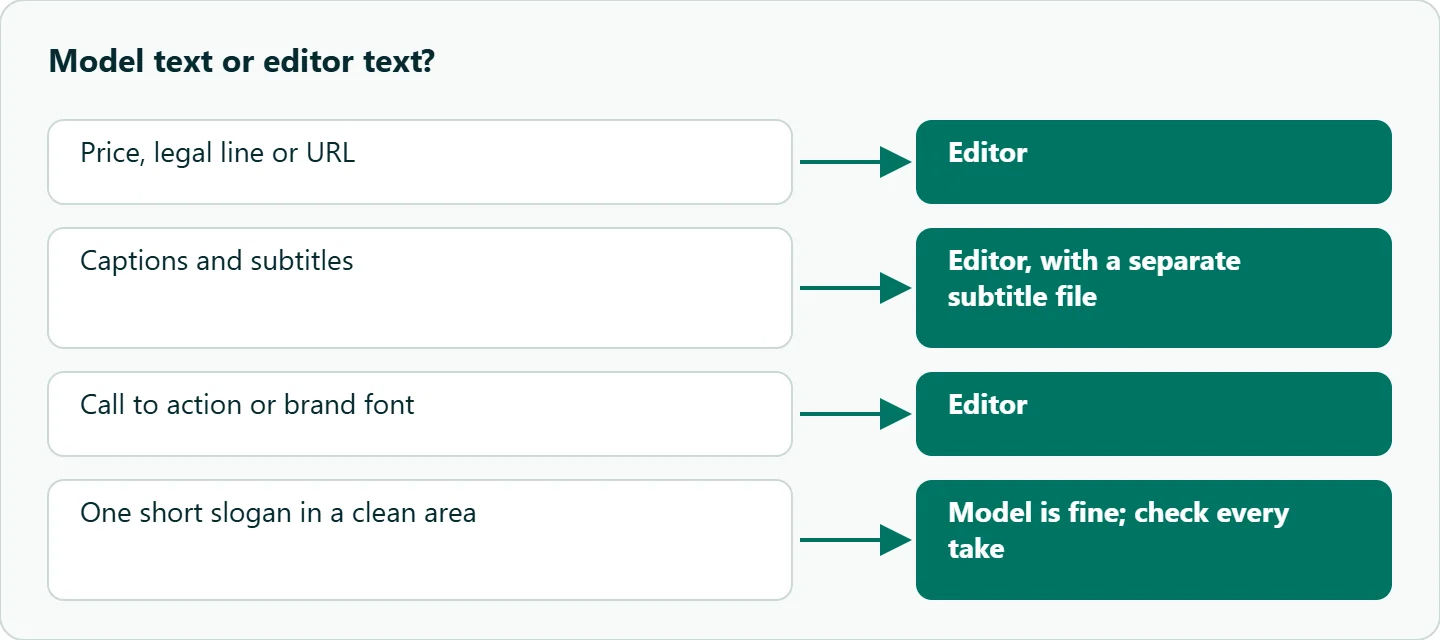
The prompt's job then is to leave room. Ask for "an empty lower third, no text, no logos" and keep the background in that area plain. Product shots have their own version of this problem: invented labels on packaging. Our Seedance product demo prompts cover how to keep product text from the reference image, so we will not repeat it here.
A four-shot ad with one on-screen line
Here is a 12-second vertical ad where only the last shot carries text. It is a template to copy, not a result we are showing.
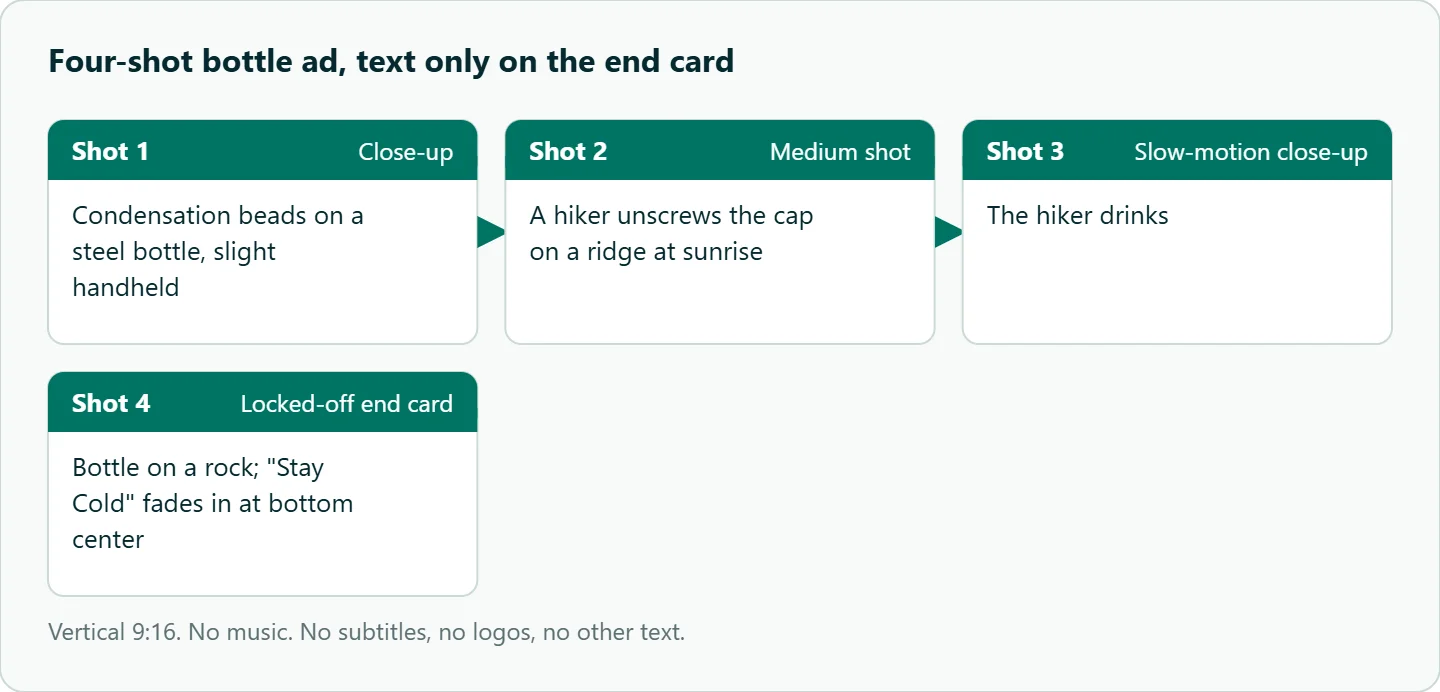
Vertical 9:16.
Shot 1: close-up, condensation beads on a steel bottle, slight handheld movement.
Shot 2: a hiker unscrews the cap on a ridge at sunrise, medium shot.
Shot 3: slow-motion drink, close-up.
Shot 4: the bottle on a rock, locked-off. The text "Stay Cold" fades in at the bottom center, white bold sans-serif.
No music. No subtitles, no logos, no other text.
If "Stay Cold" comes out misspelled, do not keep re-rolling the whole clip. Generate Shot 4 on its own with the text removed and add the line in the editor. For more genre structures to drop text into, see the Seedance prompt templates by genre.
How to test this on your workload
We have not measured text accuracy, so before you plan a campaign around generated text, run a small check:
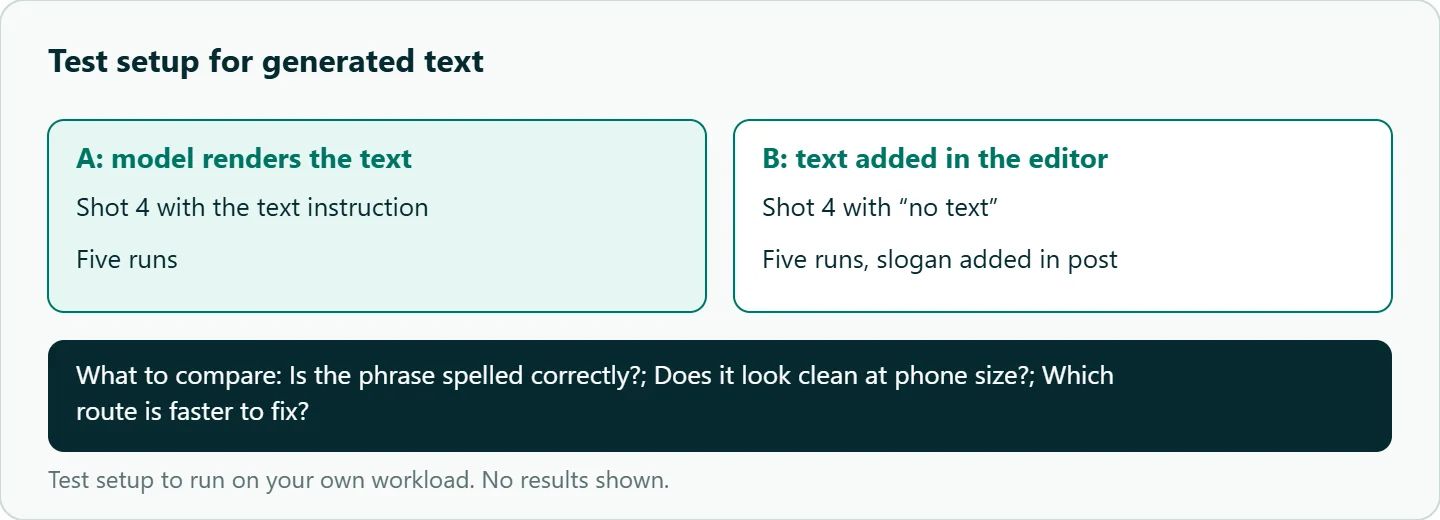
- Take Shot 4 alone and run it five times with the text instruction.
- Run it five more times with "no text" and add "Stay Cold" in your editor.
- Count how many generated takes spell the phrase correctly and look clean at phone size.
- Repeat with your real slogan and, if you need it, your target language.
Our take: Treat generated text like a first draft from an intern: fast, often fine, never final. Anything with legal or commercial weight goes in post.
Running it on OceanToken
Seedance 2.5 is bytedance/seedance-2.5 at https://api.oceantoken.ai/v1. One detail worth knowing: the request schema has a watermark flag that defaults to false, so a logo that shows up in your clip came from the prompt or references, not from a platform watermark. The Seedance 2.5 model page also lists bytedance/seedance-2.5-upscaled for 720p and 1080p.
Text tests mean repeated short takes. A failed job is not charged, billing is prepaid with no subscription, and the same key runs other video models if you want to compare how another one handles your slogan. See the current rate on /seedance-api.
FAQ
Can Seedance render readable text? Sometimes, for short phrases. ByteDance publishes no accuracy figure, so check every take.
How do I stop random subtitles? End the prompt with "No subtitles, no logos, no other text." Runway's example prompts end with these constraints, and its 2.5 guide reserves negative phrasing for subtitles and audio.
Can I mix two languages on screen? We found no first-party guidance on mixed scripts. Keep one language per shot and test yours.
Does upscaling affect small text? It can. OceanToken's model page says native output is still best for tiny text.
Should captions be generated? No. Add them in the editor so you can fix typos and time them to the final cut.
Sources
- ByteDance Seed: Introducing Seedance 2.5 (checked 2026-11-10)
- Runway: Seedance 2.0 prompt guide (checked 2026-11-10)
- Runway: Seedance 2.5 prompt guide (checked 2026-11-10)
- OceanToken: Seedance 2.5 model page (checked 2026-11-10)
- OceanToken docs: Seedance 2.5 request schema (checked 2026-11-10)
- OceanToken docs: Video guide (checked 2026-11-10)
- OceanToken Seedance API page (checked 2026-11-10)
Get your OceanToken API key
- Create an OceanToken account and an API key.
- Copy the snippet below, paste your key, and run it.
- Check the current rate on /seedance-api.
curl https://api.oceantoken.ai/v1/videos \
  -H "Authorization: Bearer $OCEANTOKEN_API_KEY" \
  -H "Content-Type: application/json" \
  -d '{"model": "bytedance/seedance-2.5", "prompt": "A steel bottle on a rock at sunrise, locked-off. The text \"Stay Cold\" fades in at the bottom center, white bold sans-serif. No subtitles, no logos, no other text.", "aspect_ratio": "9:16", "duration": 5, "resolution": "480p"}'
More from the blog
A Unified API for Chat, Image and Video
Building on a unified API for chat, image and video: sync vs async calls, billing units, retries, timeouts and storage, with three calls and a launch checklist.
Kimi K3 API International Access Guide
Use the Kimi K3 API internationally: sign up with email, pay by card, create one key and call moonshotai/kimi-k3 with an OpenAI SDK. Steps, code and checks.
Call Tencent Hy3 With the OpenAI SDK
Call Tencent Hy3 with the OpenAI SDK outside China: base URL, model id, streaming, tool calls, reasoning_effort values, Hy3 vs Hy3 preview, and token billing.