

Seedance Music Video Prompt Guide
How to write a Seedance music video prompt: split the song into sections, give the audio reference a job, mix performance and b-roll, and sync in the edit.
By OceanToken Team
Editor's note: Music videos are where Seedance's audio-in, video-out design should shine, and also where it is least proven. We would not promise frame-accurate beat sync to anyone. What we would promise is a fast way to a rough cut with the right mood, which you then tighten in an editor. Treat the track as the director and the model as the camera crew.
Short answer: Write a Seedance music video prompt per song section, not per song. Attach the track as an audio reference and say what it is for, plan two or three shots per section (performance, b-roll, detail) with one camera move each, add "no additional music" if sound is on, and land exact beats in your editor.
What Seedance can take in for a music video
ByteDance's Seedance 2.0 page says creators get "full control over performance, lighting, shadow, and camera movement" by using images, audio and video as references. On OceanToken, Seedance 2.5 (bytedance/seedance-2.5) accepts up to 30 images, 10 videos and 10 audio files in input_references, and clips from 4 to 30 seconds.
Two gaps matter. The docs give a 25 MB cap per media file but no limit on audio length, so we would not send a full song; send the section you are generating. And we found no first-party statement about lip-sync quality for sung vocals on 2.5. Plan performance shots so they still work if the mouth movement is loose: wider framing, singers half-turned, or cutaways during fast lyrics.
Give the audio reference a job
A reference with no stated role can leak into the result in ways you did not ask for. Say what each one is for at the top of the prompt:
Audio 1 is the backing track: follow its tempo and mood for the motion.
Image 1 is the singer's look: denim jacket, short dark hair.
Image 2 is the stage and color palette: rooftop with string lights.
Then decide what happens to the sound. Seedance 2.5 generates sound by default, and the model page warns that a clip with generated sound can be refused over its soundtrack. For a music video, the final audio should be your track, laid in the editor. So either set generate_audio to false and treat the clip as picture only, or keep sound on and write "no additional music" so the model does not invent a second soundtrack. Runway's guide marks music cues in parentheses, which is a handy way to describe the music when you are not attaching it.
Three shot types for every section
Most music videos cut between three kinds of shot. Naming the type in the prompt keeps each shot simple.
| Type | Purpose | Prompt wording |
|---|---|---|
| Performance | The artist sings or plays | "Medium close-up, the singer mouths the lyric, slow push-in" |
| B-roll | Mood and place | "Wide tracking shot of a rooftop crowd at dusk, handheld" |
| Detail | Rhythm and texture | "Close-up, hands on piano keys, fixed camera" |
Alternate them, and give each shot one camera move. Energy should come from the cuts and the subject, not from a frantic camera. Runway's guide notes that "slow, gentle, continuous movement holds together better than high-energy action," and that sprinting, large jumps and violent motion are "where warping and instability tend to appear." That matters for dance: a sway or a step reads better than a jump.
A Seedance music video prompt for the chorus
Here is a chorus section as one prompt. It is a starting point to copy, not a result we are showing. For how to label and order shots in one clip, see the Seedance multi-shot prompting guide.
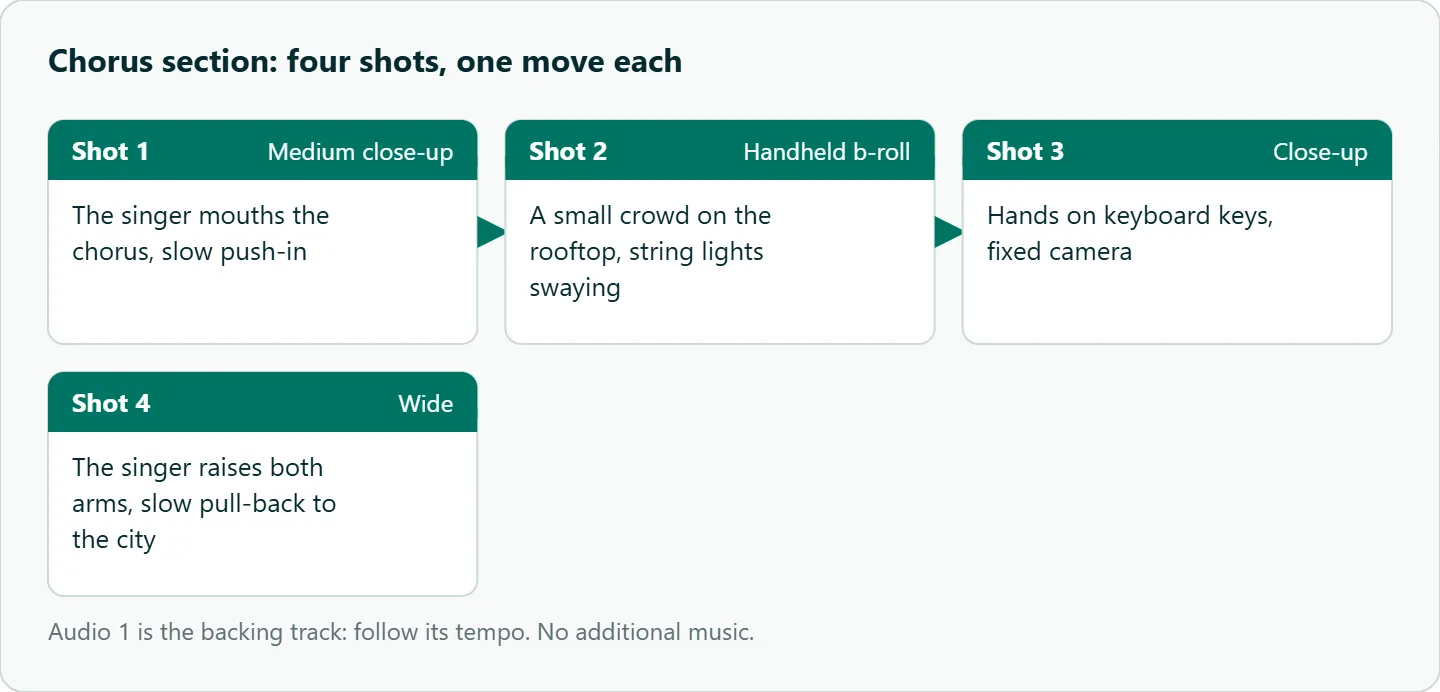
Audio 1 is the backing track: follow its tempo. Image 1 is the singer's look (denim jacket, short dark hair). Image 2 is the rooftop stage with string lights.
Shot 1: Medium close-up, the singer mouths the chorus, slow push-in, shallow depth of field.
Shot 2: Handheld b-roll of a small crowd on the rooftop, string lights swaying.
Shot 3: Close-up, hands on keyboard keys, fixed camera.
Shot 4: Wide, the singer raises both arms, slow pull-back to show the city.
No additional music.
A verse can carry a story instead of a performance. This one uses the track only as mood:
Audio 1 is the backing track: use it for mood only.
Shot 1: Locked-off wide of an empty apartment, afternoon dust in the light.
Shot 2: Slow lateral tracking as a woman packs a suitcase, tired.
Shot 3: Fixed close-up, the door closes and her hand leaves the handle.
No dialogue, no additional music.
Seedance beat sync: be honest about timing
Runway's guide says "support for precise timing is unstable." So timestamps such as "[0s]" or "[4s]" in a prompt are hints about where cuts should fall, not a contract. We would generate roughly on the beat and fix the rest in an editor, where moving a cut by a few frames takes seconds.
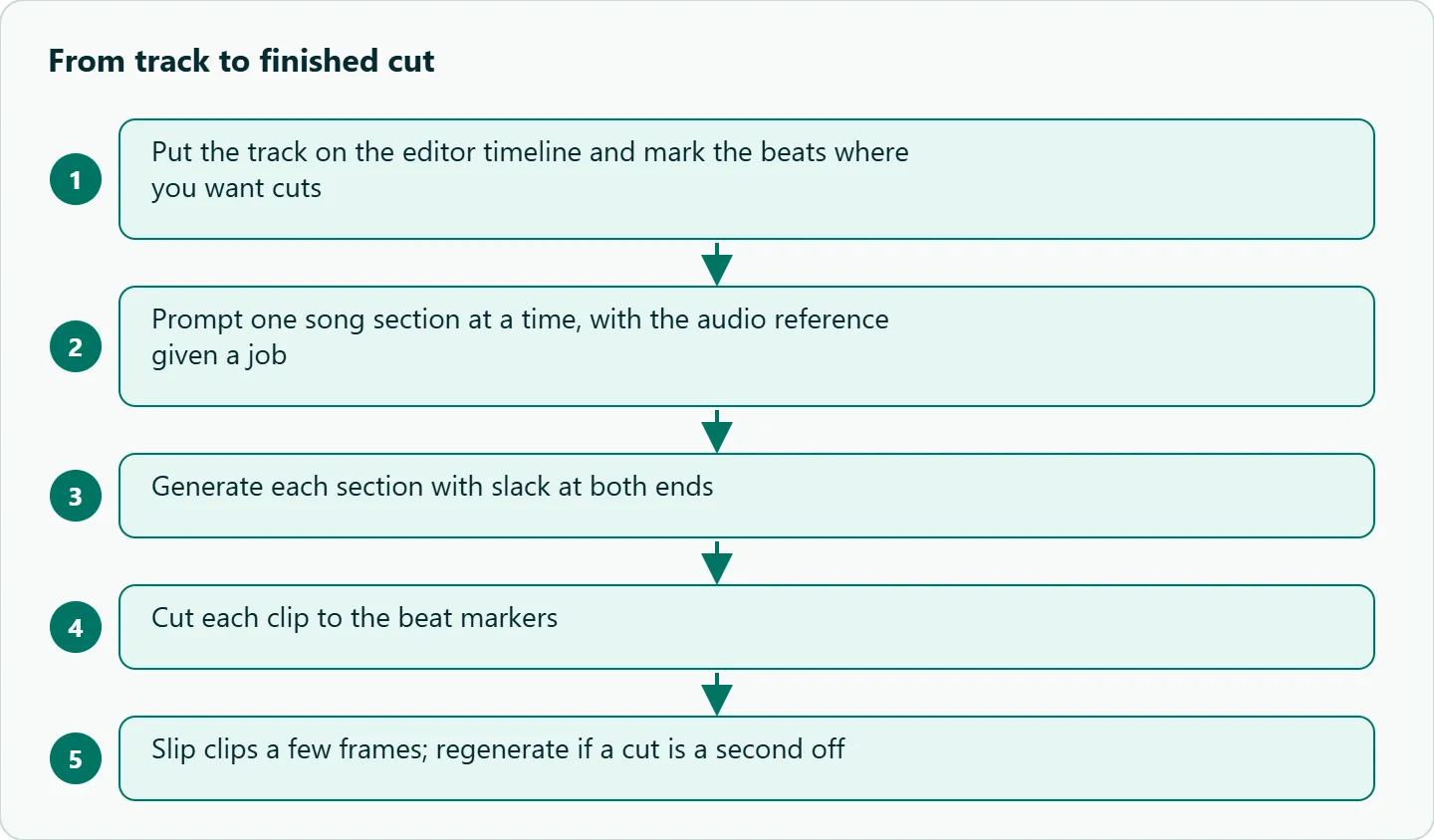
A workflow that holds up:
- Put the track on the editor timeline first and drop a marker on each beat or bar where you want a cut.
- Generate each section with a little slack at both ends, so you have room to trim.
- Cut each clip so its cuts land on the markers.
- If a cut is a few frames off, slip it. If it is a second off, generate another take.
- Check lip movement against the vocal waveform and slip the clip a frame or two.
For longer songs, chain sections. Seedance 2.5's return_last_frame option returns the last frame of a clip, which you can use as the first frame of the next section, and keeping the singer's wardrobe wording identical in every prompt helps the look carry across.
How to test this on your workload
We have not measured lip-sync or cut timing, so test on a track you have rights to before you plan a full video:
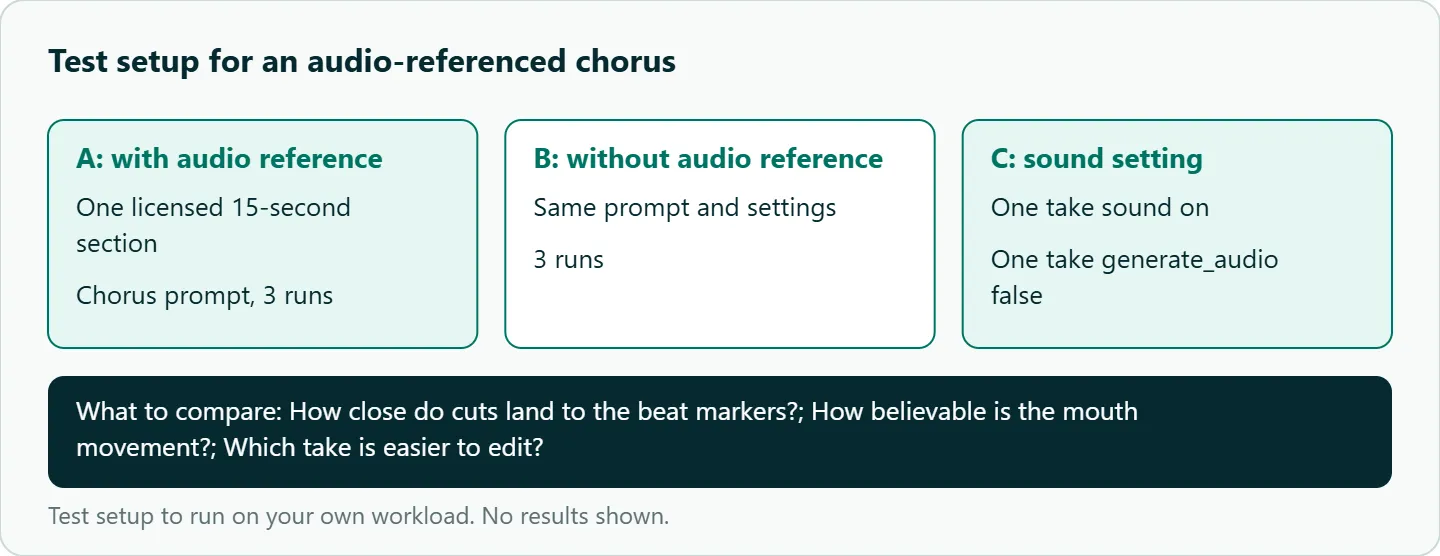
- Take one 15-second section of a royalty-free or licensed track.
- Run the chorus prompt three times with the audio reference, and three times without it.
- For each take, note how close the cuts land to your beat markers and how believable the mouth movement is.
- Run one take with sound on and one with
generate_audio: false, and note which is easier to edit.
Rights note
Only supply audio you own or have licensed. A generated video that reuses a copyrighted track is still your legal problem, whatever model made the picture.
Our take: Do not sell this as beat-perfect. Sell it as a fast rough cut you can tighten. Prompt by section, keep the camera calm, and let the editor own the timing.
Running it on OceanToken
Seedance 2.5 is bytedance/seedance-2.5 at https://api.oceantoken.ai/v1, and the Seedance 2.5 model page also lists bytedance/seedance-2.5-upscaled for 720p and 1080p. Draft every section on the native id at 480p, pick the takes that cut well, and re-render only those.
A music video means many takes, and two things keep that manageable: refused or failed jobs are not charged (the held amount returns to your balance), and every job has its own id you can log against the section and take. Billing is prepaid with no subscription, on one key that also covers other video models. If a section keeps failing, the Seedance generation failed checklist separates policy, settings and input problems. See the current rate on /seedance-api.
FAQ
Can I upload a full song? The docs give no audio length limit, only a 25 MB cap per file. Send the section you are generating.
Will Seedance lip-sync to my vocal? We found no first-party claim for sung vocals on 2.5. Test per track and frame performance shots so loose sync still works.
16:9 or 9:16? Both are accepted. Pick by the platform where the video will run.
Will it add its own music? With sound on, it may. Write "no additional music" or set generate_audio to false.
Can the clip land exactly on the beat? Not reliably; precise timing is unstable. Fix the last few frames in the editor.
Sources
- ByteDance Seed: Seedance 2.0 (checked 2026-11-09)
- Runway: Seedance 2.0 prompt guide (checked 2026-11-09)
- OceanToken docs: Seedance 2.5 request schema (checked 2026-11-09)
- OceanToken docs: Video guide (checked 2026-11-09)
- OceanToken: Seedance 2.5 model page (checked 2026-11-09)
- OceanToken Seedance API page (checked 2026-11-09)
Get your OceanToken API key
- Create an OceanToken account and an API key.
- Copy the snippet below, paste your key, and run it.
- Check the current rate on /seedance-api.
curl https://api.oceantoken.ai/v1/videos \
  -H "Authorization: Bearer $OCEANTOKEN_API_KEY" \
  -H "Content-Type: application/json" \
  -d '{"model": "bytedance/seedance-2.5", "prompt": "Medium close-up, a singer in a denim jacket mouths a chorus on a rooftop with string lights, slow push-in. No additional music.", "duration": 5, "resolution": "480p", "generate_audio": false}'
More from the blog
A Unified API for Chat, Image and Video
Building on a unified API for chat, image and video: sync vs async calls, billing units, retries, timeouts and storage, with three calls and a launch checklist.
Kimi K3 API International Access Guide
Use the Kimi K3 API internationally: sign up with email, pay by card, create one key and call moonshotai/kimi-k3 with an OpenAI SDK. Steps, code and checks.
Call Tencent Hy3 With the OpenAI SDK
Call Tencent Hy3 with the OpenAI SDK outside China: base URL, model id, streaming, tool calls, reasoning_effort values, Hy3 vs Hy3 preview, and token billing.