

Seedance Lip Sync Prompts for Dialogue
How to write a Seedance lip sync prompt: labeled dialogue lines, language marking, one speaker per shot, voice references, and fixes when mouths drift.
By OceanToken Team
Editor's note: When lip sync looks wrong, check the prompt before blaming the model. People paste a paragraph of dialogue into a prompt that also asks for three camera moves and two characters talking over each other. Seedance makes voice and picture in the same pass, so a spoken line is part of the shot, not a caption stuck on afterward. Our advice is plain: short lines, one speaker per shot, and a plan to cut around anything that drifts.
Short answer: A good Seedance lip sync prompt puts each spoken line inside the shot where it happens, labels the speaker, and marks the language if it is not English or Chinese. Keep one speaker and one gentle camera move per shot, describe the voice the same way every time, and build conversations by cutting between single-speaker shots.
How Seedance generates dialogue
ByteDance describes Seedance as a "unified multimodal audio-video joint generation architecture." The Seedance 2.5 launch post adds that it generates audio-video clips of up to 30 seconds "in a single pass," that "the audio and visuals remain in sync," and that it "can preserve the appearances and voices of multiple characters."
The same post is candid about a weakness that matters here: there is "still room for improvement," including "the stability of scenes involving interactions among multiple subjects." Two people talking to each other in one frame is exactly that kind of scene. ByteDance does not publish a list of supported speech languages, so treat any language other than English or Chinese as something to test before you commit a project to it.
What this means for prompting is that the voice is synthesized with the clip. What you write about the speaker (age, mood, the room) shapes the voice, and leaving the audio undescribed does not mean silence; you may get music or ambience you did not choose. ByteDance's own 2.5 post lists uncontrolled background music as something it worked to reduce.
Seedance lip sync prompt markup: 2.0 vs 2.5
The syntax changed between versions. Runway's Seedance 2.0 guide uses symbols: "curly braces for dialogue, parentheses for music, angle brackets for sound effects, and corner brackets for subtitles." Its Seedance 2.5 guide replaces that "four-symbol markup system" with "plain labeled dialogue lines," for example Dialogue (elderly woman): "Fly safe, my child."
Both guides agree on one rule: dialogue in a language other than English or Chinese should be marked. A line-level template for 2.5:
Shot 2: medium close-up, locked-off. A woman in her 30s, tired but amused, looks at the camera.
Dialogue (woman, dry low voice, English): "I told you it would rain."
Ambient room sound only. No music. No subtitles.
Whichever form you use, use it consistently across every shot of a project. Mixing curly braces in one shot with labeled lines in the next gives the model two conventions to interpret.
Rules we would start with for a talking character
These are our starting rules, each with the reason behind it.
One speaker per shot. ByteDance names multi-subject interaction as a weak spot, and two mouths in one frame is where lines get swapped. Cut between speakers instead.
Short lines. A long speech gives pacing more room to drift. Read the line aloud with a timer; if you cannot say it comfortably in the shot's length, split it across two shots.
Describe the voice as behavior. "Dry, low voice, a half smile before the line" gives the model more to work with than "sarcastic." Then repeat that description word for word in every shot. Runway's 2.5 guide warns that a single up-front trait declaration does not hold "the same weight across a full 30-second generation."
Keep the camera calm while the face matters. Locked-off or a slow push-in. Fast handheld moves during speech make any mouth error easier to see. OceanToken's model page also notes that native rendering is still best for close-up faces, since upscaled versions can lose a little detail.
A full three-shot dialogue scene
Here is a 12-second kitchen exchange written as one generation. It is a template, not a result we are showing.
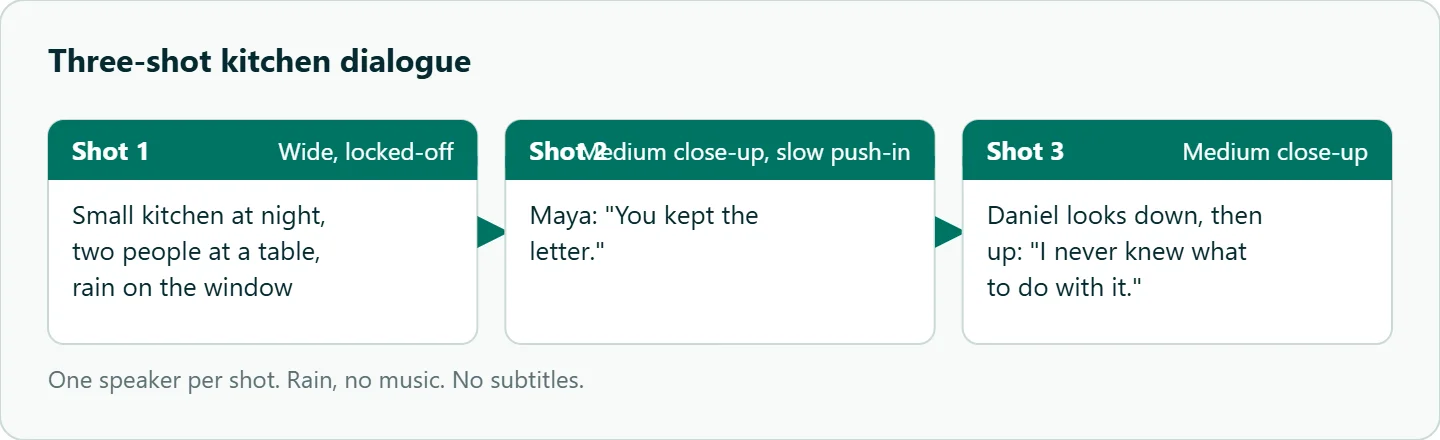
Shot 1: wide, locked-off, a small kitchen at night, two people at a table, rain on the window. Ambient sound only.
Shot 2: medium close-up on MAYA (30s, grey cardigan), slow push-in.
Dialogue (Maya, quiet, English): "You kept the letter."
Shot 3: medium close-up on DANIEL (30s, dark shirt), he looks down, then up.
Dialogue (Daniel, low and unsteady, English): "I never knew what to do with it."
Rain, no music. No subtitles. Same faces and wardrobe throughout.
Each line lives in its own shot with one speaker in frame. If one line fails, you can regenerate that shot alone with the same character description. Keeping the two faces stable across shots is its own topic; our Seedance character consistency guide covers references and locked description blocks.
Voice references and keeping a voice steady
On OceanToken, Seedance 2.5 accepts up to 10 audio files in input_references. Give each one a job, as Runway's examples do when they bind a voiceover reference and add "generate no other voice." An unexplained audio reference can bleed into the whole mix. We found no first-party statement on how closely a reference voice is reproduced, so treat it as a way to steer timbre rather than a clone.
If you are scoring the scene with a song, our Seedance music video prompt guide covers how to keep the model from inventing a second soundtrack.
When the lip sync breaks
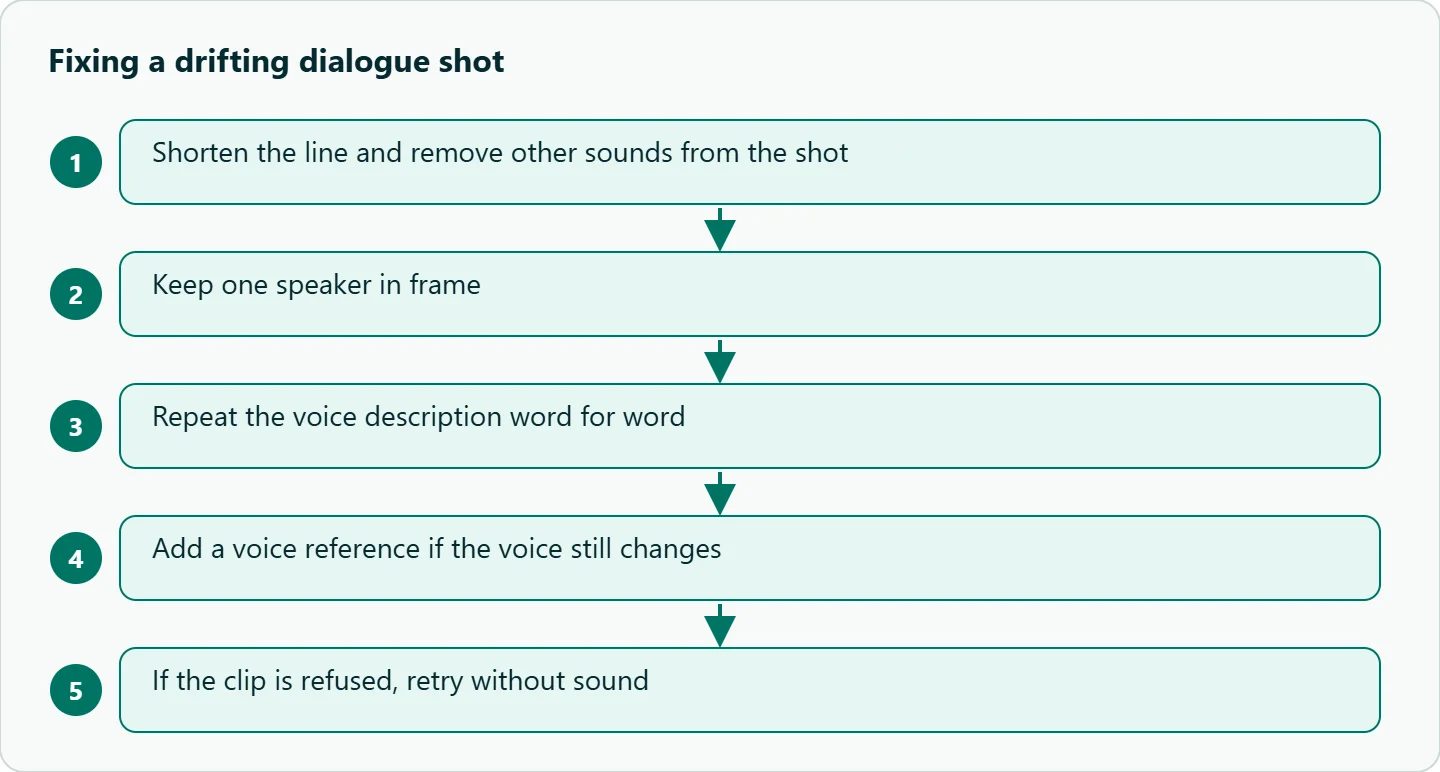
| Symptom | First fix |
|---|---|
| Mouth moves, wrong words | Shorten the line; remove other sounds from that shot |
| Voice changes between shots | Repeat the voice description verbatim, or add a voice reference |
| Lines land on the wrong person | Split into single-speaker shots |
| Subtitles appear | End with "No subtitles" |
| Clip refused | Retry without sound; real-person reference images are usually refused |
The last row comes from OceanToken's model page, which says a clip with generated sound "can also be refused over its soundtrack" and that real-person reference images are usually refused.
How to test this on your workload
We have not scored lip sync, so test your own characters and language before a full scene:
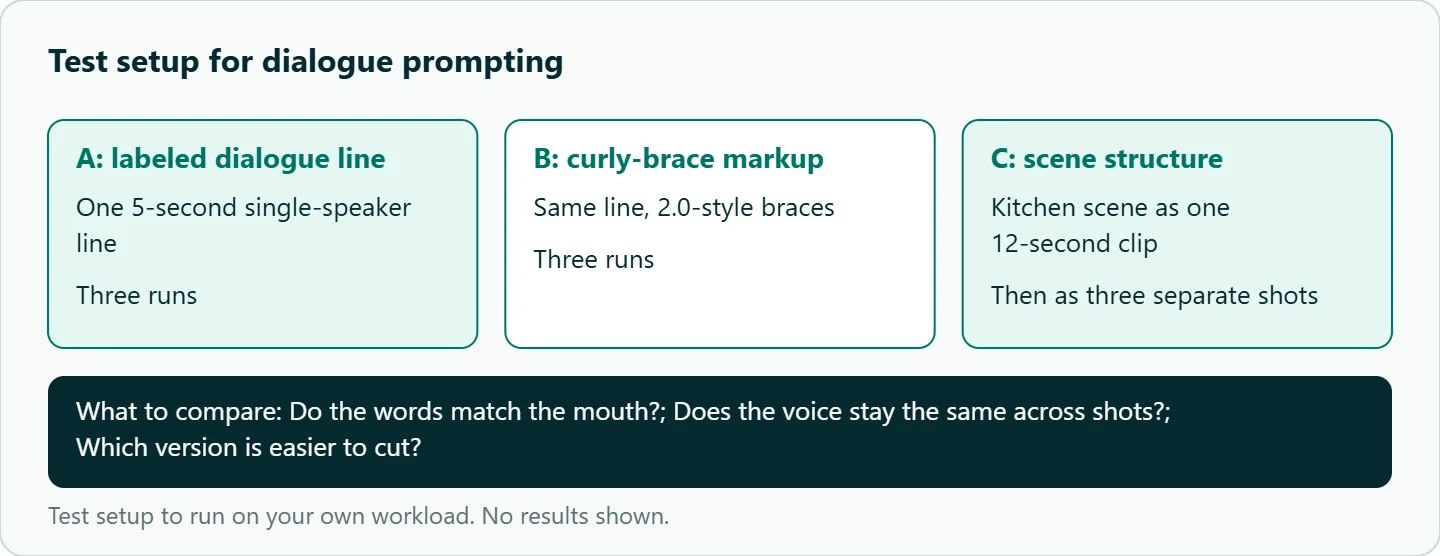
- Write one 5-second single-speaker line and run it three times as a labeled dialogue line and three times with 2.0-style curly braces.
- Run the kitchen scene once as a single 12-second generation and once as three separate shots.
- For each take, note whether the words match the mouth, whether the voice stays the same across shots, and which version is easier to cut.
- If you need a language other than English or Chinese, mark it and repeat step 1 in that language.
Our take: For ads and short drama, generate dialogue one speaker at a time and let the edit carry the conversation. It costs more clips, but a failed line means regenerating one short shot instead of the whole scene. A clean two-person single take is a bonus, not a plan.
Running it on OceanToken
Seedance 2.5 is bytedance/seedance-2.5 at https://api.oceantoken.ai/v1, with generate_audio, clips from 4 to 30 seconds and audio references in one request schema. The Seedance 2.5 model page lists bytedance/seedance-2.5-upscaled for 720p and 1080p, but for close-up dialogue we would stay on the native id.
Dialogue work means retakes, so two things help. Refused or failed jobs are not charged; the held amount goes back to your balance. Billing is prepaid with no subscription, on one key that also runs other video models. See the current rate on /seedance-api.
FAQ
Does Seedance generate the voice or do I upload audio? It generates audio with the video when generate_audio is true. You can also attach audio references to steer the voice.
Which languages work for dialogue? ByteDance publishes no list. Runway's guides say to mark any language other than English or Chinese; test yours first.
Can two characters talk in one shot? It can work, but ByteDance names multi-subject interaction as a weak spot. Separate shots are safer.
Which markup should I use? On 2.5, plain labeled lines such as Dialogue (Maya): "...". The curly-brace style comes from 2.0 guides.
Why was my dialogue clip refused? The soundtrack itself can trigger a refusal. Retry without sound, and avoid real-person reference images.
Sources
- ByteDance Seed: Introducing Seedance 2.5 (checked 2026-11-10)
- ByteDance Seed: Seedance 2.0 (checked 2026-11-10)
- Runway: Seedance 2.5 prompt guide (checked 2026-11-10)
- Runway: Seedance 2.0 prompt guide (checked 2026-11-10)
- OceanToken docs: Seedance 2.5 request schema (checked 2026-11-10)
- OceanToken: Seedance 2.5 model page (checked 2026-11-10)
- OceanToken Seedance API page (checked 2026-11-10)
Get your OceanToken API key
- Create an OceanToken account and an API key.
- Copy the snippet below, paste your key, and run it.
- Check the current rate on /seedance-api.
curl https://api.oceantoken.ai/v1/videos \
  -H "Authorization: Bearer $OCEANTOKEN_API_KEY" \
  -H "Content-Type: application/json" \
  -d '{"model": "bytedance/seedance-2.5", "prompt": "Medium close-up, locked-off. A woman in her 30s looks at the camera. Dialogue (woman, dry low voice, English): \"I told you it would rain.\" Ambient room sound only. No music. No subtitles.", "duration": 5, "resolution": "480p", "generate_audio": true}'
More from the blog
A Unified API for Chat, Image and Video
Building on a unified API for chat, image and video: sync vs async calls, billing units, retries, timeouts and storage, with three calls and a launch checklist.
Kimi K3 API International Access Guide
Use the Kimi K3 API internationally: sign up with email, pay by card, create one key and call moonshotai/kimi-k3 with an OpenAI SDK. Steps, code and checks.
Call Tencent Hy3 With the OpenAI SDK
Call Tencent Hy3 with the OpenAI SDK outside China: base URL, model id, streaming, tool calls, reasoning_effort values, Hy3 vs Hy3 preview, and token billing.