

Seedance n8n Workflow: Sheet Row to Video
A Seedance n8n workflow that turns sheet rows into video jobs: submit, wait, poll with a cap, download, and error branches keyed to the API's failure codes.
By OceanToken Team

Editor's note: Most Seedance n8n flows that fail in production fail in the loop, not the request. They poll forever, retry a clip the moderation filter already refused, or lose the job id when the instance restarts. Write the job id back to the sheet before you wait, cap the loop, and branch on the error code. Those three habits matter more than any node choice.
Short answer: For Seedance in n8n, use an HTTP Request node to POST /v1/videos, write the returned id to your sheet, then loop a Wait node and a status check until the job is completed or failed, with a hard cap on attempts. Download the MP4 as a binary file. On failed, branch on error.code: retry rate_limited and timeout, never content_filtered.
Why Seedance needs a loop in n8n
A Seedance clip is an asynchronous job. You submit it, get an id back, and the video exists only minutes later. OceanToken's video guide says "a clip usually takes a few minutes" and recommends polling every 10 to 20 seconds. A single HTTP Request node cannot sit and wait for that, so the workflow needs a loop: check, wait, check again.
The status values are short and fixed. A job moves from queued to in_progress to completed or failed. Once it is completed, the job includes a content_url, and GET /v1/videos/{id}/content returns the MP4. That gives your IF node exactly three cases to handle: done, failed, still running.
This article covers the n8n wiring. For the request fields themselves, see our Seedance API parameters guide, and for the same flow in plain Python, the Seedance API quickstart.
The sheet that drives the workflow
Give each row the columns the workflow reads and writes: row_id, prompt, duration, resolution, status (your own values such as ready, submitted, done, failed), job_id, attempt, video_link and error. Your status vocabulary and the API's are different things; keep them in separate columns so a reviewer never confuses "submitted" with queued.
Validate rows before you submit them. The Seedance 2.0 docs allow 4 to 15 seconds, and the video guide says an unsupported duration returns 400 invalid_request "before anything runs or is charged." That is cheap, but it still breaks the loop. A Set or Code node that rejects out-of-range rows keeps those errors in the sheet instead of in your execution log. If you use an -upscaled model such as bytedance/seedance-2.5-upscaled, also reject 480p: those models make only 720p and 1080p.
Seedance n8n nodes: submit, wait, check
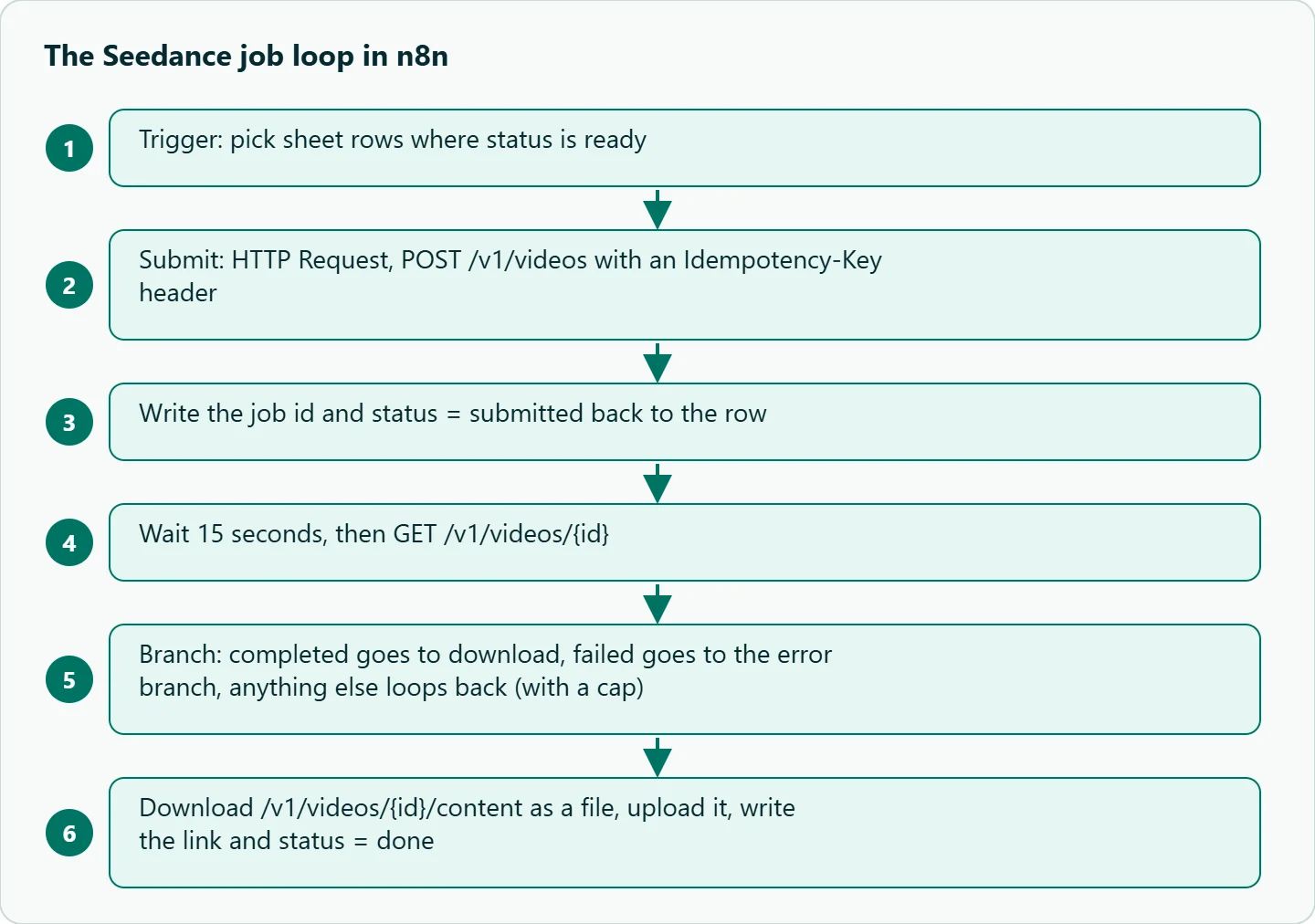
1. Trigger. A schedule or a Google Sheets trigger that picks rows where status is ready.
2. Submit. An HTTP Request node, POST https://api.oceantoken.ai/v1/videos. For authentication, n8n's generic Header Auth credential holds Authorization: Bearer <key>, so the key never sits in the node text. Add a second header, Idempotency-Key, built from the row, for example {{ $json.row_id }}-{{ $json.attempt }}. The video guide says a retry after a network timeout then "returns the existing job instead of starting and charging a second one."
{
  "model": "bytedance/seedance-2.0",
  "prompt": "{{ $json.prompt }}",
  "duration": {{ $json.duration }},
  "resolution": "{{ $json.resolution }}",
  "generate_audio": true
}
3. Write the id back. Update the row with job_id and status = submitted immediately. If the instance restarts mid-wait, the next run can resume polling instead of submitting again.
4. Wait. A Wait node set to After Time Interval, 15 seconds. n8n's Wait node docs note that waits under 65 seconds keep the execution in memory, while longer waits offload it to the database. Short waits are fine for a few rows; see the two-workflow layout below for long queues.
5. Check. An HTTP Request node, GET https://api.oceantoken.ai/v1/videos/{{ $json.job_id }}, same credential.
6. Branch. A Switch or IF node on {{ $json.status }}: completed goes to download, failed goes to the error branch, anything else goes back to the Wait node. Count the loops with an attempt-style counter in a Set node and stop at a ceiling you choose, such as 40 checks at 15 seconds for a 10-minute limit.
7. Download. An HTTP Request node, GET /v1/videos/{{ $json.id }}/content, with Response Format set to File so n8n holds the MP4 as binary data. Upload it to Drive, S3 or Slack, then write the link and status = done to the row. The content_url is valid for 24 hours, so download inside the same run rather than storing the URL as your only copy.
Error branches that match the API's codes
A failed job carries an error object with a code. The video guide lists six, and they need different handling:
error.code |
What it means | What the branch should do |
|---|---|---|
content_filtered |
Refused by moderation | Do not retry. Mark the row and notify the author |
invalid_request |
Parameters refused or a reference URL unreadable | Do not retry. Fix the row |
rate_limited |
Model busy | Resubmit after about a minute |
timeout |
Job did not finish in time | Resubmit once |
temporarily_unavailable |
Model cannot take jobs now | Retry later, or switch model |
generation_failed |
Anything else | Retry once, then log the job id for support |
A resubmission is a new job, so increment attempt before it; the same Idempotency-Key would return the existing failed job. Separately, HTTP-level errors on the submit call need their own path. A 429 rate_limited response comes with a Retry-After header, according to the limits page , and a 400 can mean the balance cannot cover the job's estimated cost. Turn on Include Response Headers and Status in the HTTP Request node so the branch can read both. Use n8n's Retry On Fail setting only for network errors; for job-level failures, the table above is the safer logic.
From sheet rows to a finished three-shot ad
A content calendar is the obvious first use. Here three rows become one short perfume teaser, each row generated separately so the cuts stay hard:
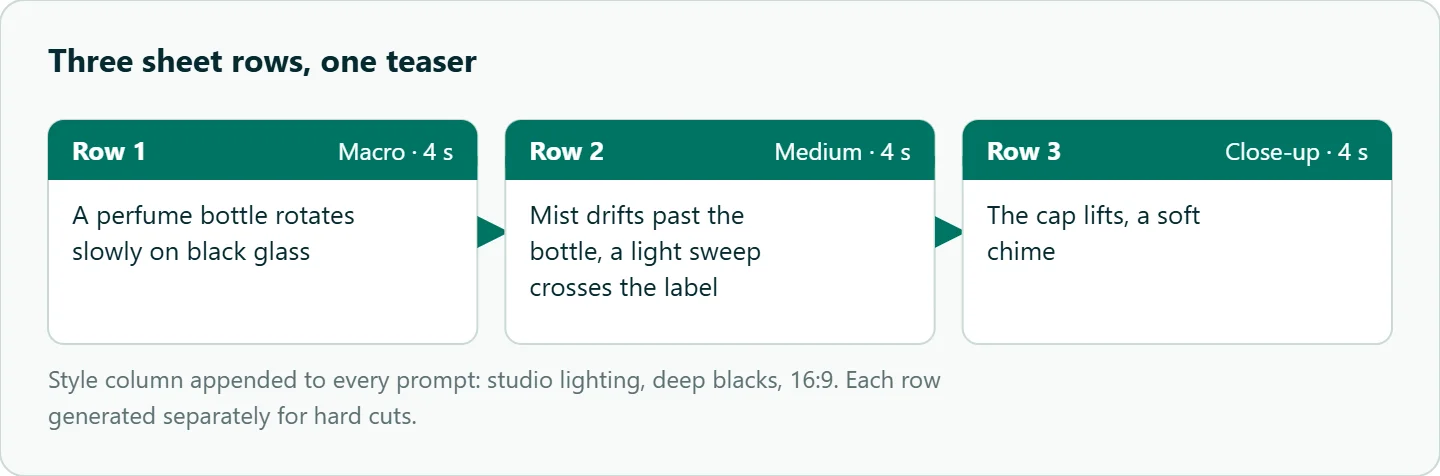
Row 1 (4 s): Macro, a perfume bottle rotates slowly on black glass.
Row 2 (4 s): Medium, mist drifts past the bottle, a light sweep crosses the label.
Row 3 (4 s): Close-up, the cap lifts, a soft chime.
Style column (appended to every prompt): studio lighting, deep blacks, 16:9.
Keeping the style sentence in its own column and concatenating it into each prompt is the simplest way to stop three rows drifting into three looks. Stitch the clips in your editor, or with ffmpeg if your n8n instance allows command execution.
One workflow or two
The single loop above is easy to read and fine for a handful of rows. For a sheet with dozens of rows, split it. Workflow A runs on a schedule, submits every ready row and writes the job ids back. Workflow B runs every minute or two, reads every submitted row, checks each job once and handles the result. No execution stays open for minutes, a restart loses nothing because the sheet is the record, and you can pause submitting without stranding jobs already in flight.
Add two guards before you leave either version running unattended. A kill-switch cell that Workflow A reads before each submit, and a daily summary to Slack or email with counts of done and failed rows, so a jump in failures shows up the same day. If prompts come from a public form, validate length and keep a human approval step before anything publishes.
How to test this on your workload
We have not timed this workflow for the article. Before you point it at a full sheet:
- Run three rows at 480p and 4 seconds on
bytedance/seedance-2.0. - Record submit-to-download time and how many loops each job used, then set your Wait interval and loop cap from that.
- Kill the workflow after the first submit and restart it; confirm it resumes polling instead of submitting again.
- Put one deliberately invalid duration in the sheet and confirm the row is rejected before submit.
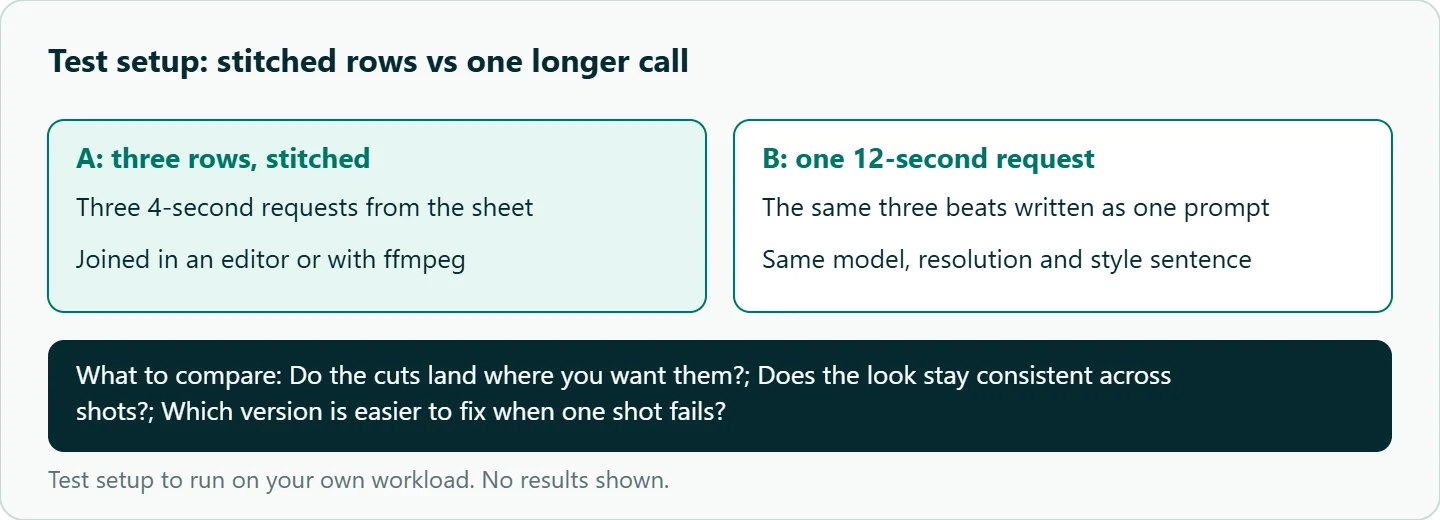
- Generate the same three-shot teaser as one 12-second request and compare it with the stitched version.
Our take: The early id write-back and the loop cap separate a demo from a flow you can leave running over a weekend. Once a sheet has more than a few rows, split submit and poll into two workflows, and treat content_filtered as a message to a human, never a retry.
Running it on OceanToken
Everything above uses OceanToken's video endpoint, https://api.oceantoken.ai/v1/videos, with bytedance/seedance-2.0. The fields are the same across Seedance versions, so moving a row to bytedance/seedance-2.5 for a longer take is a change in the model column. A failed job is not charged and its balance hold is released, which matters when an automation retries without anyone watching. Billing is prepaid with no subscription, and one key also runs Kling, Veo and Hailuo through the same HTTP Request nodes. See the current rate on /seedance-api.
FAQ
Do I need a custom n8n node for Seedance? No. Three HTTP Request nodes (submit, check, download) plus Wait and IF are enough.
How long should the Wait node wait? OceanToken's guide suggests polling every 10 to 20 seconds. Tune it from your own submit-to-download times.
Can n8n receive a webhook instead of polling? The OceanToken video guide does not describe callbacks, so poll.
Why did the same row produce two clips? Usually a resubmission without an Idempotency-Key or a missing job id write-back. Fix both.
How do I join the clips? Stitch them in an editor or with ffmpeg; keep codec, resolution and frame rate the same across rows.
Sources
- OceanToken docs: Video guide (checked 2026-11-11)
- OceanToken docs: Retries and failover (checked 2026-11-11)
- OceanToken docs: Limits (checked 2026-11-11)
- OceanToken docs: bytedance/seedance-2.0 (checked 2026-11-11)
- n8n docs: HTTP Request node (checked 2026-11-11)
- n8n docs: Wait node (checked 2026-11-11)
- n8n docs: Node settings (checked 2026-11-11)
- OceanToken Seedance API page (checked 2026-11-11)
Get your OceanToken API key
- Create an OceanToken account and an API key.
- Copy the snippet below, paste your key, and run it.
- Check the current rate on /seedance-api.
curl https://api.oceantoken.ai/v1/videos \
  -H "Authorization: Bearer $OCEANTOKEN_API_KEY" \
  -H "Content-Type: application/json" \
  -H "Idempotency-Key: row-1-1" \
  -d '{"model": "bytedance/seedance-2.0", "prompt": "Macro, a perfume bottle rotates slowly on black glass", "duration": 4, "resolution": "480p"}'
More from the blog
A Unified API for Chat, Image and Video
Building on a unified API for chat, image and video: sync vs async calls, billing units, retries, timeouts and storage, with three calls and a launch checklist.
Kimi K3 API International Access Guide
Use the Kimi K3 API internationally: sign up with email, pay by card, create one key and call moonshotai/kimi-k3 with an OpenAI SDK. Steps, code and checks.
Call Tencent Hy3 With the OpenAI SDK
Call Tencent Hy3 with the OpenAI SDK outside China: base URL, model id, streaming, tool calls, reasoning_effort values, Hy3 vs Hy3 preview, and token billing.