

Seedance Image to Video: First-Frame Guide
Seedance image to video on the API: how to send a first frame, the input limits that fail jobs, why the frame sets the aspect ratio, and motion prompts.
By OceanToken Team
Editor's note: When an animated still disappoints, look at the still first. A clean image cropped to the right shape, with room around the subject and a one-line motion prompt, does more than a beautiful photo with a paragraph of instructions. Spend the first ten minutes on the image. The prompt is the easy part once the frame is right.
Short answer: For Seedance image to video, send your still as a public https URL in the short first_frame field, or use the full frame_images form with frame_type: first_frame, which also accepts a data URL. Crop it to your delivery ratio first, because on Seedance 2.5 the frame's shape always wins. Then write a prompt that describes only what moves.
What image-to-video changes
In text-to-video, the model invents the opening frame. In image-to-video, your still is the opening frame: subject, palette, lighting and composition come from it, and the prompt supplies motion, camera and sound. You control the look and the model controls the movement, so when the picture has to match a brand, image-to-video is more controllable than describing the scene in text.
It also means the still's flaws travel into the clip. A tight crop leaves the camera nowhere to go, a haloed cut-out edge stays visible as the subject moves, and a label with tiny text has to survive every frame. This guide covers the first-frame input and the motion prompt. For every other request field, see our Seedance API parameters guide.
How to send the image: Seedance image to video API fields
On OceanToken, the Seedance 2.5 schema (bytedance/seedance-2.5) has a frame_images array with at most two items, each shaped like this:
{"type": "image_url", "frame_type": "first_frame", "image_url": {"url": "https://example.com/cup.jpg"}}
The video guide also accepts shorter forms, "first_frame": "https://..." and "last_frame": "https://...", and OpenAI's input_reference for the first frame. The limits that actually fail jobs are in the guide, not the schema:
| Rule | What happens if you break it |
|---|---|
| Image is a public https URL or a data URL | A URL the model cannot fetch fails the job with invalid_request |
| Each file up to 25 MB | Larger files are rejected |
| Whole request under 10 MB where you can | Large data URLs bloat the request; send big images as URLs |
| Frames or references, not both, on Seedance | Sending both is refused with 400 |
The last row is the one people hit when they try to add a style reference to an image-to-video job. Choose one mode per request. The guide does not list accepted file formats, so stick with ordinary JPEG or PNG and confirm on your first job.
Aspect ratio: the frame decides
The video guide is explicit. On Seedance, a request with a first frame and no aspect_ratio follows the frame: "a portrait frame gives a portrait clip." On bytedance/seedance-2.5 it goes further: a clip with a frame "always keeps the frame's shape," and a different aspect_ratio is left out.
So cropping is your job, and that is a good thing. Crop the still to the delivery ratio yourself, in an image editor, so you decide what gets cut instead of discovering it in the clip. If you need both a 16:9 and a 9:16 version, make two stills.
Settings that matter, in order
Settle these before you start judging motion, because changing them later changes the framing and you end up re-judging everything.
Resolution. The schema lists 480p, 720p and 1080p, and notes lower is faster and cheaper. Draft at 480p until the motion is right, then re-render the winners. OceanToken's model page says native rendering is still best for tiny text and close-up faces, which matters if your still has a label.
Duration. The schema allows 4 to 30 seconds, default 5. A still holds limited information, and a long clip forces the model to invent more of the scene. Start short, and lengthen only once the opening seconds hold.
Sound. generate_audio is true for a clip with sound, false for silent. Decide up front whether you want generated ambience or will lay your own track, and say so in the prompt.
Seed. Pass a fixed seed once a take looks promising, so you can change one thing at a time.
Prepare the input image
Most of the quality comes from here. Fix these before the first render:
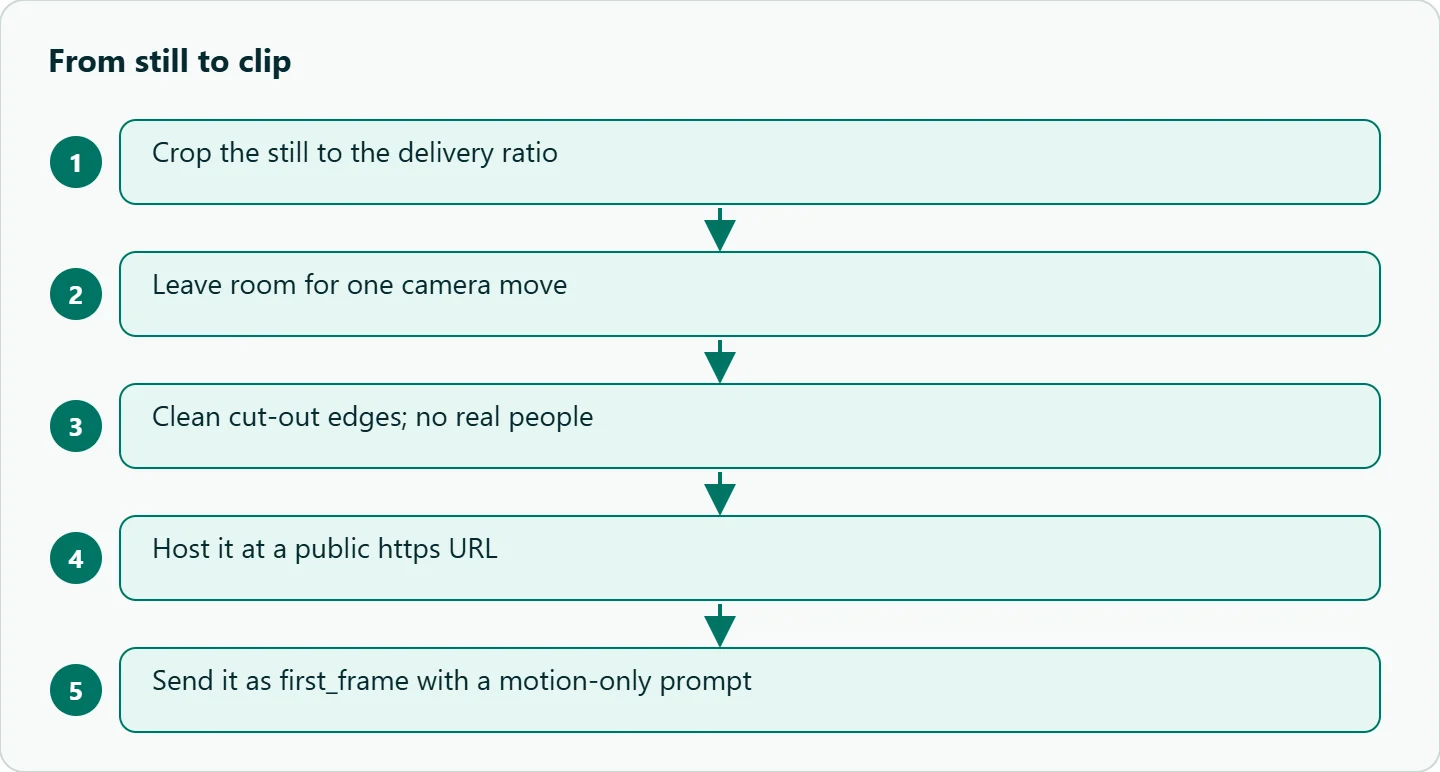
- No real people. OceanToken's model page says Seedance 2.5 "usually refuses reference images that show a real person." Illustrated, 3D or AI-generated characters work.
- Leave room for the move. A push-in needs space around the subject; a pan needs scene beyond the edge.
- Clean edges. Remove cut-out fringes and heavy sharpening. Anything odd at an edge becomes visible once things move.
- Keep text minimal. Labels and logos have to hold across every frame; plain surfaces are safer.
Write the motion prompt
Describe change, not content. The image already says what is there. A template to start from:
[subject] [action], [camera move], [light or atmosphere], [sound]
For example: "Steam rises from the cup, slow push-in, soft window light, quiet room tone." One camera move per clip is plenty; our Seedance camera language cheat sheet has the vocabulary. If you also send a last frame, put both images in the request rather than describing them: Runway's Seedance 2.5 guide warns that start and end frames described only in prose can drift "away from either one."
Here is a four-shot product sequence built from four stills of one sneaker, one request per shot. It is a template, not a result we are showing.
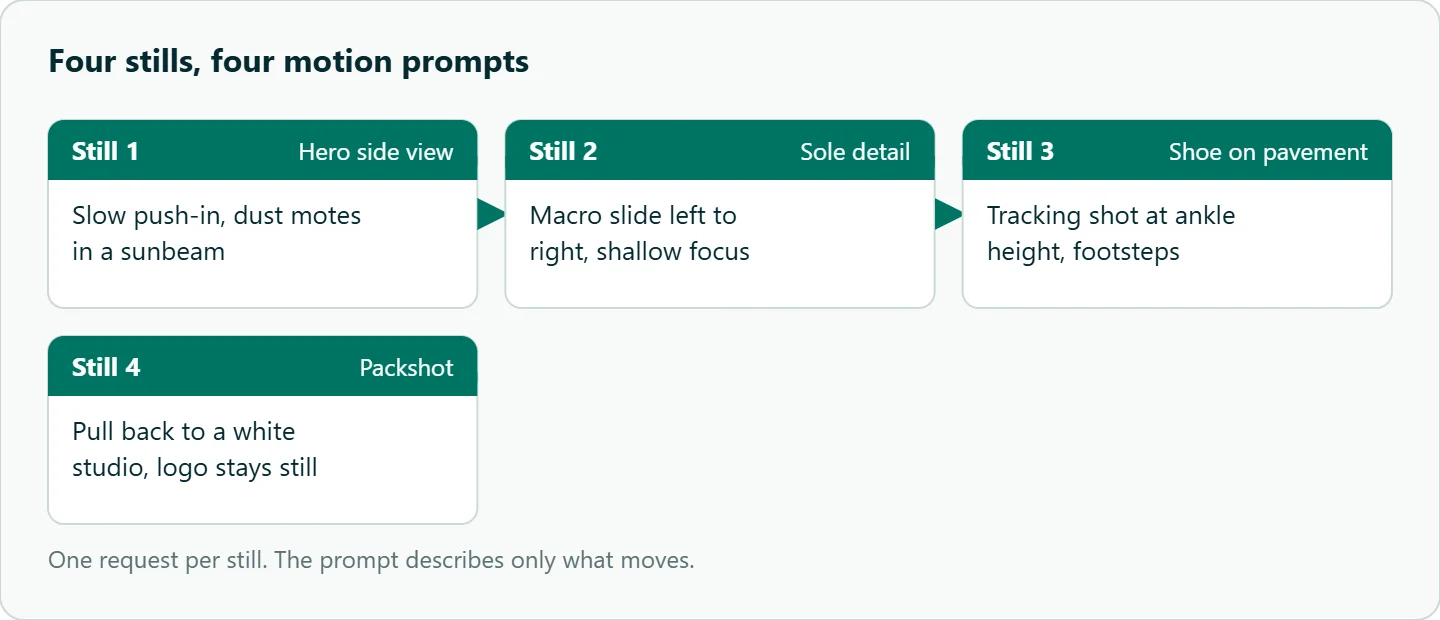
Still 1, hero side view: slow push-in, dust motes in a sunbeam.
Still 2, sole detail: macro slide left to right, shallow focus.
Still 3, shoe on pavement: tracking shot at ankle height, footsteps.
Still 4, packshot: camera pulls back to reveal a white studio, the logo stays still.
A request template
This follows the create, poll and download pattern in the OceanToken video guide:
import os, sys, time, requests

BASE = "https://api.oceantoken.ai/v1"
H = {"Authorization": f"Bearer {os.environ['OCEANTOKEN_API_KEY']}"}

r = requests.post(f"{BASE}/videos", headers=H, json={
    "model": "bytedance/seedance-2.5",
    "prompt": "Steam rises from the cup, slow push-in, soft window light",
    "seconds": "5",
    "resolution": "480p",
    "first_frame": "https://example.com/cup.jpg",
})
if not r.ok:
    sys.exit(f"{r.status_code} {r.text}")
video_id = r.json()["id"]

while True:
    job = requests.get(f"{BASE}/videos/{video_id}", headers=H).json()
    if job["status"] not in ("queued", "in_progress"):
        break
    time.sleep(10)
if job["status"] != "completed":
    sys.exit(f"failed: {job.get('error')}")

open(f"{video_id}.mp4", "wb").write(requests.get(f"{BASE}/videos/{video_id}/content", headers=H).content)
How to test this on your workload
We have not run a comparison for this article. Before you batch a catalog, test one still:
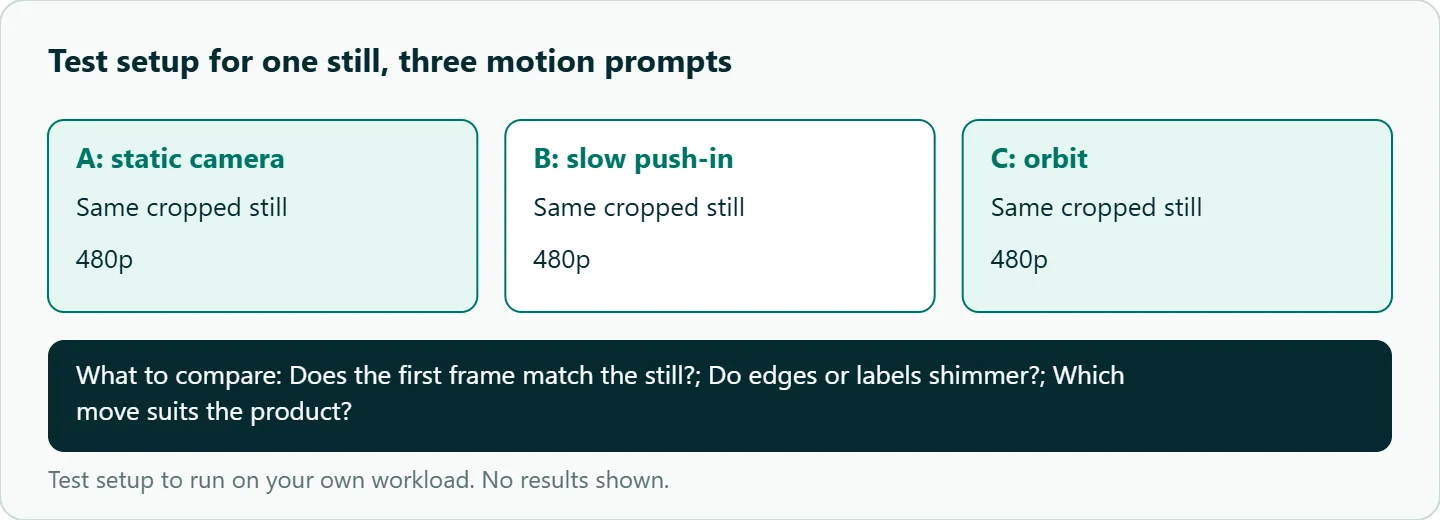
- Crop one product still to your delivery ratio and leave room around the subject.
- Run it three times at 480p with three motion prompts: static camera, slow push-in, orbit.
- Check whether the first frame matches your still, whether edges or labels shimmer, and which move suits the product.
- Re-render the best one at your final resolution.
Our take: Treat image-to-video as a layout and lighting job you finish before the model sees anything. Crop to the final ratio, leave room for one camera move, and keep the prompt to what moves.
Running it on OceanToken
Seedance 2.5 is bytedance/seedance-2.5 at https://api.oceantoken.ai/v1, and the Seedance 2.5 model page also lists bytedance/seedance-2.5-upscaled for 720p and 1080p. Iterating on a still means many short drafts, and a failed job is not charged; its hold is released.
Billing is prepaid with no subscription, on one key that also runs other video models, so animating the same still elsewhere is a change of model id. See the current rate on /seedance-api.
FAQ
Which field carries the image? The short first_frame field takes a public https URL. The full frame_images form with frame_type: first_frame also accepts a data URL.
Why does my clip ignore my aspect ratio? On Seedance 2.5 a clip with a frame keeps the frame's shape. Crop the still first.
Can I add reference images too? Not in the same request on Seedance. Frames or references, not both; sending both returns 400.
Can I animate a photo of a real person? Usually not. Real-person reference images are usually refused; illustrated or AI-generated characters work.
Why did my job fail with invalid_request? Often the model could not fetch your image URL. Make sure it is public and served over https.
Sources
- OceanToken docs: Video guide (checked 2026-11-10)
- OceanToken docs: Seedance 2.5 request schema (checked 2026-11-10)
- OceanToken: Seedance 2.5 model page (checked 2026-11-10)
- Runway: Seedance 2.5 prompt guide (checked 2026-11-10)
- OceanToken Seedance API page (checked 2026-11-10)
Get your OceanToken API key
- Create an OceanToken account and an API key.
- Copy the snippet below, paste your key, and run it.
- Check the current rate on /seedance-api.
curl https://api.oceantoken.ai/v1/videos \
  -H "Authorization: Bearer $OCEANTOKEN_API_KEY" \
  -H "Content-Type: application/json" \
  -d '{"model": "bytedance/seedance-2.5", "prompt": "Steam rises from the cup, slow push-in, soft window light", "seconds": "5", "resolution": "480p", "first_frame": "https://example.com/cup.jpg"}'
More from the blog
A Unified API for Chat, Image and Video
Building on a unified API for chat, image and video: sync vs async calls, billing units, retries, timeouts and storage, with three calls and a launch checklist.
Kimi K3 API International Access Guide
Use the Kimi K3 API internationally: sign up with email, pay by card, create one key and call moonshotai/kimi-k3 with an OpenAI SDK. Steps, code and checks.
Call Tencent Hy3 With the OpenAI SDK
Call Tencent Hy3 with the OpenAI SDK outside China: base URL, model id, streaming, tool calls, reasoning_effort values, Hy3 vs Hy3 preview, and token billing.