

Seedance: Extend Video From the Last Frame
Extend a Seedance video from its last frame: chain clips with first_frame, use the extend task when identity matters, and know when a hard cut works better.
By OceanToken Team
Editor's note: Chaining clips from the last frame is the tool people reach for first, and it should usually be the third. Every link is a fresh generation that can change the face, the jacket and the light, and the request format stops you from attaching a character reference to the same call. Try one long take, then the extend task, and keep last-frame chaining for the scenes that truly cannot cut.
Short answer: To extend a Seedance video from its last frame, send clip N's final frame as first_frame for clip N+1 and repeat the same character description in every prompt. A request carries frames or references, not both, so if you also need a character image, use the extend task with the earlier clip as a video reference.
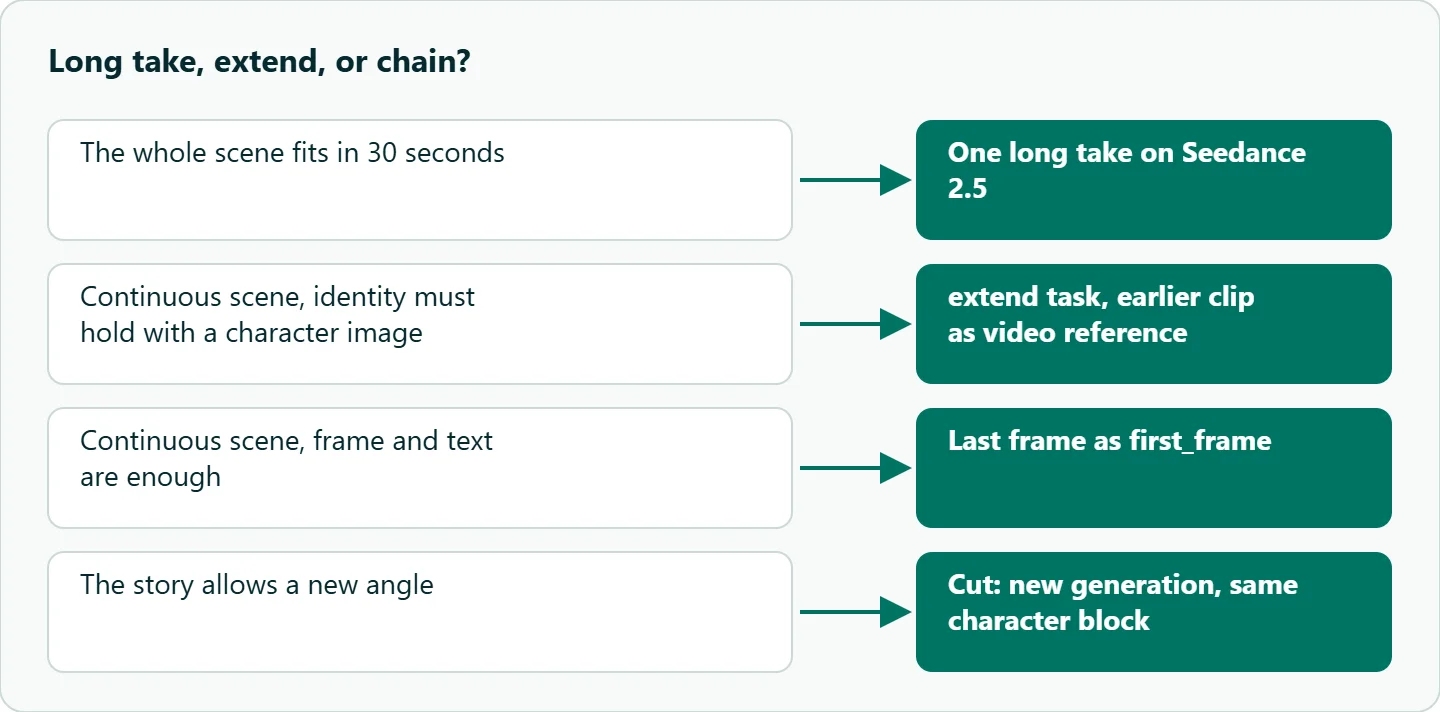
Three ways to make a Seedance scene longer
There are three tools, and they trade length against control differently.
One long take. On Seedance 2.5 a single request can run 4 to 30 seconds, per the Seedance 2.5 model docs , against 4 to 15 on Seedance 2.0 . If the whole scene fits in 30 seconds, there are no seams to hide. That is why it comes first.
The extend task. Both versions list omni_reference_task_type with an extend value, which "continues" the reference video you send. ByteDance's Seedance 2.5 launch post says 2.5 "supports multiple rounds of extension" and keeps characters, environments and pacing consistent while it does. Because this is a reference request, you can add character images alongside the video.
Last frame as first frame. Pull the final frame of one clip and use it to start the next. It works on any Seedance version, needs nothing but an image, and gives a pixel-exact join. Its weakness is that the frame is all the model gets to see.
The rule that shapes every chain: frames or references
OceanToken's video guide says it plainly: on Seedance, "a request carries frames or references, not both," and sending both returns 400.
That rules out the recipe many prompt guides suggest, where clip 2 starts from clip 1's last frame and also carries the original character image "for identity." You cannot send that request. A last-frame link has to hold identity with the frame and the text alone, and that is why drift builds up across links.
If identity has to be reinforced, switch modes. Send the earlier clip as a video_url reference with omni_reference_task_type: "extend", add your character sheet as image_url references, and write the prompt as a continuation. Seedance 2.0 takes up to 9 images and 3 videos per request; 2.5 takes up to 30 images and 10 videos. On 2.5, set the task type explicitly: the default there is reference, which builds a new clip rather than continuing one.
Extend a Seedance video from a clean last frame
You can ask for it: both the 2.0 and 2.5 docs list return_last_frame, which adds a last_frame_url JPEG to the finished job; like the MP4 link, it stays valid for 24 hours. The docs add that where it is not available it is ignored and no last_frame_url comes back, so keep an ffmpeg fallback:
ffmpeg -sseof -0.1 -i clip1.mp4 -frames:v 1 -update 1 last1.png
Look at the frame before you use it. If the final frame is mid-blink or motion-blurred, pick one a few frames earlier; whatever is wrong in that image becomes the first thing in the next clip. Upload it somewhere that serves a public https URL, or send a data URL; the guide says each image can be up to 25 MB but suggests keeping the whole request under 10 MB, so large frames are better sent as URLs.
Two shape rules prevent surprises. Keep one resolution and one aspect ratio for the whole chain. And on 2.5, remember that a frame always sets the clip's shape: a different aspect_ratio is dropped and named in the x-oceantoken-dropped-params response header rather than refused.
The character block, word for word
Since the frame carries most of the identity, the prompt has to carry the rest consistently. Write one block per character and paste it unchanged into every link:
MAYA, 30s, shoulder-length black hair, grey wool cardigan, silver hoop earrings, small scar over left eyebrow.
Rewording it between links invites a new interpretation. Put the lighting and location in a fixed scene sentence too, since a light change at a seam is as visible as a new face. For more on keeping a character stable across separate shots, see our Seedance character consistency guide.
A three-clip platform scene
Here is a 30-second train-platform scene planned as three 10-second links on bytedance/seedance-2.0. On 2.5 the same six beats could be one request; that is the first thing to try.
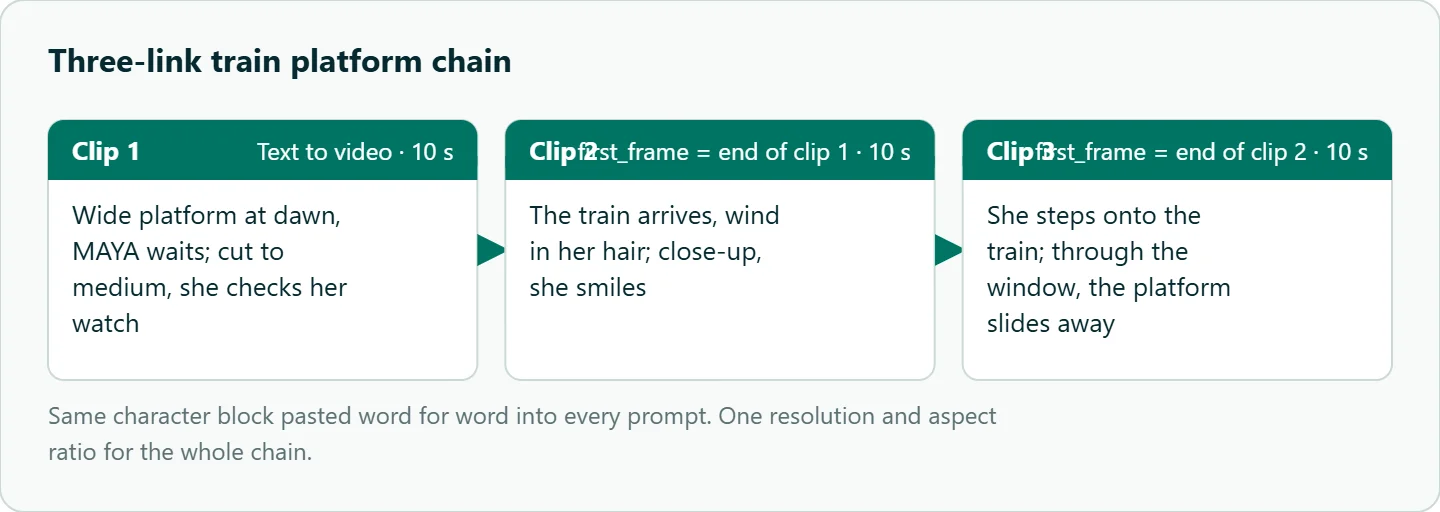
Clip 1 (text to video): Wide, a train platform at dawn. MAYA [character block] waits with a suitcase.
  Cut to medium: she checks her watch. Ambient station sound, no music.
Clip 2 (first_frame = last frame of clip 1): Same character block. Medium, the train arrives,
  wind in her hair. Close-up, she smiles.
Clip 3 (first_frame = last frame of clip 2): Same character block. She steps onto the train,
  camera tracks. Through the window, the platform slides away.
If MAYA's face has drifted by clip 3, redo clip 3 as an extend request instead: clip 2 as the video reference, your original character image as an image reference, and the same prompt text.
Cutting around the seam
Even a good join can show. A cut placed as a movement starts hides more than a cut between two still frames, because the eye follows the motion instead of checking details. A brief close-up insert, such as hands or a detail of the suitcase, gives you a buffer between links. A short cross-dissolve is the last resort; on nearly identical frames it can make a mismatch more noticeable, not less.
The bigger editorial question is whether the scene needs to be continuous at all. If the story allows a new angle, a fresh generation with the same character block, or a reference request, avoids the seam entirely.
How to test this on your workload
We have not run these chains for this article. A test that tells you which method suits your scene:
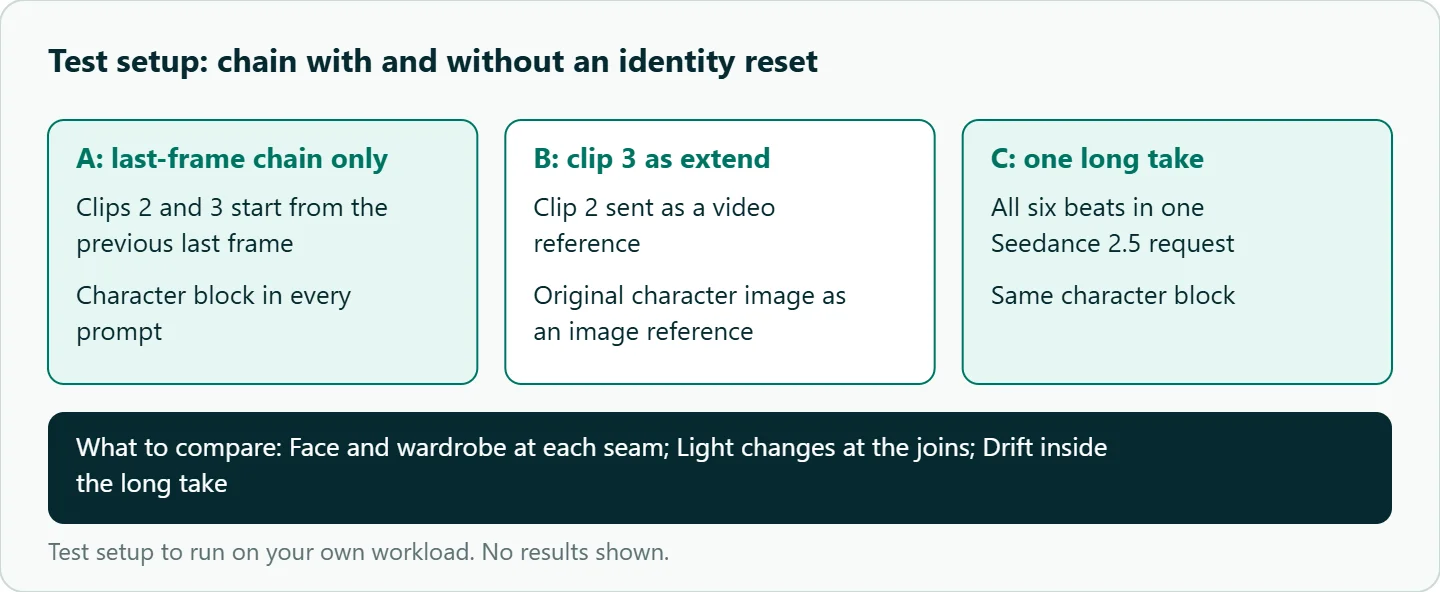
- Generate the three-link chain above with last-frame chaining only.
- Generate it again, but make clip 3 an
extendrequest with the character image attached. - On Seedance 2.5, generate the whole scene as one 30-second request.
- Compare face, wardrobe and light at each seam, and inside the long take.
- Separately, run clip 2 twice: once with the character block pasted word for word, once paraphrased, and compare.
Our take: Chain from the last frame only when the scene is truly continuous and short. Prefer a single 2.5 long take, then the extend task when identity matters, and remember the frames-or-references rule before you design a pipeline around it. When you can cut to a new angle, cut.
Running it on OceanToken
On OceanToken all three methods use the same endpoint, POST https://api.oceantoken.ai/v1/videos, and the same fields across Seedance versions, so moving a chain from bytedance/seedance-2.0 to bytedance/seedance-2.5 is a change of model id. For first-frame details, see our Seedance image to video guide. A chain means more generations than a single shot, and a failed job is not charged, its hold released. Billing is prepaid with no subscription, on one key that also runs other video models. See the current rate on /seedance-api.
FAQ
Does Seedance have a last-frame output? Yes. Seedance 2.0 and 2.5 both list return_last_frame, which returns a last_frame_url; if none comes back, extract the frame with ffmpeg.
Can I send a first frame and a character reference together? No. On Seedance a request carries frames or references; both returns 400.
What is the difference between extend and last-frame chaining? extend continues a reference video and allows image references too. Last-frame chaining starts a new clip from a single image.
How long can one Seedance clip be? 4 to 15 seconds on 2.0 and 4 to 30 seconds on 2.5, per the model docs.
Should I mix 720p and 1080p links in one chain? No. Keep one resolution and aspect ratio for the whole chain.
Sources
- OceanToken docs: Video guide (checked 2026-11-11)
- OceanToken docs: bytedance/seedance-2.5 (checked 2026-11-11)
- OceanToken docs: bytedance/seedance-2.0 (checked 2026-11-11)
- ByteDance Seed: Introducing Seedance 2.5 (checked 2026-11-11)
- OceanToken Seedance API page (checked 2026-11-11)
Get your OceanToken API key
- Create an OceanToken account and an API key.
- Copy the snippet below, paste your key, and run it.
- Check the current rate on /seedance-api.
curl https://api.oceantoken.ai/v1/videos \
  -H "Authorization: Bearer $OCEANTOKEN_API_KEY" \
  -H "Content-Type: application/json" \
  -d '{"model": "bytedance/seedance-2.0", "prompt": "MAYA, 30s, shoulder-length black hair, grey wool cardigan, silver hoop earrings, small scar over left eyebrow. Medium, the train arrives, wind in her hair. Close-up, she smiles.", "duration": 10, "resolution": "720p", "first_frame": "https://example.com/last1.png"}'
More from the blog
A Unified API for Chat, Image and Video
Building on a unified API for chat, image and video: sync vs async calls, billing units, retries, timeouts and storage, with three calls and a launch checklist.
Kimi K3 API International Access Guide
Use the Kimi K3 API internationally: sign up with email, pay by card, create one key and call moonshotai/kimi-k3 with an OpenAI SDK. Steps, code and checks.
Call Tencent Hy3 With the OpenAI SDK
Call Tencent Hy3 with the OpenAI SDK outside China: base URL, model id, streaming, tool calls, reasoning_effort values, Hy3 vs Hy3 preview, and token billing.