

Seedance Character Consistency: 6 Methods
Seedance character consistency in practice: a headshot plus full-body reference, a locked description block, an anchor shot, last-frame chaining and seeds.
By OceanToken Team
Editor's note: Perfect character consistency is not on offer from any video model today, and anyone selling it is selling a workflow plus a lot of retakes. We aim for "consistent enough that an editor can cut it." The good news is that most drift comes from a few fixable habits: a muddled reference, a description that changes wording between prompts, and long chains with nothing to pull them back.
Short answer: For Seedance character consistency, attach a close-up headshot and a separate full-body image of the character, paste the same locked description block into every prompt, and keep the subject noun constant. Reuse a good take as an anchor, chain last frame to first frame where pose continuity matters, and reuse seeds. Outputs still vary, so plan retakes.
Method 1: A two-image reference with a stated role
Runway's Seedance 2.0 guide gives the clearest advice we found: "A close-up headshot alongside a full-body image works better than one mixed reference." The reason is scale. A single full-length image gives "facial features too small a share of the frame to anchor on." The same guide discourages multi-view character sheets, because "the model can read as several different people." That runs against a common habit, so it is worth stating plainly: two clean images beat one busy sheet.
Say what each image is for. Runway puts it as "an unlabeled reference leaves the model free to borrow anything from it," which with a character means the background and lighting of your reference photo can follow her into every scene.
Image 1 is the character's face: Mara, a woman in her 30s with a short black bob.
Image 2 is the character's full outfit: green waxed raincoat, dark jeans, silver hoop earring.
Seedance 2.5 accepts up to 30 reference images, but more is not better here. Runway notes that four to five assets in total tends to work better than filling the limit.
Method 2: A locked description block
A Seedance consistent character starts with words. Write one block per character and paste it unchanged into every prompt: age, hair, one distinctive feature, outfit. Paraphrasing between shots ("green raincoat" in one, "olive jacket" in the next) gives the model permission to change the costume. Runway's examples do the same in their own words, ending with lines such as "the dog keeps the same coat, build, and markings in every shot."
Mara: a woman in her 30s, short black bob, green waxed raincoat, dark jeans, a single silver hoop earring in her left ear. Mara keeps the same face, hair and outfit in every shot.
Method 3: Keep the subject noun constant
Call the character the same thing every time. If shot one says "Mara" and shot three says "the traveler," the model may treat them as two people. Pick a name or a fixed noun and do not vary it for style.
Method 4: An anchor shot
Generate one shot where face, wardrobe and palette all land the way you want. Then use it as the reference for the others: as an image, or as a video in input_references (Seedance 2.5 takes up to 10 videos). The anchor carries information that a still photo cannot, such as how the coat moves. We have not measured how much this helps on 2.5, so treat it as a technique to test, not a rule.
Method 5: Last frame as the next first frame
Seedance 2.5's return_last_frame option returns the last frame of a clip as a JPEG, which the schema describes as useful for chaining clips. Feed it into the next request as the first frame and the pose, light and position carry over.
There is a catch the docs make explicit: a Seedance request carries frames or references, not both, and sending both returns a 400. So a chained clip cannot also attach the headshot and full-body references. In that request, identity rests on the first frame and the locked description block alone. That is why we use chaining only where pose continuity matters (a walk that continues across a cut) and go back to the reference set for the next fresh shot.
Method 6: Reuse a seed
The schema accepts a seed, and says the same seed, prompt and settings give similar results. Seeds will not lock a face across different prompts, but they help when you change one detail of a shot that already worked and want the rest to stay put.
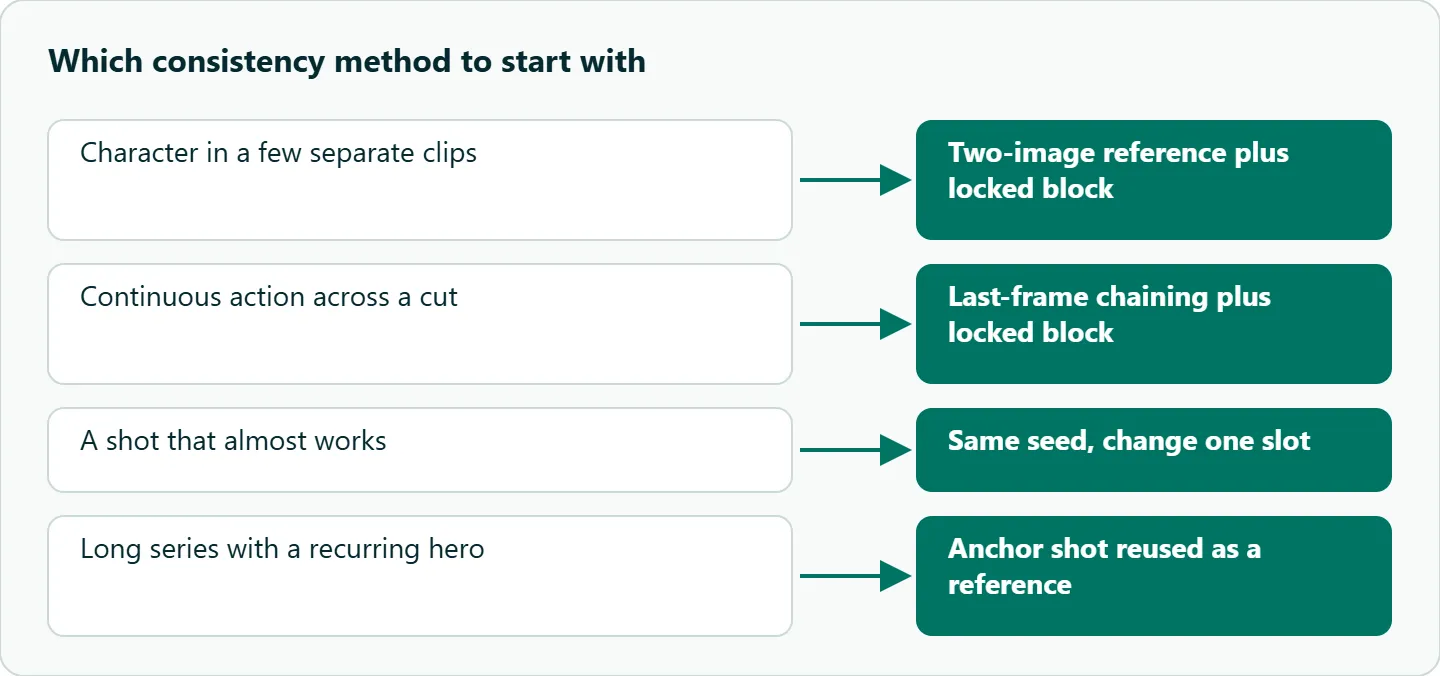
Seedance character consistency: which method when
| Situation | Start with |
|---|---|
| A character in a few separate clips | Two-image reference plus the locked block |
| A continuous action across a cut | Last-frame chaining plus the locked block |
| A shot that almost works | Same seed, change one slot |
| A long series with a recurring hero | An anchor shot reused as a reference |
| Two characters in one shot | One block and one labeled image pair per character |
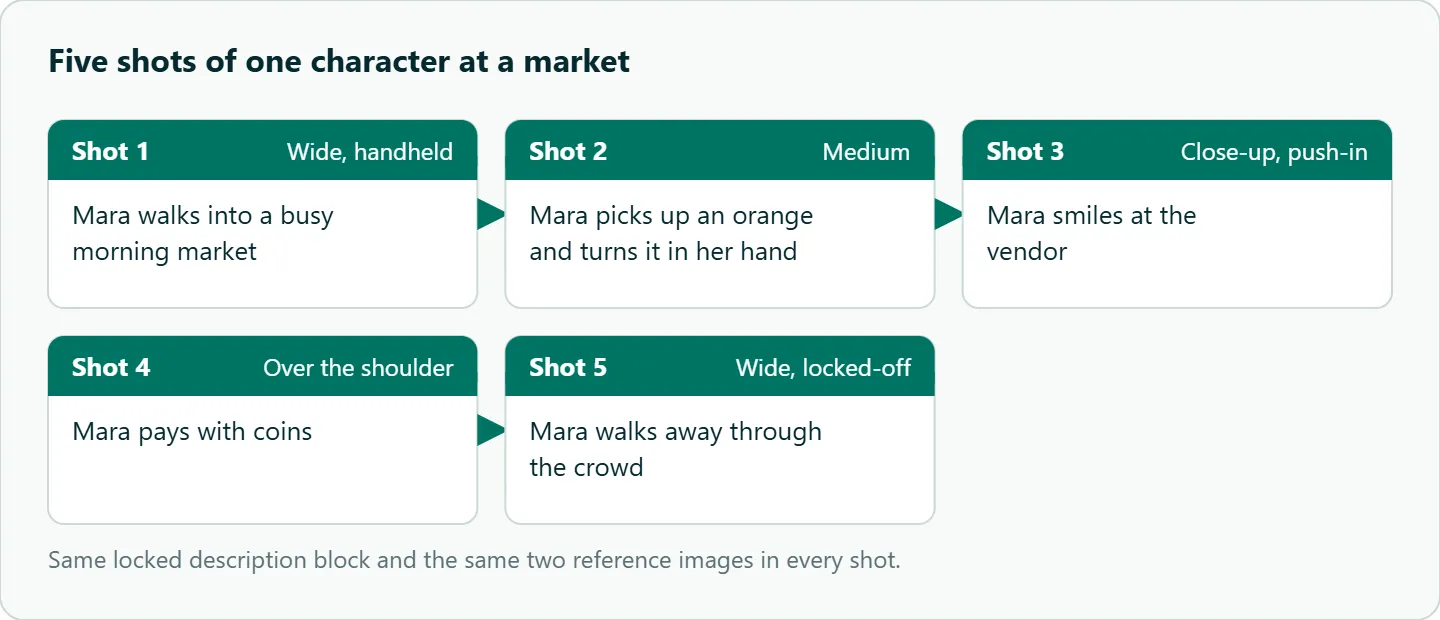
Here is a five-shot sequence of one character to practice with. It is a prompt to copy, not a result. For how Seedance handles several shots in one clip, see the Seedance multi-shot prompting guide.
Image 1 is Mara's face. Image 2 is Mara's full outfit.
Mara: a woman in her 30s, short black bob, green waxed raincoat, dark jeans, a silver hoop earring. Mara keeps the same face, hair and outfit in every shot.
Shot 1: Wide, Mara walks into a busy morning market, handheld.
Shot 2: Medium, Mara picks up an orange and turns it in her hand.
Shot 3: Close-up, Mara smiles at the vendor, slow push-in.
Shot 4: Over the shoulder, Mara pays with coins.
Shot 5: Wide, Mara walks away through the crowd, locked-off.
Where it fails
Real faces. OceanToken's Seedance 2.5 model page says reference images that show a real person are usually refused, while illustrated, 3D or AI-generated characters work. Build your character with an image model. If a reference is refused or a job fails for another reason, the Seedance generation failed checklist helps you find which.
Close-up faces after upscaling. The same page says close-up faces can lose detail in upscaled output and recommends native rendering for them. Render tight face shots on the native id.
Profile and back views. A front-facing reference says little about the back of the head. Runway names the usual cause of face drift as "a face reference the model couldn't weight properly," so if profiles drift, check that the headshot is sharp and large before you add more images.
Small details. Earrings, logos on clothing and hair partings drift first. Avoid close-ups on them, or fix them in post.
How to test this on your workload
We have not scored these methods, so run a small comparison with your own character:
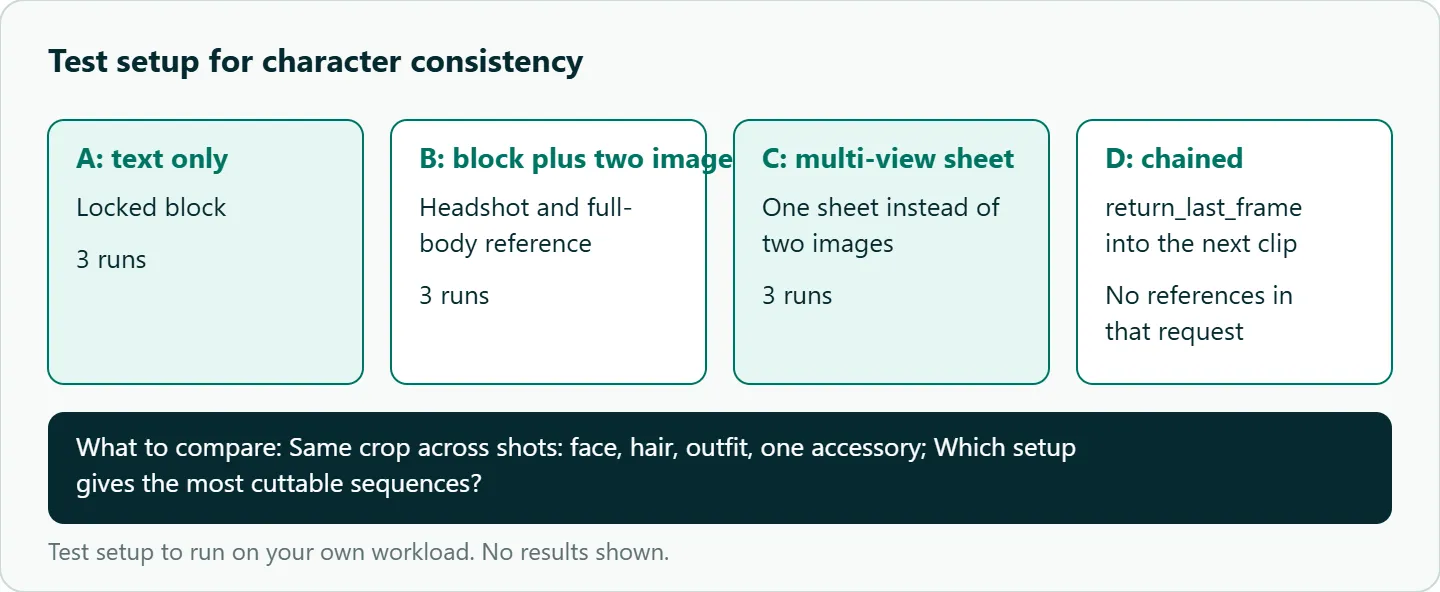
- Run the market sequence three times with only the locked block, three times with the block plus the two-image reference, and three times with a single multi-view sheet instead.
- Compare the same crop across shots: face first, then hair, outfit and one accessory.
- Chain two clips with
return_last_frameand note whether identity holds without the references. - Keep the setup that gives the most cuttable sequences.
Our take: Characters with a strong silhouette (a bright coat, a hat, distinctive hair) survive drift. Design for it, lock the words, keep the reference set to a headshot and a full-body image, and expect to pick the best of a few takes.
Running it on OceanToken
Seedance 2.5 is bytedance/seedance-2.5 (480p or 720p) at https://api.oceantoken.ai/v1, and bytedance/seedance-2.5-upscaled covers 720p and 1080p for wide shots you keep. Character work means many takes per shot, so two things help: refused or failed jobs are not charged, with the held amount returned, and each job has an id you can log with its seed and reference set. Billing is prepaid with no subscription, on one key that also covers image models you can use to make the character in the first place. See the current rate on /seedance-api.
FAQ
Is there a seed lock in Seedance? The 2.5 schema accepts a seed; the same seed, prompt and settings give similar results. It does not lock a face across different prompts.
How many reference images should I use for a character? Two: a close-up headshot and a full-body image. Runway says four to five assets total works better than filling the limit.
Should I use a multi-view character sheet? Runway's guide discourages it, because the model can read it as several people.
Can I chain clips and keep the references? No. A request carries frames or references, not both, so a chained clip relies on the frame and the text block.
What about two characters? Give each a name, a locked block and its own labeled images.
Sources
- Runway: Seedance 2.0 prompt guide (checked 2026-11-09)
- OceanToken docs: Seedance 2.5 request schema (checked 2026-11-09)
- OceanToken docs: Video guide (checked 2026-11-09)
- OceanToken: Seedance 2.5 model page (checked 2026-11-09)
- OceanToken Seedance API page (checked 2026-11-09)
Get your OceanToken API key
- Create an OceanToken account and an API key.
- Copy the snippet below, paste your key, and run it.
- Check the current rate on /seedance-api.
curl https://api.oceantoken.ai/v1/videos \
  -H "Authorization: Bearer $OCEANTOKEN_API_KEY" \
  -H "Content-Type: application/json" \
  -d '{"model": "bytedance/seedance-2.5", "prompt": "Mara, a woman in her 30s with a short black bob and a green waxed raincoat, walks into a busy morning market, handheld.", "duration": 5, "resolution": "480p", "seed": 42}'
More from the blog
A Unified API for Chat, Image and Video
Building on a unified API for chat, image and video: sync vs async calls, billing units, retries, timeouts and storage, with three calls and a launch checklist.
Kimi K3 API International Access Guide
Use the Kimi K3 API internationally: sign up with email, pay by card, create one key and call moonshotai/kimi-k3 with an OpenAI SDK. Steps, code and checks.
Call Tencent Hy3 With the OpenAI SDK
Call Tencent Hy3 with the OpenAI SDK outside China: base URL, model id, streaming, tool calls, reasoning_effort values, Hy3 vs Hy3 preview, and token billing.