

Seedance Batch Generation in Python
Seedance batch generation in Python: a CSV manifest, a small worker pool, idempotent submits, retries by error code, a per-key spend cap and an ffmpeg stitch.
By OceanToken Team

Editor's note: The scripts that cause budget incidents are usually the batch ones. A loop over a spreadsheet hits a bug, resubmits row one two hundred times, and nobody notices until the balance is gone. Before you make a Seedance batch faster, make it stoppable: a manifest on disk, a key with its own spending limit, and submits that cannot run twice.
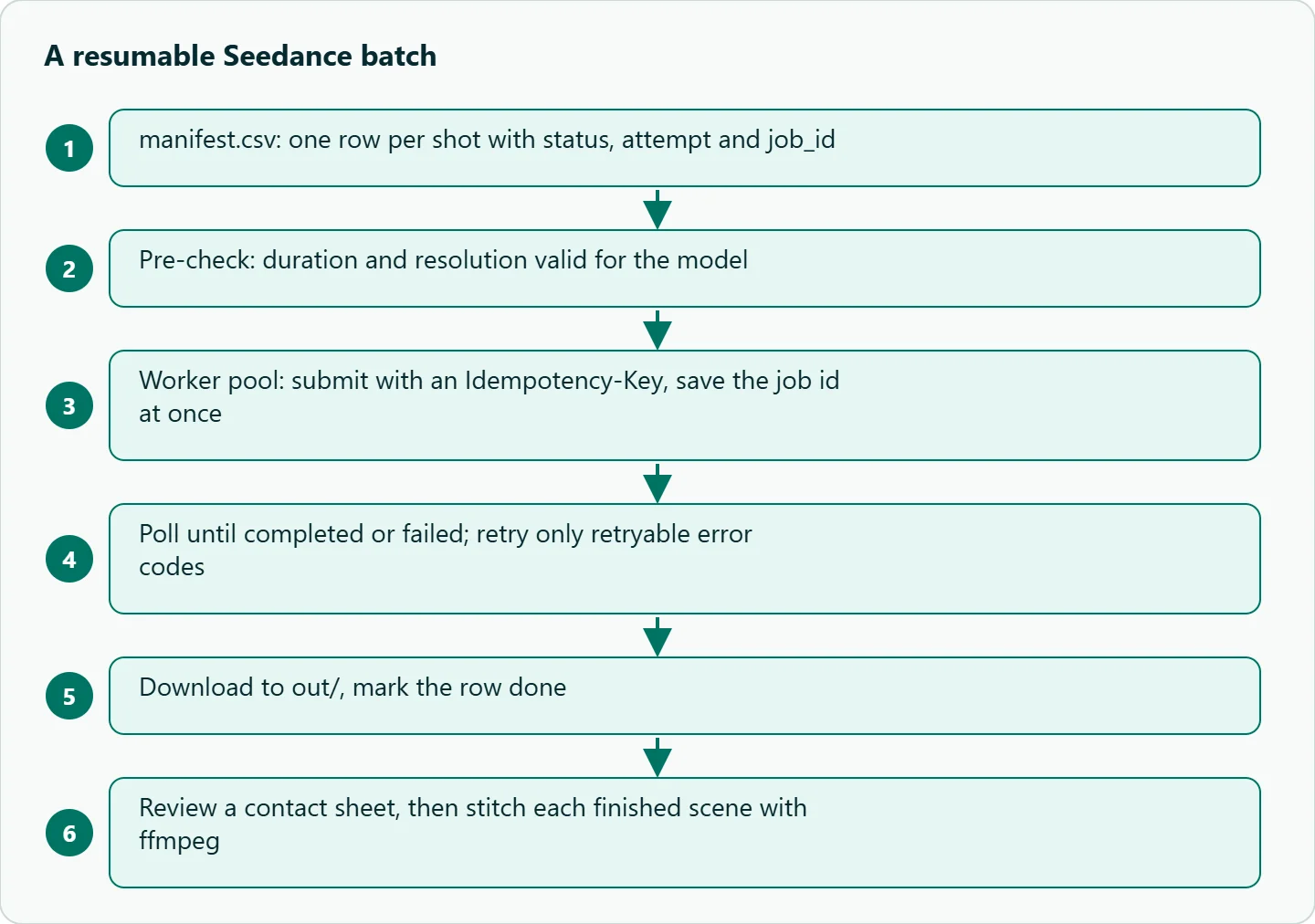
Short answer: For Seedance batch generation, keep a CSV manifest with one row per shot, a status and the job id. A small worker pool submits with an Idempotency-Key, saves the id at once, polls and downloads. Retry only rate_limited, timeout and transient errors. Give the batch its own key with a credit limit, and stitch with ffmpeg per scene.
What limits Seedance batch generation
It is tempting to think of concurrency as the main dial. OceanToken's limits page frames it differently. Rate limits are per key, as requests per minute and tokens per minute, and each response carries them in x-oceantoken-key-rpm-limit and x-oceantoken-key-tpm-limit. The page sets no video job count limit. Instead, "each model's channels have their own capacity," and when every channel of a model is busy you get 429 provider_overloaded.
So more workers make a batch finish sooner only until the model is busy, and they never make one clip faster. A clip "usually takes a few minutes," per the video guide , whatever your pool size. Start with a handful of workers and raise the number only while you are not seeing 429s.
Money is the other limit, and the API enforces part of it for you. A job "holds its estimated cost against your balance when it is created and is charged the actual cost when it finishes," and if the available balance cannot cover the estimate, create is refused with a 400. A failed job is not charged; its hold is released.
The manifest
scene,shot,model,resolution,duration,prompt,status,attempt,job_id,error,path
s01,1,bytedance/seedance-2.0,720p,5,"Wide: a lighthouse on a cliff at dusk, slow push-in",todo,0,,,
s01,2,bytedance/seedance-2.0,720p,5,"Medium: keeper climbing spiral stairs, handheld follow",todo,0,,,
s01,3,bytedance/seedance-2.0,720p,5,"Close: hands lighting the lamp, warm glow",todo,0,,,
status is your vocabulary (todo, submitted, done, failed), not the API's (queued, in_progress, completed, failed). Keep them separate. attempt feeds the idempotency key, so a deliberate resubmission gets a new key while an accidental duplicate does not.
Validate the manifest before the first submit. The Seedance 2.0 docs allow 4 to 15 seconds, the -upscaled models refuse 480p, and an unsupported value returns 400 invalid_request before anything runs or is charged. Catching that in a pre-check is cleaner than discovering it on row 87.
The worker
This follows the create, poll and download pattern from the video guide. It is a template; set WORKERS and MAX_SUBMITS for your own run.
import csv, os, sys, time, threading, requests
from concurrent.futures import ThreadPoolExecutor

API = "https://api.oceantoken.ai/v1"
KEY = os.environ["OCEANTOKEN_BATCH_KEY"]          # a dedicated key with a credit limit
WORKERS = int(os.environ.get("WORKERS", "3"))
MAX_SUBMITS = int(os.environ["MAX_SUBMITS"])      # local brake for this run
RETRYABLE = {"rate_limited", "timeout", "temporarily_unavailable", "generation_failed"}
lock, submits = threading.Lock(), 0

def save(rows, path):
    with lock, open(path, "w", newline="") as f:
        w = csv.DictWriter(f, fieldnames=rows[0].keys()); w.writeheader(); w.writerows(rows)

def submit(row):
    idem = f"{row['scene']}-{row['shot']}-{row['attempt']}"
    while True:
        r = requests.post(f"{API}/videos", timeout=60, json={
                "model": row["model"], "prompt": row["prompt"],
                "duration": int(row["duration"]), "resolution": row["resolution"]},
            headers={"Authorization": f"Bearer {KEY}", "Idempotency-Key": idem})
        if r.status_code == 429:                  # per-key limit or model busy
            time.sleep(int(r.headers.get("Retry-After", "60"))); continue
        r.raise_for_status()                      # 400 = bad params or balance too low
        return r.json()["id"]

def process(row, rows, manifest):
    global submits
    H = {"Authorization": f"Bearer {KEY}"}
    try:
        if not row["job_id"]:
            with lock:
                if submits >= MAX_SUBMITS: return
                submits += 1
            row["job_id"], row["status"] = submit(row), "submitted"
            save(rows, manifest)                  # persist the id before polling
        t0 = time.time()
        while time.time() - t0 < 1800:
            job = requests.get(f"{API}/videos/{row['job_id']}", headers=H, timeout=60).json()
            if job["status"] == "completed": break
            if job["status"] == "failed":
                code = (job.get("error") or {}).get("code", "")
                row["error"] = code
                if code in RETRYABLE and int(row["attempt"]) < 2:
                    row["attempt"] = str(int(row["attempt"]) + 1)
                    row["job_id"], row["status"] = "", "todo"   # picked up on the next run
                else:
                    row["status"] = "failed"
                return
            time.sleep(15)
        else:
            row["status"], row["error"] = "submitted", "still running"; return
        os.makedirs("out", exist_ok=True)
        path = f"out/{row['scene']}-{row['shot']}.mp4"
        with requests.get(f"{API}/videos/{row['job_id']}/content", headers=H,
                          stream=True, timeout=120) as r:
            r.raise_for_status()
            with open(path, "wb") as f:
                for chunk in r.iter_content(1 << 20): f.write(chunk)
        row["path"], row["status"] = path, "done"
    except Exception as e:
        row["error"] = str(e)[:200]; print("error", row["scene"], row["shot"], e, file=sys.stderr)
    finally:
        save(rows, manifest)

if __name__ == "__main__":
    manifest = sys.argv[1]
    rows = list(csv.DictReader(open(manifest)))
    todo = [r for r in rows if r["status"] in ("todo", "submitted")]
    with ThreadPoolExecutor(WORKERS) as ex:
        for r in todo: ex.submit(process, r, rows, manifest)
Three details carry the weight. The job id is written to disk before the first poll, so a crash resumes polling instead of submitting again. The idempotency key is built from scene, shot and attempt, so a retried POST after a network timeout returns the same job; the guide says it "returns the existing job instead of starting and charging a second one." And a job that runs past the poll window stays submitted rather than being marked failed, because it may still finish and be billed.
Retries: which failures to repeat
A failed job carries error.code, and the six codes in the video guide split cleanly into two groups. Repeat rate_limited, timeout, temporarily_unavailable and, once, generation_failed. Never auto-repeat content_filtered or invalid_request: the same prompt and parameters will fail the same way, and a batch that loops on them only wastes wall time. Our Seedance generation failed fixes cover what to change in those rows.
You also do not need to wrap every call in retries. The retries and failover page says the gateway already retries temporary errors and fails a submission over to another channel of the same model, so your client only needs to handle what reaches it, such as 429 and 5xx. Once a job is accepted it "runs to the end on that channel."
Cost control without price math in your code
Hard-coding rates into a batch script is how scripts drift out of date. Put the cap where it cannot drift instead. On OceanToken an API key can carry a credit limit, described in the API keys docs as "the most this key may spend in total," and "a key that has hit its credit limit … stops working." Create one key per batch, set its limit to what the batch is allowed to cost, and the worst bug you can write is bounded by that number. Each response also reports the key's spend and budget in x-oceantoken-key-spend and x-oceantoken-key-budget, so a dashboard can watch it.
For planning, the arithmetic is simple and lives outside the code: shots × seconds per shot × passes (drafts plus finals) × the current rate on /seedance-api. Run the draft pass at 480p, review, and only re-render the approved rows at delivery resolution. MAX_SUBMITS in the script is a second brake for the first run, not a substitute for the key limit.
A six-shot scene, then the stitch
The pipeline treats a scene as a group of rows. Here is a six-shot lighthouse sequence as six manifest rows:
scene,shot,model,resolution,duration,prompt,status,attempt,job_id,error,path
s01,01,bytedance/seedance-2.0,480p,5,"Wide: a lighthouse on a cliff at dusk, slow push-in",todo,0,,,
s01,02,bytedance/seedance-2.0,480p,5,"Medium: keeper climbing spiral stairs, handheld follow",todo,0,,,
s01,03,bytedance/seedance-2.0,480p,5,"Close: hands lighting the lamp, warm glow",todo,0,,,
s01,04,bytedance/seedance-2.0,480p,5,"Wide exterior: beam sweeping over rough sea, static camera",todo,0,,,
s01,05,bytedance/seedance-2.0,480p,5,"Medium: keeper at the window watching a ship, rack focus to the horizon",todo,0,,,
s01,06,bytedance/seedance-2.0,480p,5,"Wide: dawn over the calm sea, slow aerial pull-back",todo,0,,,
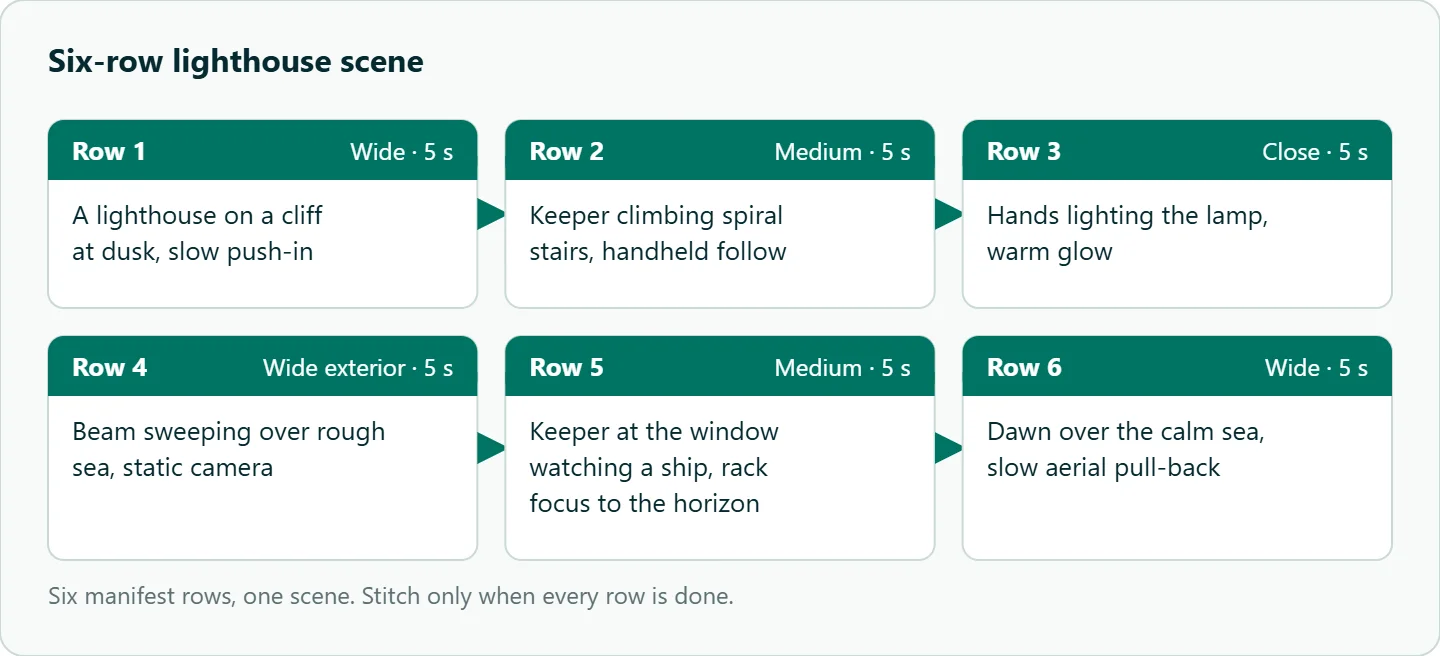
Before stitching, look at the shots. A contact sheet of first frames takes seconds to review and catches the clip that drifted:
for f in out/s01-*.mp4; do ffmpeg -y -i "$f" -frames:v 1 -vf scale=320:-1 "${f%.mp4}.png"; done
Reset a bad row to todo with attempt incremented and run the script again. When every row in the scene is done, join them with ffmpeg's concat demuxer:
printf "file '%s'\n" out/s01-*.mp4 > out/s01.txt
ffmpeg -f concat -safe 0 -i out/s01.txt -c copy scene01.mp4
The shell sorts out/s01-*.mp4 as text, so shot 10 lands before shot 2; zero-pad shot numbers (01, 02 ... 10) once a scene has more than nine shots. Stream copy (-c copy) works only when all clips share codec, resolution and frame rate; if you mixed resolutions, re-encode instead. Clips generated with sound each carry their own audio, so listen at the joins.
How to test this on your workload
We have not run this pipeline for the article. Before a large batch:
- Create a dedicated key with a small credit limit.
- Run a six-row manifest at 480p with
WORKERS=3andMAX_SUBMITS=6. - Kill the script after the first submit and restart it; confirm no row is submitted twice.
- Add one row with an out-of-range duration and confirm it fails before anything is charged.
- Raise
WORKERSstep by step and note where 429 responses start. - Compare the key's spend header with what you planned.
Our take: Give every batch its own key with a credit limit, start with a small pool, and make submits idempotent before you make them parallel. Put a human look at a contact sheet between "done" and "stitch"; it is the cheapest quality gate in the pipeline.
Running it on OceanToken
The script above calls https://api.oceantoken.ai/v1/videos with bytedance/seedance-2.0. For the single-call basics, see the Seedance API quickstart in Python. Seedance versions share the same fields on OceanToken, so moving a scene to bytedance/seedance-2.5 for longer shots means editing the model column. Failed jobs are not charged, per-key credit limits cap a runaway batch, and billing is prepaid with no subscription. The same key can also run other video models, so a mixed-model manifest needs no second integration. See the current rate on /seedance-api.
FAQ
Is there a Seedance batch endpoint? Not in the video guide. Submit one job per row; GET /v1/videos lists your jobs, newest first, if you need to reconcile after a crash.
How many workers should I run? The docs set no fixed video job limit. Start small and raise the count until you see 429 responses.
What happens if my balance runs out mid-batch? New creates are refused with a 400; jobs already accepted keep their hold and finish.
Do failed generations cost anything? No. A failed job is not charged and its hold is released.
CSV or SQLite? CSV is fine for a few hundred rows and one process. Use SQLite once several processes write to the manifest.
Sources
- OceanToken docs: Video guide (checked 2026-11-11)
- OceanToken docs: Limits (checked 2026-11-11)
- OceanToken docs: Retries and failover (checked 2026-11-11)
- OceanToken docs: API keys (checked 2026-11-11)
- OceanToken docs: bytedance/seedance-2.0 (checked 2026-11-11)
- FFmpeg: concat demuxer (checked 2026-11-11)
- OceanToken Seedance API page (checked 2026-11-11)
Get your OceanToken API key
- Create an OceanToken account and an API key.
- Copy the snippet below, paste your key, and run it.
- Check the current rate on /seedance-api.
curl https://api.oceantoken.ai/v1/videos \
  -H "Authorization: Bearer $OCEANTOKEN_API_KEY" \
  -H "Content-Type: application/json" \
  -H "Idempotency-Key: s01-1-0" \
  -d '{"model": "bytedance/seedance-2.0", "prompt": "Wide: a lighthouse on a cliff at dusk, slow push-in", "duration": 5, "resolution": "480p"}'
More from the blog
A Unified API for Chat, Image and Video
Building on a unified API for chat, image and video: sync vs async calls, billing units, retries, timeouts and storage, with three calls and a launch checklist.
Kimi K3 API International Access Guide
Use the Kimi K3 API internationally: sign up with email, pay by card, create one key and call moonshotai/kimi-k3 with an OpenAI SDK. Steps, code and checks.
Call Tencent Hy3 With the OpenAI SDK
Call Tencent Hy3 with the OpenAI SDK outside China: base URL, model id, streaming, tool calls, reasoning_effort values, Hy3 vs Hy3 preview, and token billing.