

Seedance API Python Quickstart: Create, Poll, Download
A Seedance API Python quickstart: one POST to create a video job, a GET loop to poll it, one GET to download the MP4, plus the status and URL pitfalls to catch.
By OceanToken Team
Editor's note: In February, TechCrunch reported a viral Seedance 2.0 clip of Tom Cruise fighting Brad Pitt that its poster said took "a 2 line prompt." The prompt is the easy part. A Seedance call is three HTTP requests, and the real work is the async plumbing. Our advice is firm: debug it on a short, cheap clip. A 1080p render does not test your polling loop any better than 720p does.
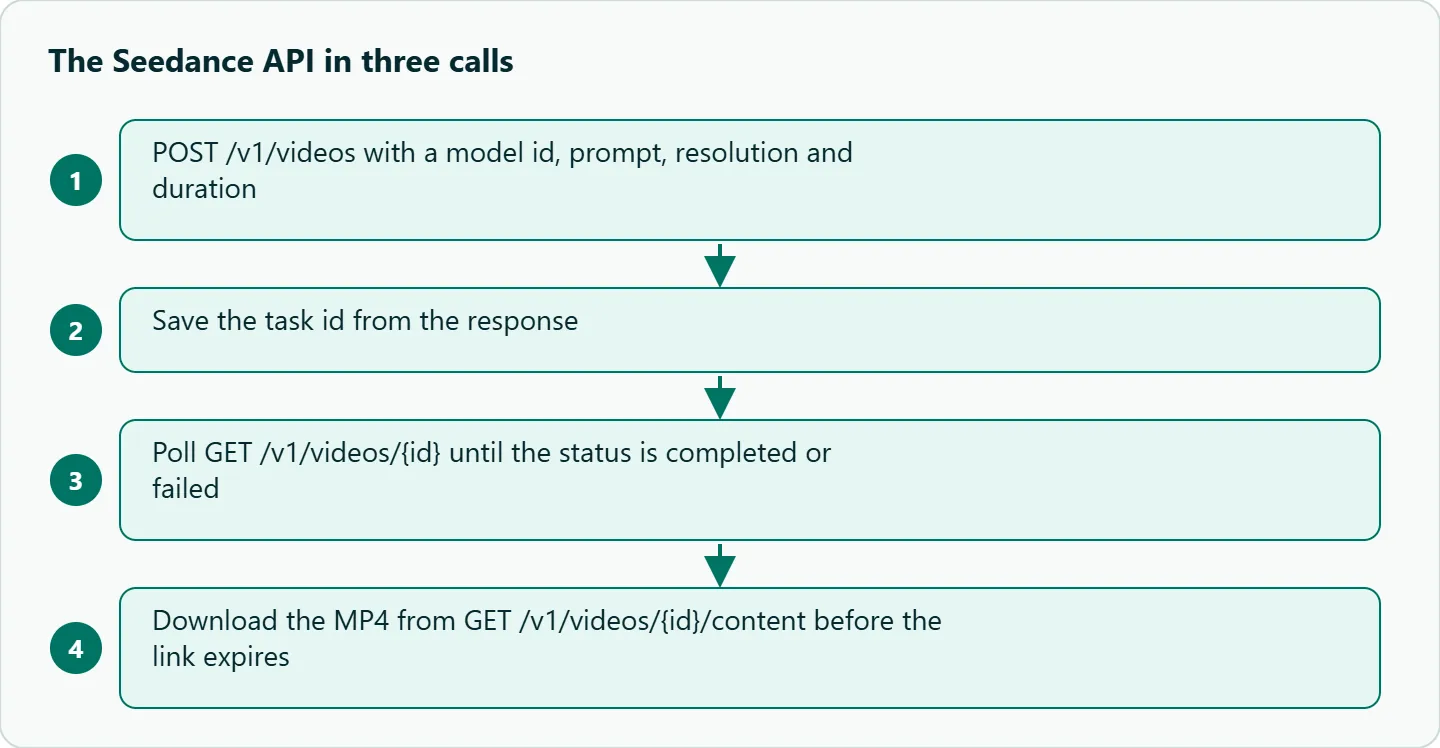
Short answer: For the Seedance API in Python, send a POST to /v1/videos with a model id, prompt, resolution and duration. You get back an id. Poll GET /v1/videos/{id} until the status is completed or failed, then save the MP4 from GET /v1/videos/{id}/content. The script below does all three with requests.
What you need before the first Seedance call
- An OceanToken API key in the
OCEANTOKEN_API_KEYenvironment variable. - Python 3.9 or later, and
pip install requests. - A model id. On November 2, 2026, the /seedance-api page listed four:
| Model id | What it is |
|---|---|
bytedance/seedance-2.0 |
Native: the request goes to ByteDance's official API |
bytedance/seedance-2.0-upscaled |
Official render, then our upscaler to 720p or 1080p |
bytedance/seedance-2.5 |
Native 2.5 (model page) |
bytedance/seedance-2.5-upscaled |
2.5 render, upscaled to 720p or 1080p |
The page says Upscaled clips run 4 to 15 seconds at 720p or 1080p. This guide uses bytedance/seedance-2.0-upscaled throughout.
Step 1: create the job
The request body is small:
{"model": "bytedance/seedance-2.0-upscaled", "resolution": "720p", "duration": 5, "aspect_ratio": "16:9", "prompt": "Aerial shot over the sea at dawn"}
Auth is a standard Authorization: Bearer header. The video guide names the aspect field aspect_ratio. It also accepts seconds as an alias for duration.
Two rules save time. First, unsupported fields get a 400 invalid_request before anything runs or is charged. Second, send an Idempotency-Key header. If your create call times out and you retry, the key stops a second job and a second charge.
Step 2: poll until it is done
The guide lists four statuses: queued, in_progress, completed and failed. It suggests polling every 10 to 20 seconds, since a clip usually takes a few minutes.
One catch: the /seedance-api page shows the failed state as "Failed" with a capital F. Lowercase the status before you compare it, and your loop will not care.
A failed job carries an error object with a code. The guide lists content_filtered, invalid_request, rate_limited, timeout, temporarily_unavailable and generation_failed. Failed jobs are not charged; the hold on your balance is released.
Step 3: download the file before the link expires
When the job completes, GET /v1/videos/{id}/content returns the MP4. The job also gets a content_url, which the guide says is valid for 24 hours. Save the file to your own storage right away. Do not store the URL and expect it to work next week.
The full Seedance Python example
import os, time, uuid, requests

API = "https://api.oceantoken.ai/v1"
HEADERS = {"Authorization": f"Bearer {os.environ['OCEANTOKEN_API_KEY']}"}
MODEL = "bytedance/seedance-2.0-upscaled"

def create(prompt, resolution="720p", duration=5):
    body = {"model": MODEL, "resolution": resolution, "duration": duration,
            "aspect_ratio": "16:9", "prompt": prompt}
    headers = {**HEADERS, "Idempotency-Key": str(uuid.uuid4())}
    r = requests.post(f"{API}/videos", headers=headers, json=body, timeout=60)
    r.raise_for_status()
    return r.json()["id"]

def wait(video_id, every=15, timeout=900):
    start = time.time()
    while time.time() - start < timeout:
        r = requests.get(f"{API}/videos/{video_id}", headers=HEADERS, timeout=30)
        r.raise_for_status()
        info = r.json()
        status = str(info.get("status", "")).lower()
        if status == "completed":
            return info
        if status == "failed":
            raise RuntimeError(f"generation failed: {info.get('error')}")
        time.sleep(every)
    raise TimeoutError(video_id)

def download(video_id, path):
    with requests.get(f"{API}/videos/{video_id}/content",
                      headers=HEADERS, stream=True, timeout=120) as r:
        r.raise_for_status()
        with open(path, "wb") as f:
            for chunk in r.iter_content(1 << 20):
                f.write(chunk)

if __name__ == "__main__":
    vid = create("Aerial shot over the sea at dawn")
    print("job", vid)
    wait(vid)
    download(vid, "dawn.mp4")
    print("saved dawn.mp4")
Note that the idempotency key is made once per create call. If you wrap create in your own retry loop, generate the key outside the loop and reuse it.
Common errors and fixes
| Symptom | Likely cause | Fix |
|---|---|---|
400 invalid_request on create |
A field the model does not take | Check the model's options at GET /oceantoken/video/model-spec?model=... |
400 about balance |
Not enough credit for the hold | Top up, then retry with the same idempotency key |
| Loop never ends | Comparing "Failed" to "failed" | Lowercase the status |
| Old links return errors | content_url expired after 24 hours |
Download on completion |
| Frames rejected on Upscaled | -upscaled takes 1 to 9 reference images, no frames |
Use a Native id for first or last frames |
The response header x-oceantoken-dropped-params lists optional fields that were ignored. Log it while you develop.
Should you use Native or Upscaled first?
Our take: Start on bytedance/seedance-2.0-upscaled at 720p and 5 seconds. Once the script runs end to end, change only the model id or the resolution. The /seedance-api page recommends Native for scenes with several people, hands, small text or close-up faces, because upscaling can lose fine detail. Switch when your content needs it, not before. For how teams weigh those trade-offs per scene, see our breakdown of what an AI short-drama episode costs and how to pick a video model.
If you call ByteDance's own ModelArk API instead, the flow is the same shape: create a task, poll it, read the video URL. A DataCamp tutorial shows the official Python SDK checking for succeeded and failed, so status strings differ by host.
How to test this on your workload
- Run the script once with the defaults above.
- Log the time from POST to
completed, and every status string you see. - Check the file with
ffprobefor resolution and length. - Compare the balance change in your console with the hold shown at create time.
- Force a failure (for example, an unsupported field) and confirm nothing was charged.
Running it on OceanToken
Everything above already runs on OceanToken: base URL https://api.oceantoken.ai/v1, model id bytedance/seedance-2.0-upscaled. The reason to use it here is choice in one place. Native and Upscaled Seedance sit behind the same key, so you can compare both on the same prompt by changing one string. See the current rate on /seedance-api.
FAQ
Can I use the OpenAI Python SDK instead of requests? Yes. The Seedance 2.5 model page shows client.videos.create_and_poll and download_content with the base URL set to OceanToken.
How often should I poll? Every 10 to 20 seconds, per the video guide. Faster polling does not make the clip render sooner.
Do I pay if a job fails? No. The estimated cost is held at create time and released if the job fails.
How long does the download link last? The content_url is valid for 24 hours, so save the file when the job completes.
Is there a webhook? The video guide we read did not mention one, so this script polls.
Sources
- OceanToken Seedance API page (checked 2026-11-02)
- OceanToken video guide (checked 2026-11-02)
- OceanToken Seedance 2.5 model page (checked 2026-11-02)
- DataCamp: Seedance 2.0 API guide (checked 2026-11-02)
- TechCrunch: Hollywood isn't happy about the new Seedance 2.0 video generator (checked 2026-11-02)
Get your OceanToken API key
- Create an OceanToken account and an API key.
- Copy the snippet below, paste your key, and run it.
- Check the current rate on /seedance-api.
curl https://api.oceantoken.ai/v1/videos \
  -H "Authorization: Bearer $OCEANTOKEN_API_KEY" \
  -H "Content-Type: application/json" \
  -d '{"model": "bytedance/seedance-2.0-upscaled", "resolution": "720p", "duration": 5, "prompt": "Aerial shot over the sea at dawn"}'
More from the blog
A Unified API for Chat, Image and Video
Building on a unified API for chat, image and video: sync vs async calls, billing units, retries, timeouts and storage, with three calls and a launch checklist.
Kimi K3 API International Access Guide
Use the Kimi K3 API internationally: sign up with email, pay by card, create one key and call moonshotai/kimi-k3 with an OpenAI SDK. Steps, code and checks.
Call Tencent Hy3 With the OpenAI SDK
Call Tencent Hy3 with the OpenAI SDK outside China: base URL, model id, streaming, tool calls, reasoning_effort values, Hy3 vs Hy3 preview, and token billing.