

Seedance 9:16 Vertical Video: Safe Zones
How to frame Seedance 9:16 vertical video: set the ratio, keep faces and captions out of app UI zones, and avoid the first-frame trap that forces landscape.
By OceanToken Team
Editor's note: Most vertical AI clips that look wrong were composed as landscape and cropped later. Decide the frame before you generate. Set the ratio in the request, describe where the face and the captions go, and assume the app will draw buttons over the bottom and the right edge. A great shot under a Like button is a wasted generation.
Short answer: For Seedance 9:16 vertical video, set aspect_ratio to 9:16 in the request and say "vertical 9:16" in the prompt. Keep faces, products and captions in the middle of the frame, leave the bottom band and right edge clear for app UI, and make sure any first-frame image is already vertical, because it overrides the ratio.
Seedance 9:16 vertical video: aspect ratio settings
On OceanToken, the Seedance 2.5 request schema (bytedance/seedance-2.5) accepts seven values for aspect_ratio: 16:9, 4:3, 1:1, 3:4, 9:16, 21:9 and adaptive. Resolution is 480p, 720p or 1080p on the native id. That covers every common social format, so the ratio itself is rarely the problem.
| Ratio | Where it usually goes |
|---|---|
| 9:16 | TikTok, Instagram Reels, YouTube Shorts |
| 3:4 | Feed posts that should take more screen than square |
| 1:1 | Marketplace listings, carousels |
| 16:9 | YouTube, websites, presentations |
| 21:9 | Cinematic trailers and banners |
The full parameter list, including duration and output handling, is in our Seedance API parameters guide. If you are writing an ad script rather than solving framing, start with the Seedance UGC ad prompts and come back here for layout.
The first-frame trap: why your 9:16 request came back landscape
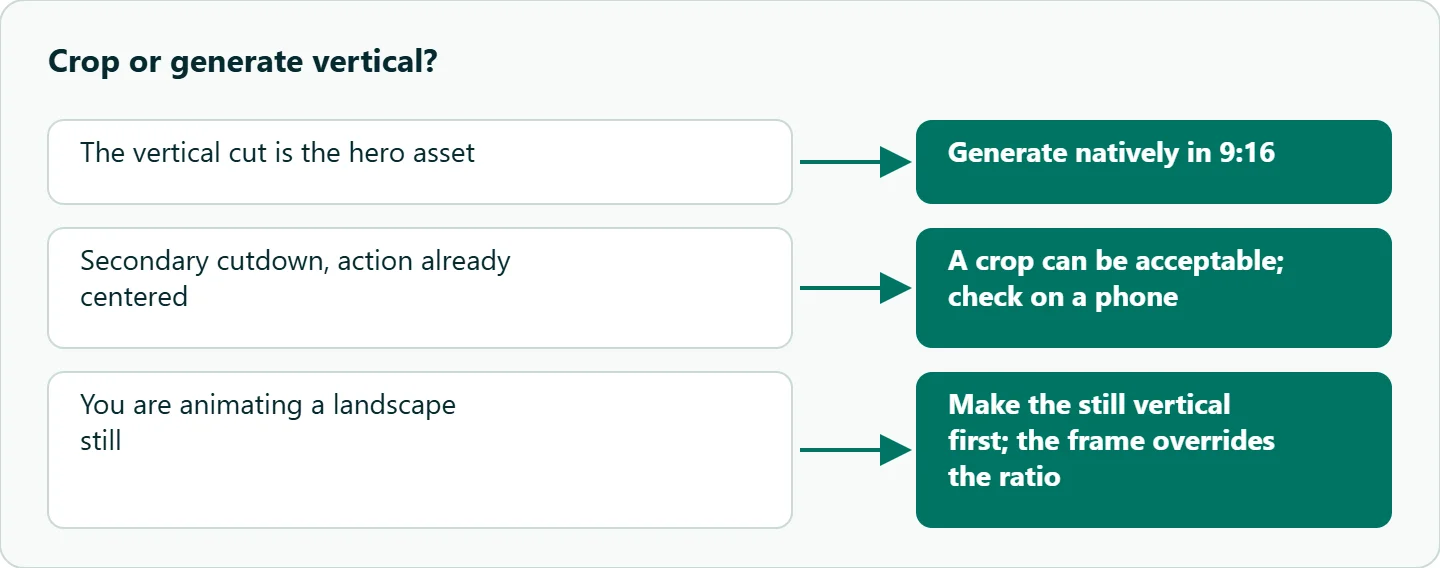
This is the pitfall worth knowing before anything else. The schema says adaptive follows the first frame and is the default when you send a first frame without a ratio. The OceanToken video guide goes further: on bytedance/seedance-2.5, a different aspect_ratio is ignored when a frame is present.
In practice, if you animate a product photo shot in landscape and ask for 9:16, you will get a landscape clip. The fix is upstream. Crop or regenerate the still to 9:16 first, with the subject already placed where you want it, then send it as frame_images with frame_type: first_frame. For text-to-video with no frame, the aspect_ratio you set is what applies.
Seedance safe zones: what the platforms actually publish
Every short-video app overlays its interface on your picture, and none of them promise the overlay stays the same. Here is what the platforms' own ad documentation says.
TikTok's in-feed ad specifications recommend vertical 9:16 at 540x960 pixels or more, state that "the safe zone size is determined by the dimension," and offer downloadable safe zone files. They also warn there "might be slight differences between the preview and the live version." Google's YouTube Shorts ad specs say 9:16 is "best suited" for Shorts, that horizontal assets serve "with blurred tops and bottoms," and that the right-hand panel holds the like, dislike, comment and share buttons. For Instagram Reels, check Meta's current Reels ad specs before you export.
So the shape of the problem is consistent: captions and the account name sit at the bottom, action buttons sit on the right, and the top carries search or tabs. The exact margins change, which is why the platform's own overlay file beats any number in a blog post.
A working layout rule for 9:16 frames
Until you have the platform overlay open, we use a conservative rule of thumb, and it is ours, not an app specification: keep anything that must be seen inside the middle of the frame horizontally, away from the right edge, and above the bottom quarter. Treat the top strip as decoration only.
That rule translates directly into prompt language. Put "subject centered" and "headroom above" in the shot description. Ask for "an empty lower third for captions" when you plan to add text later. Tall frames also reward different shots than wide ones. Runway's Seedance guide puts it plainly: "a vertical frame wants a different composition language than a wide one." Close-ups, standing full-body shots, tilts and vertical movement fill the frame well. Wide lateral tracking shots mostly waste it, because the interesting part of the scene slides through a narrow window.
A vertical storyboard prompt you can copy
Here is a three-shot prompt written for 9:16 from the start. It is a starting point, not a result we are showing.
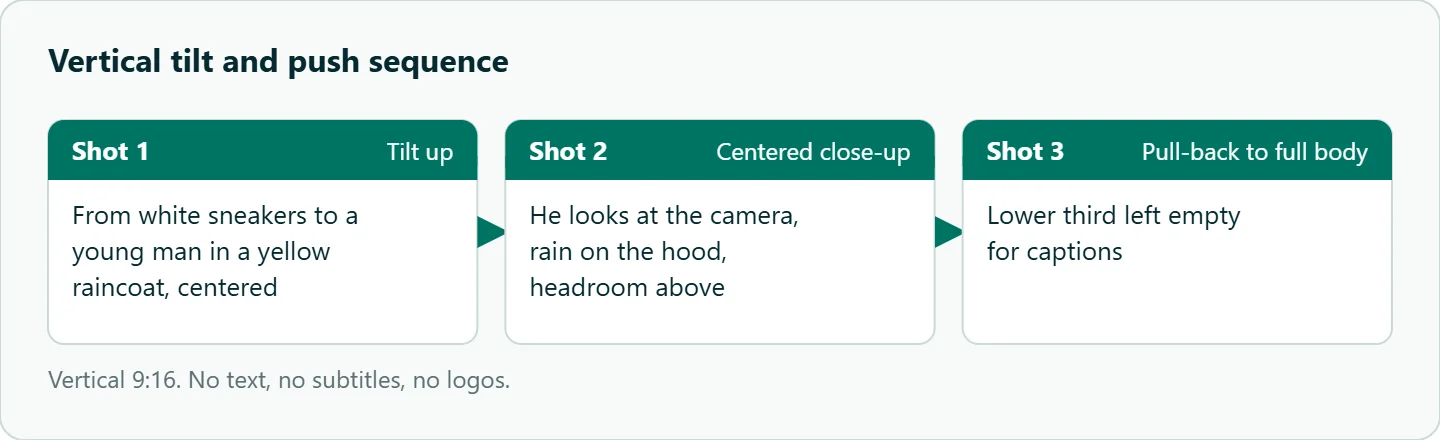
Vertical 9:16.
Shot 1: slow tilt up from white sneakers to a young man in a yellow raincoat, centered, city street at dusk.
Shot 2: cut to a centered close-up, he looks at the camera, rain drops on the hood, headroom above.
Shot 3: slow pull-back to a full-body shot, leaving the lower third empty for captions.
Audio: rain, street hum, no music. No text, no subtitles, no logos.
Each shot keeps the subject on the vertical center line, and the last shot deliberately leaves room for the caption you will add in the editor. If the clip is going into a paid placement, captions and the call to action belong in post, where you control the exact position against the overlay.
Crop from 16:9 or generate vertical?
Cropping a 16:9 clip to 9:16 at full height keeps only about a third of the original width (nine-sixteenths of nine-sixteenths), so two-thirds of the composition is thrown away. Upscaling afterwards cannot bring that composition back, and the crop often cuts through the subject's shoulders or loses the product entirely.
Our rule: if the vertical version is the hero asset, generate it natively in 9:16. If it is a secondary cutdown of a landscape film and the action is already centered, a crop can be acceptable. Check the crop on a phone before deciding it is good enough.
How to test this on your workload
We have not run a framing test for this article, so here is a short one to run on your own subject before you batch:
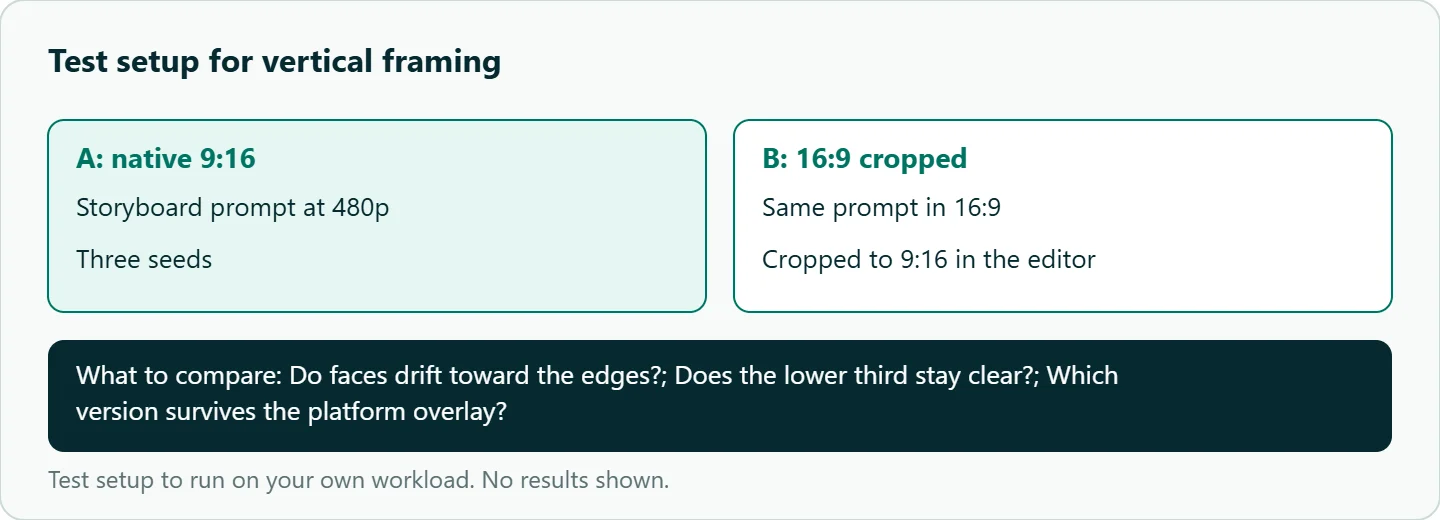
- Generate the storyboard prompt above at 480p in 9:16, three times with different seeds.
- Generate the same prompt in 16:9 and crop it to 9:16 in your editor.
- Drop the platform's safe zone overlay on top of all four versions.
- Note whether faces drift toward the edges, whether the lower third stays clear, and which version survives the overlay.
Check the frame in your editor
Prompts get you close, but the final check happens where you assemble the video. Create a 9:16 project, import the platform's overlay file as the top layer, and move captions, logos and stickers into the clear area. Check faces against the same overlay, hide it before export, and then watch the exported file on an actual phone. Desktop previews are more forgiving than a thumb hovering over the screen.
Our take: Treat 9:16 as its own shoot, not a crop. Set the ratio, make any first frame vertical, write the layout into the prompt, and keep the platform's overlay open while you edit.
Running it on OceanToken
Seedance 2.5 runs at https://api.oceantoken.ai/v1 as bytedance/seedance-2.5. The Seedance 2.5 model page also lists bytedance/seedance-2.5-upscaled for 720p and 1080p delivery. Draft framing on the native id at 480p, and confirm the output dimensions of your first clip before you upscale or batch.
Framing work means throwaway takes, and two things help. A failed job is not charged; its hold is released back to your balance. Billing is prepaid with no subscription, on one key that also runs other video models, so you can try the same vertical prompt elsewhere by changing only the model id. See the current rate on /seedance-api.
FAQ
What resolution should a 9:16 Seedance clip use? Draft at 480p, then render finals at 720p or 1080p on the native id; the upscaled id is an alternative route to 720p/1080p. TikTok's ad specs ask for at least 540x960 for vertical video.
Why did my 9:16 request return a landscape clip? You probably sent a landscape first frame. On Seedance 2.5 the frame's shape wins, so make the still vertical first.
Are safe zones the same on every app? No. TikTok publishes overlay files per dimension, and YouTube Shorts puts its buttons on the right. Check each platform's current guide.
Should I let Seedance write captions? For paid or exact text, no. Leave an empty lower third and add captions in the editor.
Is cropping 16:9 to vertical acceptable? Only for secondary cutdowns with centered action. A full-height crop keeps about a third of the width.
Sources
- OceanToken docs: Seedance 2.5 request schema (checked 2026-11-10)
- OceanToken docs: Video guide (checked 2026-11-10)
- OceanToken: Seedance 2.5 model page (checked 2026-11-10)
- Runway: Seedance 2.0 prompt guide (checked 2026-11-10)
- TikTok Ads Manager: in-feed video ad specifications (checked 2026-11-10)
- Google Ads Help: YouTube Shorts ads asset specs (checked 2026-11-10)
- OceanToken Seedance API page (checked 2026-11-10)
Get your OceanToken API key
- Create an OceanToken account and an API key.
- Copy the snippet below, paste your key, and run it.
- Check the current rate on /seedance-api.
curl https://api.oceantoken.ai/v1/videos \
  -H "Authorization: Bearer $OCEANTOKEN_API_KEY" \
  -H "Content-Type: application/json" \
  -d '{"model": "bytedance/seedance-2.5", "prompt": "Vertical 9:16. A young man in a yellow raincoat, centered close-up, rain on the hood, headroom above, empty lower third. No text, no logos.", "aspect_ratio": "9:16", "duration": 5, "resolution": "480p"}'
More from the blog
A Unified API for Chat, Image and Video
Building on a unified API for chat, image and video: sync vs async calls, billing units, retries, timeouts and storage, with three calls and a launch checklist.
Kimi K3 API International Access Guide
Use the Kimi K3 API internationally: sign up with email, pay by card, create one key and call moonshotai/kimi-k3 with an OpenAI SDK. Steps, code and checks.
Call Tencent Hy3 With the OpenAI SDK
Call Tencent Hy3 with the OpenAI SDK outside China: base URL, model id, streaming, tool calls, reasoning_effort values, Hy3 vs Hy3 preview, and token billing.