

Qwen3 Coder Next: Coding Agent Setup
Set up Qwen3 Coder Next behind a coding agent: base URL, model id, sampling, context limits, a capped tool loop, and what an 80B-A3B non-thinking coder suits.
By OceanToken Team
Editor's note: The interesting thing about Qwen3 Coder Next is its shape, not its leaderboard number: 80B parameters with only 3B active per token. That is a coding model built to be called many times in an agent loop. If your agent bill is dominated by retries and long contexts, a fast coder you can cap usually serves you better than a smarter, slower one. Measure cost per resolved task, not cost per token.
Short answer: To run Qwen3 Coder Next in a coding agent, choose the agent's OpenAI-compatible provider, set the base URL to https://api.oceantoken.ai/v1 and the model to qwen/qwen3-coder-next. It is a non-thinking model with a 262K context, so cap turns and truncate tool output. The model card suggests temperature 1.0, top_p 0.95 and top_k 40.
What it is
According to its Hugging Face model card , Qwen3 Coder Next has 80B total parameters with 3B activated per token. The 48 layers mix Gated DeltaNet and gated attention blocks, each followed by a mixture-of-experts layer with 512 experts, 10 active per token. It has a native 262,144-token context and an Apache-2.0 license.
It supports non-thinking mode only, and the card says it "does not generate <think></think> blocks." In an agent that is usually fine. The plan-act-check loop (read a file, edit, run the tests, read the error) comes from the agent framework, not from hidden reasoning. Where it hurts is open-ended planning at the start of a big task, which we come back to below.
The card also lists the scaffolds it was built to work with, including Qwen Code, Qoder, Kilo, Trae and Cline. Its published scores (70.6 on SWE-bench Verified, 44.3 on SWE-Bench Pro, 36.2 on Terminal-Bench 2.0) come from Qwen's own harness. Your agent, prompts and turn limits differ, so treat them as a reason to try the model, not as the result you will get.
Qwen3 Coder Next coding agent settings
Most coding agents ask for the same fields. Cline's OpenAI Compatible docs list base URL, API key and model ID, plus model configuration for max output tokens, context window, image support and tool use. OceanToken's Cline guide fills them in:
| Field | Value |
|---|---|
| Provider | OpenAI Compatible |
| Base URL | https://api.oceantoken.ai/v1 |
| Model ID | qwen/qwen3-coder-next |
| API key | Your OceanToken key |
| Context window | 262144, or lower to limit spend |
| Max output tokens | 32000 (the guide's suggestion) |
| Supports images | Off (text in, text out) |
Two of those deserve a second look. The context window is a cost setting as much as a capability: an agent resends its history every turn, so a long session at the full window pays for the same files again and again. Setting a lower window makes the agent trim history earlier. The max output setting works the same way for single replies, and the guide's 32,000 caps what any one runaway reply can cost.
Leave any "auto-approve everything" option off until you trust the loop on your repo. That guide also recommends giving the agent's key a credit limit, because an agent sends many requests and you want a hard ceiling on what it can spend.
Sampling and tool settings on the API
The model docs for this id list temperature (default 1), top_p (default 0.95) and top_k, so the card's recommended values can be sent as written. The docs also list tools, tool_choice (auto by default, or none, required or a named function) and parallel_tool_calls. Anything not on the list is removed before the request reaches the model, so a parameter your agent invents won't cause an error, and it won't do anything either.
top_k is not an OpenAI SDK argument, so pass it through extra_body, as the loop below does. Many agent UIs expose only temperature; the defaults already match the card for top_p, and top_k you can leave alone unless output gets repetitive.
Worked example: a capped agent loop
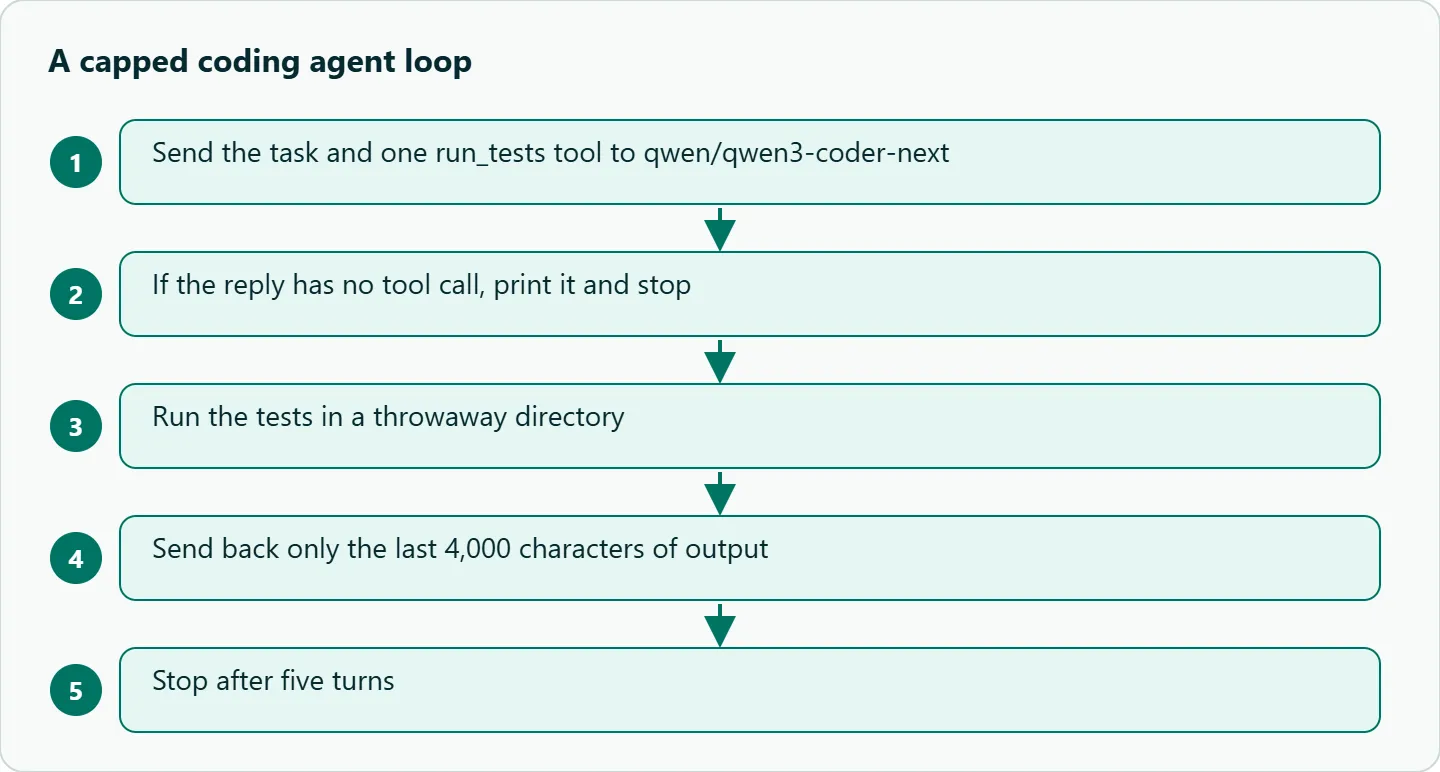
The smallest useful loop has one tool that runs the tests. Run it only in a throwaway directory or container, because the model decides when the tool runs.
import subprocess
from openai import OpenAI

client = OpenAI(base_url="https://api.oceantoken.ai/v1", api_key="YOUR_OCEANTOKEN_KEY")
tools = [{"type": "function", "function": {
    "name": "run_tests",
    "description": "Run the project's test suite and return the output.",
    "parameters": {"type": "object", "properties": {}, "required": []}}}]

messages = [{"role": "user", "content": "Tests fail in utils/dates.py. Find and describe the bug."}]
for _ in range(5):  # hard cap on turns
    r = client.chat.completions.create(
        model="qwen/qwen3-coder-next", messages=messages, tools=tools,
        temperature=1.0, top_p=0.95, extra_body={"top_k": 40}, max_tokens=8000)
    msg = r.choices[0].message
    messages.append(msg)
    if not msg.tool_calls:
        print(msg.content)
        break
    for call in msg.tool_calls:
        out = subprocess.run(["pytest", "-x", "-q"], capture_output=True, text=True).stdout[-4000:]
        messages.append({"role": "tool", "tool_call_id": call.id, "content": out})
Note the two guards: five turns at most, and only the last 4,000 characters of test output go back to the model. Without them, one noisy failure can fill the context in a few turns, and each of those turns resends everything before it. The tool-result message format is the same as in our Qwen tool calling guide, which covers the full loop.
Self-hosting parameters
If you serve the open weights yourself, the card gives SGLang (0.5.8 or newer) and vLLM (0.15.0 or newer) commands that both use --tool-call-parser qwen3_coder; the vLLM example also sets --enable-auto-tool-choice and a tensor parallel size of 2. If the server fails to start, the card suggests lowering the context length, for example to 32,768. The parser flag is the line people drop. Without it, the agent gets tool calls as plain text instead of structured calls, and the loop quietly stops working.
What goes wrong
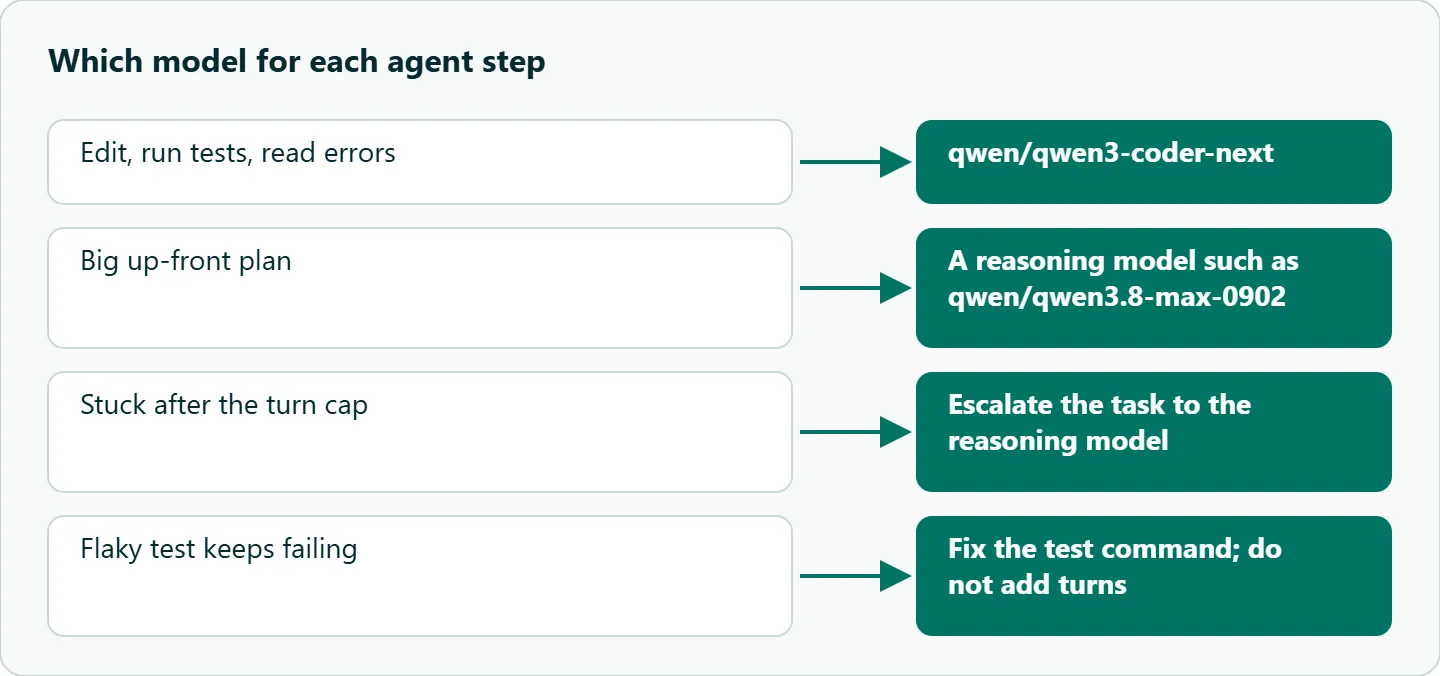
Loops on a flaky test. The model keeps retrying a test that fails for reasons outside the code. Cap turns and make the test command deterministic.
Whole repos in context. Dumping files wastes tokens. Give the agent a search or file-read tool and let it fetch what it needs.
Sampling copied from elsewhere. Temperature 1.0 is the card's suggestion for this model. If you paste a low temperature from another model's guide, test whether tool use gets worse before you keep it.
Expecting reasoning. There is no thinking mode. For a big up-front plan, route that one step to a reasoning model such as qwen/qwen3.8-max-0902, then hand the edit-and-test loop back to the coder.
How to test this on your workload
- Pick a small repo and seed three bugs with failing tests.
- Run the capped loop above, then one session in your agent.
- Record turns to green tests, total tokens and any stuck loops.
- Repeat with the plan step on Max and the loop on the coder.
- Compare cost per fixed bug, not cost per call.
Our take: Judge an agent model by cost per resolved task. A cheap coder that needs six turns can beat a pricier one that needs three, but only if you cap turns and truncate tool output; otherwise the extra turns resend more context each time and the advantage disappears. We would run Qwen3 Coder Next for the edit-and-test loop and escalate to a reasoning model only for planning or a stuck task.
Running it on OceanToken
Set the base URL to https://api.oceantoken.ai/v1 and use qwen/qwen3-coder-next as written. See the current rate on /qwen-api.
The /qwen-api page says the API is OpenAI-compatible and that the Anthropic Messages format works too, so agents built on either style can connect with only the base URL and the key changed. One key and one prepaid balance cover Qwen and every other model, so the plan-on-Max, loop-on-coder split above is two model ids on the same key. Billing has no subscription, and the page says failed requests are not charged.
FAQ
Is Qwen3 Coder Next open weight? Yes. The model card lists Apache-2.0, so you can self-host it or call it through an API.
Does it support thinking mode? No, it is non-thinking only. Route planning-heavy steps to a reasoning model.
What context length does it have? 262,144 tokens natively. In agents, a lower configured window costs less because history is resent every turn.
Which tool-call parser do I need if I self-host? qwen3_coder, in both SGLang and vLLM, per the card.
Can I set top_k from the OpenAI SDK? Yes, through extra_body. OceanToken's docs list top_k for this model.
Sources
- Hugging Face: Qwen3-Coder-Next model card (checked 2026-11-09)
- OceanToken docs: qwen/qwen3-coder-next (checked 2026-11-09)
- OceanToken docs: Cline (checked 2026-11-09)
- Cline docs: OpenAI Compatible provider (checked 2026-11-09)
- OceanToken Qwen API page (checked 2026-11-09)
Get your OceanToken API key
- Create an OceanToken account and an API key.
- Copy the snippet below, paste your key, and run it.
- Check the current rate on /qwen-api.
curl https://api.oceantoken.ai/v1/chat/completions \
  -H "Authorization: Bearer $OCEANTOKEN_API_KEY" \
  -H "Content-Type: application/json" \
  -d '{"model": "qwen/qwen3-coder-next", "temperature": 1.0, "top_p": 0.95, "top_k": 40, "messages": [{"role": "user", "content": "Write a Python function that parses ISO dates."}]}'
More from the blog
A Unified API for Chat, Image and Video
Building on a unified API for chat, image and video: sync vs async calls, billing units, retries, timeouts and storage, with three calls and a launch checklist.
Kimi K3 API International Access Guide
Use the Kimi K3 API internationally: sign up with email, pay by card, create one key and call moonshotai/kimi-k3 with an OpenAI SDK. Steps, code and checks.
Call Tencent Hy3 With the OpenAI SDK
Call Tencent Hy3 with the OpenAI SDK outside China: base URL, model id, streaming, tool calls, reasoning_effort values, Hy3 vs Hy3 preview, and token billing.