

Qwen Vision API: Images, Limits, Tokens
How to send images to the Qwen vision API: URL vs base64, Alibaba's size and count limits, the 32x32 token formula, and what high-res mode costs.
By OceanToken Team
Editor's note: Alibaba's docs list image input for the Qwen3.5 through 3.8 series in the same chat call as text, so one model id can read a screenshot and write the reply. The real question is no longer "which VL model" but "how many pixels am I paying for," and that is where most first integrations go wrong. Crop before you send, and validate everything the model reads.
Short answer: The Qwen vision API takes images in a normal chat/completions call as image_url parts, either an https URL or a base64 data URL. For Qwen3.8 and the other 3.x series, Alibaba's docs count one token per 32x32 pixels, so a 1920x1080 screenshot is about 2,040 input tokens. Crop small print instead of sending more pixels.

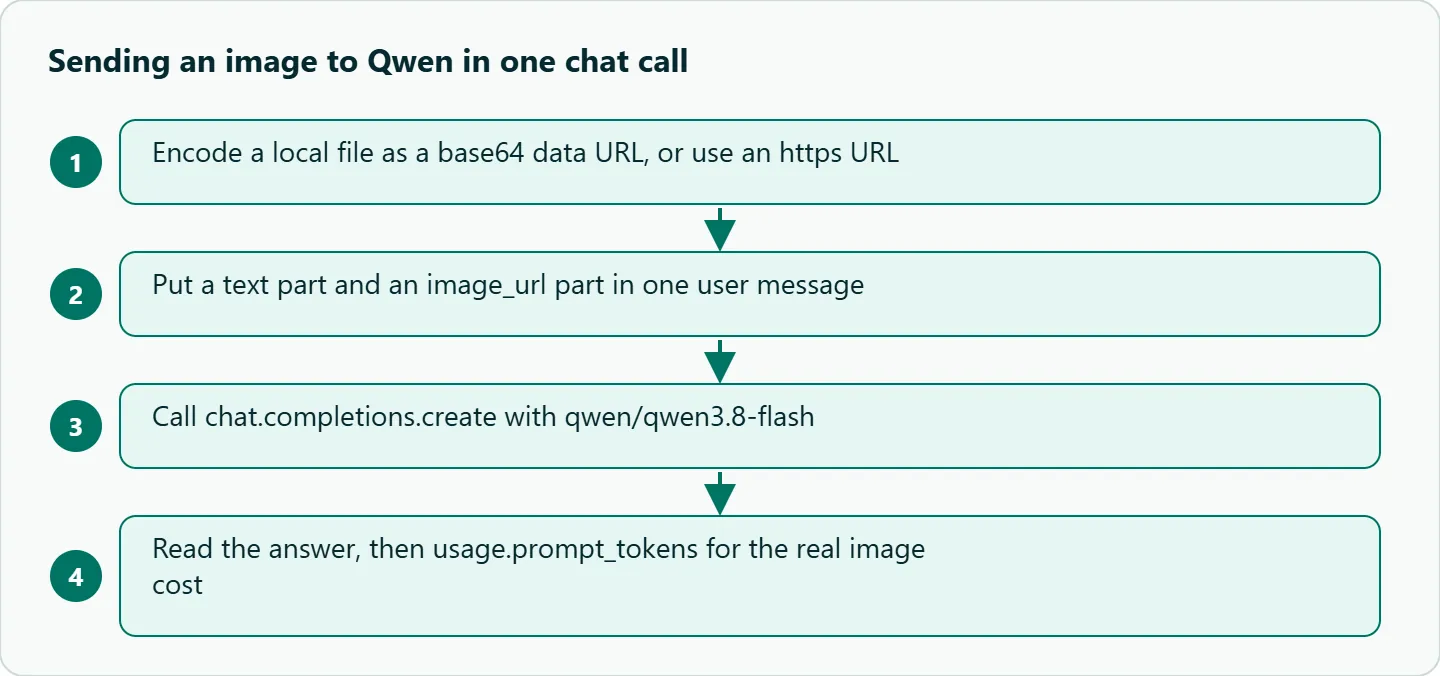
Request format
The shape follows the familiar OpenAI vision convention: a content list that mixes text and image_url parts. Alibaba's Model Studio vision docs use the same format in OpenAI-compatible mode, with base64 written as a data URL (data:[MIME_type];base64,...) and several images allowed in one user message. The MIME type has to match the file. Local file paths (file://...) work only in Alibaba's own Python and Java SDKs, not in compatible mode, so on any OpenAI-style endpoint you send a URL or base64.
Here is a receipt extraction call against qwen/qwen3.8-flash:
import base64
from openai import OpenAI

client = OpenAI(base_url="https://api.oceantoken.ai/v1", api_key="YOUR_OCEANTOKEN_KEY")

def data_url(path, mime="image/png"):
    with open(path, "rb") as f:
        return f"data:{mime};base64," + base64.b64encode(f.read()).decode()

r = client.chat.completions.create(
    model="qwen/qwen3.8-flash",
    messages=[{"role": "user", "content": [
        {"type": "text", "text": "Read this receipt. Return JSON: merchant, date, total, currency."},
        {"type": "image_url", "image_url": {"url": data_url("receipt.png")}},
    ]}],
    max_tokens=2000,
)
print(r.choices[0].message.content)
print(r.usage.prompt_tokens)  # the real image cost shows up here
Print usage.prompt_tokens on the first few calls. It is the only number that tells you what an image actually cost, and it catches the case where your client resized the file before upload.
Limits from the vendor docs
These are Alibaba's published limits for the Qwen3.8, 3.7, 3.6, 3.5 and Qwen3-VL series, checked on 2026-11-09.
| Limit | Value |
|---|---|
| Minimum side | Width and height above 10 px; long-to-short ratio at most 200:1 |
| Max resolution | Keep within 8K (7680x4320); larger images may time out |
| Formats | BMP, JPEG, PNG, TIFF, WEBP, HEIC below 4K; JPEG and PNG only from 4K to 8K |
| File size | 20 MB per image (10 MB for older models); the data URI itself must stay under 20 MB in OpenAI-compatible mode |
| Images per request | 2,048 by URL for Qwen3.8-Max and Qwen3.8-Flash; 250 as base64 |
| Request body | 64 MB total, shared by all images |
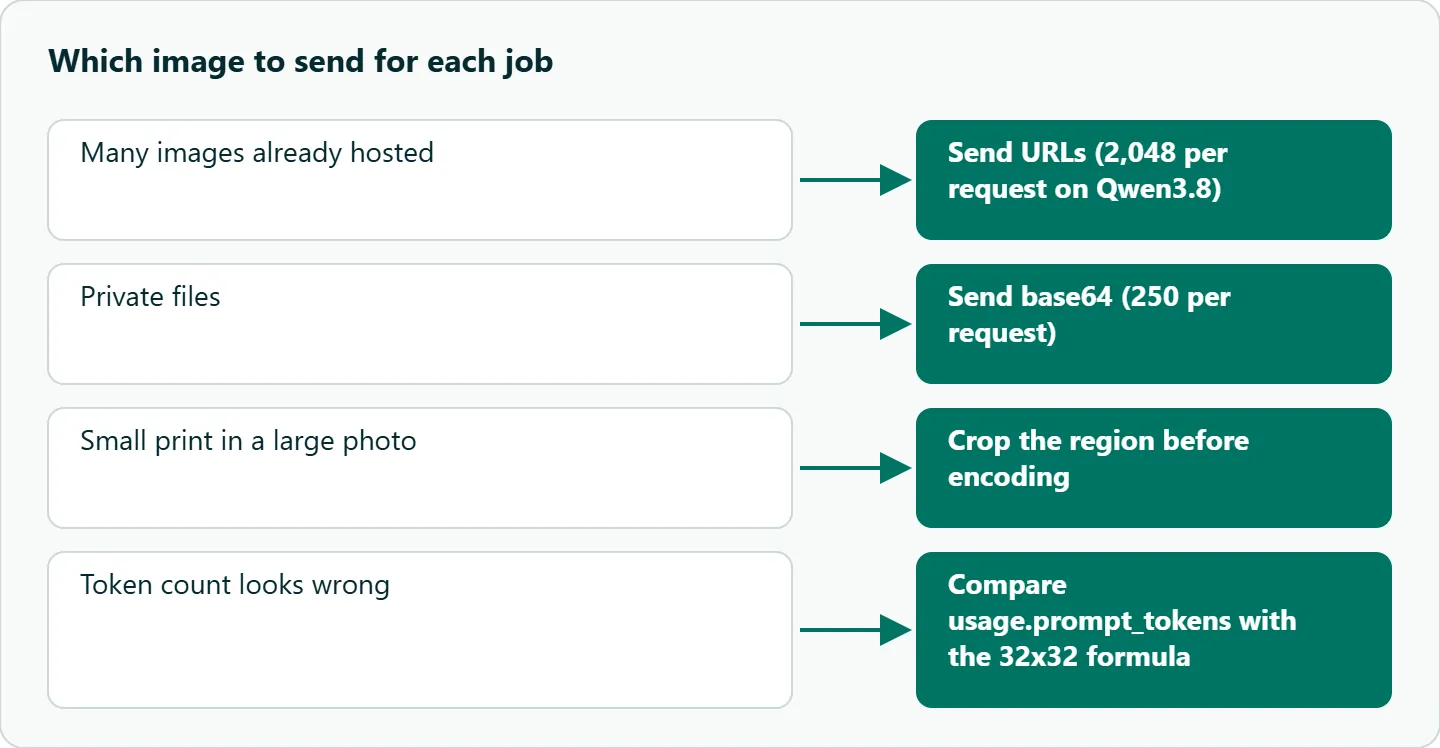
The base64 ceiling of 250 images is the one people hit first when they batch the pages of a PDF. The 64 MB body limit usually arrives at the same time, because base64 inflates every file by about a third. If you batch, send hosted URLs or split the job into several requests. All image and text tokens also share the model's input limit, so a long document can run out of context before it runs out of image slots.
Token math, worked
The documented formula is image tokens = (rounded height x rounded width) / 1,024 + 2. Each side is rounded to the nearest multiple of 32, and the +2 covers the vision begin and end markers. The default max_pixels is 2,621,440, which caps a normal image at about 2,560 tokens; anything bigger is scaled down first. With vl_high_resolution_images=true, Alibaba switches to a fixed policy with a ceiling of 16,384 tokens.
| Image | Rounded size | Input tokens from the formula |
|---|---|---|
| 960x1280 receipt photo | 960x1280 | about 1,200 |
| 1920x1080 screenshot | 1920x1088 | about 2,040 |
| 4000x3000 photo, default cap | scaled down | about 2,560 |
| 4000x3000 photo, high-res mode | 4000x3008 | about 11,750 |
The arithmetic is ours and counts the image only, not your prompt. The last two rows are the point: the same photo costs about 4.6 times more input in high-res mode. That makes resolution a per-request decision, not a global setting. For the rate per token, see the current rate on /qwen-api.
High-resolution mode in the Qwen vision API
vl_high_resolution_images, max_pixels and min_pixels are Alibaba parameters. OceanToken's model docs for qwen/qwen3.8-flash and qwen/qwen3.8-max-0902 list 18 supported parameters, and none of these three is among them. The docs also say that anything else in the request "is left out before it reaches the model." The same goes for enable_thinking.
So you get Alibaba's default scaling, and a high-res flag passed through extra_body will be dropped without an error. That is easy to miss, because the request still succeeds. The fix is to do the work on your side. If small print matters, crop the region before you encode it: a 1200x800 crop of a table header keeps its detail under the default cap and costs fewer tokens than the full photo. Then compare usage.prompt_tokens against the formula to confirm what was sent.
What goes wrong
Downscaling eats the text. A 4000x3000 photo of a dense table is reduced to the pixel cap before the model sees it, and small print then reads badly. Crop to the region you need.
Digits get misread. Totals, IDs and dates are the usual failures, and the output looks confident either way. Check that line items sum to the total, validate dates, and reject the result when a check fails. For a field you can't verify in code, route it to a human.
Charts give plausible, wrong numbers. Ask for the values the model read off the axis labels first, then the conclusion. You can check the first step; you can't check the second without it.
Too many images in one request. Two hundred full pages can fill the input budget before the question is even asked. Summarize page by page, then ask across the summaries.
Structured output on top of vision. Asking for JSON is fine, and response_format is on the supported list. Tool calls work the same way as with text; our Qwen tool calling guide covers the loop.
How to test this on your workload
- Pick 30 real images from your own traffic, not stock samples, and hand-label the fields you need.
- Send each one at full size and as a crop of the region that matters.
- Record field-level accuracy and
usage.prompt_tokensfor every call. - Compare token counts with the formula above to confirm no hidden resizing.
- Set your default crop and image size from the accuracy you get per token spent.
Our take: A vision model beats classic OCR plus rules when layouts vary: receipts from hundreds of merchants, screenshots from users, scanned forms from different banks. For one fixed form, template OCR is cheaper and exact, so use that. In both cases keep a deterministic validator behind the model, and treat pixels as your cost lever. Crop first, send less, and read the usage field.
Running it on OceanToken
The /qwen-api page lists qwen/qwen3.8-max-0902 and qwen/qwen3.8-flash, both with text, image and video input, on 2026-11-09. Set the base URL to https://api.oceantoken.ai/v1 and use those ids as written. Start with Flash for extraction and move a route to Max only when your test set shows Flash missing fields.
Two points from that page matter for vision work. The API is OpenAI-compatible, so the code above runs with only the base URL and the key changed, and you don't need an Alibaba Cloud account. And one key and one prepaid balance cover Qwen and every other model, with no subscription, so you can compare a Qwen route against another vision model by changing the model id. The page also says failed requests are not charged. See the current rate on /qwen-api.
FAQ
Which Qwen models accept images? Alibaba's docs cover the Qwen3.8, 3.7, 3.6, 3.5 and Qwen3-VL series. On OceanToken, qwen/qwen3.8-max-0902 and qwen/qwen3.8-flash list image input.
Should I send base64 or a URL? Use a URL when the image is already hosted and you send many, since base64 inflates the request and has the lower 250-image limit. Use base64 for private files you don't want to host.
Can I turn on high-resolution mode? On Alibaba's own endpoint, yes, with vl_high_resolution_images. On OceanToken that parameter is not in the documented list and is dropped, so crop the image instead.
Why is my token count higher than the formula says? Your text prompt and any system message count too, and each image adds two marker tokens. Trust usage.prompt_tokens over the estimate.
Can it read handwriting or other languages? Often, but accuracy depends on script and image quality. Test on your own samples and keep a human review path for high-value fields.
Sources
- Alibaba Cloud Model Studio: Image and video understanding (checked 2026-11-09)
- OceanToken docs: qwen/qwen3.8-flash (checked 2026-11-09)
- OceanToken docs: qwen/qwen3.8-max-0902 (checked 2026-11-09)
- OceanToken Qwen API page (checked 2026-11-09)
Get your OceanToken API key
- Create an OceanToken account and an API key.
- Copy the snippet below, paste your key, and run it.
- Check the current rate on /qwen-api.
curl https://api.oceantoken.ai/v1/chat/completions \
  -H "Authorization: Bearer $OCEANTOKEN_API_KEY" \
  -H "Content-Type: application/json" \
  -d '{"model": "qwen/qwen3.8-flash", "messages": [{"role": "user", "content": [{"type": "text", "text": "Describe this image."}, {"type": "image_url", "image_url": {"url": "https://example.com/photo.jpg"}}]}]}'
More from the blog
A Unified API for Chat, Image and Video
Building on a unified API for chat, image and video: sync vs async calls, billing units, retries, timeouts and storage, with three calls and a launch checklist.
Kimi K3 API International Access Guide
Use the Kimi K3 API internationally: sign up with email, pay by card, create one key and call moonshotai/kimi-k3 with an OpenAI SDK. Steps, code and checks.
Call Tencent Hy3 With the OpenAI SDK
Call Tencent Hy3 with the OpenAI SDK outside China: base URL, model id, streaming, tool calls, reasoning_effort values, Hy3 vs Hy3 preview, and token billing.