

Qwen enable_thinking: Budget and Streaming
Use Qwen enable_thinking per request: which tasks need it, sizing thinking_budget, streaming reasoning_content, multi-turn preserve_thinking, and sampling.
By OceanToken Team
Editor's note: Thinking mode is the most misunderstood Qwen setting. Teams leave it on for chat widgets and wonder why replies are slow, or switch it off for agents and wonder why plans fall apart. Decide it per task, put a budget on it, and measure the tail. One route caveat first:
enable_thinkingandthinking_budgetare Alibaba's parameters, and OceanToken's Qwen3.8 Max page listsreasoning_effortinstead, so there they may be dropped without an error.
Short answer: Qwen enable_thinking turns reasoning on or off per request on Alibaba's hybrid models, sent in extra_body, and thinking_budget caps it. Both are Alibaba parameters; OceanToken's Max page lists reasoning_effort, so check reasoning tokens there. Reasoning arrives in reasoning_content and bills as output. Use it for planning, math and code, not extraction or chat.

The switch
Alibaba's deep thinking page sorts models into three groups. Hybrids with thinking on by default include qwen3.8-max, qwen3.8-flash, qwen3.8-27b and qwen3.8-omni-flash. The qwen-plus and qwen-flash families are hybrids with thinking off by default. Thinking-only models such as qwen3.8-2.4t-a95b can't turn it off. Our Alibaba direct vs gateway comparison covers that default and how to check that the switch reaches the model on each route, so this article is about using it well once it does.
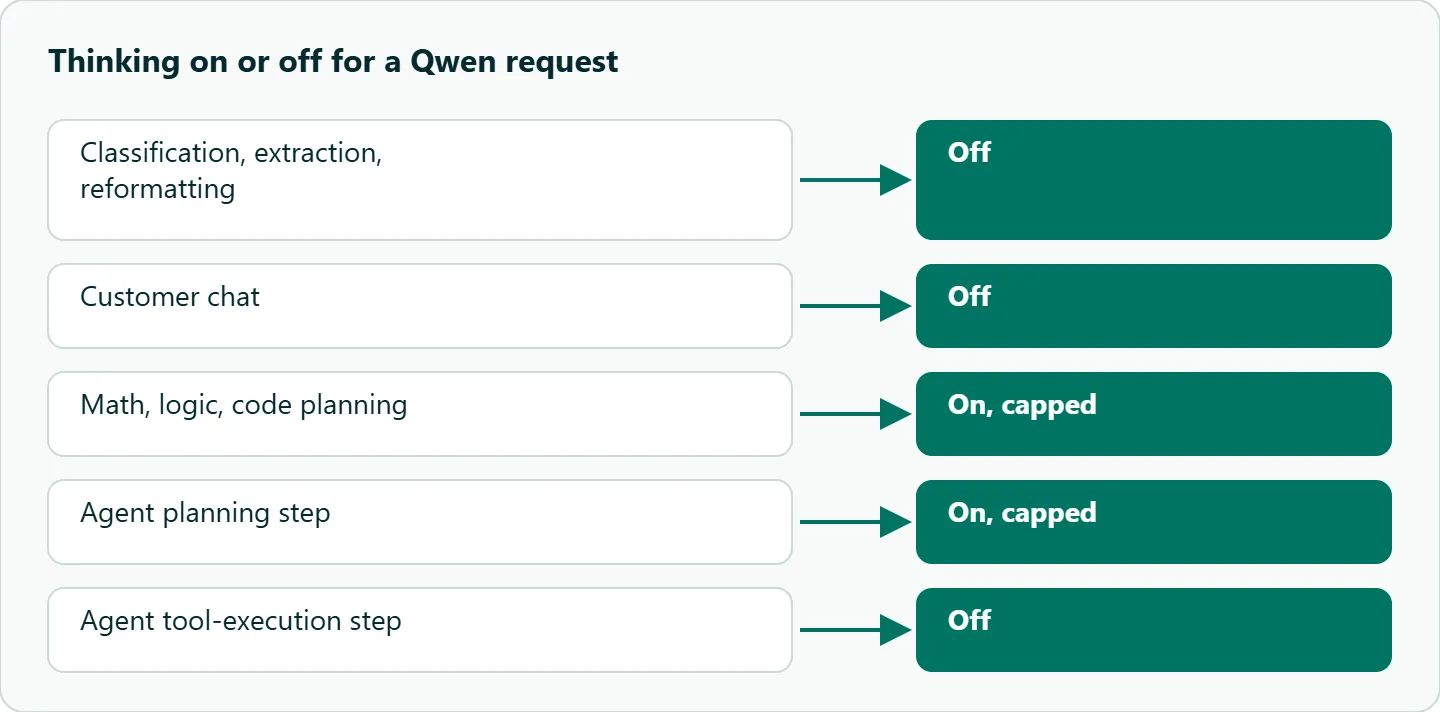
The useful question isn't "which model thinks" but "which step needs it." A lookup gains nothing from reasoning; a plan does.
| Task | Thinking | Why |
|---|---|---|
| Classification, extraction, reformatting | Off | The answer is a lookup; reasoning only adds output tokens |
| Customer chat | Off | Time to first word matters more than depth |
| Math, logic, code planning | On, capped | Reasoning is where the accuracy comes from |
| Agent planning step | On, capped | Plans benefit from deliberation |
| Agent tool-execution step | Off | Calling a known tool with known arguments is mechanical |
Budget the reasoning
thinking_budget is the maximum number of reasoning tokens. Alibaba says that once the limit is reached, "the model immediately starts generating the response." You get an answer from a truncated thought, not an error, which is why a cap that's too low shows up as confident, shallow answers rather than failures. Keep max_tokens separate in your head: it limits the whole reply, and our text guide warns that a small max_tokens can be spent on reasoning before any answer is written.
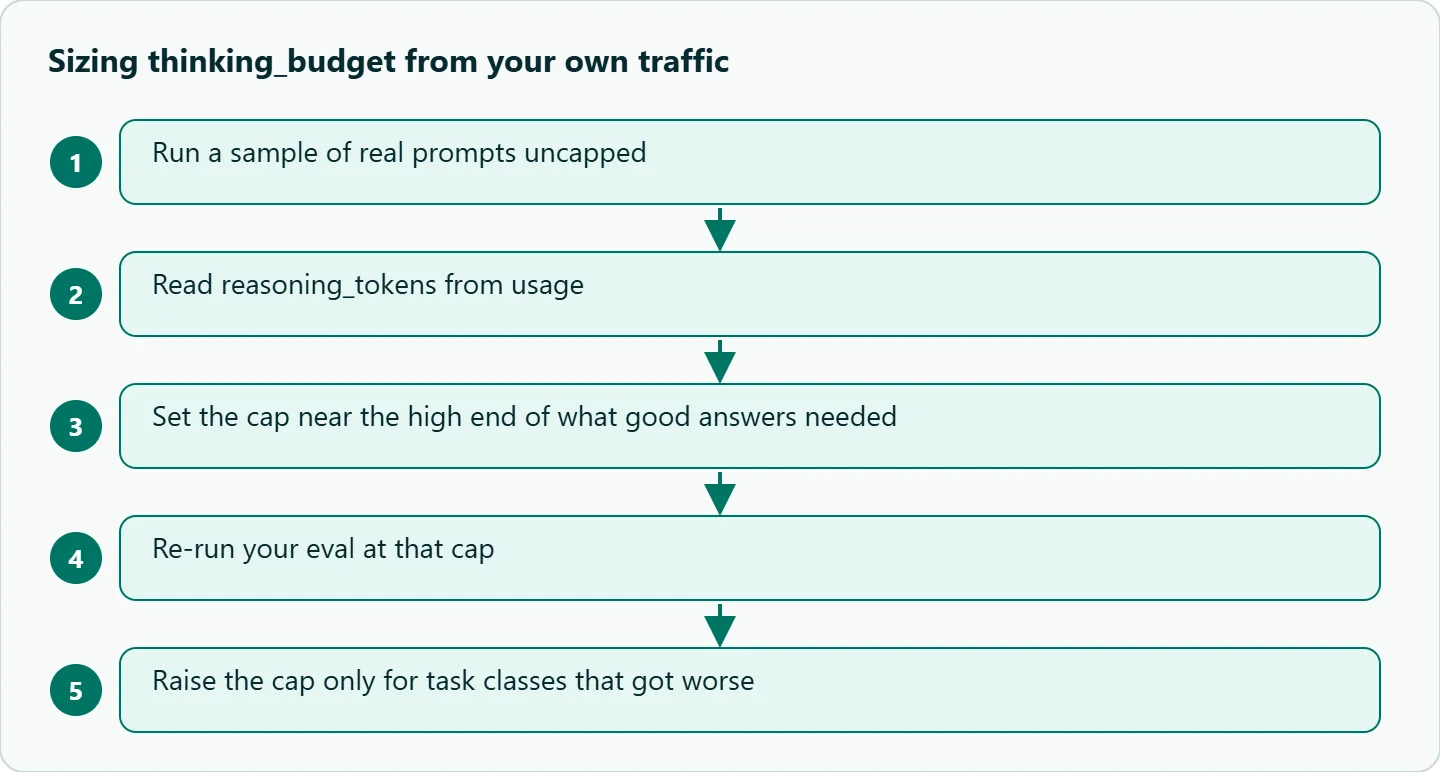
Size the cap from data, not instinct. Run a sample of real prompts uncapped, read the reasoning token count from usage.completion_tokens_details.reasoning_tokens, set the cap near the high end of what good answers needed, then re-run your eval at that cap.
The tail is what the cap is for. Picture an agent loop with six thinking steps per task, where most steps reason for about 1,500 tokens but one in twenty wanders to 30,000. Per step, that averages 0.95 x 1,500 tokens from normal steps and 0.05 x 30,000 from runaways, 2,925 in all, so a six-step task averages 17,550 reasoning tokens. Cap each step at 4,000 and the runaway share falls to 200 per step, so the task averages 9,750, a bit over half. Turn thinking off for the tool-execution steps and it drops further. These are illustrative numbers, not measurements, so run the same calculation on your own traces.
| What you see in usage logs | Likely cause | Action |
|---|---|---|
| Median reasoning tokens high | The prompt is vague | Tighten the brief |
| Median low, a few huge outliers | Rare hard inputs | Cap, then escalate low-confidence answers |
| Answers worse after capping | Cap too low for that task class | Raise the cap for that class only |
Stream it
A thinking stream sends delta.reasoning_content first and delta.content after, so a client that reads only content sees nothing for a while and looks frozen. Show a "thinking" state instead. With stream_options={"include_usage": True} the final chunk carries usage and an empty choices list, so guard the index.
Streaming also protects you from timeouts. Alibaba warns that long prompts with thinking can truncate or time out and suggests streaming or a client timeout of 180 seconds or more. Our text guide closes non-streamed requests after 240 seconds. And some open models, such as qwen3.5-122b-a10b, accept enable_thinking only on streaming calls and return an error otherwise.
import os
from openai import OpenAI

client = OpenAI(base_url="https://api.oceantoken.ai/v1",
                api_key=os.environ["OCEANTOKEN_API_KEY"], timeout=300)

stream = client.chat.completions.create(
    model="qwen/qwen3.8-flash",
    messages=[{"role": "user", "content": "Plan a 3-step REST to gRPC migration."}],
    stream=True, stream_options={"include_usage": True},
    # Alibaba names; OceanToken may drop them, so check reasoning_tokens at the end.
    # Alternative per the Max model page: reasoning_effort=... (check the docs for values)
    extra_body={"enable_thinking": True, "thinking_budget": 2000},
    max_tokens=4000,
)
answering = False
for chunk in stream:
    if chunk.usage:                       # last chunk: usage, empty choices
        details = getattr(chunk.usage, "completion_tokens_details", None)
        print("\nreasoning tokens:", getattr(details, "reasoning_tokens", "not reported"))
        continue
    d = chunk.choices[0].delta
    if getattr(d, "reasoning_content", None):
        print(".", end="", flush=True)    # show progress, not the raw trace
    if d.content:
        if not answering:
            print("\n--- answer ---"); answering = True
        print(d.content, end="", flush=True)
The reasoning token count at the end is your check that the settings did something. Run once with the budget at 500 and once at 2,000; if the count doesn't move, the parameter isn't reaching the model on that route.
For multi-turn chats, Alibaba documents preserve_thinking. When it's true, earlier reasoning_content is added to the next round's input, and it counts as input tokens. Most Qwen models don't need it by default, so leave it off unless an eval shows later turns improving with it.
Prompt for a thinking model
Write a brief, not a recipe. State the goal, the constraints and the exact output format, and say what to do when information is missing. Skip "think step by step"; the model already does. Show example outputs, not example reasoning.
A weak prompt: "Think carefully and make this code better." A better one: "Review for correctness bugs only. Return JSON [{line, issue, fix}] or []." The second one tends to shorten the reasoning as well as the answer, because the model isn't guessing what "better" means. For the JSON side of that, see our guide to Qwen function calling when the output feeds a tool.
As a rule of thumb, not a documented behavior: don't show raw reasoning to end users, since it can repeat instructions from your prompt and ideas the final answer rejected. Show a state, or a short summary you generate separately.
Sampling
These settings come from the open Qwen3.6 model, not hosted Flash or Max, so treat them as a starting point to test. The Qwen3.6-35B-A3B model card gives the clearest published values.
| Mode | temperature | top_p | top_k | presence_penalty |
|---|---|---|---|---|
| Thinking, general | 1.0 | 0.95 | 20 | 1.5 |
| Thinking, precise coding | 0.6 | 0.95 | 20 | 0.0 |
| Non-thinking | 0.7 | 0.80 | 20 | 1.5 |
The card also suggests 32,768 output tokens for most queries and up to 81,920 for hard math and competition code, and says Qwen3.6 doesn't support the old /think and /nothink prompt switches. top_k isn't an OpenAI parameter; send it in extra_body. Our rule of thumb, not from the card: avoid carrying an extraction habit of temperature 0 into a thinking request, since the card's thinking values are much higher.
Our take: Default to off, opt in per task, and always put a budget on "on". A modest cap on Flash, with an uncapped retry on Max for low-confidence cases, keeps most requests cheap and fast and spends reasoning only where it changes the answer.
Running Qwen enable_thinking on OceanToken
On OceanToken the base URL is https://api.oceantoken.ai/v1, and /qwen-api lists qwen/qwen3.8-max-0902 and qwen/qwen3.8-flash, with thinking that can be switched on or off for Max. The Qwen3.8 Max model page lists reasoning_effort as its reasoning control, not enable_thinking or thinking_budget, and the text guide says allowed reasoning_effort values vary by model. Because a parameter the model doesn't support is dropped without an error, read the reasoning token count from the snippet above before you rely on either control.
The practical advantages: the API is OpenAI-compatible, so reasoning_content and usage arrive in the shapes your OpenAI client already parses; one key and one prepaid balance also cover DeepSeek, GLM, Kimi, Claude and GPT, so you can compare thinking behavior across families by changing the model id; and the /qwen-api page states that failed requests are free. See the current rate on /qwen-api.
How to test this on your workload
We haven't published results for this article. Pick around twenty real prompts from one task class. Run them with thinking off, then with budgets of 500, 2,000 and 8,000, and record reasoning tokens, whether the answer was correct, and time to the first answer token. The lowest budget at which correctness stops improving is your cap for that class. Repeat for each class instead of setting one global number.
FAQ
How do I turn Qwen thinking off? On Alibaba, send enable_thinking: false in extra_body. Thinking-only models ignore it and always reason.
Is thinking billed? Yes, as output tokens, on both Alibaba and OceanToken. Alibaba notes some hybrids price thinking and non-thinking modes differently.
Is thinking_budget the same as max_tokens? No. The budget caps reasoning only; max_tokens caps the whole response, reasoning included.
Why is my stream empty at first? Reasoning arrives in reasoning_content before any content. Read both fields, or show a thinking state.
Should I send old reasoning back in a chat? Usually not. Alibaba's preserve_thinking does that, and the reasoning then bills as input on every turn.
Sources
- Alibaba Cloud Model Studio: deep thinking (checked 2026-11-09)
- Qwen3.6-35B-A3B model card (checked 2026-11-09)
- OceanToken docs: text generation (checked 2026-11-09)
- OceanToken Qwen API page (checked 2026-11-09)
- OceanToken Qwen3.8 Max model page (checked 2026-11-09)
Get your OceanToken API key
- Create an OceanToken account and an API key.
- Copy the snippet below, paste your key, and run it.
- Check the current rate on /qwen-api.
curl https://api.oceantoken.ai/v1/chat/completions \
  -H "Authorization: Bearer $OCEANTOKEN_API_KEY" \
  -H "Content-Type: application/json" \
  -d '{"model": "qwen/qwen3.8-max-0902", "messages": [{"role": "user", "content": "Plan a 3-step REST to gRPC migration."}]}'
More from the blog
A Unified API for Chat, Image and Video
Building on a unified API for chat, image and video: sync vs async calls, billing units, retries, timeouts and storage, with three calls and a launch checklist.
Kimi K3 API International Access Guide
Use the Kimi K3 API internationally: sign up with email, pay by card, create one key and call moonshotai/kimi-k3 with an OpenAI SDK. Steps, code and checks.
Call Tencent Hy3 With the OpenAI SDK
Call Tencent Hy3 with the OpenAI SDK outside China: base URL, model id, streaming, tool calls, reasoning_effort values, Hy3 vs Hy3 preview, and token billing.