

Qwen JSON Output with response_format
Get valid Qwen JSON output: json_object vs json_schema, which Qwen models enforce a schema, keywords that return 400, max_tokens and thinking pitfalls, retries.
By OceanToken Team
Editor's note: "The model sometimes returns broken JSON" is the most common complaint we hear about extraction pipelines, and it's usually fixable without changing models. We'd rather ship a pipeline that validates every output than one that trusts a clever prompt. Schema enforcement fixes the shape of the answer. Only your own checks catch a wrong value.
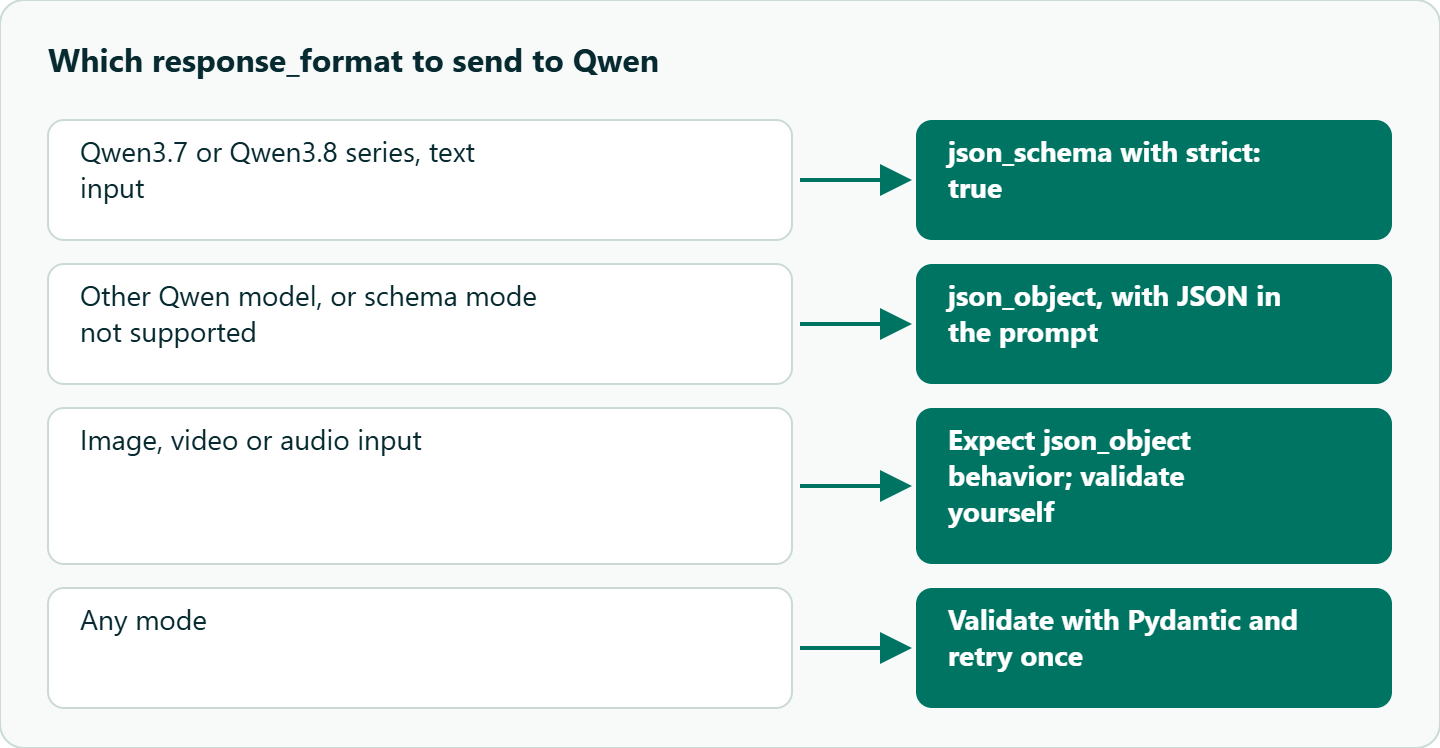
Short answer: For Qwen JSON output, Alibaba documents two response_format modes: json_object (valid JSON, any shape; the messages must contain "JSON") and json_schema with strict: true (enforces your schema on the Qwen3.7 and 3.8 series). On OceanToken, a model that doesn't honour a schema drops response_format without an error, so validate every reply and retry once.

The two modes
This article covers response_format only; for functions and tools, see Qwen tool calling. Alibaba's structured output guide describes both modes, and they guarantee different things.
| Mode | response_format | Guarantee | Notes |
|---|---|---|---|
| JSON Object | {"type": "json_object"} |
Valid JSON, any shape | Messages must contain "JSON" or the call errors |
| JSON Schema | {"type": "json_schema", "json_schema": {..., "strict": true}} |
Matches your schema | Qwen3.7 Plus/Flash/Max and Qwen3.8 Max/Flash series |
| Prompt only | none | Nothing | Works with an example; always validate |
The details are where pipelines break. In JSON Object mode, forgetting the word "JSON" returns an error that says the messages must contain it. In JSON Schema mode, the keywords multipleOf, uniqueItems, contains, minContains, maxContains, additionalItems, patternProperties and propertyNames return a 400, so a schema exported straight from a validation library can fail before the model sees it. Image, video or audio input falls back to JSON Object, which means your schema is silently not enforced. The same page says JSON Schema isn't yet supported in the Singapore region or the Java SDK, and its feature table lists fewer models than its model list, so test your exact model id.
Two recommendations from that page go straight into code. Use strict: true with additionalProperties: false, and make optional fields a union such as ["string", "null"] while still listing them in required. That way the field always appears, sometimes as null, instead of vanishing.
A pipeline that validates
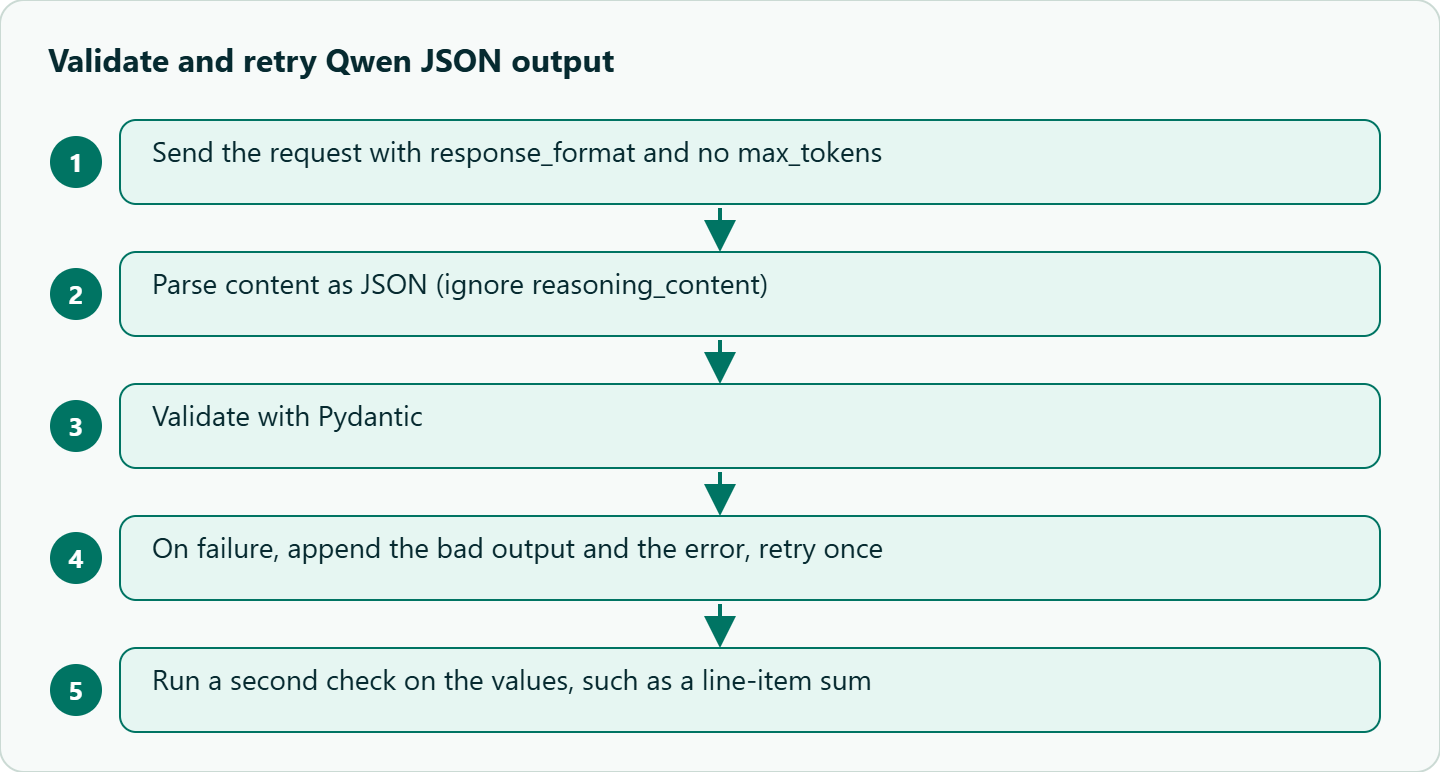
Use the schema mode on qwen/qwen3.8-max-0902, whose model page lists response_format, validate anyway, and retry once with the error message.
import json, os
from pydantic import BaseModel, ValidationError
from openai import OpenAI

client = OpenAI(base_url="https://api.oceantoken.ai/v1",
                api_key=os.environ["OCEANTOKEN_API_KEY"])

class Invoice(BaseModel):
    vendor: str
    total: float
    currency: str
    due_date: str | None = None

SCHEMA = {"type": "json_schema", "json_schema": {"name": "invoice", "strict": True, "schema": {
    "type": "object", "additionalProperties": False,
    "properties": {"vendor": {"type": "string"}, "total": {"type": "number"},
                   "currency": {"type": "string"}, "due_date": {"type": ["string", "null"]}},
    "required": ["vendor", "total", "currency", "due_date"]}}}

def extract(text, retries=1):
    msgs = [{"role": "system", "content": "Extract the invoice fields as JSON. Dates as YYYY-MM-DD or null."},
            {"role": "user", "content": text}]
    for _ in range(retries + 1):
        r = client.chat.completions.create(
            model="qwen/qwen3.8-max-0902", messages=msgs,
            response_format=SCHEMA, temperature=0.1)   # no max_tokens: a cap can cut the JSON
        raw = r.choices[0].message.content
        try:
            return Invoice(**json.loads(raw))
        except (json.JSONDecodeError, ValidationError) as e:
            msgs += [{"role": "assistant", "content": raw},
                     {"role": "user", "content": f"Invalid: {e}. Return corrected JSON only."}]
    raise ValueError("extraction failed")

print(extract("Acme GmbH invoice. Amount due EUR 1,240.50 by 2026-12-01."))
The schema is written by hand so every property is required and due_date is nullable; schemas generated from Pydantic often need the same edits, and you should strip any unsupported keyword. There's no max_tokens on purpose: Alibaba advises against setting it with structured output, because truncation produces invalid JSON. If your model id doesn't support json_schema, drop to json_object and put the key list plus one filled example in the prompt. The system message above already contains the word "JSON", so it works for both modes. If you switch to qwen/qwen3.8-flash, note that its response_format support isn't shown on a model page, so check that the first replies come back as JSON before you scale up.
Thinking is the other setting to decide before you run this. The Qwen3.8 hybrids think by default on Alibaba, and for extraction that only adds output tokens. On OceanToken, the Max model page lists reasoning_effort as its reasoning control, not enable_thinking, and gives no values for it, so don't send Alibaba's enable_thinking there and expect it to work. Instead, check reasoning_content and the reasoning token count in usage on your first calls; if reasoning shows up, look up the accepted reasoning_effort values in the docs before setting one.
Keep the schema flat when you can. Deep nesting and long enums make the model spend effort on structure instead of reading the document, and they make validation errors harder to feed back. Split a large extraction into two small calls, header fields first and then line items, rather than one sprawling schema.
Why JSON still breaks
In prompt-only mode, the usual culprit is text around the JSON, such as "Here is your JSON:" or a markdown fence. With a schema, it's more often truncation from a low max_tokens, or a multimodal input that quietly fell back to JSON Object.
Thinking mode is the other trap. Alibaba's deep thinking page says the Qwen3.8 hybrids think by default, and the structured output page says models labeled as non-thinking support structured output only with thinking off. Reasoning comes back in reasoning_content, separate from content, so parse content only. For a plain extraction, thinking adds output tokens without protecting anything. On Alibaba direct you turn it off with enable_thinking: false in extra_body; our Alibaba direct vs gateway comparison covers how to check whether that switch reaches the model on each route.
Then there's the error that no format mode catches: valid JSON with wrong values. The schema says total is a number, not that it's the right number.
A failure case
Suppose the invoice reads "Total 1.240,50 EUR". A schema-enforced call can return "total": 1.24 or 1240.5, and both pass validation. Only a second check catches the bad one: compare against a sum of line items, require the currency string to appear in the source text, or route documents where two checks disagree to qwen/qwen3.8-max-0902. Schema enforcement fixes shape, not meaning, so spot-check a sample of documents by hand before you trust a field.
| Schema pattern | What goes wrong | Safer version |
|---|---|---|
Optional field left out of required |
The field disappears from some outputs | Require it, type ["string", "null"] |
| Free-text category | "Billing", "billing " and "Invoices" all appear | enum of a few values plus "other" |
| Amount as a string | "1,240.50" breaks downstream math | number, plus a separate currency string |
| Date as free text | Mixed locales, 03/04 ambiguity | Format in the prompt, validate with a regex |
uniqueItems or patternProperties |
400 before generation | Enforce in Pydantic instead |
Cost of retries
A retry costs more than the first call. It re-sends the original messages plus the bad output and the error as input, then generates the JSON again. That sounds expensive, but a format retry on a short extraction is still small next to the cost of a wrong value that reaches your database. Thinking tokens are billed as output, so leaving thinking on for extraction is usually a bigger waste than the occasional retry. Log retry counts per model id: a rising rate is the signal to look at the schema, not to upgrade the model. See the current per-token rates on /qwen-api.
One exception: a one-sentence reason field in a classifier costs a few output tokens but makes wrong labels debuggable, so it can be worth keeping until accuracy is stable.
Our take: Don't pay for the flagship to solve a formatting problem. If Flash fails validation, check the schema keywords, max_tokens and thinking mode first. Move to Max only when the extracted values are wrong, such as misreading a table.
Qwen JSON output on OceanToken
On OceanToken the base URL is https://api.oceantoken.ai/v1, and /qwen-api lists qwen/qwen3.8-max-0902 and qwen/qwen3.8-flash. The Qwen3.8 Max model page lists response_format under structured outputs. Our text guide supports both json_schema and json_object, with one warning worth building around: a model that doesn't honour a schema drops response_format and answers in prose, with no error. The validate-and-retry loop above is exactly the defense for that, and it's also why you should log the model id with every failure.
The API is OpenAI-compatible, so the code is what you'd write for OpenAI with the base URL, key and model id changed. One key and one prepaid balance also cover DeepSeek, GLM, Claude, GPT and Gemini, so you can run the same extraction eval across families by changing one string. The /qwen-api page states that failed requests are free. If your pipeline also calls functions, our Qwen function calling guide covers the tool loop separately. See the current rate on /qwen-api.
How to test this on your workload
We haven't published results for this article. Take a few dozen real documents and send each through json_schema, json_object and prompt-only modes on qwen/qwen3.8-flash. Record three things per mode: parse failures, schema mismatches, and wrong values found by your second check. The first two tell you which mode to use. The third tells you whether you need Max.
FAQ
Does Qwen have a JSON mode? Yes. Alibaba documents json_object for most Qwen models and json_schema for the Qwen3.7 and Qwen3.8 series. Check your exact model id.
Why did my json_object call return an error? The messages must contain the word "JSON". Add it to the system prompt.
Why does my schema return a 400? It probably uses an unsupported keyword such as uniqueItems, multipleOf or patternProperties. Remove it and enforce the rule in your validator.
Should I use thinking for extraction? Usually not. Simple extraction has no reasoning to protect, thinking bills as output, and some models support structured output only with thinking off.
Can I get schema-enforced JSON from an image? Alibaba says multimodal input falls back to json_object, so the schema isn't enforced. Validate the output yourself.
Sources
- Alibaba Cloud Model Studio: structured output (checked 2026-11-09)
- Alibaba Cloud Model Studio: deep thinking (checked 2026-11-09)
- OceanToken docs: text generation (checked 2026-11-09)
- OceanToken Qwen API page (checked 2026-11-09)
- OceanToken Qwen3.8 Max model page (checked 2026-11-09)
Get your OceanToken API key
- Create an OceanToken account and an API key.
- Copy the snippet below, paste your key, and run it.
- Check the current rate on /qwen-api.
curl https://api.oceantoken.ai/v1/chat/completions \
  -H "Authorization: Bearer $OCEANTOKEN_API_KEY" \
  -H "Content-Type: application/json" \
  -d '{"model": "qwen/qwen3.8-max-0902", "messages": [{"role": "system", "content": "Return JSON with keys vendor and total."}, {"role": "user", "content": "Acme GmbH, total EUR 1,240.50"}], "response_format": {"type": "json_object"}}'
More from the blog
A Unified API for Chat, Image and Video
Building on a unified API for chat, image and video: sync vs async calls, billing units, retries, timeouts and storage, with three calls and a launch checklist.
Kimi K3 API International Access Guide
Use the Kimi K3 API internationally: sign up with email, pay by card, create one key and call moonshotai/kimi-k3 with an OpenAI SDK. Steps, code and checks.
Call Tencent Hy3 With the OpenAI SDK
Call Tencent Hy3 with the OpenAI SDK outside China: base URL, model id, streaming, tool calls, reasoning_effort values, Hy3 vs Hy3 preview, and token billing.