

Qwen in Dify, LobeChat and Cherry Studio
Connect Qwen to Dify, LobeChat and Cherry Studio with an OpenAI-compatible base URL: where each tool wants the URL, the /v1 trap, model ids, and fixes.
By OceanToken Team
Editor's note: Chat front ends and workflow builders all speak the same OpenAI-style API, so connecting Qwen comes down to three fields: base URL, key, model id. The time goes into the details around them. Each of these three tools treats the
/v1suffix differently, and that one difference causes most of the failed first connections. We haven't clicked through every screen on every version, so field names below come from each tool's current docs.
Short answer: To run Qwen in Dify, LobeChat and Cherry Studio, add an OpenAI-compatible provider, paste your key, and type the model id, such as qwen/qwen3.8-flash. Dify and LobeChat take https://api.oceantoken.ai/v1. Cherry Studio appends /v1/chat/completions itself, so give it the root https://api.oceantoken.ai. Then send one test message.

What you need first
| Item | Value |
|---|---|
| Base URL | https://api.oceantoken.ai/v1 (Cherry Studio: https://api.oceantoken.ai) |
| API key | Your OceanToken key, never committed to a repo |
| Fast model | qwen/qwen3.8-flash |
| Strong model | qwen/qwen3.8-max-0902 |
Check the key and the id with one call before you touch any UI. If this fails, no front end will work, and you will save an hour of clicking:
curl https://api.oceantoken.ai/v1/chat/completions \
  -H "Authorization: Bearer $OCEANTOKEN_API_KEY" \
  -H "Content-Type: application/json" \
  -d '{"model":"qwen/qwen3.8-flash","messages":[{"role":"user","content":"Reply with the word ok."}]}'
All three tools can also read the model list. OceanToken's model list guide says GET /v1/models returns only the ids your key can call, and a model outside that list is refused with 403 model_not_allowed. If a tool shows fewer models than you expect, check the key's model access before you blame the tool.
Dify
Dify ships model providers as plugins. The one you want is OpenAI-API-compatible by langgenius (version 0.0.40 on the Marketplace on 2026-11-09). Self-hosted installs may need to install it first.
- Open Integrations > Model Provider (workspace owners and admins only) and install the OpenAI-API-compatible plugin if it isn't listed.
- Click Add Model on the provider card.
- Fill the fields: type LLM, model name
qwen/qwen3.8-flash, your API key, API base URLhttps://api.oceantoken.ai/v1, completion mode Chat. Optional fields cover context size, token limits, streaming and vision. - Save, pick the model in a chatbot or workflow LLM node, and run the preview.
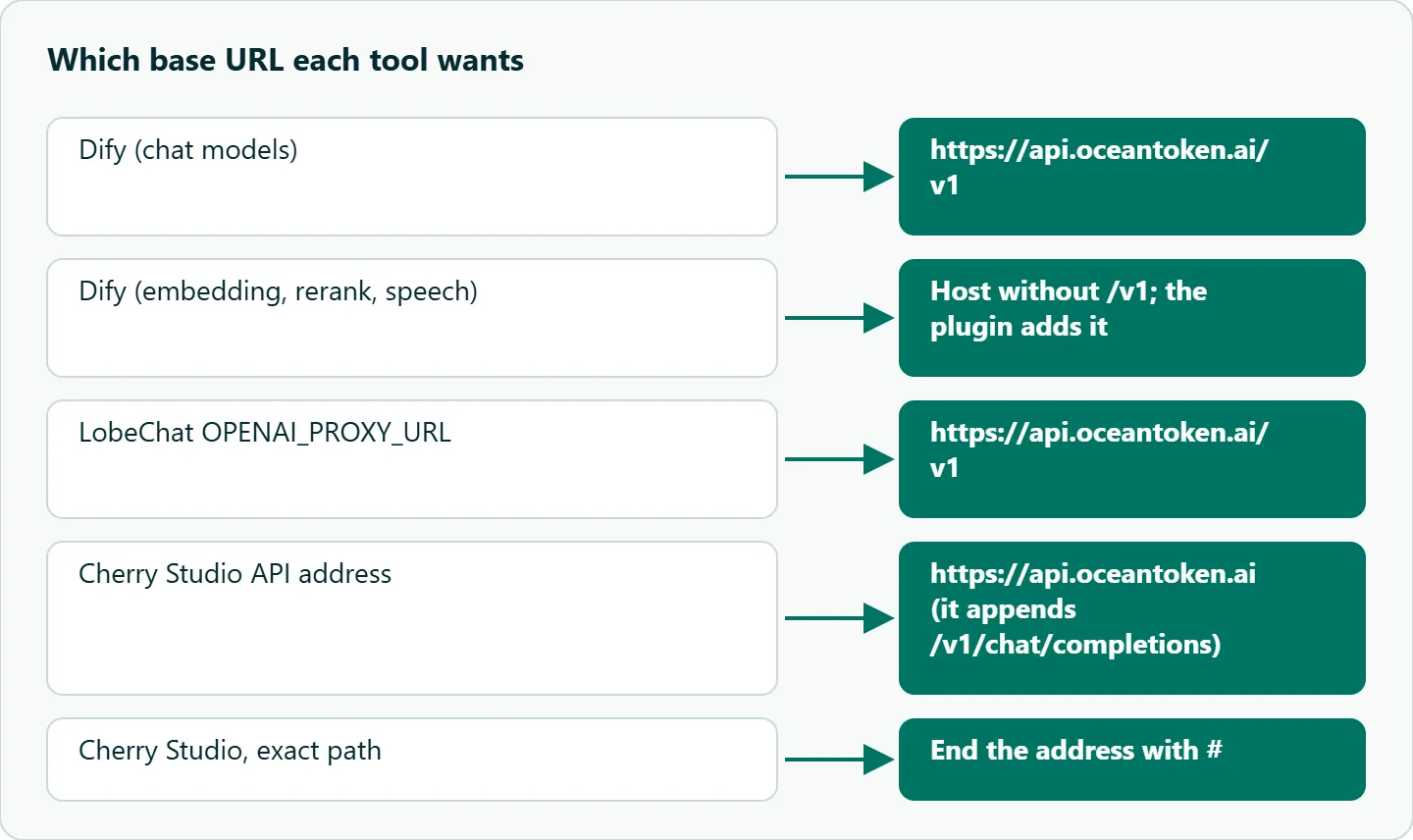
Two details from the docs save time later. Dify's model provider docs say that if you add a model whose name and type match an existing one, Dify attaches the new key to that model instead of creating a duplicate. That is useful for swapping keys, and confusing if you meant to add a second model. And the plugin's README says chat models take the base URL with /v1, while embedding, rerank, speech-to-text and text-to-speech models take the host without it, because the plugin adds the version itself for those types and you would otherwise get /v1/v1.
Tool calling is listed on the plugin page as a model requirement, not a field. Before you build a Dify agent on Qwen, test one tool call in an agent node; our Qwen tool calling guide covers what the model expects.
LobeChat
Self-hosted LobeChat reads environment variables. Three matter here:
OPENAI_API_KEY=YOUR_OCEANTOKEN_KEY
OPENAI_PROXY_URL=https://api.oceantoken.ai/v1
OPENAI_MODEL_LIST=-all,+qwen/qwen3.8-flash,+qwen/qwen3.8-max-0902
LobeChat's model provider docs say OPENAI_PROXY_URL overrides the default https://api.openai.com/v1. They also warn that endpoints differ on the /v1 suffix, and if the AI returns empty messages during testing, you should add /v1 and retry. Keep it on for OceanToken.
OPENAI_MODEL_LIST controls what users see: +id adds a model, -id hides one, -all hides everything so only the ids you list appear, and id=name sets a display name. Write qwen/qwen3.8-flash=Qwen Flash for a friendlier label in the picker. Starting with -all matters on a team install, because otherwise the picker shows OpenAI's built-in model names, which this key may not be able to call.
Cherry Studio
Cherry Studio is a desktop client with a custom provider dialog. Per its provider settings docs :
- Open Settings > Model Services and click + Add at the bottom of the provider list.
- Name the provider and choose the OpenAI type.
- Paste your key and enter the API address
https://api.oceantoken.ai. - Click Manage to fetch the model list, then click + next to
qwen/qwen3.8-flashto add it. - Click the check button next to the key field to test the connection.
Step 3 is the trap. The docs say Cherry Studio "will automatically append the remaining path (/v1/chat/completions)," so you enter only the root. Paste the /v1 address you used everywhere else and the request goes to a doubled path. If you ever need a path used exactly as typed, end the address with #, for example https://api.oceantoken.ai/v1/chat/completions#.
Step 4 has a quirk too. Fetched models are not added automatically; only models you add with + show up in the selectors. The key check uses the last chat model you added, so if the check fails, look for a wrong or non-chat id in the list first.
Which model to put where
| Job in the app | Model | Why |
|---|---|---|
| Default chat, titles, short classifiers | qwen/qwen3.8-flash |
Fast and light |
| Hard reasoning, long answers | qwen/qwen3.8-max-0902 |
Stronger tier |
Set Flash as the default and let people switch to Max per conversation. The reverse, Max by default, means every chat title and quick question runs on the expensive tier, and nobody notices until the bill arrives.
Qwen in Dify, LobeChat and Cherry Studio: what goes wrong
| Symptom | Likely cause | Fix |
|---|---|---|
| 401 | Key pasted under the wrong provider, or an old OpenAI key in an env var | Re-enter the key; check env vars |
| Empty reply in LobeChat | /v1 missing from OPENAI_PROXY_URL |
Add /v1 |
| 404 in Cherry Studio | /v1 included, so the path doubled |
Use the root address |
403 model_not_allowed |
The key can't call that id | Check the key's model access |
| Model missing from a picker | Not added in Dify or Cherry; -all in LobeChat |
Add it, or list it with + |
| Vision or tools silently off | Capability flags are per model in these UIs | Turn them on only where the model supports them |
How to test this on your workload
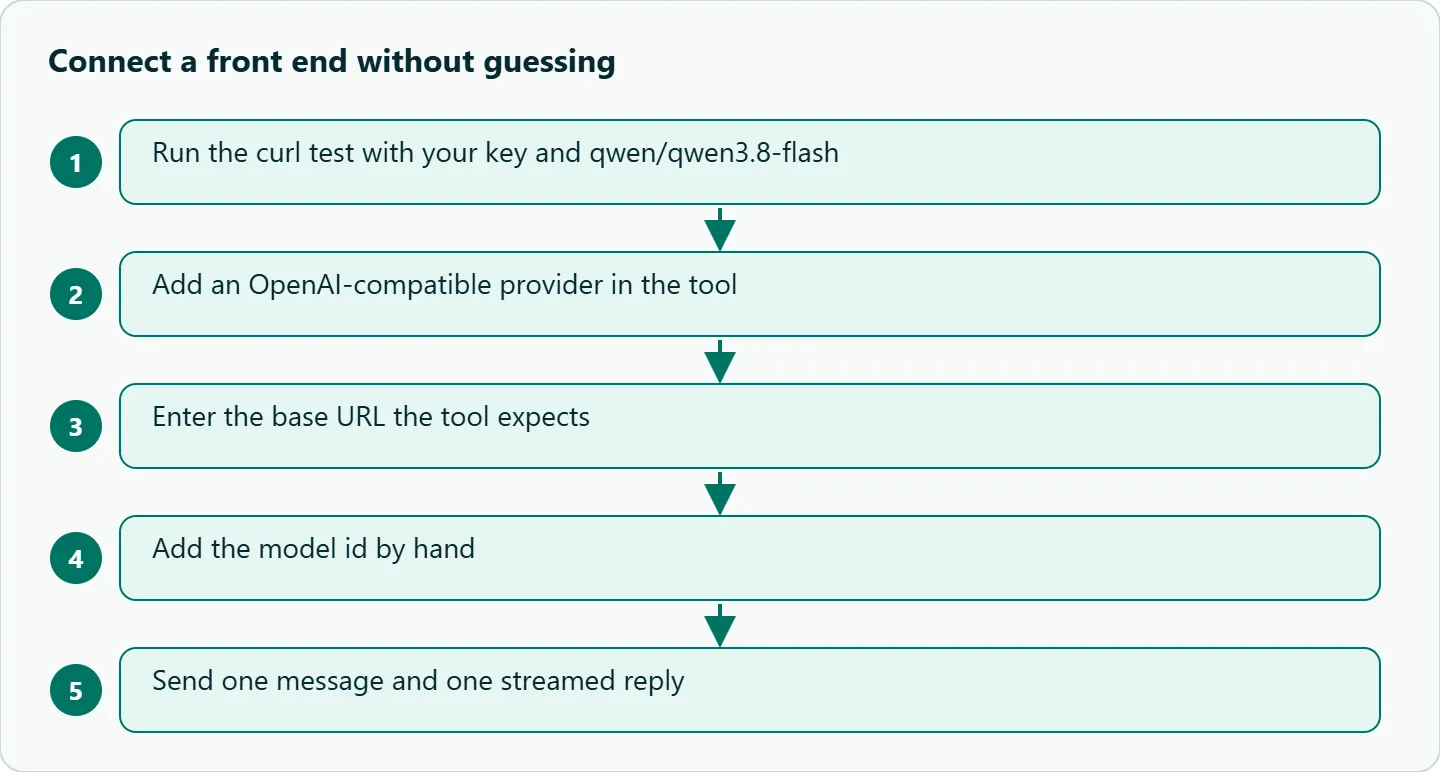
- Run the curl above with your key.
- Configure one tool and send one message and one streamed reply.
- Send a message on Max and confirm the model switch took effect.
- In Dify, run one agent node with a trivial tool.
- Write the working base URL and ids on a short internal page.
Our take: Keep one source of truth for the key and model ids, and verify with curl before debugging any UI. Treat each front end as a thin client. If the curl works and the app does not, the problem is a field in the app, almost always the base URL, not the model.
Running it on OceanToken
The /qwen-api page listed qwen/qwen3.8-max-0902 and qwen/qwen3.8-flash on 2026-11-09. See the current rate on /qwen-api.
The page says the API is OpenAI-compatible, which is what all three tools expect, and that only the base URL and the key change. You don't need an Alibaba Cloud account. One key and one prepaid balance cover Qwen and every other model, with no subscription, so the same Dify provider can hold a Qwen model and another publisher's model side by side. The page also says failed requests are not charged, which helps while you are still getting the base URL right.
FAQ
Do I need a different key per tool? No, one key works in all three. Separate keys per tool let you revoke one without breaking the others.
Why does Dify say the model does not exist? The model name typed in the plugin differs from the id the endpoint expects. Copy it exactly from /v1/models or the models page.
Should the base URL end in /v1? In Dify (for chat models) and LobeChat, yes. In Cherry Studio, no; enter the root.
Can I use Qwen for embeddings in Dify? Add it as a text embedding model in the same plugin, with the base URL without /v1, as the plugin README describes. Test it before indexing.
Why does Cherry Studio's key check fail when the key is right? The check uses the last chat model you added. Remove any wrong or non-chat id and try again.
Sources
- Dify docs: Model providers (checked 2026-11-09)
- Dify Marketplace: OpenAI-API-compatible plugin (checked 2026-11-09)
- Dify official plugins: OpenAI-API-compatible README (checked 2026-11-09)
- LobeChat docs: Model provider environment variables (checked 2026-11-09)
- Cherry Studio docs: Model service settings (checked 2026-11-09)
- OceanToken docs: Model list and catalog (checked 2026-11-09)
- OceanToken Qwen API page (checked 2026-11-09)
Get your OceanToken API key
- Create an OceanToken account and an API key.
- Copy the snippet below, paste your key, and run it.
- Check the current rate on /qwen-api.
curl https://api.oceantoken.ai/v1/chat/completions \
  -H "Authorization: Bearer $OCEANTOKEN_API_KEY" \
  -H "Content-Type: application/json" \
  -d '{"model": "qwen/qwen3.8-flash", "messages": [{"role": "user", "content": "Reply with the word ok."}]}'
More from the blog
A Unified API for Chat, Image and Video
Building on a unified API for chat, image and video: sync vs async calls, billing units, retries, timeouts and storage, with three calls and a launch checklist.
Kimi K3 API International Access Guide
Use the Kimi K3 API internationally: sign up with email, pay by card, create one key and call moonshotai/kimi-k3 with an OpenAI SDK. Steps, code and checks.
Call Tencent Hy3 With the OpenAI SDK
Call Tencent Hy3 with the OpenAI SDK outside China: base URL, model id, streaming, tool calls, reasoning_effort values, Hy3 vs Hy3 preview, and token billing.