

Prompt Caching for Coding Agents
Prompt caching for coding agents: keep the prefix stable, read cached tokens in usage, and know which models cache on their own and which need cache_control.
By OceanToken Team
Editor's note: Coding agents resend the same system prompt, tool list and repo context on every turn, so most of what you pay for is text the model has already seen. Caching is the fix that needs no new tool and no new model. Our view: before you switch models to save money, make the prompt prefix stable and prove the cache is hitting. It is the cheaper experiment.
Short answer: Prompt caching for coding agents comes down to three habits: put the stable parts first (system prompt, tool definitions, repo summary) and anything that changes last; read the cached-token field in usage on every response; and add cache_control for Claude, which caches only when asked, while DeepSeek, Qwen, GLM and GPT models cache on their own.
We use OceanToken's endpoint in the examples because one key reaches all of these families, and its API reference documents which models cache on their own, where Claude's cache_control marker goes, and which usage field reports a hit. Those details, and the publishers' own caching docs, were read on November 22, 2026. This guide covers the mechanism and the habits, not how much you will save: cached input prices differ by model, and they are listed on each model's page and on /pricing.
01 · Why coding agents are a good fit for prompt caching
A coding agent works in turns. Each turn sends the agent's instructions, the definitions of every tool it can call, often a summary of the repository, and the conversation so far, then adds one new thing: a tool result, a file, your next message. Most of the request is identical to the last one. Our agent guide puts it plainly: agents resend long prompts on every turn, so a model's cached input price matters as much as its input price.
Caching works on that repetition. The model provider keeps the processed form of a prompt's beginning for a while, and when the next request starts with the same text, it reads that part from the cache instead of processing it again. The cached part is billed at the model's cached input rate. The important word is beginning. Caches match a prefix: the first change in the prompt ends the reusable part, and everything after it is processed as new.
So your job is to make the first several thousand tokens of every request byte-for-byte identical, for as long as possible, and to check that the provider agrees with you.
02 · Keep the prompt prefix stable for cache hits
Order the prompt from most stable to least stable. For an agent, that usually means system instructions first, then tool definitions, then long reference material such as a repo map or coding standards, then the conversation history, and finally the new turn. Anthropic's docs describe the same order for Claude's cache, tools then system then messages, and Alibaba's docs for Qwen say to put shared content first and variable content last.
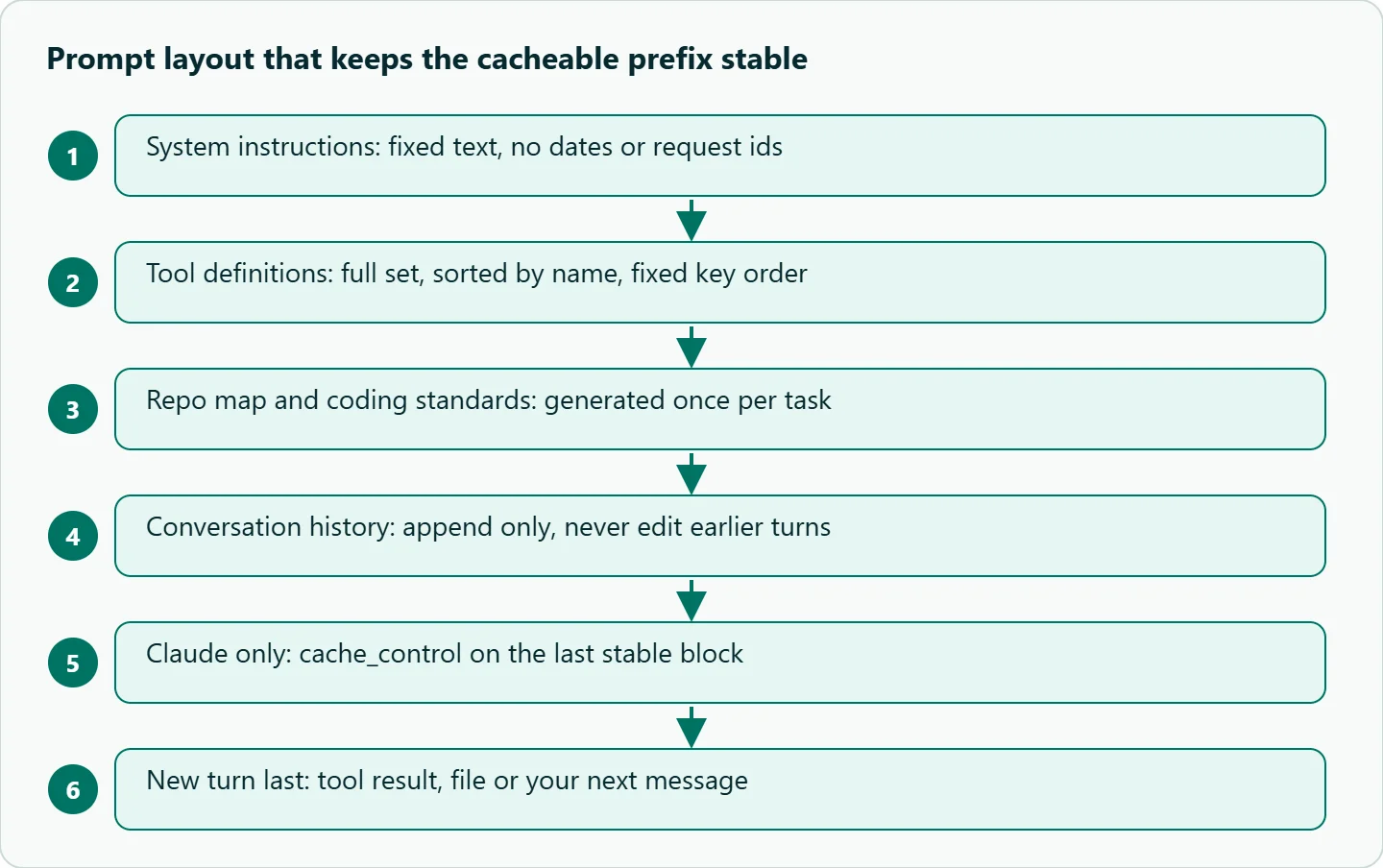
The things that break a prefix are usually small and accidental. A timestamp or request id in the system prompt changes the first few hundred tokens on every call, and nothing after it can hit. So does a tool list built from a Python set, whose order can vary from run to run, or a repo summary regenerated each turn with slightly different wording. Z.ai's caching guide for GLM warns that even minor formatting differences can reduce hits.
| Prefix breaker | Why it hurts | Fix |
|---|---|---|
| Current date or time in the system prompt | Changes the first tokens on every request | Put it in the latest user message, or round it to the day |
| Tool definitions in unstable order | Different bytes, same meaning | Sort tools by name and serialize with fixed key order |
| Repo summary regenerated each turn | Wording drifts | Generate once per task and reuse the exact text |
| Editing an early message in history | Everything after the edit is new | Append corrections as new turns instead |
| Switching models mid-task | Each model has its own cache | Pick the model per task, not per turn |
| Adding or removing a tool mid-task | For Claude, a tool change invalidates the whole cache | Declare the full tool set at the start |
When does this advice not apply? If your agent runs one-shot tasks with short prompts, there is little to cache, and Claude will not cache a short prefix at all. Caching pays off on long, multi-turn sessions over the same codebase, which is most of what coding agents do.
There is also a time element. Anthropic's default cache lifetime is five minutes, refreshed each time it is read, and OceanToken's reference gives the same five minutes for Claude. DeepSeek says unused caches are cleared, usually within a few hours to a few days. An agent that pauses for ten minutes while you review a diff may start the next turn with a cold Claude cache.
03 · Which models cache automatically vs need cache_control
On our endpoint the split is simple: GPT, DeepSeek, Qwen and GLM models cache a repeated prompt start on their own, and Claude caches only when the request marks what to cache. That matches the publishers' docs. DeepSeek says context caching is enabled by default for all users, Z.ai describes GLM caching as implicit with no configuration, and Alibaba says Qwen's implicit cache is on by default and cannot be turned off.
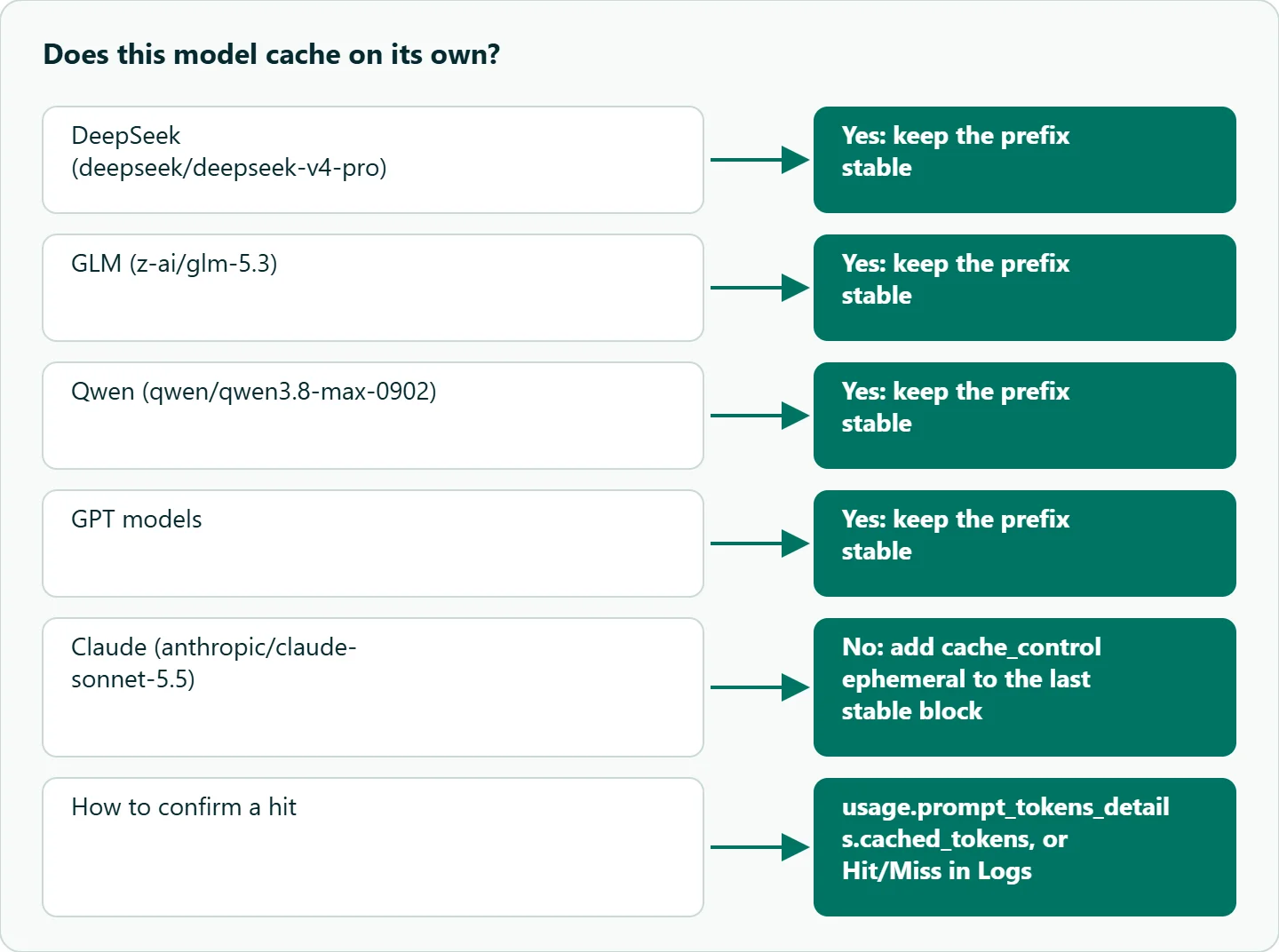
| Model (example id) | Caches on its own? | What you do | Minimum prefix |
|---|---|---|---|
DeepSeek (deepseek/deepseek-v4-pro) |
Yes | Keep the prefix stable | Not stated by DeepSeek |
GLM (z-ai/glm-5.3) |
Yes | Keep the prefix stable | Not stated by Z.ai |
Qwen (qwen/qwen3.8-max-0902) |
Yes | Keep the prefix stable | 1,024 tokens for the implicit cache, per Alibaba |
Claude (anthropic/claude-sonnet-5.5) |
No | Add cache_control: {"type": "ephemeral"} |
About 1,024 tokens per our spec; 512 per Anthropic |
Claude's marker goes on a content block. Everything up to and including that block is written to the cache on the first request and read from it on later ones. On /v1/chat/completions, it sits on a content part of a message:
import os
from openai import OpenAI

client = OpenAI(base_url="https://api.oceantoken.ai/v1",
                api_key=os.environ["OCEANTOKEN_API_KEY"])

SYSTEM = open("agent_instructions.md").read()   # long, identical every turn

r = client.chat.completions.create(
    model="anthropic/claude-sonnet-5.5",
    max_tokens=8000,
    messages=[
        {"role": "system", "content": [
            {"type": "text", "text": SYSTEM,
             "cache_control": {"type": "ephemeral"}}]},
        {"role": "user", "content": "Add input validation to parse_order() in orders.py."},
    ],
)
print(r.usage)
The two minimums in the table disagree. Anthropic's current table lists 512 tokens for Sonnet 5.5, while the API reference for that id on our endpoint says prefixes under about 1,024 tokens are not cached. Build for the higher figure. A system prompt plus tool definitions for a real agent is usually well past it anyway. Anthropic also allows up to four breakpoints per request and looks back up to 20 blocks from each one, so a second marker at the end of a long, stable history can extend the cached part. For a full Claude walkthrough with the Anthropic SDK, see our Claude prompt caching tutorial in Python.
Alibaba also offers an explicit cache_control mode for Qwen on its own API. Our API reference for Qwen does not list it, so on this endpoint, rely on Qwen's automatic cache.
04 · Your agent tool decides whether Claude gets cached
If you do not write the agent yourself, the tool you use decides whether Claude's marker is sent, and the answer varies. Our setup guides for coding tools are specific about this, which makes them a useful checklist even if you use a different tool:
| Tool and setup | Claude cached? | Source |
|---|---|---|
| Cline, OpenAI Compatible provider | No: every Claude turn is billed at full input price | Our Cline guide |
| Cline, Anthropic provider with custom base URL | Yes, Cline asks for caching | Our Cline guide |
| Kilo Code | Yes, it marks Claude prompts | Our Kilo Code guide |
| Zoo Code with Prompt Caching on | Yes | Our Zoo Code guide |
| Codex | No cached-input discount for Claude in our docs' tests | Our agent guide |
The non-Claude models do not need any of this. The same guides say GPT, DeepSeek, Qwen and GLM cache on their own in every one of these tools, from the second turn of a task. That matters for model choice inside a tool: if your tool cannot send Claude's marker, every Claude turn is billed at the full input price, so compare the cached input rates on the model pages before you decide. The Cline setup page has the provider steps.
05 · Check cached tokens in the API usage field
Do not assume the cache works; read it. Every response carries a usage object, and on our endpoint the cached part of the prompt is reported in usage.prompt_tokens_details.cached_tokens on chat completions, with cache_creation_tokens next to it for tokens written to the cache. On /v1/messages, the Anthropic shape, the same numbers are usage.cache_read_input_tokens and usage.cache_creation_input_tokens, and input_tokens counts only the uncached rest.
If you have code written for a publisher's own API, the field names may differ. DeepSeek's API reports prompt_cache_hit_tokens and prompt_cache_miss_tokens; Z.ai and Alibaba use prompt_tokens_details.cached_tokens on their OpenAI-compatible APIs, and Alibaba uses cache_creation_input_tokens for cache writes. A small reader that accepts all of these keeps your logging honest when you switch models:
def cache_stats(usage) -> dict:
    u = usage.model_dump() if hasattr(usage, "model_dump") else dict(usage)
    details = u.get("prompt_tokens_details") or {}
    read = (details.get("cached_tokens")
            or u.get("cache_read_input_tokens")
            or u.get("prompt_cache_hit_tokens") or 0)
    written = (details.get("cache_creation_tokens")
               or u.get("cache_creation_tokens")
               or u.get("cache_creation_input_tokens") or 0)
    total_in = (u.get("prompt_tokens")
                or (u.get("input_tokens", 0) + read + written))
    return {"input": total_in, "cached": read, "written": written,
            "hit_ratio": round(read / total_in, 3) if total_in else 0.0}

# after each agent turn:
# log.info("turn %d %s", n, cache_stats(r.usage))
| Field | Where | Means |
|---|---|---|
usage.prompt_tokens_details.cached_tokens |
Chat completions, all four families | Prompt tokens read from the cache |
cache_creation_tokens |
Chat completions, next to cached_tokens |
Prompt tokens written to the cache |
usage.cache_read_input_tokens |
/v1/messages |
Read from the cache |
usage.cache_creation_input_tokens |
/v1/messages |
Written to the cache |
prompt_cache_hit_tokens |
DeepSeek's own API | Read from the cache |
What should the numbers look like? On the first turn of a task, expect zero cached tokens, and for Claude some tokens written. From the second turn on, the cached count should cover most of your stable prefix. If it stays at zero on Claude, the marker is missing or the prefix is under the minimum. If it stays at zero on a model that caches on its own, something early in the prompt is changing. The console's Logs also show each request's cache Hit or Miss, which is the quickest check without writing code.
One edge case to expect: our reference notes that cached input is kept per channel, so a request moved to another channel for reliability can miss once. A single miss in a long session is not a bug in your prompt.
How to test this on your workload
We have not measured hit rates on a specific agent for this article. This test answers the question for yours in under an hour:
- Pick one real coding task your agent handles in at least five turns.
- Log
cache_stats(r.usage)for every turn, using the reader above. - Run the same task twice in a row on one model and compare turn by turn.
- Repeat on a Claude model with and without
cache_controlon the system prompt. - Add a timestamp to the top of the system prompt, run again, and watch the cached count fall, so you can recognize the symptom.
- Pause for more than five minutes between two turns on Claude and see whether the next turn misses.
- Check each request's Hit or Miss and charge in the console's Logs.
| What you see | What it means | What to do |
|---|---|---|
| Cached tokens near zero after turn one | Prefix changes each turn | Find the dynamic text near the top |
| Claude writes cache but never reads it | Breakpoint on changing content, or pauses over five minutes | Move the marker to the last stable block |
| Claude shows nothing written | Marker missing or prefix too short | Add cache_control; lengthen the stable part |
| Hits on one model, misses after switching | Each model has its own cache | Keep one model per task |
Our take: Fix the prefix before you change the model. Sort and freeze your tool list, move timestamps and ids to the end, mark Claude's prompts with cache_control, and log cached tokens from day one. Once you can see the hit ratio for each turn, model comparisons become fair, because you are comparing models on the same cached workload instead of on accidental cache misses.
Running it on OceanToken
Everything in this guide runs at one base URL, https://api.oceantoken.ai/v1, with one key for DeepSeek, Qwen, GLM, GPT and Claude, so the same agent can try a different model by changing its model string. The caching behavior is documented in one place: which models cache on their own, where Claude's marker goes on chat completions and /v1/messages, and which usage field reports a hit. Each request's cache Hit or Miss, and its cost broken into input, cache read, cache write and output, appears in the console's Logs.
Each API key can carry its own credit limit, which suits agents that send many requests; our guide to budget guardrails on a prepaid balance shows how to set one up, and the one-key guide for Claude Code and Codex covers pointing those tools at the endpoint. For prices, including cached input rates, see /pricing and, for DeepSeek, the current rate on /deepseek-api.
FAQ
Do I need to change code to get prompt caching? Not for DeepSeek, Qwen, GLM or GPT models, which cache a repeated prompt start on their own. For Claude, add cache_control: {"type": "ephemeral"} to the last stable content block.
How do I know the cache is working? Read usage.prompt_tokens_details.cached_tokens on chat completions, or cache_read_input_tokens on /v1/messages. The console's Logs also show a Hit or Miss per request.
Why is my Claude prompt not cached? Usually the marker is missing, the prefix is too short, or something before the marker changes each request. Plan for a stable prefix of at least about 1,024 tokens.
Does caching work across different models? No. Each model keeps its own cache, so switching models mid-task starts cold.
Does caching change the answers? No. Only the processing of the repeated input is reused; DeepSeek's docs note that output is still generated fresh.
Sources
- OceanToken docs: API reference, prompt caching (checked 2026-11-22)
- OceanToken docs: Run your coding agent on OceanToken (checked 2026-11-22)
- OceanToken docs: Claude Sonnet 5.5 spec (JSON) (checked 2026-11-22)
- DeepSeek API docs: Context caching (checked 2026-11-22)
- Anthropic docs: Prompt caching (checked 2026-11-22)
- Z.ai docs: Context caching (checked 2026-11-22)
- Alibaba Cloud Model Studio: Context cache (checked 2026-11-22)
Get your OceanToken API key
- Create an OceanToken account and an API key.
- Copy the snippet below, paste your key, and run it.
- Check the current rate on /deepseek-api.
curl https://api.oceantoken.ai/v1/chat/completions \
  -H "Authorization: Bearer $OCEANTOKEN_API_KEY" \
  -H "Content-Type: application/json" \
  -d '{"model": "deepseek/deepseek-v4-pro", "messages": [{"role": "system", "content": "You are a careful code reviewer. Follow the team style guide."}, {"role": "user", "content": "Review this function for off-by-one errors: def last(xs): return xs[len(xs)]"}], "max_tokens": 8000}'
More from the blog
GPT-6.1 Sol to GPT-6.2 Sol Upgrade Guide
GPT-6.1 Sol to GPT-6.2 Sol upgrade: same listed specs, what OpenAI says changed, the one-line model change, what to retest, and a shadow-test script.
How to Make GTA 6-Style Videos with AI
Four GTA 6-style AI video shots with the exact prompts, image-to-video to fix sign text, and one chase prompt run on Seedance, Kling, Hailuo and Veo.
How to Create GTA 6-Style Scenes with AI
Four GTA 6-style scenes written as code by Claude Fable 5.2, including a drivable 3D street, plus 14 prompts to copy and the fixes for what goes wrong.