

OpenAI Compatible API Differences: 9 Traps
OpenAI compatible API differences between models: token caps, thinking switches, reasoning history, dropped parameters and tool calls, checked against docs.
By OceanToken Team
Editor's note: "OpenAI-compatible" means the request has the same shape. It does not mean every model reads that request the same way. The differences that hurt are the quiet ones: a parameter that is accepted and ignored, a reasoning field one model needs back and another rejects. Treat every model swap as a new dependency, and keep a small test that proves it.
Short answer: The OpenAI compatible API differences between models sit in the details: which token-cap name is honored, how thinking is switched on or off, whether reasoning text must go back into the history, which parameters are silently dropped, and how reliably tools and JSON come back. Run a short compatibility script on each model before moving traffic.
Why OpenAI compatible API differences between models exist
An OpenAI-compatible endpoint standardizes the envelope: POST /v1/chat/completions, a messages array, tools, response_format, and a choices array in the reply. Everything inside that envelope is still the model publisher's design. DeepSeek, Alibaba, Zhipu and Moonshot each added reasoning controls after the OpenAI format was set, and each did it differently.
That is why changing the model string is usually enough for a chat demo and often not enough for production code. If you are choosing which model to move to in the first place, our workload-based switching guide covers that decision. This article is about what breaks after you have chosen.
Gotchas 1-3: token caps, reasoning budgets and thinking switches
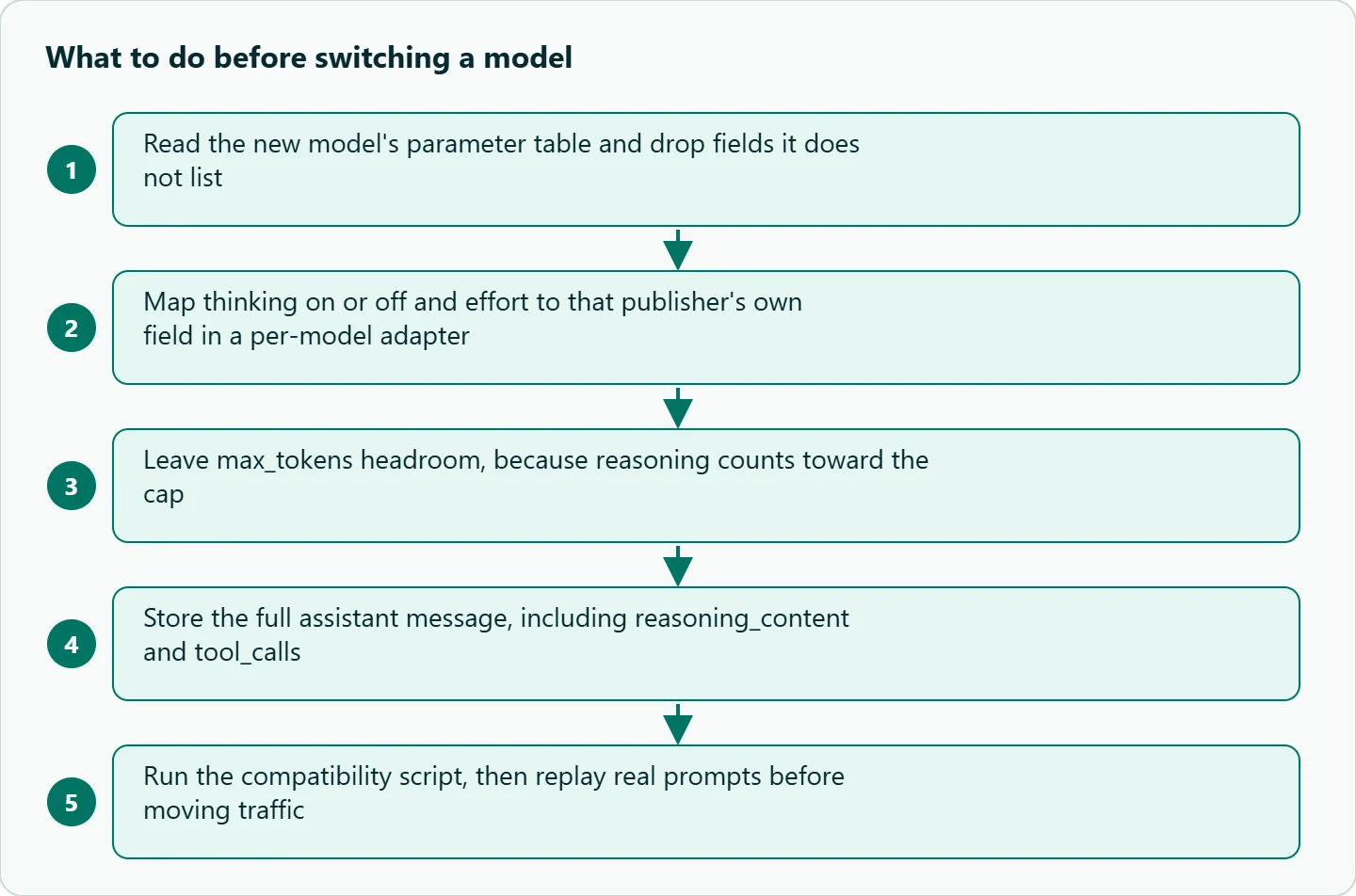
1. The token-cap name. OpenAI's API reference marks max_tokens as deprecated in favor of max_completion_tokens and says it is not compatible with o-series models. Other publishers still document max_tokens. On OceanToken, the model docs for deepseek/deepseek-v4.1-flash and z-ai/glm-5.3 say max_completion_tokens is accepted as the same thing, so either name works there. Pick one name in your code and check each model's docs once.
2. Reasoning eats the cap. OpenAI defines max_completion_tokens as covering visible output and reasoning tokens, and the OceanToken model docs describe max_tokens as "the most tokens to write, reasoning included." A cap that was generous for a non-reasoning model can be spent entirely on thinking by a reasoning one, which returns empty content with finish_reason: "length". Our empty-reply fix walks through the symptom.
3. The thinking switch has a different name everywhere. DeepSeek's thinking-mode guide uses {"thinking": {"type": "enabled"}} or "disabled", plus reasoning_effort (low, high, max), with thinking on by default at high. Alibaba's deep-thinking docs use enable_thinking, a non-standard field passed through extra_body in the Python SDK, and list qwen3.8-flash as thinking by default.
Zhipu's thinking-mode docs use {"thinking": {"type": "disabled"}}, but say GLM-5.3 uses forced thinking that cannot be disabled. OpenAI's reasoning_effort accepts values from none to max. Send one vendor's switch to another vendor's model and, on a route that drops unlisted fields (as the model docs in gotcha 4 describe), it does nothing; on a publisher's own API an unknown field may be rejected or ignored, so check each one.
Gotcha 4: parameters that are silently dropped
This one surprises people most. The OceanToken docs for each model list the parameters that model takes, and say: "Anything else in the request is left out before it reaches the model." On 2026-11-10, the lists for deepseek/deepseek-v4.1-flash, qwen/qwen3.8-flash and z-ai/glm-5.3 had no reasoning_effort and no thinking toggle. The list for minimax/minimax-m3 does include reasoning_effort, with none turning reasoning off.
So an extra_body={"enable_thinking": False} copied from Alibaba's docs is not an error on that route. It simply has no effect, and the model keeps thinking on its default. You find out from the bill or the latency, not from an exception. The fix is boring: read the parameter table on the model's docs page, and measure usage after the change instead of assuming it worked.
Gotcha 5: reasoning text in the conversation history
Reasoning models return their thinking in a separate field, usually reasoning_content. What you do with it on the next turn differs by publisher, and the rules point in opposite directions.
DeepSeek's guide says that without tools, reasoning_content does not need to be passed back and is ignored if you do. With tools, it "must be fully passed back to the API in all subsequent requests," and the API returns a 400 error if your code does not. Zhipu's docs say preserved thinking requires returning the complete, unmodified reasoning_content, and that thinking blocks should be returned together with tool results. Moonshot's Kimi K3 README asks for the full assistant message, including reasoning_content and tool_calls, on multi-turn and tool-call use.
The practical rule: store the whole assistant message as returned, not just content, and let a per-model adapter decide what to send back. A history builder that strips reasoning to save tokens will work on one model and break, or degrade, on the next.
Gotchas 6-9: sampling, stops, JSON and tools
6. Sampling parameters that are accepted and ignored. DeepSeek's guide says thinking mode does not support temperature, presence_penalty or frequency_penalty; setting them "will not trigger an error but will also have no effect." If your prompt was tuned at a low temperature for determinism, that tuning disappears on a model that ignores it. Re-check output variance after the switch.
7. Stop sequences. OpenAI's reference allows up to 4 stop sequences and notes they are not supported on some of its latest reasoning models. The OceanToken model docs above also allow up to 4 strings. If your parser depends on a stop token, test it on each reasoning model.
8. Structured output. The model docs for z-ai/glm-5.3 list response_format with json_object or json_schema, and the DeepSeek and Qwen docs list response_format too. Support on paper is not the same as identical strictness, so always validate the JSON you get back against your schema and retry once with a stricter instruction on failure.
9. Tool calls. The tools format is shared, but reliability is not. Check finish_reason == "tool_calls" before reading content, parse function.arguments inside a try block, and confirm the tool name exists before you call it. Our Qwen tool calling guide shows a full loop that handles these cases.
Where the docs differ, at a glance
| Gotcha | What differs | What to do |
|---|---|---|
| Token cap | max_tokens vs max_completion_tokens; reasoning counts toward it |
One name in code; leave headroom for reasoning |
| Thinking switch | thinking.type, enable_thinking, reasoning_effort, or not switchable |
Per-model adapter; check the model's parameter table |
| Dropped parameters | Unlisted fields are left out without an error | Read the model docs; measure usage after changes |
| Reasoning history | Ignored, required, or required only with tools | Store the full assistant message |
| Sampling | Some fields ignored in thinking mode | Re-check variance after switching |
| JSON and tools | Same format, different reliability | Validate, retry once, log failures by model |
A compatibility script to run before switching
This script sends the same tool-calling request to three models and reports what came back. Run it once per new model before you move traffic.
import json
from openai import OpenAI

client = OpenAI(base_url="https://api.oceantoken.ai/v1", api_key="YOUR_OCEANTOKEN_KEY")

MODELS = ["deepseek/deepseek-v4.1-flash", "qwen/qwen3.8-flash", "z-ai/glm-5.3"]
TOOLS = [{"type": "function", "function": {
    "name": "get_weather", "description": "Weather by city",
    "parameters": {"type": "object", "properties": {"city": {"type": "string"}}, "required": ["city"]}}}]

for m in MODELS:
    res = {"model": m}
    try:
        r = client.chat.completions.create(
            model=m,
            max_tokens=2000,  # reasoning counts toward this cap
            messages=[{"role": "system", "content": "Reply tersely."},
                      {"role": "user", "content": "Weather in Oslo? Use the tool."}],
            tools=TOOLS)
        choice = r.choices[0]
        msg = choice.message
        res["finish"] = choice.finish_reason
        res["tool_call"] = bool(msg.tool_calls)
        if msg.tool_calls:
            json.loads(msg.tool_calls[0].function.arguments)
            res["args_valid"] = True
        res["has_reasoning"] = bool(getattr(msg, "reasoning_content", None))
        res["usage"] = r.usage.model_dump()
    except Exception as e:
        res["error"] = type(e).__name__ + ": " + str(e)[:120]
    print(res)
Look at three things in the output. finish should be tool_calls; length means the cap was too small. has_reasoning tells you whether this model returns thinking you need to store. usage shows how many tokens the same request cost on each model, which is the number to compare against the rates on each model's page.
How to test this on your workload
The script covers format. Behavior needs your own traffic. These steps are a checklist, not results we have measured:
- Replay 50 to 100 real production prompts on the old and new model.
- Score both with the same rubric: valid JSON, required fields present, answer language, length.
- Run a multi-turn tool conversation end to end, storing the full assistant message, and confirm no 400s on turn two or later.
- Compare
usageper request, including reasoning tokens, before estimating cost. - Send a small share of live traffic to the new model, compare error rates, then widen.
Keep the 50 prompts as a regression suite and rerun them on a schedule, because publishers update models and your traffic changes too.
Our take: Put a thin adapter between your app and the API: one function per model family that maps your options (thinking on or off, effort, history policy) to that publisher's fields. It is a few dozen lines, and it turns the next model swap from a debugging session into a config change you can actually trust.
Running it on OceanToken
On 2026-11-10 the model ids in the script were listed on /deepseek-api, /qwen-api and /glm-api. The base URL is https://api.oceantoken.ai/v1. See the current rate on each of those pages.
One key and one prepaid balance cover all three families, so the compatibility script runs against every model without a second account or SDK. The API is OpenAI-compatible, so existing code needs only the base URL and the key, and switching models is a change to the model string. Each model also has its own docs page with the exact parameter table, which is the quickest way to catch gotcha 4 before it costs you.
FAQ
Is "OpenAI-compatible" the same as identical behavior? No. It guarantees the request and response shape, not how each model handles reasoning, sampling or tools.
Why is my output empty after switching to a reasoning model? Reasoning tokens probably used up max_tokens. Raise the cap and check finish_reason.
Why didn't enable_thinking change anything? On a route that drops unlisted parameters, it never reached the model. Check the model's parameter table.
Can I switch models in the middle of a conversation? It is risky. Reasoning history rules differ, and Moonshot advises against switching models mid-session for Kimi K3.
Do tool calls work the same across models? The format is the same; reliability is not. Validate arguments and handle failures per model.
Sources
- OpenAI API reference: Chat completions (checked 2026-11-10)
- DeepSeek API docs: Thinking mode (checked 2026-11-10)
- Alibaba Cloud Model Studio: Deep thinking (checked 2026-11-10)
- Z.ai docs: Thinking mode (checked 2026-11-10)
- Moonshot AI: Kimi K3 README (checked 2026-11-10)
- OceanToken docs: deepseek/deepseek-v4.1-flash (checked 2026-11-10)
- OceanToken docs: qwen/qwen3.8-flash (checked 2026-11-10)
- OceanToken docs: z-ai/glm-5.3 (checked 2026-11-10)
- OceanToken docs: minimax/minimax-m3 (checked 2026-11-10)
Get your OceanToken API key
- Create an OceanToken account and an API key.
- Copy the snippet below, paste your key, and run it.
- Check the current rate on /qwen-api.
curl https://api.oceantoken.ai/v1/chat/completions \
  -H "Authorization: Bearer $OCEANTOKEN_API_KEY" \
  -H "Content-Type: application/json" \
  -d '{"model": "qwen/qwen3.8-flash", "max_tokens": 2000, "messages": [{"role": "user", "content": "Say hello in one word."}]}'
More from the blog
A Unified API for Chat, Image and Video
Building on a unified API for chat, image and video: sync vs async calls, billing units, retries, timeouts and storage, with three calls and a launch checklist.
Kimi K3 API International Access Guide
Use the Kimi K3 API internationally: sign up with email, pay by card, create one key and call moonshotai/kimi-k3 with an OpenAI SDK. Steps, code and checks.
Call Tencent Hy3 With the OpenAI SDK
Call Tencent Hy3 with the OpenAI SDK outside China: base URL, model id, streaming, tool calls, reasoning_effort values, Hy3 vs Hy3 preview, and token billing.