

Kling O1 Video Editing: Prompts That Hold
Kling O1 video editing prompts that change one thing and keep the rest: the change, keep, look pattern, Kling's input limits, and what to check on the API.
By OceanToken Team
Editor's note: Prompt-based editing gets less attention than generation, but it is the feature most likely to save a reshoot. The fair way to judge it isn't a demo reel; it's a boring job, like turning a daytime street clip you already shot into dusk. If that works, you skipped a reshoot. If it doesn't, you learned the limit for the price of one render. Our one firm rule: every edit prompt must say what stays the same.
Short answer: Kling O1 video editing takes a source clip and a text instruction and returns an edited clip: remove a passerby, change the weather, swap a costume, restyle the frame. Write each instruction as change, keep, look. Kling's API takes 3- to 10-second sources. On OceanToken, confirm with one clip that the video is edited rather than used as a reference.
What Kling O1 video editing can do
Kling announced O1 on December 1, 2025 as a single model for both generation and editing. The launch release lists the editing jobs: inserting and removing content, modifying and transforming a scene, re-rendering the style of the full frame, extending a shot, and replacing a subject or a background. Its own example instructions are short and plain: "remove passersby", "transition day to dusk", "swap the protagonist's attire". The release also says edits happen without manual masking or keyframing, which is the point. You describe the change in words and the model works out which pixels it touches.
That last part is also the risk. Without a mask, the model decides how much of the frame to repaint. A prompt that only names the change gives it no reason to protect anything else, so it may repaint more than you asked for.
Kling O1 input limits you should know first
Kling's O1 API reference is precise about what a source clip can be, and these limits shape how you prepare footage:
| Input | Kling O1 limit |
|---|---|
| Format and size | .mp4 or .mov, up to 200 MB |
| Length | 3 to 10 seconds |
| Frame size | 700 to 2160 px on each side |
| Frame rate | 24 to 60 fps in; output is 24 fps |
| Videos per task | One |
| Images or elements alongside a video | Up to 4 combined |
| Sound | original keeps the source audio; default is off |
Two of these catch people. The 700-pixel minimum rules out small proxies, so export at 720p or larger. And the output is 24 fps whatever you feed in, so a 60 fps sports clip comes back at a different frame rate; conform the rest of your timeline to 24 or expect to retime.
The reference also separates the two roles a video can play. A base_video is "a video to be edited." A feature_video is a reference the model learns from while generating something new. The same footage gives very different results depending on which role it gets, which matters in the API section below.
The change, keep, look pattern for Kling video editing prompts
Write every edit in three parts:
- Change: the one thing that should be different. "Replace the red car with a yellow taxi."
- Keep: what must survive. "Keep the camera move, the pedestrians and the shop signs."
- Look: how the new element should sit in the shot. "Match the existing late-afternoon light and film grain."
Kling's own example in the O1 reference follows the same shape: "Change the color of the parrot's feathers to match the reference image. Keep all other elements of the video unchanged." Kling's 4.0 prompt guide , written for a newer model, goes further for restyles: "Preserve the original video's composition, camera work, and actions — only the style changes." It also notes that pairing positive description with explicit exclusions "tends to produce more stable results."
Name the specific things you care about instead of writing "everything else" alone. A model can act on "keep his face, the logo on his shirt and the handheld camera shake"; "keep everything else" is vaguer, and the parts you didn't name are the ones that drift.
Prompt patterns by task
These are starting points written to the pattern above. They are our suggestions, not tested results, and the third column is what to inspect first.
| Task | Prompt | Check first |
|---|---|---|
| Remove an object | "Remove the man walking in the background on the left. Keep the couple, the street and the camera move. Fill with the shopfronts behind him." | Ghost edges where he was |
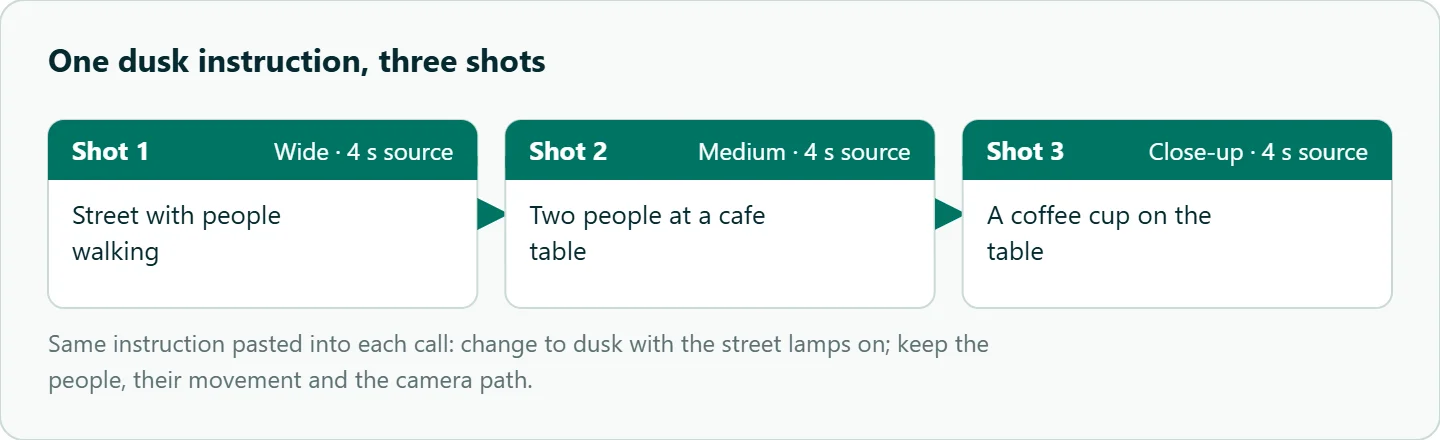
| Time of day | "Change to dusk with the street lamps on. Keep the people, their movement and the camera path." | Shadows still pointing the daytime way |
| Weather | "Add steady light rain and wet pavement. Keep the subject, framing and camera move unchanged." | Rain falling under awnings |
| Costume swap | "Change her jacket to a long green raincoat. Keep her face, hair, walk and the background." | Collar and sleeves flickering |
| Subject from an image | "Replace the dog with the dog in the reference image. Keep the leash, the path and the camera." | Face drift in the last second |
| Full restyle | "Re-render as hand-painted watercolor. Preserve composition, camera work and actions; only the style changes." | Frame-to-frame flicker |
For the reference-image row, use a clean, front-lit image with one subject. Our Kling elements guide covers how to build references that hold identity, and the same rules apply when the reference is driving an edit rather than a fresh generation.
Editing a sequence, one clip at a time
O1 takes one video per task, so a three-shot sequence is three calls. Paste the same instruction into each, character for character, and edit all three in one session. Even then the look can differ between calls, so compare the first frame of each result before you cut them together, and rerun only the shot that drifted. A light color pass in your editor afterward usually ties the shots together better than another round of prompting.
Short, stable clips edit best. A slow push-in or a locked-off shot gives the model the same background to track across every frame; a whip pan or a crowd crossing the frame asks it to keep track of far more. If a shot has a fast move in the middle, trim to the stable part first.
Running Kling O1 editing through an API
Kling's native endpoint is POST /omni-video/kling-o1, with the clip as a base_video item and settings for duration (3 to 10 seconds), aspect ratio and audio. Results are kept for 30 days.
On OceanToken the model id is kwaivgi/kling-video-o1, and its request schema is narrower. Duration is 5 or 10 seconds, resolution is 1080p only, and aspect ratio is 16:9, 9:16 or 1:1. A video goes in input_references as a video_url, with up to four images beside it, which matches Kling's cap. The schema describes input_references as "Reference media the clip is built from", which reads as the reference role, and it has no field for the edit role. So don't assume that sending your footage there edits it. The omni_reference_task_type field that switches between edit and reference is documented in the video guide only for Seedance models.
So check before you batch, and treat editing on this endpoint as unconfirmed until your test says otherwise. Send one clip with an instruction that names it as the thing to change ("Edit the source video: change to dusk; keep the people and camera path"). If the result keeps the original shot and camera path with the change applied, it was edited. If you get a new clip that only borrows the look, it was used as a reference. Also read the x-oceantoken-dropped-params response header, which lists any field that couldn't be applied. Trim source clips to 5 or 10 seconds so the requested duration matches the footage.
Sound is the other open question. The schema offers generate_audio, not Kling's original setting, so don't assume the source audio survives. Keep the original track and lay it back under the edit:
ffmpeg -i edited.mp4 -i source.mp4 -map 0:v -map 1:a -c:v copy -shortest final.mp4
How to test this on your workload
We haven't published edit results. To see what O1 holds on your own footage:
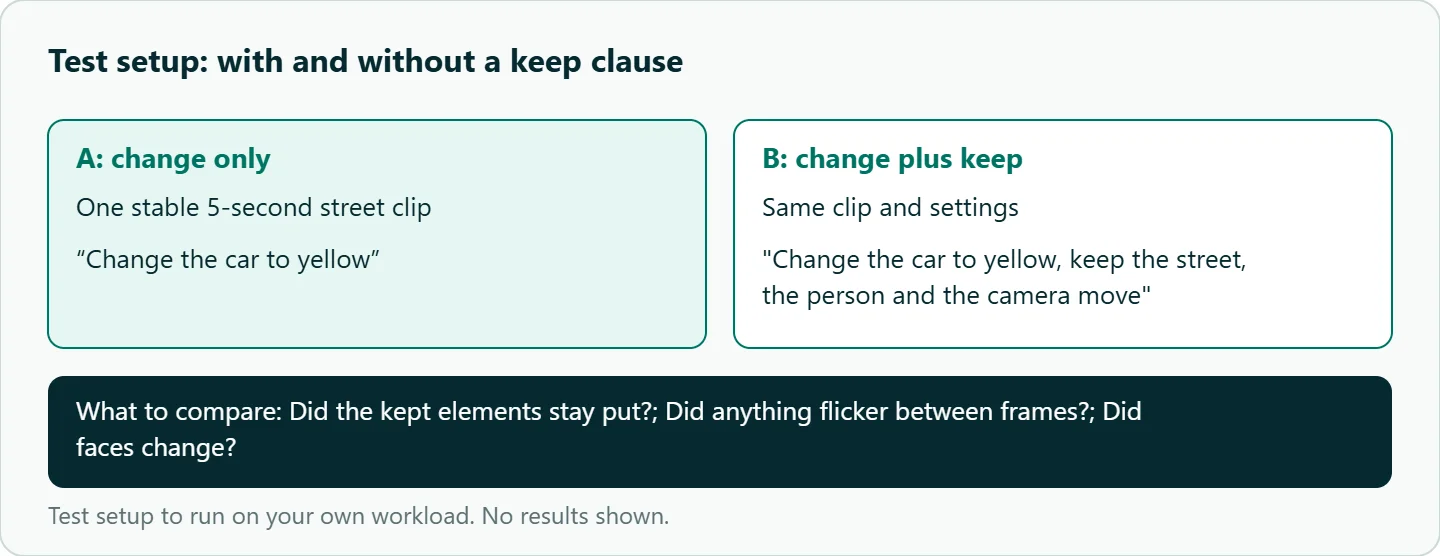
- Pick one stable 5-second clip: a person walking past a parked car, camera locked or slowly pushing in.
- Run "Change the car to yellow" alone, then with a keep clause naming the street, the person and the camera move.
- Run the remove, time-of-day and restyle patterns from the table on the same clip, two runs each.
- For each result, compare the first, middle and last frames with the source: did the kept elements stay put, did anything flicker, did faces change?
- Note whether any audio came back and whether the clip was edited or regenerated.
Our take: Treat O1 as a fix-it tool for short clips: a reshoot you don't have to do, or a look you can try before committing. A boring edit that leaves the rest of the shot alone is worth more than a dramatic one that changes it, and the keep clause is how you ask for boring.
Running it on OceanToken
Use base URL https://api.oceantoken.ai/v1 with kwaivgi/kling-video-o1, or compare against kwaivgi/kling-v3.0-omni, both listed on /kling-api. The API is OpenAI-compatible, so you change the base URL and key and keep your client code. A failed video job is not charged and its balance hold is released, which makes one-clip edit tests cheap to repeat. Each key can carry its own spending limit, and GET /oceantoken/video/model-spec?model=kwaivgi/kling-video-o1 returns the current options before you build a batch. If your edits start from stills rather than footage, see our Kling image-to-video best practices. See the current rate on /kling-api.
FAQ
Can Kling edit an existing video? Yes. Kling describes O1 as one model for generation and editing, including removal, restyling, and subject or background swaps.
How long can the source clip be? Kling's API accepts 3 to 10 seconds. The OceanToken schema offers 5- or 10-second output, so trim the source to match.
Does O1 keep the original audio? On Kling's API, only if you set audio to original; the default is silent. On other endpoints, re-attach the source track in your editor.
Do I need a mask? No. Kling says O1 edits from the instruction alone, which is why the keep clause matters.
Can I edit several shots at once? No. O1 takes one video per task, so run the same instruction on each shot.
Sources
- Kling API: Kling O1 video generation reference (checked 2026-11-10)
- Kling O1 launch release (PR Newswire, Dec 2, 2025) (checked 2026-11-10)
- Kling API: Kling 4.0 video prompt guide (checked 2026-11-10)
- OceanToken docs: kling-video-o1 request schema (checked 2026-11-10)
- OceanToken docs: video (checked 2026-11-10)
- OceanToken Kling API page (checked 2026-11-10)
Get your OceanToken API key
- Create an OceanToken account and an API key.
- Copy the snippet below, paste your key, and run it.
- Check the current rate on /kling-api.
curl https://api.oceantoken.ai/v1/videos \
  -H "Authorization: Bearer $OCEANTOKEN_API_KEY" \
  -H "Content-Type: application/json" \
  -d '{"model": "kwaivgi/kling-video-o1", "prompt": "The dog from the reference image trots along a quiet street at dusk, street lamps on, slow tracking shot.", "duration": 5, "aspect_ratio": "16:9", "input_references": [{"type": "image_url", "image_url": {"url": "https://example.com/dog.jpg"}}]}'
More from the blog
A Unified API for Chat, Image and Video
Building on a unified API for chat, image and video: sync vs async calls, billing units, retries, timeouts and storage, with three calls and a launch checklist.
Kimi K3 API International Access Guide
Use the Kimi K3 API internationally: sign up with email, pay by card, create one key and call moonshotai/kimi-k3 with an OpenAI SDK. Steps, code and checks.
Call Tencent Hy3 With the OpenAI SDK
Call Tencent Hy3 with the OpenAI SDK outside China: base URL, model id, streaming, tool calls, reasoning_effort values, Hy3 vs Hy3 preview, and token billing.