

Kling Video Generation with the OpenAI SDK
OpenAI SDK video generation for Kling in Python and Node: create_and_poll vs a manual poll loop, Kling parameters, error codes, idempotent retries, downloads.
By OceanToken Team
Editor's note: Every video publisher invents its own request shape, so integrating three of them means three adapters. In our view the quiet advantage of an OpenAI-compatible video endpoint isn't price. It's that the client, retries, logging and auth you already wrote for text work for video too. Two caveats: that client surface is now marked deprecated in the SDK, and the Python and Node clients don't offer the same helpers.
Short answer: For OpenAI SDK video generation with Kling, point the SDK at https://api.oceantoken.ai/v1 and pass a Kling id such as kwaivgi/kling-v3.0-pro. In Python, client.videos.create_and_poll() waits for the job and download_content() saves it. The Node SDK has no createAndPoll, so call videos.create(), poll videos.retrieve() yourself, then downloadContent().
Why use OpenAI SDK video generation for Kling
Kling's own API has its own shape. The Kling 3.0 text-to-video endpoint is POST /text-to-video/kling-3.0 with options such as duration, multi_shot, audio and aspect_ratio grouped in a settings object. That's a reasonable design, and it's a schema you maintain next to every other publisher's.
The OpenAI SDK gives you one client for all of them. OpenAI's own video generation guide now says its Sora models and Videos API were shut down on September 24, 2026, but the videos methods are still in both SDKs, and they work against any endpoint that implements the same routes.
The methods are marked @deprecated, though: in the openai-node source every videos method carries the note "The Sora API is scheduled to permanently shut down on September 24, 2026." Pin your openai package version, and keep a plain HTTP or hand-written poll path as a fallback in case a later release removes them. The trade-off: a publisher-specific feature may be exposed under a different name, or not at all, so list the Kling features you depend on and check each one.
| Concern | OpenAI SDK, compatible endpoint | Kling's own API |
|---|---|---|
| Client code reuse | Same client as your text calls | Separate client |
| Kling-specific options | Check each with model-spec | Full documented set |
| Retries and logging | Existing middleware | Custom |
| Switching models | Change the model id | New adapter per publisher |
For a longer look at that choice, see our comparison of the official Kling API and a multi-model gateway.
Kling model ids and parameters
/kling-api lists kwaivgi/kling-v3.0-pro, kwaivgi/kling-v3.0-std, kwaivgi/kling-video-o1 and kwaivgi/kling-v3.0-omni; the Kling v3.0 Pro model page has Pro's inputs and outputs, and the video models page lists the other publishers on the same endpoint. The video guide documents duration in whole seconds (most models default to 5), resolution, aspect_ratio, and generate_audio for models that make sound. It also notes that kwaivgi/kling-v3.0-pro takes only 1080p and kwaivgi/kling-v3.0-std only 720p, so a resolution that works on one id fails on the other.
The SDK's typed arguments were designed for OpenAI's models (seconds, size), so send the Kling-relevant fields in extra_body in Python, or in the request body in Node. To see exactly what an id accepts, call GET https://api.oceantoken.ai/oceantoken/video/model-spec?model=<id>; its spec lists durations, resolutions, aspect ratios, audio and reference limits.
Python: create_and_poll
import os, uuid
from openai import OpenAI

client = OpenAI(base_url="https://api.oceantoken.ai/v1",
                api_key=os.environ["OCEANTOKEN_API_KEY"], timeout=60)

video = client.videos.create_and_poll(
    model="kwaivgi/kling-v3.0-pro",
    prompt="A paper boat drifts down a rain gutter, close tracking, soft overcast light",
    extra_body={"duration": 5, "resolution": "1080p", "aspect_ratio": "16:9"},
    extra_headers={"Idempotency-Key": str(uuid.uuid4())},
    poll_interval_ms=15000,
)
if video.status == "completed":
    client.videos.download_content(video.id).write_to_file("boat.mp4")
else:
    print("failed:", video.error)
In the openai-python source , create_and_poll creates the job and then calls poll, which keeps going while the status is queued or in_progress and returns on completed or failed. poll has no overall deadline of its own, so in a worker, wrap it in your own timeout. The 15-second interval follows OceanToken's advice to poll every 10 to 20 seconds. A blocking helper is fine in a script; in a web request, create the job, store video.id and let a background worker poll.
Node: create, then poll yourself
The openai-node source defines create, retrieve, list, delete, downloadContent, remix and a few more on client.videos, but no createAndPoll. Code copied from a Python example will fail with "createAndPoll is not a function." Every method here is marked deprecated in the SDK, so pin the openai version in package.json; the loop below uses only create, retrieve and downloadContent, and is easy to port to plain fetch calls if those methods disappear. Write the loop:
import OpenAI from "openai";
import { randomUUID } from "node:crypto";
import fs from "node:fs";

const client = new OpenAI({ baseURL: "https://api.oceantoken.ai/v1",
                            apiKey: process.env.OCEANTOKEN_API_KEY });
const sleep = (ms) => new Promise((r) => setTimeout(r, ms));

let video = await client.videos.create(
  { model: "kwaivgi/kling-v3.0-pro",
    prompt: "A paper boat drifts down a rain gutter, close tracking, soft overcast light",
    duration: 5, resolution: "1080p", aspect_ratio: "16:9" },
  { headers: { "Idempotency-Key": randomUUID() } },
);

const deadline = Date.now() + 15 * 60 * 1000;          // your own overall limit
while (["queued", "in_progress"].includes(video.status)) {
  if (Date.now() > deadline) throw new Error(`timed out: ${video.id}`);
  await sleep(15000);
  video = await client.videos.retrieve(video.id);
}

if (video.status === "completed") {
  const res = await client.videos.downloadContent(video.id);
  fs.writeFileSync("boat.mp4", Buffer.from(await res.arrayBuffer()));
} else {
  console.error("failed:", video.error);
}
downloadContent returns a fetch Response, which is why the file is written from arrayBuffer(). In TypeScript, the extra Kling fields aren't in the SDK's parameter type, so you may need a cast on the body; plain JavaScript passes them through.
Errors, retries and downloads
The video guide lists the error codes a failed job can carry: content_filtered, invalid_request, rate_limited, timeout, temporarily_unavailable and generation_failed. They call for different responses. Back off and retry on rate_limited and temporarily_unavailable. Send content_filtered back to the user with guidance, because retrying the same prompt gets the same answer. Treat invalid_request as a bug in your parameters, often a resolution the id doesn't take.
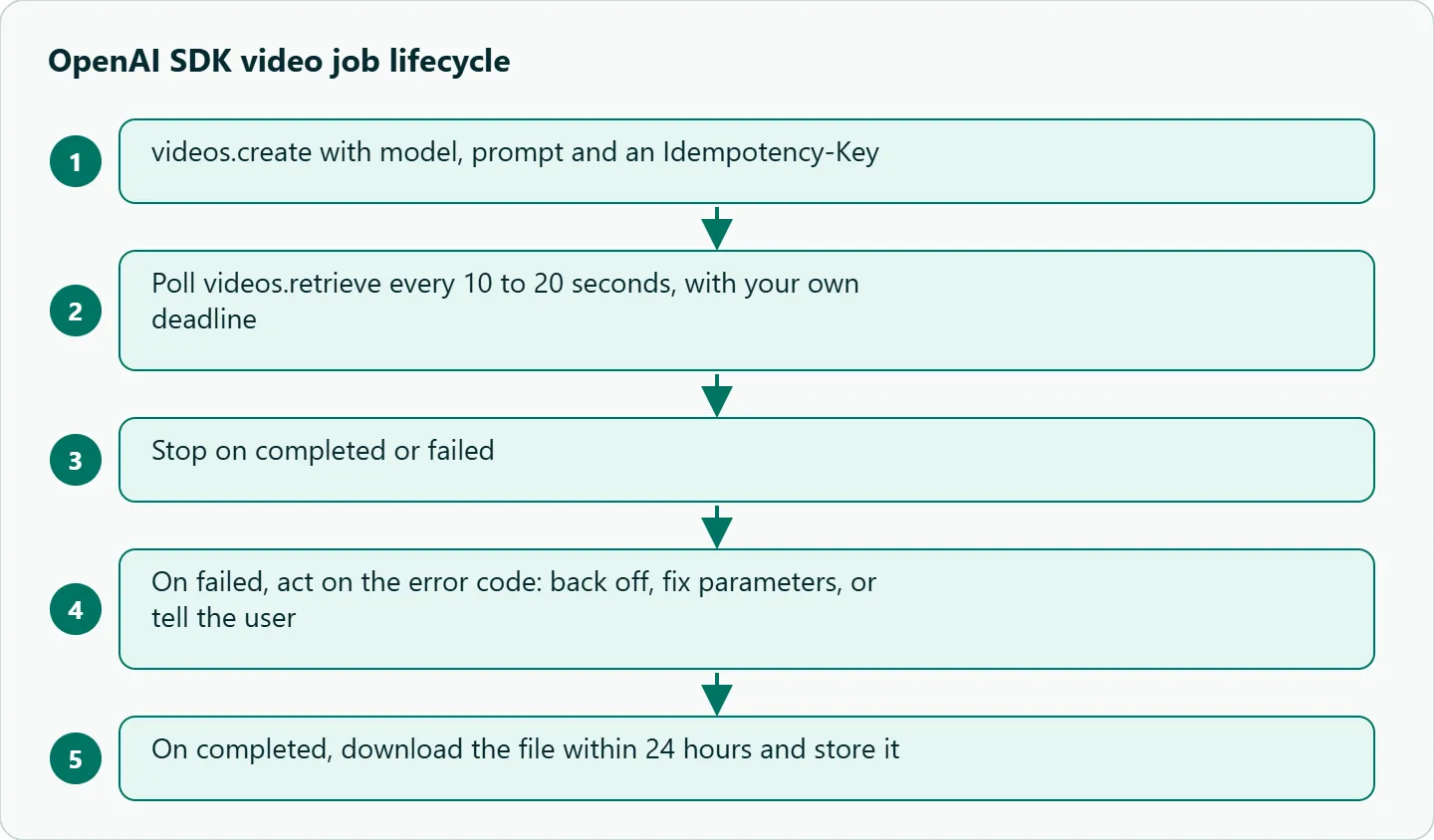
The Idempotency-Key header in both examples matters more for video than for text. If the create call times out on the network, a retry with the same key returns the job already created instead of starting, and charging, a second one. Generate the key once per logical job and reuse it on retries; a fresh key per attempt defeats the point.
When a job completes, its content_url is valid for 24 hours. Download right away into your own storage and log the video id next to your own job id, the model id and a hash of the prompt.
How to test this on your workload
We haven't published results for this article. Before you build on it:
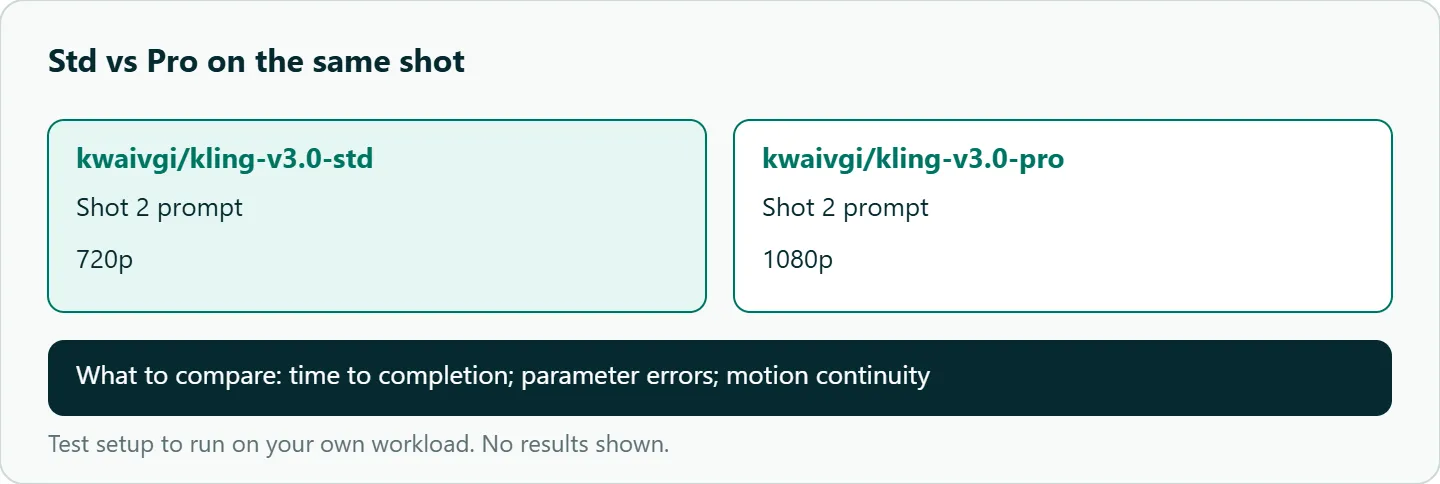
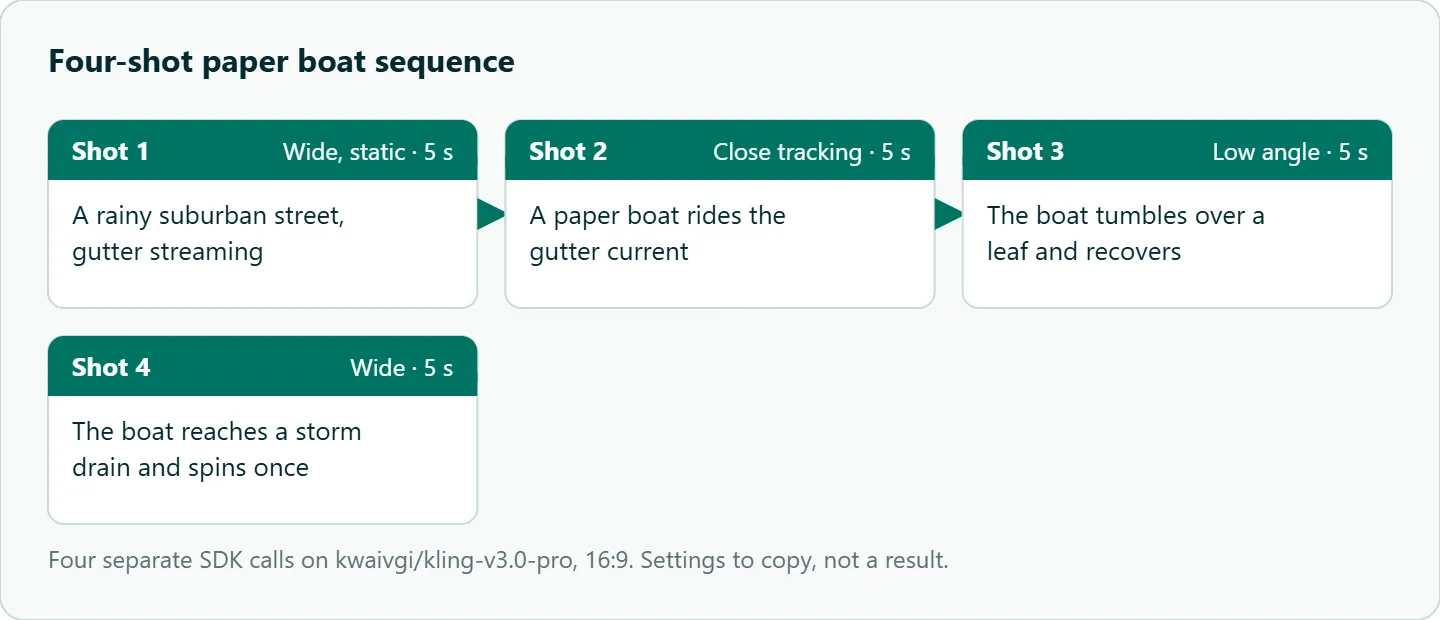
- Run the paper boat storyboard as four separate calls on
kwaivgi/kling-v3.0-stdandkwaivgi/kling-v3.0-pro, and note time to completion and any parameter errors. - Send each Kling option you plan to use (duration, aspect ratio, audio) one at a time and confirm the output file reflects it with a tool such as ffprobe.
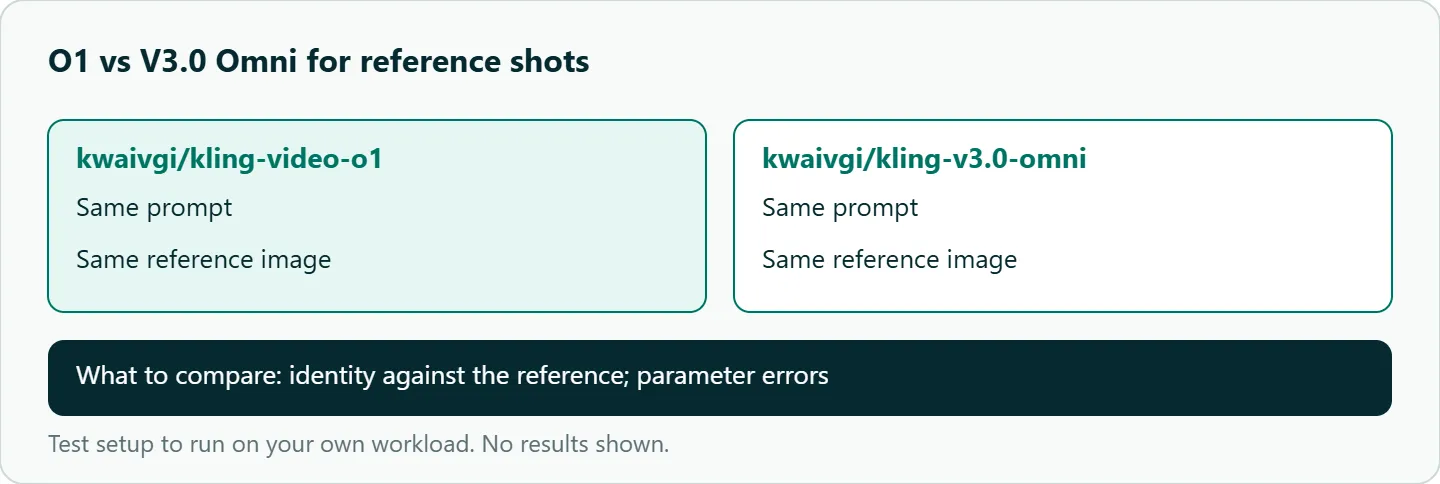
- For reference-driven shots, send the same prompt and reference image to
kwaivgi/kling-video-o1andkwaivgi/kling-v3.0-omniand compare identity. - Kill your worker mid-poll and restart it, to confirm it resumes from the stored video id.
Our take: Start with the smallest call, model plus prompt, and add Kling options one at a time after model-spec confirms them. Put your own deadline around every poll, reuse one idempotency key per job, and in Node don't go looking for a helper that isn't there.
Running Kling with the OpenAI SDK on OceanToken
Use base URL https://api.oceantoken.ai/v1 with any of the four ids on /kling-api; the Python example on that page uses the same create_and_poll and download_content calls as above. The API is OpenAI-compatible, so you change the base URL and key and keep your code.
One key and one prepaid balance also cover Seedance, Hailuo and Veo, so the same worker serves several video models with a change of model id. A failed video job is not charged, its hold goes back to your balance, and each API key can have its own spending limit, which keeps a runaway test loop from draining production. For no-code automation of the same job flow, see our Kling n8n and Make workflow. See the current rate on /kling-api.
FAQ
Does the Node SDK have createAndPoll? No. The openai-node videos resource has create, retrieve and downloadContent but no polling helper, so write a loop.
Which Kling model id should I start with? kwaivgi/kling-v3.0-std (720p) for drafts and kwaivgi/kling-v3.0-pro (1080p) for final renders.
How do I pass Kling options the SDK doesn't type? Use extra_body in Python, or put them in the request body in Node.
How long is the download link valid? The content_url lasts 24 hours on OceanToken. Copy the file to your own storage immediately.
What if my SDK has no videos resource? Upgrade the openai package; older versions predate it.
Sources
- OceanToken docs: video guide (checked 2026-11-09)
- OceanToken Kling API page (checked 2026-11-09)
- openai-python: videos resource source (checked 2026-11-09)
- openai-node: videos resource source (checked 2026-11-09)
- OpenAI: video generation guide (checked 2026-11-09)
- Kling API docs: Kling 3.0 text to video (checked 2026-11-09)
Get your OceanToken API key
- Create an OceanToken account and an API key.
- Copy the snippet below, paste your key, and run it.
- Check the current rate on /kling-api.
curl https://api.oceantoken.ai/v1/videos \
  -H "Authorization: Bearer $OCEANTOKEN_API_KEY" \
  -H "Content-Type: application/json" \
  -H "Idempotency-Key: boat-001" \
  -d '{"model": "kwaivgi/kling-v3.0-pro", "prompt": "A paper boat drifts down a rain gutter, close tracking, soft overcast light", "duration": 5, "resolution": "1080p"}'
More from the blog
A Unified API for Chat, Image and Video
Building on a unified API for chat, image and video: sync vs async calls, billing units, retries, timeouts and storage, with three calls and a launch checklist.
Kimi K3 API International Access Guide
Use the Kimi K3 API internationally: sign up with email, pay by card, create one key and call moonshotai/kimi-k3 with an OpenAI SDK. Steps, code and checks.
Call Tencent Hy3 With the OpenAI SDK
Call Tencent Hy3 with the OpenAI SDK outside China: base URL, model id, streaming, tool calls, reasoning_effort values, Hy3 vs Hy3 preview, and token billing.