

Kling Motion Brush Guide and API Status
Kling Motion Brush paints which part of an image moves and along what path. How to use it, why we found no API field for it, and what to use in code instead.
By OceanToken Team
Editor's note: Motion Brush is the control we would show a skeptical art director first: paint the boat, draw the path, and the boat goes where you drew. The catch for developers is just as important. We found no Motion Brush field in the Kling 3.0 request schemas we checked, so if you are building a pipeline, plan around prompts, frames and motion control instead of a brush. And a caveat on our own basis: we have not used Motion Brush in the current Kling app, and this page relies on the 2024 Kling 1.5 release, so check that it is still offered for 3.0 before planning around it.
Short answer: Kling Motion Brush lets you mark up to six elements in an image, draw the path each should follow, and mark areas that must stay still. It arrived in Kling 1.5's image-to-video Professional Mode; whether the current app still offers it is unconfirmed. We found no Motion Brush field in OceanToken's Kling 3.0 API schemas, so in code use motion prompts, first and last frames, or motion_control.
What Motion Brush does
Kling AI's November 27, 2024 press release introduced Motion Brush with the Kling 1.5 model, in image-to-video Professional Mode. You upload an image and "specify motion trajectories for up to 6 elements," and you can "designate static areas for certain elements" so they stay put. The release's comparison table lists it as a Professional Mode feature, not available in Standard Mode, and shows it on 5-second clips.
That is a different kind of control from a prompt. A prompt says "the boat drifts to the right" and leaves the path to the model. A brush says which pixels are the boat and exactly where they go. For product shots and illustration, where one wrong movement wastes a good still, that precision is the whole point.
Motion Brush tutorial: using it well
We have not used Motion Brush in the current Kling app, and the release covers Kling 1.5; check that it is still offered for 3.0 before planning around it. The release describes what the brush does; the tips and both tables below are ours, from how region-and-path controls behave in general. Treat them as a checklist to try, not as measured results.
Start with a clean image. A busy scene makes it hard to select one element cleanly. Brush the object itself (the boat), not the water around it. Draw a short, slightly curved path, no longer than the object could plausibly travel in five seconds. Then mark a static area for anything that must not move, such as the dock or the horizon. Finally, write a prompt that agrees with the strokes: "the paper boat drifts slowly from left to right."
Our reasoning, not tested:
| Do | Avoid |
|---|---|
| One or two brushed elements | Using all six at once on a first try |
| Smooth, short paths | Zig-zags and long sweeps |
| A static area for the background | Leaving everything else free to drift |
| A prompt that matches the direction | A prompt that says the opposite |
Typical failures and their usual causes
Our reasoning, not tested:
| What you see | Likely cause | Try |
|---|---|---|
| The brushed element smears | The path is too long, or the element too small | Shorten the path, crop closer |
| The whole background drifts | No static area marked | Mark the background static |
| The strokes seem ignored | The prompt describes different motion | Rewrite the prompt to match the path |
Kling motion brush API status
This is the part that matters for anyone writing code. We checked the request schemas for kwaivgi/kling-v3.0-pro, kwaivgi/kling-v3.0-std and kwaivgi/kling-v3.0-omni on November 9, 2026. They define prompt, duration (3 to 15 seconds), aspect ratio, resolution, audio, first and last frames, reference images, subjects, multi-shot fields and, on Pro and Standard, motion_control. We found no Motion Brush, mask or trajectory field. Kling's own API reference page did not load for us that day, so we cannot say whether Kling exposes the brush on its own API for 3.0; we did not find it in ours.
So for automated work, plan on what is there:
- A motion prompt that names the path. "The boat drifts slowly from left to right; the dock and water stay still; camera locked." Less precise than a brush, but it runs in any pipeline.
- First and last frames. Put the starting image in
frame_imagesasfirst_frameand an edited copy with the object in its end position aslast_frame. That pins where the move starts and ends, which covers many brush use cases. motion_controlwhen the movement is a performance (see below).
Kling motion control: copy movement from a video
Motion control solves a different problem. Instead of drawing a path, you supply footage. OceanToken's schemas for Kling 3.0 Pro and Standard describe motion_control as applying a video's movement to a character image. It needs one character image and one video in input_references. With character_orientation set to video (the default) the input video can run up to 30 seconds; with image, up to 10 seconds. The request's duration and aspect_ratio are ignored. It is limited to accounts cleared for real-person media, and it is not listed on the Omni schema.
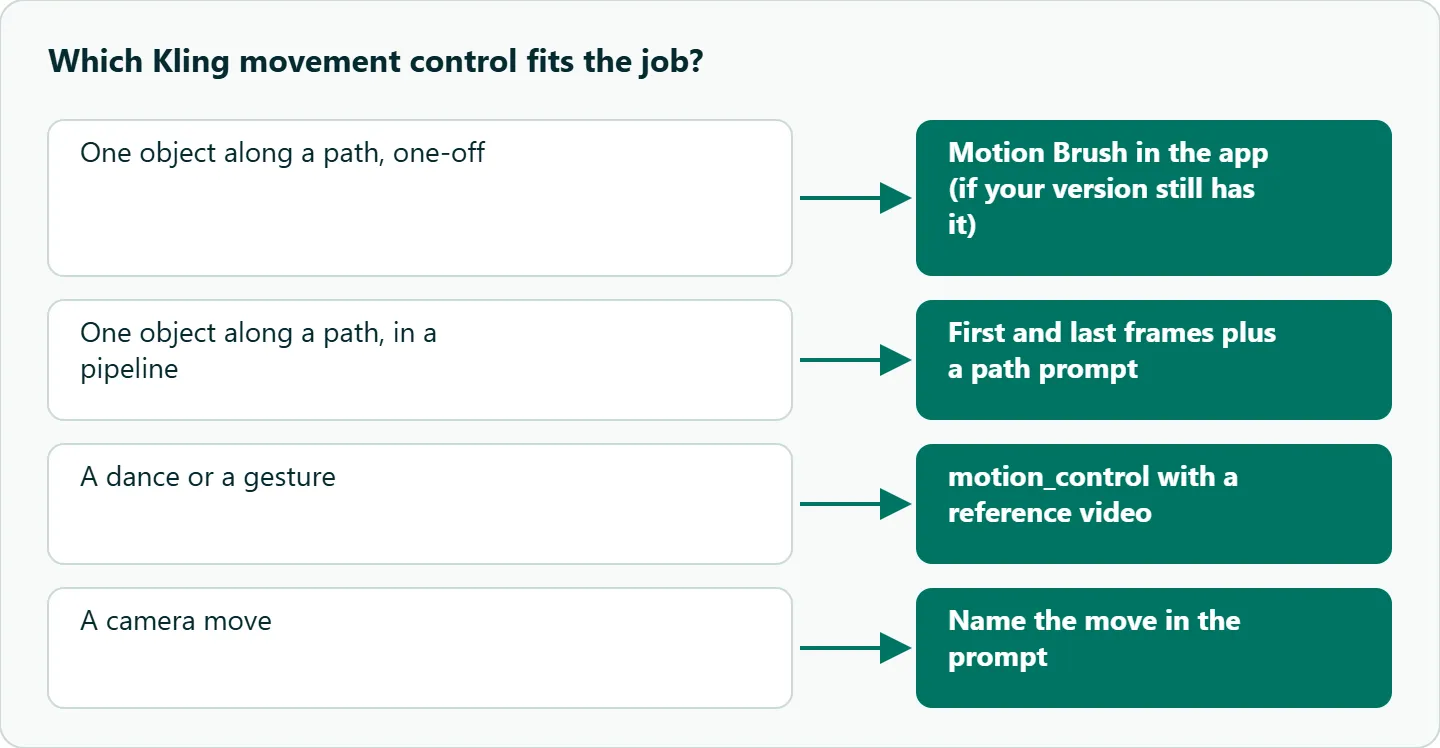
| Task | Motion Brush (app) | Motion control (API) | Prompt and frames (API) |
|---|---|---|---|
| Move one object along a path | Best fit | Not designed for it | Workable with first and last frames |
| Match a dance or a gesture | Poor fit | Best fit | Poor fit |
| Keep the background still | Static area | Depends on the video | Say so in the prompt |
| Runs in a pipeline | Not found in the API | Yes | Yes |
For motion control, film the reference with the framing you want (full body for body movement, closer for upper-body acting), and keep the character in the image at a similar scale and pose to the performer. Limbs hidden in the reference will be guessed.
How to test this on your workload
We have not run these side by side. To see what the API route costs you in precision against the brush:
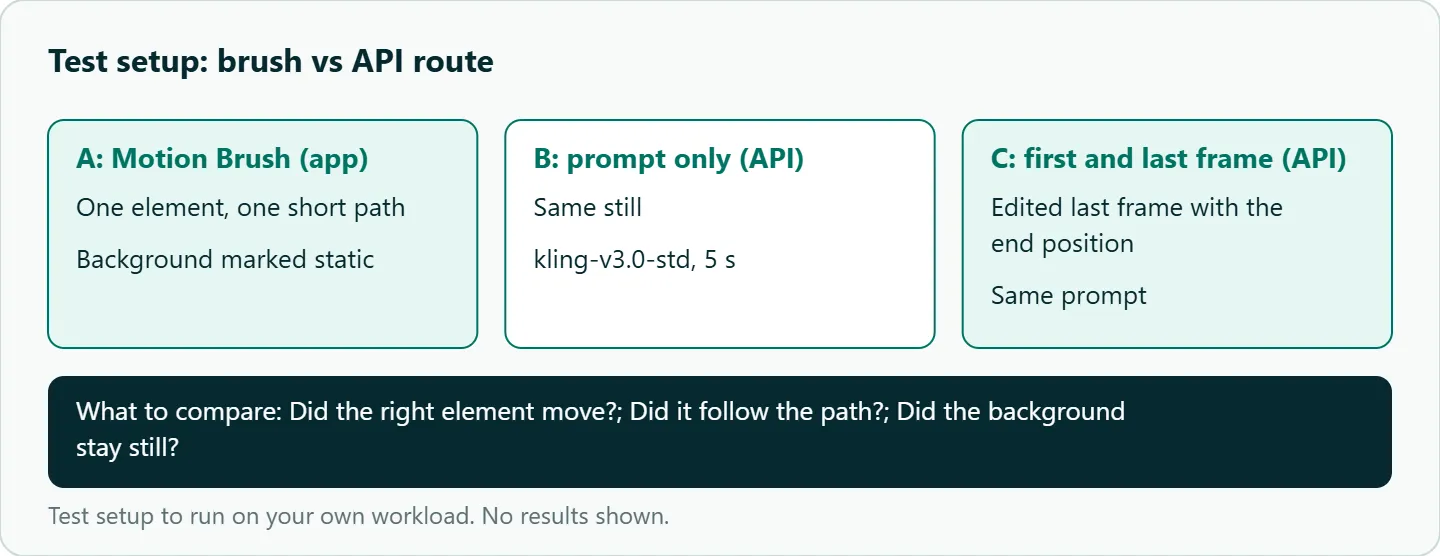
- Pick one still with one obvious moving element, such as a paper boat on a pond.
- If your Kling app version still has Motion Brush, animate it there: one element, one short path, the background marked static.
- On the API, animate the same still on
kwaivgi/kling-v3.0-stdat 5 seconds with a motion prompt only. - Run it again with a first frame and an edited last frame that shows the boat in its end position.
- Compare whether the right element moved, whether it followed the path, and whether the background stayed still.
Our take: Motion Brush is worth learning for one-off still animation, especially product and illustration work. For anything repeatable, build on what the API exposes: path-naming prompts, first and last frames, and motion control for performances.
Running it on OceanToken
Kling 3.0 is kwaivgi/kling-v3.0-pro (1080p) or kwaivgi/kling-v3.0-std (720p) at https://api.oceantoken.ai/v1; see the Kling v3.0 Pro model page. The API is OpenAI-compatible, so you change the base URL and key and keep your code, and each key can have its own spending limit, which is useful when a test grid runs unattended. Refused or failed video jobs are not charged. To run first-and-last-frame batches from a sheet, the Kling n8n workflow (and Make) post shows create, poll and download. See the current rate on /kling-api.
FAQ
When was Motion Brush added? Kling AI announced it with the Kling 1.5 model in a November 27, 2024 press release, in image-to-video Professional Mode. We have not confirmed it is still in the current app.
How many elements can Motion Brush move? Up to six, per that release, plus static areas you mark.
Is Motion Brush in the API? We found no Motion Brush field in OceanToken's Kling 3.0 schemas. Kling's own API reference did not load for us, so its status there is unconfirmed.
Does Motion Brush work on text-to-video? No. It works on an uploaded image.
What is the closest API alternative? A first frame plus an edited last frame, with a prompt that names the path. For performances, motion_control.
Sources
- Kling AI press release via Manila Times (GlobeNewswire, 2024-11-27) (checked 2026-11-09)
- OceanToken docs: Kling v3.0 Pro request schema (checked 2026-11-09)
- OceanToken docs: Kling v3.0 Standard request schema (checked 2026-11-09)
- OceanToken docs: Kling v3.0 Omni request schema (checked 2026-11-09)
- OceanToken: Kling v3.0 Pro model page (checked 2026-11-09)
- OceanToken Kling API page (checked 2026-11-09)
Get your OceanToken API key
- Create an OceanToken account and an API key.
- Copy the snippet below, paste your key, and run it.
- Check the current rate on /kling-api.
curl https://api.oceantoken.ai/v1/videos \
  -H "Authorization: Bearer $OCEANTOKEN_API_KEY" \
  -H "Content-Type: application/json" \
  -d '{"model": "kwaivgi/kling-v3.0-std", "prompt": "The paper boat drifts slowly from left to right; the dock and water stay still; camera locked.", "duration": 5, "frame_images": [{"type": "image_url", "frame_type": "first_frame", "image_url": {"url": "https://example.com/boat-start.jpg"}}, {"type": "image_url", "frame_type": "last_frame", "image_url": {"url": "https://example.com/boat-end.jpg"}}]}'
More from the blog
A Unified API for Chat, Image and Video
Building on a unified API for chat, image and video: sync vs async calls, billing units, retries, timeouts and storage, with three calls and a launch checklist.
Kimi K3 API International Access Guide
Use the Kimi K3 API internationally: sign up with email, pay by card, create one key and call moonshotai/kimi-k3 with an OpenAI SDK. Steps, code and checks.
Call Tencent Hy3 With the OpenAI SDK
Call Tencent Hy3 with the OpenAI SDK outside China: base URL, model id, streaming, tool calls, reasoning_effort values, Hy3 vs Hy3 preview, and token billing.