

Kling Lip Sync: Native Audio vs Post-Sync
Kling lip sync has two routes: native audio that speaks with the picture, or a post-sync pass on existing video. How to choose, write dialogue and check mouths.
By OceanToken Team
Editor's note: People use "lip sync" for two different Kling tools. One generates the voice and the face together from a prompt. The other bends the mouth in an existing clip to fit audio you supply. The second tool fails most often on footage it was never built for: profile angles, covered mouths, two faces in frame. For new shots, the first tool is the one to reach for. Pick the route first, then worry about prompts.
Short answer: For new scenes, Kling lip sync means native audio: set generate_audio to true and Kling 3.0 writes speech and mouth movement in one pass from your prompt. Dubbing footage you already have needs the Advanced Lip-Sync API on Kling's own platform, with a separate Kling account. Use native audio for anything you are generating anyway.
Two kinds of Kling lip sync
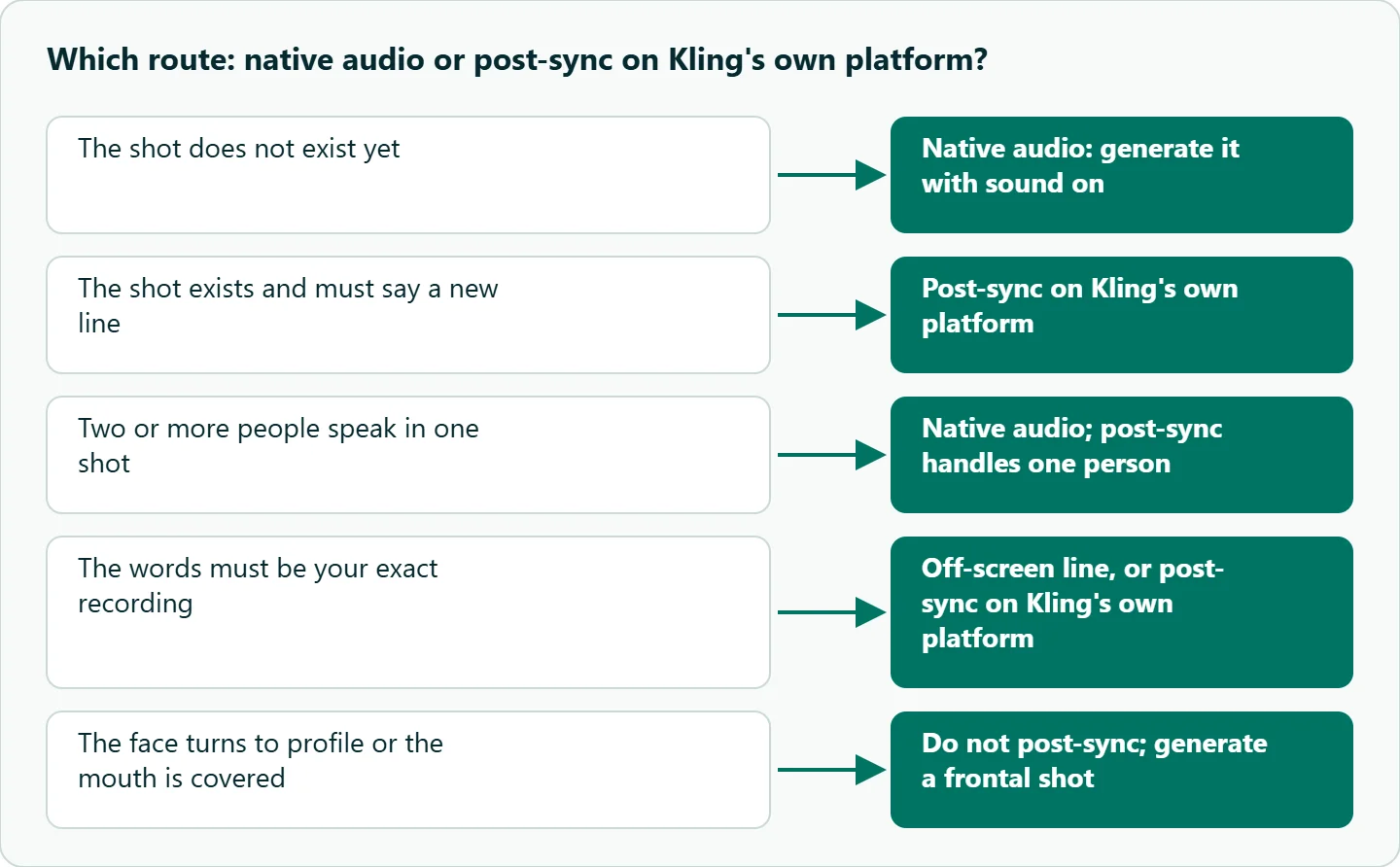
The routes differ in what you control and in where they break. With native audio, the prompt is your only lever: the model invents the voice, the timing and the face at the same time. With a post-sync pass you bring finished audio, so the words and voice are exactly yours, and the model only has to move one mouth.
Native audio (generate_audio) |
Post-sync pass (Kling's own platform) | |
|---|---|---|
| Input | Prompt (plus optional frames and references) | An existing video plus your audio |
| Voice control | Prompt description, or a voice bound to an element | Exactly the audio you upload |
| Calls | One generation | Face detection, then the sync task |
| Faces | Several speakers in one scene | One person per task |
| Typical failure | Accent drift, lines running past the clip end | Face not found, profile angles, hands over the mouth |
The decision is usually made for you by your source material. If the shot does not exist yet, generate it with sound. If it exists and you need it to say something else, such as a translated line or a corrected product name, you need the sync pass, which means a separate Kling account.
Route 1: Kling native audio dialogue
Kling's VIDEO 3.0 user guide says 3.0 "supports dialogue output in five languages: Chinese, English, Japanese, Korean, and Spanish," and that dialogue in other languages is translated into English. Characters can switch languages within one scene, and you can tag a dialect or accent (American, British or Indian English, several Chinese dialects) next to the line. The guide also says 3.0 handles three or more speakers better than VIDEO 2.6.
On the API side, every Kling id on OceanToken accepts generate_audio: "true for a clip with sound, false for a silent one." The ids differ in output, not in sound:
| Id | Resolution | Duration |
|---|---|---|
kwaivgi/kling-v3.0-pro |
1080p | 3 to 15 s |
kwaivgi/kling-v3.0-std |
720p | 3 to 15 s |
kwaivgi/kling-v3.0-omni |
720p, 1080p or 4k | 3 to 15 s |
kwaivgi/kling-video-o1 |
1080p | 5 or 10 s |
For talking-head work, Pro is the sensible default: 1080p keeps the mouth large enough to judge, and it supports multi_prompt, which lets you give each speaker a shot. Omni is the pick when you need 4k or more reference images. Standard is fine for drafts, as long as you review at 100 percent, since small mouths at 720p hide errors.
Writing dialogue prompts for Kling native audio
Because the prompt is the only control, its structure matters more than adjectives. Kling's guide shows the pattern: a speaker label, a short note on tone or accent in parentheses, then the line in quotation marks. It also uses time markers such as "At the 4th second" to place a line inside a longer clip. We add three habits of our own, which are working rules rather than documented ones:
- Name every speaker. "The woman in the green coat (calm, low voice):" beats a bare quote, and it becomes essential once two people share a frame.
- Fit the line to the clip. Read it aloud at the pace you want. If it runs longer than the clip, cut words instead of hoping the model speeds up, because a line that overruns gets clipped mid-word.
- Describe the voice once. If you bound a voice to an element, Kling's guide advises against describing the tone again in the prompt.
A spokesperson spot with one line per shot
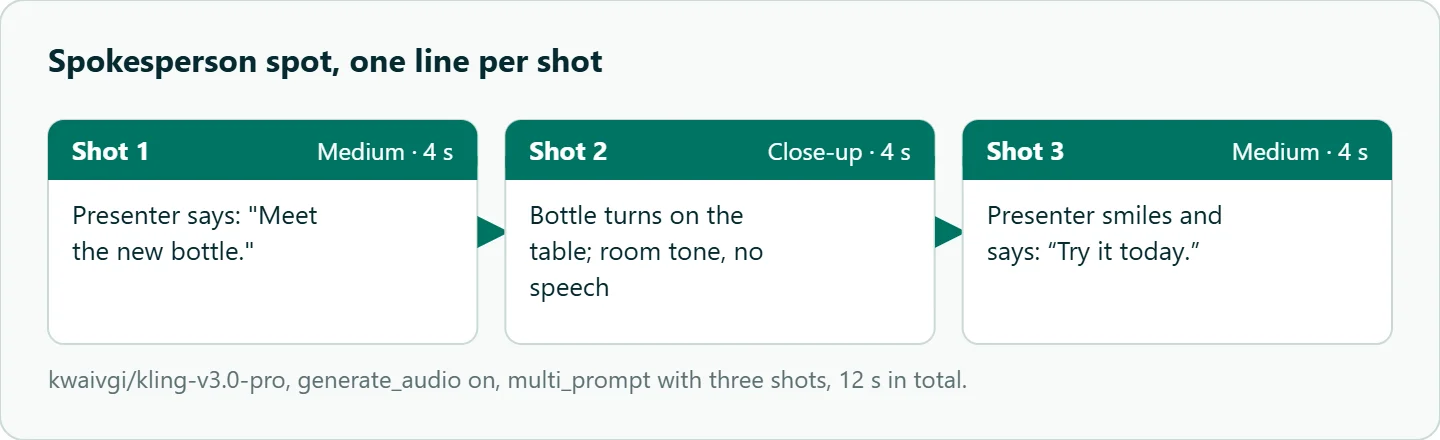
For a short spokesperson spot, put one speaker per shot with multi_prompt. The shot durations must add up to duration, each shot is at least one second, and each shot prompt can be up to 512 characters.
{
  "model": "kwaivgi/kling-v3.0-pro",
  "prompt": "A presenter in a bright studio introduces a water bottle",
  "duration": 12,
  "aspect_ratio": "9:16",
  "generate_audio": true,
  "multi_prompt": [
    {"prompt": "Medium shot. The presenter (warm, upbeat, American accent) says: \"Meet the new bottle.\"", "duration": 4},
    {"prompt": "Close-up on the bottle turning slowly on the table, soft studio room tone, no speech.", "duration": 4},
    {"prompt": "Medium shot. The presenter smiles and says: \"Try it today.\"", "duration": 4}
  ]
}
The middle shot carries no dialogue on purpose. It gives you a cutaway in the edit and keeps the model from inventing filler speech.
Route 2: The lip-sync API on Kling's own platform
This route runs on Kling's own platform with a Kling account, because OceanToken's video docs did not list a separate lip-sync endpoint on 2026-11-11. Kling documents it as a two-stage flow. A face-recognition call analyzes the video and returns a session_id, then POST /v1/videos/advanced-lip-sync creates the task with that session, the chosen face and the audio. The limits on the official lip-sync page shape how you prepare files:
- It "currently only supports one person lip-sync," so a two-shot needs a different plan.
- Source audio must be 2 to 60 seconds, as .mp3, .wav, .m4a or .aac up to 5 MB, or audio made with Kling's TTS in the last 30 days.
- The inserted sound has to overlap the face's lip-sync interval by at least 2 seconds.
- You can set
sound_volumeandoriginal_audio_volumefrom 0 to 2, which helps when you want to keep room tone under a new line. - Generated videos "will be deleted after 30 days," so download results right away.
The face-detection step is where this route fails most. Anything that hides the lips (a hand, a microphone, a fast head turn) or a profile angle leaves the model little to work with. Start from a front-facing clip with the mouth visible for the whole line.
Pitfall: audio_url is not a sync input
The kling-v3.0-pro schema lists audio_url as one of the input_references types, next to image_url and video_url. It is tempting to read that as "upload my voiceover and the character will mouth it." The schema gives no description of what an audio reference does, and the field is described only as "Reference media the clip is built from."
Until the docs say otherwise, treat an audio reference as something to test on one short clip, not as a dubbing feature. If you need a character to say your exact recorded words, the post-sync route on Kling's platform is the documented way (a separate Kling account).
Music and ambience under dialogue
Native audio is more than speech. Kling's prompt examples include room hum and "soft French piano BGM in the background," which tells you the model responds to sound descriptions in both directions. We found no documented switch that forces speech only. That matters, because music baked under a voice cannot be removed cleanly in the edit.
| Goal | Approach | Trade-off |
|---|---|---|
| Clean voice for your own mix | Generate silent and put the line off-screen: narration over a cutaway or a shot where the speaker's mouth is not visible | No lip sync needed; if a face must say your recording, that takes Kling's own lip-sync API on a separate account, one face per task |
| Native voice, no music | Describe only room tone in the prompt, for example "room tone only, no music" | Not guaranteed; listen to every take |
| Your own soundtrack | Keep the native voice and duck your music under it | Music already in the take stays there |
Mouth-shape checklist
Review talking clips frame by frame at the moments mouths are easiest to get wrong:
- M, B and P. The lips should fully close on these sounds. Step through a line like "maybe a boy" and look for the closed frames.
- Wide vowels. "A" and "O" should open the jaw, not just the lips.
- Teeth and tongue. Watch for teeth that change count or a tongue that smears.
- Eyes and brows. Sync passes can freeze the upper face while the mouth moves.
- Silent frames. The mouth should stop when the line ends. A mouth that keeps moving after the audio is a common native-audio tell.
- Who is speaking. In a two-person shot, check that the right person moves their lips on each line.
How to test this on your workload
We have not run these comparisons, so treat the setup below as a test plan for your own prompts. Keep the line and settings fixed and change one thing at a time.
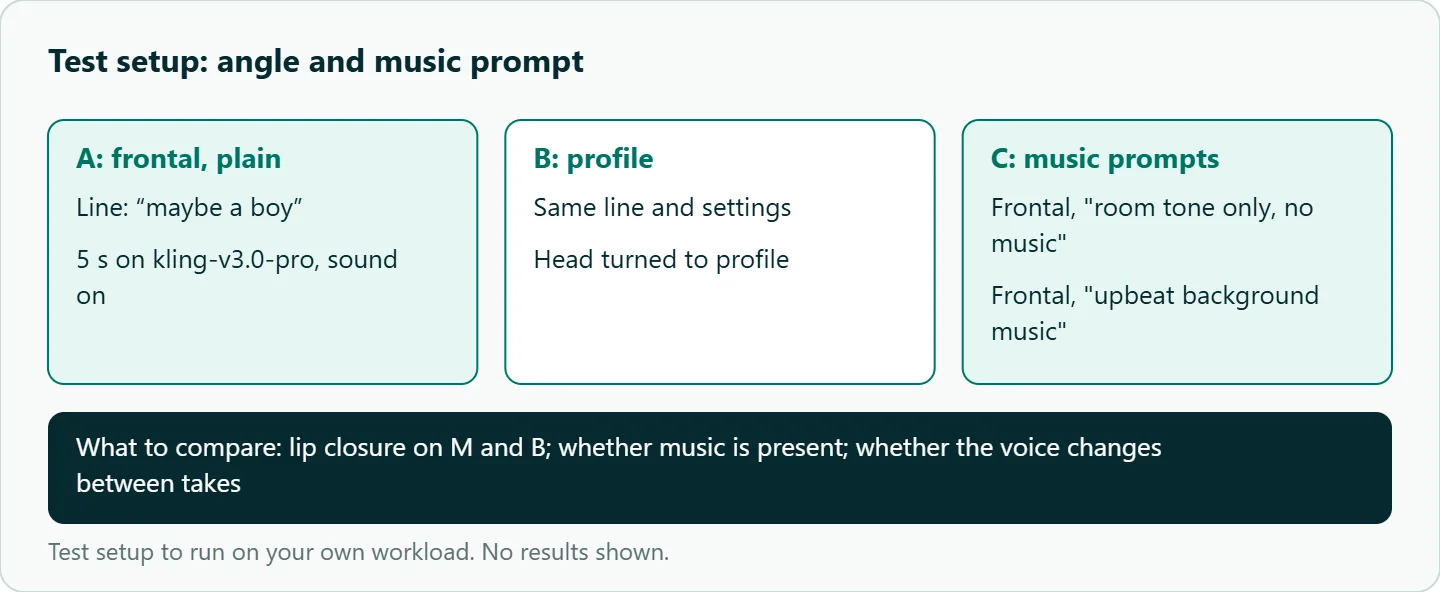
- Generate the same 5-second line, "maybe a boy," on
kwaivgi/kling-v3.0-prowithgenerate_audio: true, once frontal and once in profile. - Generate the frontal version twice more: once with "room tone only, no music" and once with "upbeat background music."
- Export the audio and note whether music is present and whether the voice changes.
- Run the checklist above on all four clips and count closed-lip frames on the M and B sounds.
Our take: Use native audio for every new talking shot and keep the post-sync pass on Kling's own platform for footage you already own. Do not post-sync a profile shot, and do not count on an audio reference to make a character say your exact words until the docs describe it.
Running it on OceanToken
All four Kling ids are listed on /kling-api and called at https://api.oceantoken.ai/v1: start with kwaivgi/kling-v3.0-pro for dialogue, or kwaivgi/kling-v3.0-omni when you need 4k. Set generate_audio explicitly in every request so a silent take never surprises you, and GET /oceantoken/video/model-spec?model=kwaivgi/kling-v3.0-pro returns each model's audio support, durations and reference limits before you build a batch.
The API is OpenAI-compatible, so you change the base URL and key and keep your client code. A failed video job is not charged and its balance hold is released, which keeps retakes of a fluffed line cheap to try. Each key can have its own spending limit. See the current rate on /kling-api. For editing an existing clip rather than generating speech, see our guide to Kling O1 editing prompts, and for planning shots, how Kling multi-shot storyboards work.
FAQ
Does Kling have built-in lip sync? Yes, in two forms: native audio that generates speech with the video, and a separate Advanced Lip-Sync API, on Kling's own platform, that fits supplied audio onto an existing clip.
Which languages does Kling native audio speak? Kling's 3.0 guide lists Chinese, English, Japanese, Korean and Spanish; lines in other languages are translated into English.
Can I use my own voice recording? Only through Kling's own platform, on a separate account: the post-sync route takes your audio file (2 to 60 seconds, up to 5 MB). Do not assume an audio_url reference does the same thing.
Why does lip sync fail on Kling? Usually the face is hidden, turned to profile, or one of several faces, or the line is longer than the clip.
Can I get dialogue without background music? There is no documented switch. Describe room tone only and check each take, or generate silent and add your own voice off-screen.
Sources
- Kling: VIDEO 3.0 model user guide (checked 2026-11-11)
- Kling API docs: Advanced Lip-Sync (checked 2026-11-11)
- OceanToken docs: Kling v3.0 Pro request schema (checked 2026-11-11)
- OceanToken docs: Kling v3.0 Omni request schema (checked 2026-11-11)
- OceanToken docs: Video guide (checked 2026-11-11)
- OceanToken Kling API page (checked 2026-11-11)
Get your OceanToken API key
- Create an OceanToken account and an API key.
- Copy the snippet below, paste your key, and run it.
- Check the current rate on /kling-api.
curl https://api.oceantoken.ai/v1/videos \
  -H "Authorization: Bearer $OCEANTOKEN_API_KEY" \
  -H "Content-Type: application/json" \
  -d '{"model": "kwaivgi/kling-v3.0-pro", "prompt": "Medium shot. A woman in a green coat (calm, low voice) says: \"We open at nine.\" Room tone only, no music.", "duration": 5, "generate_audio": true}'
More from the blog
A Unified API for Chat, Image and Video
Building on a unified API for chat, image and video: sync vs async calls, billing units, retries, timeouts and storage, with three calls and a launch checklist.
Kimi K3 API International Access Guide
Use the Kimi K3 API internationally: sign up with email, pay by card, create one key and call moonshotai/kimi-k3 with an OpenAI SDK. Steps, code and checks.
Call Tencent Hy3 With the OpenAI SDK
Call Tencent Hy3 with the OpenAI SDK outside China: base URL, model id, streaming, tool calls, reasoning_effort values, Hy3 vs Hy3 preview, and token billing.