

Kling Image to Video: Best Practices
Kling image to video done right: pick a sharp first frame at the output ratio, prompt only the motion, keep start and end frames close, and know the API limits.
By OceanToken Team
Editor's note: Image-to-video is where we would start any new Kling workflow. The first frame settles subject, composition and style before you spend a cent on video, and what is left is motion, which you can usually describe in one sentence. The cheapest place to iterate is the still. A bad hand in the image is a bad hand for the whole clip.
Short answer: For Kling image to video, start from a sharp, well-composed still at the output aspect ratio (16:9, 9:16 or 1:1), then write a prompt that describes only motion and camera, not what is already visible. Keep one action per clip and leave room in the frame to move. Add an end frame only when the final image must be exact.
Why start Kling from an image
Kuaishou's Kling 3.0 launch release lists image-to-video alongside text-to-video, reference-to-video and in-video editing, with clips "up to 15 seconds." On OceanToken, both kwaivgi/kling-v3.0-pro and kwaivgi/kling-v3.0-std take a first frame and a last frame through frame_images, and up to six reference images through input_references.
The reason to start from a still is control. With text alone, the model decides what the subject looks like, where it stands and what the light does, and you only find out after a render. With a first frame, those decisions are already made and checked, so the prompt carries one job: motion. That also makes re-rolls cheaper to reason about, because when a take fails you know the image was not the variable.
When is text-to-video the better choice? When you want the model to explore. If you have no fixed look yet and are hunting for ideas, a still can lock you in too early.
Choosing the Kling first frame
Most image-to-video problems are visible in the still before you render anything. The table is our checklist.
| Use | Avoid | Why |
|---|---|---|
| Sharp focus, even exposure | Motion blur, crushed shadows | Blur and noise get animated too |
| Subject with space to move into | Subject cropped at the frame edge | The model has to invent what is off-frame |
| The output aspect ratio | A different ratio | Avoids leaving the crop or pad to the model |
| Clean hands, faces and text | Already-distorted anatomy | Errors in frame 1 last the whole clip |
| A readable, neutral pose | An extreme or ambiguous pose | The model has to guess the next movement |
Fix the image first, in your image tool. It is much faster to regenerate a still than a video, and every hour spent there removes re-rolls later.
Two rules for the file itself. The video guide says images go in as public https:// URLs or data URLs, up to 25 MB each, and that the whole request should stay under 10 MB where possible, so send large images as URLs. A URL the model cannot fetch fails the job with invalid_request. And the Kling v3.0 Pro model page says the maker's content rules can refuse some images: only use photos of real people you have the right to use, with that person's consent.
Writing the Kling image to video prompt
The image already says what is in the frame, so the prompt should say what changes. "A red fox in snow" repeats the picture. "The fox lifts its head, ears turn toward the sound, breath fogs in the cold air, slow push-in" gives the model something to do.
Separate subject motion from camera motion. Subject: what moves and how. Camera: how we see it, with one move and a speed, such as "slow push-in" or "camera locked." Then say what stays still. "Background trees remain still, camera locked" cuts accidental drift, which is the most common way a good still turns into a wobbly clip.
Keep one action per clip. Two actions in a five-second clip usually means neither finishes. If you need a sequence, render it as separate clips, each from its own still.
The fox lifts its head and turns its ears toward the left. Breath fogs in the cold air. The trees and snow in the background stay still. Slow push-in over the whole clip.
Aspect ratio, duration and resolution limits
These come from OceanToken's request schemas for Kling 3.0, checked on November 8, 2026:
| Setting | kwaivgi/kling-v3.0-pro | kwaivgi/kling-v3.0-std |
|---|---|---|
| Duration | 3 to 15 s, default 5 | 3 to 15 s, default 5 |
| Aspect ratio | 16:9, 9:16, 1:1 | 16:9, 9:16, 1:1 |
| Resolution | 1080p only | 720p only |
| Frames | First and last, up to 2 | First and last, up to 2 |
| Reference images | Up to 6 | Up to 6 |
Two practical notes. First, prepare the still at one of those three ratios. If you send a 4:3 photo, something has to crop or pad it, and you would rather make that choice yourself. The schema does not say how Kling handles a mismatched first frame, so check the size field in the job response on your first clip.
Second, a value the model does not accept is refused with a 400 before any job runs or is charged, and optional fields that cannot be applied are dropped and listed in the x-oceantoken-dropped-params response header. Read that header once when you set up a new workflow. Shorter clips give the model less time to drift, so we would start at the 5-second default and lengthen only when the action needs it.
Kling start and end frames
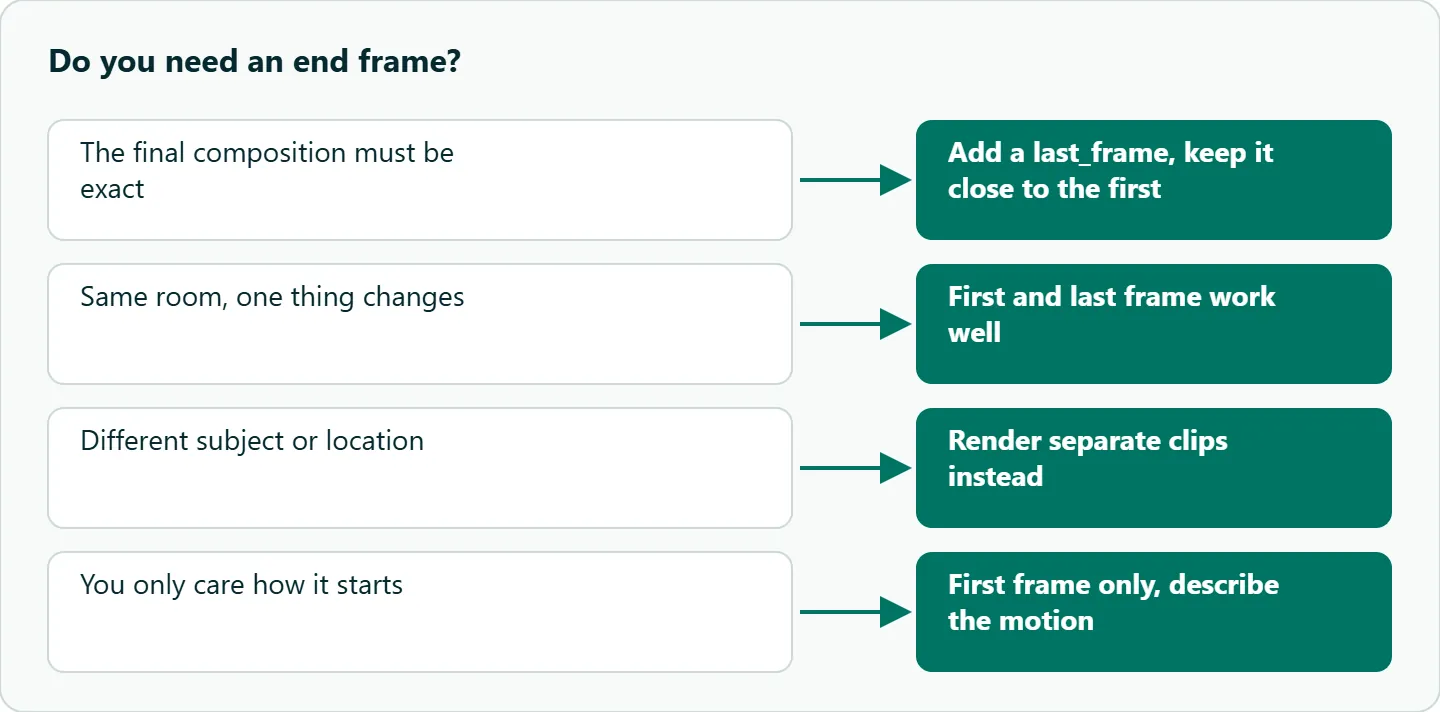
Giving both a first and a last image turns the task into "move between these two states." It works best when the two frames share the setting and subject and differ in one thing.
| Transition | Likely to hold | Likely to struggle |
|---|---|---|
| Pose change in the same room | Yes | |
| Day to night from the same angle | Yes | |
| Different subject or location | The model invents a morph | |
| Large camera jump between frames | Warping in the middle |
That table is our reasoning from how interpolation works, not a measured result. In the prompt, describe the path, not the endpoints: "the door slowly opens and warm light floods the hallway" tells the model how to get from frame A to frame B.
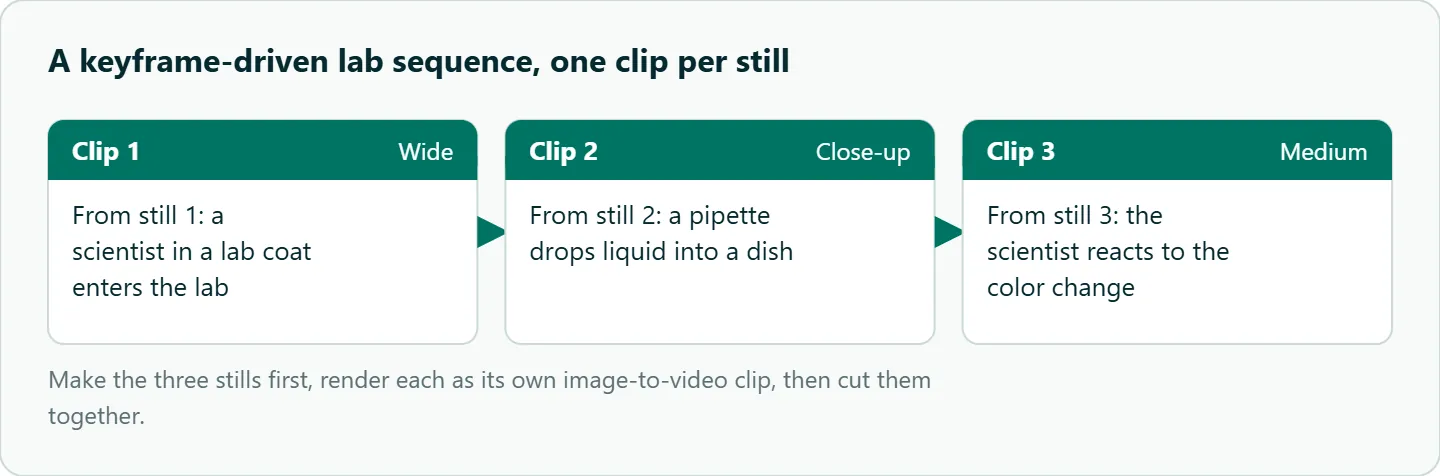
If you are building a longer sequence, make the keyframes first and render each shot as its own image-to-video clip. Three stills of the same scientist in the same lab, rendered as three short clips and cut together, keep identity steadier than asking one clip to cover everything:
Common problems and what to try
| Problem | Try |
|---|---|
| Face changes during the clip | A front-facing still, a shorter clip |
| Background warps | Say the background stays still; lock the camera |
| Text in the still changes | Avoid text in the image, or keep the clip short |
| The image "jumps" at the first frame | The prompt contradicts the image; remove appearance words |
| The wrong thing moves | Name what moves and what stays still |
Job fails with invalid_request |
Check the image URL is public and the values fit the model |
Calling it on the API
The schema puts the first frame in frame_images. Here is a minimal request with requests; for polling and downloading inside n8n or Make, see Kling n8n workflow (and Make).
import os, requests

r = requests.post(
    "https://api.oceantoken.ai/v1/videos",
    headers={"Authorization": f"Bearer {os.environ['OCEANTOKEN_API_KEY']}"},
    json={
        "model": "kwaivgi/kling-v3.0-std",
        "prompt": "The fox lifts its head and turns its ears to the left. Background stays still. Slow push-in.",
        "duration": 5,
        "aspect_ratio": "16:9",
        "frame_images": [
            {"type": "image_url", "frame_type": "first_frame",
             "image_url": {"url": "https://example.com/fox-16x9.jpg"}}
        ],
    },
)
print(r.status_code, r.headers.get("x-oceantoken-dropped-params"), r.json())
Add a second entry with "frame_type": "last_frame" for a start and end frame pair. Poll GET /v1/videos/{id} every 10 to 20 seconds until the status is completed or failed.
How to test this on your workload
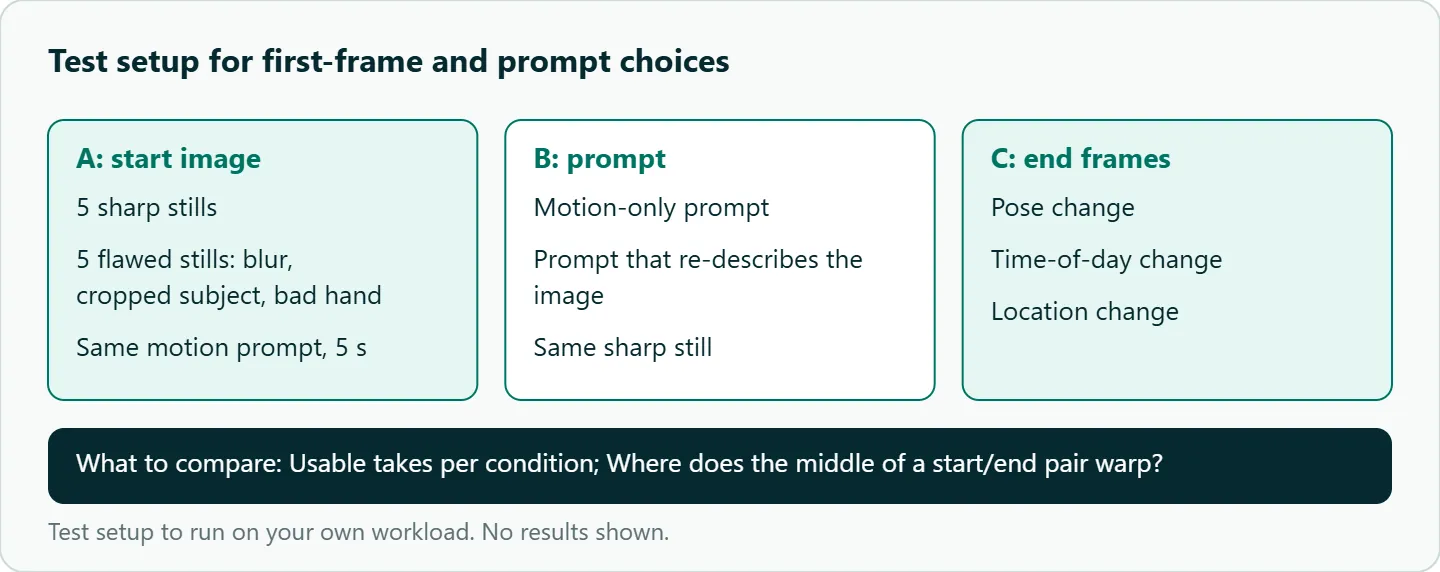
We have not measured take rates for these practices, so check them on your own images. A small test:
- Pick five sharp stills and five flawed ones (blur, a cropped subject, a bad hand) and animate all ten with the same motion prompt on
kwaivgi/kling-v3.0-stdat 5 seconds. - Animate one sharp still twice: once with a motion-only prompt, once with a prompt that re-describes the image.
- Run three start and end frame pairs of increasing difference: a pose change, a time-of-day change, a location change. Note where the middle starts to warp.
- Count usable takes for each condition.
Our take: Spend an hour on keyframes and you will need fewer re-rolls. Prompt the motion, not the picture. Treat the end frame as a tool for exact landings, not a default, because every end frame adds a transition the model can get wrong.
Running it on OceanToken
Kling 3.0 on OceanToken is kwaivgi/kling-v3.0-pro (1080p) or kwaivgi/kling-v3.0-std (720p), at base URL https://api.oceantoken.ai/v1. The /kling-api page also lists kwaivgi/kling-v3.0-omni and kwaivgi/kling-video-o1. A good loop is to settle the motion prompt on Standard, then re-run the keepers on Pro.
The API is OpenAI-compatible, so you change the base URL and key and keep your code; the /kling-api page shows the OpenAI SDK's videos.create_and_poll helper. Each key can carry its own spending limit, which is useful when an image-to-video batch runs unattended. Refused or failed video jobs are not charged. One prepaid balance with no subscription covers Kling and the other video and image models, so the still and the clip can come from the same account. See the current rate on /kling-api.
FAQ
Should I use text-to-video or image-to-video on Kling? Image-to-video when identity or composition matters; text-to-video when you want the model to explore ideas.
What aspect ratios does Kling image to video support? On OceanToken's Kling 3.0 ids: 16:9, 9:16 and 1:1. Prepare the still at the ratio you want.
How long can a Kling image-to-video clip be? 3 to 15 seconds on Kling 3.0, with 5 as the default.
Why does my image change during the clip? Usually the prompt contradicts the image, or the clip is long. Remove appearance words and try a shorter duration.
Do I need an end frame? Only when the final composition must be exact. Otherwise it adds a transition to get wrong.
Sources
- OceanToken docs: Kling v3.0 Pro request schema (checked 2026-11-08)
- OceanToken docs: Kling v3.0 Standard request schema (checked 2026-11-08)
- OceanToken docs: Video guide (checked 2026-11-08)
- OceanToken: Kling v3.0 Pro model page (checked 2026-11-08)
- OceanToken Kling API page (checked 2026-11-08)
- Kuaishou: Kling AI launches 3.0 model (GlobeNewswire) (checked 2026-11-08)
Get your OceanToken API key
- Create an OceanToken account and an API key.
- Copy the snippet below, paste your key, and run it.
- Check the current rate on /kling-api.
curl https://api.oceantoken.ai/v1/videos \
  -H "Authorization: Bearer $OCEANTOKEN_API_KEY" \
  -H "Content-Type: application/json" \
  -d '{"model": "kwaivgi/kling-v3.0-std", "prompt": "The fox lifts its head, ears turn left, slow push-in", "duration": 5, "aspect_ratio": "16:9", "frame_images": [{"type": "image_url", "frame_type": "first_frame", "image_url": {"url": "https://example.com/fox-16x9.jpg"}}]}'
More from the blog
A Unified API for Chat, Image and Video
Building on a unified API for chat, image and video: sync vs async calls, billing units, retries, timeouts and storage, with three calls and a launch checklist.
Kimi K3 API International Access Guide
Use the Kimi K3 API internationally: sign up with email, pay by card, create one key and call moonshotai/kimi-k3 with an OpenAI SDK. Steps, code and checks.
Call Tencent Hy3 With the OpenAI SDK
Call Tencent Hy3 with the OpenAI SDK outside China: base URL, model id, streaming, tool calls, reasoning_effort values, Hy3 vs Hy3 preview, and token billing.