

Kling Camera Control: Prompt Words
Kling camera control is in the prompt: push-in, pan, tilt, track, orbit, crane, dolly zoom. One move per shot, speed, end point, and what the API lacks.
By OceanToken Team
Editor's note: Most weak AI video is weak camera direction. With Kling, the camera is something you write, so a dozen precise words do more than any setting. This page is a cheat sheet built from ordinary film terms and what the Kling docs actually define. It is not a result from our own test grid, and we say plainly where a test is still missing.
Short answer: Kling camera control on the API happens in the prompt. Name one move per clip with a film term (push-in, pull-out, pan, tilt, track, orbit, crane, handheld), add a speed, a direction and where the move ends, and do not stack moves. OceanToken's Kling 3.0 request schemas have no camera parameter.
What Kling camera control the API actually has
We checked OceanToken's request schemas for kwaivgi/kling-v3.0-pro and kwaivgi/kling-v3.0-std on November 8, 2026. They define prompt, duration (3 to 15 seconds), aspect_ratio (16:9, 9:16, 1:1), resolution, generate_audio, first and last frames, reference images, subjects, multi-shot fields and motion_control. We did not find a camera_control field, and we did not find negative_prompt or cfg_scale either. So on this API, the prompt is the camera control.
Two things in that list could be mistaken for camera tools. motion_control applies the movement in a video to a character image; it moves the character, not the lens, and the schema limits it to accounts cleared for real-person media. The multi-shot fields let you write a prompt per shot, which Kuaishou's 3.0 launch release describes as setting "camera movements for each shot" in storyboarding. That is a different job from single-clip camera direction, so this page leaves it out.
Kuaishou's release also says Video 3.0 works by "dynamically adjusting camera angles and shots to match creative direction." Our reading: if you leave the camera unspecified, the model will choose for you. Name the move if you care what it is.
Kling camera movement prompt vocabulary
The descriptions and risks below come from ordinary film practice and from how image models invent unseen areas. They are a starting vocabulary, not measured results.
| Write | What the camera does | Use when | Watch out for |
|---|---|---|---|
| Static / locked-off | Does not move | Dialogue, product | Feels dead without subject motion |
| Slow push-in / dolly in | Moves toward the subject | Emphasis, a reveal | May read as a zoom |
| Slow pull-out / dolly out | Moves away | Showing context | The model invents what enters frame |
| Pan left / right | Rotates horizontally | Following, surveying | Smears if the subject is fast |
| Tilt up / down | Rotates vertically | Height reveals | Keep the range small |
| Tracking / follow | Moves with the subject | Action, walking | The subject can drift out of frame |
| Orbit | Circles the subject | A product hero shot | The unseen side is invented |
| Crane up / down | Rises or drops | Establishing shots | Needs a clear start and end height |
| Handheld | Slight shake | Documentary feel | Too much shake reads as noise |
| Rack focus | Focus shifts between depths | A narrative beat | Needs two clear planes in frame |
Rules that hold up
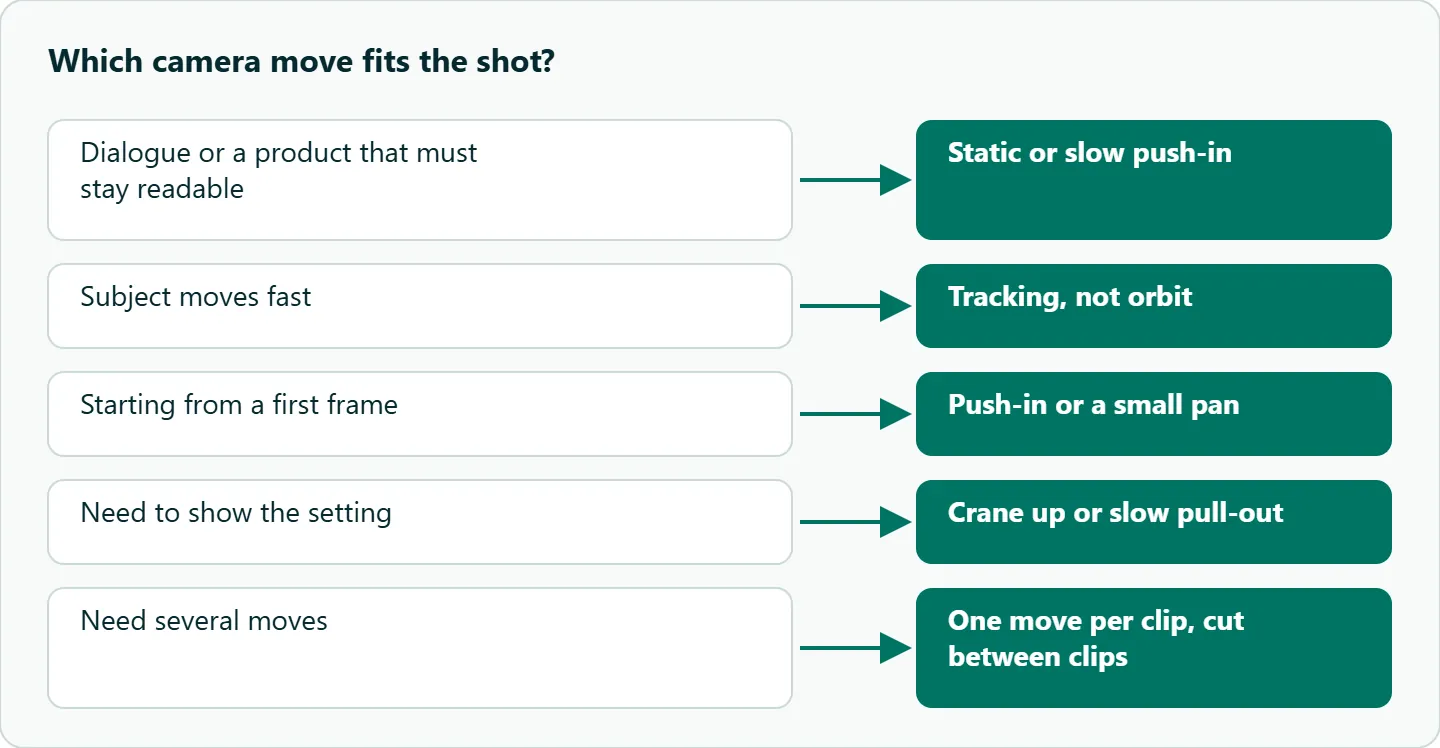
One move per clip. "Dolly in and pan and zoom" asks for three paths, and the usual result is a vague drift that matches none of them. If you need three moves, render three clips and cut.
Give a speed and a direction: slow, steady or fast; left to right, clockwise, upward. Pair the move with a lens when it matters: 24mm for wide, 50mm for natural, 85mm for portrait compression. And say where the camera ends: "slow push-in, ending on a close-up of the label." An end point gives the model a target, which is the simplest fix for a move that finishes in the first second and then holds. If that still happens, add "over the full five seconds."
The Kling dolly zoom
The dolly zoom (the "vertigo" shot) is the one combination worth asking for by name: the camera moves toward or away from the subject while the lens zooms the other way, so the subject stays the same size and the background stretches or squeezes. It breaks our one-move rule on purpose, because the two motions are designed as a single effect.
Write the result you want, not only the name, since the model may not know the term:
Dolly zoom: the camera pulls back while zooming in, so the man stays the same size in frame and the hallway behind him stretches away. Static subject, slow and steady, over the full clip.
We have not tested how reliably Kling produces this, so run it a few times before you plan a scene around it. A still subject and a background with clear depth lines (a corridor, a street, a row of columns) give the effect the best chance to read.
What goes wrong
Subject motion fighting the camera. A fast subject plus an orbit loses the subject. Use a track instead, or slow the subject down.
Speed words ignored. The move finishes early and the camera holds. Add an end point and a duration cue.
Moves that reveal too much. A pull-out or orbit forces the model to invent new areas, and invented areas are where warping starts. Prefer moves that reveal little: a push-in, a small pan.
Camera from a first frame
If you start from a still, the move has to suit the image. You cannot orbit behind a subject whose back the model has never seen without it inventing the back. A first frame plus a push-in or a small pan is the safest pairing. On the API the first frame goes in frame_images with frame_type set to first_frame, and a last_frame entry pins where the move ends. Keep the two frames close in angle; a big camera jump between them tends to warp in the middle.
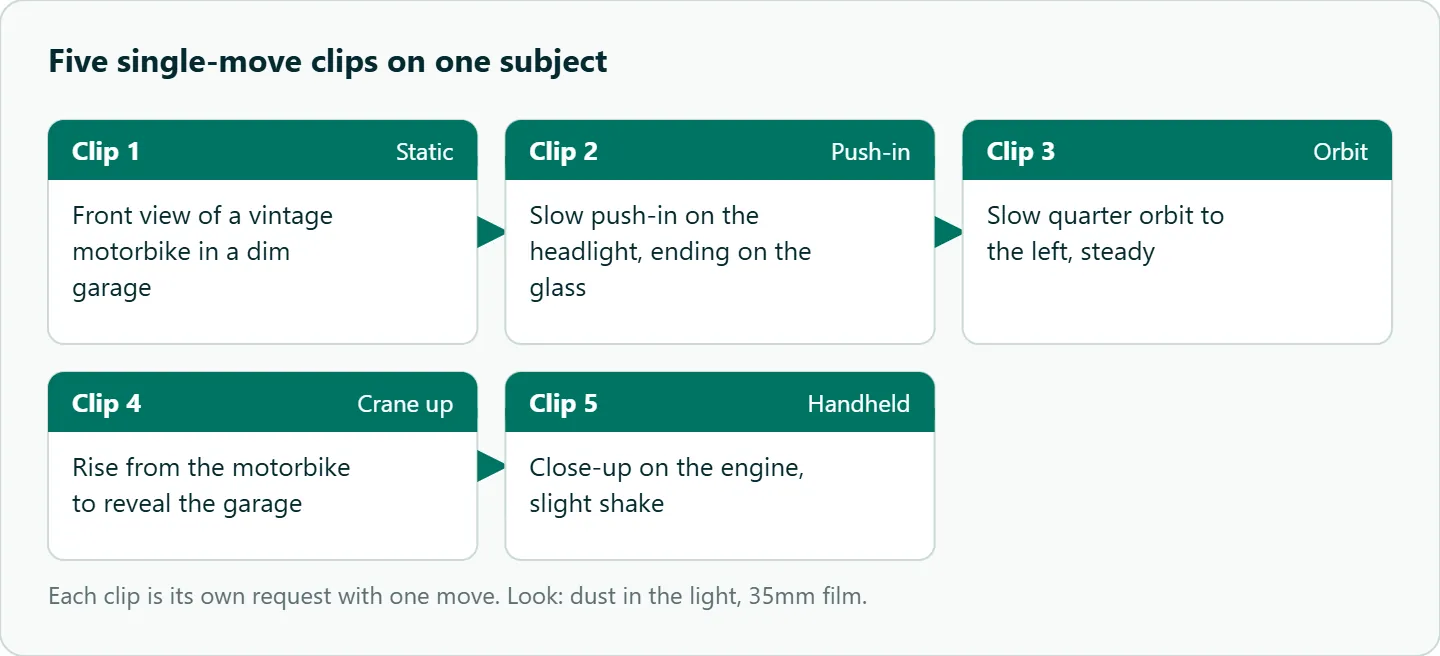
Here is a set of five separate clips on one subject, each with one move. Each is its own request, so the moves never compete:
1. Static front view of a vintage motorbike in a dim garage, dust in the light, 35mm film look.
2. Slow push-in on the motorbike's headlight, ending on a close-up of the glass.
3. Slow quarter orbit to the left around the motorbike, steady.
4. Crane up from the motorbike to reveal the whole garage.
5. Handheld close-up on the engine, slight shake.
Kling camera prompts by genre
| Genre | Starting set |
|---|---|
| Ads | Slow orbit, slow push-in, macro close-up |
| Short drama | Static, over-the-shoulder, slow push-in |
| Action | Tracking, handheld |
| Real estate | Crane, slow dolly |
| Anime or illustration | Slow pan with parallax, static |
How to test this on your workload
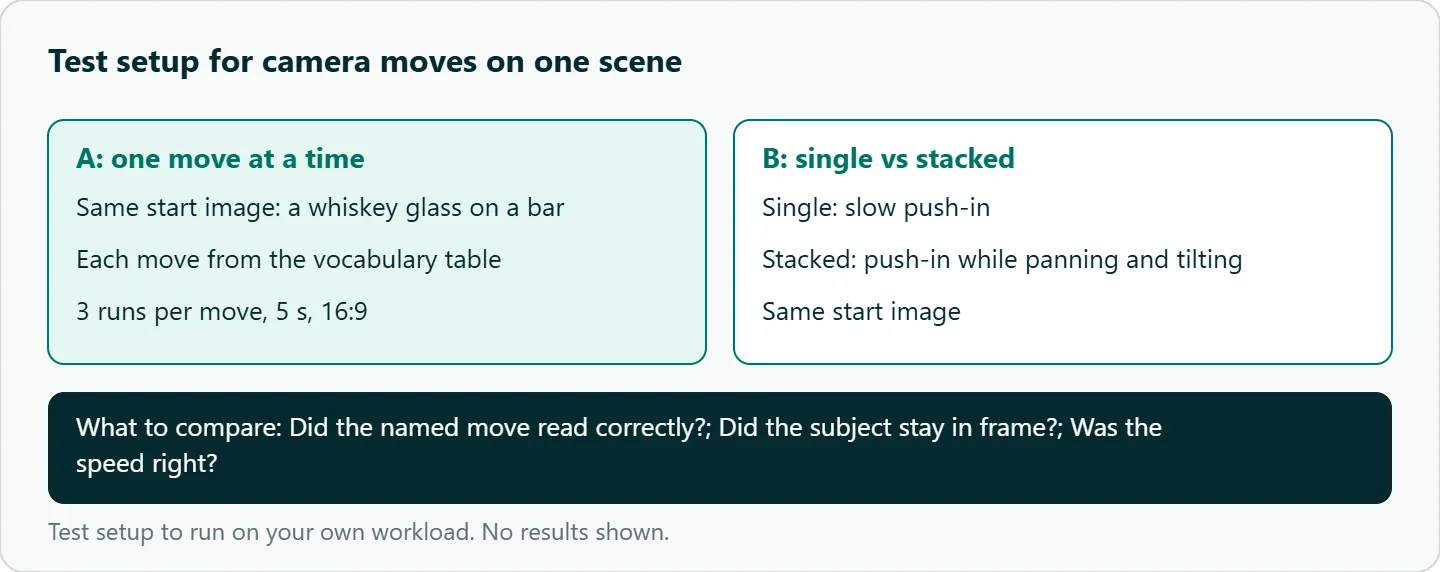
We have not run a hit-rate test on these words, so check them on your own scenes:
- Pick one start image and one prompt, such as "A glass of whiskey on a bar, warm light, [camera move]."
- Run each move from the vocabulary table three times on
kwaivgi/kling-v3.0-stdat 5 seconds and 16:9. - Score each take on three questions: did the named move read correctly, did the subject stay in frame, was the speed right.
- Run one stacked prompt ("push-in while panning and tilting") against the single push-in.
- Keep the phrases that read and drop the rest.
Our take: Ask for less. A clean, slow push-in beats an ambitious combination nearly every time, and cutting between two simple moves looks more like a camera crew than one clever move does. The dolly zoom is the exception worth testing.
Running it on OceanToken
Kling 3.0 is kwaivgi/kling-v3.0-pro (1080p) or kwaivgi/kling-v3.0-std (720p) at base URL https://api.oceantoken.ai/v1; see the Kling v3.0 Pro model page. For camera-word tests, Standard is the natural place to iterate, with Pro for the final render.
The API is OpenAI-compatible: change the base URL and key, and the OpenAI SDK's videos.create_and_poll helper works as shown on /kling-api. Each key can have its own spending limit, so a test grid cannot run away with your balance, and refused or failed video jobs are not charged. If you want to run a grid unattended, the Kling n8n workflow (and Make) post shows how to create, poll and download jobs. See the current rate on /kling-api.
FAQ
Does Kling have a camera control parameter in the API? Not in OceanToken's Kling 3.0 schemas as of November 8, 2026. The prompt is the control.
Does Kling understand film terms? Plain film terms with a speed and a direction are the safest input. Kuaishou says 3.0 adjusts the camera to match your direction.
How do I prompt a dolly zoom in Kling? Describe the effect: the camera pulls back while zooming in, the subject stays the same size, the background stretches. Test it before relying on it.
What is the best move for product videos? A slow push-in or a partial orbit. Keep the product centered and check the far side of the object.
Is motion_control a camera feature? No. It transfers movement from a video to a character image and is limited to accounts cleared for real-person media.
Sources
- OceanToken docs: Kling v3.0 Pro request schema (checked 2026-11-08)
- OceanToken docs: Kling v3.0 Standard request schema (checked 2026-11-08)
- OceanToken docs: Video guide (checked 2026-11-08)
- Kuaishou: Kling AI launches 3.0 model (GlobeNewswire) (checked 2026-11-08)
- OceanToken: Kling v3.0 Pro model page (checked 2026-11-08)
- OceanToken Kling API page (checked 2026-11-08)
Get your OceanToken API key
- Create an OceanToken account and an API key.
- Copy the snippet below, paste your key, and run it.
- Check the current rate on /kling-api.
curl https://api.oceantoken.ai/v1/videos \
  -H "Authorization: Bearer $OCEANTOKEN_API_KEY" \
  -H "Content-Type: application/json" \
  -d '{"model": "kwaivgi/kling-v3.0-std", "prompt": "A glass of whiskey on a bar, warm light. Slow push-in, ending on a close-up of the ice.", "duration": 5, "aspect_ratio": "16:9"}'
More from the blog
A Unified API for Chat, Image and Video
Building on a unified API for chat, image and video: sync vs async calls, billing units, retries, timeouts and storage, with three calls and a launch checklist.
Kimi K3 API International Access Guide
Use the Kimi K3 API internationally: sign up with email, pay by card, create one key and call moonshotai/kimi-k3 with an OpenAI SDK. Steps, code and checks.
Call Tencent Hy3 With the OpenAI SDK
Call Tencent Hy3 with the OpenAI SDK outside China: base URL, model id, streaming, tool calls, reasoning_effort values, Hy3 vs Hy3 preview, and token billing.