

Kimi K3 API International Access Guide
Use the Kimi K3 API internationally: sign up with email, pay by card, create one key and call moonshotai/kimi-k3 with an OpenAI SDK. Steps, code and checks.
By OceanToken Team
Editor's note: For a developer outside China, the hard part of the Kimi K3 API is rarely the code. It is the account: which sign-up flow, which payment method, which key. Once that is settled, Kimi K3 is an ordinary OpenAI-compatible model. Our view is that if Kimi is one of several Chinese models you want, one international account beats opening one per model maker.
Short answer: To use the Kimi K3 API internationally on OceanToken, sign up with an email address and activate it from the emailed link, add credits by card, create an API key, and point any OpenAI SDK at https://api.oceantoken.ai/v1 with the model id moonshotai/kimi-k3. The docs show no phone-number step. Then check latency from your region, data retention and request timeouts.
01 · What Kimi K3 API international access comes down to
Access from abroad is four questions: can you open an account, can you pay, can you get a key, and does your code work unchanged. Here is what each takes, from the create-account and add-credits docs and the Kimi K3 model page, checked November 17, 2026:
| Step | What you need | Notes |
|---|---|---|
| Account | An email address | Activate from the emailed link and set a password; after that you can also sign in with Google or GitHub on the same email; disposable addresses are refused |
| Payment | A card, on a hosted checkout page | Prepaid credits, no subscription |
| Key | One API key from the console | The same key works for every model your account can use |
| Code | Any OpenAI-compatible SDK | Base URL https://api.oceantoken.ai/v1, model moonshotai/kimi-k3 |
None of these steps asks for a phone number, and none of them is specific to Kimi. That is the point for a team outside China: the account you open for Kimi K3 also reaches Qwen and GLM models, with the same key and balance. If you want the background on what Kimi K3 is and what it is good at first, our Kimi K3 explainer covers that; this guide stays on access.
02 · Four steps from sign-up to the first Kimi K3 request
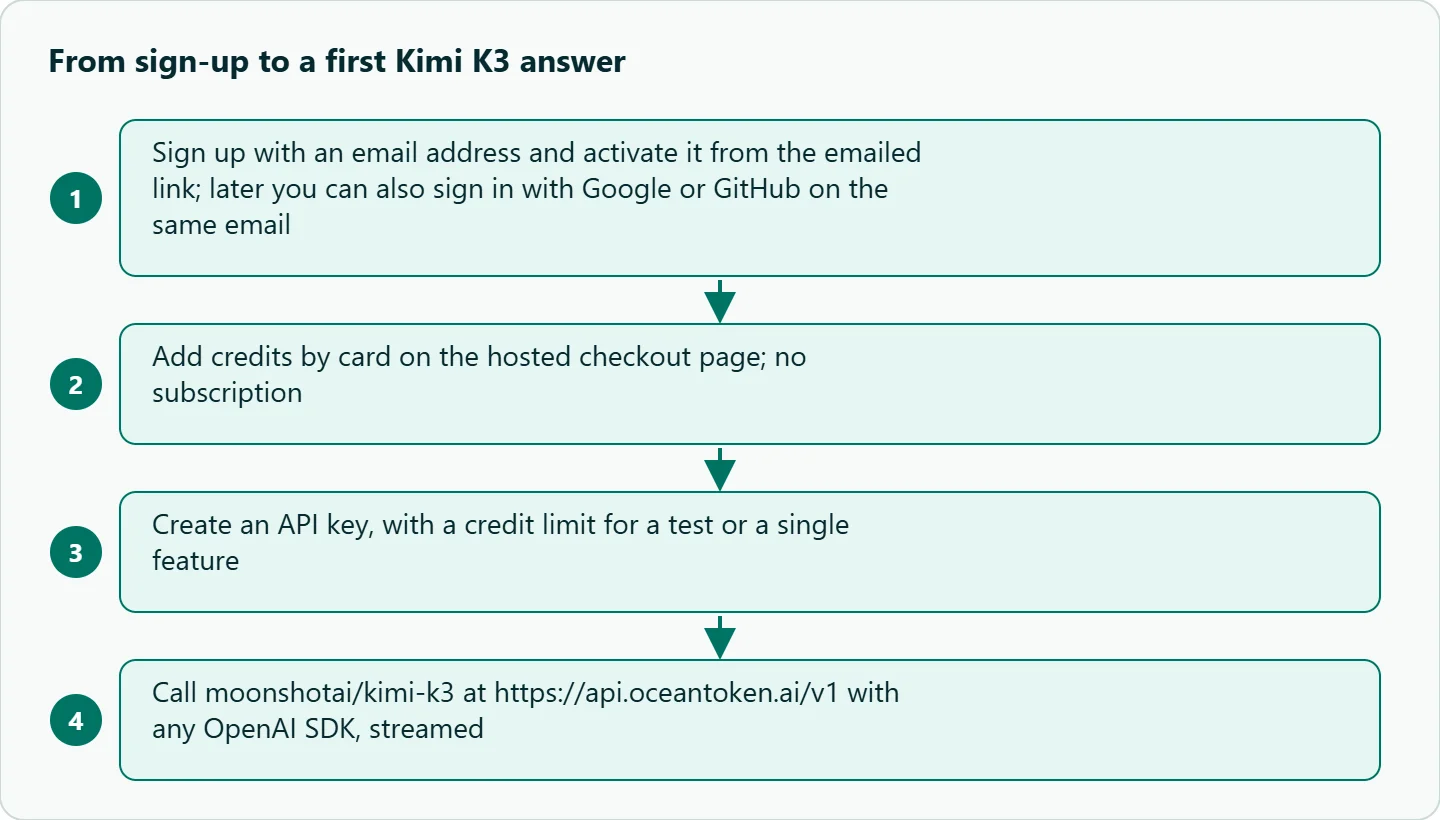
First, open app.oceantoken.ai/ui/signup and pick Personal, or Organization if more than one person will share one bill. Enter your email, follow the activation link, and set a password; the account is active at that moment. Second, open Credits in the console, pick an amount or type your own, and pay by card on the checkout page, which shows a card processing fee as its own line before you pay. Third, create an API key. Give it a credit limit if it is for a test or a single feature, because a key that reaches its limit gets 400 key_budget_exceeded while the rest of the account keeps working.
Fourth, send one request. Here it is in curl:
curl https://api.oceantoken.ai/v1/chat/completions \
  -H "Authorization: Bearer $OCEANTOKEN_API_KEY" \
  -H "Content-Type: application/json" \
  -d '{"model": "moonshotai/kimi-k3", "messages": [{"role": "user", "content": "Reply with one sentence: what is a context window?"}]}'
And the same call with the OpenAI Python SDK, streamed, since a long Kimi K3 answer is exactly the kind of request you should not hold open:
import os
from openai import OpenAI

client = OpenAI(base_url="https://api.oceantoken.ai/v1", api_key=os.environ["OCEANTOKEN_API_KEY"])

with client.chat.completions.create(
    model="moonshotai/kimi-k3",
    messages=[{"role": "user", "content": "Summarize the trade-offs of long-context models in five bullets."}],
    stream=True,
) as stream:
    for chunk in stream:
        if chunk.choices and chunk.choices[0].delta.content:
            print(chunk.choices[0].delta.content, end="", flush=True)
If your app already uses the OpenAI SDK with no arguments, setting OPENAI_BASE_URL and OPENAI_API_KEY and changing the model name is enough, per the migration guide .
03 · What the model page says about Kimi K3
Before you design around Kimi K3, read its limits from the model page rather than from memory, because these numbers are what the API will enforce. The four that matter for access, as of November 17, 2026:
| Field | Value on the model page |
|---|---|
| Model id | moonshotai/kimi-k3 |
| Endpoint | POST /v1/chat/completions |
| Context window | 1.05M tokens |
| Billing unit | Per 1M input and output tokens; thinking tokens billed as output |
Input types, reasoning, tool calling and structured-output support are listed with the full specs on the Kimi K3 model page.
Reasoning is billed as output, so a request that thinks hard costs more and takes longer than its visible answer suggests. If you send reasoning_effort, check the token counts in usage to confirm the setting did what you expected, since parameters a model does not take are dropped without an error. Rates are on /kimi-api.
04 · What to check when calling from outside China
Getting a 200 back proves access. It does not prove the setup suits your users. Four things are worth checking before you build on it.
Latency from your region. Time to first token depends on where your servers are and how much the model reasons. Measure it from the region you deploy in, with streaming on, rather than trusting a number from someone else's network.
Timeouts. The Limits page says a synchronous request is held open for at most 240 seconds and then returns 504 timeout; a stream stays open while tokens flow. With a large context and reasoning on, stream by default.
Where your data goes. The same page says request content is kept for 365 days and uploaded or generated files for 30 days, and that the console has no setting to change where requests are processed. If your company has data-residency rules, read the privacy policy it points to before sending customer data.
Rate limits and balance. Limits are per key. Going over returns 429 rate_limited with a Retry-After header, while 429 provider_overloaded means the model itself is busy. A request also reserves its worst-case cost first and is refused with 400 request_exceeds_balance if that does not fit in your balance, so keep enough headroom for long-context calls.
How to test this on your workload
We have not measured Kimi K3 latency from different regions for this article. Run these checks from your own deployment before you commit:
- Send 20 typical prompts with streaming on and record time to first token and total time from the region you deploy in.
- Send your longest realistic prompt and confirm it streams to completion without a
504 timeout. - Run each prompt once with and once without
reasoning_effort, and compareusagetoken counts and answer quality. - Set a low credit limit on a test key and confirm your app handles
key_budget_exceededcleanly. - Have whoever owns compliance read the Limits page and privacy policy against your data rules.
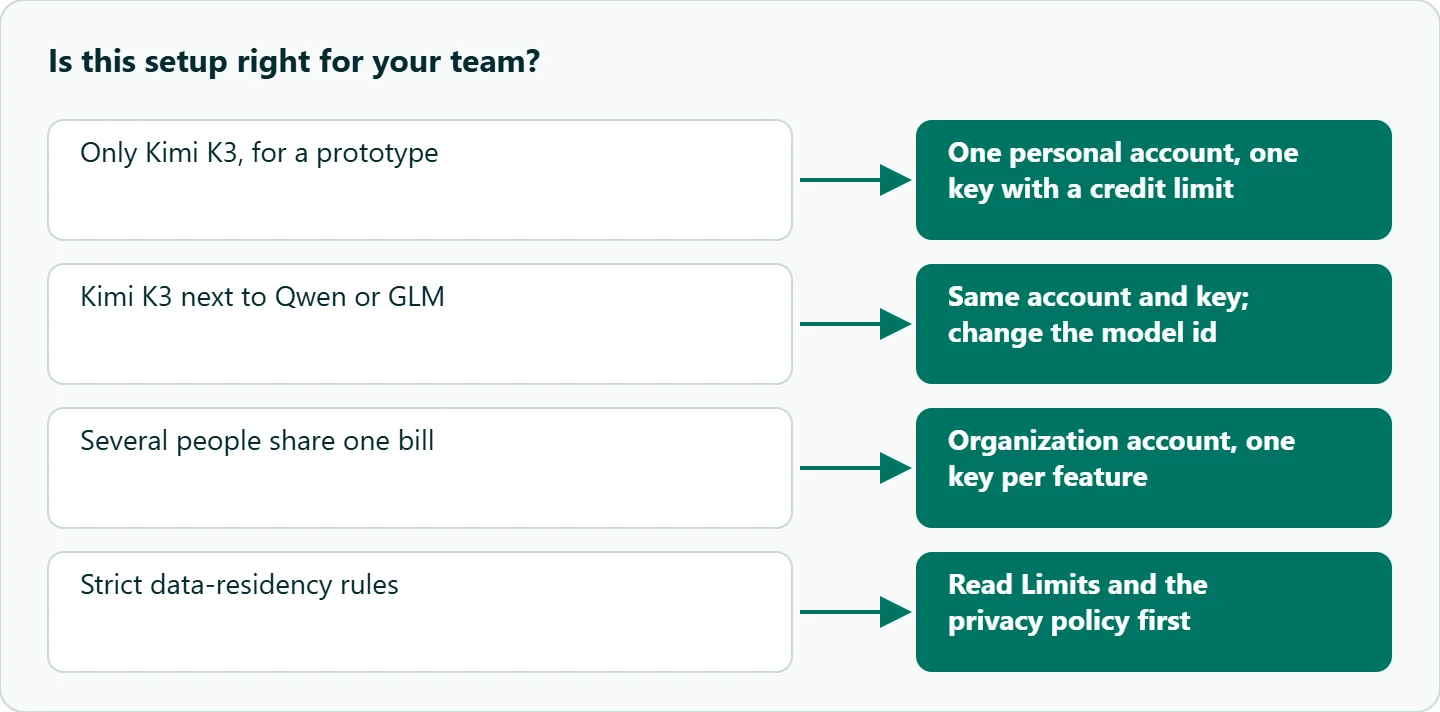
| Your situation | Do this |
|---|---|
| You only need Kimi K3, for a prototype | One personal account, one key with a credit limit |
| You need Kimi K3 next to Qwen or GLM | Same account and key; change only the model id |
| Several people share one bill | Organization account, one key per feature or environment |
| Strict data-residency rules | Check the Limits page and privacy policy before any customer data |
Our take: If Kimi K3 is the only Chinese model you will ever call, any working account will do. Most teams outside China end up wanting two or three of these models side by side, though, and then separate accounts, separate payment methods and separate SDK configs become the real cost. Start with one OpenAI-compatible key and treat Kimi K3 as one model id among several.
Running it on OceanToken
On OceanToken, Kimi K3 is moonshotai/kimi-k3 at https://api.oceantoken.ai/v1, called with any OpenAI-compatible SDK by changing the base URL and key. One key and one prepaid balance reach Kimi, Qwen, GLM and the rest of the catalog, so adding a second Chinese model is a model id change rather than a new account. You pay by card with no subscription, each key can carry its own credit limit, and non-streamed responses report their cost in the x-oceantoken-cost header. See the current rate on /kimi-api, or how billing works on /pricing.
FAQ
Can I use the Kimi K3 API outside China? Yes. With one international account you sign up with an email address, pay by card and call moonshotai/kimi-k3 from anywhere your servers can reach api.oceantoken.ai.
Do I need a Chinese phone number? No phone-number step appears in the sign-up and credits docs. You sign up with an email address and activate it from the emailed link; after that you can also sign in with Google or GitHub on the same email.
Is the Kimi K3 API OpenAI-compatible? Yes. Set the base URL to https://api.oceantoken.ai/v1, use your API key, and call chat.completions.create with model moonshotai/kimi-k3.
What is Kimi K3's context window? The model page lists 1.05M tokens, with text, image and video input and text output.
How is Kimi K3 billed? Per million input and output tokens from a prepaid balance, with thinking tokens billed as output. Current rates are on /kimi-api.
Sources
- OceanToken: Kimi K3 model page (checked 2026-11-17)
- OceanToken: Kimi API page (checked 2026-11-17)
- OceanToken docs: Create an account (checked 2026-11-17)
- OceanToken docs: Add credits (checked 2026-11-17)
- OceanToken docs: Limits (checked 2026-11-17)
- OceanToken docs: Migrate from OpenAI (checked 2026-11-17)
Get your OceanToken API key
- Create an OceanToken account and an API key.
- Copy the snippet below, paste your key, and run it.
- Check the current rate on /kimi-api.
curl https://api.oceantoken.ai/v1/chat/completions \
  -H "Authorization: Bearer $OCEANTOKEN_API_KEY" \
  -H "Content-Type: application/json" \
  -d '{"model": "moonshotai/kimi-k3", "messages": [{"role": "user", "content": "Reply with one sentence: what is a context window?"}]}'
More from the blog
A Unified API for Chat, Image and Video
Building on a unified API for chat, image and video: sync vs async calls, billing units, retries, timeouts and storage, with three calls and a launch checklist.
Call Tencent Hy3 With the OpenAI SDK
Call Tencent Hy3 with the OpenAI SDK outside China: base URL, model id, streaming, tool calls, reasoning_effort values, Hy3 vs Hy3 preview, and token billing.
Call the Hailuo 3 Max API With an API Key
How to call the Hailuo 3 Max API with an API key: the request, polling and download, the Max-only limits, what sets the cost of one video, and Max vs Hailuo 3.