

How to Make GTA 6-Style Videos with AI
Four GTA 6-style AI video shots with the exact prompts, image-to-video to fix sign text, and one chase prompt run on Seedance, Kling, Hailuo and Veo.
By OceanToken Team
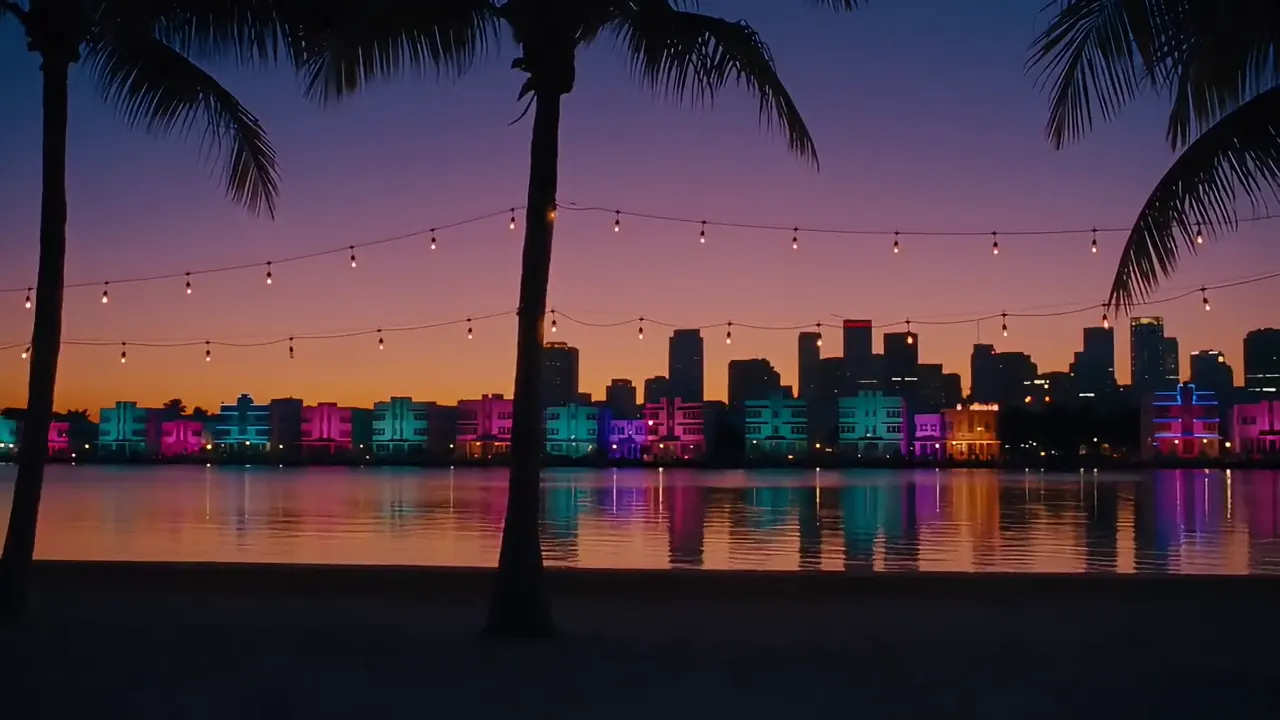
Editor's note: In part one we asked a language model for code and got four GTA 6-style scenes that run in a browser. This time we sent the same four shots to a video model for photoreal footage, then gave the hardest one, a night chase, to four video models with the same prompt and kept the first result from each. Every clip below is a first take unless we say otherwise.
Short answer: To make a GTA 6-style video with AI, write one paragraph per shot with seven parts: shot type, subject, setting, light, one camera move, look and exclusions. Draft it at 480p for 5 seconds, then render one 1080p final. Use image-to-video from a frame you like when a sign or a car has to stay exactly the same. AI video can now make single shots that pass for trailer footage, but not a whole trailer.
Rockstar released Grand Theft Auto VI on November 19, and its look is everywhere: pink dusk, wet asphalt, palms and neon on stucco. Part one blocked four shots in code, where changing a camera move costs nothing. This article renders them as film: a bayfront at dusk, a causeway chase, a motel arrival and a beachfront strip at golden hour.
Everything here is an original, Miami-inspired world with invented names and unbranded cars. Nothing uses characters, locations, logos or footage from Grand Theft Auto, and this article is not affiliated with Rockstar Games or Take-Two Interactive.
What you need to know
- Four shots were rendered with Seedance 2.5 Upscaled at 1080p, 10 seconds each, audio off. Three worked on the first take.
- The sign in the motel shot came out misspelled twice. Starting from a frame of a draft that spelled it right fixed it.
- The chase prompt went to four models. Kling v3.0 Pro looked the most like a trailer, Veo 3.1 Fast had the best motion, Hailuo 3 looked the most like game CG, and Seedance 2.5 Upscaled was the only one with no real-looking car.
- Three of the four put a real-looking car in the chase, even with "unbranded" in the prompt. Check every frame before you publish.
- Every model here runs on one API key; prices are per second of video.
How do you write a prompt for a GTA 6-style video?
Every prompt in this article fills the same seven parts, in roughly the order video models weigh them.
| Part | What to write | Example (the chase) |
|---|---|---|
| Shot type | Framing and what kind of moment it is | Night chase on a long causeway |
| Subject | The one thing the eye follows, described without brands | A low coral-red coupe, unbranded |
| Setting | An original place, invented names only | Over water toward a neon city skyline |
| Light | Time of day and the colour of every light source | Warm street lamps, red and blue light from behind, a helicopter searchlight |
| Camera | Position and one camera move | Chase camera a few metres behind and slightly above, slight shake |
| Look | Medium and texture | Cinematic, photoreal, wet asphalt reflections, motion blur |
| Exclusions | What must not appear | No text overlays, no logos, no game interface, no visible driver face |
Two rules matter more than any single word. Name one camera move per shot: models handle "slow truck right" well and "truck right, then crane up, then whip pan" badly. And write the exclusions every time. Without "no game interface", prompts in this genre sometimes come back with mini-map shapes or mission-style text.
Shot one: Bayfront at dusk
Seedance 2.5 Upscaled, text-to-video, first take. Rendered at 1080p in 248 seconds; shown here as a 720p loop.
The establishing shot: a whole neon skyline and its reflection. It is easy for every model. The hard part is keeping the camera move slow, so the prompt says "slow, steady" and nothing else about the camera.
Prompt · Bayfront at dusk
Wide establishing shot of an original Miami-inspired bayfront just after sunset. Sky fades from deep indigo to magenta to orange at the horizon. Low art-deco hotels with pink, teal and amber neon trim line the water, with hazy downtown towers behind them. The whole skyline reflects in calm rippling water. Foreground boardwalk in silhouette with swaying palm trees and sagging string lights. Slow, steady camera truck to the right. Cinematic, photoreal, 35mm film look, soft grain. No text overlays, no logos, no game interface.
What to notice: the palette is given in words, top to bottom. The model kept the indigo-to-orange sky for all ten seconds, and the reflections never broke.
Shot two: Causeway run
A night chase: fast motion, many cars and coloured light. This is where video models break first, so it is also the shot we sent to four models. The Seedance take and the other three are in the comparison below.
Prompt · Causeway run
Night chase on a long causeway over water toward a neon city skyline. A low coral-red coupe, unbranded, seen from a chase camera a few metres behind and slightly above, weaves between slower cars across three lanes. Warm street lamps and palm trees flash past on both sides. Red and blue light from pursuing vehicles washes over the road from behind the camera. A helicopter searchlight sweeps across the lanes ahead. Wet asphalt reflections, motion blur, slight camera shake. Cinematic, photoreal. No text overlays, no logos, no game interface, no visible driver face.
What to notice: as in part one, the pursuit is never shown. Red and blue light from behind the camera and a searchlight ahead tell the story, and they give the model less to get wrong.
Shot three: The arrival, fixed with image-to-video
Seedance 2.5 Upscaled, image-to-video from a draft's first frame, third 1080p attempt. Rendered in 518 seconds; shown here as a 720p loop.
A character beat: a car pulls in, the lights cut, someone steps out. It tests a sequence of actions and one readable word, and it is the only shot that needed retries.
The two text-to-video takes spelled the sign PARADISS and PARADISIS. Spelling the word out letter by letter in the prompt did not help. The cheap 480p draft had spelled it right, so we took that draft's first frame and started the 1080p render from it. The sign stayed correct for all ten seconds. One action still missed: the headlights stay on.
Prompt · The arrival (with the draft's first frame attached)
Keep the motel, the pink PARADISO sign and the teal VACANCY sign exactly as in the first frame. Night, light rain. A low two-door coupe pulls in from the right with headlights on and stops in front of the motel. The headlights cut. The driver's door opens and an original character in a light jacket steps out, seen mostly in silhouette with pink rim light from the sign and amber light from the car, and walks toward camera-left. The camera pushes in slowly and follows the character. Cinematic, photoreal, anamorphic look, shallow depth of field. No text overlays, no logos, no game interface.
What to notice: the prompt opens by telling the model what to keep from the frame, then describes only what changes. A first frame is also how you keep the same car or character across shots. To control where a shot ends as well, see first and last frames with Hailuo and chaining Seedance clips from the last frame.
Shot four: Ocean strip
Seedance 2.5 Upscaled, text-to-video, first take. Rendered at 1080p in 267 seconds; shown here as a 720p loop.
Golden hour down a beachfront boulevard, the same street part one built in 3D. It tests architecture, long shadows and a steady forward glide.
Prompt · Ocean strip
Golden hour on an original ocean-front boulevard. Four-lane road running toward a low sun. On the right, a row of pastel art-deco hotels with balconies, eyebrow ledges, café umbrellas on raised terraces and neon signs with invented names such as LUNA, TIDE and CORAL. On the left, a palm-lined promenade, grass, sand and the sea. Parked unbranded cars along both kerbs, long palm shadows across the asphalt. The camera glides forward at car height down the middle of the road. Photoreal, warm light, gentle lens flare. No text overlays, no logos, no game interface.
What to notice: short invented names survive. TIDE and CORAL came out spelled correctly on the first take, where the longer PARADISO did not.
Which AI video model is best for a GTA-style chase?
We sent the causeway prompt to four video models with the same settings: text only, 16:9, audio off, no first frame. We kept the first result from each, with no cherry-picking. Each model ran at its longest length and at 1080p, or its nearest resolution.
Seedance 2.5 Upscaled: 1080p, 10 seconds, 201 seconds to render.
Kling v3.0 Pro: 1080p, 10 seconds, 184 seconds to render.
Hailuo 3: 768p, 10 seconds, 198 seconds to render.
Veo 3.1 Fast: 1080p, 8 seconds (its longest), 119 seconds to render.
| Model | Output | Render time | Price per second | One clip at that length | What we saw |
|---|---|---|---|---|---|
| Seedance 2.5 Upscaled | 1080p · 10 s | 201 s | $0.459 | $4.59 | The car never changes shape or colour, and nothing looks like a real car. The chase is tame and the darkest of the four. |
| Kling v3.0 Pro | 1080p · 10 s | 184 s | $0.103 | $1.03 | Brightest and most trailer-like: searchlight, police lights, a palm-lined rail. The hero car drifted toward a real classic sports car. |
| Hailuo 3 | 768p · 10 s | 198 s | $0.056 | $0.56 | The most game-CG look: saturated towers and a strong searchlight. The car resembles a real coupe, with a plate. |
| Veo 3.1 Fast | 1080p · 8 s | 119 s | $0.09 | $0.72 | The best motion: a visible helicopter and a searchlight on the road. It also put a real maker's badge on the trunk. |
Prices are the Tier 1 prices the site shows on November 27, 2026, at the resolution we used; higher top-up tiers pay less. Hailuo 3 offers 768p or 2K, so it ran at 768p, and Veo 3.1 Fast stops at 8 seconds. Render time runs from request to finished file.
Which would we use? For a shot that has to stay original, Seedance 2.5 Upscaled: it was the only first take with no real-looking car, and it held up across all four shots. For energy, Kling v3.0 Pro and Veo 3.1 Fast had the more exciting chase, and Hailuo 3 is the cheapest way to see a shot move. Results vary between runs, so draft on two models and keep the take that suits the shot.
How much does a GTA-style AI video cost?
It depends on the model, the resolution and the length, and you pay per second of video. Iterating at full quality is what makes it expensive, so we worked in three steps:
- Block the shot in code. Part one turns the same paragraph into a scene a browser runs, where a camera change costs a sentence.
- Draft at 480p for 5 seconds. A Seedance 2.5 draft at 480p lists at $0.51 and took about two minutes. All four drafts got framing, palette and camera right.
- Render one final. A 10-second 1080p Seedance 2.5 Upscaled clip lists at $4.59, so a four-shot sequence is about $18.35 when every shot lands first time.
Retries are the hidden cost. The arrival took three 1080p attempts, which is why it pays to fix text and continuity on a draft first.
How do you make one with the API?
Video generation is asynchronous: create a job, poll it, then download the file. This is the bayfront shot.
# 1. Create the job
curl -s https://api.oceantoken.ai/v1/videos \
  -H "Authorization: Bearer $OCEANTOKEN_API_KEY" \
  -H "Content-Type: application/json" \
  -d '{
    "model": "bytedance/seedance-2.5-upscaled",
    "prompt": "Wide establishing shot of an original Miami-inspired bayfront just after sunset. ...",
    "duration": 10,
    "resolution": "1080p",
    "aspect_ratio": "16:9",
    "generate_audio": false
  }'
# -> {"id": "video_...", "status": "queued", ...}

# 2. Poll until "status" is "completed" (about 4 minutes for this shot)
curl -s https://api.oceantoken.ai/v1/videos/$VIDEO_ID \
  -H "Authorization: Bearer $OCEANTOKEN_API_KEY"

# 3. Download the MP4
curl -s -o bayfront.mp4 https://api.oceantoken.ai/v1/videos/$VIDEO_ID/content \
  -H "Authorization: Bearer $OCEANTOKEN_API_KEY"
The same flow in Python, standard library only:
# make_shot.py
import json, os, time, urllib.request

BASE = "https://api.oceantoken.ai/v1"
KEY = os.environ["OCEANTOKEN_API_KEY"]

def call(method, path, body=None):
    req = urllib.request.Request(BASE + path, method=method,
        data=json.dumps(body).encode() if body else None,
        headers={"Authorization": f"Bearer {KEY}", "Content-Type": "application/json"})
    with urllib.request.urlopen(req, timeout=300) as r:
        return r.read()

job = json.loads(call("POST", "/videos", {
    "model": "bytedance/seedance-2.5-upscaled",
    "prompt": open("prompt.txt").read(),  # any prompt from this article
    "duration": 10,
    "resolution": "1080p",
    "aspect_ratio": "16:9",
    "generate_audio": False,
}))

while True:
    time.sleep(10)
    job = json.loads(call("GET", f"/videos/{job['id']}"))
    if job["status"] in ("completed", "failed"):
        break

if job["status"] == "completed":
    open("shot.mp4", "wb").write(call("GET", f"/videos/{job['id']}/content"))
else:
    print(job["error"])
To start from a first frame, as in the arrival, add a frame_images list to the same request:
"frame_images": [{"type": "image_url", "frame_type": "first_frame",
                  "image_url": {"url": "data:image/jpeg;base64,..."}}]
For the comparison, change the model id: kwaivgi/kling-v3.0-pro, minimax/hailuo-3 (with "resolution": "768P") or google/veo-3.1-fast (with "duration": 8). For a 480p draft, use bytedance/seedance-2.5 with "resolution": "480p" and "duration": 5. Each model accepts its own durations and resolutions, so check its model page before you change them. For the first request end to end, see the quickstart .
Why do GTA-style AI videos go wrong, and what fixes each?
| Symptom | Likely cause | Fix |
|---|---|---|
| Logos, mini-map shapes or on-screen text appear | A game or brand name in the prompt, or no exclusions | Remove names, describe the look, end with "No text overlays, no logos, no game interface." |
| The car changes colour or shape mid-clip | Subject described loosely, or too much action for the length | Give one colour and one body shape ("low coral-red coupe"), cut the lane changes, or start from a first frame |
| Sign text is garbled | Text is regenerated from scratch on every take | Use one short invented word per sign. When a draft gets it right, start the final from that frame |
| The camera does something you didn't ask for | More than one camera move in the prompt | Name exactly one move and its speed ("slow, steady truck right") |
| Job fails with an audio or copyright error | The generated soundtrack was flagged | Set generate_audio to false and add music in your editor |
| Request rejected before rendering | The prompt asks for a real person, a real brand or a protected character | Rewrite with original characters and invented names |
| The car looks like a real model or shows a badge | Models fall back on famous designs for "sports coupe" | Describe the body shape ("low, smooth, rounded coupe, no badges"), pick the cleanest take, or start from your own first frame |
| Costs add up while iterating | Iterating at 1080p | Block the shot in code first, draft at 480p for 5 seconds, render 1080p once |
Can AI make a GTA 6-quality trailer?
It can make individual shots that pass for trailer footage. It can't yet make the trailer. Here is what still breaks:
- Continuity across shots. Each clip invents its own car and its own character: the chase coupe and the arrival coupe are different cars. A trailer needs the same hero in every shot, which today means image-to-video from a fixed reference frame, and even then details drift.
- Length. Clips run 4 to 15 seconds. A 90-second trailer is 15 to 30 separate generations that you cut together yourself.
- Text on signs. Even one short word can fail, as the arrival showed. Background shopfronts still turn into near-letters.
- Physics in fast action. Cars mostly hold their shape at chase speed, but collisions and crowds are where wheels melt and cars pass through each other.
- Style borrowing. Put a game title or a brand in a prompt and models may copy logos, interface elements or real car designs. That is a quality problem and a legal one. Describe the look instead.
Frequently asked questions
Can I put GTA characters, logos or Vice City in my clips?
Don't. They belong to Rockstar Games and Take-Two, and most video models refuse or degrade prompts that name them. Build your own world with the same mood: a neon coast, art-deco hotels, invented sign names, unbranded cars.
Which model is best for GTA 6-style video?
In our first-take test, Seedance 2.5 Upscaled was the only one of four whose chase stayed fully original, and the most consistent across four shots. Kling v3.0 Pro and Veo 3.1 Fast had the more exciting motion. Draft on two and keep the better take.
How long does a clip take to render?
Two to five minutes from request to file for text-to-video in our run: Veo 3.1 Fast 119 seconds, Kling v3.0 Pro 184, Hailuo 3 198 and Seedance 2.5 Upscaled 201 to 267. The image-to-video take took about nine minutes.
Should I use text-to-video or image-to-video?
Start with text-to-video while you look for the shot. Switch to image-to-video when something has to stay fixed: a sign, a car, a character's face, or the last frame of the previous shot.
Can I make a full trailer?
You can assemble one from many shots and cut it yourself. To keep the hero consistent, make a reference frame first and use image-to-video for every shot that features it; see chaining shots from the last frame.
Is a language model or a video model better for this?
Use both. A language model writes a scene you can change for free and play in a browser, as in part one. A video model turns the same paragraph into photoreal footage. Block in code, render the final in video.
Make your own GTA-style shot
Copy the starter below, fill in the seven parts, draft it at 480p, and render the take you like at 1080p.
[Shot type] of an original [place], [time of day and weather].
[Subject, one colour and one shape, no brands] [does one thing].
[Setting details, invented names only].
[Every light source and its colour].
[Camera position] with [one camera move].
Cinematic, photoreal, [film look].
No text overlays, no logos, no game interface.
Grand Theft Auto and GTA are trademarks of Take-Two Interactive Software. This article is independent commentary and a creative tutorial. The scenes, names and signs shown here are original and are not taken from any game.
More from the blog
GPT-6.1 Sol to GPT-6.2 Sol Upgrade Guide
GPT-6.1 Sol to GPT-6.2 Sol upgrade: same listed specs, what OpenAI says changed, the one-line model change, what to retest, and a shadow-test script.
How to Create GTA 6-Style Scenes with AI
Four GTA 6-style scenes written as code by Claude Fable 5.2, including a drivable 3D street, plus 14 prompts to copy and the fixes for what goes wrong.
Prompt Caching for Coding Agents
Prompt caching for coding agents: keep the prefix stable, read cached tokens in usage, and know which models cache on their own and which need cache_control.