

How to Create GTA 6-Style Scenes with AI
Four GTA 6-style scenes written as code by Claude Fable 5.2, including a drivable 3D street, plus 14 prompts to copy and the fixes for what goes wrong.
By OceanToken Team
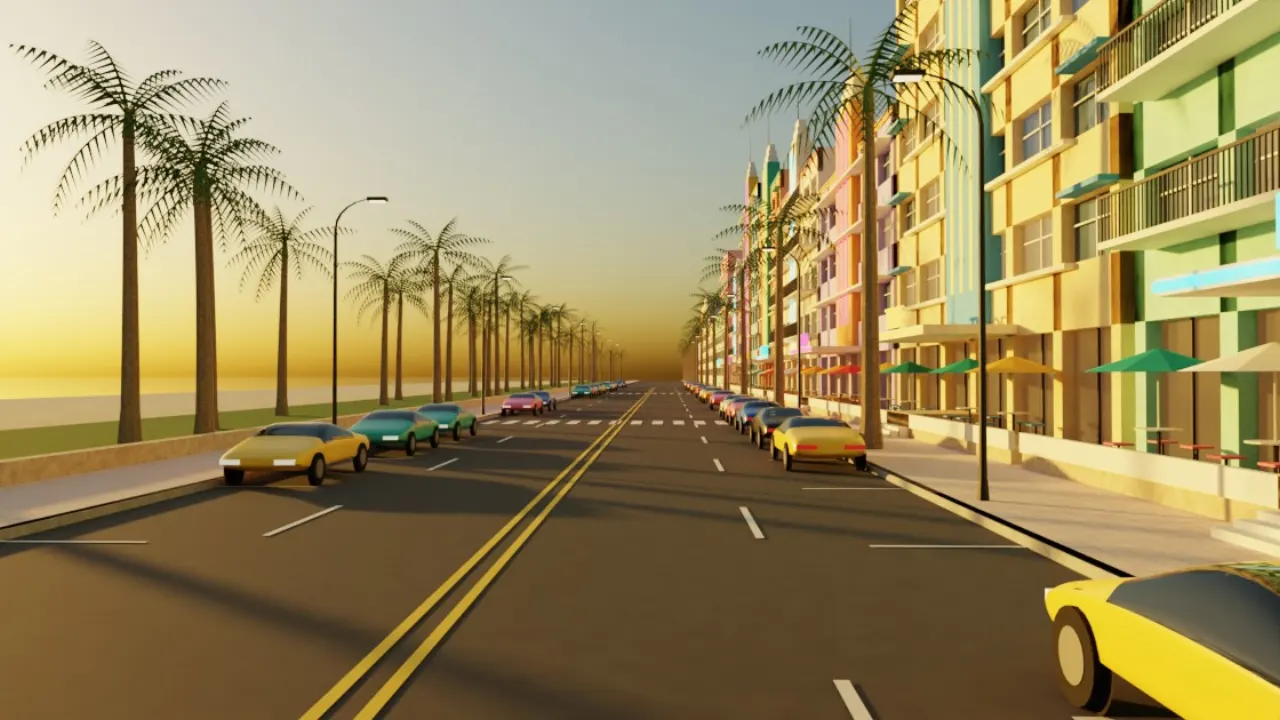
Editor's note: Most guides to the GTA 6 look send you straight to a video model. We took the other route first: we asked a language model for code. What came back is a 3D street you can drive, a skyline, a chase you can steer and a short cinematic shot, all drawn by programs that run in a browser. Nothing was downloaded: every model, texture and shadow came out of a script.
Short answer: To create a GTA 6-style scene with AI, give a language model such as Claude Fable 5.2 a written brief and ask for one self-contained HTML file. Describe the place, the layers back to front, the movement, one camera move and the finish. You get a program that draws and animates the scene, which you can steer, loop and change one line at a time. Keep the world original: describe a mood and invent your own names.
Rockstar released Grand Theft Auto VI on PlayStation 5 and Xbox Series X|S on November 19, and the look of its world is everywhere: pink dusk, wet asphalt, palm trees, neon on stucco. If you make videos, trailers or game concepts, you probably want to work in that mood this week.
We gave Claude Fable 5.2, Anthropic's most capable generally available model, a written brief for each scene and asked for one self-contained HTML file. What came back is code: a 3D street you can drive down, a skyline that scrolls with parallax, a chase you can steer, and a short cinematic shot with a camera move and a title card. Below is a short capture of each scene, the exact prompt behind it, ten more prompts to copy, and the problems we hit on the way.
Everything here is an original, Miami-inspired world. Nothing uses characters, locations, logos or footage from Grand Theft Auto, and this article is not affiliated with Rockstar Games or Take-Two Interactive.
What you need to know
- A language model can't render video. It can write a program that draws and animates a scene, and that program runs in any browser.
- Four scenes were written that way: a 3D street you can drive, a parallax skyline, a chase you can steer, and a 15-second cinematic shot.
- The prompts follow one formula: place, layers back to front, movement, one camera move, finish.
- The 2D results are stylised. The 3D street gets realistic light by baking it in Blender, and it is still simpler than game footage. Use it for web headers, playable teasers and animatics, and use a video model for final footage.
- Keep the world original. Describe a mood and invent your own names.
Why use a language model for a GTA 6-style scene?
A video model gives you pixels. A language model gives you a program that draws the pixels. That difference decides what you can do next.
- You can change one thing. Want teal neon instead of pink? Ask for it, or edit one line. Nothing else in the shot moves.
- It can be interactive. The chase below responds to your keyboard and pointer. A video clip can't.
- It loops forever, and the 2D scenes weigh almost nothing. The three 2D scenes use no images and no libraries. The 3D street is the heavy one: its models and baked lighting add about 15 MB.
- It stays consistent. The same palm, the same car and the same palette appear in every frame because they are the same function.
Scene one: Ocean strip in 3D
Ocean strip in 3D, captured from the scene running in a browser: it tours by itself, W A S D takes the wheel, and dragging swings the camera.
This street is real 3D, and it was made in two passes. First Fable 5.2 wrote a Python script for Blender that builds everything: eight art-deco hotels with balconies and eyebrow ledges, palms with individual leaflets, lamps, café terraces and parked cars. Then the same script lights the street with a physical sky, traces the golden-hour sun with Blender's Cycles renderer, and bakes the result into textures. The browser only has to display it.
That is why the shadows are soft and the walls pick up colour from the pavement. The cars and the sea stay live so they can reflect the sky.
Our first version skipped the bake and drew flat-coloured boxes with real-time lights. It ran well and looked like a toy. Baked light is most of the difference between that and the still above.
Prompt · Ocean strip in 3D
You have Blender on this machine. Build a 3D street I can drive through in a browser, in two stages. Everything must be generated by code: no downloaded models, textures or HDRIs.

Scene: an original, Miami-inspired ocean-front strip at golden hour. Do not reference any existing game, character or brand.

Stage 1: Blender with Python, run headless.
- A four-lane road with markings, kerbs and zebra crossings. On the right, eight pastel art-deco hotels: recessed windows between piers, eyebrow ledges or balconies with railings, a central tower with neon strips, a marquee with an invented name, a raised café terrace with umbrellas. On the left, a promenade, a low coral wall, grass with palms, sand and the sea.
- Palms with individual leaflets, street lamps, parked cars along both kerbs.
- Procedural materials only. Light it with a physical sky, sun about 8 degrees above the horizon.
- Render three test stills and look at them before going on. Fix what looks wrong.
- Bake the lighting with Cycles into lightmap textures: diffuse and emission only, no glossy, denoised, saved with the same view transform as the stills. Bake palm fronds into per-point mesh colours. Export GLB files and a sky panorama.

Stage 2: a three.js viewer in one HTML file.
- Show the baked meshes unlit. Use the panorama as background and reflection map. Keep the cars and the sea real-time so they reflect the sky.
- The car drives itself while the camera slowly swings around it. W A S D takes over. Drag orbits the camera. Loop back to the start with a short fade.

Before you finish, look at the result as a critic who has not seen the code. List the five biggest visual problems, fix the worst first, and check again.
What to notice: the prompt tells the model to look at its own test renders twice. A model that can see what it made catches problems a model that only writes code never will. This scene needs an agent that can run programs on your machine. OceanToken works inside coding agents such as Claude Code, Codex, Cursor and Cline, as its integrations page explains.
Scene two: Bayfront at dusk
Bayfront at dusk, captured from the scene, which runs live in the browser and is drawn in real time on a 2D canvas.
Back to two dimensions, where a scene costs almost nothing to run. Three skyline layers scroll at different speeds, the water mirrors everything above the horizon with a ripple, and string lights sway over the boardwalk. The prompt asks for a mood and a list of layers, then leaves the drawing decisions to the model.
Prompt · Bayfront at dusk
Write one self-contained HTML file that draws an animated 16:9 scene on a 2D canvas. No images, no libraries.

Scene: an original, Miami-inspired bayfront just after sunset. Do not reference any existing game, character or brand.

Layers, back to front:
1. Sky gradient from deep indigo to magenta to orange at the horizon, twinkling stars, a low hazy sun, slow pink-lit clouds, one blinking plane.
2. Three skyline layers with parallax: hazy downtown towers, mid-rise blocks, then low art-deco hotels with pink, teal and amber neon trim. Lit windows in warm and cool tones. Red blinking lights on the tallest roofs.
3. Water in the lower third that mirrors everything above it with a moving ripple and small glints.
4. Foreground boardwalk in silhouette: railing, swaying palm trees, sagging string lights.

Camera: slow, constant truck to the right. The scene must tile and loop forever.
Finish: soft vignette and light film grain. Pause when off screen. Respect prefers-reduced-motion.
What to notice: depth comes from three cheap tricks working together. Far buildings are lighter and slower, near ones darker and faster, and the reflection ties the layers into one place.
Scene three: Causeway run
Causeway run on autopilot, captured from the playable scene, which runs live in the browser: arrow keys, A/D or a pointer steer the car.
This one you can drive. Hover or drag across the scene to steer, or click it and use the arrow keys. Leave it alone for a few seconds and an autopilot takes over and weaves through traffic by itself.
Prompt · Causeway run
Write one self-contained HTML file with a playable night-drive scene on a 2D canvas, 16:9. No images, no libraries.

Scene: an original chase along a causeway toward a neon city. Do not reference any existing game, character or brand.

Build:
- A pseudo-3D road drawn row by row from the horizon, three lanes, dashed lane lines, pink and white edge strips, and curves that change over distance.
- A city skyline on the horizon that slides sideways with the curves, mirrored in the water on both sides of the road.
- Roadside lamps with warm glow, palm trees and a few neon billboards with invented names, all scaled by distance.
- Slower traffic to overtake. My car is seen from behind at the bottom of the frame and tilts when it steers. A hit slows me down and shakes the camera.
- Pursuit lighting: red and blue flashes washing in from the bottom corners, and a helicopter with a sweeping searchlight.
- A small speed readout in mph.

Controls: arrow keys or A/D, and pointer or touch drag. If I do nothing for a few seconds, an autopilot should pick the emptiest lane.
What to notice: the pursuit is never shown. Red and blue light on the road and a searchlight overhead are enough to tell the story, and they cost a few lines each.
Scene four: The arrival
Part of The arrival, a 15-second loop that runs live in the browser, with a Replay button.
A fifteen-second shot built like a trailer beat. A car pulls into a motel lot, the headlights cut, someone steps out, and the camera pushes in as they walk. Then the title lands.
Prompt · The arrival
Write one self-contained HTML file that plays a 15-second cinematic shot on a 2D canvas, 16:9 with letterbox bars, looping. No images, no libraries.

Scene: an original character arrival outside a neon motel at night. Do not reference any existing game, character or brand.

Timeline:
0-3s Wide shot. Two-storey motel with a flickering pink rooftop sign and a teal VACANCY sign, palms, distant skyline, wet asphalt that reflects everything. A low coupe drives in from the right with headlight beams and brakes to a stop.
3-5s Brake lights off, headlights fade, the driver's door opens.
5-9s A figure in silhouette steps out and walks toward camera-left with a real walk cycle: legs, arms, a slight bob. Pink rim light from the sign side, amber from the car side. The camera pushes in slowly and follows.
9-13s The figure stops. A title fades up in the lower third: NEON TIDE.
13-15s Fade to black, then loop.

Finish: film grain, vignette, eased camera moves. Add a Replay button.
What to notice: the prompt is a shot list with timestamps. Language models follow timelines well, and writing one forces you to decide what the shot is actually about.
The same four shots can also be turned into photoreal film with video models. Part two renders them and sends the chase to four video models to compare the results.
Ten more prompts to copy
Each one is written for a language model that can return a complete HTML file. Start every prompt with the same line so results stay comparable: one self-contained HTML file, 2D canvas, 16:9, no images, no libraries, original world, no existing games or brands.
| Prompt | What to send after the starting line |
|---|---|
| Golden hour beach | A wide beach at golden hour with three parallax layers: sea with rolling foam lines, sand with long umbrella shadows, and a boardwalk of pastel lifeguard towers. Gulls cross the frame. Slow truck left. |
| Rain on downtown | A downtown street at night in heavy rain. Neon signs with invented names reflect in puddles, traffic lights cycle, rain streaks fall at an angle and lightning briefly lights the towers every 8 to 14 seconds. |
| Top-down city block | A top-down view of a procedurally generated coastal city block: roads, parked cars, palms, pools and rooftops. Small cars follow the roads and stop at junctions. Click to generate a new block from a new seed. |
| Airboat through mangroves | A third-person airboat ride through a mangrove channel at dawn using a pseudo-3D water plane. Mist, herons taking off as I pass, a spray trail, and left and right steering with keys or drag. |
| Rooftop pool, 2 a.m. | A rooftop pool party seen from across the street: a crowd of silhouettes dancing in loose sync, underwater pool lights rippling on the walls, a DJ booth with beat-matched light bars at 118 BPM. |
| 24 hours in 24 seconds | A fixed shot of a bay skyline that runs a full day-night cycle in 24 seconds: sun and moon arcs, sky colour, windows switching on at dusk and off toward dawn, with a small clock in the corner. |
| Radio dial visualiser | A car radio face with five invented stations. Tuning between them changes a generated waveform, colour theme and scrolling station text. Use the Web Audio API to synthesise a short loop per station, started by a button. |
| Crosswalk crowd | A street-level crosswalk where 40 pedestrians with different heights, speeds and walk cycles wait for the light and cross without colliding. Add a slider for crowd size. |
| Trailer title sequence | A 12-second title sequence: five quick wipes between flat-colour scene silhouettes (pier, garage, highway sign, pool, skyline) cut to a 120 BPM grid, ending on an invented title in heavy type. |
| Photo mode | Take any of the scenes above and add a photo mode: pause, drag to pan, scroll to zoom, plus toggles for five film looks (warm, teal-orange, noir, faded print, night vision) drawn as canvas filters. |
What is the prompt formula for a GTA-style scene?
All fourteen prompts in this article are built from the same six parts. Fill them in order and the model has everything it needs.
| Part | What to write | Example |
|---|---|---|
| Output | The file you want back and what it may not use | One self-contained HTML file, 2D canvas (or three.js for 3D), no images, no downloaded models |
| Place | Where we are, time, weather, in plain words | A Miami-inspired bayfront just after sunset |
| Layers | Back to front. The model draws in the order you list | Sky, towers, deco hotels, water, boardwalk |
| Movement | What moves and how fast, or a timeline in seconds | 0-3s car drives in, 3-5s door opens |
| Camera | One move per shot | Slow truck right, or push in and follow |
| Finish | The boring parts that save a second round | Vignette, grain, loop, pause off screen, reduced motion |
Two habits matter more than the rest. Give the palette in words, such as "indigo to magenta to orange", so the model can choose good values. And say "original world, no existing games, characters or brands" every time, which gets you a scene you can publish.
How do you make your own, step by step?
Method 1: in a chat window
- Open a chat with Claude Fable 5.2. OceanToken Chat works in the browser with no setup. Pick Claude Fable 5.2 from the model list.
- Paste a prompt from this article. Start with the starter prompt at the end and fill in the six parts.
- Open the result. Save the reply as
scene.htmland open it in a browser. - Change one thing per message. "Make the neon teal." "Slow the camera by half." "Add rain." Small requests keep everything else stable.
- Ask for the last 10 percent. Touch controls, a pause button, a replay button and a reduced-motion fallback are one sentence each.
- Capture it if you need video. Screen-record the canvas, or ask the model to add a record button that saves a WebM with
MediaRecorder.
Method 2: call it through the OceanToken API
OceanToken exposes Fable 5.2 behind an OpenAI-compatible endpoint, so the standard OpenAI SDK works once you change the base URL. Put any prompt from this article in prompt.txt and run this.
# make_scene.py
import os
from openai import OpenAI

client = OpenAI(
    base_url="https://api.oceantoken.ai/v1",
    api_key=os.environ["OCEANTOKEN_API_KEY"],
)

prompt = open("prompt.txt").read()

reply = client.chat.completions.create(
    model="anthropic/claude-fable-5.2",
    messages=[{
        "role": "user",
        "content": prompt + "\n\nReturn only the HTML file. No commentary, no code fence.",
    }],
    max_tokens=32000,  # room for thinking plus a whole HTML file
)

with open("scene.html", "w") as f:
    f.write(reply.choices[0].message.content)
Set max_tokens high when you ask Fable 5.2 for a whole HTML file, as in the Python above. With a small limit the model can spend it all on thinking and return an empty reply. For the first request end to end, see the quickstart ; for the current rate, see the Claude Fable 5.2 model page.
Why do AI-coded scenes go wrong, and what fixes each?
These are the problems we hit while building these scenes, with the message that fixed them.
| Symptom | Likely cause | Fix to ask for |
|---|---|---|
| Blank canvas | A script error before the first frame | Paste the console error back and ask for a fix |
| Stutter on large screens | Reflections reading the canvas row by row, or heavy glow effects | "Copy the frame to a buffer once, then draw the reflection from it. Cap the canvas at 1600 pixels wide." |
| 3D scene looks like a toy | Flat colours and real-time lights only | "Build it in Blender, bake the lighting with Cycles into textures, and show it unlit in three.js." |
| Scene feels flat | Every layer moves at the same speed | "Give far layers 0.2x speed and lighter colour, near layers 1x and darker." |
| Visible seam when it loops | Layers are not tiled | "Generate each layer as a repeating tile and wrap it." |
| Stiff walking figure | Legs swing without knees or body bob | "Add knee bend on the back swing, opposite arm swing and a small vertical bob." |
| Looks like a specific game | The prompt named one | Remove the name. Describe mood, palette and place instead |
| Signs are unreadable | Too many, too small | "Use three signs at most, each with a short invented name." |
Where this goes for game worlds
A city like the one in GTA VI is built by hand over years: every storefront, every pedestrian routine, every radio line. The four scenes here are tiny, but they point at a real shift. People already use the same approach outside games, turning 2D floor plans into 3D walkthroughs that a buyer can tour in a browser. A model that can write a skyline generator can also write the rule that decides which windows are lit at 2 a.m., how traffic thins after rain, or what a shop sign says on a given block.
That is the near-term use in game production: concept animatics, placeholder environments, procedural rules, tools and UI, all produced as editable code that an artist then takes over. The craft stays with the people. The blank page goes away.
Frequently asked questions
Can Claude Fable 5.2 generate video?
No. It writes text, and code is text. The scenes in this article are programs that a browser runs, which is why they can loop, respond to input and stay sharp at any size.
Can AI make a GTA 6-quality trailer?
No, and it helps to be clear about why. The 2D scenes are stylised vector animation, and even the baked 3D street has simple geometry when you look closely. They read as a mood and a place, and they will never be mistaken for footage from a studio that spent years on one city.
Do I need to know how to code?
No. You describe the scene and ask for changes in plain language. Reading a little JavaScript helps when you want to tune a number yourself.
Can I make something that looks exactly like GTA 6?
You shouldn't try. Characters, logos, maps and footage belong to Rockstar Games and Take-Two. A neon-coast mood with your own names and places is yours to publish, and it tends to look better because the model designs it as a whole.
Will these scenes run on a phone?
Yes. The 2D scenes use the canvas every current browser supports, and the chase accepts touch drag. The 3D street needs WebGL, which current phones have, and downloads about 15 MB, or about 11 MB on a phone. On a phone it tours by itself and you drag to look around.
Where can I run Claude Fable 5.2?
OceanToken lists it as anthropic/claude-fable-5.2 on the same OpenAI-compatible endpoint as its other text, image and video models. Use the chat page to try a prompt, or the API to generate scenes in bulk.
Should I use a language model or a video model?
Use code when you need interaction, exact control or a loop for the web. Use a video model when you need photoreal footage. For a trailer, block the shots in code first, where a camera move costs nothing to change, and render the final clips with a video model.
Create your own GTA-inspired scene
Try Claude Fable 5.2 on OceanToken. Copy the starter below, swap in your place, time of day and camera move, and send it.
Write one self-contained HTML file that draws an animated 16:9 scene on a 2D canvas. No images, no libraries. Original world only: no existing games, characters or brands.

Place: [where we are]
Time and weather: [dusk, midnight, after rain...]
Layers, back to front: [sky] / [far] / [mid] / [near] / [foreground]
Movement: [what moves, and how fast]
Camera: [one move]
Interaction: [none, or how I control it]
Finish: vignette, light grain, loop forever, pause off screen, respect prefers-reduced-motion.
Next: How to Make GTA 6-Style Videos with AI, the same four shots as photoreal video, and one chase prompt on four video models.
Grand Theft Auto and GTA are trademarks of Take-Two Interactive Software. This article is independent commentary and a creative tutorial. The scenes, names and signs shown here are original and are not taken from any game.
More from the blog
GPT-6.1 Sol to GPT-6.2 Sol Upgrade Guide
GPT-6.1 Sol to GPT-6.2 Sol upgrade: same listed specs, what OpenAI says changed, the one-line model change, what to retest, and a shadow-test script.
How to Make GTA 6-Style Videos with AI
Four GTA 6-style AI video shots with the exact prompts, image-to-video to fix sign text, and one chase prompt run on Seedance, Kling, Hailuo and Veo.
Prompt Caching for Coding Agents
Prompt caching for coding agents: keep the prefix stable, read cached tokens in usage, and know which models cache on their own and which need cache_control.