

Hailuo Product Video: Three Shots per SKU
Make a Hailuo product video set for each SKU: hero, detail and in-use prompts, which Hailuo id fits listing ratios, keeping labels intact, and a checklist.
By OceanToken Team
Editor's note: Product video is the least glamorous use of AI video and one of the most useful. We think one template of three short clips per SKU (hero, detail, in-use) covers most listings, and that the single most important rule is to move the camera, not the product. Labels survive a slow push-in. They rarely survive a spin.
Short answer: For a Hailuo product video, start from a clean packshot and animate it with subtle motion: a light sweep for the hero, a macro push-in for the detail, a simple hand gesture for in-use. Use minimax/hailuo-3 for square and vertical listings, since Hailuo 2.3 renders 16:9 only. Composite real labels in the edit when text must be exact.
Why Hailuo fits product clips
MiniMax pitches its newest model squarely at this work. The Hailuo H3 announcement of July 31, 2026 says H3 is "built for advertising, branding, e-commerce, product design," offers 2K by default, and cites "accurate text and brand rendering" from early testing. The older Hailuo 2.3 release in October 2025 highlighted better response to motion commands for objects and said beta creators used it for e-commerce ads.
Take the vendor claims as a reason to try it, not as proof. Text and logos are still where AI video fails most visibly, and a listing that shows a misspelled brand name does more harm than no video at all. The template below is built to keep those risks small.
Which Hailuo id fits a listing
The model choice is mostly an aspect-ratio question, and the three Hailuo ids answer it differently. Hailuo 3 Max, at 480p or 768p, also suits draft rounds before a final 2K render; its schema notes that lower resolution is faster and cheaper.
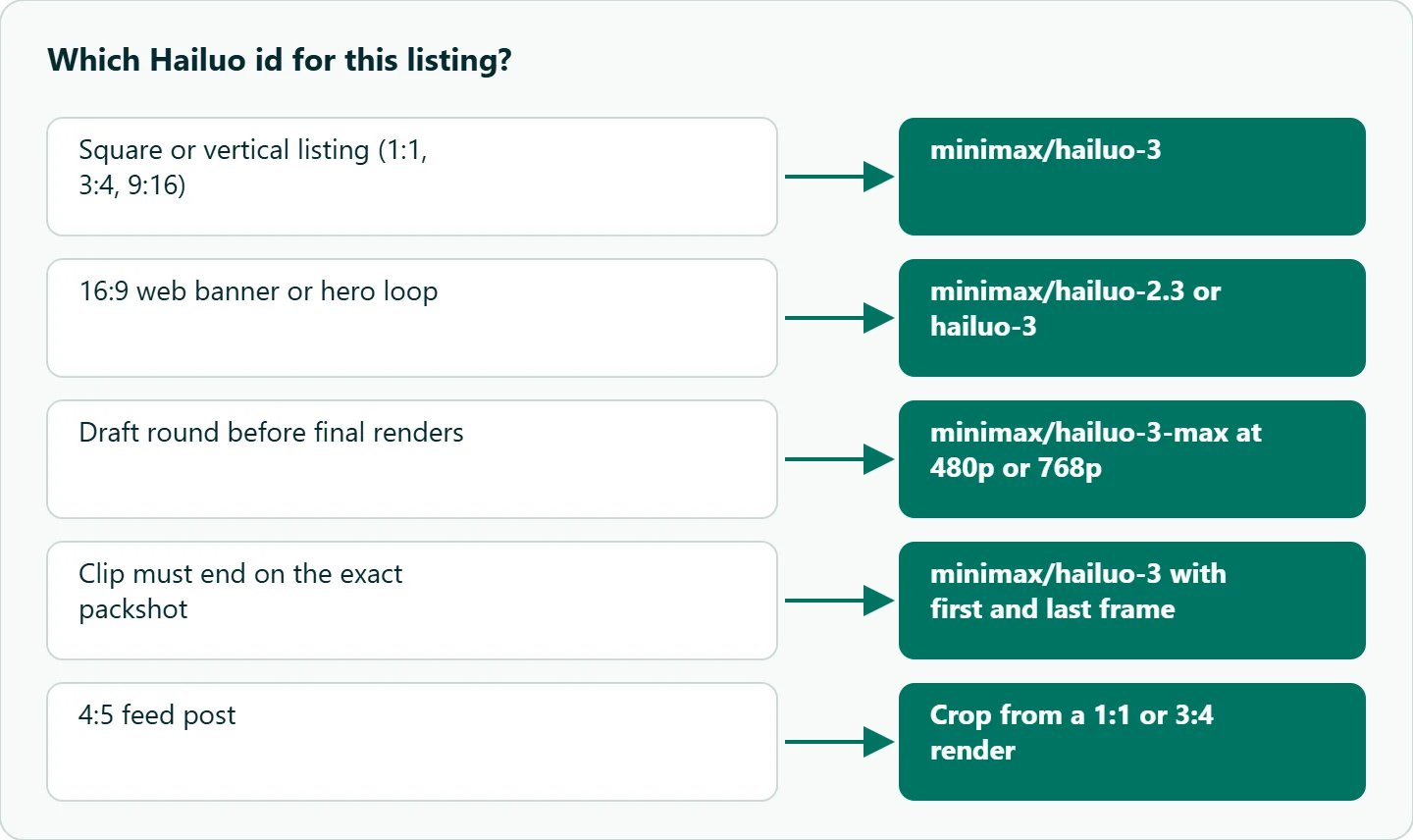
OceanToken's schemas, checked on 2026-11-11, give each id a different shape:
| Id | Resolution | Aspect ratios | Duration | Frames | Sound |
|---|---|---|---|---|---|
minimax/hailuo-3 |
2K | 21:9, 16:9, 4:3, 1:1, 3:4, 9:16, adaptive | 5 to 15 s | First and last | generate_audio |
minimax/hailuo-3-max |
480p or 768p | Same as Hailuo 3 | 5 to 15 s | First and last | Not listed |
minimax/hailuo-2.3 |
1080p | 16:9 only | 6 or 10 s | First only | Not listed |
So the default for marketplaces is minimax/hailuo-3: square and vertical are native, and adaptive follows the shape of your first frame. minimax/hailuo-2.3 still earns a place for 16:9 web banners and hero loops. No Hailuo id offers 4:5, so plan feed posts as a crop from 1:1 or 3:4 and leave space around the product.
The three-clip Hailuo product video set
One SKU gets three clips, each with one job. Keep them short: five seconds is the floor on Hailuo 3 and six on 2.3, and you can trim in the edit.
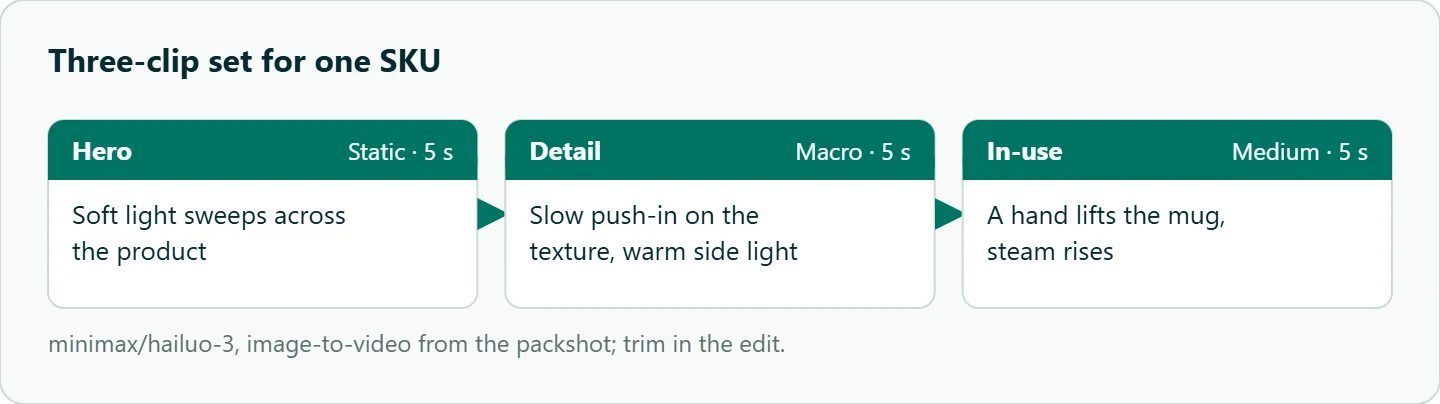
Hero. The product alone, light sweeping across it. This is the clip that loops on a product page.
Static camera. Soft light sweeps slowly across the glass bottle, highlights glide along the edge, subtle reflection on the table.
Detail. A macro of material or texture: the stitching, the glaze, the weave.
Macro, slow push-in on the stitched leather texture, shallow depth of field, warm side light.
In-use. A hand or person interacting with the product, which also shows scale.
Medium shot, static camera. A hand lifts the ceramic mug from the table and takes a sip, steam rises, soft morning light.
With image-to-video, describe the change, not the product. The bottle is already in the frame; repeating its description invites the model to redraw it. Our guide to Hailuo prompt length and keywords explains why shorter, motion-first prompts behave better.
Keeping labels and logos intact
Labels distort when the product rotates, because the model has to invent the side it cannot see. A few habits lower the risk:
- Move the camera, not the product. A push-in or slow drift keeps the label facing the lens.
- Lock the end pose. Hailuo 3 accepts a first and a last frame. Sending the same packshot as both asks the clip to end where it began, which suits a looping hero.
- Composite the real label. For text that must be exact, animate a label-free render and track the true label on in the edit.
- Reject on sight. Any take where letters change shape is a reject, however good the light looks.
Here is a hero request that pins both ends to the packshot:
{
  "model": "minimax/hailuo-3",
  "prompt": "Static camera. Soft light sweeps slowly across the tea tin, highlights glide along the lid.",
  "duration": 5,
  "aspect_ratio": "1:1",
  "generate_audio": false,
  "frame_images": [
    {"type": "image_url", "frame_type": "first_frame", "image_url": {"url": "https://example.com/tea-tin.png"}},
    {"type": "image_url", "frame_type": "last_frame", "image_url": {"url": "https://example.com/tea-tin.png"}}
  ]
}
We set generate_audio to false because listing clips usually play muted or get music in the edit.
Packshots and lifestyle backgrounds
Image-to-video is only as good as the start frame. Use a clean cutout or a well-lit studio shot, leave empty space in the direction the camera will move, keep other brands out of frame, and prepare the frame at the target ratio so nothing gets cropped later.
Lifestyle context (a kitchen counter, an outdoor table) helps a listing but costs retries. Generate the scene as a still first, approve it, then animate it with light, steam or a slight camera drift as the only motion. If the same product appears across many scenes, our guide to Hailuo subject reference covers keeping it consistent.
Review checklist for Hailuo product clips
A product clip can fail quietly: it looks good and misleads. Check these in order before anything goes live:
- Shape. Do proportions hold on the first, middle and last frame?
- Color. Compare against the packshot in a neutral viewer; light sweeps can shift hue.
- Text and logos. Zoom to 100 percent on every label.
- Scale. A hand next to the product exposes size errors fast.
- Claims. The clip must not show features the product lacks, like a lid that opens when it does not.
Step five is about marketplace rules and customer trust, so keep a person in the loop for it.
When AI video is the wrong tool for a product
Some products are poor candidates: engraved glassware, jewelry with fine facets, garments where the weave is the selling point, and anything where exact text is the product. A short real-camera shot or a 3D render is more reliable there. AI video works best when mood, light and context sell the item, not fine detail.
Planning a catalog run
For a catalog, treat the three clips as a template and the SKU as the variable. Keep the prompts fixed, swap the packshot and a short product noun, and log pass or fail per clip. The workload is simple multiplication: SKUs times three clips times seconds per clip times the takes you need per accepted clip. Measure that last number on your first batch rather than guessing it, then check the per-second rate for each id on /hailuo-api.
How to test this on your workload
We have not run this comparison, so use the setup below on five of your own packshots before committing a catalog to it:
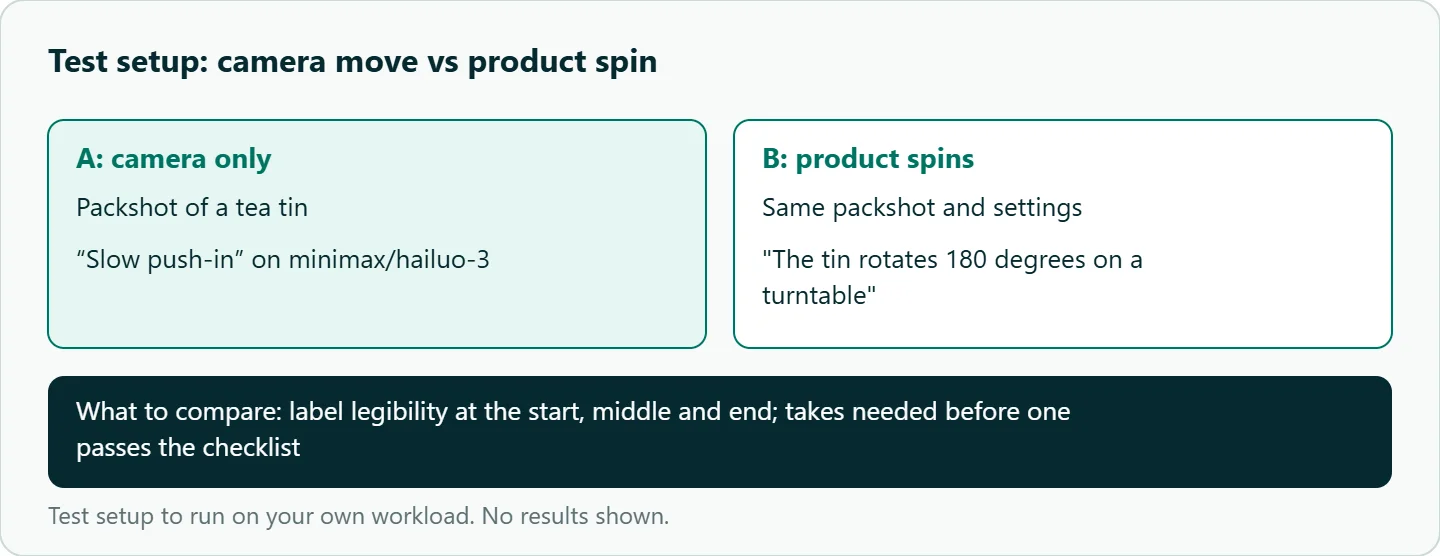
- Run the hero prompt as a camera-only push-in on
minimax/hailuo-3. - Run the same packshot with "the tin rotates 180 degrees on a turntable."
- Pause both at the start, middle and end, and check whether the label stays legible.
- Log how many takes each product type needs before one passes the checklist.
Our take: Make the camera move and keep the product still. Use Hailuo 3 for marketplace ratios, keep 2.3 for 16:9 web loops, and composite any label that has to be letter-perfect.
Running it on OceanToken
All three ids, minimax/hailuo-3, minimax/hailuo-3-max and minimax/hailuo-2.3, are listed on /hailuo-api and called at https://api.oceantoken.ai/v1. Before a catalog run, GET /oceantoken/video/model-spec?model=minimax/hailuo-3 returns the accepted durations, ratios and reference limits, so a batch script can reject a bad row before it costs anything.
The API is OpenAI-compatible: change the base URL and key and keep your code. A failed video job is not charged and its balance hold is released, which matters when a catalog runs unattended. Each key can carry its own spending limit, and billing is prepaid with no subscription. See the current rate on /hailuo-api.
FAQ
Can Hailuo keep my logo exact? Not reliably enough for a listing. Animate the camera, reject takes with warped text, and composite the true logo when it must be perfect.
Does Hailuo support 1:1 video? Hailuo 3 and 3 Max do; Hailuo 2.3 on OceanToken takes 16:9 only.
Which Hailuo model is best for product videos? Hailuo 3 for marketplace ratios and 2K output; Hailuo 2.3 for 16:9 web clips.
How long should each product clip be? Generate the minimum (5 s on Hailuo 3, 6 s on 2.3) and trim in the edit.
Should product clips have sound? Usually not. Set generate_audio to false on Hailuo 3 and add music in the edit if you need it.
Sources
- OceanToken docs: Hailuo 3 request schema (checked 2026-11-11)
- OceanToken docs: Hailuo 2.3 request schema (checked 2026-11-11)
- OceanToken docs: Hailuo 3 Max request schema (checked 2026-11-11)
- MiniMax: Hailuo H3 announcement (checked 2026-11-11)
- MiniMax: Hailuo 2.3 release (checked 2026-11-11)
- OceanToken docs: Video guide (checked 2026-11-11)
- OceanToken Hailuo API page (checked 2026-11-11)
Get your OceanToken API key
- Create an OceanToken account and an API key.
- Copy the snippet below, paste your key, and run it.
- Check the current rate on /hailuo-api.
curl https://api.oceantoken.ai/v1/videos \
  -H "Authorization: Bearer $OCEANTOKEN_API_KEY" \
  -H "Content-Type: application/json" \
  -d '{"model": "minimax/hailuo-3", "prompt": "Static camera. Soft light sweeps slowly across a ceramic mug on a wooden table.", "duration": 5, "aspect_ratio": "1:1", "generate_audio": false}'
More from the blog
A Unified API for Chat, Image and Video
Building on a unified API for chat, image and video: sync vs async calls, billing units, retries, timeouts and storage, with three calls and a launch checklist.
Kimi K3 API International Access Guide
Use the Kimi K3 API internationally: sign up with email, pay by card, create one key and call moonshotai/kimi-k3 with an OpenAI SDK. Steps, code and checks.
Call Tencent Hy3 With the OpenAI SDK
Call Tencent Hy3 with the OpenAI SDK outside China: base URL, model id, streaming, tool calls, reasoning_effort values, Hy3 vs Hy3 preview, and token billing.