

Hailuo in ComfyUI: Workflow and Edit Stack
A Hailuo ComfyUI workflow: the MiniMax H3 partner nodes, their limits, a small custom node that calls your own API key, and handing clips to CapCut or Premiere.
By OceanToken Team

Editor's note: ComfyUI is a good place to make the stills that become first frames, so calling Hailuo from the same graph is natural. But Hailuo runs in the cloud, not on your GPU, and the official nodes bill through Comfy's credits. Once clips feed a real edit, we would rather own the key, the file names and the retries. Automate the handoff before you chase the next model.
Short answer: A Hailuo ComfyUI workflow can use the MiniMax H3 partner nodes (text, first-last-frame, reference and Max image-to-video templates), billed in Comfy credits with no option for your own API key. To use your own key inside a graph, add a small custom node (an untested example is below). Either way, save clips by shot id and import the folder into your editor.
Hailuo ComfyUI workflow templates: the MiniMax H3 partner nodes
ComfyUI's MiniMax H3 workflow docs list three families of templates:
| Family | Templates | Output |
|---|---|---|
| H3 | Text to video, first-last-frame to video, reference to video | Up to 2K with native stereo audio, 5 to 15 s |
| H3 Max | Text, image, first-last-frame and reference to video | 480P or 768P, optional prompt enhance and upscale to 2K |
| H3 Max Turbo | Text and image to video | 480P or 768P; described as a faster, cheaper Max |
The details that trip people up are in the small print. All Max templates need ComfyUI 0.34.3 or later, and Turbo needs 0.34.4. The prompt-enhance and upscale stages sit behind switches that are off by default. The Regenerate to 2K node "only accepts 768P source video," has no duration input, and re-renders the clip at its original length. Generation and prompt enhance must use the same duration.
Reference-to-video has its own limits on base H3: up to 9 images, 3 videos and 3 audio clips; each video or audio clip 2 to 15 seconds, with reference video and audio each capped at 15 seconds in total; reference video between 23.976 and 60 fps. And "reference audio cannot be used without at least one reference image or video." Max accepts up to 12 reference files.
Account, credits and your own key
Partner Nodes are API calls dressed as nodes. The Partner Nodes overview says you need a signed-in Comfy account with credits, that it is prepaid, and that Partner Nodes "send your inputs (prompts, images, and other content) to third-party providers for processing." On bringing your own key, the answer today is no: the nodes "do not support this feature yet."
Signing in works from 127.0.0.1 or localhost; from another machine on your network you log in with a Comfy API key instead.
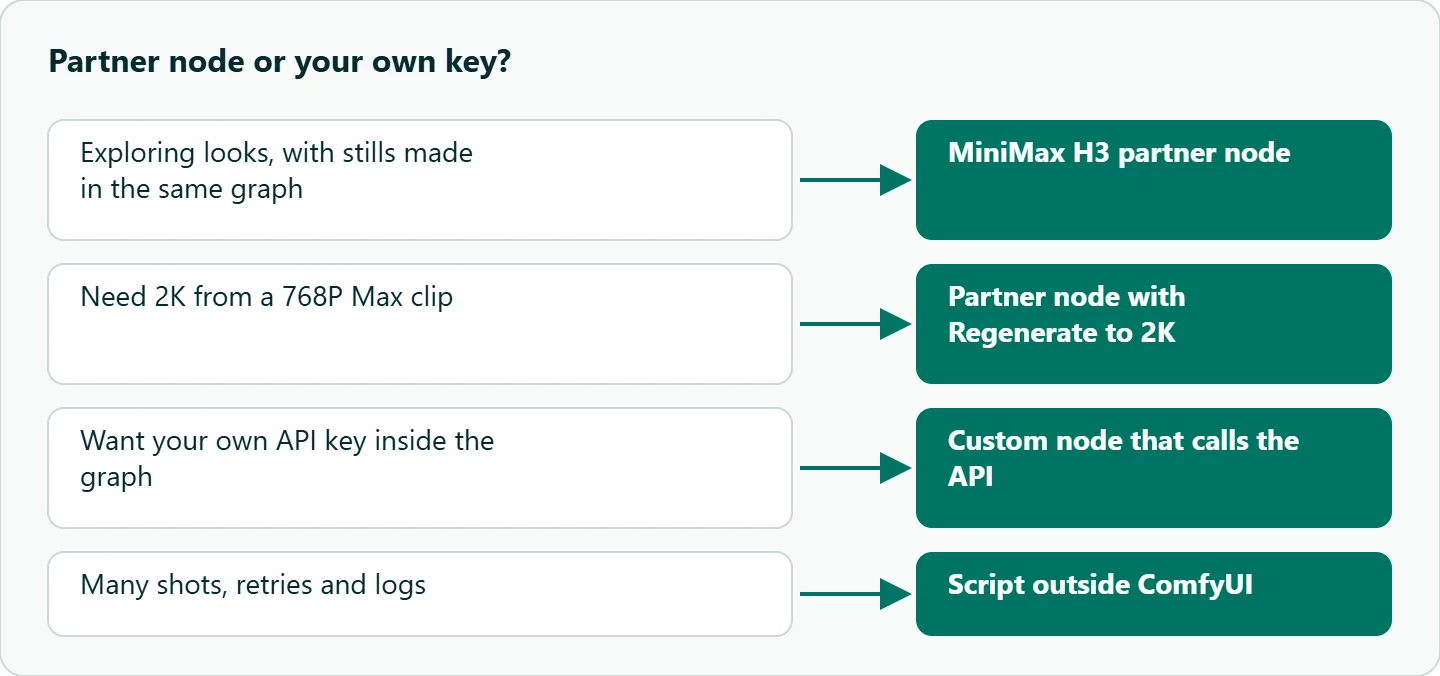
The H3 docs also note that the API workflows need no model download or local GPU. Running H3 weights locally for commercial work is a separate matter that requires a MiniMax commercial license.
An example Hailuo ComfyUI node on your own key (untested)
If you want Hailuo inside the graph but billed to your own API key, write a custom node. ComfyUI's custom node walkthrough puts nodes in ComfyUI/custom_nodes, and its node properties page defines the pieces you need: an INPUT_TYPES class method whose result must contain required, a RETURN_TYPES tuple, a FUNCTION name and a CATEGORY. NODE_CLASS_MAPPINGS must be available at the package level.
This node follows the create, poll and download pattern from OceanToken's video guide .
Untested example. We have not run this node inside ComfyUI; check it on one shot before you rely on it.
# ComfyUI/custom_nodes/oceantoken_hailuo/__init__.py
# Untested example: not run inside ComfyUI
import os, time, requests
import folder_paths

BASE = "https://api.oceantoken.ai/v1"

class OceanTokenHailuo:
    CATEGORY = "video/oceantoken"
    RETURN_TYPES = ("STRING",)
    RETURN_NAMES = ("video_path",)
    FUNCTION = "generate"
    OUTPUT_NODE = True

    @classmethod
    def INPUT_TYPES(cls):
        return {"required": {
            "model": (["minimax/hailuo-3", "minimax/hailuo-3-max"],),
            "prompt": ("STRING", {"multiline": True}),
            "duration": ("INT", {"default": 5, "min": 5, "max": 15}),
            "aspect_ratio": (["16:9", "9:16", "1:1"],),
            "shot_id": ("STRING", {"default": "s01-sh01-t1"}),
        }}

    def generate(self, model, prompt, duration, aspect_ratio, shot_id):
        h = {"Authorization": f"Bearer {os.environ['OCEANTOKEN_API_KEY']}"}
        r = requests.post(f"{BASE}/videos", headers=h, timeout=60, json={
            "model": model, "prompt": prompt,
            "duration": duration, "aspect_ratio": aspect_ratio})
        r.raise_for_status()
        vid = r.json()["id"]
        while True:
            poll = requests.get(f"{BASE}/videos/{vid}", headers=h, timeout=60)
            poll.raise_for_status()
            job = poll.json()
            if job["status"] not in ("queued", "in_progress"):
                break
            time.sleep(10)
        if job["status"] != "completed":
            raise RuntimeError(f"{shot_id} failed: {job.get('error')}")
        path = os.path.join(folder_paths.get_output_directory(), f"{shot_id}.mp4")
        clip = requests.get(f"{BASE}/videos/{vid}/content", headers=h, timeout=300)
        clip.raise_for_status()  # don't save an error body as .mp4
        with open(path, "wb") as f:
            f.write(clip.content)
        return (path,)

NODE_CLASS_MAPPINGS = {"OceanTokenHailuo": OceanTokenHailuo}
NODE_DISPLAY_NAME_MAPPINGS = {"OceanTokenHailuo": "Hailuo video (OceanToken)"}
Three practical notes. The walkthrough says "you must restart ComfyUI to see any changes," so restart after every edit. The key comes from an environment variable, because workflow files get shared and a key typed into a widget travels with them.
The node also blocks while it polls, so a long clip holds up the rest of the queue; for many shots, a script outside ComfyUI is the better tool. Our Hailuo async flow in Python covers that pattern with retries.
To add a start and end frame, extend the request with frame_images, which takes a first_frame and a last_frame on Hailuo 3. Our guide to Hailuo first and last frame transitions shows how to pick the two stills.
Partner node vs OceanToken: what differs
The two routes look alike but are not the same product. OceanToken's schemas, checked on 2026-11-11, list minimax/hailuo-3 at 2K, 5 to 15 seconds, with first and last frames and the same 9 image, 3 video and 3 audio reference limits as the partner node. minimax/hailuo-3-max lists 480p and 768p with no upscale option, so the Regenerate to 2K stage is a partner-node feature. If you need 2K on your own key, call Hailuo 3 directly.
Handing Hailuo clips to the edit
The graph's job ends at a folder of well-named files. A few habits make the editor's job easy:
- Name by shot.
s01-sh02-t1.mp4sorts correctly in every bin. Keep a sheet with prompt, model id, duration and date. - Measure the frame rate. Neither the ComfyUI docs nor MiniMax's H3 post state one, so run
ffprobeon the first clip and build the timeline from it. - Decide about audio. H3 generates native stereo sound with the picture, according to MiniMax's H3 announcement . Keep it as a guide or ambience track, or strip it if you will score the edit yourself.
- Grade once. One LUT or grade across all shots hides small color differences between takes.
- Trim the ends. Cut on motion and trim the first and last moments of a clip if they look like the model settling in.
In the editor itself, CapCut is fast for vertical social cuts and has auto-captions; Premiere handles many 2K files better with proxies and a bin per scene; DaVinci Resolve suits color matching across takes, because its color page and scopes are built for matching shots.
A five-shot sequence from one shot list
Here is a short social spot built from a shot list. Keep one style line identical in every prompt, so the shots grade together.
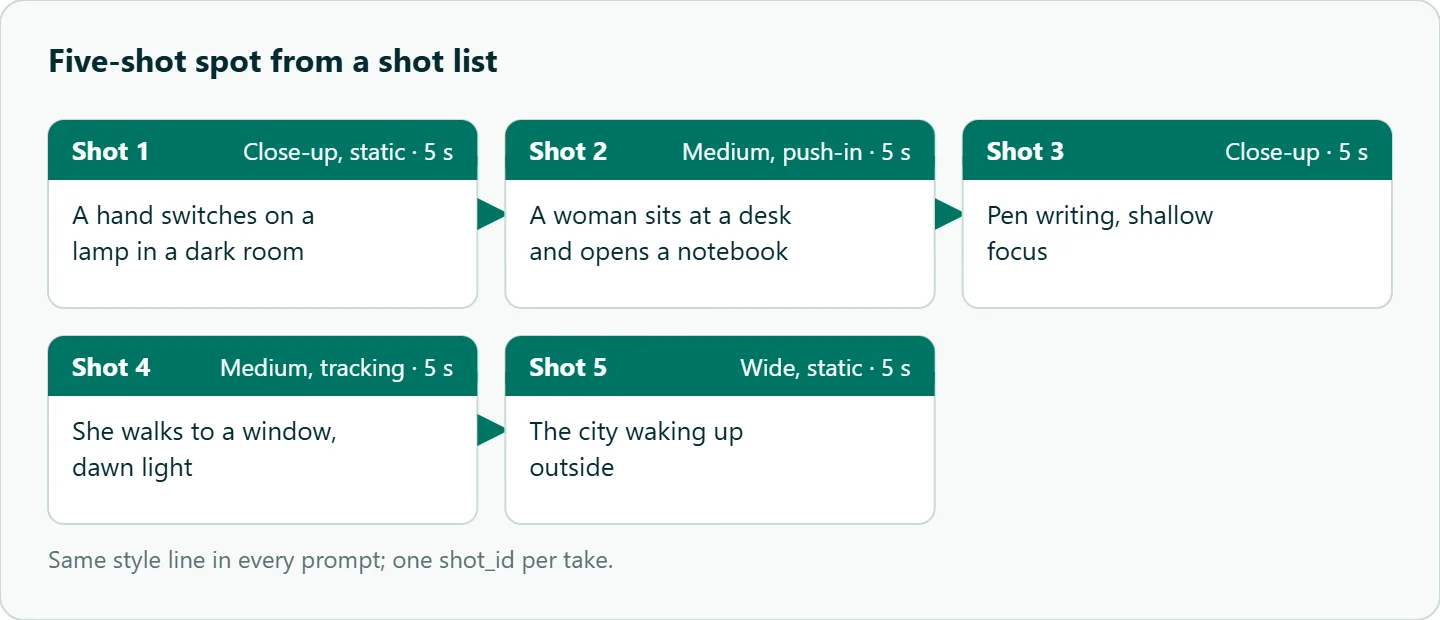
Every prompt ends with the same style line: "Soft natural light, muted teal and amber palette, 35mm film look."
| Shot | Framing | Length | Prompt |
|---|---|---|---|
s03-sh01 |
Close-up, static | 5 s | A hand switches on a lamp in a dark room. |
s03-sh02 |
Medium, push-in | 5 s | A woman sits at a desk and opens a notebook. |
s03-sh03 |
Close-up | 5 s | A pen writing, shallow focus. |
s03-sh04 |
Medium, tracking | 5 s | She walks to a window, dawn light. |
s03-sh05 |
Wide, static | 5 s | The city waking up outside. |
Each shot is a separate node run (or script row) with its own shot_id. ComfyUI reuses a node's result when its inputs have not changed, so a new take needs a new shot_id such as s03-sh01-t2.
Troubleshooting
| Problem | Likely cause | Fix |
|---|---|---|
| Partner node errors at once | Old ComfyUI, not signed in, or no credits | Update to 0.34.3 or later (0.34.4 for Turbo), sign in, add credits |
| Regenerate to 2K fails | Source is not 768P | Generate the Max clip at 768P first |
| Audio reference rejected | No image or video reference next to it | Add one |
| Reference video rejected | Frame rate outside 23.976 to 60 fps, or clip outside 2 to 15 s | Conform or trim the reference |
| Custom node missing | ComfyUI not restarted | Restart and reload the page |
How to test this on your workload
We have not compared the routes, so run this before you commit a project to one:
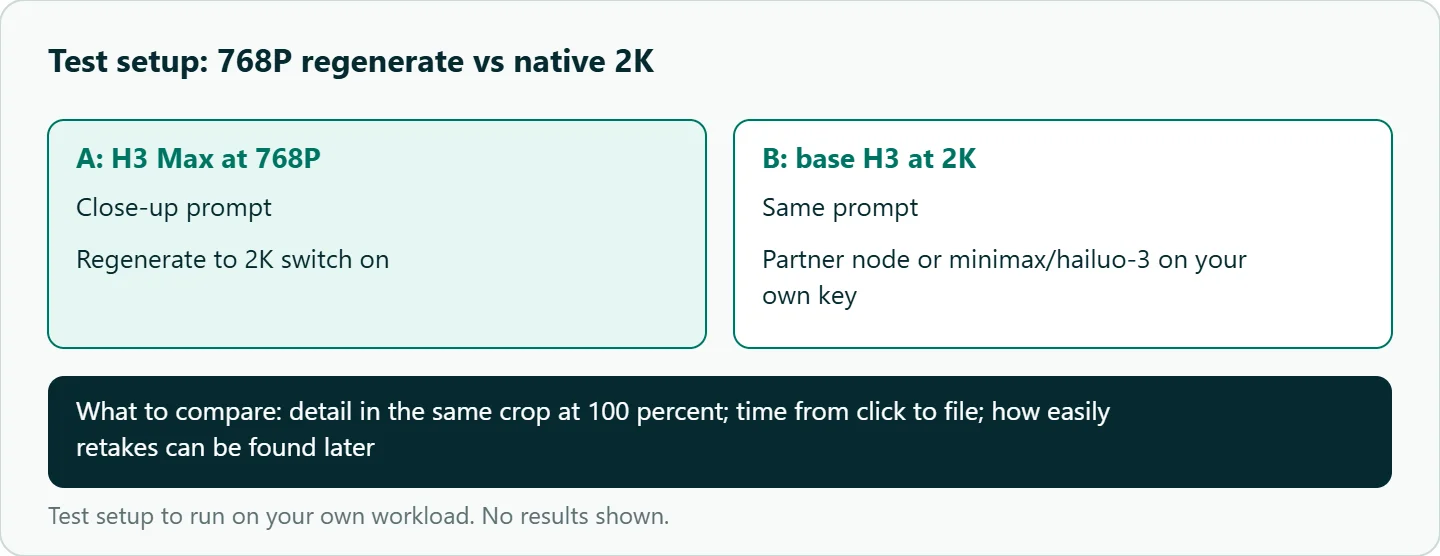
- Generate one close-up on H3 Max at 768P with the Regenerate to 2K switch on.
- Generate the same prompt on base H3 at 2K, through the partner node or
minimax/hailuo-3on your own key. - Crop both to the same detail area and compare at 100 percent.
- Time each route from click to file and note which made retakes easier to find later.
Our take: Use the partner nodes to explore looks inside a graph. Once clips feed a real edit, move to your own key through a custom node or script, and spend your first hour automating names and folders, not tuning prompts.
Running it on OceanToken
On OceanToken, call minimax/hailuo-3 for 2K or minimax/hailuo-3-max for 480p and 768p drafts at https://api.oceantoken.ai/v1; both are listed on /hailuo-api, with minimax/hailuo-2.3 alongside. GET /oceantoken/video/model-spec?model=minimax/hailuo-3 returns the accepted durations, ratios and reference limits, which is handy for setting the node's widget ranges.
The same key and base URL work in the custom node, a script or any HTTP client; for chat models, the OpenAI SDKs work by changing the base URL and key. A failed video job is not charged and its balance hold is released, and each key can carry its own spending limit, which is sensible for a node anyone on the team can queue. Billing is prepaid with no subscription. See the current rate on /hailuo-api. For the Kling equivalent, see our Kling ComfyUI workflow.
FAQ
Is there an official Hailuo node for ComfyUI? Yes. ComfyUI ships MiniMax H3, H3 Max and H3 Max Turbo partner-node templates.
Can I use my own API key in the Hailuo partner nodes? No. Partner Nodes bill through Comfy credits and do not support your own key yet; use a custom node or script.
Does the Hailuo partner node run locally? No. The API workflows run on MiniMax's servers and need no local GPU.
Why does Regenerate to 2K fail? It only accepts 768P source video. Generate the Max clip at 768P first.
Do I need ComfyUI at all? No. For batches, a script is shorter and easier to retry; ComfyUI earns its place when the graph also makes your stills.
Sources
- ComfyUI docs: MiniMax H3 workflow (checked 2026-11-11)
- ComfyUI docs: Partner Nodes overview (checked 2026-11-11)
- ComfyUI docs: Custom node walkthrough (checked 2026-11-11)
- ComfyUI docs: Custom node properties (checked 2026-11-11)
- MiniMax: Hailuo H3 announcement (checked 2026-11-11)
- OceanToken docs: Hailuo 3 request schema (checked 2026-11-11)
- OceanToken docs: Hailuo 3 Max request schema (checked 2026-11-11)
- OceanToken docs: Video guide (checked 2026-11-11)
- OceanToken Hailuo API page (checked 2026-11-11)
Get your OceanToken API key
- Create an OceanToken account and an API key.
- Copy the snippet below, paste your key, and run it.
- Check the current rate on /hailuo-api.
curl https://api.oceantoken.ai/v1/videos \
  -H "Authorization: Bearer $OCEANTOKEN_API_KEY" \
  -H "Content-Type: application/json" \
  -d '{"model": "minimax/hailuo-3", "prompt": "Close-up, static: a hand switches on a desk lamp in a dark room, warm light", "duration": 5, "aspect_ratio": "9:16"}'
More from the blog
A Unified API for Chat, Image and Video
Building on a unified API for chat, image and video: sync vs async calls, billing units, retries, timeouts and storage, with three calls and a launch checklist.
Kimi K3 API International Access Guide
Use the Kimi K3 API internationally: sign up with email, pay by card, create one key and call moonshotai/kimi-k3 with an OpenAI SDK. Steps, code and checks.
Call Tencent Hy3 With the OpenAI SDK
Call Tencent Hy3 with the OpenAI SDK outside China: base URL, model id, streaming, tool calls, reasoning_effort values, Hy3 vs Hy3 preview, and token billing.