

Hailuo First and Last Frame: Transitions
Use Hailuo first and last frame control for cuts, morphs and loops: which models accept it, image and size rules, the crop pitfall, and a Python example.
By OceanToken Team
Editor's note: First-and-last-frame control is the closest thing to a storyboard tool inside a video model, and we'd put it ahead of any new resolution tier on a creator's wish list. It turns "hope the clip ends somewhere useful" into a plan. The catch is that support differs by model version, and the docs for each version don't say the same thing, so check before you build a pipeline on it.
Short answer: Hailuo first and last frame control means you send a start image and an end image, and the model generates the motion between them. MiniMax documents it for H3 and H3 Max (one or both frames) and, on a separate endpoint, for Hailuo 02, but not for Hailuo 2.3. Generate both frames at the same size, because a mismatched last frame gets cropped.
Which Hailuo models take a first and last frame
MiniMax's video generation guide lists image-to-video for MiniMax-H3 and MiniMax-H3-Max as a prompt plus a first-frame image, a last-frame image, or both. Send no image and the request becomes text-to-video. For image-to-video the aspect ratio comes from the input image; the ratio field is always adaptive. H3 runs 4 to 15 seconds at 768P or 2K, and H3 Max runs 5 to 15 seconds at 480P or 768P.
The older first-and-last-frame endpoint is a different story. Its model list has one value, MiniMax-Hailuo-02. Hailuo 2.3 appears on MiniMax's text-to-video and image-to-video pages, not on this one. If your code targets 2.3 and you add a last frame, don't expect it to be honored just because 02 supports it.
| Model | First + last frame per MiniMax docs | Duration and resolution |
|---|---|---|
| MiniMax-H3 | Yes, first and/or last | 4-15 s; 768P or 2K |
| MiniMax-H3-Max | Yes, first and/or last | 5-15 s; 480P or 768P |
| MiniMax-Hailuo-02 | Yes, dedicated endpoint | 768P: 6 or 10 s; 1080P: 6 s; no 512P |
| MiniMax-Hailuo-2.3 | Not listed on the first-and-last-frame endpoint | Use first frame only, or test |
Image rules and the crop pitfall
The frame images have to pass size checks before any motion happens. For H3 and H3 Max, width and height must each be between 256 and 5,760 pixels, the aspect ratio between 2:5 and 5:2, and formats include JPG, PNG, WEBP, HEIC and HEIF, up to 30MB per image. The Hailuo 02 endpoint is stricter: JPG, JPEG, PNG or WebP, under 20MB, short side above 300px, and the same 2:5 to 5:2 ratio range.
The rule that catches people sits on the 02 page: "Video resolution follows the first frame image," and if the two frames differ in size, the last frame is cropped to match the first. Picture a 16:9 start frame and a 4:5 end frame of a product. The crop cuts the sides off your hero shot, and the model then interpolates toward a frame you never designed. The fix is cheap: export both frames at the same pixel dimensions before you upload. H3's docs don't spell out the crop behavior, but since the ratio is set by the input image, matching sizes is the safe habit there too.
Use case 1: cuts that line up
Take the last frame of shot A and use it as the first frame of shot B. The two clips meet on an identical frame, so the cut has no jump, and the setting carries over because it's literally the same pixels. This is the main reason to use the feature.
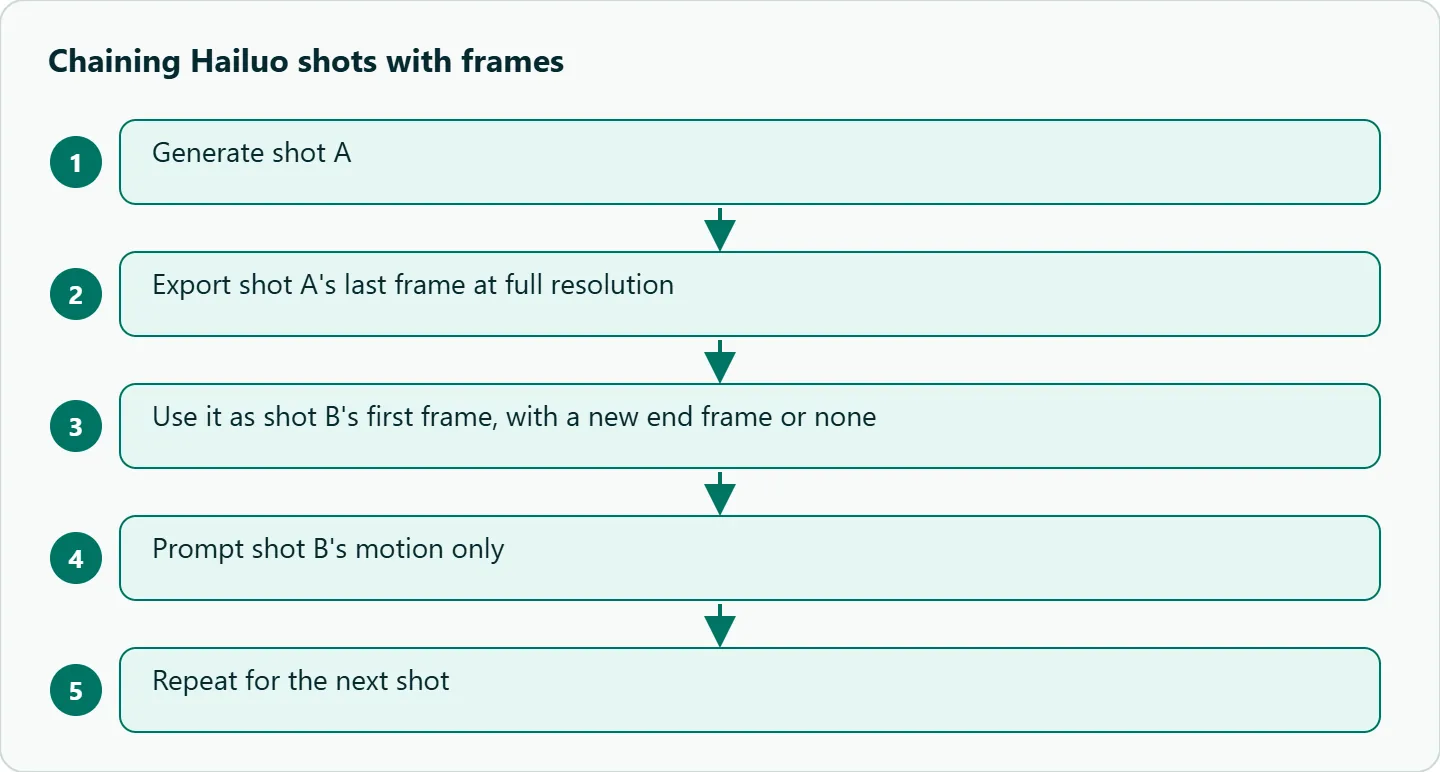
Export shot A's last frame at full resolution, not a screenshot of the player. Use it as B's first frame, with a new end frame or none, and write B's prompt about B's motion only.
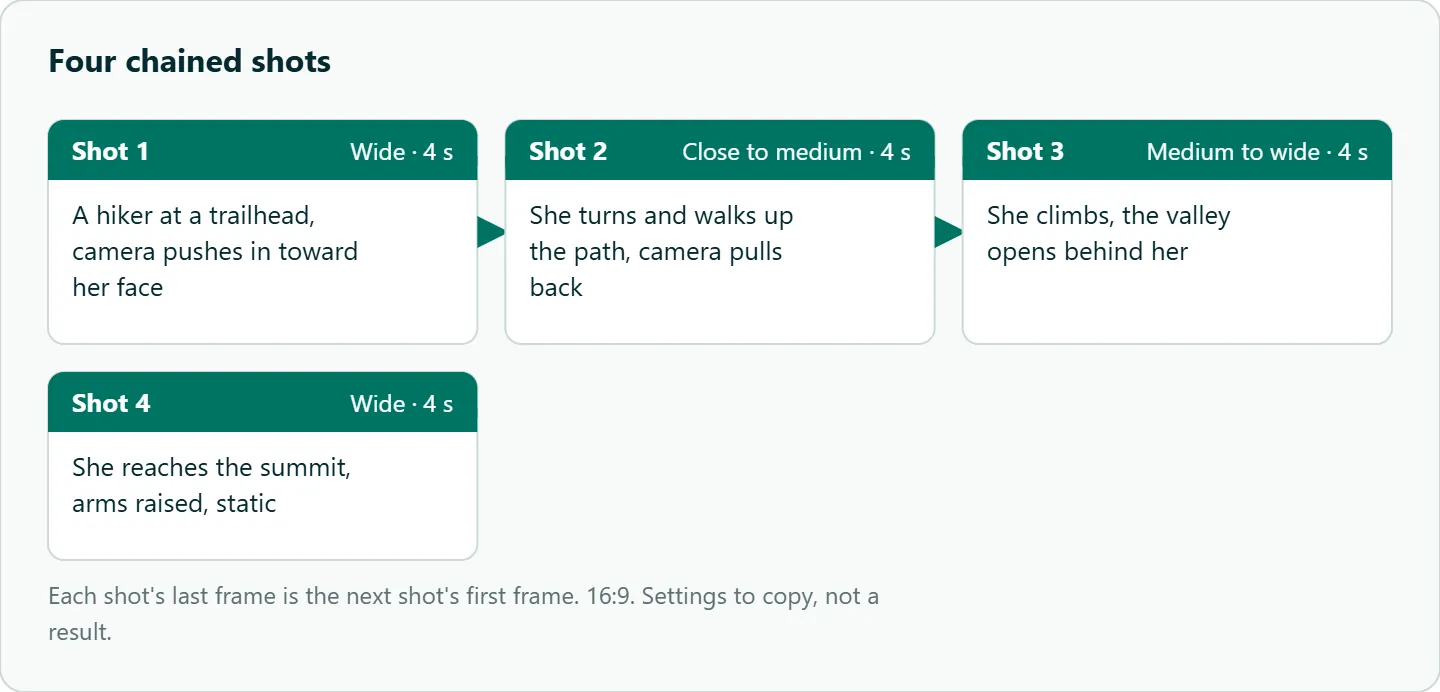
The four-shot storyboard in this section is built this way: each shot's last frame becomes the next shot's first.
Use case 2: morphs and reveals
Give two different images and the model invents the change: day to night, sketch to render, a product on white to the same product on a kitchen counter. Keep the compositions aligned. Same camera angle, same subject position, same lens feel. If the start frame is a low-angle wide shot and the end frame a top-down close-up, the model has to invent a camera move and a transformation at once, and the middle of the clip turns to mush.
The easiest way to keep pairs consistent is to generate both frames with the same image model and the same prompt prefix, changing only the thing that should change. Otherwise style differences between the two images get animated as if they were motion.
Use case 3: loops
Send the same image as first and last frame and you get a clip that returns to where it started. Pair it with a gentle motion prompt such as "steam rises from the cup, camera static." Loops suit ambient shots: a window with rain, a candle, a café background for a website hero. Check the seam by comparing the clip's first and last frames side by side; small lighting shifts are what give a loop away.
Prompting between two frames
Describe the motion, not the images. The frames already show what things look like, so the prompt should say how you get from one to the other: "the camera pushes in while she turns toward the window." Keep the action physically plausible. If A has a person seated and B has them standing, say "she stands up," or the model may teleport her.
Prompt length is generous, up to 7,000 characters on H3 and 2,000 on the 02 endpoint, but long prompts fight the frames. A sentence or two of motion and camera is usually the right size. On the 02 endpoint you can also use bracketed camera commands such as [Push in] or [Tracking shot].
Known gaps
You control the endpoints, not the pacing: the model decides how fast the change happens and can add or drop props in between. Support also differs by model and by route, which is the gap that costs the most time. Finally, the frames don't fix identity for anything that leaves and re-enters the shot; for a recurring character, pair frames with a reference image.
How to test this on your workload
We haven't published results for this article. To check whether chaining beats a plain prompt for your shots, run the two setups below with the same subject and judge the seams frame by frame.
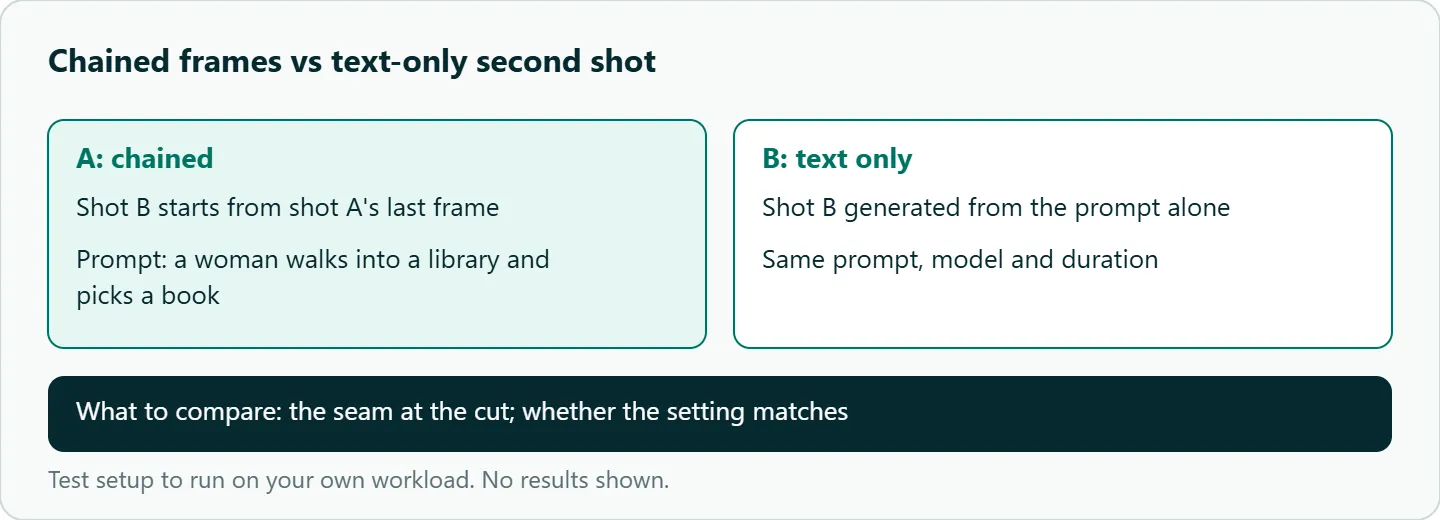
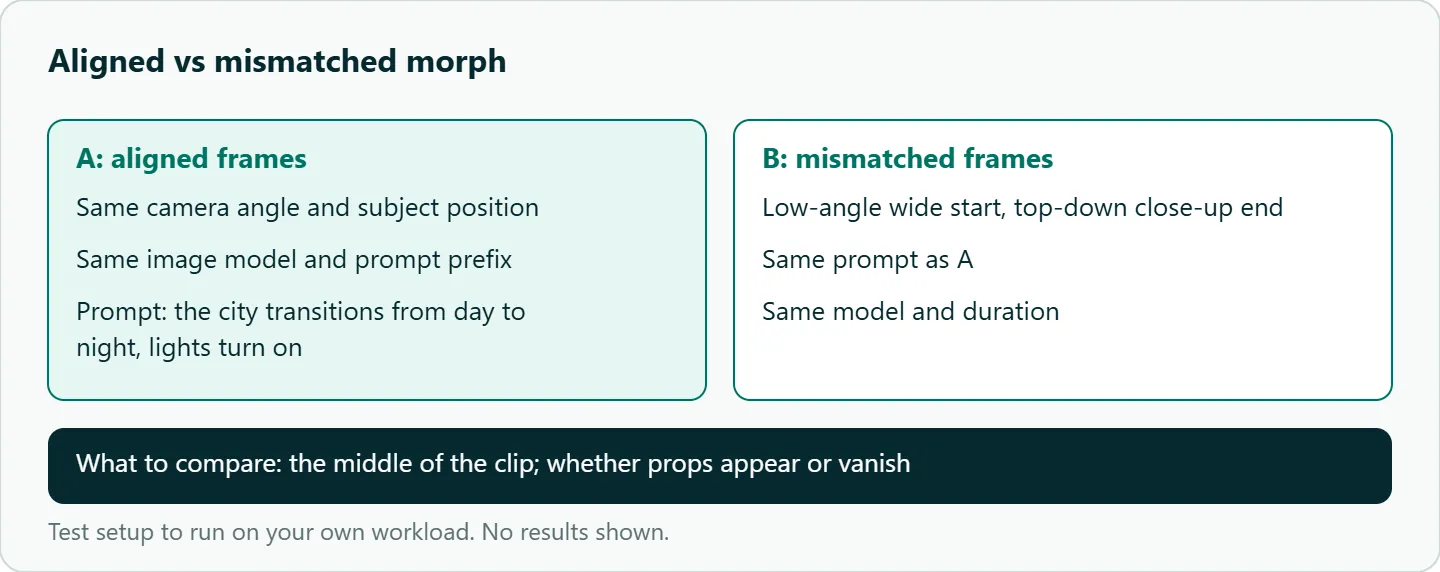
Also confirm support for the exact model id first. Send one short request with both frames and check that the last frame of the output matches your end image. A clip that ignores it is your answer.
Our take: Chain frames for any shots that must match, and use H3 or H3 Max when you need both endpoints fixed. Treat Hailuo 2.3 as first-frame-only until a test on your route shows otherwise. Match frame sizes every time; it's the cheapest fix on this page.
Running Hailuo first and last frame on OceanToken
On OceanToken the base URL is https://api.oceantoken.ai/v1, and /hailuo-api lists minimax/hailuo-3, minimax/hailuo-3-max and minimax/hailuo-2.3. The Hailuo 3 model page lists text, image, video and audio input. The video guide takes frames as frame_images, each with frame_type set to first_frame or last_frame, and also accepts first_frame and last_frame as plain URL strings. Images can be public https URLs or data URLs up to 25MB.
from openai import OpenAI

client = OpenAI(base_url="https://api.oceantoken.ai/v1", api_key="YOUR_OCEANTOKEN_KEY")

video = client.videos.create_and_poll(
    model="minimax/hailuo-3",
    prompt="The door slowly opens and light floods the dark hallway, camera static",
    extra_body={"frame_images": [
        {"type": "image_url", "frame_type": "first_frame",
         "image_url": {"url": "https://example.com/door-closed.png"}},
        {"type": "image_url", "frame_type": "last_frame",
         "image_url": {"url": "https://example.com/door-open.png"}},
    ]},
)
client.videos.download_content(video.id).write_to_file("door.mp4")
Before you rely on 2.3, call https://api.oceantoken.ai/oceantoken/video/model-spec?model=minimax/hailuo-2.3 and read its modes. The practical advantages for this workflow: the API is OpenAI-compatible, so the SDK's video helpers handle create, poll and download; one key and one prepaid balance cover Kling, Seedance and Veo too, so a chained sequence can be retried on another model by changing the model id; and a failed video job is not charged, its hold goes back to your balance. For the polling side in production, see our Hailuo API Python guide. See the current rate on /hailuo-api.
FAQ
Can I use the same image as first and last frame? Yes. That is how you make a loop; add a gentle motion prompt and check the seam.
Does Hailuo 2.3 support a last frame? MiniMax's first-and-last-frame endpoint lists only Hailuo 02, not 2.3. Use H3 or H3 Max for both frames, or test 2.3 on your route.
What happens if my two frames are different sizes? On the 02 endpoint, the output follows the first frame and the last frame is cropped to match. Export both at the same dimensions.
Can I send only a last frame? H3 and H3 Max accept a first frame, a last frame, or both, per MiniMax's guide. Check your model id before relying on last-frame-only.
Does the prompt still matter with two frames? Yes, for motion and camera. Keep it short and describe how the scene changes, not what it looks like.
Sources
- MiniMax API: first and last frame video generation (checked 2026-11-09)
- MiniMax: video generation guide (H3, H3 Max) (checked 2026-11-09)
- OceanToken docs: video guide (checked 2026-11-09)
- OceanToken Hailuo API page (checked 2026-11-09)
- OceanToken Hailuo 3 model page (checked 2026-11-09)
Get your OceanToken API key
- Create an OceanToken account and an API key.
- Copy the snippet below, paste your key, and run it.
- Check the current rate on /hailuo-api.
curl https://api.oceantoken.ai/v1/videos \
  -H "Authorization: Bearer $OCEANTOKEN_API_KEY" \
  -H "Content-Type: application/json" \
  -d '{"model": "minimax/hailuo-3", "prompt": "The door slowly opens and light floods the hallway", "first_frame": "https://example.com/door-closed.png", "last_frame": "https://example.com/door-open.png"}'
More from the blog
A Unified API for Chat, Image and Video
Building on a unified API for chat, image and video: sync vs async calls, billing units, retries, timeouts and storage, with three calls and a launch checklist.
Kimi K3 API International Access Guide
Use the Kimi K3 API internationally: sign up with email, pay by card, create one key and call moonshotai/kimi-k3 with an OpenAI SDK. Steps, code and checks.
Call Tencent Hy3 With the OpenAI SDK
Call Tencent Hy3 with the OpenAI SDK outside China: base URL, model id, streaming, tool calls, reasoning_effort values, Hy3 vs Hy3 preview, and token billing.