

How to Call the GTE-Large Embedding API
Call the GTE-Large embedding API with the OpenAI SDK: batch inputs, the 512-token limit, 1024-dim vectors, cosine search, per-token billing, and when to switch.
By OceanToken Team
Editor's note: GTE-Large is not the newest embedding model, and that is part of its appeal. It is small, MIT-licensed, well documented and good at English retrieval. The trouble starts when people treat it like a modern long-context embedder. It reads 512 tokens and stops, and it does not shorten its vectors on request. Plan for both and it is a dependable workhorse.
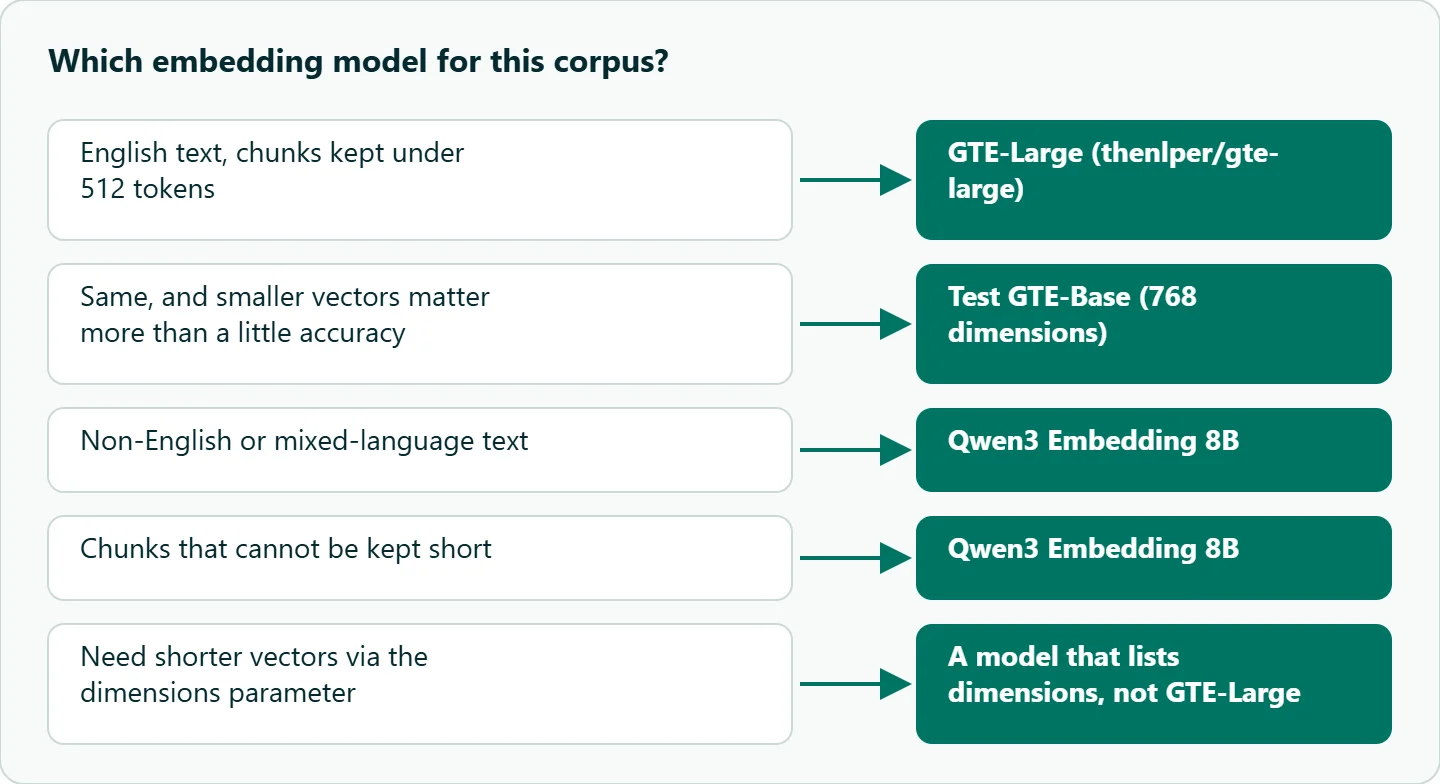
Short answer: To call the GTE-Large embedding API, send POST /v1/embeddings with model thenlper/gte-large to an OpenAI-compatible endpoint such as https://api.oceantoken.ai/v1, passing one string or a list. You get 1024-dimension vectors. Keep chunks under 512 tokens, English only. Billing is per input token; see the rate on the model page.
01 · What GTE-Large is, in one table
GTE-Large comes from the paper Towards General Text Embeddings with Multi-stage Contrastive Learning . Its model card gives the facts that shape every integration decision, and the OceanToken model page repeats the same limit and vector size.
| Property | GTE-Large | Why it matters |
|---|---|---|
| Vector size | 1024 dimensions | Set your vector index to 1024 before the first insert |
| Input limit | 512 tokens | The card says longer text "will be truncated to a maximum of 512 tokens" |
| Language | English only | The card says it "exclusively caters to English texts" |
| Query prefix | None mentioned | Embed queries and documents as plain text |
| Normalization | Optional on the card | Normalize yourself if your index uses dot product |
| License | MIT | Fine for commercial retrieval systems |
The input limit is the one that bites. The card describes truncation, not rejection. The tail of a long chunk simply never reaches the vector. If your chunker produces 1,000-token passages, half of each passage is invisible to search.
02 · How to call the GTE-Large embedding API from Python and curl
The endpoint follows OpenAI's Embeddings API, so the official SDK works once you change the base URL and the key. Send a list of strings in one request rather than looping; the embeddings guide says a batched request "is faster and simpler than one request each." Vectors come back in the same order as your inputs.
import os
from openai import OpenAI

client = OpenAI(base_url="https://api.oceantoken.ai/v1",
                api_key=os.environ["OCEANTOKEN_API_KEY"])

chunks = [
    "Refunds are processed within five business days.",
    "To reset your password, open Settings and choose Security.",
]
resp = client.embeddings.create(model="thenlper/gte-large", input=chunks)

vectors = [item.embedding for item in resp.data]
print(len(vectors), len(vectors[0]))   # expect 2 and 1024
print(resp.usage.prompt_tokens)        # input tokens you are billed for
The same request with curl:
curl https://api.oceantoken.ai/v1/embeddings \
  -H "Authorization: Bearer $OCEANTOKEN_API_KEY" \
  -H "Content-Type: application/json" \
  -d '{"model": "thenlper/gte-large", "input": ["first chunk", "second chunk"]}'
The docs give no fixed batch size, so pick a batch that keeps each request comfortably small and retry the whole batch on a 429.
03 · Parameters, and the one that does nothing
| Parameter | Values | What it does on GTE-Large |
|---|---|---|
model |
thenlper/gte-large |
Selects the model |
input |
string or list of strings | One vector per string, same order |
encoding_format |
float (default) or base64 |
base64 shrinks the response for large batches |
dimensions |
not listed | Removed before the request reaches the model |
The GTE-Large reference lists only the first three and says anything else is removed. That matters if you copied code written for a model that does accept dimensions: the guide names openai/text-embedding-3-small as one of those. On GTE-Large the field is dropped, so you still get 1024 numbers, and an index sized for 256 or 512 will reject the insert. Size the index from len(vectors[0]), not from your config file.
04 · Chunking under 512 tokens, then searching
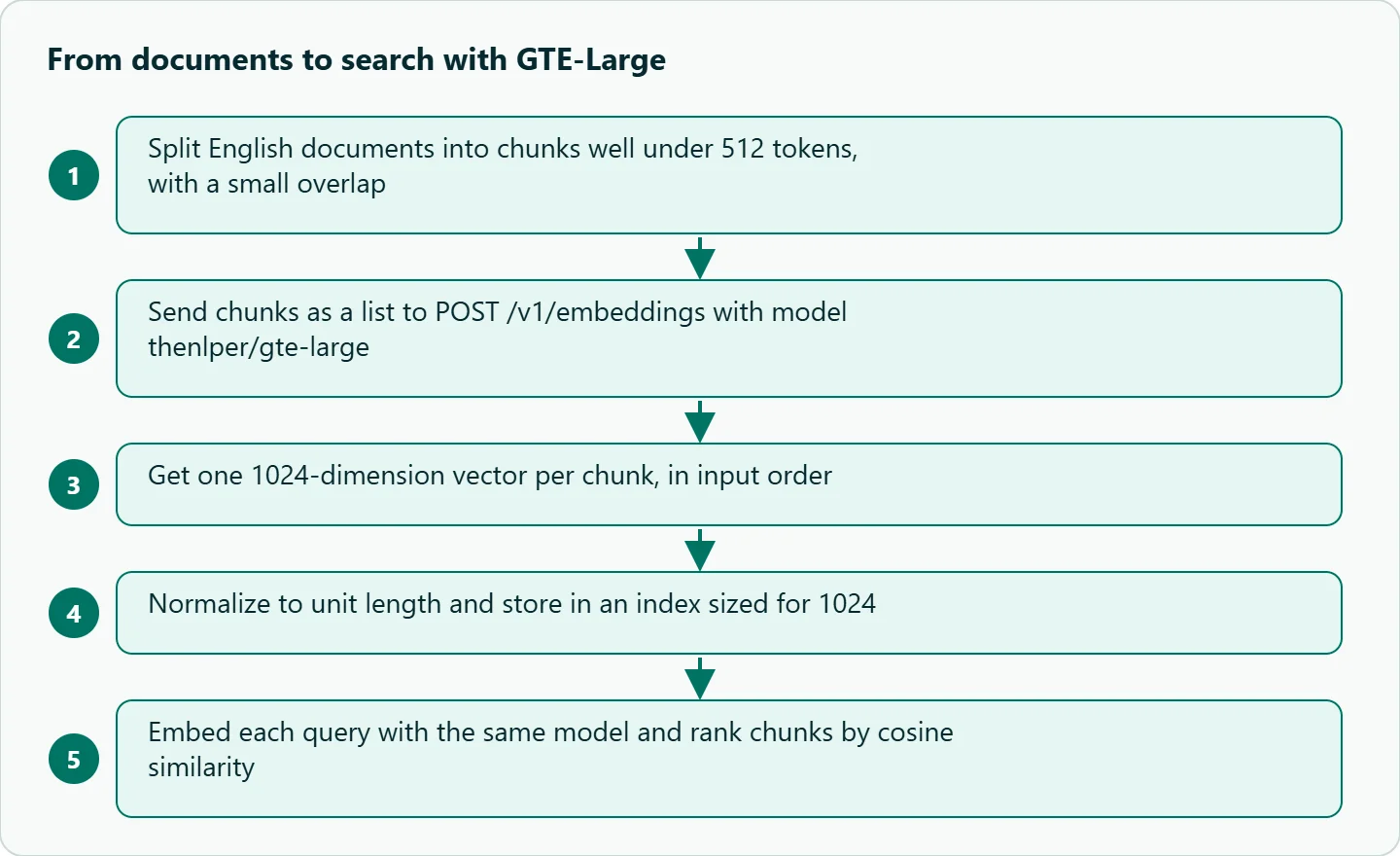
Because the model ignores everything after 512 tokens, chunking is where retrieval quality is won. Split on paragraphs or headings, keep each chunk well under the limit, and carry a small overlap so a sentence cut at a boundary still appears whole in one chunk. Each response reports usage.prompt_tokens, which gives you the model's own count; sending a sample of your longest chunks one at a time is a quick way to check you are not near the limit.
For search, normalize each vector to unit length and use cosine similarity, which becomes a plain dot product after normalizing:
import numpy as np

def unit(v):
    v = np.asarray(v, dtype=np.float32)
    return v / np.linalg.norm(v)

doc_matrix = np.stack([unit(v) for v in vectors])
q = client.embeddings.create(model="thenlper/gte-large",
                             input="how long do refunds take").data[0].embedding
scores = doc_matrix @ unit(q)
print(scores.argsort()[::-1][:3])   # best three chunks
The guide's other rule applies here: use the same model for documents and queries, because "vectors from different models cannot be compared." Switching models later means re-embedding the whole corpus, so pick deliberately.
05 · What it costs, and how to estimate it
The embeddings guide says embeddings are charged per input token, and the model page quotes GTE-Large per 1M input tokens. There is no output charge. Your estimate is total tokens across the corpus divided by one million, times the rate on /models/thenlper/gte-large. Queries cost the same way, but they are short. The easiest way to get the token total is to embed a representative sample, sum usage.prompt_tokens, and scale up. To compare against other embedding models by price, the /cheapest/embedding-api page lists them side by side.
How to test this on your workload
We have not run a retrieval benchmark for this article. Before committing, run a small check on your own data:
- Take 50 real queries with known correct passages from your corpus.
- Embed the corpus with GTE-Large at your planned chunk size, and again with chunks half that length.
- Record how often the correct passage lands in the top three for each setup.
- Repeat with GTE-Base, which has 768 dimensions and the same 512-token limit, to see whether the smaller vectors cost you anything on your data.
- Send one chunk well over 512 tokens and compare
usage.prompt_tokenswith your own count, so you know how long input is handled.
Our take: GTE-Large is a sound default for English retrieval when you control chunk size. Keep chunks short, size the index at 1024, and do not rely on dimensions. If your text is multilingual or your chunks cannot be kept short, start with Qwen3 Embedding 8B instead: its model card lists more than 100 languages, a far longer input window and adjustable vector sizes.
Running it on OceanToken
On OceanToken, GTE-Large is thenlper/gte-large on https://api.oceantoken.ai/v1/embeddings. The API is OpenAI-compatible, so an existing OpenAI client needs only a new base URL and key, and moving to another embedding model later is a change of model id on the same key, though you will re-embed the corpus. The same key and prepaid balance cover chat, image and video models too, with no subscription. If you also switch chat models through the same client, our guide to OpenAI-compatible model-switching gotchas covers the parameter differences. See the current rate on /models/thenlper/gte-large.
FAQ
What is the GTE-Large embedding dimension? 1024, according to the model card and the model page.
What happens to text longer than 512 tokens? The model card says it is truncated to 512 tokens, so the rest of the chunk is not represented in the vector.
Can I request shorter GTE-Large vectors? No. The dimensions parameter is not in the model's parameter list and is removed, so vectors stay at 1024.
Does GTE-Large need a query prefix? The model card does not mention one; its examples embed raw text for both queries and passages.
Is GTE-Large good for non-English text? The card says it handles English only. Use a multilingual model for other languages.
How is GTE-Large billed? Per input token, quoted per 1M input tokens on the model page; there is no output charge.
Sources
- thenlper/gte-large model card (checked 2026-11-13)
- Towards General Text Embeddings with Multi-stage Contrastive Learning (arXiv 2308.03281) (checked 2026-11-13)
- OceanToken docs: thenlper/gte-large reference (checked 2026-11-13)
- OceanToken docs: Embeddings and rerank (checked 2026-11-13)
- oceantoken.ai: GTE-Large model page (checked 2026-11-13)
- Qwen3-Embedding-8B model card (checked 2026-11-13)
Get your OceanToken API key
- Create an OceanToken account and an API key.
- Copy the snippet below, paste your key, and run it.
- Check the current rate on /models/thenlper/gte-large.
curl https://api.oceantoken.ai/v1/embeddings \
  -H "Authorization: Bearer $OCEANTOKEN_API_KEY" \
  -H "Content-Type: application/json" \
  -d '{"model": "thenlper/gte-large", "input": ["first chunk", "second chunk"]}'
More from the blog
A Unified API for Chat, Image and Video
Building on a unified API for chat, image and video: sync vs async calls, billing units, retries, timeouts and storage, with three calls and a launch checklist.
Kimi K3 API International Access Guide
Use the Kimi K3 API internationally: sign up with email, pay by card, create one key and call moonshotai/kimi-k3 with an OpenAI SDK. Steps, code and checks.
Call Tencent Hy3 With the OpenAI SDK
Call Tencent Hy3 with the OpenAI SDK outside China: base URL, model id, streaming, tool calls, reasoning_effort values, Hy3 vs Hy3 preview, and token billing.