

LangChain OpenAI base_url for GPT Models
Set the LangChain OpenAI base_url and a LlamaIndex custom endpoint for GPT: env-var order, stream usage, structured output, OpenAILike and its defaults.
By OceanToken Team
Editor's note: Framework code should never hide the model vendor in a place you have to grep for. Put the base URL and the model id in environment variables on day one. That one habit is the difference between "swap the model in a config file" and "find six constructors" when price or quality changes. The settings below are the ones that bite after the first demo works.
Short answer: Set the LangChain OpenAI base_url by passing base_url="https://api.oceantoken.ai/v1" and your key to ChatOpenAI. In LlamaIndex, use OpenAILike, not the plain OpenAI class, and set context_window yourself. Chat works out of the box; streaming usage, structured output and tool forcing need one setting each.
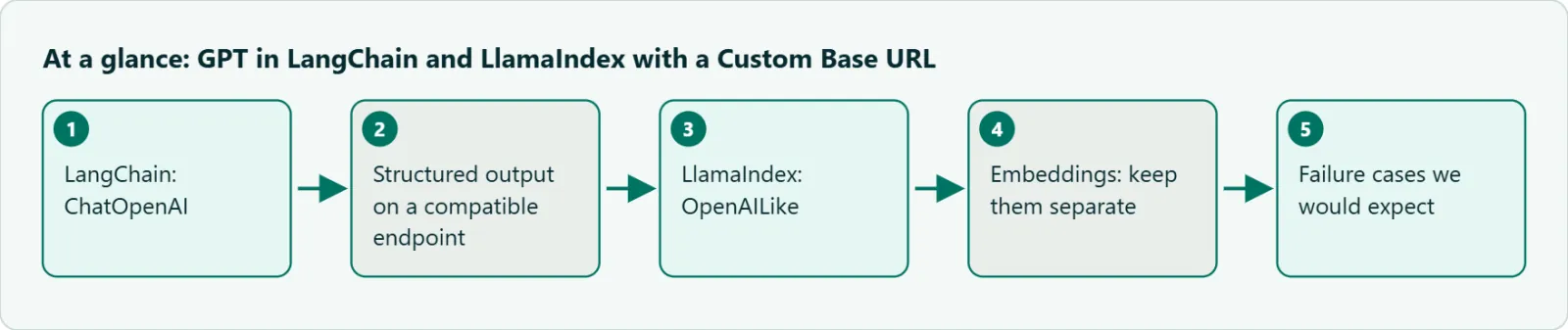
LangChain: ChatOpenAI
ChatOpenAI lives in the langchain-openai package (version 1.7.4 on PyPI on 2026-11-09). A minimal setup that keeps everything in config:
import os
from langchain_openai import ChatOpenAI

llm = ChatOpenAI(
    model=os.getenv("LLM_MODEL", "openai/gpt-6-sol"),
    base_url=os.getenv("LLM_BASE_URL", "https://api.oceantoken.ai/v1"),
    api_key=os.environ["OCEANTOKEN_API_KEY"],
    max_tokens=8000,
)

print(llm.invoke("List three risks of caching LLM answers.").content)
LangChain's ChatOpenAI docs say max_tokens is converted to max_completion_tokens internally. That cap includes reasoning tokens on GPT-6 models, so a small value copied from an old tutorial can return an empty answer. Our guide to empty replies and max_output_tokens covers why.
The same page lists three behaviors worth knowing before production.
Streaming usage is off by default on custom endpoints. When OPENAI_BASE_URL is set, LangChain leaves stream_usage off, because "many non-OpenAI endpoints don't support streaming token usage." The GPT-6 model docs do list stream_options with include_usage, so set stream_usage=True if you track cost from streamed runs, and confirm the totals arrive.
Reasoning fields are not preserved. ChatOpenAI targets the official OpenAI spec, and non-standard fields such as reasoning_content or reasoning_details "are not extracted or preserved." For GPT models this rarely matters. If you put other model families behind the same base URL, check what you lose.
The Responses API can switch on by itself. ChatOpenAI routes to the Responses API when you use built-in tools or the reasoning output parameter, or when you set use_responses_api=True. OceanToken's model docs list /v1/responses for GPT-6 ids, but the parameter tables describe Chat Completions. Test any Responses path on your id. If a call fails on that route, set use_responses_api=False.
Where LangChain reads the OpenAI base_url from
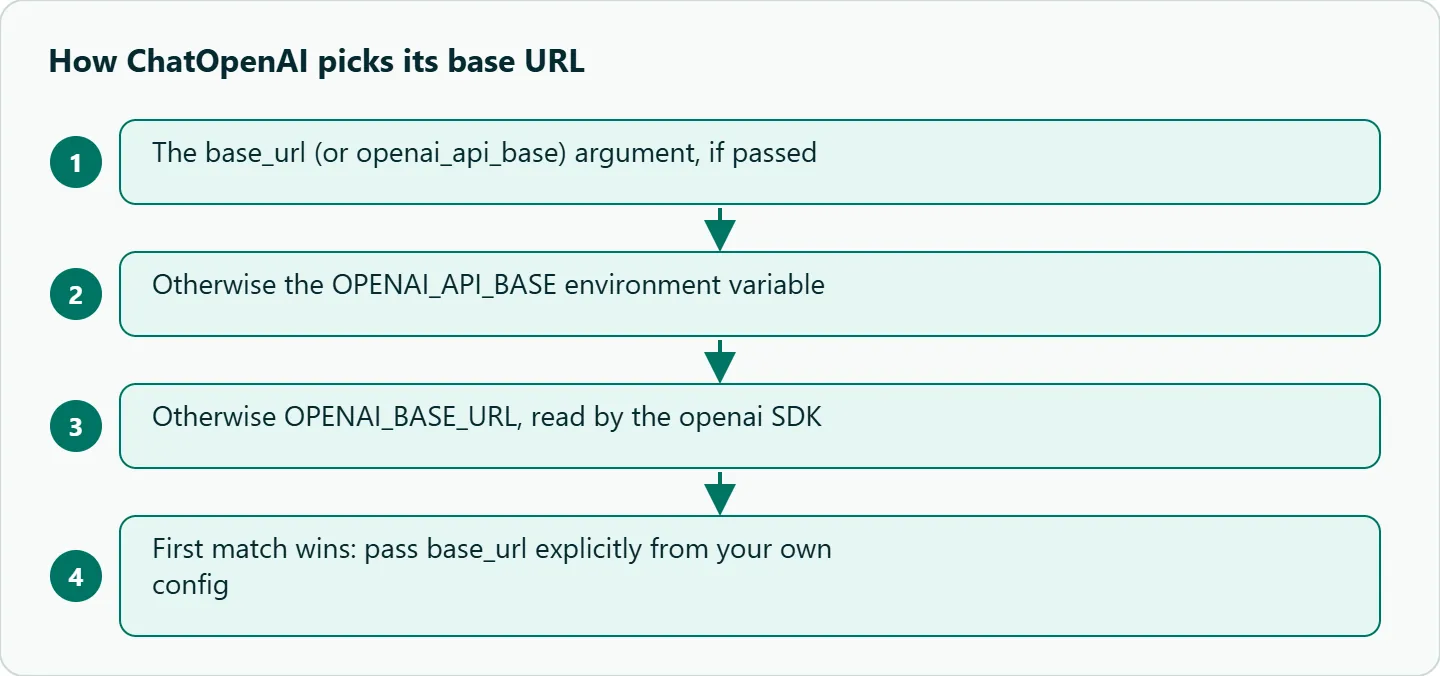
The docs give a strict order, and the first match wins: the base_url (or openai_api_base) argument, then the OPENAI_API_BASE environment variable, then OPENAI_BASE_URL, which the underlying openai SDK reads.
That order causes a classic bug. A teammate sets OPENAI_BASE_URL in the shell for a script. An old .env file still holds OPENAI_API_BASE, pointing somewhere else. LangChain picks the old one, and the call fails with an auth error that looks like a bad key. Pick one variable for the whole team. Better still, use your own name, such as LLM_BASE_URL, and pass it in as above. Then nothing is picked by accident.
Structured output on a compatible endpoint
with_structured_output defaults to function calling, per the LangChain docs; method="json_schema" uses OpenAI's native structured output instead. On a custom endpoint the choice matters more than it looks.
OceanToken's docs for openai/gpt-6-sol , openai/gpt-6-luna and openai/gpt-6-astra list response_format with json_schema and list tools, but they do not list tool_choice. They also say anything not in the table "is left out before it reaches the model." The function-calling method works by forcing a tool call. If the forcing field is dropped, the model is free to answer in prose and your parser gets nothing. That is our reading of the docs, not a logged failure, but it is enough reason to prefer json_schema:
import os
from pydantic import BaseModel
from langchain_openai import ChatOpenAI

class Ticket(BaseModel):
    category: str
    urgent: bool

llm = ChatOpenAI(model="openai/gpt-6-luna",
                 base_url="https://api.oceantoken.ai/v1",
                 api_key=os.environ["OCEANTOKEN_API_KEY"])
chain = llm.with_structured_output(Ticket, method="json_schema")
print(chain.invoke("Site is down for all users, fix now"))
The same table omits temperature for these GPT-6 ids, so a temperature=0 you set on ChatOpenAI is dropped too. Don't count on it for repeatable output; validate the parsed object instead.
LlamaIndex: OpenAILike
LlamaIndex's OpenAILike is described as a thin wrapper for third-party tools that offer an OpenAI-compatible API. Install it with pip install llama-index-llms-openai-like (0.8.1 on PyPI on 2026-11-09). The plain OpenAI class is the wrong tool for a prefixed id: in the source of llama-index-llms-openai 0.8.3, its context-size lookup raises ValueError: Unknown model for any name outside its built-in OpenAI list, and openai/gpt-6-sol is not on it.
import os
from llama_index.llms.openai_like import OpenAILike

llm = OpenAILike(
    model="openai/gpt-6-sol",
    api_base="https://api.oceantoken.ai/v1",
    api_key=os.environ["OCEANTOKEN_API_KEY"],
    is_chat_model=True,
    is_function_calling_model=True,
    context_window=200000,
    max_tokens=8000,
)
print(llm.complete("Summarize RAG in one sentence."))
The defaults are the trap. is_chat_model and is_function_calling_model both default to False. If you leave is_chat_model off, LlamaIndex uses the completion route. Turn on is_function_calling_model only after a tool-call test passes.
The context_window default is 3,900 tokens. At that size, LlamaIndex trims retrieved context to fit a small window. It looks like a retrieval problem, but it is a setting. The GPT-6 docs list a 922,000-token window, and you rarely want to fill it. Set the value your app needs.
Embeddings: keep them separate
If your RAG index was built with one embedding model, queries must use the same one. Changing the chat model is a config change; changing the embedding model means re-indexing everything. Keep chat and embedding settings in separate variables, so a model swap on the chat side can't quietly break retrieval.
Failure cases we would expect
These follow from the docs above. Most surface on day one if you run the checklist in the next section.
| Symptom | Likely cause | What to do |
|---|---|---|
| 404 on the first call | base_url missing /v1, or the Responses route was chosen |
Check the URL; set use_responses_api=False |
| Auth error with a valid key | An old OPENAI_API_BASE wins over OPENAI_BASE_URL |
Pass base_url explicitly |
| Token counts are zero in streams | OPENAI_BASE_URL set in the environment, so stream_usage is off |
Pass stream_usage=True; if you pass base_url in code, print usage anyway to see which case you are in |
| Structured output comes back as prose (untested) | Function-calling method; forcing field dropped | Use method="json_schema" |
LlamaIndex raises Unknown model |
Plain OpenAI class with a prefixed id |
Switch to OpenAILike |
| RAG answers ignore most retrieved chunks | context_window left at 3,900 |
Set context_window explicitly |
| Empty answer on a long prompt | Reasoning used up max_tokens |
Raise the cap |
A small compatibility checklist
- Plain chat:
llm.invoke("ping")returns text. - Streaming: iterate
llm.stream(...)and confirm chunks arrive. - Usage: with
stream_usage=True, readusage_metadataon the final chunk. - Tool call: bind one trivial tool and confirm the model calls it.
- Structured output: a two-field schema with
method="json_schema"parses. - Long prompt: a reasoning-heavy question returns non-empty content.
Our take: Frameworks are a convenience, not a requirement. For a single-step extraction or Q&A call, the plain OpenAI SDK with a new base_url is simpler. It has fewer moving parts and fewer defaults to fight. Use LangChain or LlamaIndex when you need their retrievers, agents or tracing, and keep the model layer thin enough to replace in one file.
Running it on OceanToken
Set the base URL to https://api.oceantoken.ai/v1 and use the model id as written. The /gpt-api page listed openai/gpt-6-sol, openai/gpt-6-luna, openai/gpt-6-astra, openai/gpt-6.1-sol and older GPT ids on 2026-11-09. See the current rate on /gpt-api.
The page says any OpenAI-compatible SDK works and that you change only the base URL and the key, which is all ChatOpenAI and OpenAILike need. One key and one prepaid balance cover GPT and the other model families, so LangChain's with_fallbacks can fall back from a GPT model to another publisher's model with the same client settings and a different model id. Each API key can also have its own spending limit, which helps when an agent loop runs unattended.
FAQ
Do I need a different package for a custom endpoint? For GPT models, langchain-openai with base_url is enough. LangChain recommends provider-specific packages only for models that return extra reasoning fields.
Why does LlamaIndex reject my model id? The plain OpenAI class checks names against its own list and raises Unknown model. Use OpenAILike.
Can I use the Responses API through LangChain here? OceanToken lists /v1/responses for GPT-6 ids, but test it on your id first and fall back to Chat Completions if a call fails.
Why is my temperature setting ignored? OceanToken's GPT-6 docs don't list temperature, and unlisted parameters are dropped before the model sees them.
Where should the key live? In an environment variable or a secrets manager, never in a notebook or a committed .env file.
Sources
- LangChain: ChatOpenAI integration (checked 2026-11-09)
- LlamaIndex: OpenAILike API reference (checked 2026-11-09)
- PyPI: llama-index-llms-openai 0.8.3 (checked 2026-11-09)
- OceanToken docs: openai/gpt-6-sol (checked 2026-11-09)
- OceanToken GPT API page (checked 2026-11-09)
Get your OceanToken API key
- Create an OceanToken account and an API key.
- Copy the snippet below, paste your key, and run it.
- Check the current rate on /gpt-api.
curl https://api.oceantoken.ai/v1/chat/completions \
  -H "Authorization: Bearer $OCEANTOKEN_API_KEY" \
  -H "Content-Type: application/json" \
  -d '{"model": "openai/gpt-6-sol", "max_tokens": 8000, "messages": [{"role": "user", "content": "ping"}]}'
More from the blog
A Unified API for Chat, Image and Video
Building on a unified API for chat, image and video: sync vs async calls, billing units, retries, timeouts and storage, with three calls and a launch checklist.
Kimi K3 API International Access Guide
Use the Kimi K3 API internationally: sign up with email, pay by card, create one key and call moonshotai/kimi-k3 with an OpenAI SDK. Steps, code and checks.
Call Tencent Hy3 With the OpenAI SDK
Call Tencent Hy3 with the OpenAI SDK outside China: base URL, model id, streaming, tool calls, reasoning_effort values, Hy3 vs Hy3 preview, and token billing.