

GPT Structured Outputs: JSON Schema Guide
GPT structured outputs with a JSON schema: strict-mode rules, size limits, refusal and truncation checks, a Pydantic example, and JSON mode compared.
By OceanToken Team
Editor's note: "Please return valid JSON" in a prompt is technical debt. If your code parses model output, give the model a schema. The setup is a dozen lines, and it costs less than the first production parse error at 2 a.m. Pair a strict schema with a small model for extraction work, and spend the savings on validation.
Short answer: For GPT structured outputs, pass a JSON schema with strict: true in response_format (Chat Completions) or text.format (Responses), and the reply will match it. Set additionalProperties: false on every object, list every property under required, and check for refusals and truncation before you parse.
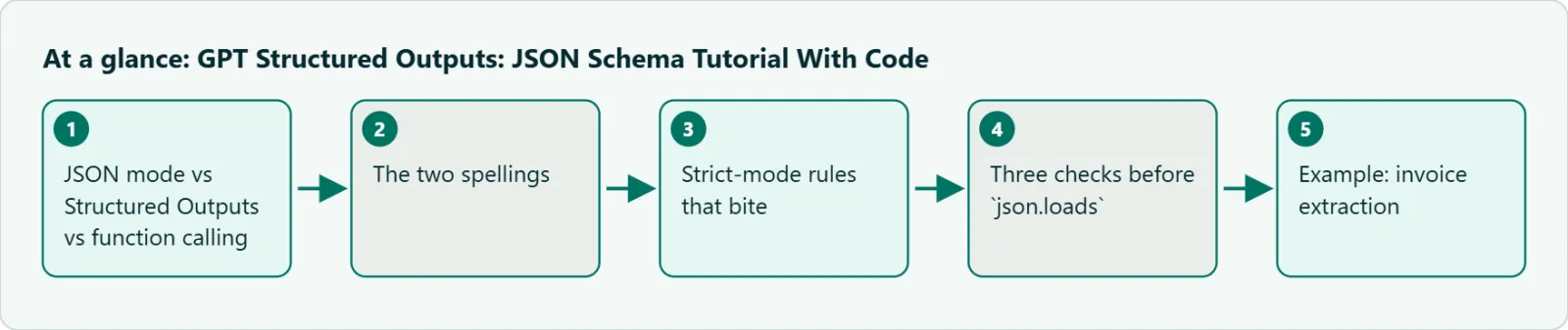
JSON mode vs Structured Outputs vs function calling
OpenAI's structured outputs guide puts the difference in one line: both modes produce valid JSON, but "only Structured Outputs ensure schema adherence." It recommends Structured Outputs whenever the model supports it, starting with GPT-4o. Older models such as gpt-4-turbo only get JSON mode.
| Approach | What it guarantees | Use it when |
|---|---|---|
| Prompt only | Nothing | Never for output your code parses |
JSON mode (json_object) |
Valid JSON, not your shape | Older models without schema support |
Structured Outputs (json_schema) |
JSON that matches your schema | Extraction, classification, API payloads |
| Function calling | Arguments for your tools | The model should trigger an action |
The split between the last two rows trips people up. Use function calling when the model is choosing whether to call your code. Use a response schema when you simply want the reply itself in a fixed shape. An extraction job that always returns the same object is a response schema, not a tool.
The two spellings
In Chat Completions the schema goes in response_format: {"type": "json_schema", "json_schema": {...}}. In the Responses API it moves to text: {"format": {"type": "json_schema", ...}}. The schema body is the same in both. Most OpenAI-compatible endpoints and SDK examples use Chat Completions, so that is the spelling in the code below. If you copy a Responses example into a Chat Completions call, the text field is not a Chat Completions parameter, and on an endpoint that drops unknown fields you get prose back with no error.
Strict-mode rules that bite
These come from the "Supported schemas" section of OpenAI's guide, checked on 2026-11-09.
Every object needs additionalProperties: false. The guide says this is how you opt in to Structured Outputs. It applies to nested objects too, which is where hand-written schemas usually forget it.
Every property must be in required. An optional field is written as a union with null, such as "type": ["string", "null"], and the model returns null when the value is absent.
The root must be an object, and it can't be anyOf. A Zod discriminated union at the top level produces exactly that root anyOf and fails. Put the union inside a property instead.
Only a subset of JSON Schema works. Supported types are string, number, boolean, integer, object, array, enum and anyOf. Strings accept pattern and format (date-time, time, date, duration, email, hostname, ipv4, ipv6, uuid). Numbers accept minimum, maximum, multipleOf and the exclusive bounds; arrays accept minItems and maxItems. allOf, not and if/then/else are not supported, and fine-tuned models skip several of the constraints.
There are size limits. A schema can have up to 5,000 object properties, 10 levels of nesting, 120,000 characters across property names, definition names and enum values, and 1,000 enum values in total.
The good news is that a schema that breaks these rules with strict: true returns an error rather than a quiet downgrade. It fails in development, which is where you want it.
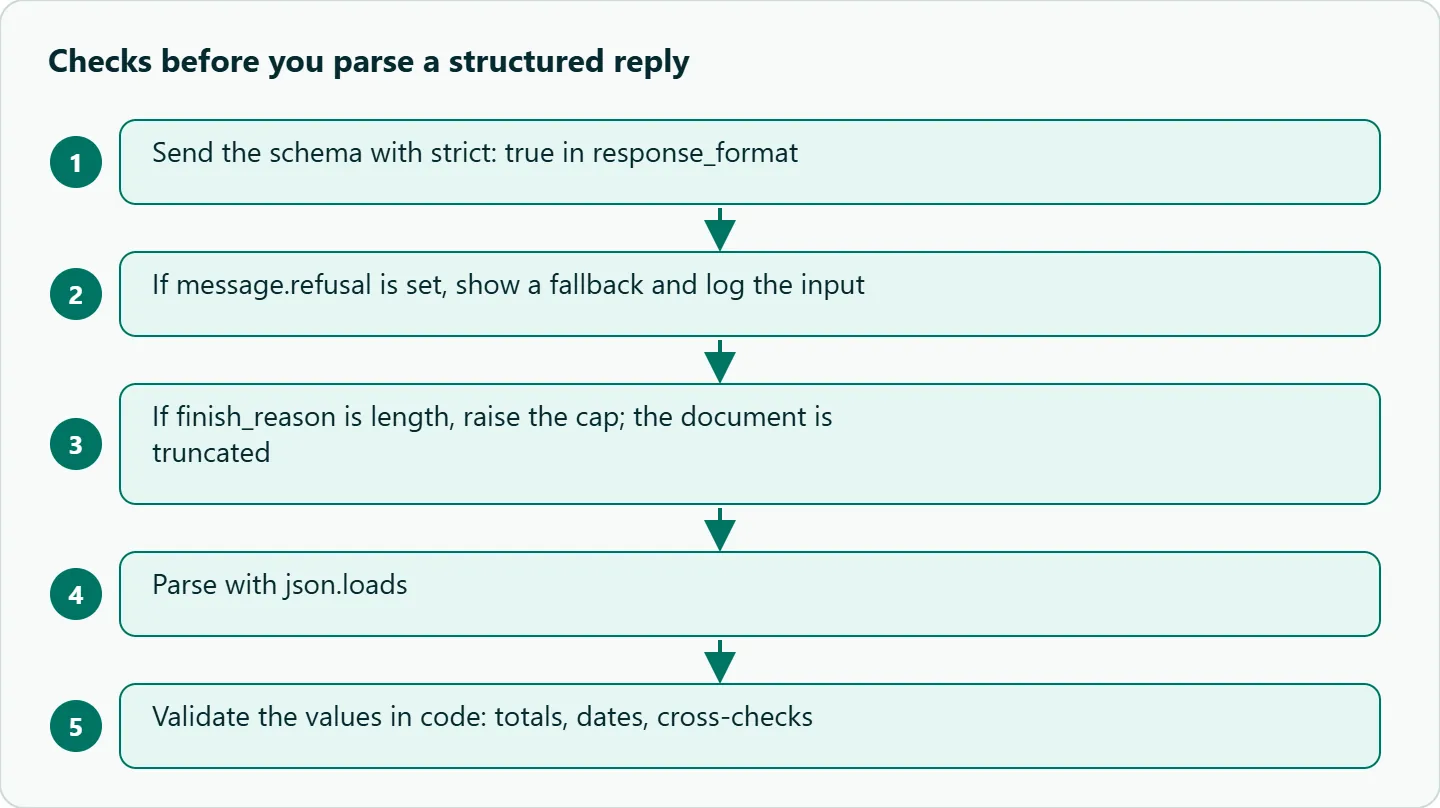
Three checks before json.loads
Refusal. A safety refusal may not follow your schema. The SDK exposes message.refusal; check it first.
Truncation. If the output cap runs out, you get half a document. The guide's examples check finish_reason == "length" in Chat Completions and status == "incomplete" in Responses. Reasoning models spend part of that cap on thinking, which our guide to empty replies and max_output_tokens explains.
Your own validation. The schema guarantees shape, not truth. A field typed as a number can still be the wrong number, so cross-check what you can: line items against the total, dates against the document date.
Example: invoice extraction
The schema below extracts three fields. confidence stays an enum rather than a free-form string, and each field has a short description.
import json
from openai import OpenAI

client = OpenAI(base_url="https://api.oceantoken.ai/v1", api_key="YOUR_OCEANTOKEN_KEY")

schema = {
    "name": "invoice",
    "strict": True,
    "schema": {
        "type": "object",
        "properties": {
            "vendor": {"type": "string", "description": "Seller name as printed"},
            "total": {"type": "number", "description": "Grand total, numeric"},
            "confidence": {"type": "string", "enum": ["high", "medium", "low"]},
        },
        "required": ["vendor", "total", "confidence"],
        "additionalProperties": False,
    },
}

r = client.chat.completions.create(
    model="openai/gpt-6-luna",
    reasoning_effort="none",
    messages=[{"role": "user", "content": "ACME Corp invoice ... Total due: $1,240.50"}],
    response_format={"type": "json_schema", "json_schema": schema},
    max_completion_tokens=2000,
)
choice = r.choices[0]
if getattr(choice.message, "refusal", None) or choice.finish_reason == "length":
    raise RuntimeError("refused or truncated")
print(json.loads(choice.message.content))
One detail matters on the model id. OceanToken's docs list none as a reasoning_effort value for openai/gpt-6-luna , but openai/gpt-6-astra lists only low, medium, high and max. If you move this code to Astra for harder documents, change the effort to low too.
Our take: Put an enum on every field that is really a category, and a one-line description on every field. Descriptions are the cheapest prompt engineering you will ever do, and they travel with the schema instead of rotting in a prompt string. An enum also kills a whole class of cleanup code ("Refund", "refund ", "REFUNDED").
GPT structured outputs with a JSON schema from Pydantic
The official Python SDK can build the schema from a class, so you keep one definition. Current versions expose the helper as client.chat.completions.parse, and the parsed object arrives in message.parsed:
from typing import Literal, Optional
from pydantic import BaseModel

class Invoice(BaseModel):
    vendor: str
    total: float
    currency: Optional[str]
    confidence: Literal["high", "medium", "low"]

r = client.chat.completions.parse(
    model="openai/gpt-6-luna",
    messages=[{"role": "user", "content": "ACME Corp invoice ... Total due: $1,240.50"}],
    response_format=Invoice,
    max_completion_tokens=2000,
)
print(r.choices[0].message.parsed)
Optional[str] becomes the ["string", "null"] union, and the field stays in required, which is what strict mode wants. In JavaScript the matching helper is zodResponseFormat. Remember the root rule here: a top-level discriminated union fails, so wrap it in an object with one property.
Failure cases to plan for
| Case | What you see | Handling |
|---|---|---|
| Safety refusal | refusal set, no JSON |
Show a fallback, log the input |
| Cap hit | Truncated document, finish_reason: length |
Raise the cap; reasoning counts toward it |
| Right shape, wrong values | Valid JSON, total off by a digit | Cross-check against another field |
| Schema breaks a rule | Error on the call | Read the error path; fix or split the schema |
response_format not sent to the model |
Prose instead of JSON | Check the model's parameter list; test each id |
The last row is specific to gateways. OceanToken's model docs say anything not in a model's parameter table "is left out before it reaches the model." Both GPT-6 pages list response_format with json_schema, so this is about older or non-GPT ids you add to the same code path. Read the table for each id before you rely on the schema, and keep json.loads inside a try block regardless.
How to test this on your workload
- Collect 100 real documents and hand-label the fields for 20 of them.
- Run all 100 through
openai/gpt-6-lunawith your schema andreasoning_effort="none". - Count schema failures, refusals and truncations; the first should be zero.
- Score field-level errors on the labeled 20.
- Rerun the misses on
openai/gpt-6-astraatloweffort and compare.
Running it on OceanToken
Set the base URL to https://api.oceantoken.ai/v1 and use the ids as written. The /gpt-api page listed openai/gpt-6-luna, openai/gpt-6-astra, openai/gpt-6.1-sol and older GPT ids on 2026-11-09. See the current rate on /gpt-api.
The API is OpenAI-compatible, so the SDK code above, including parse, runs with only the base URL and the key changed. That also makes step 5 of the test cheap to run: moving from Luna to Astra is a model id change, not a new account. Each API key can have its own spending limit, which is useful when a batch extraction job runs unattended overnight. Billing is prepaid, with no subscription.
FAQ
Does strict mode make the model more accurate? No. It constrains the shape of the output, not the correctness of the values. Validate the values yourself.
How do I make a field optional? Keep it in required and allow null in its type.
Why is my first call with a new schema slow? OpenAI's guide attributes first-request schema latency to fine-tuned models only. On a base model, look at reasoning effort and output length instead.
Why does the API say my schema is invalid? Usually a missing additionalProperties: false, a property missing from required, a root anyOf, or an unsupported keyword. The error names the path.
Is JSON mode ever the right choice? Only on older models without schema support, and then validate with your own schema checker.
Does streaming work with a schema? Yes. OpenAI recommends letting the SDK stream helpers handle it rather than parsing partial JSON yourself.
Sources
- OpenAI: Structured outputs guide (checked 2026-11-09)
- OceanToken docs: openai/gpt-6-luna (checked 2026-11-09)
- OceanToken docs: openai/gpt-6-astra (checked 2026-11-09)
- OceanToken GPT API page (checked 2026-11-09)
Get your OceanToken API key
- Create an OceanToken account and an API key.
- Copy the snippet below, paste your key, and run it.
- Check the current rate on /gpt-api.
curl https://api.oceantoken.ai/v1/chat/completions \
  -H "Authorization: Bearer $OCEANTOKEN_API_KEY" \
  -H "Content-Type: application/json" \
  -d '{"model": "openai/gpt-6-luna", "reasoning_effort": "none", "messages": [{"role": "user", "content": "Return the vendor of: ACME Corp invoice"}], "response_format": {"type": "json_schema", "json_schema": {"name": "v", "strict": true, "schema": {"type": "object", "properties": {"vendor": {"type": "string"}}, "required": ["vendor"], "additionalProperties": false}}}}'
More from the blog
A Unified API for Chat, Image and Video
Building on a unified API for chat, image and video: sync vs async calls, billing units, retries, timeouts and storage, with three calls and a launch checklist.
Kimi K3 API International Access Guide
Use the Kimi K3 API internationally: sign up with email, pay by card, create one key and call moonshotai/kimi-k3 with an OpenAI SDK. Steps, code and checks.
Call Tencent Hy3 With the OpenAI SDK
Call Tencent Hy3 with the OpenAI SDK outside China: base URL, model id, streaming, tool calls, reasoning_effort values, Hy3 vs Hy3 preview, and token billing.