

GPT Image Edit Mask: Keep Everything Else
GPT image edit mask rules from OpenAI's docs, a keep-everything-else preserve list, and a composite step that keeps untouched pixels identical after the edit.
By OceanToken Team
Editor's note: Editing is where people get burned. The prompt says "make the sofa green" and the model also nudges the wall color, the light and the logo on the cushion. The fix is boring discipline: a mask where you can use one, an explicit keep-list on every call, and a final composite when the untouched pixels have to stay exactly as they were.
Short answer: For a GPT image edit mask that keeps everything else, send a PNG mask with an alpha channel on endpoints that accept one (OpenAI's does; OceanToken's gpt-image-2 page lists no mask today). Its transparent area may change. Write "change only X" plus a keep-list. The mask is only guidance, so composite over the original if pixels must match.
GPT image edit mask rules from OpenAI's docs
OpenAI's image generation guide and images edit reference set these rules, checked on November 10, 2026:
| Rule | What the docs say |
|---|---|
| Mask format | Same format and size as the image to edit, under 50MB |
| Alpha | The mask must contain an alpha channel |
| How it is used | "Masking with GPT Image is entirely prompt-based"; the model may not follow the exact shape |
| Several input images | The mask applies to the first image |
| Input images | Up to 16 for GPT image models |
| Prompt length | Up to 32,000 characters |
| Outputs per call | n from 1 to 10 |
input_fidelity |
Omit it on gpt-image-2, which processes image inputs at high fidelity automatically |
The third row is the one to design around. A mask narrows where the model is likely to work. It does not lock the rest of the frame, which is why the prompt still has to say what stays.
These are OpenAI's rules for its own endpoint; on OceanToken, see the last section before sending a mask.
Two practical notes. If you build the mask in an image editor, export it as PNG with the alpha channel kept; a flattened JPEG has no alpha and fails the second rule. And because the mask applies to the first input, put the photo you are editing first whenever you also pass reference images.
Pair the GPT image edit mask with a keep everything else list
OpenAI's prompting guide recommends "change only X" plus "keep everything else the same", and repeating the preserve list on each iteration to reduce drift. For surgical edits it suggests naming what must not change, such as saturation, contrast, layout, labels, camera angle and surrounding objects.
Edit image 1.
Change only: the sofa fabric, from grey to dark green velvet.
Keep unchanged: wall color, window position, floor, lighting direction,
camera angle, the picture frame and its artwork, all shadows, all text.
Do not add text, logos or new objects.
"Everything else" is vague to a model. A list of the five or six things that usually drift in your images is specific, and it costs a few dozen prompt characters out of a 32,000-character limit.
The guide gives patterns for harder cases too. For edits involving a person, lock the face, body shape, pose, hair and expression and allow changes only to the garment. For images with transparency, say "preserve the transparent background" in every prompt and keep the output as PNG or WebP. When details start to drift across rounds, re-specify them instead of hoping they come back.
One catalog photo, four ways to ask
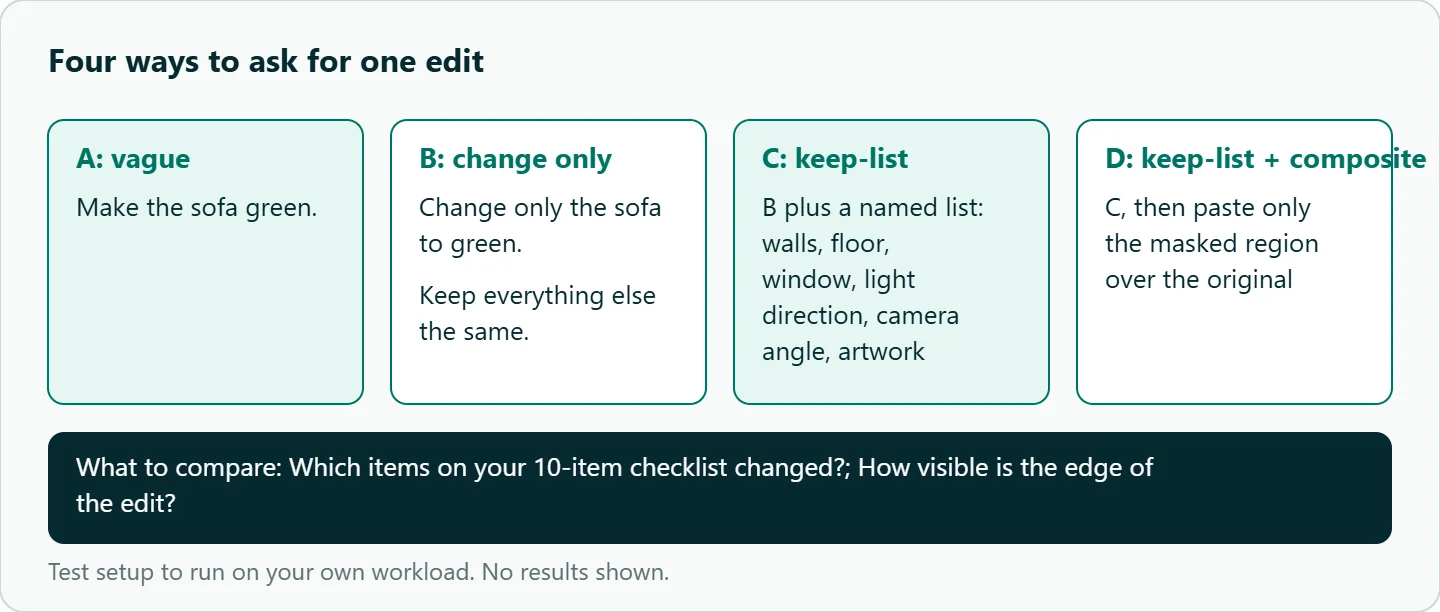
Say you sell a grey sofa and need the same photo in dark green with nothing else changed. Based on OpenAI's guidance, not on our own runs, here is what each way of asking leaves open:
| Request | What is left to chance |
|---|---|
| "Make the sofa green." | Walls, rug, light, everything |
| "Change only the sofa to green. Keep everything else the same." | Whatever the model thinks "everything" means |
| Same, plus an explicit keep-list | Only things you forgot to list |
| Keep-list, then composite over the original with your mask | Only the edge where the edit meets the original |
Composite the edit back over the original
When the rest of the frame has to be identical, such as a product photo with legal text on the packaging, don't trust the model with it. Run the edit, then paste only the masked region of the result onto the original. Everything outside the mask is then the original pixels, by construction.
from PIL import Image

original = Image.open("living_room.png").convert("RGBA")
edited = Image.open("edited.png").convert("RGBA").resize(original.size)
mask = Image.open("sofa_mask.png").convert("RGBA").resize(original.size)

# Transparent in the mask = area allowed to change, so invert the alpha.
region = mask.getchannel("A").point(lambda a: 255 - a)
Image.composite(edited, original, region).save("final.png")
The edited image may come back at a different size than you sent, so resize before compositing, and feather the mask edge a few pixels if the seam shows. The composite needs your own local mask file (the code opens sofa_mask.png) even when no mask is sent to the API. Run it after a prompt-only edit too: the edit plus a local composite still gives you a clean result outside the region.
Edit from the original, not from the last result
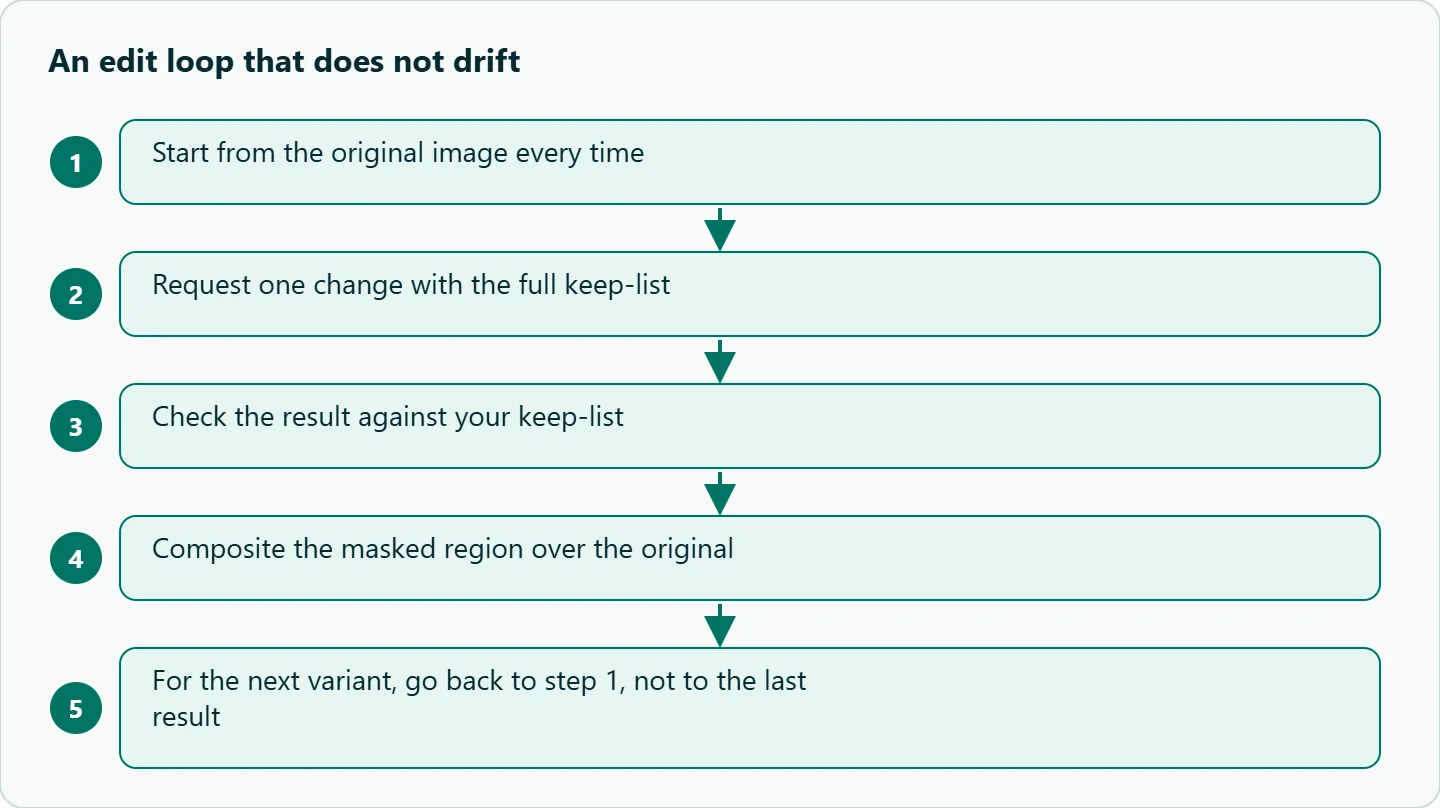
Chained edits accumulate drift, and drift is invisible until you put step 1 next to step 8. For catalog work, keep the original as the input for every variant and change one thing per call, as the guide's "small, single-change follow-ups" advice suggests. If you need several changes together, list them all in one request with one keep-list.
Common failure patterns
| Symptom | Likely fix |
|---|---|
| Face or logo changes | Add it to the keep-list; composite over the original |
| Lighting shifts | Name the light direction in the keep-list |
| Drift over several rounds | Edit from the original each time |
| Edit spills past the mask | The mask is guidance; composite to enforce it |
| Text gets altered | Keep-list: "all text and labels unchanged" |
| Transparent background turns solid | Say "preserve the transparent background"; output PNG or WebP |
| Mask applied to the wrong image | It applies to the first input; reorder |
| Mask rejected | Check the alpha channel and that sizes match |
How to test this on your workload
- Pick one real product photo and write a 10-item checklist of things that must not change.
- Run the four request styles from the table above on the same photo and count checklist items that changed.
- Chain five edits on one image, restating the keep-list each time, then run the same five from the original, and compare.
- Try your mask tight, loose by about 20 pixels, and deliberately wrong, and see how far the model strays from it.
Our take: Treat the keep-list as part of every edit request, not an afterthought, and treat the mask as a hint. When the untouched area matters commercially, the composite step is what actually guarantees it, and it takes ten lines of Python.
Running it on OceanToken
OceanToken has POST https://api.oceantoken.ai/v1/images/edits, and adding images to a generation request also makes it an edit. Its images guide says a mask works only on models that support masks, and a model without mask support refuses the request rather than ignoring the mask. The gpt-image-2 and gpt-image-2.5-sunburst model pages list up to 16 reference images and n from 1 to 8, but no mask, and say fields they don't list are left out before the request reaches the model.
The two pages point different ways, so check the model-spec endpoint (GET https://api.oceantoken.ai/oceantoken/image/model-spec?model=...) or send one test call with a mask before relying on it. The keep-list plus composite approach works either way. Results come back as data[].url, even if you ask for b64_json, and expire after 24 hours.
import urllib.request
from openai import OpenAI

client = OpenAI(base_url="https://api.oceantoken.ai/v1", api_key="YOUR_OCEANTOKEN_KEY")
r = client.images.edit(
    model="openai/gpt-image-2",
    image=open("living_room.png", "rb"),
    prompt=("Change only: the sofa fabric to dark green velvet. Keep unchanged: walls, "
            "floor, window, lighting direction, camera angle, artwork, all shadows."),
    quality="high",
)
urllib.request.urlretrieve(r.data[0].url, "edited.png")  # then run the composite step
The /gpt-api page says any OpenAI-compatible SDK works with the new base URL and key, each API key can have its own spending limit, and one prepaid balance covers image and text models, so the same key can call GPT-6 Astra to write keep-lists from a product brief. For the newest image versions, see our GPT Image 2.6 news post. See the current rate on /gpt-api.
FAQ
Which part of the mask gets edited? The transparent area. Opaque areas are what you want kept.
Why did the model change things outside the mask? OpenAI describes masking as prompt-based guidance, so the model may not follow the exact shape. Name what to keep, and composite if it must be exact.
How many images can one edit take? Up to 16 per OpenAI's reference, and the mask applies to the first one.
Should I set input_fidelity? Not on gpt-image-2; OpenAI says to omit it because the model already uses high fidelity for image inputs.
Can I edit a photo of a person? Yes, with a keep-list that locks face, body shape, pose, hair and expression. Check the output closely before you publish it.
Sources
- OpenAI: Image generation guide (checked 2026-11-10)
- OpenAI API reference: Create image edit (checked 2026-11-10)
- OpenAI Cookbook: Image generation prompting guide (checked 2026-11-10)
- OceanToken docs: Images (checked 2026-11-10)
- OceanToken docs: openai/gpt-image-2 (checked 2026-11-10)
- OceanToken docs: openai/gpt-image-2.5-sunburst (checked 2026-11-10)
- OceanToken GPT API page (checked 2026-11-10)
Get your OceanToken API key
- Create an OceanToken account and an API key.
- Copy the snippet below, paste your key, and run it.
- Check the current rate on /gpt-api.
curl https://api.oceantoken.ai/v1/images/edits \
  -H "Authorization: Bearer $OCEANTOKEN_API_KEY" \
  -H "Content-Type: application/json" \
  -d '{"model": "openai/gpt-image-2", "images": ["https://example.com/living_room.png"], "prompt": "Change only: the sofa fabric to dark green velvet. Keep unchanged: walls, floor, window, lighting direction, camera angle, artwork, all shadows.", "quality": "high"}'
More from the blog
A Unified API for Chat, Image and Video
Building on a unified API for chat, image and video: sync vs async calls, billing units, retries, timeouts and storage, with three calls and a launch checklist.
Kimi K3 API International Access Guide
Use the Kimi K3 API internationally: sign up with email, pay by card, create one key and call moonshotai/kimi-k3 with an OpenAI SDK. Steps, code and checks.
Call Tencent Hy3 With the OpenAI SDK
Call Tencent Hy3 with the OpenAI SDK outside China: base URL, model id, streaming, tool calls, reasoning_effort values, Hy3 vs Hy3 preview, and token billing.