

GPT-6.1 Sol to GPT-6.2 Sol Upgrade Guide
GPT-6.1 Sol to GPT-6.2 Sol upgrade: same listed specs, what OpenAI says changed, the one-line model change, what to retest, and a shadow-test script.
By OceanToken Team
Editor's note: On paper this is the easiest upgrade you will do this year: the two model pages list identical specs, and the code change is one string. That is exactly why it deserves a test run. When nothing in the spec sheet changes, every difference you will see is behavioral, and behavior is what breaks parsers and agents. We recommend a shadow comparison on your own requests before you switch.
Short answer: A GPT-6.1 Sol to GPT-6.2 Sol upgrade is a one-line change from openai/gpt-6.1-sol to openai/gpt-6.2-sol. Both list the same context, output limit, inputs and parameters. OpenAI says 6.2 Sol is smarter and more efficient, and that it powers through multistep agentic work. Retest JSON output, tool calls, output length and refusals on your own traffic first.
If your app already calls GPT-6.1 Sol on OceanToken, both models sit behind the same key and the OpenAI-compatible base URL https://api.oceantoken.ai/v1, so you can run old and new side by side in one script and switch per request, which is what makes the testing below cheap. Specs and parameters come from our model pages and API reference, read November 24, 2026. Every statement about how 6.2 Sol behaves differently comes from OpenAI's own announcement; where OpenAI does not say something, we say so rather than guess. Price is its own question: see the current rate on /gpt-api.
01 · GPT-6.2 Sol vs GPT-6.1 Sol: what is actually different
On the spec sheet, nothing is different. The GPT-6.2 Sol model page describes it as an upgrade to GPT-6.1 Sol from OpenAI, positioned below GPT-6.2 Astra, released November 17, 2026. The GPT-6.1 Sol page lists a September 29, 2026 release. Line up the two API references and every row matches.
| Row (OceanToken API reference, 2026-11-24) | openai/gpt-6.1-sol |
openai/gpt-6.2-sol |
|---|---|---|
| Released (model page) | September 29, 2026 | November 17, 2026 |
| Input | file, image, text | file, image, text |
| Output | text | text |
| Context window | 1,050,000 tokens | 1,050,000 tokens |
| Max output per reply | 128,000 tokens | 128,000 tokens |
reasoning_effort |
low, medium, high, max; default medium |
low, medium, high, max; default medium |
tools, parallel_tool_calls |
Listed | Listed |
response_format |
Listed | Listed |
seed, stream, max_tokens |
Listed | Listed |
tool_choice, verbosity |
Under "may be ignored" | Under "may be ignored" |
| Response fields | content, reasoning_content, tool_calls, reasoning token count |
Same |
| Prompt caching | Yes, at the official price | Yes, at the official price |
So what did change? OpenAI's announcement of GPT-6.2 Astra and Sol is the only first-party source for behavior, and it says the following about Sol specifically. Compared with GPT-6.1 Sol, it calls 6.2 Sol "smarter, more efficient," says it powers through multistep agentic workflows and writes clearly and naturally, and reports a 5.3-point gain on its GDPval v2 evaluation. For both new models, OpenAI says they produce better results with fewer output tokens, and that they launch with tighter cyber safeguards, which it says also restrict some legitimate vulnerability research.
Just as useful is what the announcement does not say. It lists no changes to tool calling, instruction following, structured outputs, verbosity or context length for Sol, no API parameter changes, and no deprecation date for GPT-6.1 Sol. We will not fill those gaps with guesses. If you need to know whether 6.2 Sol formats your JSON or picks your tools differently, your own regression set is the only reliable answer. For the launch coverage itself, see our GPT-6.2 Astra and Sol news post.
02 · Change model name only: the OpenAI-compatible diff
Yes, you can upgrade by changing only the model name. With an OpenAI-compatible API, the request shape, base URL, key, endpoint and parameter names stay the same; the model field is the only line that moves.
 resp = client.chat.completions.create(
-    model="openai/gpt-6.1-sol",
+    model="openai/gpt-6.2-sol",
     messages=messages,
     reasoning_effort="medium",
     response_format={"type": "json_schema", "json_schema": schema},
 )
That is true here because the two API references are identical, not because model names are always interchangeable. When you change models across publishers, parameter support and defaults do change, and our OpenAI-compatible switching gotchas guide covers those cases. Within the Sol line, the one-line diff is genuinely all the code you need.
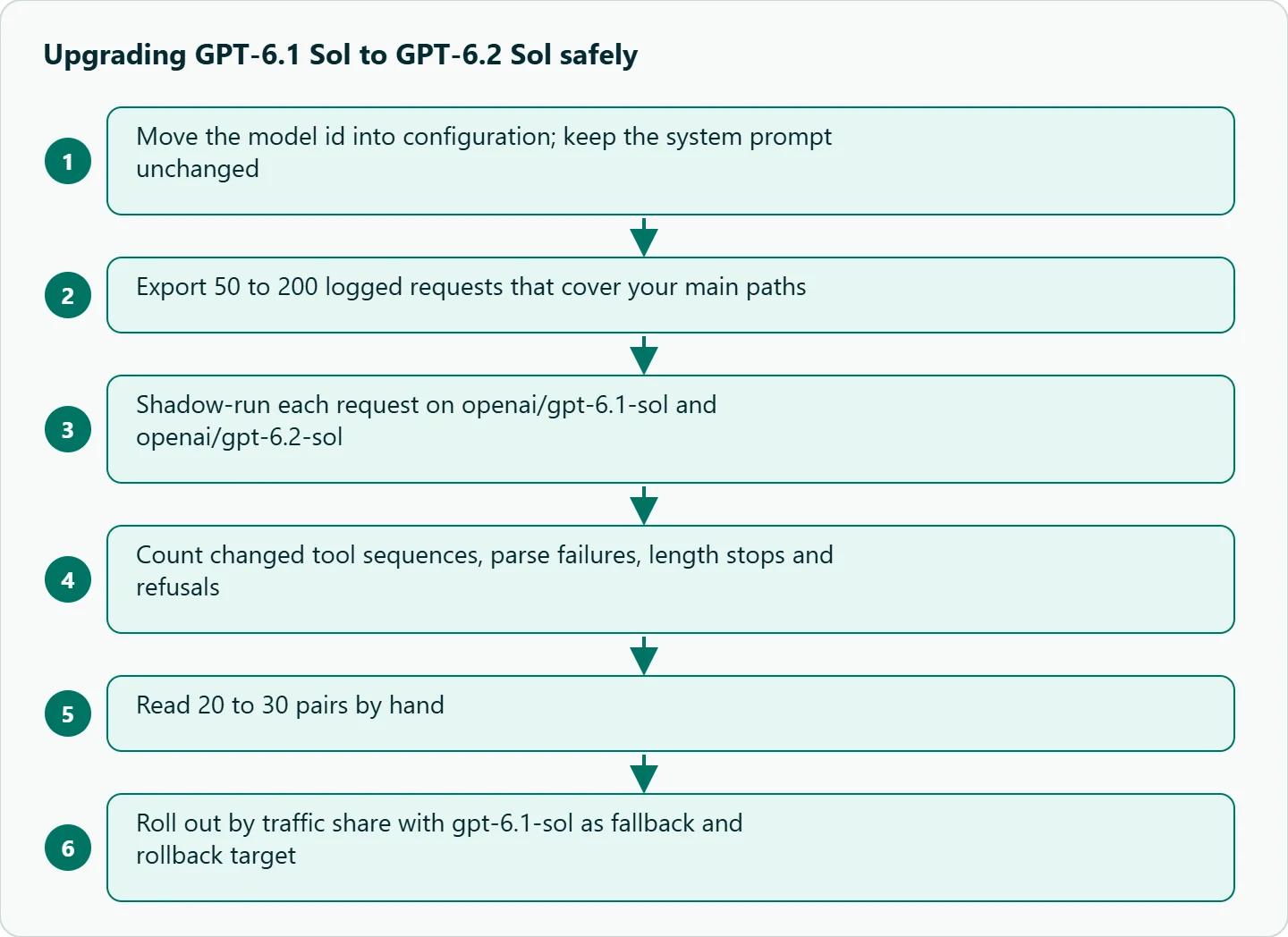
Where should that line live? Not inline in twenty call sites. Put the model id in configuration so that upgrade and rollback are a config change with no deploy:
import os
from openai import OpenAI

client = OpenAI(base_url="https://api.oceantoken.ai/v1",
                api_key=os.environ["OCEANTOKEN_API_KEY"])
SOL_MODEL = os.environ.get("SOL_MODEL", "openai/gpt-6.1-sol")

def complete(messages, **kw):
    return client.chat.completions.create(model=SOL_MODEL, messages=messages, **kw)
One parameter detail matters during an upgrade. Neither API reference lists temperature or top_p, and our text guide says a parameter a model does not support is dropped and the request still runs. If your 6.1 Sol code sends temperature=0 and you believe it makes outputs deterministic, it may not be doing anything on either model. That is not new with 6.2, but upgrades are when people notice output variance and blame the new model. tool_choice and verbosity sit under "may be ignored" in both references, so do not build a test that depends on them being honored.
OpenAI's announcement also gives one piece of advice that applies here: keep prompt prefixes unchanged and append new instructions to the conversation, which it says improves cache reuse and preserves reasoning across turns. When you upgrade, resist the urge to rewrite your system prompt at the same time. Change one thing, measure, then change the next.
03 · What to retest after a model upgrade
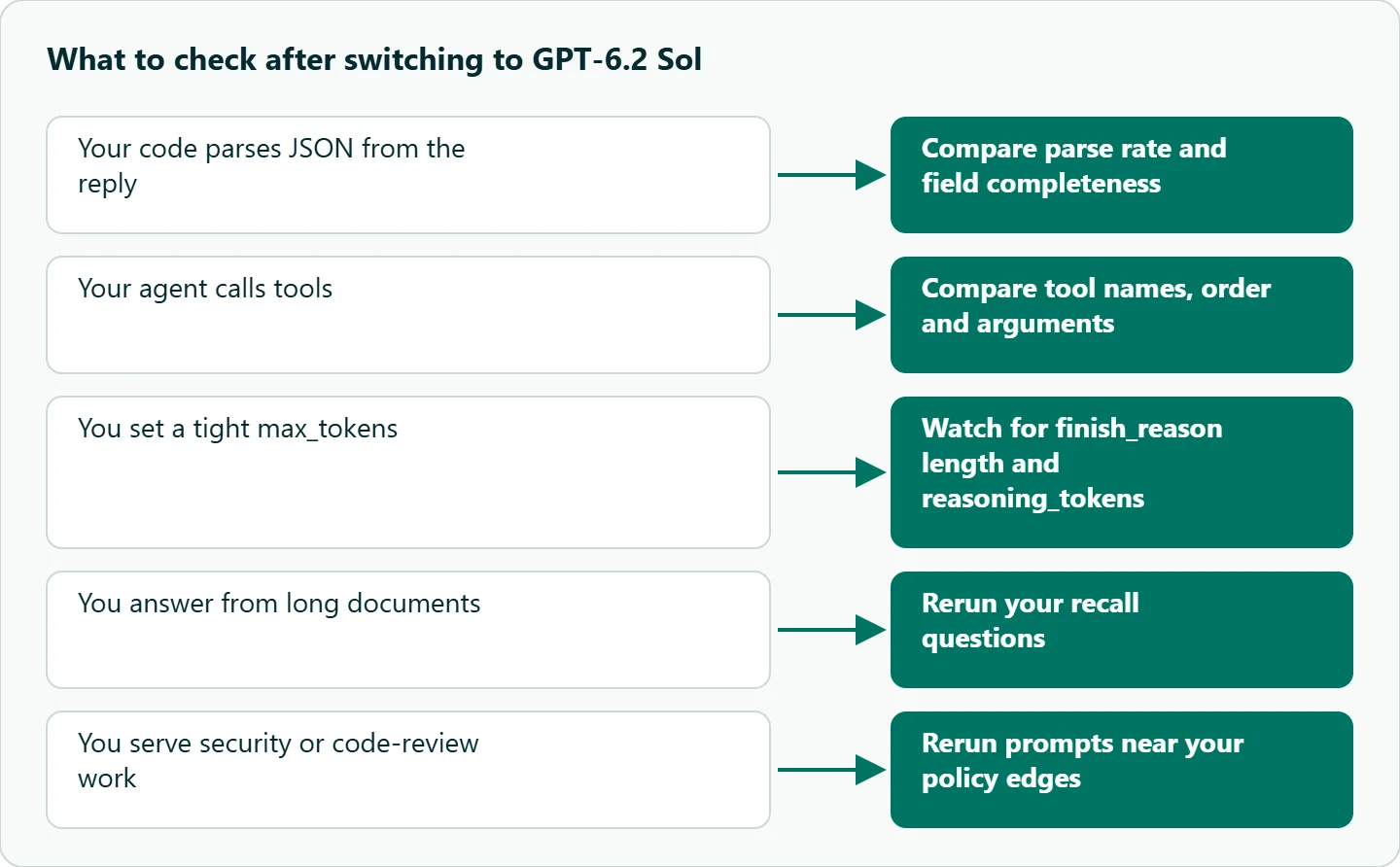
Retest everything downstream code parses, and everything you budget by length. Five areas cover most breakages when a newer model replaces an older one with identical specs.
| Area | Why it can change | What to check | Pass condition |
|---|---|---|---|
| Structured outputs | A different model can fill optional fields, enums and nesting differently even under the same schema | Run your parser over every response in the test set | Parse rate and field completeness match 6.1 Sol |
| Tool calls | Tool choice and argument filling are model behavior; OpenAI says 6.2 Sol powers through multistep agentic workflows, which can mean different sequences | Log which tools are called, in what order, with what arguments | Same final outcome; any extra or fewer calls are explained |
| Reasoning and output length | OpenAI says fewer output tokens for better results; reasoning tokens count toward max_tokens |
Compare completion_tokens, reasoning_tokens, finish_reason |
No new length stops; answers not truncated |
| Long-context recall | The window is the same, the model is not | Ask questions whose answer sits deep in a long document you already use | Same answers on your recall set |
| Refusals and tone | OpenAI says safeguards tightened for cyber topics | Run prompts near your policy edges, especially security work | No new refusals on legitimate tasks you serve |
The reasoning row deserves a closer look because it produces the most confusing failure. On both models, our API reference describes max_tokens as the most tokens to write, reasoning included. If a request spends its budget reasoning, you get an empty or truncated content with finish_reason set to length. OpenAI's claim of fewer output tokens suggests this should get better, not worse, but a claim is not a measurement on your prompts. Our fix for empty GPT replies caused by reasoning tokens explains the pattern and how to size the cap.
For structured output, the schema setup is unchanged; if you are not yet using json_schema, our GPT structured outputs tutorial walks through it. Run it on both models with strict behavior you rely on, and count parse failures rather than eyeballing a few outputs.
The security row matters only if you serve security work. If your product does code review, patching or vulnerability triage, OpenAI's own words, that the tighter safeguards also restrict some legitimate vulnerability research, are a reason to test those prompts specifically before switching.
04 · A shadow comparison script
A shadow comparison sends the same logged requests to both models and compares what matters to your code, not just whether the text reads well. Because both ids sit behind one key and one base URL, the script is short.
import json, os, time
from openai import OpenAI

client = OpenAI(base_url="https://api.oceantoken.ai/v1",
                api_key=os.environ["OCEANTOKEN_API_KEY"])
OLD, NEW = "openai/gpt-6.1-sol", "openai/gpt-6.2-sol"

def run(model, req):
    t0 = time.time()
    r = client.chat.completions.create(model=model, **req)
    m, u = r.choices[0].message, r.usage
    details = getattr(u, "completion_tokens_details", None)
    return {
        "finish": r.choices[0].finish_reason,
        "content": m.content,
        "tools": [(t.function.name, t.function.arguments) for t in (m.tool_calls or [])],
        "out_tokens": u.completion_tokens,
        "reasoning_tokens": getattr(details, "reasoning_tokens", None),
        "seconds": round(time.time() - t0, 2),
    }

def parses(text):
    try:
        json.loads(text or "")
        return True
    except ValueError:
        return False

rows = []
for line in open("logged_requests.jsonl"):
    req = json.loads(line)          # each line: {"messages": [...], "response_format": ..., ...}
    a, b = run(OLD, req), run(NEW, req)
    rows.append({
        "same_tools": [n for n, _ in a["tools"]] == [n for n, _ in b["tools"]],
        "old_parses": parses(a["content"]) if "response_format" in req else None,
        "new_parses": parses(b["content"]) if "response_format" in req else None,
        "new_length_stop": b["finish"] == "length",
        "old": a, "new": b,
    })
json.dump(rows, open("sol_shadow.json", "w"), indent=1)
Read the output in two passes. First the counts: how many rows changed tool sequence, how many new parse failures, how many new length stops. Any non-zero count is a list of specific requests to read. Second, a human pass over twenty or thirty random pairs, because tone, clarity and refusals do not show up in a count. OpenAI says 6.2 Sol writes clearly and naturally; that is something you judge by reading.
Keep the shadow run small and representative. Fifty to two hundred real requests that cover your main paths are more useful than thousands of near-duplicates, and each request runs on two models, so it is billed twice; see the current rate on each model page before you size it.
05 · Rolling out the GPT-6.1 Sol to GPT-6.2 Sol upgrade
Roll out by traffic share, and keep the old model one config change away. With the model id in configuration, the simplest rollout is a percentage switch:
import os, random
def pick_model():
    share = float(os.environ.get("SOL_NEW_SHARE", "0.1"))   # start at 10% of requests
    return "openai/gpt-6.2-sol" if random.random() < share else "openai/gpt-6.1-sol"
Log which model answered each request, then compare error rates, parse failures and user-visible complaints by model. Raise the share when the numbers match; set it to zero if they do not. For per-user consistency, hash the user id instead of calling random, so one person does not bounce between models mid-conversation.
There is also a request-level safety net. Our docs describe a fallbacks field, a list of model ids tried in order if your model fails, and say failover never changes the model unless you ask for one this way. During the rollout, sending openai/gpt-6.2-sol with openai/gpt-6.1-sol as a fallback covers availability failures. It does not cover quality regressions, because a bad answer is not a failure, which is why the shadow comparison comes first.
OpenAI has not announced a retirement date for GPT-6.1 Sol in the announcement we cite, so there is no deadline forcing a rushed switch. Use that time to test.
How to test this on your workload
We have not run your traffic through both models, so this is the checklist we would follow. It assumes you can export a sample of real requests.
- Export 50 to 200 logged requests covering plain answers, JSON outputs, tool loops and your longest prompts.
- Run the shadow script in section 04 with your current
reasoning_effortandmax_tokens. - Count regressions: changed tool sequences, new parse failures, new
finish_reason: length, new refusals. - Read 20 to 30 pairs by hand for clarity, tone and correctness.
- Repeat at a second
reasoning_effortif you use more than one setting, since both models acceptlow,medium,highandmax. - Check cost per request with the
x-oceantoken-costheader or the console, because output and reasoning token counts can move in either direction. - Roll out by share, starting small, with 6.1 Sol as the fallback and as the rollback target.
Our take: Make the switch, but earn it. Identical specs mean the risk is entirely in behavior, and OpenAI's own description (powering through multistep agentic work, fewer output tokens, tighter safeguards) points at exactly the areas where code breaks: tool sequences, length budgets and refusals. A shadow run on 50 to 200 of your own requests is cheap insurance, and with the id in config, rollback takes seconds.
Running it on OceanToken
Both Sol models are on the same key and endpoint, which is what makes a side-by-side test a few lines of code. From our model pages and docs, as of November 24, 2026:
- One key, OpenAI-compatible.
https://api.oceantoken.ai/v1andPOST /v1/chat/completionsfor bothopenai/gpt-6.1-solandopenai/gpt-6.2-sol; the OpenAI SDK works by changing the base URL and key. - Switch per request. The model is a field in each request, so shadow tests and percentage rollouts need no second account or client.
- Fallbacks in the request. A
fallbackslist names models to try in order if your model fails. - Per-request cost and logs. The
x-oceantoken-costheader and the console's Logs show what each call cost and how failed calls failed.
Price: see the current rate on /gpt-api. For the previous step in the line, the GPT-6 Sol vs GPT-6.1 Sol comparison has the side-by-side.
FAQ
Is GPT-6.2 Sol a drop-in replacement for GPT-6.1 Sol? In code, yes: our API references list the same context, output limit, inputs and parameters, so only the model id changes. In behavior, test it first.
What does OpenAI say changed in GPT-6.2 Sol? OpenAI calls it smarter and more efficient than GPT-6.1 Sol, says it powers through multistep agentic workflows and writes clearly and naturally, and launched it with tighter cyber safeguards.
Does GPT-6.2 Sol have a bigger context window? No. Both list 1,050,000 tokens of context and 128,000 tokens of output in our API reference.
Is GPT-6.1 Sol being retired? OpenAI's announcement does not give a retirement date, and our model page still lists it as of November 24, 2026.
Why does temperature seem to do nothing on either model? Neither API reference lists temperature, and unsupported parameters are dropped while the request still runs.
What breaks most often after an upgrade like this? Parsers and length budgets: JSON that fills fields differently, tool sequences that change, and reasoning that uses up max_tokens.
Sources
- OpenAI: Introducing GPT-6.2 Astra and Sol (checked 2026-11-24)
- OceanToken: GPT-6.2 Sol model page (checked 2026-11-24)
- OceanToken: GPT-6.1 Sol model page (checked 2026-11-24)
- OceanToken docs: GPT-6.2 Sol API reference (JSON) (checked 2026-11-24)
- OceanToken docs: GPT-6.1 Sol API reference (JSON) (checked 2026-11-24)
- OceanToken docs: Text generation (checked 2026-11-24)
- OceanToken docs: Retries and failover (checked 2026-11-24)
Get your OceanToken API key
- Create an OceanToken account and an API key.
- Copy the snippet below, paste your key, and run it.
- Check the current rate on /gpt-api.
curl https://api.oceantoken.ai/v1/chat/completions \
  -H "Authorization: Bearer $OCEANTOKEN_API_KEY" \
  -H "Content-Type: application/json" \
  -d '{"model": "openai/gpt-6.2-sol", "messages": [{"role": "user", "content": "Return three test cases for a date parser as a JSON array."}], "reasoning_effort": "medium", "max_tokens": 8000}'
More from the blog
How to Make GTA 6-Style Videos with AI
Four GTA 6-style AI video shots with the exact prompts, image-to-video to fix sign text, and one chase prompt run on Seedance, Kling, Hailuo and Veo.
How to Create GTA 6-Style Scenes with AI
Four GTA 6-style scenes written as code by Claude Fable 5.2, including a drivable 3D street, plus 14 prompts to copy and the fixes for what goes wrong.
Prompt Caching for Coding Agents
Prompt caching for coding agents: keep the prefix stable, read cached tokens in usage, and know which models cache on their own and which need cache_control.