

GLM Function Calling with the OpenAI SDK
GLM function calling in Python: define tools, run the tool_calls loop, return reasoning with results, and handle tool_choice auto-only and silent drops.
By OceanToken Team
Editor's note: People pick GLM-5.3 for agent work, and the tool loop is where those agents break. The schema is the easy part. The habits that decide whether the loop holds up are duller: send the reasoning back untouched, validate arguments before you run anything, and cap the number of turns. We'd also stop expecting
tool_choiceto force a call on GLM, because Z.ai says it can't.
Short answer: GLM function calling uses the standard OpenAI tools format. Send tools with JSON Schema parameters, read message.tool_calls, run each function, append a tool message with the matching tool_call_id, and call again. Z.ai documents only tool_choice: "auto", and GLM-5.3 always thinks, so return the assistant message, reasoning included, unmodified.
How the GLM tools API works
Z.ai's function-calling guide describes each tool as a {"type": "function", "function": {...}} object with a name, a description and JSON Schema parameters. When the model wants a tool, the reply carries tool_calls, each with an id, a function.name and function.arguments. The arguments are a JSON string, not a dict, so you parse them yourself. Its examples use glm-5.3; on OceanToken the same model is z-ai/glm-5.3, and both that page and the GLM-5.3 model page list tool calling as a capability.
The same guide is blunt that function calling executes code, and it asks for security validation and permission control around external APIs and databases. Take that literally. The model chooses the arguments, so anything it can call should be safe to call with bad input.
A complete loop in Python
import json, os
from openai import OpenAI

client = OpenAI(base_url="https://api.oceantoken.ai/v1",
                api_key=os.environ["OCEANTOKEN_API_KEY"])

tools = [{
    "type": "function",
    "function": {
        "name": "get_order_status",
        "description": "Look up one order by its numeric id. Use only when the user gives an order number.",
        "parameters": {
            "type": "object",
            "properties": {"order_id": {"type": "integer", "description": "Order id, e.g. 10492"}},
            "required": ["order_id"],
        },
    },
}]

def get_order_status(order_id: int):
    return {"order_id": order_id, "status": "shipped"}

messages = [{"role": "user", "content": "Where is order 10492?"}]
for turn in range(6):                                   # hard cap on the loop
    r = client.chat.completions.create(model="z-ai/glm-5.3", messages=messages,
                                       tools=tools, max_tokens=4000)
    msg = r.choices[0].message
    messages.append(msg.model_dump(exclude_none=True))  # keeps reasoning_content
    if not msg.tool_calls:
        print(msg.content)
        break
    for tc in msg.tool_calls:
        try:
            args = json.loads(tc.function.arguments)
            result = get_order_status(**args)
        except Exception as e:                          # bad JSON or bad args
            result = {"error": str(e)}
        messages.append({"role": "tool", "tool_call_id": tc.id,
                         "content": json.dumps(result)})
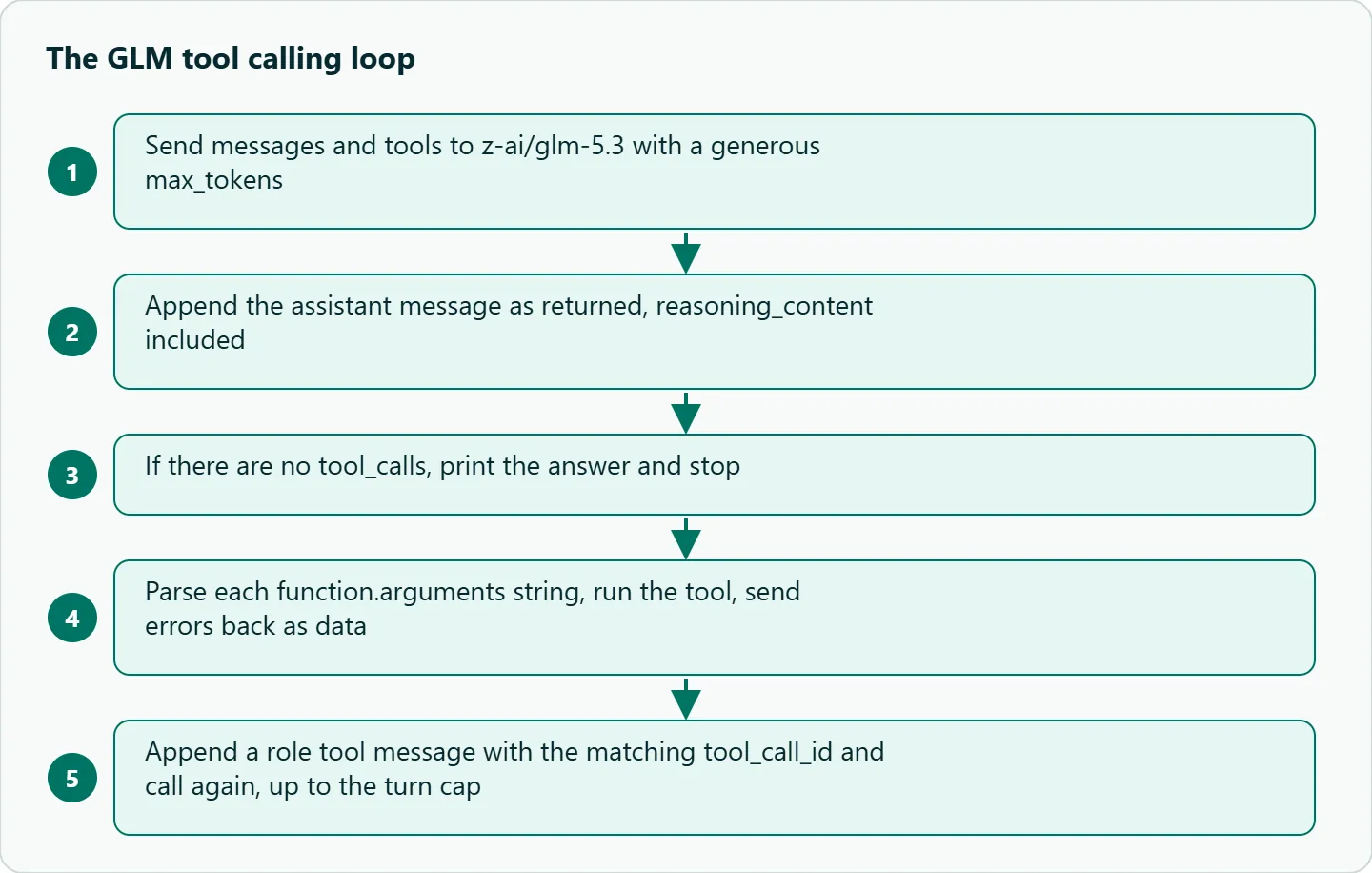
Three details in this loop are deliberate. The turn cap stops a confused model from looping forever. Errors go back to the model as the tool result instead of crashing the script, so the model can apologise or ask a follow-up. And max_tokens is generous, because the reasoning tokens come out of the same budget as the answer.
Return the reasoning with tool results
GLM-5.3 and GLM-5.3-Flash use forced thinking, according to Z.ai's thinking-mode docs , and interleaved thinking is on by default, so the model reasons again after each tool result. The docs say thinking blocks should be preserved and returned together with the tool results, and that when you keep reasoning across turns you must return the complete, unmodified reasoning_content without reordering or editing it.
That is why the loop appends msg.model_dump(exclude_none=True) instead of building a fresh {"role": "assistant", ...} dict. Hand-built messages usually copy content and tool_calls and drop the reasoning, and the next turn gets worse for reasons that are hard to see in logs. Print one appended message the first time you run the loop and confirm reasoning_content is in it.
Why GLM function calling can't be forced
Z.ai's guide says tool_choice defaults to auto and only supports auto. OceanToken's tool-calling guide documents required, none and a named function for models in general, and its API reference says a parameter a model doesn't support is dropped while the request still runs. Put those together and a request with tool_choice: "required" to GLM may succeed and simply not call the tool. Nothing in the response tells you the setting was ignored.
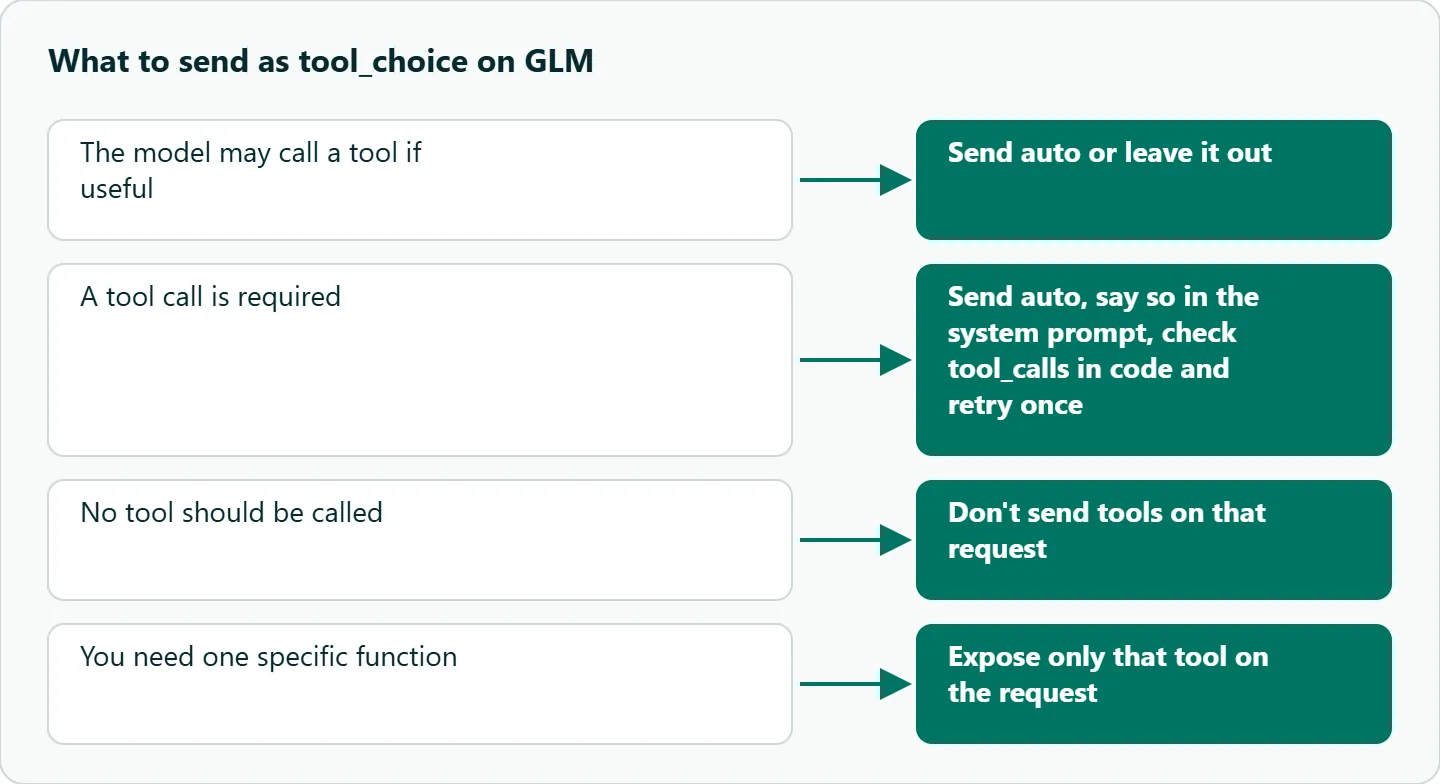
So design for the text path. Send auto (or leave it out), say in the system prompt when a tool must be used, and check message.tool_calls in code. If a call was required and didn't happen, retry once with a sharper instruction and then fall back to a clear error. The tools list is the control that does work: if only one function makes sense for a request, send only that tool, and if no tool should be called, leave tools out of the request. This is also why we'd make the first tools read-only and put writes behind a confirmation step: if you can't force or forbid a call, a wrong call has to be cheap.
Parallel calls and streaming
Z.ai's examples loop over tool_calls, which implies one reply can hold several calls, but the page doesn't state it. Our tool-calling guide says a model whose page lists parallel tool calls can request several calls in one message, and that "parallel_tool_calls": false asks for one at a time. The GLM-5.3 model page mentions parallel tool calls in its description, so the loop above handles every entry rather than only the first. Test it with a prompt that needs two lookups.
For streaming, the same guide says tool-call fragments arrive in pieces that you join by index, and you run the calls once the stream ends with finish_reason: "tool_calls". Z.ai's GLM-5.3-Flash page recommends stream together with tool_stream for streamed tool output; treat tool_stream as a Z.ai-native field and check whether your route accepts it.
One more cost note from the same guide: tool definitions are part of the prompt and are billed as input on every request that carries them, so ten verbose tools on every turn add up.
Descriptions beat cleverness
Z.ai's docs stress detailed descriptions for functions and parameters. Write descriptions as instructions: what the tool does, what units and formats each field takes, and when not to call it. A parameter described as "ISO 8601 date, UTC" prevents a whole class of timezone bugs. When two tools overlap, the model picks between them on wording alone, so give each one a sentence that excludes the other.
Failure cases and fixes
| Symptom | Likely cause | Fix |
|---|---|---|
tool_choice: "required" has no effect |
Z.ai documents only auto; the value can be dropped silently |
Send auto, prompt for the call, check tool_calls in code |
json.loads fails on arguments |
Arguments are a model-written JSON string | Catch the error and send it back as the tool result |
| The model calls the same tool in a loop | Result unclear, or tool_call_id doesn't match |
Return a short, explicit result with the matching id |
| Later turns get worse | Reasoning dropped from history | Append the assistant message as returned |
| Wrong tool picked | Overlapping descriptions | Say when not to use each tool |
Empty answer, finish_reason: "length" |
Reasoning used max_tokens |
Raise the cap |
Worked example: a tool that fails
Give the model get_weather(city) and ask for the weather in Atlantis. Your function returns {"error": "unknown city"}. A well-built loop appends that as the tool message, calls the model again, and gets a clarifying question or an apology rather than an invented forecast. Keep that case in your tests, together with a timeout and an empty result, since those are the failures production sees most. Log every tool_calls entry with its arguments and result; when the model misuses a tool, the log usually shows the description was ambiguous.
How to test this on your workload
We haven't published measurements for this guide, so run these against your own tools:
- Run the loop above and print the appended assistant message to confirm
reasoning_contentis kept. - Ask about two orders in one message and check whether one reply contains two
tool_calls. - Send
tool_choice: "required"with a prompt that doesn't need a tool and see whether a call happens. Expect it may not. - Build a small prompt suite: one that should call a tool, one that should call two, one that should call none, and one with a missing argument. Assert on tool names and parsed arguments, not on prose.
- Draw the sequence for your own agent (user, model, tool, model, answer) and mark where reasoning is returned, then check your code matches it.
Our take: On GLM, the loop matters more than the schema. Send the assistant message back as returned, validate arguments, cap turns at a handful, and treat a missing tool call as a normal outcome your code handles. If a call absolutely must happen, enforce it in code with a retry, not with tool_choice.
Running it on OceanToken
Use base URL https://api.oceantoken.ai/v1 with z-ai/glm-5.3, or z-ai/glm-5.3-flash if you also need image input; both model pages list tool calling. The /glm-api page says you change the base URL and the model and keep your OpenAI SDK, and that the same key reaches DeepSeek, Qwen, Kimi, Claude, GPT and Gemini from one prepaid balance, so testing your tool suite on a second model family is a one-line change. It also says failed requests are free, which matters in a loop that retries. See the current rate on /glm-api. If you are wiring GLM into a chat UI rather than your own code, see GLM in Open WebUI and other chat front ends.
FAQ
Can I force GLM to call a specific tool? Z.ai documents only tool_choice: "auto". Prompt for the call and enforce it in code.
Is function.arguments already parsed? No. It is a JSON string; parse it with json.loads and handle failures.
Does GLM return several tool calls at once? The docs imply it by looping over tool_calls but don't state it. Loop over every entry and test with a two-lookup prompt.
Do I need to send reasoning back? Yes. Z.ai says thinking blocks should be returned with tool results, so append the assistant message unmodified.
Does GLM-5.3-Flash support tools? The model page for z-ai/glm-5.3-flash lists tool calling. Run the same test suite before switching.
Sources
- Z.ai: function calling (checked 2026-11-08)
- Z.ai: thinking mode (checked 2026-11-08)
- Z.ai: GLM-5.3-Flash (checked 2026-11-08)
- OceanToken docs: tool calling (checked 2026-11-08)
- OceanToken docs: API reference (checked 2026-11-08)
- OceanToken GLM-5.3 model page (checked 2026-11-08)
- OceanToken GLM API page (checked 2026-11-08)
Get your OceanToken API key
- Create an OceanToken account and an API key.
- Copy the snippet below, paste your key, and run it.
- Check the current rate on /glm-api.
curl https://api.oceantoken.ai/v1/chat/completions \
  -H "Authorization: Bearer $OCEANTOKEN_API_KEY" \
  -H "Content-Type: application/json" \
  -d '{"model": "z-ai/glm-5.3", "max_tokens": 4000, "messages": [{"role": "user", "content": "Where is order 10492?"}], "tools": [{"type": "function", "function": {"name": "get_order_status", "description": "Look up one order by id", "parameters": {"type": "object", "properties": {"order_id": {"type": "integer"}}, "required": ["order_id"]}}}]}'
More from the blog
A Unified API for Chat, Image and Video
Building on a unified API for chat, image and video: sync vs async calls, billing units, retries, timeouts and storage, with three calls and a launch checklist.
Kimi K3 API International Access Guide
Use the Kimi K3 API internationally: sign up with email, pay by card, create one key and call moonshotai/kimi-k3 with an OpenAI SDK. Steps, code and checks.
Call Tencent Hy3 With the OpenAI SDK
Call Tencent Hy3 with the OpenAI SDK outside China: base URL, model id, streaming, tool calls, reasoning_effort values, Hy3 vs Hy3 preview, and token billing.