

Gemini Structured Output, Function Calling
Gemini structured output and function calling pitfalls: JSON schema limits, tools plus JSON on Gemini 3 only, MALFORMED_FUNCTION_CALL, dropped params, fixes.
By OceanToken Team
Editor's note: Gemini structured output works well most of the time and fails in specific, documented ways. Google's own docs list most of them, they are just spread across three pages. Our position: never let the schema be your only validator, and on Gemini 2.5 don't ask one request to both call tools and return final JSON. A parse-validate-retry wrapper turns each of these into a logged retry instead of a 3am page.
Short answer: The main Gemini structured output and function calling pitfalls are: schema keywords that Gemini accepts but doesn't enforce, large or nested schemas rejected with 400, tools plus structured output being a Gemini 3 preview only, Malformed_Function_Call when structured text precedes a tool call, and gateways dropping parameters silently. Validate in code, and split tool turns from JSON turns on 2.5.
Pitfall 1: schema keywords Gemini ignores
Google's structured output docs say Gemini supports a subset of JSON Schema. The subset is generous on types (string, number, integer, boolean, object, array, null) and on keywords like required, enum, minimum and items. The trap is in what's accepted but not enforced.
According to that page, minLength and maxLength are not enforced during constrained decoding and are ignored by the server. uniqueItems, contains, minContains and maxContains aren't enforced either. Only minItems and maxItems are enforced for arrays. So a schema that says a summary field has maxLength: 280 will happily return 600 characters, and nothing in the response tells you a constraint was skipped.
Google's advice is to validate the parsed output on the client. We'd go further and say that the client-side validator is the real contract, and the schema you send is a hint that makes most outputs pass it. The same page also warns that output can be syntactically valid JSON and still semantically wrong, so check values, not just shape.
Pitfall 2: big or deeply nested schemas return 400
The structured output page says very large or deeply nested schemas may be rejected with 400 INVALID_ARGUMENT, and it names large maxItems limits, especially on nested arrays, as a common cause. It gives no numeric threshold, so you can't design to a limit. You find it when a schema change ships.
The function calling page has a parallel warning: in any mode, the API may reject very large or deeply nested schemas. The practical fix is the same for both. Flatten objects where you can, use enum instead of free text, keep maxItems small on inner arrays, and break one giant extraction into two smaller requests if the schema keeps growing. When a 400 appears right after someone adds a field, the schema is the first suspect.
Pitfall 3: Gemini structured output plus function calling works only on Gemini 3
This is the one that breaks agent designs. Google's structured output page describes combining structured outputs with tools, including function calling, as a preview feature available only to Gemini 3 series models. It doesn't say 2.5 supports it, and the function calling page's tip to "combine function calling with structured output for consistently formatted responses" is likewise scoped to Gemini 3.
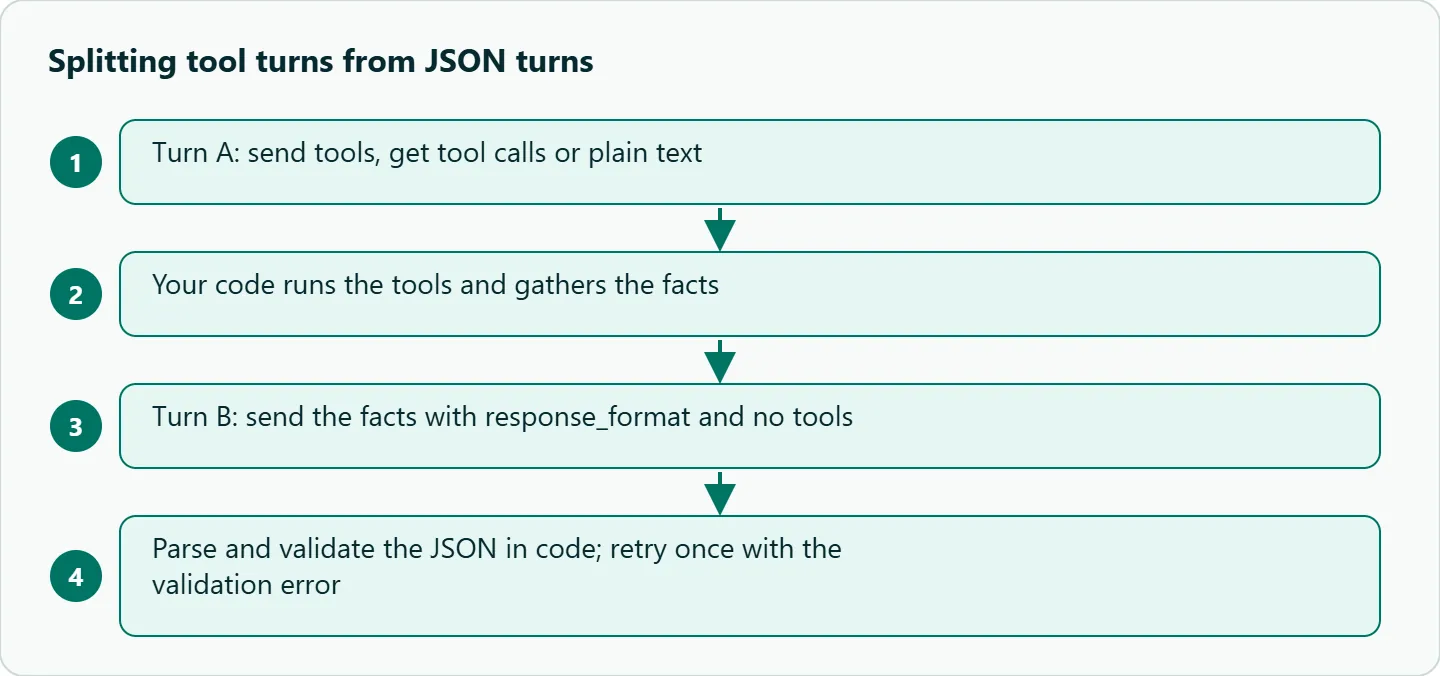
If you run google/gemini-2.5-flash or google/gemini-2.5-pro, assume one request can't do both. Split the pipeline: turn A sends tools and returns tool calls or plain text, your code runs the tools, and turn B sends the gathered facts with response_format and no tools. It costs one extra call, but each turn has one job and fails in one way.
On Gemini 3 models you can try the combined request, but treat it as a preview: keep the split version behind a flag so you can fall back if behavior changes.
Pitfall 4: Malformed_Function_Call before a tool call
Google's function calling docs say a tool call may occasionally fail with Malformed_Function_Call when the prompt requires structured text right before the tool call. The suggested fix is to move those notes into a dedicated function, such as an update() call, so the model emits a tool call instead of free-form structure followed by a tool call.
Say your prompt asks the model to "write a short status block, then call save_report". That is exactly the shape the docs describe. Give it an update_status(text) tool instead and let the save be a separate call. A related habit helps too: pass large payloads by reference. If a tool needs a long document, have the model pass an id and let your code fetch the content, so arguments stay short.
The same page lists best practices that reduce wrong or extra calls: clear and specific descriptions, descriptive names without spaces, specific types such as enum, an active set of 10 to 20 tools at most, and validating function calls before executing them.
Pitfall 5: parameters dropped on OpenAI-compatible endpoints
Many teams call Gemini through the OpenAI SDK, either via Google's own compatibility layer or a gateway. Google's OpenAI compatibility page says support for the OpenAI libraries is still in beta, and in its image generation section it notes that unlisted parameters are silently ignored. The page doesn't say the same happens elsewhere, but it may, so test the parameters you depend on.
Gateways can behave the same way. OceanToken's text guide says a model that does not honour a schema drops response_format and answers in prose, and that any unsupported parameter is dropped while the request still runs. You won't get an error. You'll get prose where you expected JSON, and json.loads fails downstream. That is why the wrapper below parses every response and treats prose as a failure to retry, not a crash.
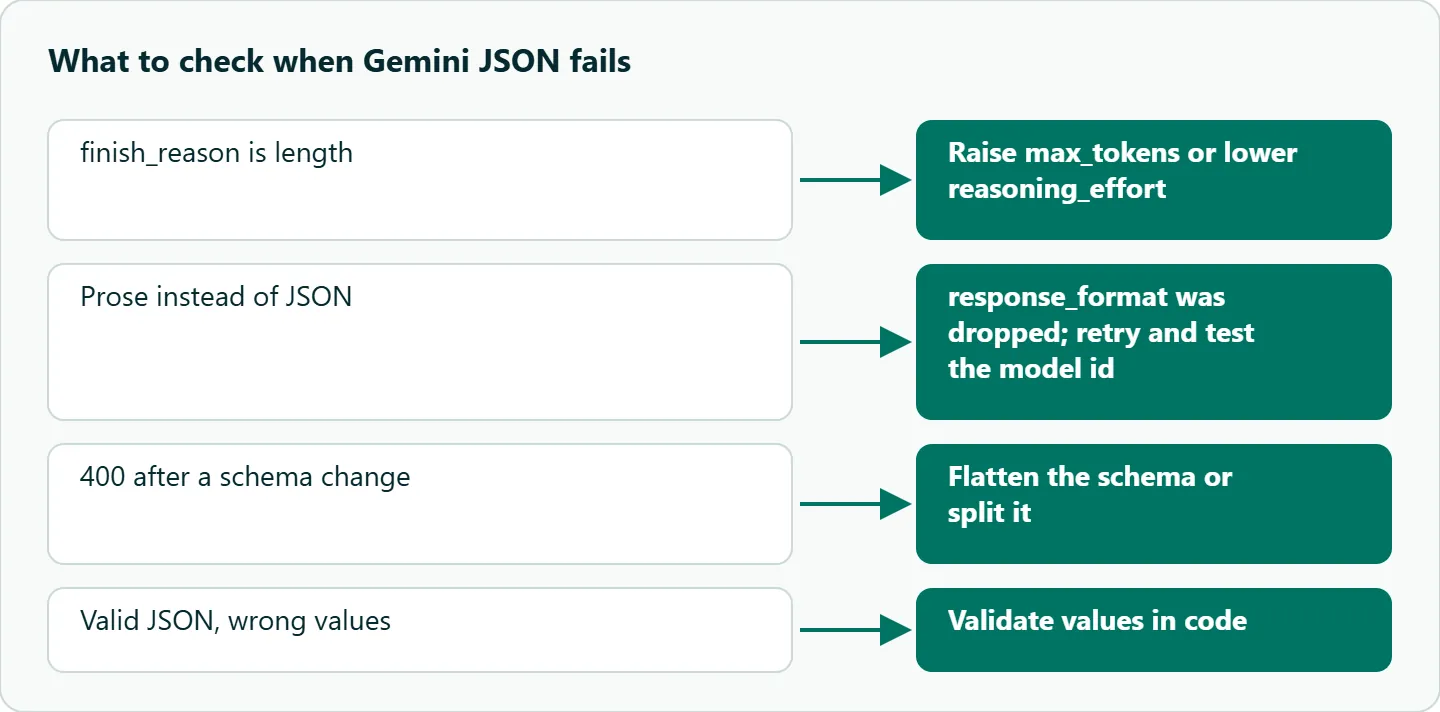
Thinking adds one more silent failure. Google's compatibility page says reasoning can't be turned off for Gemini 2.5 Pro or Gemini 3 models. Separately, OceanToken's text guide says reasoning tokens are billed as output and that a max_tokens that is too small can be used up by the reasoning before any answer is written. A tight max_tokens can cut the JSON before its closing brace, so check finish_reason for length before you blame the schema.
A defensive JSON wrapper
import json, os, time
from openai import OpenAI
import jsonschema

client = OpenAI(base_url="https://api.oceantoken.ai/v1",
                api_key=os.environ["OCEANTOKEN_API_KEY"])

def get_json(messages, schema, model="google/gemini-3.1-pro-preview", tries=3):
    last_err = None
    for i in range(tries):
        r = client.chat.completions.create(
            model=model, messages=messages, max_tokens=8000,
            response_format={"type": "json_schema",
                             "json_schema": {"name": "out", "schema": schema}})
        choice = r.choices[0]
        if choice.finish_reason == "length":
            last_err = "truncated: raise max_tokens or lower reasoning_effort"
        else:
            try:
                data = json.loads(choice.message.content)
                jsonschema.validate(data, schema)   # enforces maxLength etc.
                return data
            except (json.JSONDecodeError, jsonschema.ValidationError) as e:
                last_err = str(e)
                messages = messages + [{"role": "user",
                    "content": f"Your last answer failed validation: {last_err}. Return corrected JSON only."}]
        time.sleep(2 ** i)
    raise ValueError(f"no valid JSON after {tries} tries: {last_err}")
The second attempt sends the validation error back to the model, which is usually cheaper than a blind retry. If that fails too, route the item to a smaller schema, a different model or human review, and log the model id and a prompt hash so you can tell schema problems from model problems.
Quick reference
| Symptom | Documented cause | Fix |
|---|---|---|
Field longer than maxLength |
Length keywords not enforced | Validate in code |
400 INVALID_ARGUMENT after a schema change |
Schema too large or nested | Flatten; smaller maxItems; split |
| Tools plus JSON fails on 2.5 | Combined mode is Gemini 3 preview only | Two-turn split |
Malformed_Function_Call |
Structured text right before a tool call | Move it into its own function |
| Prose instead of JSON | response_format dropped by model or layer |
Parse, treat as failure, retry |
| JSON missing closing brace | Reasoning used the output cap | Check finish_reason; raise max_tokens |
How to test this on your workload
We haven't published measurements for these failure modes, so test the model ids you ship. Send your real schema 50 times and count parse and validation failures separately. Add a schema with maxLength and confirm whether outputs exceed it. On a 2.5 model, send tools and response_format together and record what comes back. Finally, rerun one long request with a small max_tokens and check that your wrapper reports truncation instead of a parse error.
Our take: Build the validator before you tune the prompt. Gemini versions change often, and a client-side schema check plus a two-attempt retry makes your pipeline indifferent to which one is current. On 2.5, split tools and JSON by default; on Gemini 3, use the combined mode only behind a fallback flag.
Running it on OceanToken
Use base URL https://api.oceantoken.ai/v1 with an id from /gemini-api, such as google/gemini-3.1-pro-preview. Its model page lists tool calling, structured outputs (JSON) and reasoning, with tool_choice, response_format and reasoning_effort, and a max output of 65,536 tokens on November 6, 2026. The catalog also carries 2.5 ids like google/gemini-2.5-flash, so the split-versus-combined test above is a one-string change. The endpoint is OpenAI-compatible, so you switch the base URL and key and keep your code, and one prepaid balance with no subscription covers Gemini and the other families. See the current rate on /gemini-api. If your structured extraction runs over very long inputs, our piece on Gemini 1M context vs RAG covers when to send everything at once.
FAQ
Can I use Gemini function calling and structured output in one request? Google documents it as a preview for Gemini 3 series models only. On 2.5, split tool calls and the final JSON into separate requests.
What does Malformed_Function_Call mean? The model failed to produce a valid tool call. Google notes it can happen when the prompt asks for structured text right before a tool call.
Does Gemini enforce maxLength in a JSON schema? No. Google says minLength and maxLength are ignored during constrained decoding, so enforce them in code.
Why did I get prose instead of JSON? The model or compatibility layer may have dropped response_format. Parse every response and retry when parsing fails.
How many tools should I give Gemini? Google's best practices say to keep the active set to 10 to 20 tools at most.
Sources
- Google AI for Developers: structured output (checked 2026-11-06)
- Google AI for Developers: function calling (checked 2026-11-06)
- Google AI for Developers: OpenAI compatibility (checked 2026-11-06)
- OceanToken docs: text generation (checked 2026-11-06)
- OceanToken Gemini API page (checked 2026-11-06)
- OceanToken Gemini 3.1 Pro Preview model page (checked 2026-11-06)
Get your OceanToken API key
- Create an OceanToken account and an API key.
- Copy the snippet below, paste your key, and run it.
- Check the current rate on /gemini-api.
curl https://api.oceantoken.ai/v1/chat/completions \
  -H "Authorization: Bearer $OCEANTOKEN_API_KEY" \
  -H "Content-Type: application/json" \
  -d '{"model": "google/gemini-3.1-pro-preview", "messages": [{"role": "user", "content": "Extract the city from: I live in Lyon."}], "response_format": {"type": "json_schema", "json_schema": {"name": "out", "schema": {"type": "object", "properties": {"city": {"type": "string"}}, "required": ["city"]}}}}'
More from the blog
A Unified API for Chat, Image and Video
Building on a unified API for chat, image and video: sync vs async calls, billing units, retries, timeouts and storage, with three calls and a launch checklist.
Kimi K3 API International Access Guide
Use the Kimi K3 API internationally: sign up with email, pay by card, create one key and call moonshotai/kimi-k3 with an OpenAI SDK. Steps, code and checks.
Call Tencent Hy3 With the OpenAI SDK
Call Tencent Hy3 with the OpenAI SDK outside China: base URL, model id, streaming, tool calls, reasoning_effort values, Hy3 vs Hy3 preview, and token billing.