

Gemini OpenAI Compatible API Migration
Use the Gemini OpenAI compatible API from the OpenAI SDK: change base URL and model id, then retest thinking, max_tokens, dropped parameters and tools.
By OceanToken Team
Editor's note: "Just change the base URL" is true for hello world and misleading for production. The code keeps running after the switch, but the behaviour moves underneath it: Gemini thinks by default, counts that thinking against your output cap, and quietly ignores some parameters. We'd budget an afternoon for the swap and a few days for the replay eval that tells you whether it was safe.
Short answer: To use the Gemini OpenAI compatible API, keep the OpenAI SDK, change base_url and the key, and set model to a Gemini id such as google/gemini-3.8-flash. Chat, streaming and tools keep their shape. Then retest thinking defaults, max_tokens, dropped parameters and tool calls, because those change silently.
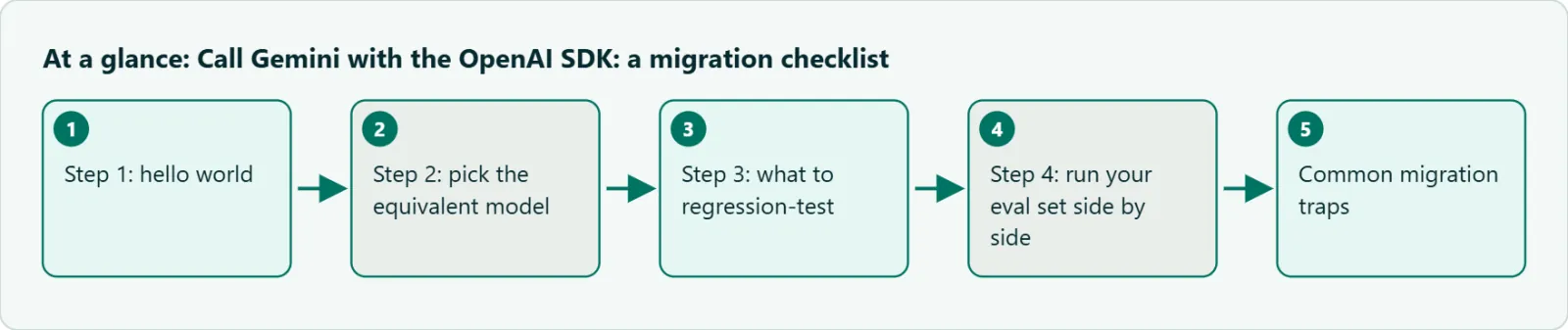
Step 1: hello world
Start with the smallest call that proves the key, the URL and the model id are right. Read the key from an environment variable now, because the same script will end up in CI.
import os
from openai import OpenAI

client = OpenAI(
    base_url="https://api.oceantoken.ai/v1",
    api_key=os.environ["OCEANTOKEN_API_KEY"],
)

resp = client.chat.completions.create(
    model="google/gemini-3.8-flash",
    messages=[{"role": "user", "content": "Say hello in French."}],
    max_tokens=2000,
)
print(resp.choices[0].message.content)
print(resp.choices[0].finish_reason, resp.usage)
Model ids on OceanToken carry the publisher prefix, so it is google/gemini-3.8-flash, not gemini-3.8-flash. If you go to Google directly, its OpenAI compatibility page uses the base URL https://generativelanguage.googleapis.com/v1beta/openai/ and bare model names. Google also labels that support as beta, which is one more reason to keep the base URL and model id in config rather than in code.
Step 2: pick the equivalent model
Pick by job, then check the thinking default, because the default is what changes your bill. The defaults below come from Google's thinking docs (checked November 8, 2026).
| If you used | Try first | Default thinking | Why |
|---|---|---|---|
| A small, cheap chat model | google/gemini-3.5-flash-lite |
minimal | Closest to a model that answers without deliberating |
| A mid-tier workhorse | google/gemini-3.8-flash |
medium | Good default for chat, extraction and tool use |
| A top reasoning model | google/gemini-3.1-pro-preview or google/gemini-4-argon |
high (3.1 Pro) | Hard reasoning, long agent runs |
All four ids appear on /gemini-api as of November 8, 2026. If your old model was a non-reasoning one, Flash-Lite is usually the honest comparison; a Pro model at its high default will look slow and expensive next to it for reasons that have nothing to do with quality.
Step 3: what to regression-test
Thinking is the first thing to check. Google's docs say response pricing is the sum of output tokens and thinking tokens, and its OpenAI page says reasoning cannot be turned off for Gemini 3 models. You can steer it with reasoning_effort, which the compatibility layer maps onto Gemini's thinking levels; if you leave it out, the model's own default applies. Don't send reasoning_effort together with a native thinking_level or thinking_budget in extra_body, since Google says the two overlap and can't be combined.
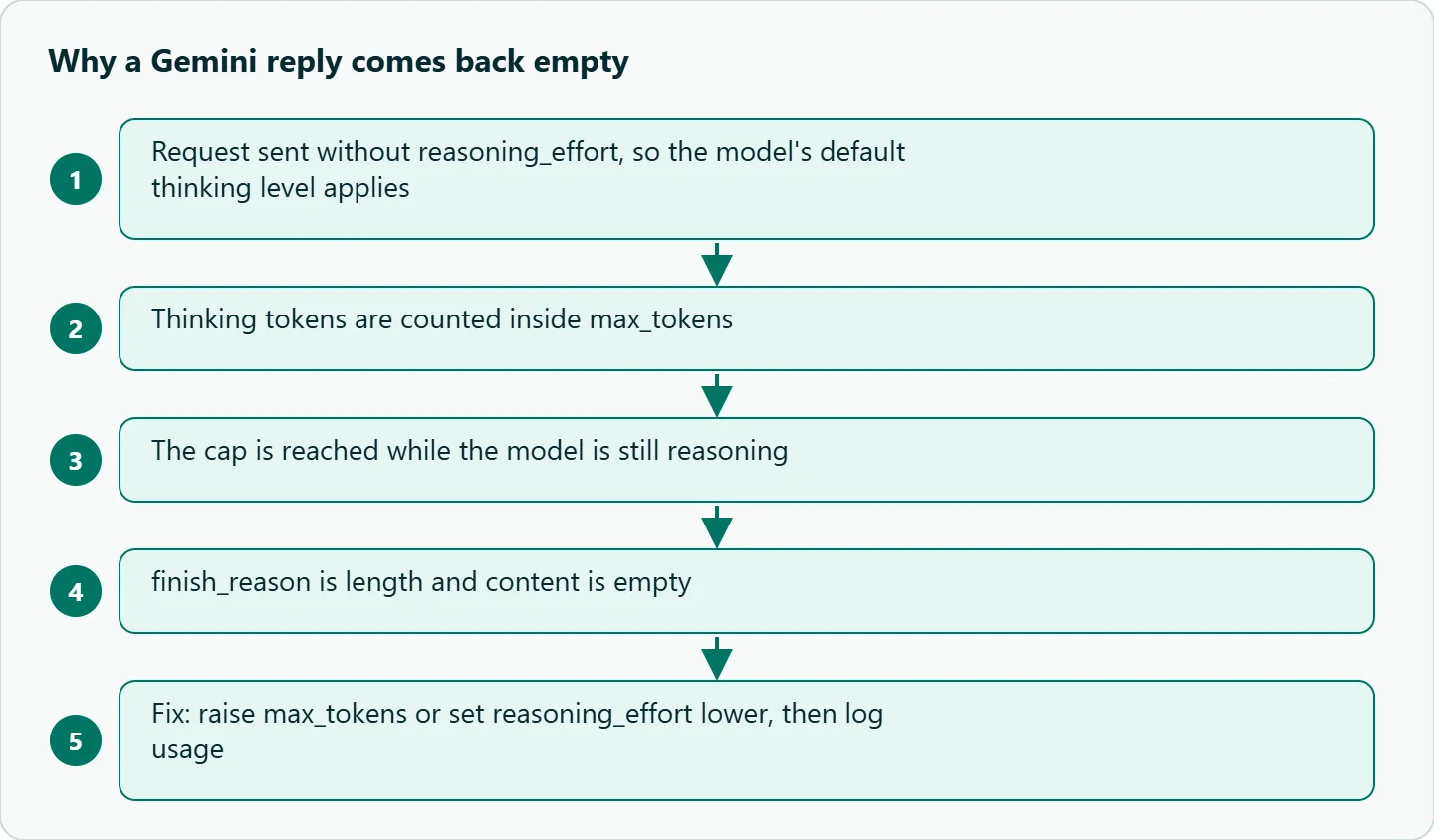
The second is max_tokens. Google's thinking page says the output limit includes thought tokens, and a response that hits the cap during reasoning can come back truncated or empty. A cap of 300 that was generous on a non-reasoning model can now produce finish_reason: "length" with nothing in content.
After those, check structured output and tools together (the Gemini structured output and function calling pitfalls post covers the combinations that break), system-prompt adherence on your own eval set, and image or audio parts if you send them. Google's page shows images as base64 image_url parts and audio as input_audio, so the OpenAI shapes carry over, but confirm the route you use accepts them.
Gemini OpenAI compatible API parameters that may be dropped
This is the trap that costs the most debugging time, because nothing errors. Google's page says unlisted parameters are silently ignored in its image-generation section and does not say the same for chat, so treat chat behaviour as unproven. OceanToken's API reference says explicitly that a parameter the model doesn't support is dropped and the request still runs, so "a successful response is not evidence that every parameter you sent took effect."
Google's page doesn't list logit_bias, seed or top_k among the chat parameters it documents, so treat each as unproven until you've seen it change something. The test is cheap. Send the same prompt twice with a value that should make an obvious difference, for example a stop sequence that should cut the answer short or a very low max_tokens, and compare outputs and usage. If nothing moves, the parameter isn't reaching the model. Write down the ones you drop on purpose so the next engineer doesn't add them back.
Step 4: run your eval set side by side
MODELS = ["google/gemini-3.8-flash", "google/gemini-3.5-flash-lite"]

for m in MODELS:
    for case in cases:          # your own labelled prompts
        out = client.chat.completions.create(
            model=m, messages=case["messages"], max_tokens=2000)
        record(m, case, out.choices[0], out.usage)   # score later
Because only the model string changes, the eval loop is the same for every candidate. Score effective cost per successful task, not price per token: a cheaper model that needs a retry on one case in five can cost more than the one above it.
Worked example: migrating a support bot
Take a support bot on another vendor's mid-tier model with a 600-token system prompt, one lookup_order tool and JSON output for the final reply. We'd move it in this order.
First, move base URL, key and model into environment variables with no other code change. Then run a smoke test: one plain answer, one streamed answer, one tool call, and log usage for each. Next, replay 100 anonymised conversations from your logs through the new model with the same system prompt, and auto-check that the JSON parses, the tool was called when expected and no reply is empty. Have a person read 20 of them for tone and policy.
Fix failures by category. Empty replies usually mean thinking used the cap, so raise max_tokens or lower reasoning_effort. Missed tool calls usually mean the tool description needs a sharper "call this when" sentence. Only after that, send a small share of live traffic to the new route in shadow mode, compare latency and error rates, and ramp with a rollback switch.
Common migration traps
| Symptom | Usual meaning | First action |
|---|---|---|
| 401 | Wrong or revoked key | Check the key variable before the model |
| Model not found | Typo or missing google/ prefix |
Copy the id from /gemini-api |
Empty content, finish_reason: "length" |
Thinking used the output cap | Raise max_tokens or lower reasoning_effort |
| Bill higher than expected | Thinking billed as output at the default level | Set reasoning_effort explicitly and log usage |
| A parameter has no effect | Dropped by the compatibility layer | Run the change-the-value test above |
| Tool calls missing | Description or schema too vague | State the trigger condition in the description |
Two more are easy to miss. Token-counting libraries tuned for another tokenizer will be wrong for Gemini, so budget from the usage field. And prompts that relied on one vendor's refusal wording will behave differently, which your replay set will show if it includes a few edge cases.
How to test this on your workload
We haven't published measurements for this guide, so run these yourself before you ramp traffic.
- Send five real prompts to
google/gemini-3.8-flashwithreasoning_effortset tolowand then left unset, and compareusage.completion_tokens. - Repeat one prompt with
max_tokens=200and check whetherfinish_reasonbecomeslengthwith empty content. - For every non-default parameter in your current code, run the change-the-value test and list what was dropped.
- Keep ten of your prompts as a CI smoke test with a low cap, so a renamed id fails the build instead of production.
Our take: Keep the model id in config, set reasoning_effort and max_tokens on every call, and don't trust a 200 response as proof that your parameters worked. The swap is an afternoon; the replay eval is the part that tells you whether it's safe, so build it first.
Running it on OceanToken
Use base URL https://api.oceantoken.ai/v1 with an id such as google/gemini-3.8-flash or google/gemini-3.1-pro-preview. The /gemini-api page states the parts that matter for a migration: it is OpenAI-compatible, so you change the base URL and the key and keep your code, and one API key and one prepaid balance reach the other model families too, so comparing Gemini with your current model in the eval loop above is a one-line change. Billing is prepaid with no subscription, and each key can have its own spending limit, which is handy for capping an eval run. See the current rate on /gemini-api.
FAQ
Do I need Google's SDK to call Gemini? No. For chat, streaming, tools and image input the OpenAI SDK works against an OpenAI-compatible endpoint; you change the base URL, key and model id.
Can I turn thinking off on Gemini 3 models? Google's OpenAI page says reasoning cannot be turned off for Gemini 3 models. Lower it with reasoning_effort and cap max_tokens.
Why is my reply empty after switching? Usually the thinking tokens used up max_tokens, which includes thought tokens on Gemini. Check finish_reason; if it is length, raise the cap.
Will my existing parameters still work? Not necessarily. OceanToken's API reference says a parameter the model doesn't support is dropped without an error, so test each one by changing its value and watching the output.
Is the base URL the same for every model on OceanToken? Yes. One base URL and one key; only the model string changes.
Sources
- Google: OpenAI compatibility (checked 2026-11-08)
- Google: Gemini thinking (checked 2026-11-08)
- OceanToken Gemini API page (checked 2026-11-08)
- OceanToken docs: text generation (checked 2026-11-08)
- OceanToken docs: API reference (checked 2026-11-08)
Get your OceanToken API key
- Create an OceanToken account and an API key.
- Copy the snippet below, paste your key, and run it.
- Check the current rate on /gemini-api.
curl https://api.oceantoken.ai/v1/chat/completions \
  -H "Authorization: Bearer $OCEANTOKEN_API_KEY" \
  -H "Content-Type: application/json" \
  -d '{"model": "google/gemini-3.8-flash", "max_tokens": 2000, "messages": [{"role": "user", "content": "Hello"}]}'
More from the blog
A Unified API for Chat, Image and Video
Building on a unified API for chat, image and video: sync vs async calls, billing units, retries, timeouts and storage, with three calls and a launch checklist.
Kimi K3 API International Access Guide
Use the Kimi K3 API internationally: sign up with email, pay by card, create one key and call moonshotai/kimi-k3 with an OpenAI SDK. Steps, code and checks.
Call Tencent Hy3 With the OpenAI SDK
Call Tencent Hy3 with the OpenAI SDK outside China: base URL, model id, streaming, tool calls, reasoning_effort values, Hy3 vs Hy3 preview, and token billing.