

OpenAI SDK + DeepSeek: base_url in Python
Point the OpenAI SDK at DeepSeek V4 by changing base_url, key and model id. Python and Node code, streaming, reasoning_content, and a checklist to verify it.
By OceanToken Team
Editor's note: Moving an OpenAI SDK app to DeepSeek V4 takes three changed lines, and that part is never where teams lose time. They lose it on what DeepSeek does differently once the request lands: it reasons by default, it returns that reasoning in its own field, and it expects that field back in tool loops. Change the lines in five minutes, then spend your afternoon on those three behaviors.
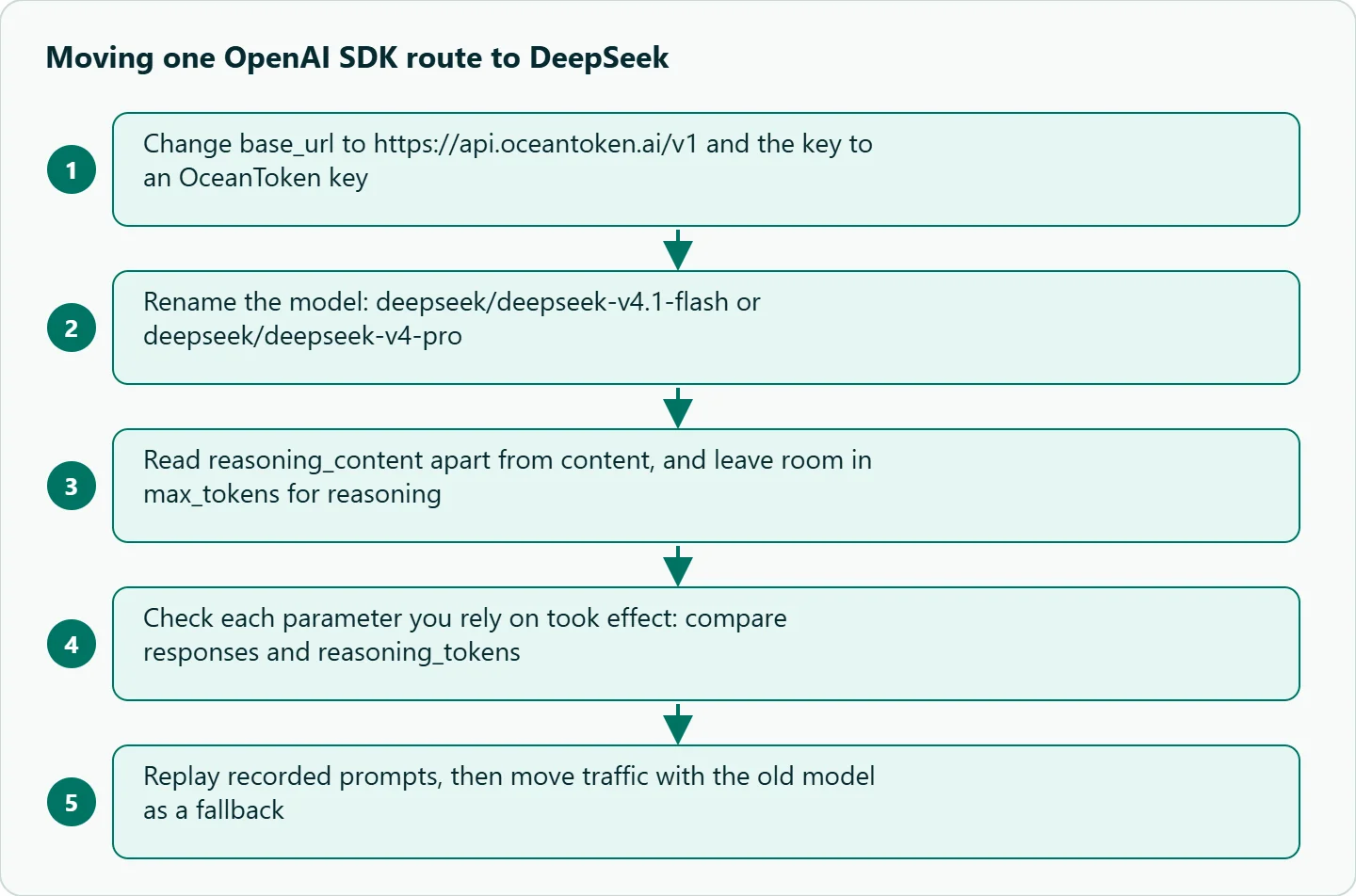
Short answer: Keep your OpenAI SDK and change three things: base_url, the API key and the model id. On OceanToken that is https://api.oceantoken.ai/v1, your OceanToken key, and deepseek/deepseek-v4.1-flash or deepseek/deepseek-v4-pro. Then handle reasoning_content, check which parameters actually take effect, and replay real prompts before switching traffic.
01 · The OpenAI SDK DeepSeek base_url change, line by line
DeepSeek's own API and ours both speak the OpenAI Chat Completions format, so the SDK, the request body and the response shape stay the same. What changes is where the client points and what you call the model. Here is the whole diff, from our migration guide and DeepSeek's API docs , both checked November 17, 2026:
| Setting | Before (OpenAI) | DeepSeek's own API | OceanToken |
|---|---|---|---|
base_url |
https://api.openai.com/v1 |
https://api.deepseek.com |
https://api.oceantoken.ai/v1 |
api_key |
OpenAI key | DeepSeek key | Key from our console |
| Model id, fast tier | gpt-... |
deepseek-flash |
deepseek/deepseek-v4.1-flash |
| Model id, top tier | gpt-... |
deepseek-v4-pro |
deepseek/deepseek-v4-pro |
| Endpoint | /chat/completions |
/chat/completions |
/v1/chat/completions (also /v1/responses) |
Here the model id carries the publisher prefix, so deepseek-v4-pro becomes deepseek/deepseek-v4-pro; a name that does not exist is refused with 400 model_not_found rather than quietly swapped for another model. And the Flash page lists three ids for one model: deepseek/deepseek-v4.1-flash, a dated id ending in -1017, and deepseek/deepseek-flash-latest. Pin the dated id in production if you want a release change to be your decision, and use -latest only where you are happy to move automatically.
02 · Minimal Python and Node examples
The Python client takes base_url and api_key. Nothing else in your call needs to change for a first request:
import os
from openai import OpenAI

client = OpenAI(
    base_url="https://api.oceantoken.ai/v1",      # was https://api.openai.com/v1
    api_key=os.environ["OCEANTOKEN_API_KEY"],
)

resp = client.chat.completions.create(
    model="deepseek/deepseek-v4.1-flash",          # was gpt-...
    messages=[{"role": "user", "content": "Summarize this ticket in one line: printer offline after update."}],
)
print(resp.choices[0].message.content)
print(resp.usage)
In Node the option names are baseURL and apiKey:
import OpenAI from "openai";

const client = new OpenAI({
  baseURL: "https://api.oceantoken.ai/v1",
  apiKey: process.env.OCEANTOKEN_API_KEY,
});

const resp = await client.chat.completions.create({
  model: "deepseek/deepseek-v4-pro",
  messages: [{ role: "user", content: "Explain this stack trace in two sentences." }],
});
console.log(resp.choices[0].message.content);
If your app builds the client with no arguments, you may not need a code change at all. Both SDKs read OPENAI_BASE_URL and OPENAI_API_KEY, so setting those two environment variables and renaming the model is enough. That is convenient for a staging test, but put the values in config behind a flag before production, so rolling back is a deploy setting rather than an incident.
03 · Streaming and the reasoning_content field
This is the first place a DeepSeek migration differs from a model swap inside OpenAI. DeepSeek's thinking mode guide says thinking is on by default for V4 models, and the chain of thought comes back in reasoning_content, next to content. Our model docs list the same response field: choices[].message.reasoning_content holds the reasoning, content holds the answer, and usage.completion_tokens_details.reasoning_tokens counts what the reasoning cost.
That has two practical effects. First, reasoning tokens are output tokens, so max_tokens covers reasoning plus answer; a limit tuned for a non-reasoning model can be used up before any answer is written. Second, time to the first answer token goes up, so any client timeout tuned on a fast chat model deserves a second look. Stream anything a person waits on: a request that is not streamed is closed after 240 seconds (see Limits ).
When you stream, read the two fields separately so your UI never shows reasoning as if it were the answer:
stream = client.chat.completions.create(
    model="deepseek/deepseek-v4.1-flash",
    messages=[{"role": "user", "content": "Is 1,001 prime? Answer yes or no, then one line why."}],
    stream=True,
    stream_options={"include_usage": True},
)
answer = []
for chunk in stream:
    if not chunk.choices:
        print("\nusage:", chunk.usage)               # last event: token counts
        continue
    delta = chunk.choices[0].delta
    thinking = getattr(delta, "reasoning_content", None)   # present only if the model streams it
    if thinking:
        pass                                          # log it or show it in a collapsed panel
    if delta.content:
        answer.append(delta.content)
print("".join(answer))
The getattr guard matters because the OpenAI SDK does not declare reasoning_content, so code that reads it as a plain attribute can break when it is absent.
04 · DeepSeek parameters: what takes effect and what is dropped
Our per-model docs for V4.1 Flash and V4 Pro list the request parameters each model takes, and say anything else is left out before it reaches the model. A parameter that is dropped does not raise an error. So a request can succeed while ignoring the setting you added.
| Parameter or behavior | What the docs say (checked 2026-11-17) | What to do |
|---|---|---|
temperature, presence_penalty, frequency_penalty |
Listed for both models; DeepSeek says they have no effect in thinking mode | Do not rely on temperature=0 for determinism while the model reasons |
DeepSeek's thinking switch (extra_body) |
Documented by DeepSeek for its own API; not in our parameter tables for these models | Do not assume it applied; check reasoning_tokens in usage |
reasoning_effort |
Shown under Reasoning on the oceantoken.ai model page, but not in the docs parameter table for either model; DeepSeek documents low, high and max | Treat it like the thinking switch: send it, compare reasoning_tokens with and without it, and if the number does not move it was dropped |
response_format |
json_object and json_schema listed for both |
Parse and validate anyway; handle a failure |
tools, tool_choice, parallel_tool_calls |
Listed for both | In tool loops, send back the full assistant message (below) |
| Image input | Flash takes images; Pro is text only | Route image requests to the Flash id |
The tool-calling row deserves a sentence of its own. DeepSeek's guide says that when a conversation uses tools, you must pass back the reasoning_content from all previous assistant turns, or the API returns a 400. Many OpenAI-era agents rebuild the assistant message from content and tool_calls only. Append the whole message object instead. This is a DeepSeek-specific rule, which is why it is here; the broader list of things that change between any two OpenAI-compatible models is in our guide to switching models on an OpenAI-compatible API.
Say a support app labels tickets with a short prompt and temperature=0. After the switch, labels look slightly less stable and each call spends tokens reasoning about an easy task. Nothing errored. The fix is to measure reasoning_tokens on that route, try a lower reasoning_effort and confirm in reasoning_tokens that it took effect, and judge stability on a replay set rather than on the temperature you sent.
How to test this on your workload
We have not run a replay benchmark for this article, so here is the checklist we would run before moving any traffic:
- Send one request per model id you plan to use and confirm
resp.modelnames the model you expect. - Replay 50 to 100 recorded production prompts through your current model and the DeepSeek id, and score both with your tests or a rubric, not by eye.
- For every parameter you depend on (
temperature,reasoning_effort,response_format,seed), compare the response andusage.completion_tokens_details.reasoning_tokenswith and without it. - Run one full tool-calling loop of three or more turns, passing the whole assistant message back, and confirm there is no 400.
- Stream a long answer through your real UI and check that reasoning text never lands in the answer area.
- Look up the requests in the console Logs, and compare their cost per route with what your current model costs.
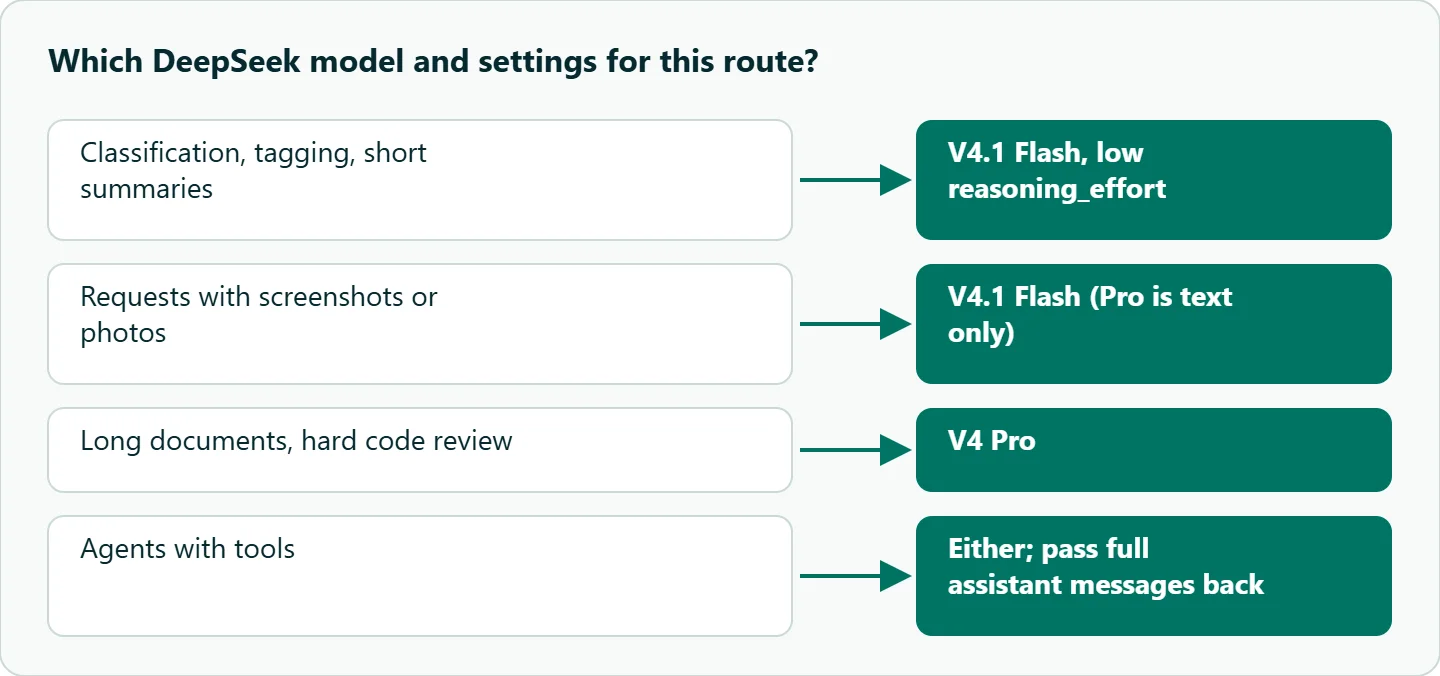
| Your route | Start with | Why |
|---|---|---|
| Classification, tagging, short summaries | deepseek/deepseek-v4.1-flash, try low reasoning_effort (confirm it applied) |
High volume, low stakes; reasoning adds tokens without much gain |
| Requests with screenshots or photos | deepseek/deepseek-v4.1-flash |
Pro takes text only |
| Long documents, hard code review | deepseek/deepseek-v4-pro |
Reasoning and coding focus, 1.05M-token context |
| Agents with tools | Either id, full assistant messages passed back | DeepSeek requires reasoning_content in tool loops |
Our take: Move the highest-volume, lowest-stakes route first, usually classification or summaries on V4.1 Flash, and keep the old model as an automatic fallback until your replay set passes. Leave the route a customer reads word for word until last. The three changed lines are the easy part; the replay set and a check that each parameter really applied are the actual migration.
Running it on OceanToken
On OceanToken, the same OpenAI SDK client calls DeepSeek V4 Pro and V4.1 Flash at https://api.oceantoken.ai/v1 with model ids deepseek/deepseek-v4-pro and deepseek/deepseek-v4.1-flash. Because one key and one prepaid balance cover every model in the catalog, with no subscription, your old model stays one model id away: list it in fallbacks and it is tried in order if the DeepSeek call fails, which is the safety net the staged rollout above needs.
Non-streamed responses report their cost in the x-oceantoken-cost header, and each key can carry its own credit limit for a trial route. See the current rate on /deepseek-api, or the V4.1 series page and the model pages for V4.1 Flash and V4 Pro. If you hit 429s under load, our DeepSeek 429 and server-busy guide covers backoff and pacing.
FAQ
Can I use the OpenAI Python SDK with DeepSeek? Yes. Set base_url and api_key on the client and change the model id; the request and response shapes stay the same.
What is the base_url for DeepSeek with the OpenAI SDK? DeepSeek's own API uses https://api.deepseek.com. Here it is https://api.oceantoken.ai/v1 with a key from our console.
Where is DeepSeek's reasoning in the response? In choices[0].message.reasoning_content, separate from content. Reasoning tokens are counted as output in usage.
Does extra_body thinking work through this API? It is not in our parameter tables for these models, and unlisted parameters are dropped without an error. Check reasoning_tokens in usage to see what actually happened.
Why do I get a 400 in a DeepSeek tool loop? DeepSeek requires the reasoning_content of earlier assistant turns when tools are in use. Send the full assistant message back, not a rebuilt one.
Sources
- OceanToken docs: Migrate from OpenAI, Anthropic or another API (checked 2026-11-17)
- OceanToken docs: Text generation (checked 2026-11-17)
- OceanToken docs: Limits (checked 2026-11-17)
- OceanToken docs: DeepSeek V4.1 Flash (checked 2026-11-17)
- OceanToken docs: DeepSeek V4 Pro (checked 2026-11-17)
- OceanToken: DeepSeek V4.1 Flash model page (checked 2026-11-17)
- OceanToken: DeepSeek V4 Pro model page (checked 2026-11-17)
- DeepSeek API docs: Quick start (checked 2026-11-17)
- DeepSeek API docs: Thinking mode (checked 2026-11-17)
Get your OceanToken API key
- Create an OceanToken account and an API key.
- Copy the snippet below, paste your key, and run it.
- Check the current rate on /deepseek-api.
curl https://api.oceantoken.ai/v1/chat/completions \
  -H "Authorization: Bearer $OCEANTOKEN_API_KEY" \
  -H "Content-Type: application/json" \
  -d '{"model": "deepseek/deepseek-v4.1-flash", "messages": [{"role": "user", "content": "Summarize this ticket in one line: printer offline after update."}]}'
More from the blog
GPT-6.1 Sol to GPT-6.2 Sol Upgrade Guide
GPT-6.1 Sol to GPT-6.2 Sol upgrade: same listed specs, what OpenAI says changed, the one-line model change, what to retest, and a shadow-test script.
How to Make GTA 6-Style Videos with AI
Four GTA 6-style AI video shots with the exact prompts, image-to-video to fix sign text, and one chase prompt run on Seedance, Kling, Hailuo and Veo.
How to Create GTA 6-Style Scenes with AI
Four GTA 6-style scenes written as code by Claude Fable 5.2, including a drivable 3D street, plus 14 prompts to copy and the fixes for what goes wrong.